
www.wuming0.tech: a server that handed out Mirai botnet files for routers and Linux devices, and what to do if a device asked for them
www.wuming0.tech is a web address that URLhaus lists 13 times on 3 October 2026 for files named after processor types (arm7, mips, x86_64, sh4 and others), all tagged elf and mirai.
These are Linux programs for routers, cameras and similar devices, not files for a Windows PC or a Mac, and every one of them was marked offline when we read the data. If you only saw the name in a log, nothing is proven; if a router, camera or Linux server asked for these files, treat that device as taken over:
- disconnect it
- factory reset it
- update it
- change its passwords
Facts checked October 13, 2026. Removal steps tested on Windows 11 (26H2) and checked against Microsoft's and the browser makers' current documentation.
Automatic
Get a free scan and check if your PC is infected.
Fortect finds malware, unwanted programs and the Windows damage they leave behind, and repairs it in one pass.
An automatic scan checks installed programs, startup items and browser extensions for anything that came with a script or program on a router, camera or Linux device that downloads files from www.wuming0.tech.
Do it yourself · free Remove www.wuming0.tech (Mirai ELF files) yourself 5 steps, about 15 minutes, no software needed.
Start the steps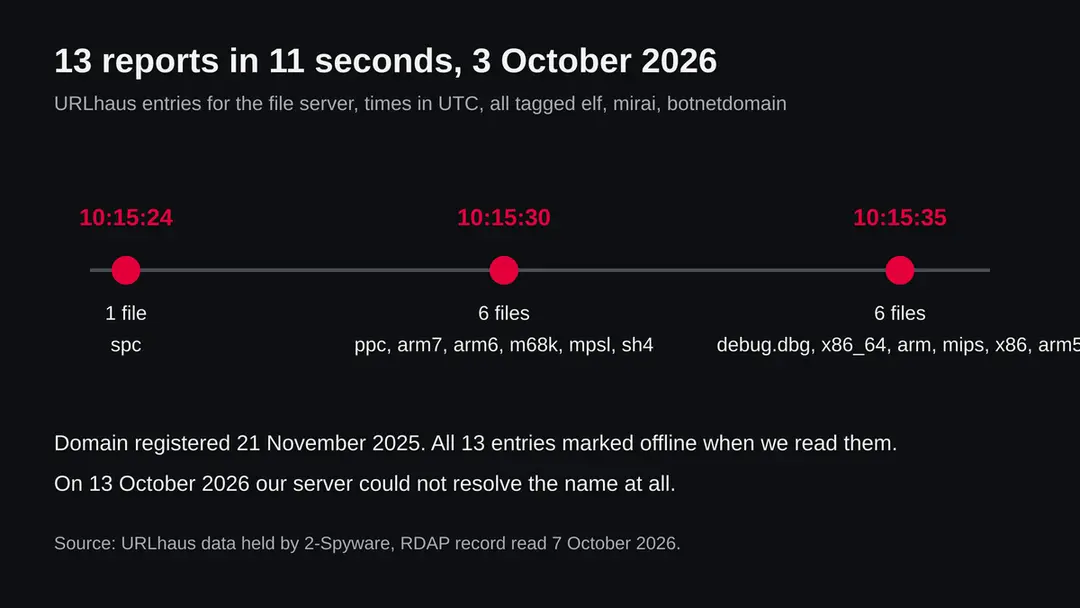
Www.wuming0.tech (Mirai ELF files): summary
| Type | A malware server: URLhaus lists 13 Linux ELF files on it, tagged mirai (a botnet family for routers, cameras and other Linux devices) |
|---|---|
| Risk | High for a router, camera or Linux server that fetched and ran one of its files. Low if you only saw the name |
| Symptoms | Often none. A slow or restarting device, heavy upload and open telnet or SSH are the signs the sources suggest |
| How to get rid of it | Disconnect the device, factory reset it, update the firmware, set a new admin password and turn off telnet, remote access and UPnP |
| Our check (13 October 2026) | One request from our server: the name did not resolve. That clears nothing; the danger rating comes from URLhaus |
| Running since / first seen | Domain registered 21 November 2025; the 13 files were reported on 3 October 2026 |
| Removal | Scan the PC with security software to find and remove the malware and anything installed with it. Fortect scans Windows for malware and repairs the system files and settings it damaged. Remove it nowTo use the full-featured product, you have to purchase a license for Fortect. The scan is free. |
Show 9 more facts
| Platform | Linux and embedded devices. Nothing we read says Windows, Mac or phones are affected |
|---|---|
| Detection names | We did not open the files, so we cannot say which name fits them. Microsoft lists Mirai builds for Linux under the family name Trojan:Linux/Mirai, for example Trojan:Linux/Mirai.AA and Trojan:Linux/Mirai.A!AMTB. URLhaus tags the files mirai and elf |
| Name | Www.wuming0.tech |
| Domain registered | 21 November 2025 |
| Evidence | 13 write-ups by security sites; details still limited |
| First seen | 3 October 2026 |
| Distribution | Typically fake installers, cracked programs, e-mail attachments, fake "verify you are human" pages and ads for popular apps |
| Damage | Installs other malware, often several programs at once |
| Facts checked | 13 October 2026 |
Facts checked on 13 October 2026 against the URLhaus rows for www.wuming0.tech held in our database (we did not open the abuse.ch site), the RDAP record read on 7 October 2026, one request of our own that failed to resolve the name, and published Mirai write ups by Rapid7, LevelBlue, Cromwell International, NSFOCUS and MalwareBazaar.
We read these pages through search excerpts, not in full, so we state only what those excerpts said. The Microsoft detection names come from the Microsoft Security Intelligence listing of the Trojan:Linux/Mirai family, read on 13 October 2026; its page for one name did not open, so we give family names only.
We did not download the files and we infected no device; the removal steps follow general vendor advice and were not tried on a live infection.
What www.wuming0.tech is, and what we know about it
www.wuming0.tech is not a program on your computer. It is a web address that the abuse.ch project URLhaus lists as a place where malware files were served. We found no public write up of this one address, so what follows is what URLhaus shows, what we saw ourselves, and what security researchers have published about the malware family the files are tagged with.
- 1
What URLhaus lists
Thirteen file addresses on www.wuming0.tech, all on plain http at the top level of the site. Twelve are named after a processor type: x86, x86_64, arm, arm5, arm6, arm7, mips, mpsl, ppc, m68k, sh4 and spc. The thirteenth is called debug.dbg. All were added within eleven seconds on 3 October 2026 by one reporter, and all carry the threat label malware_download.
- 2
What the tags mean
elf is the file format of programs on Linux and many embedded systems, the counterpart of .exe on Windows. mirai is the name of a malware family that turns routers, cameras and other small Linux devices into a botnet, a network of hijacked machines. botnetdomain is a URLhaus tag; we read it as a statement that the domain belongs to botnet infrastructure, but we found no page that defines it, so treat that reading as ours.
- 3
What we could not confirm
We did not download any of the files, so we cannot tell you what is inside them, which Mirai build they are, who controls them or which servers they call. URLhaus shows tags, not a proof. We also do not know which devices were ever infected through this server, because the first step of an infection happens on the victim's device and is not visible from the server side.
- 4
What this means for you
If you only saw the name in a firewall log, a DNS log, a blocked request or a warning, you are not infected by that alone. The risk is for a device where something already ran and went to fetch one of these files. A normal visitor with a browser has no reason to ask for them, and they do nothing on a Windows PC or a Mac.
- Kind of threat
- A server that handed out 13 Linux ELF files tagged mirai, a botnet malware family for routers, cameras and other small Linux devices
- Where the files were
- hxxp://www[.]wuming0[.]tech/ followed by a file name such as x86_64, arm7, mips or debug.dbg: plain http, no secure connection
- Domain registered
- 21 November 2025 through DNSPod, Inc.; status active when we read the RDAP record on 7 October 2026
- URLhaus entries
- 13 file addresses, all added on 3 October 2026 between 10:15:24 and 10:15:35 UTC; all 13 marked offline when we read them
- Our request on 13 October 2026
- The name did not resolve from our server (getaddrinfo ENOTFOUND). We could not reach any page
- Platform
- Linux and embedded devices (ELF files for ARM, MIPS, x86, PowerPC, SuperH and m68k processors). Nothing we read says these files run on Windows, Mac, iPhone or Android phones
What www.wuming0.tech (Mirai ELF files) does on an infected PC
What we checked on 13 October 2026, and what we could not
Our check was a plain request sent once from our server to www.wuming0.tech. It failed before any page could load: the name could not be resolved to an address. That clears nothing. A malware server that has been cleaned up, taken down or moved looks exactly like this.
Our request, 13 October 2026
- The name did not resolveOur server reported ENOTFOUND for www.wuming0.tech. The address list of the internet had no entry for the name that our resolver could use. It can mean the DNS records were removed, that the domain was suspended, or that the name was changed. We cannot tell which.
- Why that is not a clean resultThe server may have moved to another name or address, and the same files may be offered there. A dead address today says nothing about the devices that already fetched the files before it went quiet.
- The registration still looked activeThe RDAP record we read on 7 October 2026 showed the domain with status active, registered on 21 November 2025. An active registration and a name that does not resolve can both be true, for example when the records at the name server were removed.
- URLhaus listing13 files tagged elf and mirai, added on 3 October 2026. All 13 were marked offline when we read them, so URLhaus itself no longer saw them being served.
- Downloads and the files themselvesWe did not download any file and did not look for others on the server. We cannot tell you what the files contain.
Dangerous while it was online: treat it as a malware server Our test was one request that failed, so it proves nothing either way. The rating comes from the 13 URLhaus reports and their tags, not from our request. The files were offline when we read them, but a device that fetched one earlier may still be running it.
What happened to www.wuming0.tech, from registration to our check
The domain is almost eleven months old, but all the reports come from a single moment. The dates come from RDAP and from the URLhaus data we hold; the times are UTC.
21 November 2025
The domain is registered
RDAP shows wuming0.tech registered on 21 November 2025 through DNSPod, Inc. We do not know who owns it, and we do not know what, if anything, it served in the ten months that followed.
3 October 2026, 10:15:24 UTC
The first file is reported
URLhaus adds the file spc, tagged botnetdomain, elf and mirai. spc is named after the SPARC processor family, one of the rarer targets in this kind of file set.
3 October 2026, 10:15:30 UTC
Six more files, five seconds later
ppc, arm7, arm6, m68k, mpsl and sh4 are added with the same tags. Names such as mpsl and sh4 stand for little endian MIPS and SuperH processors.
3 October 2026, 10:15:35 UTC
Six more files, and a debug file
debug.dbg, x86_64, arm, mips, x86 and arm5 are added, again five seconds later. The whole set of 13 is in the database within eleven seconds, from the same reporter, which looks like one person or one tool listing a whole folder at once. That is our reading of the timestamps.
The three groups of URLhaus entries for www.wuming0.tech on 3 October 2026. The file names are processor types; the tags are the same on every row. 7 October 2026
The registration is still active
Our copy of the RDAP record, fetched on this day, shows the status active. It names the registrar but gives us nothing about the owner.
13 October 2026
The name does not resolve
Our request fails with ENOTFOUND, and URLhaus marks all 13 entries offline. The files are not reachable at this name from our server.
What the pattern suggests, and what it does not: one file for every processor family is how the malware catalogue of this family is usually built, because the person who infects a device does not know its processor in advance. The set does not tell us how many devices were infected, whether the server was the attacker's own or a hacked machine, or whether the same files are now offered under another name.
What Mirai is, and why the files are named after processors
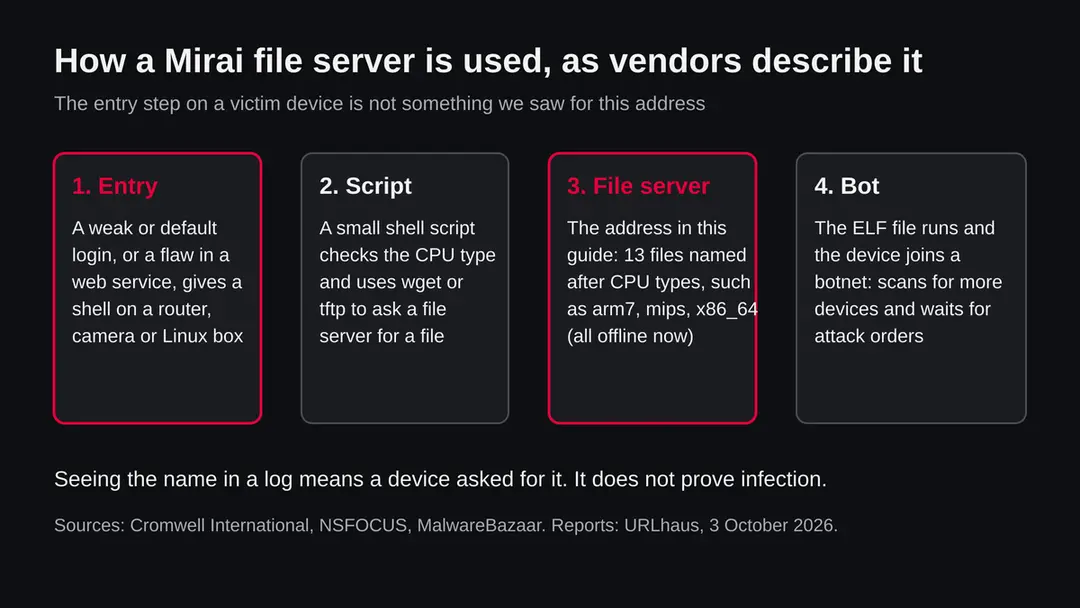
Mirai is a family of malware that takes over small internet connected Linux devices and uses them together for attacks. The write ups we read agree that it spreads mostly through weak or default logins and that it does not need a Windows PC at all.
- 1
A device is opened
The Mirai write ups from Rapid7 and LevelBlue describe scanning for devices that still use factory default or built in logins on telnet or SSH. Cromwell International describes a newer variant that starts instead with a command injection flaw in a web service. In both cases the attacker ends up with a shell, a command line, on the device.
- 2
A script chooses the right file
NSFOCUS describes a loader that identifies the device's processor, then checks whether wget or tftp is present. A router with an ARM chip needs a different file from one with a MIPS chip, which is why a server carries a file for each type. The names on this server follow that scheme.
- 3
The file is fetched from a server like this one
NSFOCUS says the loader fetches the matching program from the file server with wget or tftp, or, if neither exists, writes a tiny helper onto the device that fetches it over HTTP. It also says the loader deletes itself after running. MalwareBazaar lists samples from the same pattern, with scripts that pull x86, x86_64, mips, mpsl, arm and m68k files.
- 4
The device joins the botnet
Once the program runs, the device is one more bot: it looks for new devices to open and waits for orders from a controller. The best known use is a flood of traffic that knocks a target offline, but a bot can be told to do other work as well.
- 5
What the odd file is
debug.dbg is the only name that is not a processor type. We did not open it. A file named debug can be a test build, a leftover or something else, and we will not guess which.
Cromwell International also describes infrastructure of this kind as the botnet's support servers: the machines that hand out files, collect new victims and give orders. A server like this one is a link in that chain. Taking it offline does not remove a single bot that already runs.
What www.wuming0.tech (Mirai ELF files) can steal or download
What a device with Mirai on it can be used for
A bot is not a spy on your files in the way a Windows trojan can be. Its main damage is that your device works for someone else and may weaken your network. The list below is what the write ups and general Mirai descriptions support; we do not know what these particular files do.
Reported as possible
- Traffic floods against other sites
- Scanning the internet for more devices to open
- Guessing telnet and SSH logins of other devices
- Using up the device's bandwidth and processor
- Slowing or dropping your own connection
- Making your address look bad to mail and security filters
- Running other programs the controller sends
| Question | What the sources say | Source |
|---|---|---|
| How does it get in? | Mostly default or weak telnet and SSH logins; newer variants also use flaws in web services | Rapid7; LevelBlue; Cromwell International |
| Does it need a software flaw? | The classic form did not: the write ups describe it using credentials rather than vulnerabilities | Rapid7; LevelBlue |
| How does it hide? | The write ups describe it as stealthy and as deleting files that could alert the owner | Rapid7; LevelBlue |
| How does it fetch itself? | A script picks the processor type, then uses wget, tftp or a small helper | NSFOCUS |
| Which processors? | x86, x86_64, mips, mpsl, several ARM versions, m68k and others appear in MalwareBazaar samples | MalwareBazaar |
| Does it stay after a restart? | Not confirmed for these files. Sources differ by build, and we did not run them | Not available |
| Which build is this server's? | Not known. URLhaus gives only the tag mirai | Not available |
What this can cost you
Reading the name or seeing it in a log costs nothing. The risks below apply to a router, camera, recorder or Linux server that fetched and ran one of these files.
- High
A device that works for a stranger
An infected router or camera takes part in attacks on third parties from your internet address. You may be the one whose address shows up in a complaint, even though you did nothing.
- High
A foothold on your network
The router sits between your devices and the internet. If it is controlled by someone else, everything you do on that network passes through a machine you cannot trust. We have no report that these files read traffic; this is a general risk of a captured router.
- Medium
A slow or unstable connection
A bot scans and floods, which uses the device's processor and your upstream bandwidth. Unexplained slowness or restarts can be a sign, though they have many other causes.
- Medium
Your logins to the device
If the device was opened through a default or weak login, anyone who knows that login can come back, even after the malware itself is gone. The login is the real hole.
- Low
Nothing, if you only saw the name
A name in a block list, a log or a warning is not an infection. A Windows PC or a Mac cannot run these files by being used normally.
What you may notice, and what you may not
Bots are built to be quiet, and a router or camera has no screen that would show a problem. The signs below come from the sources and from what they imply; none is certain, and many owners notice nothing.
| Sign | What the reports show |
|---|---|
| The device is slow or restarts on its own | A bot scans and floods, which uses processor and bandwidth. This follows from the behaviour; many other faults look the same |
| Your internet is slow with nothing running | Upload traffic that you did not start, which the router status page or traffic graph may show |
| Your admin password no longer works | Some malware changes the login to keep the owner out. We did not confirm this for these files |
| Telnet or SSH is open on a device that should not have it | Mirai scans these services on other devices, so a device that offers them to the internet is a target |
| Unknown files in a temporary folder on a Linux server | The loader described by NSFOCUS fetches a file, runs it and deletes it, so files may not remain |
| Complaints from your provider about attacks from your address | A provider can see floods that come from an infected customer device |
| Nothing at all | Quiet operation is the point |
How to check the PC for www.wuming0.tech (Mirai ELF files)
Who can meet this, and how a device ends up asking for these files
Nobody visits www.wuming0.tech on purpose. The request comes from a program or a script, so the real question is how that script got onto a device. We cannot say for this server; the routes below are the ones the researchers found for Mirai in general.
- 1
A router, camera or recorder with a factory login
This is the classic Mirai route in the Rapid7 and LevelBlue write ups: a device exposed to the internet with telnet or SSH open and a default password still set. If you never changed the admin password, you are in the group at risk.
- 2
A web service with a command injection flaw
Cromwell International describes a variant that starts with a command injection attack on a web service, followed by the download of a script and then the binaries. Old firmware on a router or network recorder is the usual home of such a flaw.
- 3
A Linux server with a weak login
A small server or a hosted virtual machine with a guessable SSH password can be opened the same way. The file names here include x86 and x86_64, so ordinary Linux servers are within the reach of the set.
- 4
A security researcher or an automatic scanner
Some of the requests that reach a server like this come from security tools that follow the links in a malware script. If the name appears in your own lab or sandbox logs, that may be the whole story.
- 5
A legitimate site with one bad file
We do not know whether this is a purpose built malware server or a legitimate site that was hacked and abused. The name alone gives no way to tell. If you own the site, see the section on owners below.
Check your device before you change anything
Start with the question that matters: did a device of yours contact www.wuming0.tech? If you came here from a router log, a DNS filter, a firewall alert or a security notice, the device named there is the one to check, not every device in the house. None of the checks below deletes anything.
- 1
Note the device and the time
Open the log or alert that showed the name. Write down which device (its address or name) asked and when. If the request came from the router itself, the router is the suspect.
- 2
Look for the name in your router's DNS or traffic log
Most home routers have a log or a list of connected devices on the admin page. We cannot give you one menu path, because every maker names it differently. Search the manual of your model for the words log, system log or connected devices.
- 3
Check the login first
Look at the sticker or the manual of your device. If it still uses the default admin name and password, or if you do not remember ever changing it, treat the device as open to anyone who tried.
- 4
See whether remote access is switched on
In the router or camera settings look for Remote management, Remote access, Telnet, SSH and UPnP. The advice we read says to turn off telnet and other remote login services you do not need, and to turn off UPnP on routers unless you need it, because it can open ports to the internet.
- 5
Look at the firmware version
Compare the version shown in the admin page with the latest version on the maker's own support page. Old firmware is the common home of the flaws used in newer variants.
- 6
On a Linux server, look at processes and connections
As the administrator, run ps aux to list processes and ss -tunp to list connections with the program behind each. Look for programs with random names, programs run from /tmp or another temporary folder, and many outgoing connections to addresses you do not know. Their absence does not clear the server, because the loader described by NSFOCUS deletes itself after running.
- 7
A scan or a quiet check does not clear it
No vendor publishes a removal procedure for the files on this server, and we infected no device. Treat a clean-looking device the way you treat a clean site test: one data point. The order in the plan below is our judgement from the vendor advice we read, not a tested result.
How to remove www.wuming0.tech (Mirai ELF files)
How to remove www.wuming0.tech
A loader's job is to install other malware, so treat the PC as infected with more than one program until the scans are clean.
Step 1: Delete scheduled tasks that bring it back
Open Task Scheduler from the Start menu and click Task Scheduler Library. Select each task you do not recognise and read the Actions tab:
- a task that starts a file in
%AppData%or%Temp% - runs
powershellwith a long encoded line - opens a web address belongs to www.wuming0.tech or a similar program
Right-click such a task and choose Delete, and check the subfolders too. Leave tasks from Microsoft, your PC's maker and programs you use. Task Scheduler is the same in Windows 11 and Windows 10.

Windows 11: Task Scheduler Library, the task selected, the Actions tab shows the file it runs. Full procedure with screenshots: Remove what malware leaves behind in Windows
- a task that starts a file in
Step 2: Remove it from startup
Whatever www.wuming0.tech installed usually starts with Windows. Open Task Manager with Ctrl + Shift + Esc, go to Startup apps in Windows 11 or the Startup tab in Windows 10, and disable what you do not know, starting with entries that have an empty Publisher column.
Open file location on the right-click menu shows the file, which helps you decide and tells you what to delete later. Disabling is safe: if something you need stops working, switch it back on.
Full procedure with screenshots: Stop apps from opening at startup On uGetFix
Step 3: Delete the folders left behind
What the uninstaller leaves behind is usually in the user folders. Open File Explorer, switch on View > Show > Hidden items (in Windows 10 View > Hidden items), and go through
%LocalAppData%,%AppData%, %ProgramData% and the two Program Files folders.Sort by Date modified and delete folders that appeared together with the problem and belong to no program you use. Folders with random names that hold
.exe,.dll, .js or .ps1 files are the strongest sign.Full procedure with screenshots: Remove what malware leaves behind in Windows
Step 4: Scan the PC, then run the offline scan
Open Windows Security > Virus & threat protection > Scan options, run a Full scan and remove everything it finds. Then select Microsoft Defender Antivirus (offline scan) and click Scan now: the PC restarts and scans before Windows loads, which finds files that hide while Windows runs.
Save your work first, because the offline scan takes about 15 minutes. Both scans are built into Windows 11 and Windows 10, and a second scanner from another vendor is a useful extra opinion.

Windows 11: Windows Security > Virus & threat protection > Scan options. Full procedure with screenshots: Run a Microsoft Defender Offline scan
Step 5: Change passwords from another device and sign out other sessions
Assume that the passwords saved in this PC's browsers, and the accounts that were open in them, are known to the attacker. From a phone or a clean computer, change the e-mail password first, then banking, shopping, social and gaming accounts.
Use each service's option to sign out of all other sessions, because stolen cookies keep a session open even after a password change. Turn on two-step verification on each account. Wait with the infected Windows 11 or Windows 10 PC until the scans are clean.
Full procedure with screenshots: Turn on two-step verification / secure a hacked account
If you own a website or server and this name appears on it
The brief version for an owner: if the address is yours, someone placed these files on your server or pointed the name at a server you rent. Work from a clean device and keep a copy of the evidence before you delete anything.
- 1
Find out whether the name is really yours
RDAP shows wuming0.tech registered through DNSPod, Inc. on 21 November 2025. If you did not register it, you are not the owner; the files and the name belong to someone else.
- 2
Take the server out of service
If the files were on a server you run, remove it from the network or put it behind a maintenance page. Take a disk snapshot first, so you can see later how the files arrived.
- 3
Find how the files were placed
Look at the web server log for requests to the file names on this page (x86_64, arm7, mips, debug.dbg and the others) and at the upload and login logs around 3 October 2026. We cannot tell you which of these shows the entry; it depends on your software.
- 4
Rebuild rather than clean
The safe answer for a hacked server is a fresh install from a known source, with new keys and passwords, and a restore of data only. Update every piece of software before the server returns to the internet.
- 5
Ask for a review
When the files are gone, the abuse.ch project and the security vendors that list the name can be asked to review it. We do not control any block list and we cannot promise a result.
If you use Windows, a Mac, an iPhone or an Android phone
The tags describe Linux ELF files. We found nothing that says the files on www.wuming0.tech run on a laptop or phone.
| Your device | What we know | What to do |
|---|---|---|
| Windows PC | ELF is not a Windows program format. A Windows PC does not run these files by itself | Nothing to remove for this threat. If the PC asked for the name, run a normal scan and look at the program that did |
| Mac | Mac programs use a different file format. Nothing we read links these files to macOS | Nothing to remove for this threat |
| iPhone or iPad | No source describes this family on iOS | Nothing to remove. If you typed a password into a suspicious page, change it |
| Android phone | Android is built on Linux, but we found no source that says these files are made for it | Nothing confirmed to remove. Keep the phone updated and install apps only from Google Play |
| Router, camera, recorder, NAS, Linux server | These are the devices the file names point at | Follow the plan on this page |
After removal: passwords, accounts and prevention
Clean the device and close the hole
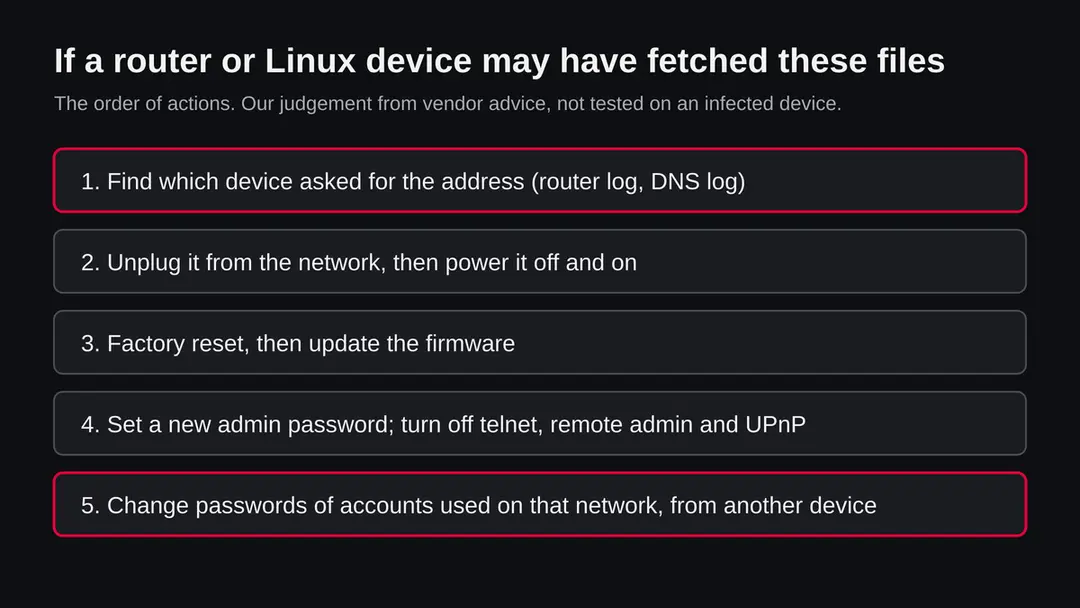
The device is one half. The other half is the way in. A device cleaned but left with the same login is open again within hours, because the scanning for weak logins never stops. Do the steps in this order.
- 1
Disconnect the device
Unplug the network cable and turn off Wi-Fi on the device. A bot needs the connection to scan and to take orders. A power cycle stops a program that lives only in memory, but we did not confirm that for these files, so it is a first step and not the cure.
- 2
Factory reset it
Use the reset button or the reset item in the admin page of the device, following its manual. A reset returns the settings and, on most routers and cameras, removes anything added later. If the device is a server, rebuild it instead, as in the owner section.
- 3
Update the firmware before you reconnect
Download the newest firmware from the maker's own support site and install it. If the maker no longer issues updates for the model, plan to replace it. An unsupported router that is exposed to the internet will be found again.
- 4
Set a new admin password
Choose a long password that you use nowhere else, and change the default admin name if the device allows it. This is the step that closes the hole the classic form of Mirai uses.
- 5
Turn off what you do not use
Switch off telnet, remote management from the internet and UPnP unless you have a reason for them. The advice we read also says to keep cameras and similar devices apart from your computers, for example on a guest network or a separate zone.
- 6
Change passwords from another device
Change the Wi-Fi password, and the passwords of accounts you used on that network, from a phone or computer that you trust. We found no report that these files read traffic, but a router that was controlled by a stranger cannot be assumed private.
- 7
Check the connection list afterwards
After a day, open the router's connection or traffic page. Heavy upload when nothing is running, or open telnet and SSH, means you should repeat the reset or replace the device.
- 8
Tell your provider if they contacted you
If your internet provider sent a notice about attacks from your connection, reply with what you did. Providers often wait for a sign that the device has been dealt with.
Keep a router or camera out of a botnet
Mirai works on the weakest part of a device: a login nobody changed. Nearly every item below targets that.
Do
- Change the default admin password of every router, camera, recorder and NAS on the day you plug it in.
- Turn off telnet and remote administration from the internet; use them only inside your network.
- Turn off UPnP on the router unless a program you use needs it.
- Keep firmware updated, and replace devices the maker no longer updates.
- Put cameras and similar devices on a separate network from your computers.
- On Linux servers use key based SSH logins and keep the software patched.
Don't
- Do not leave a device with its factory login on the internet, even for a day.
- Do not forward ports from the router to a device you cannot update.
- Do not assume a power cycle removed the problem.
- Do not download files from a server you saw in a malware report to look at them.
- Do not rely on a quiet check to say that you are safe.
Questions about www.wuming0.tech (Mirai ELF files)
What is www.wuming0.tech?
It is a web address that URLhaus, the malware tracking project run by abuse.ch, lists for 13 files on 3 October 2026. Twelve are named after processor types and one is called debug.dbg, and all are tagged elf and mirai.
It is not a program on your computer and not a website anyone is meant to visit. We did not download the files, so what they contain is not confirmed by us. The domain was registered on 21 November 2025 through DNSPod, Inc., and we do not know who owns it.
Is www.wuming0.tech safe to open?
No. Do not request files from it, and do not run anything that does. When we sent one request on 13 October 2026 the name did not resolve, which proves nothing: a malware server that was cleaned up or moved looks the same.
All 13 URLhaus entries were marked offline when we read them, but a device that fetched a file earlier may still be running it. The rating comes from the reports and their tags, not from our request.
What is Mirai?
Mirai is a malware family that takes over small internet connected Linux devices, such as routers and cameras, and uses them together as a botnet. The write ups from Rapid7 and LevelBlue describe it spreading mostly through default or weak telnet and SSH logins, and Cromwell International describes a newer variant that starts with a flaw in a web service.
The best known use is floods of traffic against other sites. A device that is infected still looks like it works, which is why owners often do not notice.
Why are the files named arm7, mips and x86_64?
Because each name is a processor type, and a small device only runs the file built for its own chip. NSFOCUS describes a loader that identifies the processor first and then fetches the matching program.
The attacker does not know in advance which device they will reach, so a server keeps one file for each family: x86 and x86_64 for PCs and servers, arm versions for many routers and cameras, mips and mpsl for routers, and ppc, m68k, sh4 and spc for rarer chips.
I saw www.wuming0.tech in my router or DNS log. Am I infected?
Not necessarily, and the name alone proves nothing. It does mean that a device on your network asked for it, and a person does not usually do that by hand. Find which device it was and note the time.
Check whether it still uses a default or weak admin login, whether telnet, SSH or remote management is open, and whether its firmware is old. If the answer to any is yes, follow the plan on this page. Security tools and sandboxes also generate such requests, so a lab log may have a harmless explanation.
How do I remove Mirai from a router or camera?
Disconnect the device, then factory reset it using the reset button or the admin page, following its manual. Install the newest firmware from the maker's own site before you reconnect it, set a new long admin password, and turn off telnet, remote management and UPnP.
Then change your Wi-Fi password and your account passwords from another device. We followed general vendor advice for this and did not test the steps on an infected device. If the maker no longer issues updates, replace the device.
Does a restart remove it?
We could not confirm that either way for these files. Some sources describe bots that run only in memory, so a restart can end them, but the same device is usually found and infected again within hours if its login is still weak.
A restart is therefore a first step and not a cure. The reliable answer is a factory reset, updated firmware and a new password. For a Linux server, rebuild it from a known source rather than trying to find every file.
Can www.wuming0.tech affect my Windows PC, Mac, iPhone or Android phone?
We found nothing that says so. The files are tagged elf, a Linux program format, and Windows and macOS use different formats, so a normal computer does not run them by itself.
We found no source saying the files are built for iOS or Android. The devices at risk are routers, cameras, recorders, network storage and Linux servers. If a computer asked for the name, look at the program that did, and run a normal scan.
I own a site on this name. What do I do?
First check whether the name is really yours: RDAP shows wuming0.tech registered through DNSPod, Inc. on 21 November 2025.
If it is yours, take the server out of service after a disk snapshot, look in the web server, upload and login logs for requests to the file names on this page around 3 October 2026, and rebuild the server from a known source with new keys and passwords.
After the files are gone you can ask the block lists to review the name. We control none of them.
Will Fortect remove www.wuming0.tech?
Fortect scans Windows for malware and unwanted programs and repairs the system files and settings they change, and its free scan shows what it finds on your PC before you decide anything.
For www.wuming0.tech, follow the plan above as well: the browser steps take back permissions and settings that no scanner treats as a threat, and uninstalling the program that brought it removes the source.
Run Microsoft Defender's full scan and, if anything was found, its offline scan as a second opinion. If the symptoms are gone after the plan and both scans are clean, there is nothing more to do.
Sources
- Cromwell International: The lolol.sh Mirai variant, analysis of the infection chain (read October 13, 2026)
- MalwareBazaar (abuse.ch): Mirai shell script loader sample with per processor ELF files (read October 13, 2026)
- NSFOCUS: Mirai code and principle analysis (in Chinese; loader, wget and tftp) (read October 13, 2026)
- Rapid7: Mirai FAQ, when IoT attacks (25 October 2016) (read October 13, 2026)
- LevelBlue: The Mirai botnet, tip of the IoT iceberg (read October 13, 2026)