
Scam With Your Friends: is it a scam or a virus? What the name means and what to do
Scam With Your Friends is the name of a co-op comedy game for Windows on Steam, in which you and friends play workers in a scam call centre; the scamming is part of the game, and we found no report that the game itself is malware.
The name can still be used by others, so get the game only from Steam, and treat any message that uses a friend's name to ask for money or a login as a real scam.
Facts checked October 18, 2026. Removal steps tested on Windows 11 (26H2) and checked against Microsoft's and the browser makers' current documentation.
Automatic
Get a free scan and check if your PC is infected.
Fortect finds malware, unwanted programs and the Windows damage they leave behind, and repairs it in one pass.
Do it yourself · free Remove Scam With Your Friends (game name, fake copies and friend scams) yourself 4 steps, about 12 minutes, no software needed.
Start the steps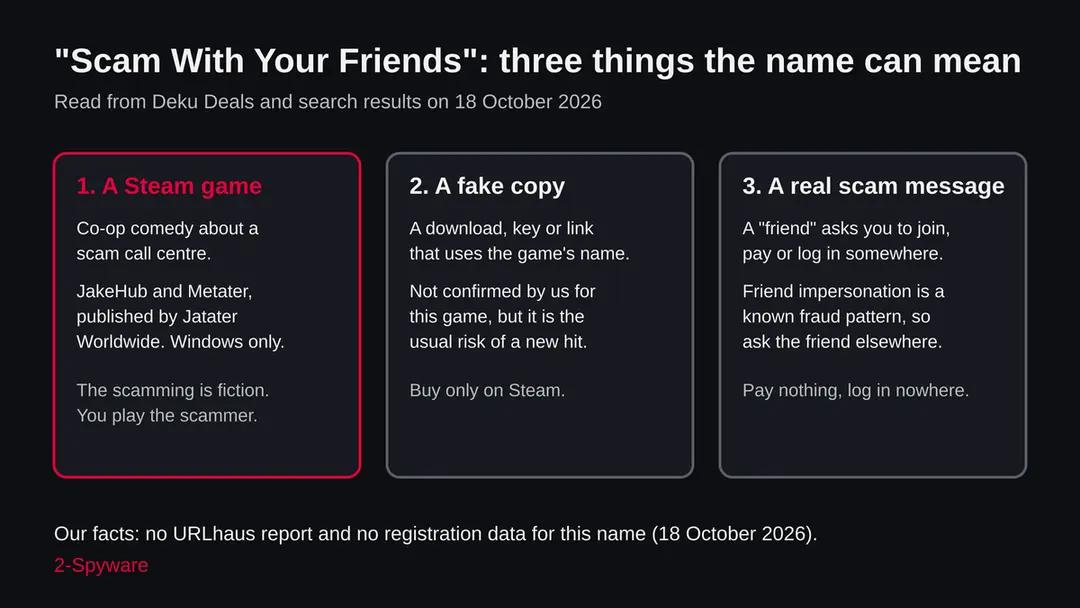
Scam With Your Friends (game name, fake copies and friend scams): summary
| Name | Scam With Your Friends |
|---|---|
| Type | The title of a Windows co-op comedy game on Steam about a scam call centre; also a phrase that scam messages could borrow |
| Risk | Low for the game by our reading; fake copies and friend impersonation messages are general risks, not confirmed for this game |
| Symptoms | None on a PC from the real game. A scam shows as a message that asks for money, a login or a file, or a download outside Steam |
| How to get rid of it | Nothing to remove for the real game. After a fake file, a payment or a login, follow the order of steps in this guide |
| Our check (18 October 2026) | Desk check of a shop listing, a Discord game page and FTC pages; no URLhaus entry; no site to test; game not installed |
| Removal | Scan the PC with security software to find and remove the malware and anything installed with it. Fortect scans Windows for malware and repairs the system files and settings it damaged. Remove it nowTo use the full-featured product, you have to purchase a license for Fortect. The scan is free. |
Show 6 more facts
| Makers | Developers JakeHub and Metater, publisher Jatater Worldwide (Deku Deals listing) |
|---|---|
| Platform | Windows PC, Steam |
| Microsoft detection | None known: the game is not reported as malware, so there is no Microsoft detection name |
| Evidence | 0 write-ups by security sites; details still limited |
| First seen | 17 October 2026 |
| Facts checked | 18 October 2026 |
Facts checked on 18 October 2026 against the Deku Deals listing of the game, the FTC pages on how to avoid a scam and what to do if you were scammed, and our own database (no URLhaus entry, no registration data because the subject is a name).
The Discord game page and the BBB fake-friends alert were seen in search results and are cited only for the existence of a listing and for the general warning. We did not install the game or any file, and no steps were tested on a live infection. Our check was a desk check, not a site test.
What Scam With Your Friends is
Scam With Your Friends is a video game. According to the Deku Deals listing we read on 18 October 2026, you and your friends run a scam call centre in Kolkata, India, under a demanding boss, and you have to talk to AI callers, take over their computers inside the game and meet a daily quota or get fired. The scam is the joke of the game, not something done to you.
People search for the name with words like scam, virus and safe because the title sounds like a warning. Someone sees it in a friend's Steam status, in a chat, in a video or in a trend list, and asks the sensible question: is this a trick?
The honest answer has two parts. The game described by the listings is a commercial product, and nothing we found says it contains malware. But a popular name is also a name that criminals borrow, so the safe way to meet it matters as much as the game itself.
- What it is
- A comedy co-op game about working in a scam call centre; you play the scammer, against AI callers
- Developers
- JakeHub and Metater (Deku Deals listing)
- Publisher
- Jatater Worldwide (Deku Deals listing)
- Platform
- Windows PC through Steam; the listing names no other platform
- Release status
- Deku Deals shows 15 October 2026 and Early Access; another listing we saw gave 1 October 2026, so the exact date is not settled
- Not the same as
- A real scam, a virus, or a program that scams your friends for you
Is Scam With Your Friends a virus or a scam?
Based on what we could read, no. The game is listed by shops and by Discord as a game, with a named developer and publisher. We found no malware report about the game and no report of its shop page being a trap. We cannot prove the absence of a problem, because we did not install or run the game, and a quiet check never clears anything for good.
Where the worry does make sense is around the game, not inside it. New games that spread quickly attract fake download pages, cheap keys from unknown sellers, cracked copies and messages that pretend to come from a friend.
These patterns are common to all popular games; we have no report that they exist for this one, and we do not claim they do. We list them because a reader who found this page after a worrying message needs to know what to look for.
There is also a point of confusion inside the game. Its Deku Deals description says scambaiters can infect your computer with viruses, and that the game has workplace disasters. That is a game mechanic.
If a virus alert, a police raid or a hacked screen appears inside the game window, it is part of play. If a window like that appears outside the game, on your desktop, it is not.
What the Scam With Your Friends (game name, fake copies and friend scams) message looks like
How people could end up in trouble with the name
We have no report of harm tied to this game. The paths below are the ordinary ways a popular game name is abused, drawn from the FTC's description of scams and from common sense, and we name them so you can recognise them, not to say they have happened here.
The first path is the fake or pirated copy. Someone offers the game free or at a tiny price through a download page, a torrent or a key reseller, and the file contains something else. A game launcher or installer runs with your user rights, so a bad one can install a stealer or a remote access tool. The cure is the boring one:
- buy from Steam
- where the store page shows the publisher
- do not run files from pages that promise the same for nothing
The second path is the invitation. The game is built around playing with friends, and the Deku Deals page says each player who gets access can invite up to three friends. That makes invitation messages normal for this game, and normal messages are what scammers copy.
An account that sends links through Steam chat, Discord or text may be hijacked. The link may lead to a fake login page that asks for your Steam name and password, or to a file you are told to open.
The third path is a plain money scam that borrows the title. Someone says you can make money by scamming with friends, or that a friend got paid and you should send a small amount first. The FTC lists payment by cryptocurrency, wire transfer, payment app or gift card among the signs of a scam, and a request to pay before you can get something is the classic form.
- 1
Fake or cracked copy
A file from a site other than Steam, or a key from a seller you cannot check. The harm is whatever the file contains, which can be a stealer or a remote access tool. Not confirmed for this game.
- 2
Hijacked friend invitation
A message from a friend's real account that links to a login page or a file. The sender is not the friend. Not confirmed for this game.
- 3
Money request using the name
A story that you can earn by joining, with a payment first. Whatever the story, the payment is the scam.
- 4
Fake security alert outside the game
A page or window that says your PC has a virus, with a phone number or a download. In the game, such alerts are scenery; outside it, they are a known scam type.
How to get the game safely
Open the Steam app itself, search for the exact title and check the developer and publisher against the names above: JakeHub, Metater and Jatater Worldwide. Do not start from a link in a message, because a link can lead to a page that looks like the store.
If you want to look before you buy, the Deku Deals page we read shows a price near nine euros on 18 October 2026, with a sale until 29 October, and says the game is Steam only.
A price very far below that, or a seller that is not Steam or a known key shop, is a reason to stop. Cheap is not proof of a fake, but fake offers always use cheap.
Two cautions for any Early Access game. First, early builds can crash or misbehave, and that is not malware. Second, the game uses real time AI conversations and, according to the listing, lets players add their own AI personalities through JSON files and voice cloning files.
Mods are files from strangers. Download them only from places the game or its community recommends, and do not run anything with the ending .exe that arrives as a mod.
Do
- Open Steam yourself and search for the title; check the publisher on the store page.
- Ask a friend who sends an invite whether it was really them, by phone or in person.
- Keep Windows Security on and up to date, and turn on two factor sign in for Steam and your email.
- Treat mods as files from strangers and use only the sources the game's community points to.
Don't
- Download the game from a page that promises it free, cracked or with a key at a tiny price.
- Type your Steam name and password on a page you reached through a message link.
- Run an .exe file that arrives as a mod, a patch or a trainer.
- Send money, codes or gift cards to join a game or to get paid for playing.
Is Scam With Your Friends (game name, fake copies and friend scams) dangerous? What the senders want
What we checked for this guide, and what we could not
This guide covers a name, not an address. Our tool reported the name as a radar topic, so there is no web address to test, no URLhaus entry and no registration record. We read a shop listing, a Discord game page, two pages of the US Federal Trade Commission and a consumer warning about fake friends. We did not install the game.
Scam With Your Friends: desk check, 18 October 2026
- A real product with named makersThe Deku Deals page names JakeHub and Metater as developers and Jatater Worldwide as publisher, and describes a game for Windows on Steam.
- Malware listsOur server found no URLhaus report for this name on 18 October 2026. A name is not an address, so this only tells you that no reported file URL carries it in our data.
- Registration and site testNot possible: the subject is a phrase, not a domain. Our request was not sent, and no registration data exists to read.
- Release dateOne listing gives 15 October 2026 with Early Access, another gives 1 October 2026. We do not know which is right.
- The game itselfNot installed and not scanned by us. We cannot say what the program does on a PC beyond what the listing says.
- Fake copiesWe found no report of fake copies, and a search that finds nothing does not prove there are none.
A game, not a threat by our reading; fake copies not ruled out The name belongs to a game. Nothing we read calls the game malware. The risk lies in where you get it and in messages that use a friend's name.
Why the name looks like a warning
The title is an invitation, written as a joke: scam together with your friends. Search engines and trend lists do not read jokes, so they show the phrase beside real fraud topics and people click to check.
The phrase also sits close to real fraud. Consumer warnings about friend-impersonation scams describe copied profiles that send you a friend request, hacked accounts of people you know, and posts in which a friend claims to have made money easily and asks you to send some.
A BBB scam alert about fake friends on Facebook is one example of that warning. If a message says something like join me to scam, earn with your friends or send money to join, the message is the problem, whatever game it mentions.
Remember also that a game about scamming teaches the tricks in a harmless setting. Playing it does not make you a target, and it does not give anyone access to your accounts. What it can do is make you more careful, because you see the scripts that real scammers use:
- urgency
- a story
- a request for remote access
- a request for gift cards
- a transfer
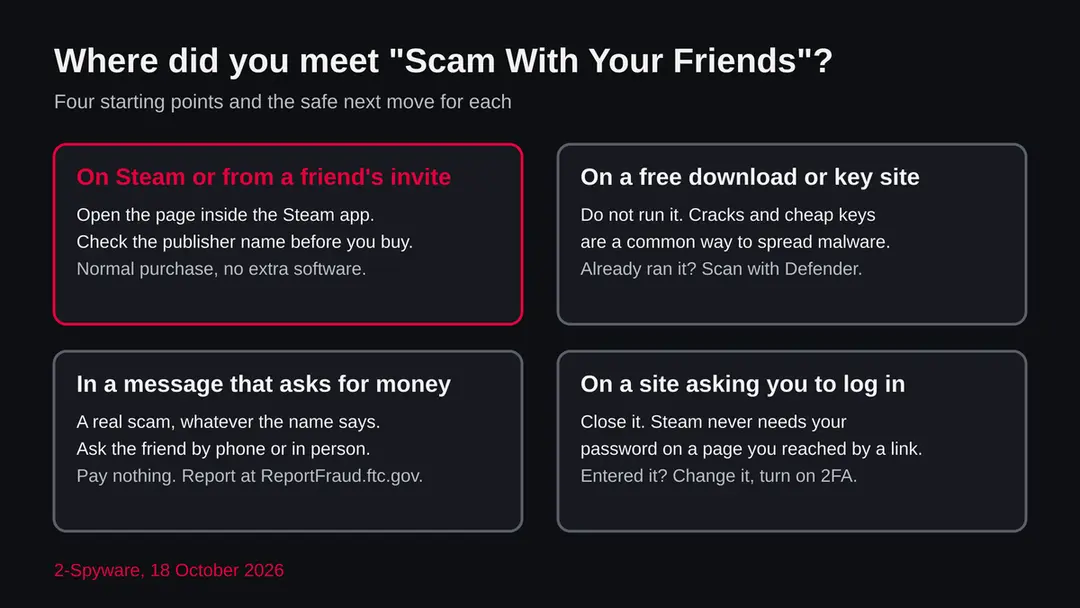
| Where you saw it | What it most likely is | What to do |
|---|---|---|
| Steam store page, opened inside the Steam app | The game | Check the publisher name, read reviews, buy as usual |
| A friend invites you to play in Steam or Discord | The game, but the invite could be from a hijacked account | Ask the friend by voice or in person if it is really them |
| A site offering a free download, a crack or a key far below the shop price | Possibly a fake copy; unknown | Do not run it; buy on Steam |
| A message asking you to pay, send a code or log in to join | A real scam message | Pay nothing, log in nowhere, report it |
| A pop-up outside the game saying your PC is infected | A scam or a malicious ad, not the game | Close it; do not call a number or install anything |
How to tell a real scam from the game
The FTC's page on avoiding scams lists the signs: someone pretends to be from a name you know, claims a problem or a prize, pushes you to act now, and asks for payment in an unusual way such as cryptocurrency, a wire, a payment app or gift cards. A game does none of that to you. A game store asks for a normal purchase and asks nothing else.
Apply the list to anything that uses the name. A friend who invites you does not need your password, a code from your phone or a payment. A shop does not tell you that you must buy now or lose a friend's progress.
A support page does not call you from a number that you never gave. If a message hits two or more signs, treat it as a scam and stop, even if it comes from a friend's account, because the account may have been taken over.
The FTC's advice when you are unsure is also simple: stop and talk to someone you trust. Talking it through often shows the trick. Because this game is about the same tricks, a friend who has played it may be the best person to ask.
| Sign of a scam (FTC) | What it looks like around a game | A game store does |
|---|---|---|
| Pretends to be someone you know | A message from a friend's copied or hijacked account | Shows the publisher's name on the store page |
| A made up problem or prize | Your account is banned, a skin or a prize is waiting | Tells you about your real purchases and library |
| Pressure to act now | Claim now or lose it today | Lets you take your time |
| Unusual payment | Gift cards, crypto, a payment app, a wire | Takes the normal payment methods of the shop |
What is not known
Several facts are not settled, and we say so rather than guess.
- 1
The exact release date
Deku Deals shows 15 October 2026 and Early Access, and says playtest sign ups were closed. Another listing we saw gave 1 October 2026. Check the Steam page for the current state.
- 2
What the game does on your PC
The listing describes what it does inside the game: a call centre, AI callers, a paint app and a screen recorder inside the game world, remote access to victims inside the game. It does not describe what the program does to your PC beyond that, and we did not run it.
- 3
Whether fake copies exist
We found no report either way. A fake copy would not announce itself, and new games often attract them, so the advice stays the same.
- 4
Who is behind a message that uses the name
Unknown for any single message. We cannot name a sender, a site or a campaign, and we do not name any.
If you clicked the link or replied
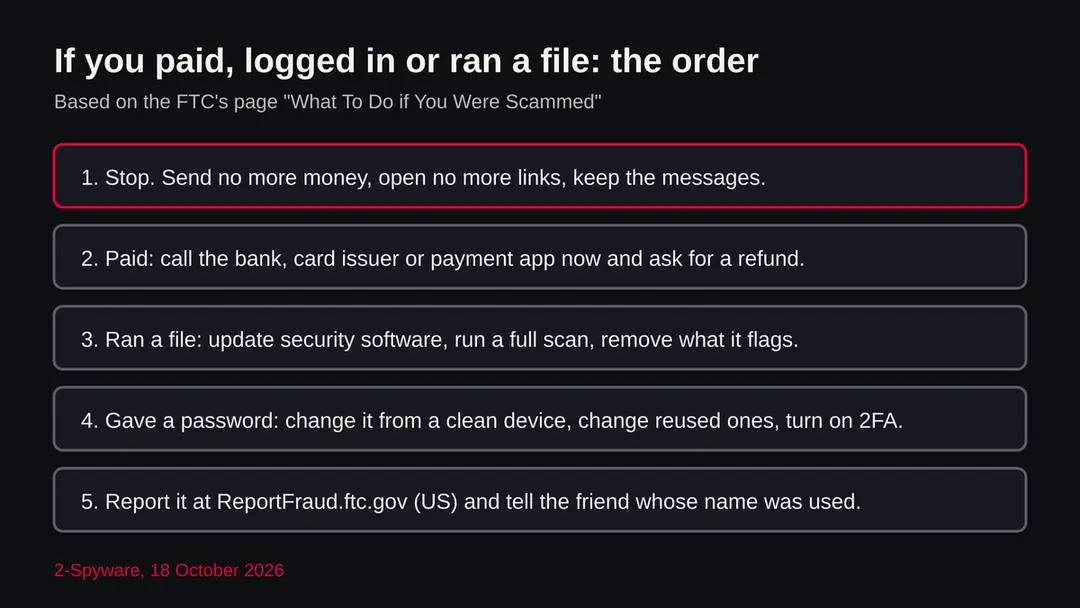
Act in the order of what you did. These steps follow the FTC page on what to do if you were scammed. The page does not mention this game, and we have not tested the steps on a live case.
- 1
You only read the message or opened the Steam page
Nothing to do. Reading a message or opening a store page does not harm the PC. If the message was odd, do not answer it, and tell the friend whose name it used.
- 2
You paid
Report it right away to the bank, card issuer or payment app and ask for the payment to be reversed. For a card, call the number on the back. For a gift card, call the issuer, say a scammer got the number and PIN, and keep the card and receipt. For cryptocurrency, contact the exchange or ATM operator and report to the FTC; crypto has fewer protections than cards.
- 3
You gave a password or a login
If you can still sign in, set a new strong password, change it anywhere you reused it and turn on two factor sign in. Do this from a device you trust. If you cannot sign in, use the account recovery of the service, and for a hacked email or social account follow the FTC's recovery instructions.
- 4
You ran a file or gave remote access
Update your security software and run a scan, remove what it flags, then change your passwords from a different device. The FTC adds that you can ask the device maker or a trusted technician for help. On Windows, open Windows Security and run a full scan; the manual steps for a threat that is still there are in the plan of this guide.
- 5
Report it
In the United States report at ReportFraud.ftc.gov. If a Social Security number was used, report at IdentityTheft.gov. Elsewhere, report to your national consumer or police fraud service.
What to do after the Scam With Your Friends e-mail
If you only received the message and clicked nothing, step 3 is all you need.
If you clicked the link or typed anything on the page it opened, do every step, starting with the password.
Step 1: Change the password you typed on the fake page
If you entered a password after clicking the link in the Scam With Your Friends message, treat that account as known to the sender.
Open the provider's real site by typing its address yourself, not through any link in the e-mail, and change the password there. Choose a new one you have never used before, and change it on every other account that shared the old one.
Then use the option to sign out of all other sessions or devices, if the provider has one. This works the same in any browser on Windows 11 and Windows 10.
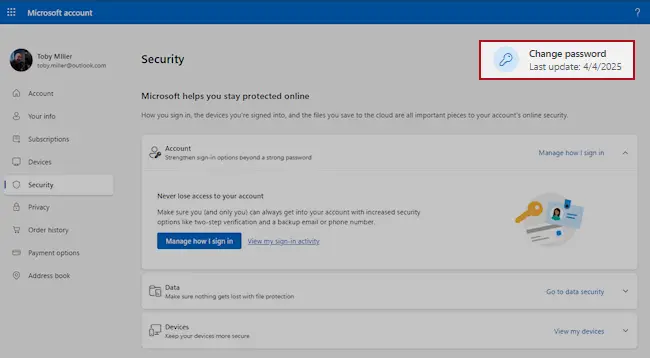
Microsoft account, Security page (account.microsoft.com/security): Change password. Full procedure with screenshots: Turn on two-step verification / secure a hacked account
Step 2: Turn on two-step verification
Two-step verification asks for a code from your phone or an authenticator app whenever someone signs in from a new device. A stolen password alone is then not enough to open the mailbox.
Turn it on in the security settings of the e-mail account first, then for the bank, shop and social accounts that send their reset links to that address.
While you are there, check the recovery e-mail and phone number and the forwarding rules, which attackers sometimes change to keep access. The settings pages look the same on Windows 11 and Windows 10.
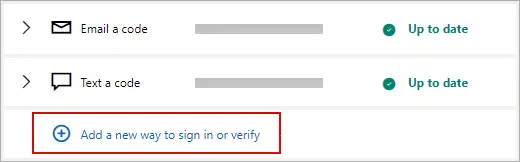
Microsoft account: Manage how I sign in, where two-step verification and the sign-in methods are. Full procedure with screenshots: Turn on two-step verification / secure a hacked account
Step 3: Report the e-mail and delete it
Report the message instead of only deleting it. In Outlook choose Report > Report phishing, in Gmail the three-dot menu > Report phishing; the provider then blocks the same message for other people.
Do not reply and do not click anything else in it. On a work account, forward it to your IT team as an attachment first. Web mail and the mail apps on Windows 11 and Windows 10 offer the same options.
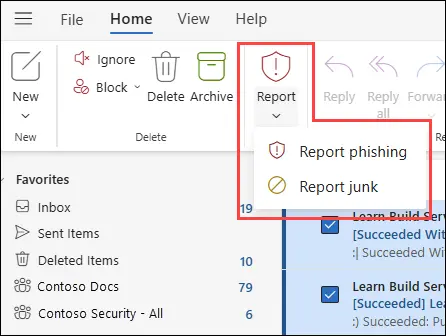
New Outlook for Windows and Outlook on the web: Report > Report phishing. Full procedure with screenshots: Report a phishing e-mail
Step 4: Scan the PC if you opened a file from the message
A page that only asked for a password installs nothing, so most readers can skip this step.
If the Scam With Your Friends e-mail or the page it opened made you download or open a file, delete it and run a full scan, then a Microsoft Defender Offline scan.
In Windows 11 and Windows 10 open Windows Security > Virus & threat protection > Scan options, select Microsoft Defender Antivirus (offline scan) and click Scan now. The PC restarts and the scan takes about 15 minutes, so save your work first.

Windows 11: Windows Security > Virus & threat protection > Scan options. Full procedure with screenshots: Run a Microsoft Defender Offline scan
How to check a Windows PC after an unknown download
If you ran a file that claimed to be the game and it did not come from Steam, assume it could be harmful until a scan says otherwise. The steps in the plan below are for Windows 11 and Windows 10 and use Microsoft's own tools.
Open Windows Security, go to Virus and threat protection and look at the protection history first. It shows what Defender found, blocked or quarantined and when.
If a detection shows the time you ran the file, take it seriously. Then run a scan. The Quick scan covers common places; for a file you ran, a Full scan or an offline scan is better.
If something odd remains, look at Installed apps for programs you do not know, at the Startup list for entries that start with Windows, and at Task Manager for a process that uses much CPU for no reason.
None of these is proof, but together they show whether anything stayed behind. Last, change your passwords from another device. If the PC still behaves oddly after all this, the last resort is to reset Windows after saving your files.
Questions about Scam With Your Friends (game name, fake copies and friend scams)
Is Scam With Your Friends a scam?
By what we could read, the name belongs to a game, not to a scam. Deku Deals lists Scam With Your Friends as a Steam game by the developers JakeHub and Metater, published by Jatater Worldwide, in which you play a worker in a scam call centre. The scamming happens inside the game, against AI callers.
What can be a scam is a message, a download page or a payment request that uses the name. We found no report of such a case for this game, but we cannot rule it out, so buy only on Steam and pay nothing to anyone who says they will let you join.
Is Scam With Your Friends a virus?
We found no report that it is. The game is described by shops and by Discord as a game with named makers, and no malware report about it appeared in our data on 18 October 2026.
We did not install or scan it, and a quiet check never clears a program for good, so this is a reading of the sources, not a test result.
Inside the game you may see virus alerts and hacked screens; those are part of play. A virus alert that appears on your desktop outside the game window is not the game, and you should close it and not call a number from it.
Is Scam With Your Friends safe to download?
It is safest to get it through the Steam app, where the store page shows the developer and publisher. Check that the names match JakeHub, Metater and Jatater Worldwide, and do not start from a link in a message.
Avoid pages that offer it free, cracked or through a key at a price far below the shop price, because a fake installer can carry a stealer or a remote access tool. The game is in Early Access according to Deku Deals, so crashes can happen and are not malware. Keep Windows Security on.
What is the Scam With Your Friends game about?
According to the Deku Deals description, you and friends work in a scam call centre in Kolkata, India, under a demanding boss. You talk to AI callers who answer in real time, take remote control of their computers inside the game to find personal details, and must meet a daily quota or be fired.
There are online co-op lobbies, a single player mode and disasters such as viruses, police raids and air strikes. It is a comedy about scamming, played against computer characters, and the listing shows it for Windows on Steam only.
A friend invited me to Scam With Your Friends. Is the invite safe?
It may well be real, because the game is built around inviting friends and the listing says a player who gets access can invite up to three. But invitations are exactly what a hijacked account can send, so check before you click. Ask your friend by voice, in person or in another app whether they sent it.
Open Steam yourself instead of the link. Never type your Steam password on a page that a message sent you to, and never pay or send a code to accept an invite. If the friend did not send it, tell them to secure their account.
What do I do if I paid for something called Scam With Your Friends?
If you paid Steam through the Steam app for the real game, nothing is wrong. If you paid a stranger, a site or a message sender, act as the FTC advises. Contact your bank, card issuer or payment app at once, say you were tricked and ask for a reversal.
For a gift card, call the issuer and keep the card and receipt. For cryptocurrency, contact the exchange or ATM operator and report it, knowing that crypto has fewer protections. Then report the scam at ReportFraud.ftc.gov if you are in the United States, and change any password you shared.
I typed my Steam password on a site from a message. What now?
Assume the password is known to someone else. From a device you trust, sign in to Steam directly through the app or the official site, not through the message, change the password and turn on the two factor sign in. Change the same password anywhere else you used it, starting with your email.
If you cannot sign in, use the account recovery of the service. Check your recent purchases and trades, and remove any device you do not know. The FTC page on what to do if you were scammed gives the same order:
- new password
- other accounts
- two factor
I ran a file that said it was Scam With Your Friends. What should I do?
Disconnect from the internet if you can, then update Windows Security and run a full scan. Open Protection history to see if Defender found or blocked anything and remove what it flags.
Look at Installed apps and the Startup list for programs you do not know. Then change your passwords from a different device, because a stealer or a remote access tool would have seen the ones you typed. The FTC advises the same for remote access:
- update security software
- scan
- delete what it finds
- change passwords
- turn on two factor sign in
If the PC still acts oddly, reset Windows after saving your files.
Can playing a game about scams get me scammed?
Playing the real game does not put you at risk by itself. The scamming is acted out against AI characters in the game, and nobody in the real world receives your data from it. The risks lie around the game:
- fake downloads
- hijacked friend accounts
- messages that use the title to ask for money
If anything, the game shows the tricks scammers use:
- a story
- urgency
- a request for remote access
- an odd payment
Keep those in mind when a real message asks for money or a login, and ask a friend you trust when in doubt.
Will Fortect remove Scam With Your Friends?
Fortect scans Windows for malware and unwanted programs and repairs the system files and settings they change, and its free scan shows what it finds on your PC before you decide anything.
For Scam With Your Friends, follow the plan above as well: the browser steps take back permissions and settings that no scanner treats as a threat, and uninstalling the program that brought it removes the source.
Run Microsoft Defender's full scan and, if anything was found, its offline scan as a second opinion. If the symptoms are gone after the plan and both scans are clean, there is nothing more to do.
Sources
- Deku Deals: Scam With Your Friends (developers, publisher, release status, description, features) (read October 18, 2026)
- FTC Consumer Advice: How to avoid a scam (read October 18, 2026)
- FTC Consumer Advice: What to do if you were scammed (read October 18, 2026)
- Discord: game page for scam with your friends (listing seen in search results) (read October 18, 2026)
- BBB: Scam alert, don't be fooled into thinking that's your friend on Facebook (seen in search results) (read October 18, 2026)