
Vinted scam: fake payment links, QR codes and support chats, and what to do if you clicked
A Vinted scam is not Vinted cheating you: it is a stranger who uses Vinted's name to get your card details, your login or a payment outside the app. The usual trick is a buyer who asks for your e-mail or phone number, then a fake Vinted message with a link or QR code to "confirm the sale".
Vinted says you never have to leave Vinted to confirm a payment or receive an order. If you only read such a message, report it and delete it. If you typed card details or a password, call your bank and change the password now.
Facts checked October 17, 2026. Removal steps tested on Windows 11 (26H2) and checked against Microsoft's and the browser makers' current documentation.
Automatic
Get a free scan and check if your PC is infected.
Fortect finds malware, unwanted programs and the Windows damage they leave behind, and repairs it in one pass.
Do it yourself · free Remove Vinted scam yourself 4 steps, about 12 minutes, no software needed.
Start the steps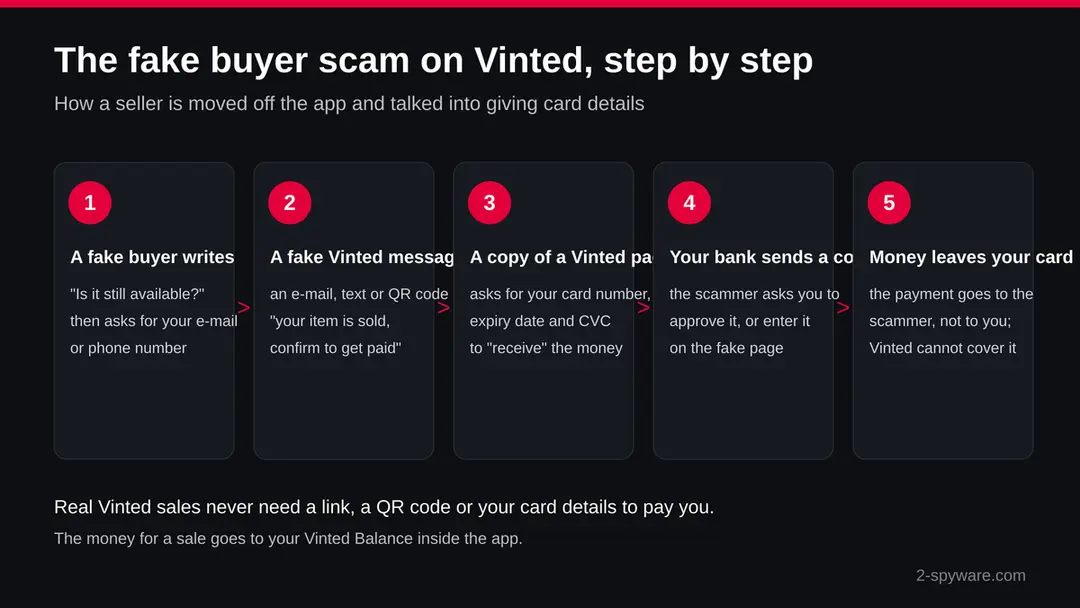
Vinted scam: summary
| Type | Phishing and payment fraud that uses Vinted's name; not a virus, and not a scam by Vinted itself |
|---|---|
| Risk | High if you typed card details, a bank code or your Vinted password on a linked page; low if you only read the message |
| Symptoms | A buyer asks for your e-mail or phone, then a "Vinted" e-mail, text or QR code says your item sold and you must confirm through a link |
| How to get rid of it | Do not tap the link. Report it to phishing@vinted.com or with Contact us in the app. If you typed card details, freeze the card with your bank |
| Our check | Source check on 17 October 2026 of Vinted's Help Centre, the NCSC and the FTC. No site test: the scam has no fixed address |
| Name | Vinted scam |
| Removal | Scan the PC with security software to find and remove the malware and anything installed with it. Fortect scans Windows for malware and repairs the system files and settings it damaged. Remove it nowTo use the full-featured product, you have to purchase a license for Fortect. The scan is free. |
Show 7 more facts
| Evidence | 2 reports from affected users and security sites; no sample analysed yet |
|---|---|
| Arrives as | |
| Pretends to be | Vinted |
| Claim | Your account needs urgent attention |
| Asks for | Your password |
| First seen | 16 October 2026 |
| Facts checked | 17 October 2026 |
Facts checked on 17 October 2026 against Vinted's Help Centre pages on phishing, safe payments and trading outside its system, the NCSC reporting page and the FTC phishing page. There is no single address or file to test: the scam uses many short-lived pages, so we made no site test.
What a Vinted scam is, and what it is not
Vinted itself is a real second-hand marketplace, and nothing we read says Vinted is a scam. A Vinted scam is a trick by other people who pose as buyers, sellers or Vinted staff. Vinted's own Help Centre warns that scammers "often impersonate Vinted" with realistic messages and websites to capture logins, passwords or payment details.
People search for "Vinted scam" for three reasons: a buyer behaves oddly, a message claims to come from Vinted, or money has already gone. This guide covers all three. It describes the patterns Vinted names on its phishing page, how a real Vinted sale works, and what to do in the right order if you clicked, typed something or paid.
- What it is
- Phishing and payment fraud in Vinted's name, by strangers; it installs nothing by itself
- Where it starts
- The Vinted chat, then e-mail, text messages, WhatsApp or a QR code, according to Vinted's phishing page
- What they want
- Card number, expiry date and security code, bank approval codes, your Vinted login, or a payment outside Buy now
- Who is targeted
- Mostly sellers, who are told they must confirm a sale to be paid; buyers are pushed to pay outside the app
- Vinted's rule
- You do not need to leave Vinted to confirm a payment or receive an order (Help Centre page 628)
- Who covers the loss
- Vinted says it cannot be held responsible for losses from scams or phishing; payments outside Buy now are not protected
What the Vinted scam message looks like
The wording as reported: a phishing e-mail asking you to sign in
Your item has been sold. Confirm the sale through the link to receive your payment.
The wording as reported: a social media message with a suspicious link
A buyer asks to continue the chat outside Vinted or sends a QR code.
Why scammers use Vinted, and how they find you
| Question | What we know |
|---|---|
| How did they find me? | Your listing is public. Anyone can message a seller. The scammer does not need to know anything about you except that you are selling something. |
| Did my account leak? | Not necessarily. A buyer who writes to you on Vinted sees only what any member sees. If a message on another service already knew your phone number, you may have given it in a chat, or it may come from an older leak. |
| Is my phone infected? | Nothing we read says these messages infect a phone by being read. A link can lead to a page that asks you to install something; only then is there a program to remove. |
| Why do they want me off the app? | Inside the app, payment runs through Vinted's payment provider and Vinted can see the conversation. Outside it, nobody checks what is said and no protection applies. |
How to tell the Vinted scam message is fake
How to check whether a Vinted message is real
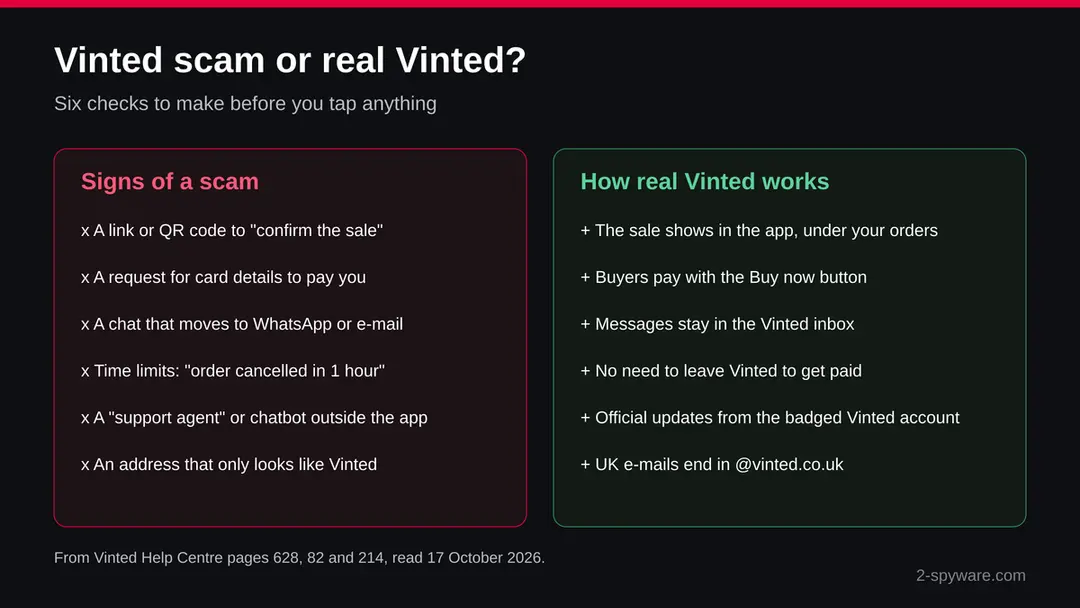
The safest test is simple: close the message, open the Vinted app yourself and look. If a sale, a refund or a warning is real, it is in the app. If it exists only in an e-mail, a text or a chat on another service, treat it as a scam.
- 1
Look in the app, not in the message
Open Vinted from your home screen or type the address yourself. Check your orders and your Vinted inbox. A sale that is not listed under your orders did not happen, whatever an e-mail says.
- 2
Check the sender
Vinted's UK help page says its e-mails come from an address ending in @vinted.co.uk and to be careful with anything else. If you use Vinted in another country, check the same help page on your country's Vinted site. Scammers use lookalike designs and addresses with small differences.
- 3
Check where a link goes
Do not tap to find out. On a computer, rest the pointer on the link and read the address. On a phone, touch and hold the link to see it. Vinted says the app shows a pop-up when a link in a message leads outside Vinted, so that warning is a reason to stop.
- 4
Ask what the message wants
A request for card details to receive money, a bank code, your password, a transfer to fix a problem or a move to WhatsApp is enough on its own. Real Vinted sales need none of these.
- 5
Look at the official account
Vinted says official updates in the app come from the Vinted account, which has a unique badge. A profile named "Vinted Support" or "Vinted Team" without that badge is a member, not Vinted.
What we checked on 17 October 2026, and what we could not
Vinted scam · source check · 17 October 2026
- Vinted Help Centre, phishing pageRead in full. It names Vinted messages, text messages, e-mails and QR code attachments as phishing routes and gives phishing@vinted.com for reports.
- Vinted Help Centre, safe paymentsRead. Purchases made with Buy now are protected if the parcel does not arrive or is damaged; payments outside Vinted's system are not protected.
- UK and US reporting pagesRead the NCSC page on reporting scam e-mails and the FTC page on phishing, for the reporting addresses in this guide.
- Site testNone. The scam has no single address: pages change often and copy Vinted under many names. One visit to one page would clear nothing.
- Size of the problemWe found no official count of Vinted scam victims. The topic came to us through rising searches, about 480 a month with a security question in the US.
A real and common trick, but not Vinted itself The patterns are confirmed by Vinted's own warnings. Treat any request to leave the app, scan a code or share card details as a scam.
How to sell and buy on Vinted without falling for the next one
Do
- Keep every chat inside the Vinted inbox
- Let buyers pay only with the Buy now button
- Check a sale under your orders in the app, never in an e-mail
- Use the shipping label Vinted gives you with the order
- Turn on multi-factor authentication for Vinted and your e-mail
- Report odd buyers and fake messages to Vinted
Don't
- Do not give your e-mail, phone number or WhatsApp to a buyer
- Do not scan a QR code a buyer sends you
- Do not type card details to receive money
- Do not approve a bank request you did not start
- Do not pay or accept payment outside the app
- Do not trust a support agent or chatbot that contacts you outside Vinted
Is Vinted scam dangerous? What the senders want
The usual Vinted scams, one by one
Most Vinted scams follow one of five scripts. The details change, but each one tries to move you out of the Vinted app, where Vinted's payment and messages are, into a chat, a page or a payment that the scammer controls.
- 1
The fake buyer and the "confirm your sale" link
A buyer shows interest and asks for your e-mail address or phone number, often with an excuse such as a broken app. Soon after, you get an e-mail or text in Vinted colours saying the item sold. A button asks you to confirm the sale or receive the money. The page behind it asks for your card details. Vinted's phishing page shows a fake e-mail of exactly this kind, asking you to open a link to "confirm a sale".
- 2
The QR code
Instead of a link, the buyer sends a QR code in the chat, sometimes said to be a shipping label or a payment confirmation. Scanning it opens a page in your phone's browser, outside the app. Vinted lists QR code attachments among the ways phishing reaches its members. A real Vinted shipping label comes with the order inside the app, not from a buyer.
- 3
The fake support agent or chatbot
After a "failed" sale or refund, a person or a chatbot that calls itself Vinted support contacts you on WhatsApp, Telegram or a web page. It asks for card details, a bank code or a transfer to fix the problem. Vinted says it contacts users through its support account only when needed, and that official updates come from the Vinted account with a badge.
- 4
The buyer who wants to pay outside the app
A buyer, or a seller when you are the buyer, suggests a bank transfer, a payment app or "friends and family" to save fees. Vinted says that without the Buy now button your purchase is not protected, it cannot help with the order and it cannot cancel it. The item may never come, or the money that arrives may be pulled back later.
- 5
The fake Vinted website
Some scam pages copy Vinted's design and offer support, a refund or a payment form. Vinted's phishing page shows examples of fake Vinted websites that request payment details. They use addresses that differ from the real one by a letter, a hyphen or an extra word.
The fake sale message, line by line
| What the scammer says | What is wrong with it |
|---|---|
| "My app is not working, can you give me your e-mail?" | Vinted's buyers pay inside the app. A buyer has no reason to need your e-mail or phone number. Vinted tells members not to share data in messages unless they work with Vinted support. |
| "Your item has been sold, confirm the sale to receive the payment" | A real sale appears in your Vinted orders. Vinted says you do not need to leave Vinted to confirm a payment or receive an order. |
| "Enter your card details so we can send you the money" | Payment details are handled in your profile settings and at checkout. The page asks for the number, expiry date and security code that are needed to take money, not to send it. |
| "Your account will be blocked in 1 hour" | Vinted names urgent language, time limits and threats of a blocked account or a cancelled order as signs of phishing. |
| "Scan this QR code for the shipping label" | A QR code opens a page outside the app. Vinted lists QR codes in messages among the ways phishing arrives. |
| "Approve the request in your banking app to receive the funds" | Banks send approval requests to confirm that money leaves your account. A code or approval is never needed to receive money. |
What a Vinted scam can cost you
Reading a scam message does no harm. The cost comes from what you type or pay afterwards. Here is what each step can lead to, from the worst case down.
- High
Card details and bank codes
A fake payment page that collects your card number, expiry date and security code lets the scammer pay with your card. If you also approve a request in your banking app or type a code from your bank, you may have confirmed a payment yourself, which can make a refund harder.
- High
A payment outside Buy now
Money sent by bank transfer or a payment app for a Vinted item has no Vinted protection. Vinted says it cannot help with such an order and cannot cancel it, so the bank is the only place to ask.
- Medium
Your Vinted account
A Vinted password typed on a fake page lets the scammer sign in, change your details and use your profile, with its reviews, to cheat other members. If the same password opens your e-mail, that account is at risk too.
- Medium
Personal details
Your name, phone number, e-mail and address can be used for the next, more convincing message. Expect more texts and calls that sound like your bank or Vinted.
- Low
Malware
Vinted warns that links you are unsure of may carry malware. Most Vinted scams want card details, not a program. Only if a page made you install an app or a file do you need to remove it.
If you clicked the link or replied
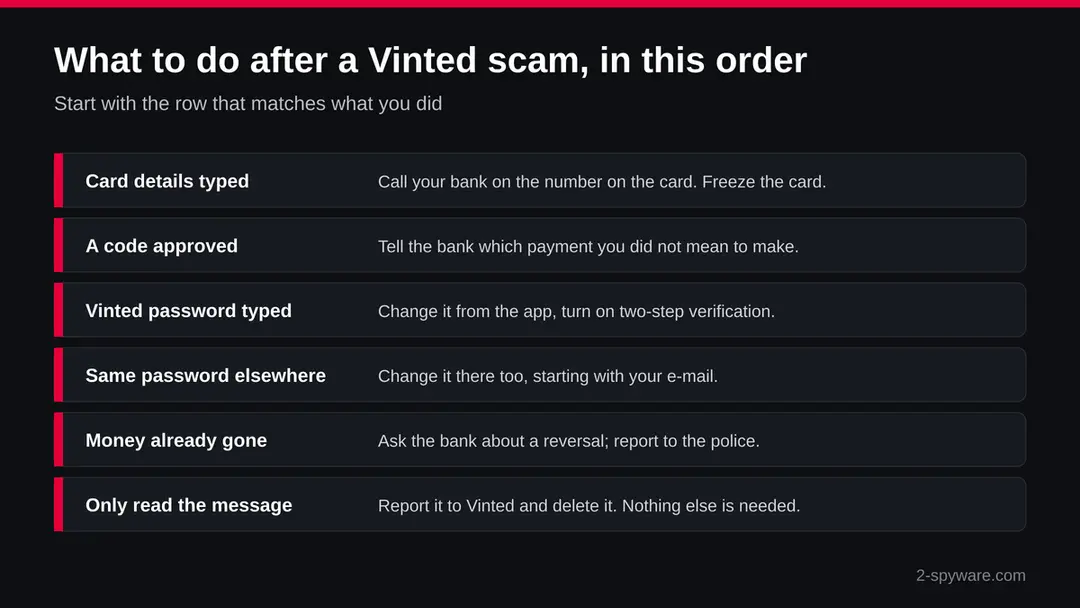
Start with the money, then the accounts, then the report. Speed matters most with card details and bank codes: the sooner the bank knows, the more it can stop.
- 1
You typed card details or approved a code
Call your bank on the number printed on your card or in its official app, not a number from the message. Ask it to freeze or block the card and to stop any pending payment. Vinted's page says to freeze bank accounts, bank cards or credit cards to stop future payments.
- 2
You sent money outside Buy now
Ask your bank at once whether the payment can be reversed, as Vinted advises. Keep the chat, the payment reference and the scammer's profile link. If money was taken from your bank account, Vinted says to contact your local police.
- 3
You typed your Vinted password
Open the Vinted app yourself and change the password while you can still sign in. Turn on multi-factor authentication, as Vinted recommends. If you can no longer sign in, use Vinted's help page for a hacked or compromised account.
- 4
You used the same password elsewhere
Change it on every account that shares it, starting with your e-mail, because a taken e-mail account lets someone reset the others. Use a different password for each one.
- 5
A page made you install something
Remove the app or program you installed from the link. On a phone, remove the app from the home screen or Settings. On a computer, uninstall it and run a full scan with your security program, as the FTC advises after a phishing link.
- 6
You only read the message
Nothing was taken. Report the message and delete it. Block the member if it came through the Vinted chat.
What to do after the Vinted scam e-mail
If you only received the message and clicked nothing, step 3 is all you need.
If you clicked the link or typed anything on the page it opened, do every step, starting with the password.
Step 1: Change the password you typed on the fake page
If you entered a password after clicking the link in the Vinted scam message, treat that account as known to the sender.
Open the provider's real site by typing its address yourself, not through any link in the e-mail, and change the password there. Choose a new one you have never used before, and change it on every other account that shared the old one.
Then use the option to sign out of all other sessions or devices, if the provider has one. This works the same in any browser on Windows 11 and Windows 10.
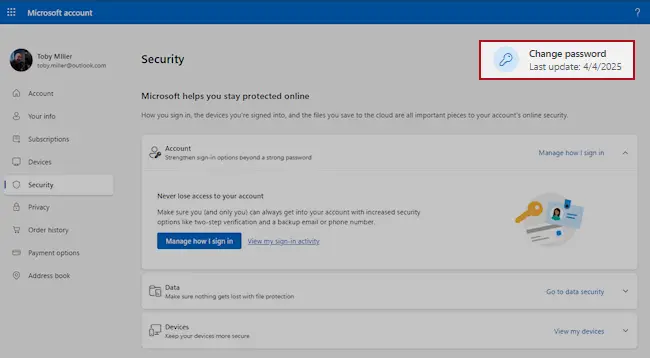
Microsoft account, Security page (account.microsoft.com/security): Change password. Full procedure with screenshots: Turn on two-step verification / secure a hacked account
Step 2: Turn on two-step verification
Two-step verification asks for a code from your phone or an authenticator app whenever someone signs in from a new device. A stolen password alone is then not enough to open the mailbox.
Turn it on in the security settings of the e-mail account first, then for the bank, shop and social accounts that send their reset links to that address.
While you are there, check the recovery e-mail and phone number and the forwarding rules, which attackers sometimes change to keep access. The settings pages look the same on Windows 11 and Windows 10.
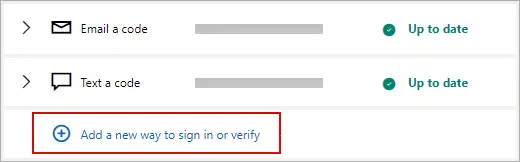
Microsoft account: Manage how I sign in, where two-step verification and the sign-in methods are. Full procedure with screenshots: Turn on two-step verification / secure a hacked account
Step 3: Report the e-mail and delete it
Report the message instead of only deleting it. In Outlook choose Report > Report phishing, in Gmail the three-dot menu > Report phishing; the provider then blocks the same message for other people.
Do not reply and do not click anything else in it. On a work account, forward it to your IT team as an attachment first. Web mail and the mail apps on Windows 11 and Windows 10 offer the same options.
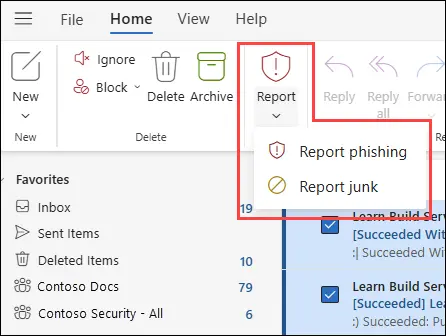
New Outlook for Windows and Outlook on the web: Report > Report phishing. Full procedure with screenshots: Report a phishing e-mail
Step 4: Scan the PC if you opened a file from the message
A page that only asked for a password installs nothing, so most readers can skip this step.
If the Vinted scam e-mail or the page it opened made you download or open a file, delete it and run a full scan, then a Microsoft Defender Offline scan.
In Windows 11 and Windows 10 open Windows Security > Virus & threat protection > Scan options, select Microsoft Defender Antivirus (offline scan) and click Scan now. The PC restarts and the scan takes about 15 minutes, so save your work first.

Windows 11: Windows Security > Virus & threat protection > Scan options. Full procedure with screenshots: Run a Microsoft Defender Offline scan
How to report Vinted scam
Report it
A report gives you a reference number for your bank and insurer and helps police link cases.
Include the dates, an e-mail with the subject "Your item has been sold.", any payment details, addresses and phone numbers the attackers used, and screenshots.
In the US, report to the FBI at ic3.gov and scams to ReportFraud.ftc.gov. In the UK, use Report Fraud (reportfraud.police.uk); in Canada, the Canadian Anti-Fraud Centre; in Australia, ReportCyber at cyber.gov.au. EU residents report to their national police: Report a cyber attack or scam to the authorities.
Every agency, with what to send and when businesses must notify regulators, is listed in where to report cybercrime by country.
Report it
A report gives you a reference number for your bank and insurer and helps police link cases.
Include the dates, an e-mail with the subject "Your item has been sold.", any payment details, addresses and phone numbers the attackers used, and screenshots.
In the US, report to the FBI at ic3.gov and scams to ReportFraud.ftc.gov. In the UK, use Report Fraud (reportfraud.police.uk); in Canada, the Canadian Anti-Fraud Centre; in Australia, ReportCyber at cyber.gov.au. EU residents report to their national police: Report a cyber attack or scam to the authorities.
Every agency, with what to send and when businesses must notify regulators, is listed in where to report cybercrime by country.
Questions about Vinted scam
Is Vinted a scam?
No. Vinted is a real second-hand marketplace, and none of the sources we read call it a scam. Scams on Vinted are tricks by other people who pose as buyers, sellers or Vinted staff.
They work by moving you out of the app, where Vinted's payment and protection apply. Purchases made with the Buy now button are protected if the parcel does not arrive or is damaged.
How do I know if a Vinted buyer is a scammer?
A buyer who asks for your e-mail address, phone number or WhatsApp, sends a QR code, or wants to pay outside the app is very likely a scammer.
Real buyers pay with Buy now and the sale then appears in your orders. Vinted tells members not to share data in messages and not to leave Vinted to contact others or send payments.
I got an e-mail that my Vinted item sold. Is it real?
Check the app, not the e-mail. If the sale is not listed under your orders, it did not happen. Vinted says you do not need to leave Vinted to confirm a payment or receive an order.
Its UK help page says real e-mails come from an address ending in @vinted.co.uk. A link that asks you to confirm the sale is the scam itself.
Does Vinted ever ask for card details to pay a seller?
Nothing in Vinted's help pages says it needs your card to pay you. Vinted says payment details belong in your profile settings and at checkout, not in messages.
Money from a sale made with Buy now goes to your Vinted Balance. A page that wants your card number, expiry date and security code to "send" you money is fake.
What is the Vinted QR code scam?
A buyer sends you a QR code in the chat, often said to be a shipping label or a payment confirmation. Scanning it opens a page outside the Vinted app that asks for card details or your login.
Vinted names QR code attachments among the ways phishing reaches its members. Real shipping labels come with the order in the app.
I entered my card details on a fake Vinted page. What now?
Call your bank at once on the number on your card or in its official app, and ask it to freeze the card and stop pending payments.
Tell it if you approved a code or a request in the banking app. If money was taken, ask about a reversal and report it to the police. Then report the message to phishing@vinted.com.
Can I get my money back from a Vinted scam?
It depends on how you paid. Purchases made with Buy now are protected if the parcel does not arrive or is damaged.
Money sent outside Vinted's payment system is not protected, and Vinted says it cannot help with or cancel such orders. Then only your bank or card issuer can try to reverse the payment, so contact it quickly.
Is a Vinted support chat on WhatsApp real?
Treat it as a scam. Vinted says it contacts users through its support account only when needed and that official updates in the app come from the Vinted account with a unique badge. A support agent or chatbot that writes on WhatsApp, Telegram or a web page and asks for card details, codes or a transfer is not Vinted.
How do I report a Vinted scam?
Forward phishing e-mails to phishing@vinted.com or use Contact us in Vinted's Help Centre, with screenshots and the member's profile link. In the UK, forward scam e-mails to report@phishing.gov.uk and report lost money to Report Fraud or Police Scotland.
In the US, forward texts to 7726 and report at ReportFraud.ftc.gov. Elsewhere, report it to your national police or fraud office and tell your bank.
Will Fortect remove Vinted scam?
Fortect scans Windows for malware and unwanted programs and repairs the system files and settings they change, and its free scan shows what it finds on your PC before you decide anything.
For Vinted scam, follow the plan above as well: the browser steps take back permissions and settings that no scanner treats as a threat, and uninstalling the program that brought it removes the source.
Run Microsoft Defender's full scan and, if anything was found, its offline scan as a second opinion. If the symptoms are gone after the plan and both scans are clean, there is nothing more to do.
Sources
- Vinted Help Centre: Recognize spoof and phishing messages (page 628) (read October 17, 2026)
- Vinted Help Centre: How to shop and pay safely (page 82) (read October 17, 2026)
- Vinted Help Centre: Selling outside Vinted's payment system and Mark as sold (page 214) (read October 17, 2026)
- National Cyber Security Centre: Reporting a scam email (read October 17, 2026)
- Federal Trade Commission: How to recognize and avoid phishing scams (read October 17, 2026)