
Anti-Spyware
SUPERAntiSpyware Review 2026: Free vs Professional X
SUPERAntiSpyware is a Windows anti-spyware scanner that has been around since 2004 and is now owned by RealDefense. This review covers what the Free and Professional X editions do, what they cost, how they test, privacy, and how to remove the program.
6.6/10
Useful second-opinion scanner, no lab results
SUPERAntiSpyware is a veteran Windows anti-spyware tool with a real Free Edition and a low-cost Professional X Edition, but no independent lab results.
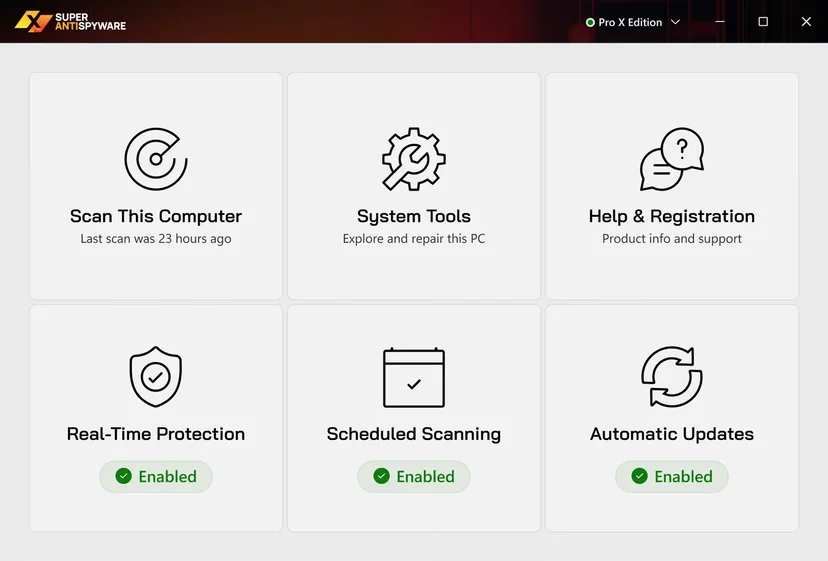
- Our score
- 6.6 / 10
- Price from
- 0 first year
- Platforms
- Windows 7, 8, 8.1, 10 and 11
- Type
- Anti-Spyware
Verdict in short
- Free Edition scans and removes threats on demand; Professional X Edition adds real-time blocking, scheduling and automatic updates.
- Professional X Edition costs $19.99 for three PCs for the first year, with a 30-day refund window.
- Owned by RealDefense since 2023 and absent from current AV-TEST and AV-Comparatives results.
What we liked
- Long track record since 2004
- Real Free Edition that removes threats
- Repairs, System Investigator and Critical Point Scan
- Low first-year price for three PCs
- Runs next to Microsoft Defender
- Email and phone support, 30-day refund
What we did not
- No current AV-TEST or AV-Comparatives results
- Windows only
- Free Edition lacks real-time protection and automatic updates
- Renewal price not shown on the product page
Score breakdown
- Detection and protection5.8Good record against adware and hijackers in our earlier tests; no current lab results.
- Tools and features7.4Repairs, System Investigator, Critical Point Scan, email reports, ad blocking.
- Ease of use7.5New tile interface with clear scan, tools and status screens.
- Value7.2Useful Free Edition and $19.99 for three PCs in the first year.
- Privacy5.8Broad group privacy policy covering many RealDefense brands.
- Support and refunds7.0Email support, phone line and a 30-day refund window.
SUPERAntiSpyware at a glance
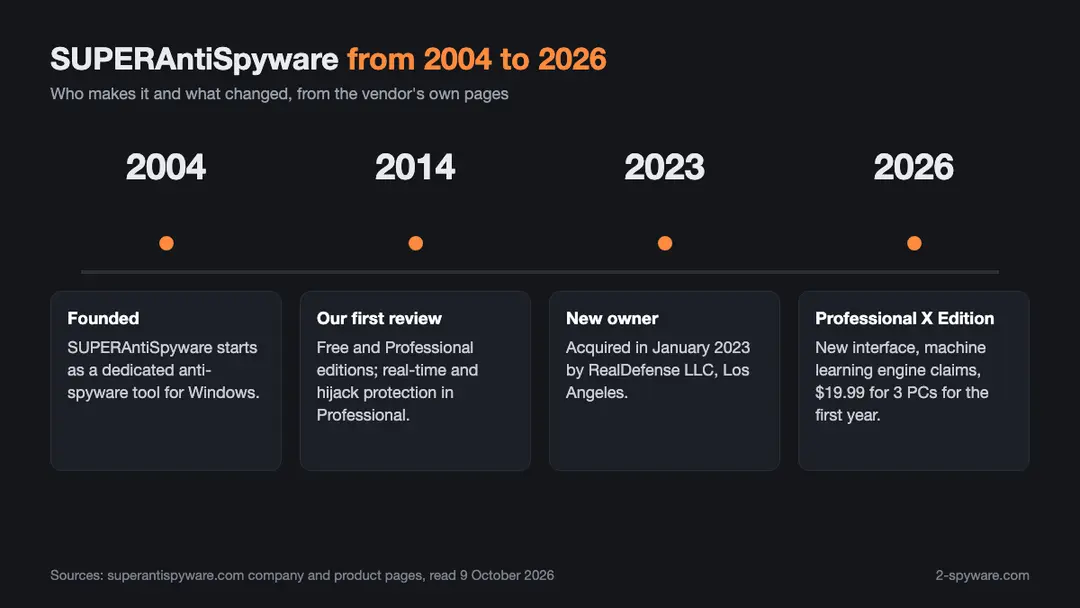
SUPERAntiSpyware is a Windows program that finds and removes spyware, adware, browser hijackers, trojans, keyloggers, rootkits and potentially unwanted programs [1]. It has been around since 2004 [3]. For most of that time it was known as a free second-opinion scanner: a tool you run next to your main antivirus to catch what that antivirus left behind.
Today it is sold by RealDefense LLC of Los Angeles, which bought SUPERAntiSpyware in January 2023 [3]. The current paid product is called Professional X Edition. It costs $19.99 for three PCs for one year on the vendor's site on 2026-10-09, and a Free Edition is still offered for download [1][2].
- Best for: Windows users who want a light second scanner next to Microsoft Defender or another antivirus, especially for adware, hijackers and unwanted programs.
- Platforms: Windows 7, 8, 8.1, 10 and 11 only [2]. There is no Mac, Android or iPhone version.
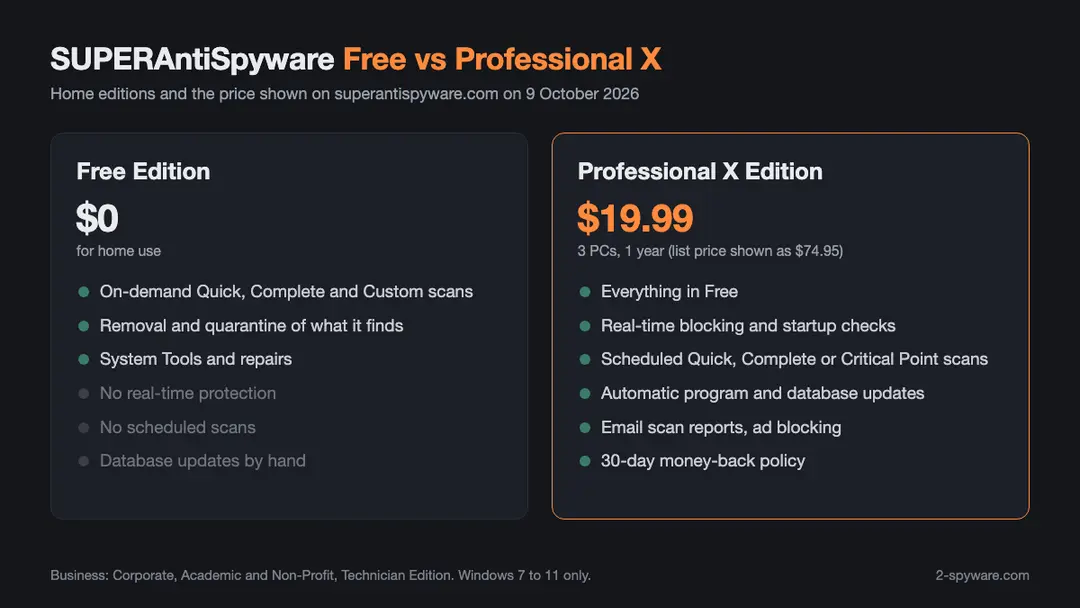
- Price: Free Edition at no cost; Professional X Edition $19.99 for 3 PCs for 1 year, shown against a list price of $74.95 [2].
- Independent tests: not listed in current AV-TEST or AV-Comparatives results that we could find.
- Refund: 30-day money-back policy, according to the vendor [2][3].
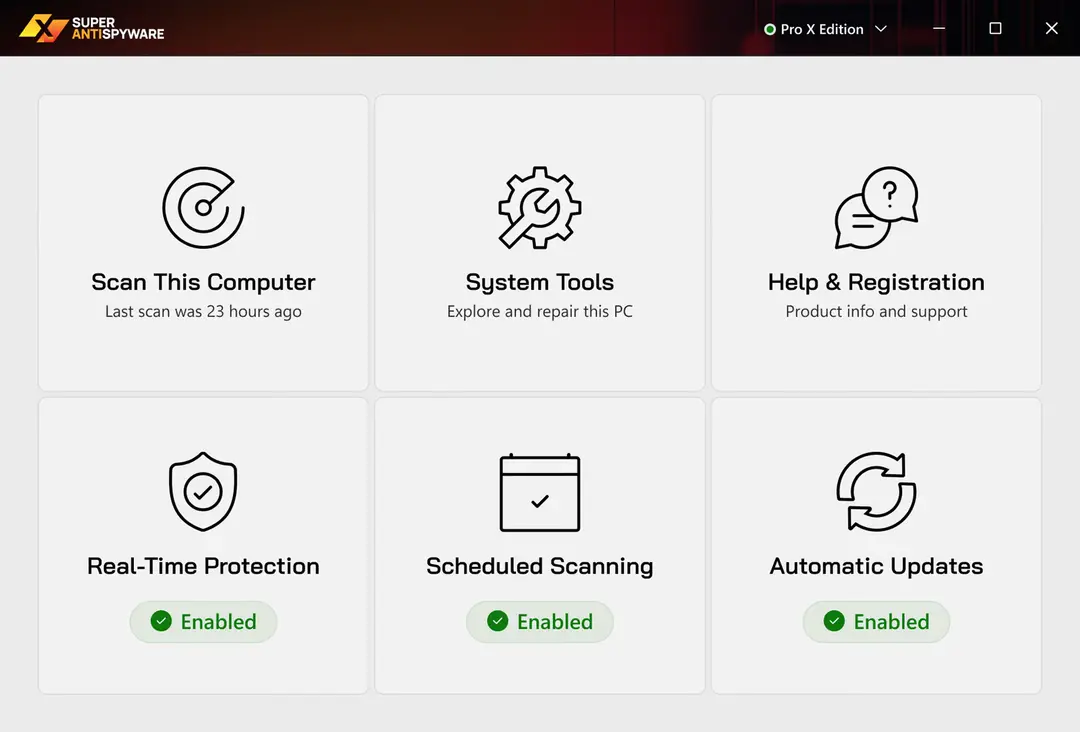
How we reviewed SUPERAntiSpyware and how we earn money
Our first SUPERAntiSpyware review was written in 2014 after hands-on tests of the Free and Professional editions on Windows test machines. Back then the program found every sample we planted, and we rated it as one of the better spyware removers of the time. A lot has changed since, including the owner, the interface and the edition names.
For this 2026 update we checked each fact against the vendor's own pages: the home page, the Professional X Edition page, the company page, the FAQ and the uninstall guide [1][2][3][4][5]. We read the RealDefense privacy policy that covers SUPERAntiSpyware [6]. The screenshots in this review come from the vendor's site, because the interface of the X Edition is new and our 2014 screenshots no longer show the program as it is.
2-spyware.com earns a commission only from partner products such as the Fortect offer mentioned on this page. We have no deal with SUPERAntiSpyware or RealDefense, this review carries no affiliate link to them, and we earn nothing if you buy SUPERAntiSpyware after reading it.
Who makes SUPERAntiSpyware now?
SUPERAntiSpyware was founded in 2004 and grew into one of the best known names in the anti-spyware niche [3]. In January 2023 it was acquired by RealDefense [3]. The footer of the site now reads SUPERAntiSpyware c/o RealDefense, 6080 Center Dr #800, Los Angeles, CA 90045, and the copyright belongs to RealDefense LLC [1].
RealDefense owns a wide group of consumer software brands. Its privacy policy lists, among others, System Mechanic, iolo Updater, Hotspot Shield, MyCleanPC, CyberDefender, DriveScrubber, MyCleanID and the support.com and USTechSupport services next to SUPERAntiSpyware [6]. In practice this means SUPERAntiSpyware is now one product in a larger portfolio, with shared billing, shared support systems and a shared privacy policy.
This matters for two reasons. First, card charges may show the name RealDefense or Antispyware rather than SUPERAntiSpyware, which the vendor's FAQ confirms by answering questions about both charge names [4]. Second, you may see offers for other RealDefense products, such as paid technical support, during checkout or in the program. The FAQ has a separate entry for people who bought the Technical Support service during checkout and for people who see a monthly charge after buying [4].
Editions and current version
For home users there are two editions. SUPERAntiSpyware Free Edition is the on-demand scanner that made the brand popular. Professional X Edition is the paid edition with real-time protection, scheduling and automatic updates [1][2]. The X in the name came with a redesigned interface and a new detection engine that the vendor describes as AI powered [2].
For organisations the vendor sells Corporate licensing, Academic and Non-Profit licensing and a Technician Edition for repair shops and IT staff who clean many computers [1]. There is also a reseller program and a separate browser product called SUPERSafeWeb [1].
The product page shows the current definition database, core and program version in a live box that loads when you open the page [2]. Because that number changes often, we do not print one here. Open the Professional X Edition page or the Help and Registration tile in the program to see the version you have. If your copy still shows the old blue and grey Professional Edition window, you are on an older build and should update or reinstall from the official site.
Free Edition
The Free Edition scans and removes threats when you start a scan yourself. It keeps the System Tools and repairs, and it lets you quarantine and restore items. It does not block threats in real time, it does not run on a schedule, and you have to update its database by hand before each scan. This split was the same in our 2014 test, and the vendor's FAQ still has a separate entry on the differences between the Free and Professional editions [4].
Professional X Edition
Professional X Edition adds real-time blocking, checks of critical system points at startup and shutdown, alerts when new programs are added to startup, scheduled Quick, Complete or Critical Point scans, automatic updates and email notifications with scan results [2]. The last one is useful if you look after a parent's or a relative's PC and want to see the results from your own inbox.
Features checked against the vendor's pages
Below is what the vendor says Professional X Edition does, with our notes on what each feature means in daily use [2]. We could not test the 2026 build hands-on for this update, so the notes rest on the vendor's description, our earlier tests and how this type of tool works.
Detection engine and scan types
The vendor says the X Edition uses a detection engine based on fourth generation machine learning, backed by a definitions database fed by over 500 million endpoints [2]. It also describes Multi-Dimensional Scanning, which looks at code patterns and general traits of files rather than only exact signatures, and Process Interrogation Technology, which it says finds rootkits and kernel drivers that other anti-spyware tools miss [2].
You get three main scan types. A Quick Scan checks the places where malware usually sits. A Complete Scan checks every file. A Critical Point Scan checks only the areas that load at startup and in memory, which makes it the fastest way to see whether something is running right now [2][4]. The old Custom Scan lets you pick folders and drives, including USB drives.
In our 2014 tests the Quick Scan took 15 to 18 minutes and the Complete Scan around 20 minutes on the test machines of the time. The vendor's FAQ still has an entry on why scans take longer than in other products [4]. Expect a full scan of a large SSD to take a while, and run it when you do not need the PC.
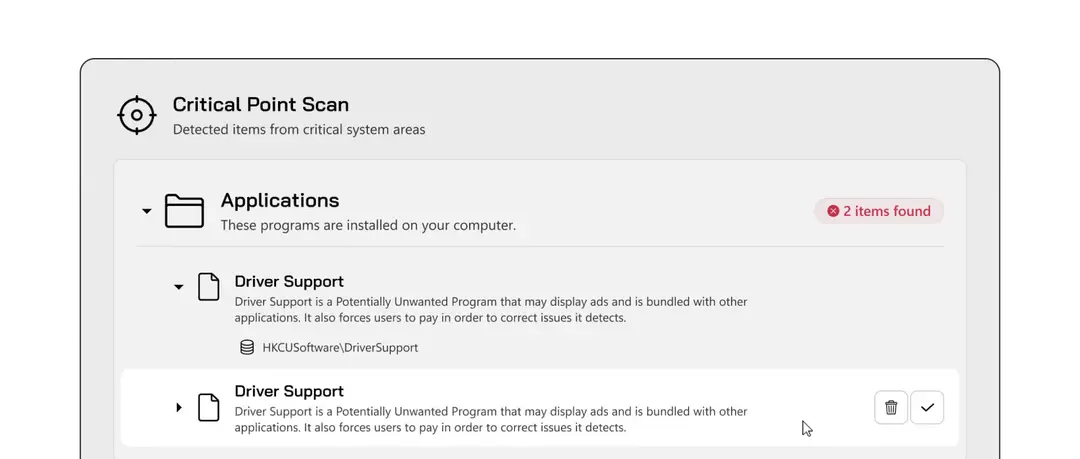
Removal, quarantine and repairs
Detected items go to quarantine, and you can restore an item if it turns out to be harmless [2]. The vendor also lists repairs for damage malware leaves behind: a disabled Task Manager, broken internet connections, registry changes and hijacked browser settings [2]. These repairs were one of the most useful parts of the program in our 2014 test. The FAQ asks whether you should run all of them, and the sensible answer is no: run only the repair that matches the problem you have [4].
System Investigator
System Investigator shows what runs and is installed on the PC: startup programs, browser plugins, Windows Security status, services and drivers, desktop and Start menu items, registry load points, CLSIDs and application data folders [2]. It also lets you track changes over time [2]. For an experienced user this is a good way to find the leftovers of an adware bundle after the main scan.
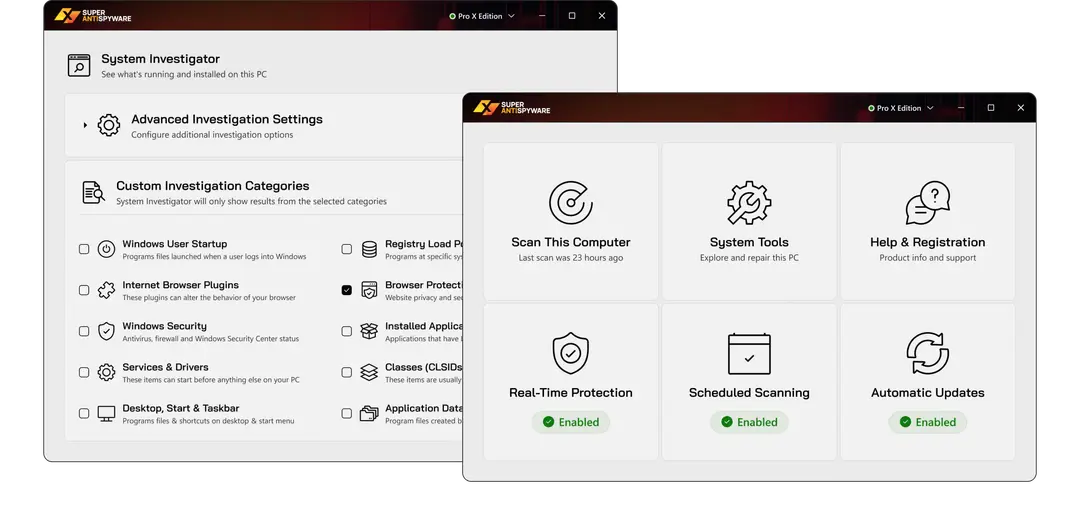
Real-time protection
Real-time protection in Professional X Edition stops harmful software from installing, watches startup items and guards the browser home page [2]. You can turn alerts and sounds on or off. The vendor says the program works with your antivirus rather than replacing it, and markets it as a way to boost Microsoft Defender [1][2].
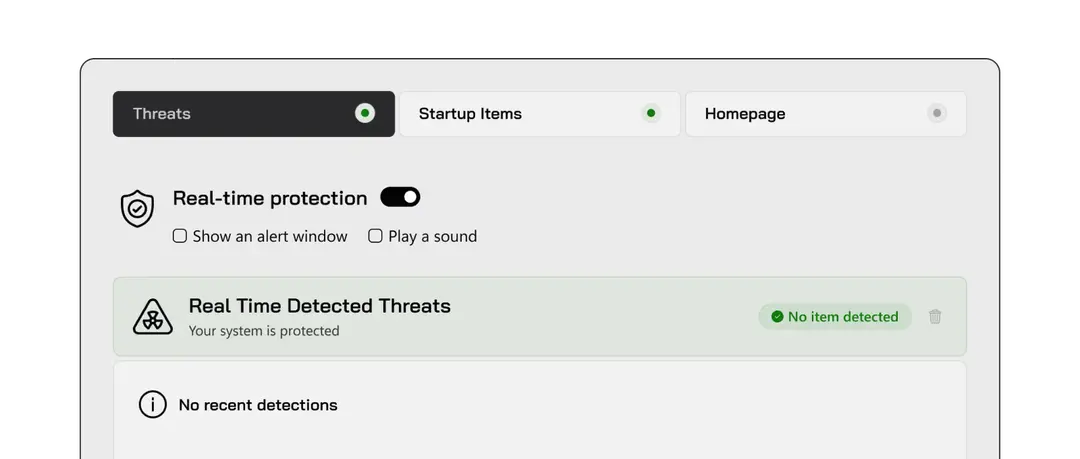
Ad blocking and cookie cleanup
The product page lists cookie removal and an integrated ad blocker called SUPERAdBlocker [2]. Cookie removal is a privacy cleanup, not malware removal. Tracking cookies are not spyware in the classic sense, and the vendor's own FAQ has a page on the difference between cookies and spyware [4].
Ransomware
The vendor says Professional X Edition stops ransomware and protects files from being held hostage [2]. It does not publish how this works, and no independent lab result backs it. Treat this as an extra layer, not your main defence. Keep offline or cloud backups and keep Microsoft Defender or another full antivirus running.
Detection results from AV-TEST and AV-Comparatives
This is the weak point of the review. We found no current listing for SUPERAntiSpyware or for any RealDefense consumer antivirus in the public results of AV-TEST or AV-Comparatives, the two labs most people rely on. The vendor's own pages also cite no lab certificate [1][2].
That does not prove the program detects poorly. Many second-opinion scanners never enter these tests, because the tests measure full antivirus suites. It does mean the claims about AI detection, 1 billion threats and 500 million endpoints are the vendor's words only [1][2]. You have no independent number for its detection rate or for false alarms.
Compare this with Microsoft Defender, which is built into Windows and appears in both labs' regular tests, or with SpyHunter 5, which AV-TEST certified in 2024. Our SpyHunter review covers that test.
Prices, renewal and refunds
On 2026-10-09 the Professional X Edition page showed $19.99 for 3 PCs for 1 year, with $74.95 shown as a crossed out list price [2]. The page does not say what the renewal costs after the first year. Check the price in your cart and in the confirmation email, and note whether automatic renewal is on.
The vendor's FAQ has entries on prices in other currencies, on how long a subscription lasts and on old lifetime licences that are now asked to renew [4]. Older SUPERAntiSpyware licences were often sold as lifetime keys. If you hold one and the program now asks for a renewal, contact support with your original order details before you buy again.
The company page promises free, unlimited technical support by email, with replies usually within 24 hours, and a 30-day unconditional money-back policy [3]. Support also lists a phone line, 801-609-5814, as open 24 hours a day [1]. The site has a Manage My Subscription link where you can check renewal settings [1].
- Free Edition: no cost, on-demand scanning and removal, manual updates.
- Professional X Edition: $19.99 for 3 PCs for the first year on the date we checked, renewal price not shown on the product page.
- Business: Corporate, Academic and Non-Profit, and Technician Edition licences, priced on their own pages [1].
- Refund: within 30 days of purchase, per the vendor [3].
Privacy
SUPERAntiSpyware is covered by the RealDefense privacy policy, posted and effective on June 3, 2026 [6]. The policy covers all RealDefense brands at once. It says RealDefense collects contact, account and payment details when you buy, and website data such as IP address and cookies [6].
For software, the policy says RealDefense may collect device data such as operating system version, device name, installed applications, processor, disk and memory details, and internal identifiers such as a serial number or MAC address [6]. It may also collect data from logs, configuration files, registry keys and network activity. The policy says this data is generally anonymous and aggregated, and that RealDefense will ask before it collects more to diagnose a problem [6].
The site footer says SUPERAntiSpyware does not share or sell your data to third parties [1]. The policy itself is broader: it allows disclosure to service providers under contract, and it describes third-party advertising and tracking on RealDefense websites [6]. EU, UK and Swiss residents can ask to access, correct or delete their data [6]. This is a normal policy for a commercial software group, but it is not a privacy-first product. Read the policy if data collection matters to you.
Installation and system requirements
Professional X Edition runs on Windows 7, 8, 8.1, 10 and 11 [2]. The vendor does not list Windows on ARM separately. Windows 7, 8 and 8.1 no longer get security updates from Microsoft, so if you still use one of them, an anti-spyware tool will not make that system safe.
- Download the installer only from superantispyware.com. The Free Edition download link is on the home page [1]. Avoid download portals and bundles.
- Run the installer and accept the Windows prompt. You need an administrator account; the FAQ has an entry for the error you get otherwise [4].
- On first start, update the definitions before the first scan. In the Free Edition you have to do this each time.
- Run a Quick Scan first, then a Complete Scan when you have time.
- Review each detection before you remove it. Uncheck anything you know and trust, such as a game mod or a remote access tool you use on purpose.
SUPERAntiSpyware runs fine next to Microsoft Defender or another antivirus [2]. Do not install two full antivirus suites with real-time protection at the same time, but a scanner like this one is made to sit next to your main antivirus.
How to uninstall SUPERAntiSpyware
The vendor's preferred method uses the normal Windows uninstaller [5]:
- Right-click the SUPERAntiSpyware icon near the clock and choose Exit. Close other programs.
- On Windows 11, open Settings, then Apps, then Installed apps. On Windows 10, open Settings, then Apps, then Apps and features. You can also use Control Panel, then Programs, then Uninstall a program.
- Find SUPERAntiSpyware FREE Edition or SUPERAntiSpyware Professional in the list and choose Uninstall.
- Follow the wizard, then restart the PC right away. The vendor says the restart is needed or the removal may not finish [5].
If the program is not in the list or the uninstall fails, the vendor offers an Uninstaller Assistant in 32-bit and 64-bit versions on the same FAQ page [5]. The other option is to download the installer for your edition again, choose Remove in the wizard and restart [5]. Uninstalling the program does not cancel a paid subscription, so turn off renewal in Manage My Subscription as well [1].
Pros and cons
What SUPERAntiSpyware does well
- Long track record since 2004 as a second-opinion scanner [3].
- A real Free Edition that removes what it finds, not only a scan that asks for payment.
- Good tools for adware and hijacker leftovers: repairs, System Investigator and Critical Point Scan [2].
- Low first-year price for three PCs [2].
- Made to run next to Microsoft Defender or another antivirus [2].
- Email support, a phone line and a 30-day refund window [1][3].
Where it falls short
- No current results from AV-TEST or AV-Comparatives, so detection claims cannot be checked.
- Windows only.
- Free Edition has no real-time protection and no automatic updates.
- Renewal price is not shown on the product page.
- Now part of a large software group, with cross-selling of support plans and a broad privacy policy [4][6].
Alternatives
If you want a free second opinion, Microsoft Safety Scanner is a free on-demand tool from Microsoft; see our Microsoft Safety Scanner review. Spybot Search & Destroy is another veteran anti-spyware tool with a free edition; see our Spybot review. For a paid remover with an independent AV-TEST certificate and hands-on support, read our SpyHunter review.
If your PC is slow, crashes or shows damaged Windows files after an infection, a repair tool is a better fit than another scanner. Fortect scans for damaged system files, junk and unwanted programs and repairs them; our Fortect review explains what is free and what the licence costs.
Verdict
SUPERAntiSpyware is still what it was in 2014 at its core: a light, Windows-only scanner that is good at adware, hijackers and unwanted programs, with repair tools that help after a cleanup. The Free Edition remains a useful second opinion, and the first-year price of Professional X Edition is low.
What holds it back is proof. Under RealDefense the marketing now speaks of AI detection and billions of threats, yet there are no independent lab results to support it. For that reason we score it 6.6 out of 10. Use it as a second scanner next to Microsoft Defender or your antivirus, not as your only protection, and check the renewal terms before you buy.
Features
Quick, Complete and Custom scans
On-demand scans of common malware locations, every file, or chosen folders and drives.
Critical Point Scan
Fast check of startup locations and memory for active threats.
Real-time protection
Blocks harmful installs and watches startup items and the browser home page; Professional X only.
System Investigator
Lists startup items, browser plugins, services, drivers and other load points, and tracks changes.
Repairs
Fixes a disabled Task Manager, broken connections, registry changes and hijacked browser settings.
Quarantine
Holds removed items so you can restore one that turns out to be harmless.
Scheduled scans and email reports
Runs scans on a schedule and emails the results; Professional X only.
Cookie cleanup and ad blocking
Removes tracking cookies and blocks ads with SUPERAdBlocker.
Pricing
Free Edition0
1 PC · renews at Free
- On-demand scans
- Removal and quarantine
- Repairs and System Tools
- Manual definition updates
Professional X Edition$19.99 for 1 year (list price $74.95)
3 PCs · renews at Renewal price not shown on the product page
- Everything in Free
- Real-time protection
- Scheduled scans
- Automatic updates
- Email scan reports
- 30-day refund window
Prices as recorded in the review on October 8, 2026. Check the vendor's site for current prices.
Frequently asked questions
What is SUPERAntiSpyware?
SUPERAntiSpyware is an anti-spyware program for Windows that finds and removes spyware, adware, browser hijackers, trojans, keyloggers, rootkits and unwanted programs. It was founded in 2004 and is now owned by RealDefense LLC of Los Angeles.
Is SUPERAntiSpyware free?
Yes, there is a Free Edition that scans and removes threats when you run a scan yourself. It has no real-time protection, no scheduled scans and no automatic updates. Those come with the paid Professional X Edition.
How much does SUPERAntiSpyware Professional X Edition cost?
On 9 October 2026 the vendor's site showed $19.99 for three PCs for one year, against a list price of $74.95. The product page does not state the renewal price, so check your cart and confirmation email.
Who owns SUPERAntiSpyware?
RealDefense LLC acquired SUPERAntiSpyware in January 2023. RealDefense also owns brands such as System Mechanic, iolo, Hotspot Shield and MyCleanPC, and the same privacy policy covers all of them.
Is SUPERAntiSpyware safe?
Yes, the official program from superantispyware.com is legitimate software and not malware. Download it only from the official site, because download portals may bundle extra offers with the installer.
Is SUPERAntiSpyware tested by AV-TEST or AV-Comparatives?
We found no current listing for SUPERAntiSpyware in the public results of AV-TEST or AV-Comparatives, and the vendor cites no lab certificate. Its detection claims come from the vendor only.
Can SUPERAntiSpyware replace my antivirus?
We do not recommend it. SUPERAntiSpyware is built to work next to Microsoft Defender or another antivirus as a second layer. Keep a full antivirus running and use SUPERAntiSpyware as a second scanner.
Does SUPERAntiSpyware work on Mac or Android?
No. SUPERAntiSpyware supports Windows 7, 8, 8.1, 10 and 11 only. There is no version for macOS, Android or iOS.
Why do I see a RealDefense or Antispyware charge on my card?
Purchases of SUPERAntiSpyware are billed by RealDefense, so the charge can appear under that name or as Antispyware. A monthly charge may come from a technical support plan added at checkout. Contact support or use Manage My Subscription to check.
How do I uninstall SUPERAntiSpyware?
Exit the program from the tray icon, then open Settings, Apps, Installed apps on Windows 11, choose SUPERAntiSpyware and click Uninstall. Restart the PC right away. If that fails, use the vendor's Uninstaller Assistant from its uninstall FAQ page.
Does uninstalling cancel my subscription?
No. Removing the program from the PC does not stop billing. Turn off automatic renewal in Manage My Subscription on the vendor's site or ask support to cancel it.
Can I get a refund?
The vendor offers a 30-day money-back policy on purchases. Contact SUPERAntiSpyware support by email or phone within 30 days of the order.
Sources
- SUPERAntiSpyware: home page (Free download, Professional X Edition, features, address and owner)
- SUPERAntiSpyware: Professional X Edition product page (price, features, system requirements)
- SUPERAntiSpyware: Company page (founded 2004, acquired by RealDefense in January 2023, support and refund policy)
- SUPERAntiSpyware: Frequently Asked Questions index
- SUPERAntiSpyware FAQ: How do I uninstall SUPERAntiSpyware?
- RealDefense LLC: Privacy Policy, posted and effective June 3, 2026
Questions and experiences
Ask about this page: members and our editors answer. Reading is open; writing needs a free account.
…