
Taylor Swift $1,000 Visa gift card giveaway scam: what the ad is and what to do
The "Taylor Swift FREE $1,000 VISA Gift Card Giveaway" is a fake ad that uses a deepfake video of her to push a survey and requests for personal and card details. There is no gift card:
- close the ad
- type nothing
- use the steps below if you already did
Facts checked October 6, 2026. Removal steps tested on Windows 11 (26H2) and checked against Microsoft's and the browser makers' current documentation.
Automatic
Get a free scan and check if your PC is infected.
Fortect finds malware, unwanted programs and the Windows damage they leave behind, and repairs it in one pass.
Do it yourself · free Remove Taylor Swift FREE $1,000 VISA Gift Card Giveaway scam yourself 3 steps, about 9 minutes, no software needed.
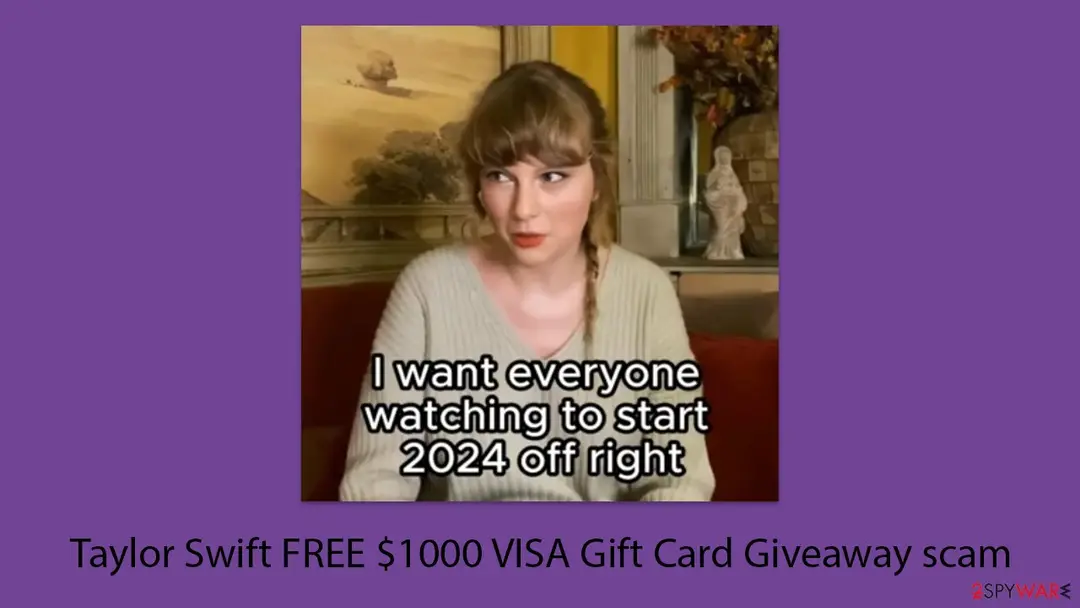
Taylor Swift FREE $1,000 VISA Gift Card Giveaway scam: summary
| Type | Fake giveaway ad with a deepfake video of Taylor Swift; a phishing and survey scam, not a virus |
|---|---|
| Risk | High if you fill in the survey, enter card details or pay a fee; low if you only close the ad |
| Symptoms | A Facebook ad or other post with a short video of a woman who looks like Taylor Swift offering $1,000 Visa gift cards, a Get Offer button and a 3-question survey |
| How to get rid of it | Close the ad and the page, report the ad; call your bank if you gave card details; uninstall any file you ran and scan with Microsoft Defender |
| Our check (6 October 2026) | A desk check: no page opened and no site test; the 2024 address swifties-united.com is not registered now |
| First seen | Early 2024; our guide came out 22 April 2024. A similar Taylor Swift deepfake ad (Le Creuset) was reported on 9 January 2024 |
| Removal | Scan the PC with security software to find and remove the malware and anything installed with it. Fortect scans Windows for malware and repairs the system files and settings it damaged. Remove it nowTo use the full-featured product, you have to purchase a license for Fortect. The scan is free. |
Show 10 more facts
| Name | Taylor Swift FREE $1,000 VISA Gift Card Giveaway scam (an ad and survey, not a program) |
|---|---|
| Address in 2024 | swifties-united.com, per our 2024 guide; other addresses possible |
| Distribution | Facebook ads, other social media and random websites; redirects can also show it |
| Damage | Stolen personal and card details, unauthorised charges, spam and phishing, possible unwanted software |
| Evidence | One write-up by a security site; details still limited |
| Imitates | Taylor Swift |
| Domains | swifties-united[.]com |
| Arrives through | Facebook ad or social post |
| Promised prize | $1,000 Visa gift card for a 3-question survey |
| Facts checked | 6 October 2026 |
Facts checked on 6 October 2026 against the FTC, CBS News, McAfee and the .com registry answer for swifties-united.com. We did not open the live ad or page; what happens after the button comes from our old 2024 guide and is marked as such.
What the Taylor Swift Visa gift card giveaway is
The "Taylor Swift FREE $1,000 VISA Gift Card Giveaway" is a fake. It is an ad, usually on Facebook, with a video of a woman who looks and sounds like Taylor Swift offering $1,000 Visa gift cards. The button leads to a survey and then to requests for personal and card details. No gift card follows, and Taylor Swift is not behind the ad.
- What it claims
- "FREE $1,000 VISA gift cards to the first 10,000 people that see this video", given out "through the end of TODAY ONLY"
- The steps it gives
- Press the Get Offer button, then take a 3-question survey "to see if you qualify"
- What it is
- A lure. The video borrows a famous face and voice to make you hand over personal data, and possibly card details, for a prize that does not exist
- What it is not
- A giveaway by Taylor Swift, or a virus. Watching the ad installs nothing; the risk starts when you fill things in or download something
- What to do
- Close the ad and the page, type nothing. If you already did, use the steps further down
What the Taylor Swift FREE $1,000 VISA Gift Card Giveaway scam page looks like
Hey guys it's Taylor Swift here.
I am in such a positive place right now and I want to share my good fortune with everyone since times are so tough!
I want everyone watching to start 2024 off right and to do that I am giving away FREE $1,000 VISA gift cards to the first 10,000 people that see this video.
If you are still seeing this video, then that means that we still have gift cards available to give away.
All you have to do is press Get Offer button below. then take the 3 question survey to see if you qualify.
These are going to be given out through the end of TODAY ONLY! So do not hesitate as supplies are running out!
What the Taylor Swift FREE $1,000 VISA Gift Card Giveaway scam scammers want
Our check on 6 October 2026
Taylor Swift Visa gift card giveaway · desk check · 6 October 2026 · no page was opened
- Live ad and pageNot opened for this rewrite. We have no site test, so we cannot say which ad network, redirect or survey page serves the offer today.
- swifties-united.comThe address our 2024 guide named is not in the .com registry now: the Verisign RDAP service answered "not found" on 6 October 2026. Our 2024 guide said it was registered only in late March 2024 and showed no owner details; we have not seen the 2024 record ourselves, so that part is the old guide's account.
- The offer itselfIt fails all three of the FTC's signs of a prize scam that apply to it: a real prize needs no survey to "qualify", a famous person does not hand out cards by video to "the first 10,000", and the survey is where personal and financial details are asked for. No site test is needed to know that.
- Same script, other facesIn January 2024 CBS News reported a fake Taylor Swift giveaway for Le Creuset cookware that used the same wording idea ("click the button below", a survey, "supplies are running out"). It was not this gift card ad; we list it as the same family.
Fake giveaway The offer is a scam whatever a test shows. This was a desk check, not a visit: a quiet page on some future visit would clear nothing, because ad scams change what they show by country, device, referrer and time.
The video and the page, line by line
| What the video and page say | What is really going on |
|---|---|
| "Hey guys it's Taylor Swift here." "I am in such a positive place right now and I want to share my good fortune with everyone since times are so tough!" | A script read by a synthetic voice and face. Our old guide calls the video a deepfake; CBS News described the same kind of ad in January 2024, where the woman "is neither Swift, nor even a real person". The warm greeting is meant to make a fan lower their guard. |
| "I want everyone watching to start 2024 off right ... I am giving away FREE $1,000 VISA gift cards to the first 10,000 people that see this video." | A prize for watching. Nobody can know who has seen a video, so "the first 10,000" is not a count that anyone is keeping. A year in the line also dates the ad: it was made for the start of 2024. |
| "If you are still seeing this video, then that means that we still have gift cards available to give away." | A circular claim: the video does not know whether cards are left, it only says so. It is there to make you think the offer is live and real. |
| "All you have to do is press Get Offer button below, then take the 3 question survey to see if you qualify." | The click that starts the scam. A survey "to qualify" is how your answers, e-mail and phone number are collected. The FTC says to delete such messages without clicking links. |
| "These are going to be given out through the end of TODAY ONLY! So do not hesitate as supplies are running out!" | Pressure to act now. The FTC lists "act now" among the ways scammers stop you thinking, and says to be most careful when you are asked to do something to get a prize. |
After the click, our old guide says the visitor was sent to swifties-united.com, a WordPress-style page with no owner details, which may ask you to take a survey as a "qualification test" for the card. We did not follow that path ourselves.
How the scam went
9 January 2024
A fake Taylor Swift giveaway is reported
CBS News, citing the New York Times, reported AI-generated Facebook ads in which a fake Taylor Swift offered Le Creuset cookware sets for a survey. Le Creuset said it had no partnership with her and that it was working to have the posts taken down. This was the same trick with a different prize.
January 2024
The gift card variant of the ad
The script of our 2024 guide opens "Hey guys it's Taylor Swift here" and talks about starting 2024 off right, so the ad was made for the new year. We do not have a first-seen date for it.
A still from the ad as shown in our 2024 guide, with its subtitle. The purple background and the title line are our own artwork, not part of the video. Late March 2024
The landing address is registered
Our 2024 guide says swifties-united.com was registered at this time. We could not check that record today.
22 April 2024
Our first guide
We published the guide with a lead picture that draws a face-mapping mesh over a portrait, to show how a deepfake is built.
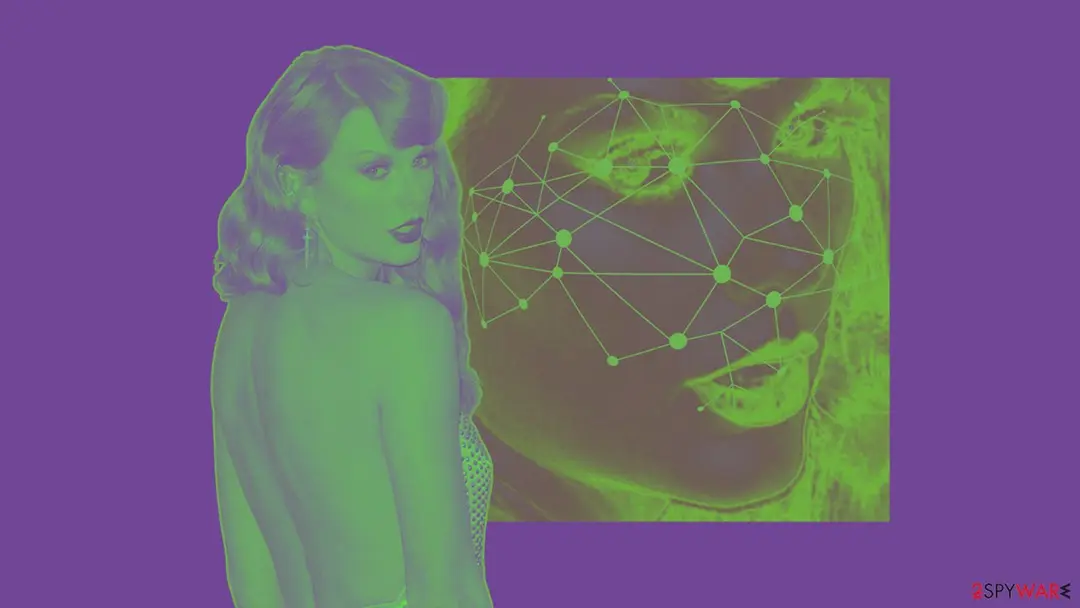
Our lead illustration of 2024: a portrait next to a face with a mapping mesh drawn on it. It illustrates the deepfake technique and is not a frame from the scam video. 6 October 2026
Our desk check
The old address is not registered. We ran no site test and cannot say whether the ad is still running.
The real risks, from most to least serious
- High
Card details and money
Our old guide says that when people are enticed to enter card information, scammers can take money directly or make unauthorised charges. In the similar Le Creuset ads, McAfee reports that a shipping fee of $9.96 was charged to the card and that the cards were sometimes charged repeatedly. We do not know whether this gift card ad asked for a fee.
- High
Identity theft and financial fraud
Our old guide says the personal information given in the survey can be used for identity theft or financial fraud. The FTC lists identity theft, new accounts in your name and hacked e-mail or social media accounts as the uses of stolen personal information.
- Medium
More scams afterwards
Our old guide says scammers may use the collected details to target you with further deceptive schemes. The FTC says contest promoters may sell what you give, so expect spam and targeted ads.
- Medium
Malware from links
Our old guide says links in the survey or on the website may download malware. The FTC says links in prize messages "might download malware". We did not follow the page and have no sample.
- Medium
Being sent to worse pages
Our old guide says the site leads to other harmful websites. We have no list of them.
- Medium
Feeling cheated
Our old guide notes that victims often feel upset and betrayed once they learn they were tricked. It is not your fault: the ad was made to be believed.
If you filled in the survey, paid or gave details
- 1
If you only watched the video or clicked Get Offer
There is nothing to undo. Close the tab and check the Installed apps list and your extensions page for anything new from that day (see the steps below).
- 2
If you typed card details or paid anything
Call your bank or card issuer at once, using the number on the back of the card, and ask them to refund the charge and block the card. The FTC says federal law protects you from unauthorised use of a credit or debit card (What to do after paying a scammer).
- 3
If you gave a password
Choose a new strong password for that account and for any other account that used it, and turn on two-factor authentication (Turn on two-step verification / secure a hacked account). If you can no longer log in, follow the recovery steps of the service.
- 4
If you gave your name, address, e-mail or phone number
Expect spam, phishing and calls. Do not answer anything that mentions a prize, a gift card or a parcel.
- 5
If your identity details were used
Report at IdentityTheft.gov, which gives a recovery plan based on what you gave away. Our old guide also advises watching your credit reports and setting alerts so misuse is seen early.
- 6
Report the scam
Tell the FTC at ReportFraud.ftc.gov, and your state attorney general and local consumer protection office if you are in the US. These offices can also tell you what help is available where you live. Keep screenshots of the ad, the page and any payment.
Why Taylor Swift FREE $1,000 VISA Gift Card Giveaway scam opens in your browser
How the offer reaches you
| Route | What happens | What to check |
|---|---|---|
| A Facebook ad or other social media post | Our old guide says the scam appears on Facebook as an advertisement with a short video, and that other social platforms and random websites carry it as well. CBS News saw the similar Le Creuset ads "permeating Facebook and other social media platforms". | Do not click the button. Report the ad inside the app and close it. |
| The page after the button | Our old guide says the Get Offer button led to swifties-united.com, a site of unknown owners, and from there possibly to a survey and further pages. | Close the tab. Do not answer survey questions or enter an e-mail or phone number. |
| Redirects from a random site | Our old guide says random websites can also show the offer. Such sites may redirect you after a click. | Check Installed apps and your browser's extensions if offers keep appearing. See the browser tabs on this page. |
How the scam is built
| Trick | How it works | What to do |
|---|---|---|
| A cloned face and voice | Deepfake software builds fake video from real clips. CBS News says scammers use authentic video and audio of public figures, which are "abundant and easy to come by online"; McAfee says the Le Creuset ad used an AI voice clone. Our old guide adds that the tools are becoming easier to use and harder to spot. | Do not trust a video because it looks and sounds like someone you know. Look for the offer on the star's own verified channels. |
| Trust and fandom | The fake uses the affection fans have for the star, so a fan is likelier to act without checking. Our old guide calls this the reason the scam is dangerous. | Ask why a celebrity would hand out cash cards to whoever clicks an ad. |
| Urgency and scarcity | "Today only" and "supplies are running out" are there so you act before you think. The FTC says scammers pressure you to act now and that you should not be rushed. | Stop for a day. A real offer will still be there, and will be on the official site. |
| A survey as the hook | The 3-question survey feels harmless, but it is the step that gathers your answers and contact details. The FTC says there is no reason to give financial or personal information to claim any prize. | Never fill in a form to win something. |
The Better Business Bureau warned in April 2023 that celebrity impersonations were getting more sophisticated with AI, according to CBS News. Our old guide says these ads are now common; we have no count of our own.
How to keep celebrity giveaway scams away
Do
- Check any celebrity giveaway on the star's own verified accounts and official site; real ones are announced there.
- Treat an offer that is too good to be true, with a survey, a countdown or "today only", as a scam until proven otherwise.
- Type the address of the official site into the browser yourself instead of clicking an ad or a link in a message.
- Report the ad to the platform and close it. Review your social media privacy settings so fewer people see your posts and details.
- Use a unique, complex password for each account and turn on two-factor authentication.
- Keep Windows and Microsoft Defender, or the security software you use, up to date. Read about new scam methods now and then.
- Keep a current backup with the tools built into Windows. A VPN hides your IP address but does not block a giveaway ad.
Don't
- Do not click Get Offer, or any link or download from the ad or the site.
- Do not fill in a survey to "qualify" for a prize.
- Do not enter card details, a password or a Social Security number to claim a prize or to pay for shipping.
- Do not trust a video because the face and voice are familiar; both can be cloned.
- Do not rush because of "today only" or "supplies are running out".
- Do not pay a fee, "tax" or shipping charge to collect winnings.
If you entered your details or paid
- 1
You downloaded or ran a file
On Windows 11 open Start > Settings > Apps > Installed apps (Windows 10: Apps & features), sort by install date, find the program you added, choose Uninstall and confirm if User Account Control asks ().
- 2
Run a scan
Open Windows Security > Virus & threat protection > Scan options, run a full scan, restart and check Installed apps again. The FTC advises updating your security software, running a scan and deleting what it finds.
- 3
Change passwords from a clean device
If a program was installed, change your important passwords after the scan, starting with e-mail and banking, and turn on two-factor authentication.
- 4
Still redirected or seeing ads?
The browser tabs on this page list extension, site-data and reset steps for each browser.
How to get rid of the Taylor Swift FREE $1,000 VISA Gift Card Giveaway scam pages
There is no prize.
Close the page, stop the notifications, and protect your card if you entered it.
Which browser shows the ads?
Step 1: Remove swifties-united[.]com from Chrome's notification list
Open More (the three dots) > Settings > Privacy and security > Site settings > Notifications, or paste
chrome://settings/content/notificationsinto the address bar.Under Allowed to send notifications, open the menu next to
swifties-united[.]comand choose Remove or Block, and do the same for any other address you do not recognise.Next to Not allowed to send notifications, click Add and enter swifties-united[.]com, so the site cannot ask again. The menus are the same in Chrome on Windows 11 and Windows 10, and each Chrome profile keeps its own list.
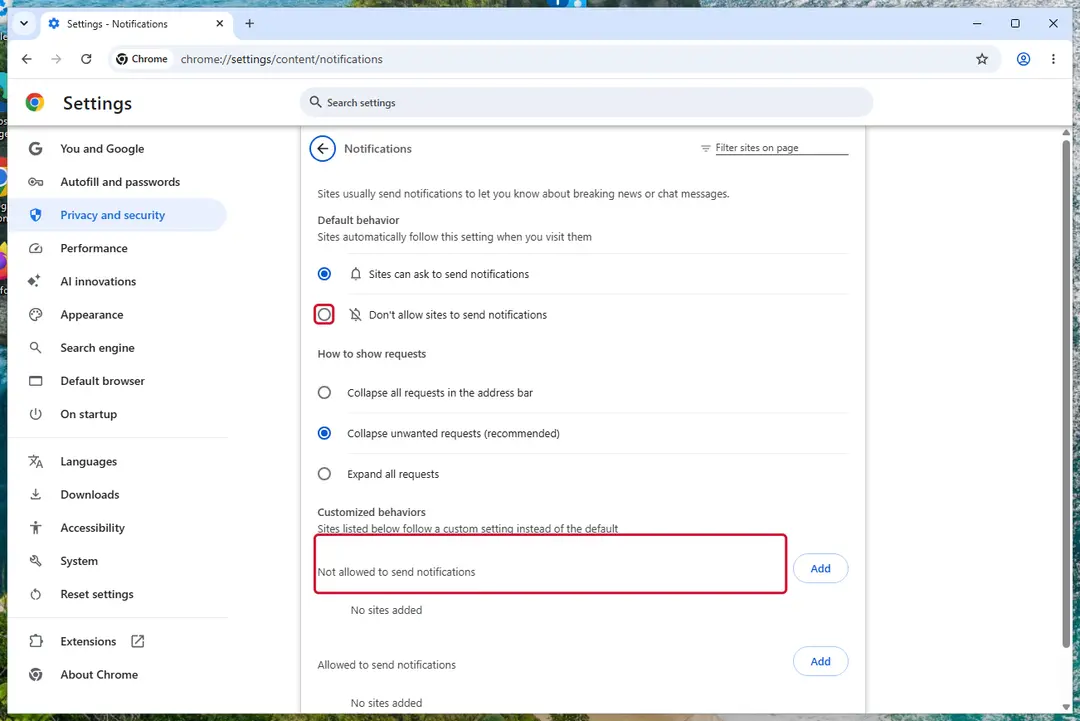
Chrome on Windows 11: Settings > Privacy and security > Site settings > Notifications. Full procedure with screenshots: Stop website notifications and pop-ups
Still there? More for Google Chrome
Remove extensions you do not recognise
Paste
chrome://extensionsinto the address bar and click Remove on anything you did not install yourself, especially video downloaders, "search" or PDF helpers added recently.Full procedure with screenshots: Remove a browser extension
Reset Chrome
Open Settings > Reset settings > Restore settings to their original defaults and confirm with Reset settings. This resets the start page, search engine and pinned tabs and turns off extensions; bookmarks and saved passwords stay.
Full procedure with screenshots: Reset a browser and fix a hijacked search engine
Step 1: Remove swifties-united[.]com from Edge's notification list
Edge stores its own permission list, separate from Chrome's, and it is often the browser behind these pop-ups on Windows 11 and Windows 10.
Go to Settings > Privacy, search, and services > Site permissions > All permissions > Notifications, or paste
edge://settings/content/notifications. Removeswifties-united[.]comfrom Allowed, then add it under Not allowed to send notifications. Notifications that show the Edge logo come from this list.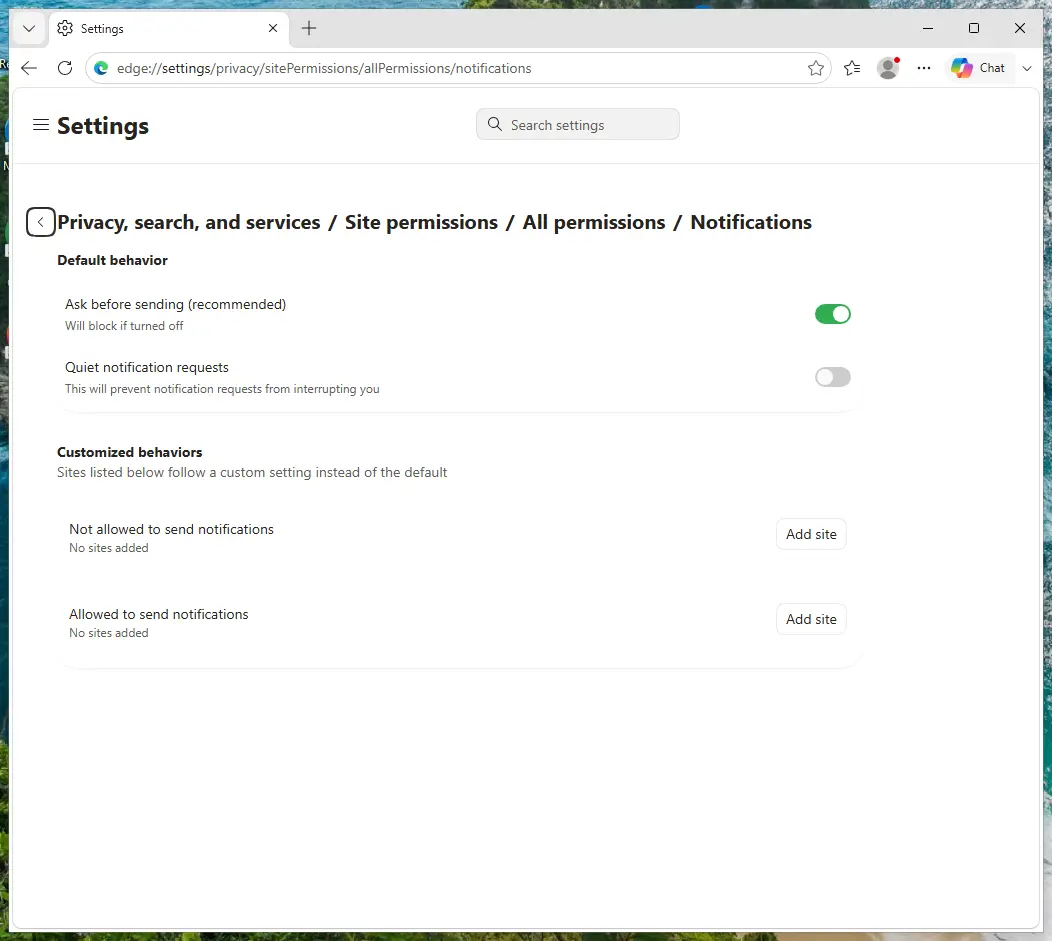
Edge on Windows 11: Site permissions > All permissions > Notifications. Full procedure with screenshots: Stop website notifications and pop-ups
Still there? More for Microsoft Edge
Remove extensions you do not recognise
Paste
edge://extensionsinto the address bar and click Remove under anything you did not install yourself.Full procedure with screenshots: Remove a browser extension
Reset Edge
Open Settings > Reset settings > Restore settings to their default values and confirm with Reset. Extensions are turned off and the start page goes back to default; favourites, history and saved passwords stay.
Full procedure with screenshots: Reset a browser and fix a hijacked search engine
Step 1: Remove swifties-united[.]com from Firefox's notification permissions
In Firefox the permission sits in Settings > Permissions and data > Notifications (in older versions Privacy & Security > Notifications > Settings). Select
swifties-united[.]comin the list, click Remove Website, and confirm with Save Changes.Firefox only shows these notifications while it is open, so if they stopped after closing Firefox, this is the browser to clean. The steps are the same on Windows 11 and Windows 10.
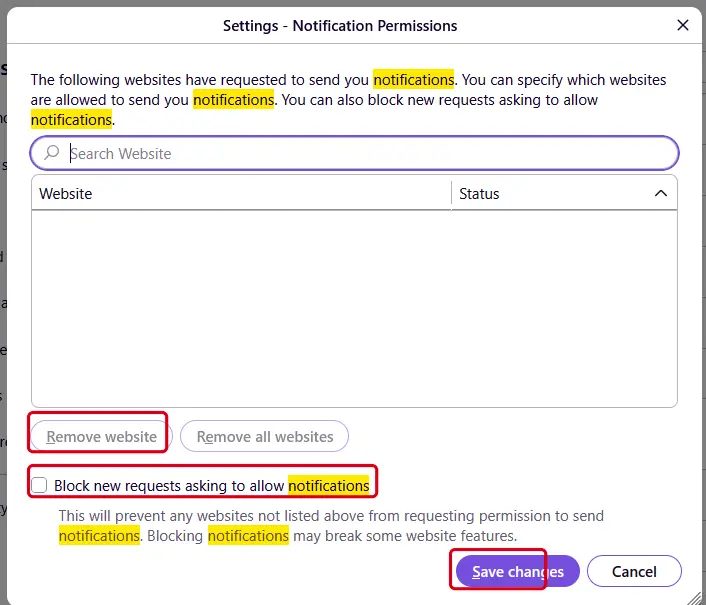
Firefox on Windows 11: the Notification Permissions window. Full procedure with screenshots: Stop website notifications and pop-ups
Still there? More for Mozilla Firefox
Remove add-ons you do not recognise
Paste
about:addonsinto the address bar, open Extensions, and choose Remove from the three-dot menu of anything you did not install yourself.Full procedure with screenshots: Remove a browser extension
Refresh Firefox
Open the menu > Help > More troubleshooting information and click Refresh Firefox. Add-ons and custom settings are removed and the home page goes back to default; bookmarks, history and passwords stay.
Full procedure with screenshots: Reset a browser and fix a hijacked search engine
Take back the notification permission
Safari 18 and later on macOS: open Safari > Settings > Websites > Notifications, select any site you do not recognise and set it to Deny, or click Remove. Untick Allow websites to ask for permission to send notifications at the bottom so no site can ask again.
Remove extensions you do not recognise
In Safari > Settings > Extensions, select anything you did not install yourself and click Uninstall.
Check the Mac for apps from the ads
Ads also target Mac users with fake players and "cleaners". In Finder > Applications, move anything unknown to the Bin.
Then, whichever browser you use
Step 2: Close the page without touching its buttons
The warning is a web page, not Windows, so closing the browser ends it. If the page blocks the browser or goes full screen, press Esc first, then end the browser in Task Manager (Ctrl + Shift + Esc).
Start the browser again without restoring the session, and do not follow any instruction the page gave. On Windows 11 and Windows 10 the steps are identical.
Full procedure with screenshots: Close a frozen app (Task Manager, Force Quit) On uGetFix
Step 3: Block the card if you entered it
If you typed card details on the page, call the number on the back of the card and ask the bank to block it and issue a new one.
Ask about every charge from the last days, including small ones, because a test payment of one or two units usually comes first.
Request a chargeback for anything you did not authorise. Do this by phone, not from a link in the message, on a phone or on a Windows 11 or Windows 10 PC.
Full procedure with screenshots: What to do after paying a scammer
Questions about Taylor Swift FREE $1,000 VISA Gift Card Giveaway scam
Is the Taylor Swift $1,000 Visa gift card giveaway real?
No. Taylor Swift is not giving away $1,000 Visa gift cards, and the video that says so is a fake. The ad tells you to press Get Offer and take a 3-question survey to see if you qualify, and our old 2024 guide says that page is a front for collecting personal data.
The FTC says that if you have to give financial or personal information to claim a prize, it is a scam, and that real prizes are free. Fake celebrity giveaways with her face were also reported by CBS News in January 2024. If an offer is real, it is announced on her own verified accounts.
Is the Taylor Swift gift card video a deepfake?
Yes, according to our 2024 guide, and it is the same kind of fake CBS News described in January 2024. A deepfake is a video or audio clip made by software that copies a person's face and voice from real recordings.
In the similar Le Creuset ad, CBS wrote that the woman was neither Swift nor a real person, and McAfee said the voice was an AI clone.
We have not seen the original gift card video ourselves, so we cannot say how it was made. What matters is that she did not make it, and that the offer fails the FTC's tests of a prize.
I filled in the survey for the Taylor Swift gift card. What now?
Treat what you typed as known to scammers and act on that. Our old guide says the survey collects personal data.
If you gave only an e-mail address or phone number, expect spam and phishing, and do not answer messages about prizes, parcels or gift cards. If you gave a password, change it everywhere it was used and turn on two-factor authentication.
If your name, address or other identity details were used, the FTC's IdentityTheft.gov gives a recovery plan. Report the ad at ReportFraud.ftc.gov. Do not click any link in a message that follows the survey.
I entered my card number on the Taylor Swift giveaway page. What should I do?
Call your bank or card issuer now, using the number on the back of the card. Tell them a scammer tricked you into giving the card number, ask them to block the card and refund any charge, and ask for a new card.
The FTC says federal law protects you from unauthorised use of your credit or debit card. Then look at your statement for the next weeks, since in a similar Taylor Swift deepfake scam McAfee reports that cards were charged more than once after a small shipping fee. Report the scam at ReportFraud.ftc.gov and keep screenshots.
I clicked Get Offer on the Taylor Swift ad. Do I have a virus?
Probably not, if you did nothing more. Clicking the button opens another page; it does not install a program on its own. Our old guide says links on the site or in the survey may download malware, so the risk grows if you downloaded or ran a file.
Look at Settings, Apps, Installed apps in Windows and at your browser's extensions for anything you did not add, and run a full Microsoft Defender scan. Our desk check could not open the live page, so we cannot say what the button does today. If nothing new appeared, there is nothing to remove.
Is swifties-united.com safe?
No. Our 2024 guide named swifties-united.com as the page the Get Offer button opened, and said it had no owner details and had been registered only in late March 2024. We checked on 6 October 2026: the .com registry's RDAP service answered "not found", so the name is not registered now.
That does not clear the scam: the same ad can use another address. Do not visit it or any page that comes from the ad. A site that offers a celebrity giveaway and asks for a survey or card details is not safe, whatever its name.
Why does the video say the first 10,000 people and today only?
The numbers are pressure, not facts. Nobody counts who has seen a video, and the line "if you are still seeing this video, we still have gift cards" is just text read out by the voice. The FTC lists urgent deadlines and "act now" among the ways scammers push you to do things before you think.
A real giveaway does not need you to hurry or to qualify through a survey. Neither the 10,000 nor "today only" can be checked, and the same ad appears again the next day. Close it and take your time.
How can I tell a fake celebrity giveaway ad from a real one?
Check where the offer is announced. A real giveaway is on the star's own verified accounts and official site, not only in an ad. The FTC's three signs apply to every case:
- you have to pay
- you have to pay to improve your odds
- you have to give financial or personal information
Also watch for "today only" and "limited supplies". Do not rely on how real the video looks, since CBS News notes that deepfake makers use real clips that are easy to find. Type the address of the official site yourself and look for the offer there.
How do I report the Taylor Swift gift card scam?
Report it to the FTC at ReportFraud.ftc.gov. The FTC says reports help it build cases against scammers and spot trends. If you are in the US you can also tell your state attorney general and local consumer protection office.
Report the ad on the platform where you saw it, such as Facebook, using the report option on the ad, so it can be taken down; we did not test the current menu names. If someone used your personal information, go to IdentityTheft.gov. Keep screenshots of the ad, the page and any payment confirmation, and tell friends and family.
Will Fortect remove Taylor Swift FREE $1,000 VISA Gift Card Giveaway scam?
Fortect scans Windows for malware and unwanted programs and repairs the system files and settings they change, and its free scan shows what it finds on your PC before you decide anything.
For Taylor Swift FREE $1,000 VISA Gift Card Giveaway scam, follow the plan above as well: the browser steps take back permissions and settings that no scanner treats as a threat, and uninstalling the program that brought it removes the source.
Run Microsoft Defender's full scan and, if anything was found, its offline scan as a second opinion. If the symptoms are gone after the plan and both scans are clean, there is nothing more to do.
Sources
- FTC Consumer Advice: Fake prize, sweepstakes and lottery scams (read October 6, 2026)
- FTC Consumer Advice: What to do if you were scammed (read October 6, 2026)
- CBS News: AI-generated ads using Taylor Swift's likeness dupe fans with fake Le Creuset giveaway (read October 6, 2026)
- McAfee: No, Taylor Swift won't send you a free Dutch oven, the new AI cloning scam (read October 6, 2026)
- Verisign .com registry lookup (RDAP): swifties-united.com, not found (no longer online) (read October 6, 2026)
- Google Chrome Help: Use notifications to get alerts (computer and Android) (no longer online) (read October 5, 2026)
- Microsoft Support: Uninstall or remove apps and programs in Windows (read October 5, 2026)