BargainBuddy (Removal Instructions) - 2021 update
BargainBuddy Removal Guide
What is BargainBuddy?
BargainBuddy is a browser hijacker that tries to show unwanted ads and monitor user's activity on the web browser
BargainBuddy is a browser hijacker that may monitor users' activity on the Internet for getting more knowledge about their interests. In addition, it may cause undesirable pop-up advertisements that are usually filled with information about discounts, coupons, and promotions. Unfortunately but there is no guarantee that these ads will help you to save money because they are displayed for promoting affiliate parties.
If you have started seeing annoying ads during your browsing on the web and you know that you have never downloaded it, you should beware that it may get into the system along with some free of charge software as well. This distribution method is called bundling. In this case, you should remove adware from the system because, as we have already mentioned, it can hardly deliver what it promises.
As soon as the BargainBuddy virus is installed on computer, IE browser helper object is installed on it as well. After doing so, this program starts its process at every Windows startup and begins showing its ads.
It seems that it can also update itself via the Internet and contact third parties for sharing information about people's activity on the web.
If you have been seeing its advertisements popping up during your browsing, you should avoid them because they may lead you to Bargain Buddy redirects that may be used for promoting shady and unreliable websites. So, stay mindful and do not click on the ads that show up on your screen while browsing.

Bargain Buddy may also change your homepage or install unnecessary toolbars. If you have started seeing its notifications in the system tray bar and a pop-up message saying, „CashBack pays you to shop!“, you should ignore them. If you want to avoid these ads and keep your personally non-identifiable information away from tracking, we recommend installing a reliable anti-spyware like SpyHunter 5Combo Cleaner or Malwarebytes.
After successful Bargain Buddy removal, it is also important to repair the system if you notice that the computer is performing worse than before. FortectIntego or similar tool should help to fix system files.
Browser hijacker enters the system without the user noticing it
As much as we know, you cannot download this particular application from any official website. That means Bargain Buddy browser hijacker can be installed only in a bundled pack of programs as you download freeware from the Internet.
Bundling is a way to spread adware, unwanted system tools, or internet hijackers without the knowledge of the user. You should stay cautious and install free programs carefully because usually such unwanted programs are concealed behind “default”, “regular” or “standard” options of installation. Choose „advanced“ or „custom“ options and be sure to untick everything that differs from the preferred program.
In addition, read Terms and Agreements. Users commonly just tick „Yes, I agree“ and proceed to the next step. Stay aware and do not ignore this step. Yes, it is that simple to prevent your computer from infectious software.
You can remove BargainBuddy virus quite easily by following our explanations
If you have recognized that this tool has hijacked your Internet browser and you are not satisfied with its activity on it, you should remove BargainBuddy. You can do it manually or by downloading reliable anti-spyware. If you wish to do it on your own, we have all the right information for you.
Please follow the instructions below to eliminate the unwanted application. If you do all the steps, you will easily get rid of this browser hijacker. And in the future, don’t forget the importance of installing new applications using the Custom/Advanced installation.
You may remove virus damage with a help of FortectIntego. SpyHunter 5Combo Cleaner and Malwarebytes are recommended to detect potentially unwanted programs and viruses with all their files and registry entries that are related to them.
Getting rid of BargainBuddy. Follow these steps
Uninstall from Windows
-
Click Start → Control Panel → Programs and Features (if you are Windows XP user, click on Add/Remove Programs).

-
If you are Windows 10 / Windows 8 user, then right-click in the lower left corner of the screen. Once Quick Access Menu shows up, select Control Panel and Uninstall a Program.

-
Uninstall BargainBuddy and related programs
Here, look for BargainBuddy or any other recently installed suspicious programs. -
Uninstall them and click OK to save these changes.


Delete from macOS
-
If you are using OS X, click Go button at the top left of the screen and select Applications.

-
Wait until you see Applications folder and look for BargainBuddy or any other suspicious programs on it. Now right click on every of such entries and select Move to Trash.


Remove from Microsoft Edge
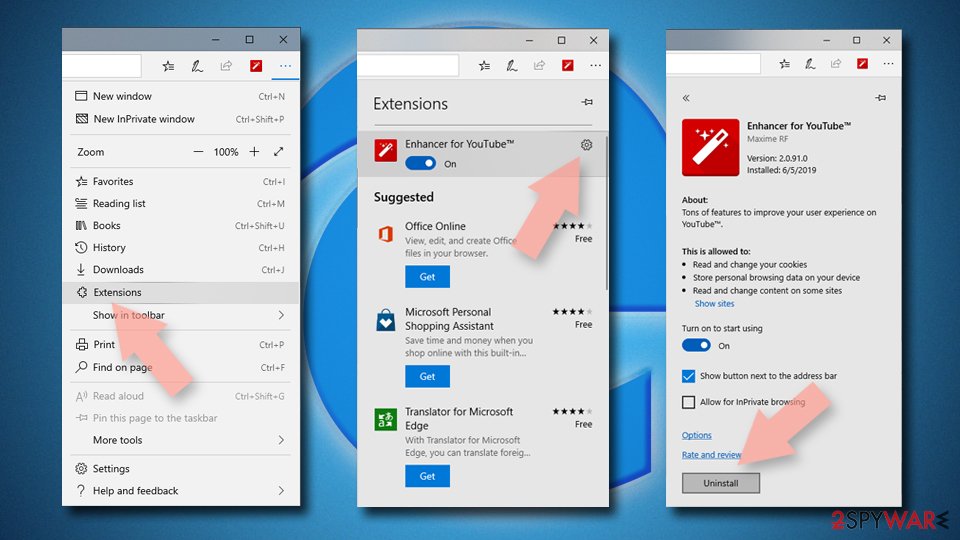
Delete unwanted extensions from MS Edge:
- Select Menu (three horizontal dots at the top-right of the browser window) and pick Extensions.
- From the list, pick the extension and click on the Gear icon.
- Click Remove.

Clear cookies and other browser data:
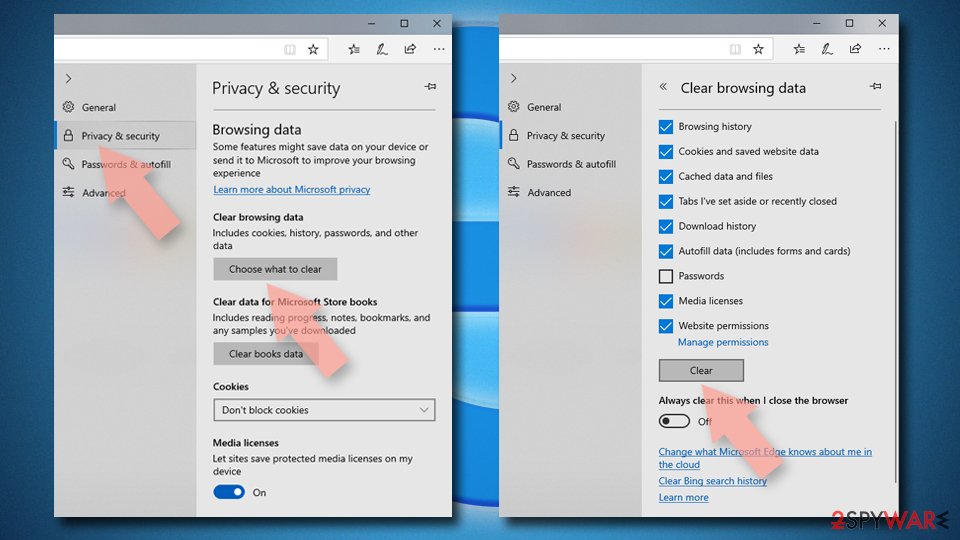
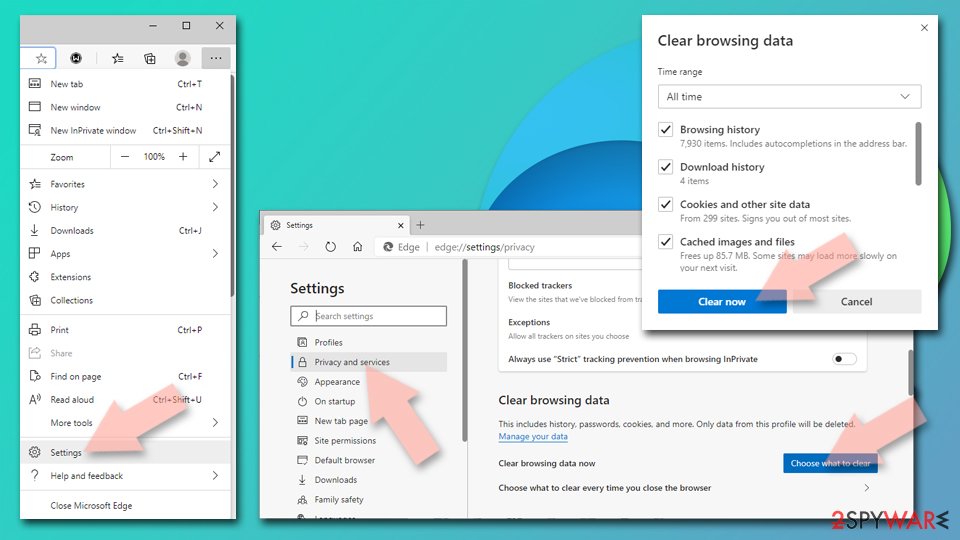
- Click on the Menu (three horizontal dots at the top-right of the browser window) and select Settings > Privacy, search, and services..
- Under Clear browsing data, pick Choose what to clear.
- Select Cookies and other site data and Cached images and files. (apart from passwords, although you might want to include Media licenses as well, if applicable) and click on Clear.

Restore new tab and homepage settings:
- Click the menu icon and choose Settings.
- Then find On startup section.
- Click Remove next to any suspicious startup page.
Reset MS Edge if the above steps did not work:
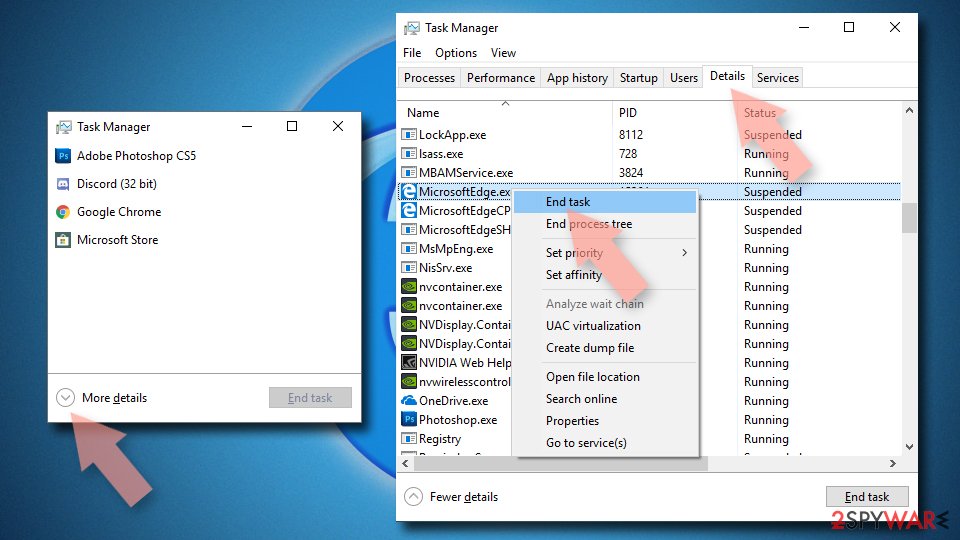
- Press on Ctrl + Shift + Esc to open Task Manager.
- Click on More details arrow at the bottom of the window.
- Select Details tab.
- Now scroll down and locate every entry with Microsoft Edge name in it. Right-click on each of them and select End Task to stop MS Edge from running.

Instructions for Chromium-based Edge
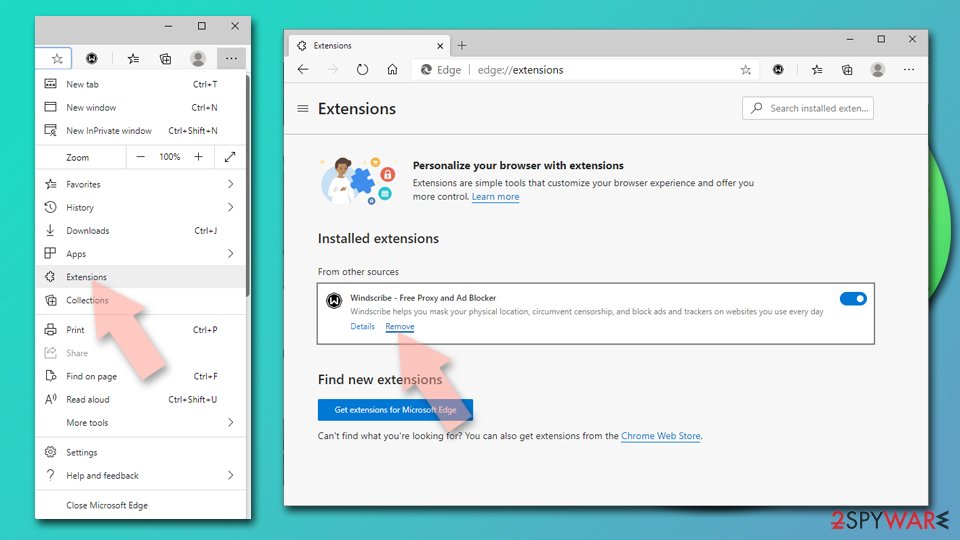
Delete extensions from MS Edge (Chromium):
- Open Edge and click select Settings > Extensions.
- Delete unwanted extensions by clicking Remove.

Clear cache and site data:
- Click on Menu and go to Settings.
- Select Privacy, search and services.
- Under Clear browsing data, pick Choose what to clear.
- Under Time range, pick All time.
- Select Clear now.

Reset Chromium-based MS Edge:
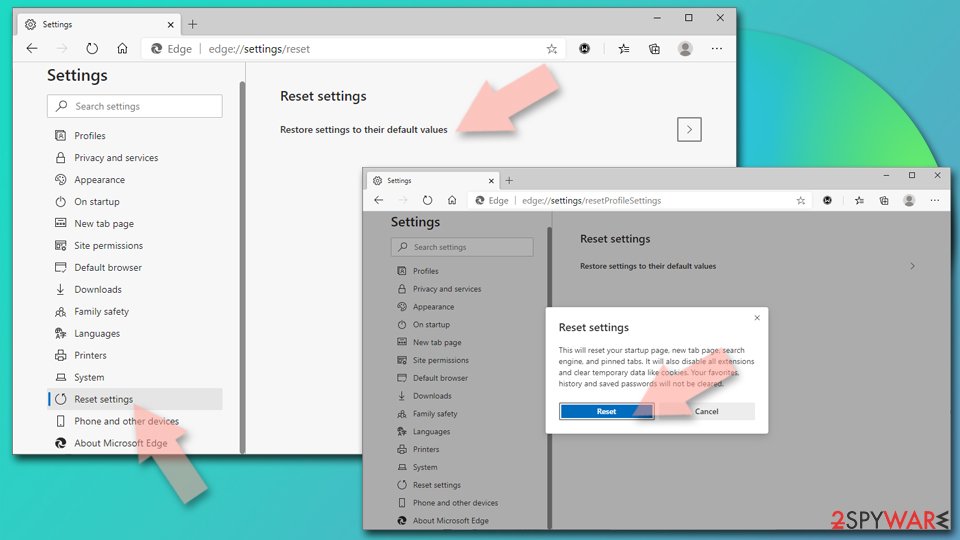
- Click on Menu and select Settings.
- On the left side, pick Reset settings.
- Select Restore settings to their default values.
- Confirm with Reset.
- This will disable extensions and reset startup pages but will not delete bookmarks, saved passwords, or browsing history.

Remove from Mozilla Firefox (FF)
Remove dangerous extensions:
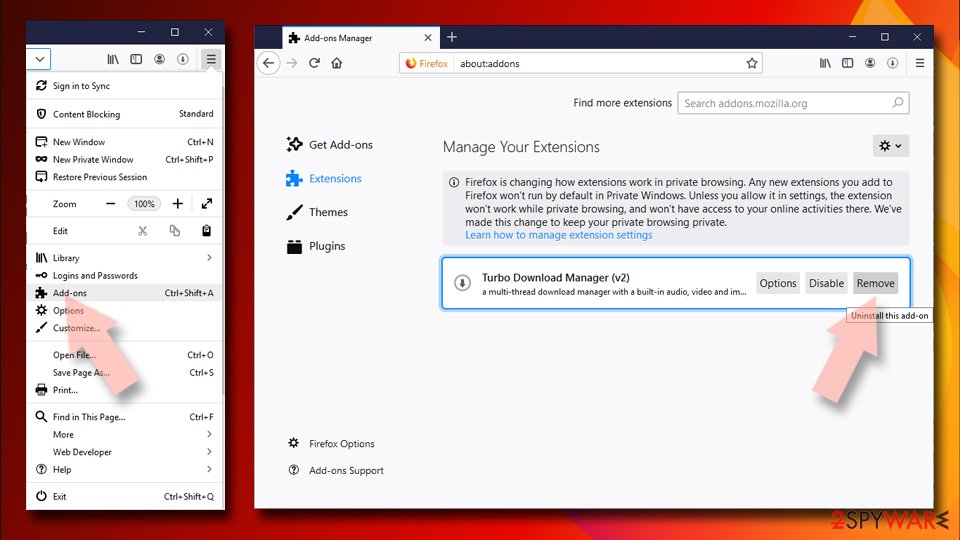
- Open Mozilla Firefox browser and click on the Menu (three horizontal lines at the top-right of the window).
- Select Add-ons.
- In here, select the unwanted extension and click Remove.

Reset the homepage:
- Click three horizontal lines at the top right corner to open the menu.
- Choose Settings.
- Under Home, set your preferred homepage and new tab settings.
Clear cookies and site data:
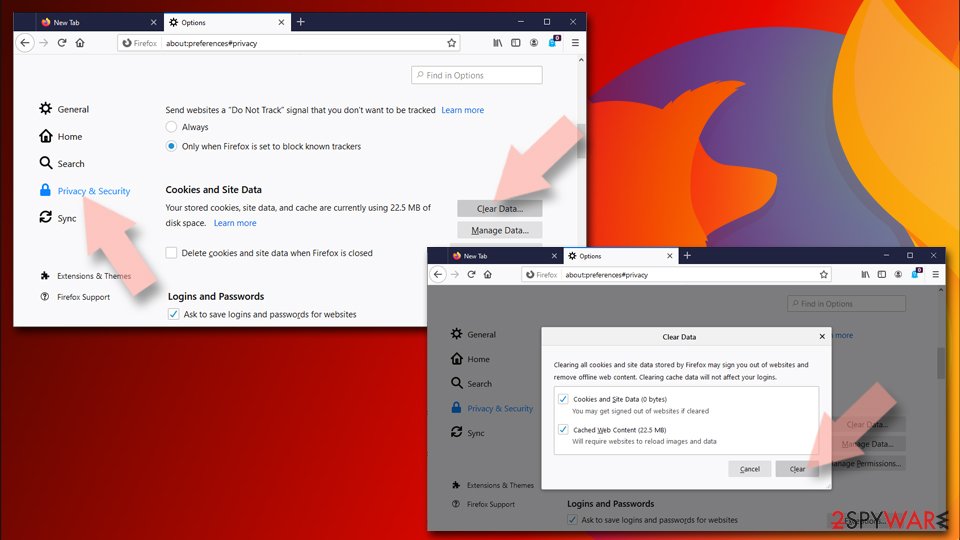
- Click Menu and pick Settings.
- Go to Privacy & Security section.
- Scroll down to locate Cookies and Site Data.
- Click on Clear Data…
- Select Cookies and Site Data and Temporary cached files and pages, then click Clear.

Reset Mozilla Firefox
If clearing the browser as explained above did not help, reset Mozilla Firefox:
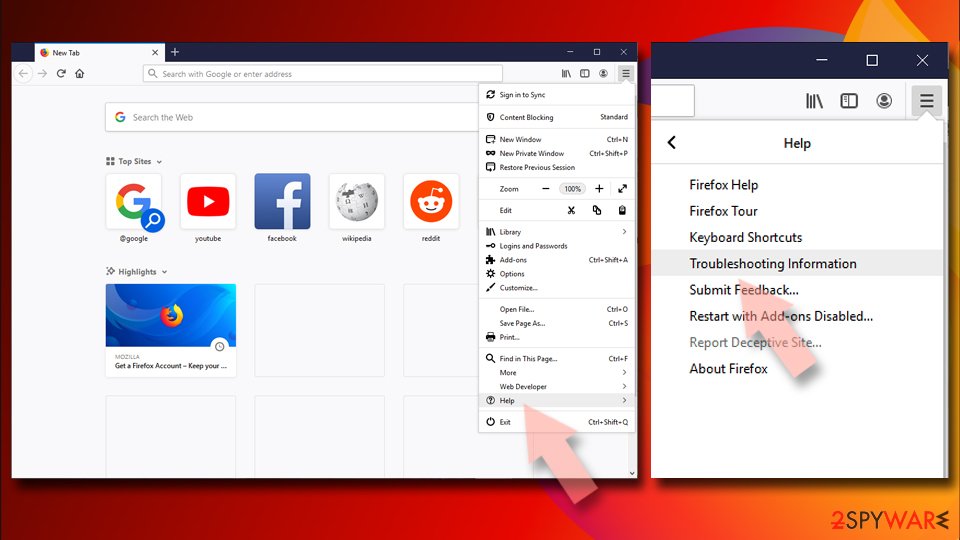
- Open Mozilla Firefox browser and click the Menu.
- Go to Help and then choose Troubleshooting Information.
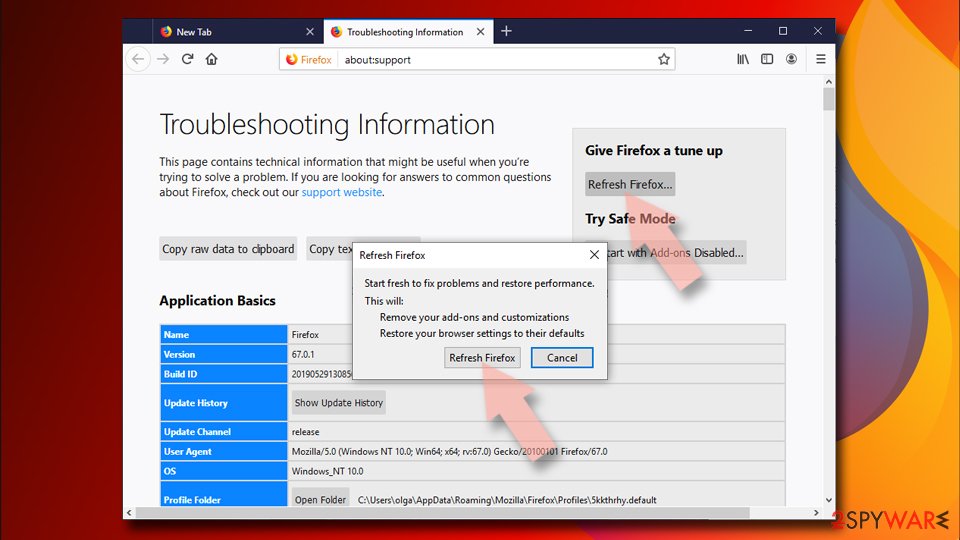
- Under Give Firefox a tune up section, click on Refresh Firefox…
- Once the pop-up shows up, confirm the action by pressing on Refresh Firefox.


Remove from Google Chrome
Delete malicious extensions from Google Chrome:
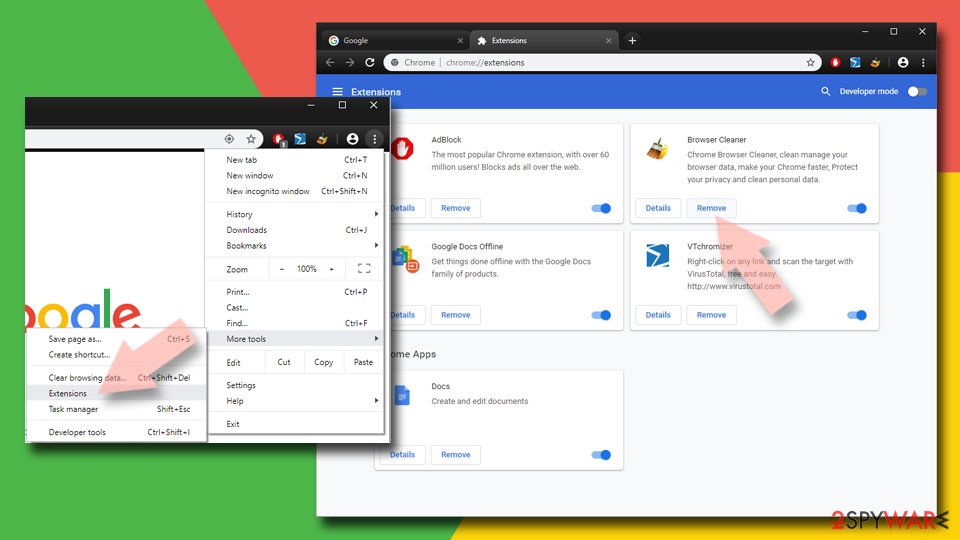
- Open Google Chrome, click on the Menu (three vertical dots at the top-right corner) and select More tools > Extensions.
- In the newly opened window, you will see all the installed extensions. Uninstall all suspicious extensions related to the unwanted program by clicking Remove.
Clear cache and web data from Chrome:
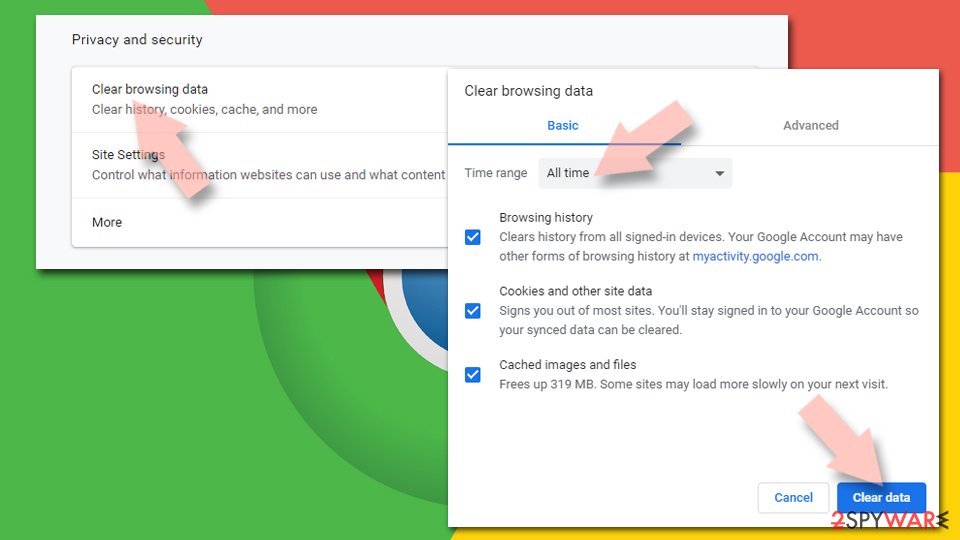
- Click on Menu and pick Settings.
- Under Privacy and security, select Clear browsing data.
- Select Browsing history, Cookies and other site data, as well as Cached images and files.
- Click Clear data.

Change your homepage:
- Click menu and choose Settings.
- Look for a suspicious site in the On startup section.
- Click on Open a specific or set of pages and click on three dots to find the Remove option.
Reset Google Chrome:
If the previous methods did not help you, reset Google Chrome to eliminate all the unwanted components:
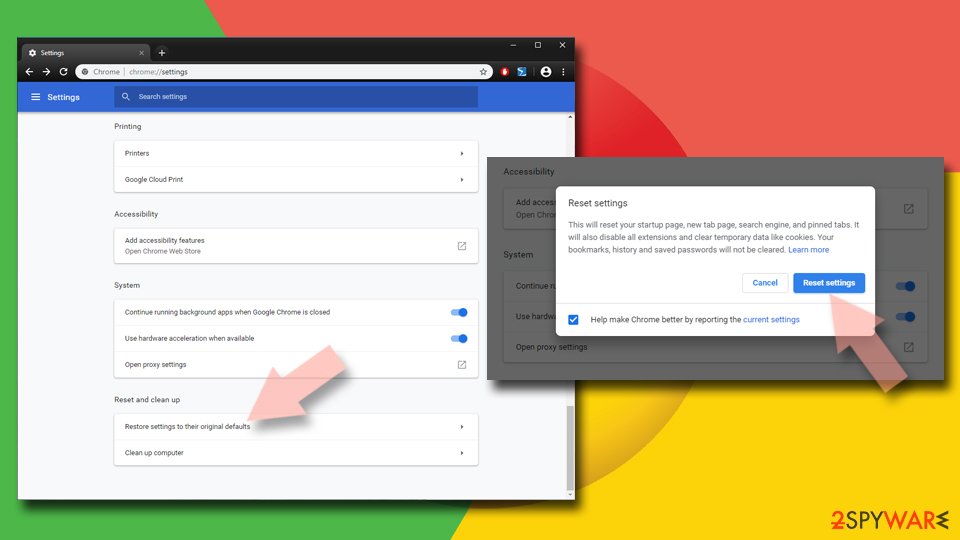
- Click on Menu and select Settings.
- In the Settings, scroll down and click Advanced.
- Scroll down and locate Reset and clean up section.
- Now click Restore settings to their original defaults.
- Confirm with Reset settings.

Delete from Safari
-
Remove dangerous extensions
Open Safari web browser and click on Safari in menu at the top left of the screen. Once you do this, select Preferences.
-
Here, select Extensions and look for BargainBuddy or other suspicious entries. Click on the Uninstall button to get rid each of them.

-
Reset Safari
Open Safari browser and click on Safari in menu section at the top left of the screen. Here, select Reset Safari....
-
Now you will see a detailed dialog window filled with reset options. All of those options are usually checked, but you can specify which of them you want to reset. Click the Reset button to complete BargainBuddy removal process.


After uninstalling this potentially unwanted program (PUP) and fixing each of your web browsers, we recommend you to scan your PC system with a reputable anti-spyware. This will help you to get rid of BargainBuddy registry traces and will also identify related parasites or possible malware infections on your computer. For that you can use our top-rated malware remover: FortectIntego, SpyHunter 5Combo Cleaner or Malwarebytes.
How to prevent from getting adware
Choose a proper web browser and improve your safety with a VPN tool
Online spying has got momentum in recent years and people are getting more and more interested in how to protect their privacy online. One of the basic means to add a layer of security – choose the most private and secure web browser. Although web browsers can't grant full privacy protection and security, some of them are much better at sandboxing, HTTPS upgrading, active content blocking, tracking blocking, phishing protection, and similar privacy-oriented features. However, if you want true anonymity, we suggest you employ a powerful Private Internet Access VPN – it can encrypt all the traffic that comes and goes out of your computer, preventing tracking completely.
Lost your files? Use data recovery software
While some files located on any computer are replaceable or useless, others can be extremely valuable. Family photos, work documents, school projects – these are types of files that we don't want to lose. Unfortunately, there are many ways how unexpected data loss can occur: power cuts, Blue Screen of Death errors, hardware failures, crypto-malware attack, or even accidental deletion.
To ensure that all the files remain intact, you should prepare regular data backups. You can choose cloud-based or physical copies you could restore from later in case of a disaster. If your backups were lost as well or you never bothered to prepare any, Data Recovery Pro can be your only hope to retrieve your invaluable files.

If this free guide helped you and you are satisfied with our service, please consider making a donation to keep this service alive. Even a smallest amount will be appreciated.