ILivid virus (Free Guide) - Jan 2021 update
iLivid virus Removal Guide
What is iLivid virus?
iLivid is a potentially unwanted program that is recognized by multiple anti-virus engines

iLivid is a download manager that can be acquired from many shady third-party sites that host freeware. Due to this, the application is often installed with other potentially unwanted programs that change Chrome, Firefox, Safari, or other browser's settings (for example, SearchQuco was detected as one of the unwanted apps bundled with it), display intrusive ads, interfere with users' web browsing sessions, and record their online activities by using tracking technologies like cookies or web beacons.
Besides being labeled as a potentially unwanted program[1] by multiple anti-virus vendors, iLivid virus can also be dangerous due to other reasons – namely, its functionality. There multiple download managers that can serve as great additions for those who like to transfer a large amount of data and view the content while offline, but this one might lead to downloads of potentially dangerous files, such as Trojans that disguise themselves as legitimate software installers.
| Name | iLivid |
| Type | Download manager, potentially unwanted program |
| Related files | iLividSetupV1_1032444936.exe, APTunerInstall308_2220856294.exe, iLivid.exe |
| Distribution | The PUP can be installed intentionally due to its functionality, while in other cases users might find it on their system unexpectedly after carelessly installing freeware or shareware |
| Symptoms | This ad-supported program that might display intrusive advertisements on all websites that you visit. Additionally, web browser settings might get changed, along with the homepage and the search engine |
| Associated risks | Installation of other potentially unwanted programs, personal information disclosure to unknown parties, |
| Removal | You can terminate adware and other PUPs manually as instructed below or by scanning your computer with anti-malware software |
| Optimization | To remediate your computer system and fix virus damage, we recommend using FortectIntego |
Potentially unwanted programs are usually not dangerous per se, although analysis of the main executable in the sandbox environment revealed that it triggers multiple malicious and suspicious indicators.[2] For example, it includes the capability of rebooting or shutting down Windows. Additionally, it imports a variety of APIs and connects to suspicious domains in the background.
Talking about suspicious activity, the installation executable is detected as follows on Virus Total:[3]
- FileRepMalware [PUP]
- Application.Downloader (A)
- PUA:Win32/InstallCore
- W32/Ulise.9186!tr
- Trojan.InstallCore.3711
- Adware.Gen
- PUA.InstallCore
Therefore, if you want to remove iLivid automatically, you can employ one of the security applications that detect it as malicious. Nevertheless, you can also check our guide below – getting rid of the manually should not be a problem. Nevertheless, experts advise resetting the web browser settings and also scanning the PC with a repair tool FortectIntego for best results.

If you found that this adware is not the only problem you have on your computer and you are suffering from browser redirects, ads, and other suspicious activity, it is highly likely that another potentially unwanted program is also installed on your machine. The intrusive ads might often be filled with scam messages prompting to download other unsafe programs, or claim that your computer is infected with viruses.
Never click on these links, as you might be directed to a site that is booby-trapped by malicious JavaScript.[4] As a result, malware like ransomware, trojan, worm, rootkit, etc. might be injected into your machine without warning. To protect yourself from such threats, make sure all the software on your machine is up to date. Also, safeguard your computer from viruses by using anti-malware software – it can also help you with PUP removal.
Ways to avoid potentially unwanted programs
There are hundreds of computer users who have become victims of PUPs after downloading and installing freeware on their computers. Typically, these unwanted apps can easily come as optional “components” of download managers, PDF creators, video streaming software, and similar programs; the stealthy infiltration allows the unwanted program to perform web browser modifications and begin its suspicious activity on the computer.
Considering that there are 2.5 million apps on Google Play/Chrome web store,[5] one might just ask why would anyone need to download applications from third-party sources in the first place. What does that mean from a security perspective? Well, some of the apps do not possess the required standards that Google, Microsoft, and other reputable sources set up. Thus, developers of such apps often resort to third-party sites. Nevertheless, you will also find many apps from official sources being distributed by third-parties – there is no need to choose the latter.
While most of the apps from well-known third-party sites will not harm your computer, the installers of such software might be infected with other optional components that are considered as adware or another unwanted program. If you insist on downloading apps from third-parties, make sure you check every installation step carefully: decline all the deals/offers, remove pre-ticked box markings, read the fine print, and always opt for Advanced/Custom installation settings.

Uninstall adware quickly
While the term iLivid virus is not entirely correct (viruses come into systems without users' consent and infect other files on the system, which allows them to propagate further in such a way), many people might refer to this program as such due to its unexpected appearance on their machines. It also happens to be so that many security software vendors recognize the app as a PUP or even malware, so users can perform adware removal automatically. Simply download an anti-malware tool of your preference and perform a full system scan.
If your anti-malware does not detect the app, but you do not want to download additional software, you can remove the app by following the step-by-step guide below. The process is not that complicated, as long as you follow each of the steps carefully. Finally, experts also recommend resetting all the installed browsers as the unwanted activity caused by PUPs would not return.
You may remove virus damage with a help of FortectIntego. SpyHunter 5Combo Cleaner and Malwarebytes are recommended to detect potentially unwanted programs and viruses with all their files and registry entries that are related to them.
Getting rid of iLivid virus. Follow these steps
Uninstall from Windows
To get rid of potentially unwanted programs from Windows, follow these steps:
-
Click Start → Control Panel → Programs and Features (if you are Windows XP user, click on Add/Remove Programs).

-
If you are Windows 10 / Windows 8 user, then right-click in the lower left corner of the screen. Once Quick Access Menu shows up, select Control Panel and Uninstall a Program.

-
Uninstall iLivid and related programs
Here, look for iLivid or any other recently installed suspicious programs. -
Uninstall them and click OK to save these changes.


Delete from macOS
-
If you are using OS X, click Go button at the top left of the screen and select Applications.

-
Wait until you see Applications folder and look for iLivid or any other suspicious programs on it. Now right click on every of such entries and select Move to Trash.


Remove from Microsoft Edge
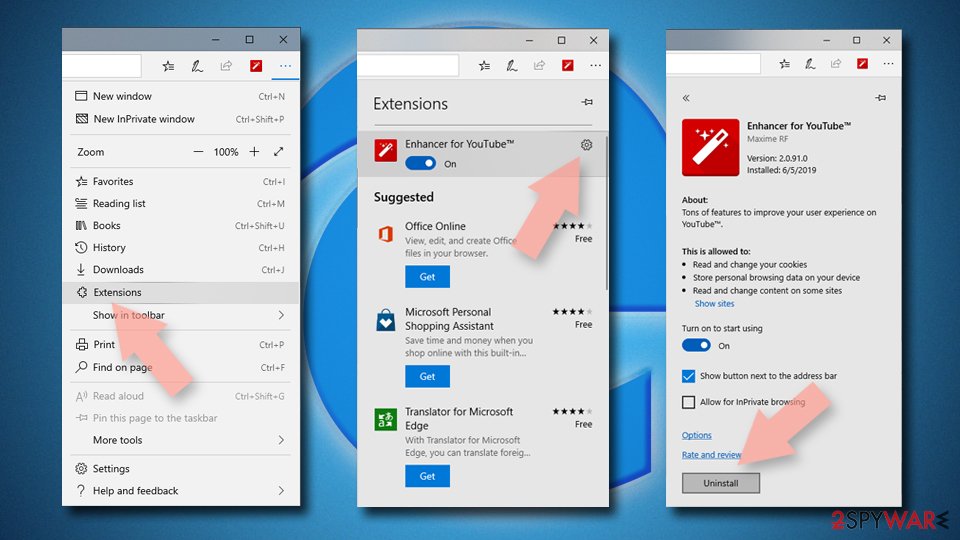
Delete unwanted extensions from MS Edge:
- Select Menu (three horizontal dots at the top-right of the browser window) and pick Extensions.
- From the list, pick the extension and click on the Gear icon.
- Click Remove.

Clear cookies and other browser data:
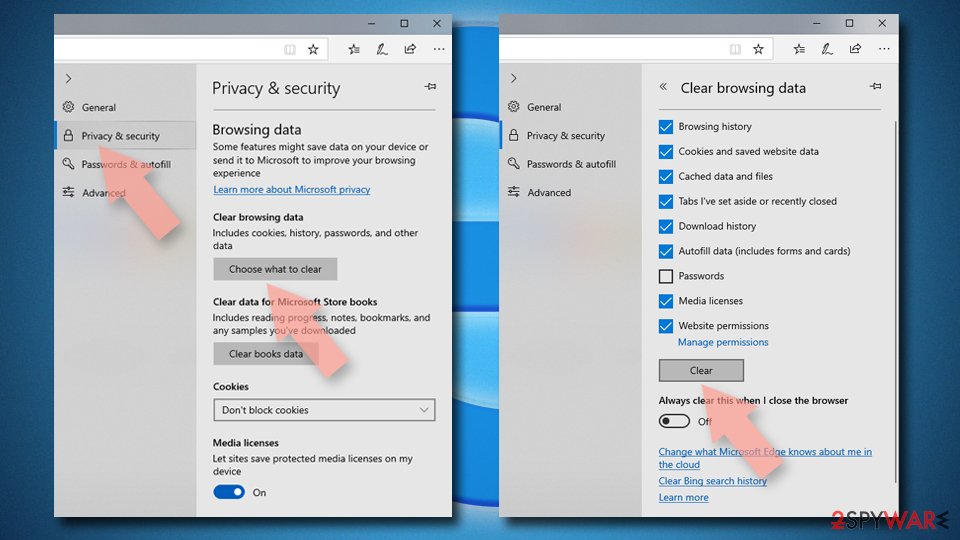
- Click on the Menu (three horizontal dots at the top-right of the browser window) and select Settings > Privacy, search, and services..
- Under Clear browsing data, pick Choose what to clear.
- Select Cookies and other site data and Cached images and files. (apart from passwords, although you might want to include Media licenses as well, if applicable) and click on Clear.

Restore new tab and homepage settings:
- Click the menu icon and choose Settings.
- Then find On startup section.
- Click Remove next to any suspicious startup page.
Reset MS Edge if the above steps did not work:
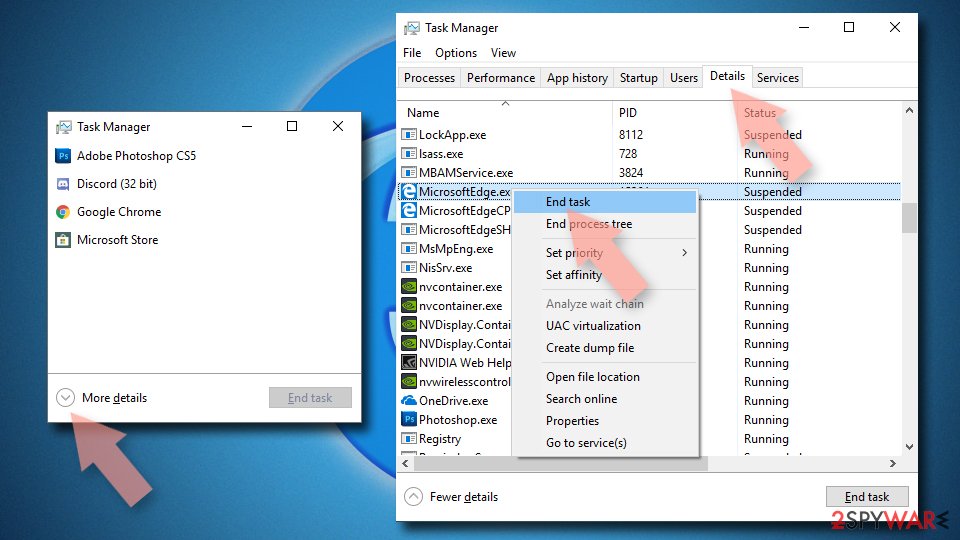
- Press on Ctrl + Shift + Esc to open Task Manager.
- Click on More details arrow at the bottom of the window.
- Select Details tab.
- Now scroll down and locate every entry with Microsoft Edge name in it. Right-click on each of them and select End Task to stop MS Edge from running.

Instructions for Chromium-based Edge
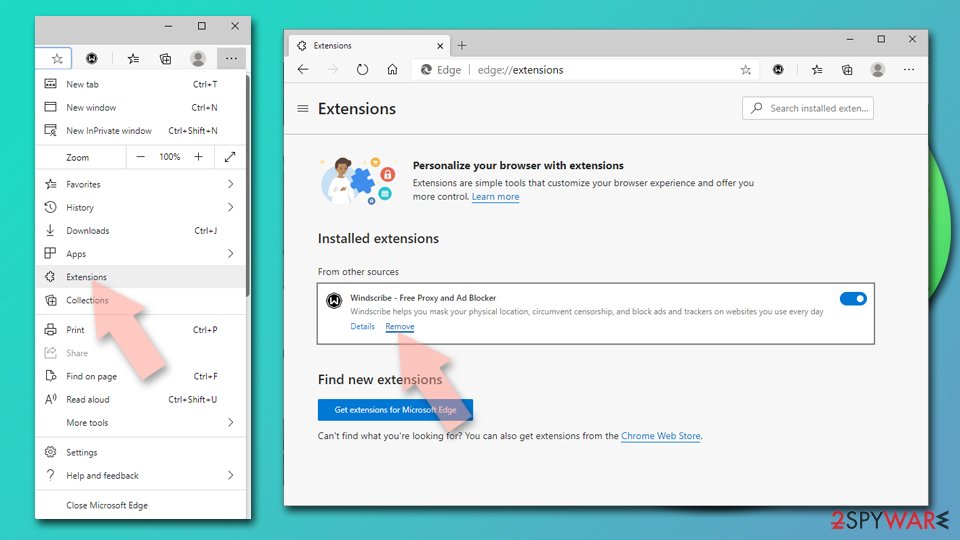
Delete extensions from MS Edge (Chromium):
- Open Edge and click select Settings > Extensions.
- Delete unwanted extensions by clicking Remove.

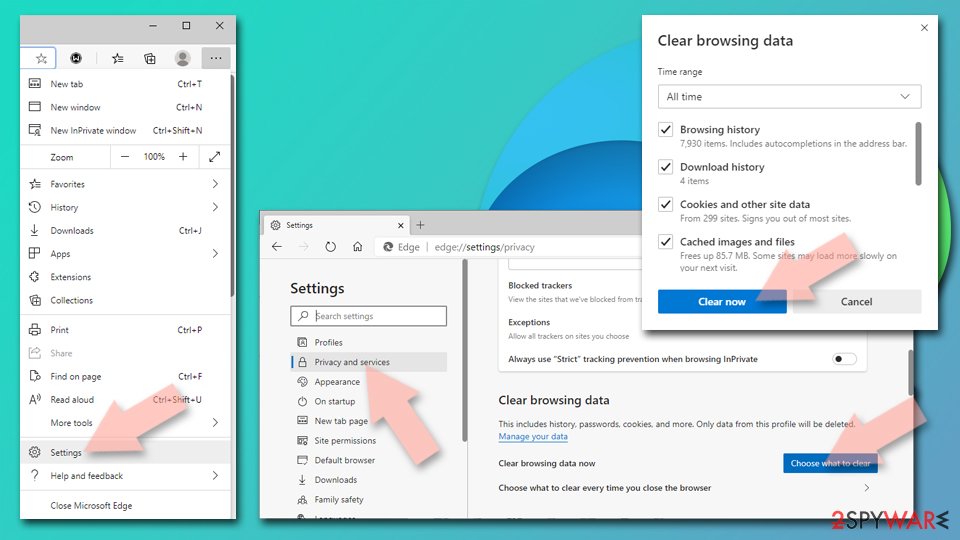
Clear cache and site data:
- Click on Menu and go to Settings.
- Select Privacy, search and services.
- Under Clear browsing data, pick Choose what to clear.
- Under Time range, pick All time.
- Select Clear now.

Reset Chromium-based MS Edge:
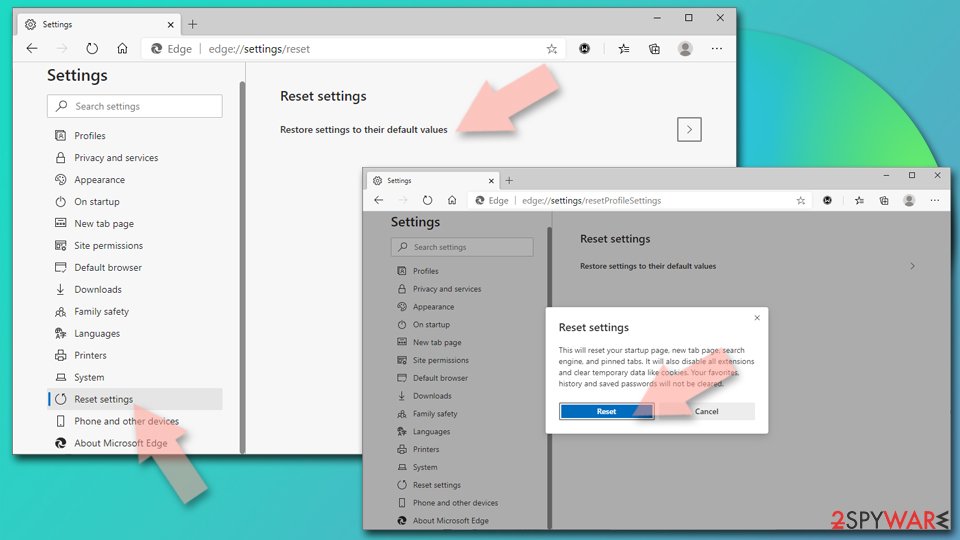
- Click on Menu and select Settings.
- On the left side, pick Reset settings.
- Select Restore settings to their default values.
- Confirm with Reset.
- This will disable extensions and reset startup pages but will not delete bookmarks, saved passwords, or browsing history.

Remove from Mozilla Firefox (FF)
Remove dangerous extensions:
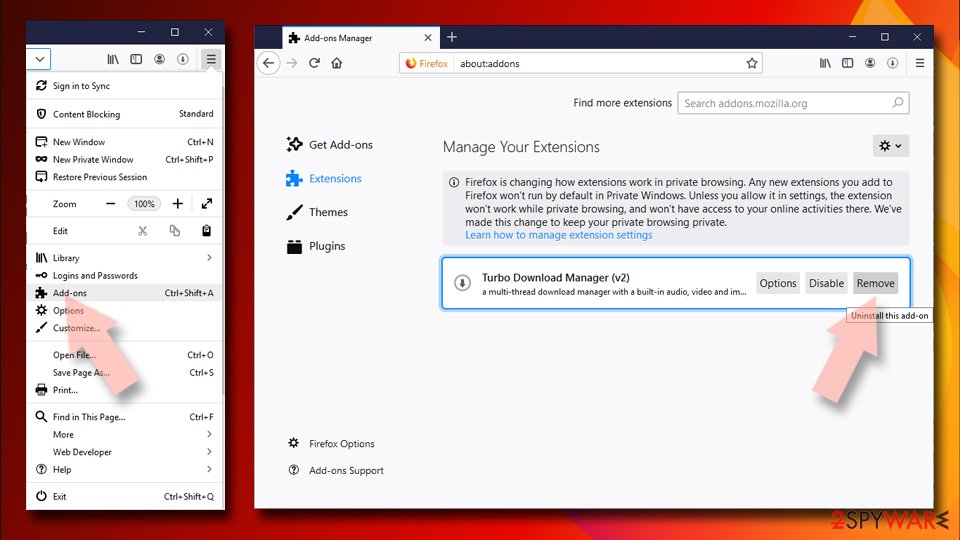
- Open Mozilla Firefox browser and click on the Menu (three horizontal lines at the top-right of the window).
- Select Add-ons.
- In here, select the unwanted extension and click Remove.

Reset the homepage:
- Click three horizontal lines at the top right corner to open the menu.
- Choose Settings.
- Under Home, set your preferred homepage and new tab settings.
Clear cookies and site data:
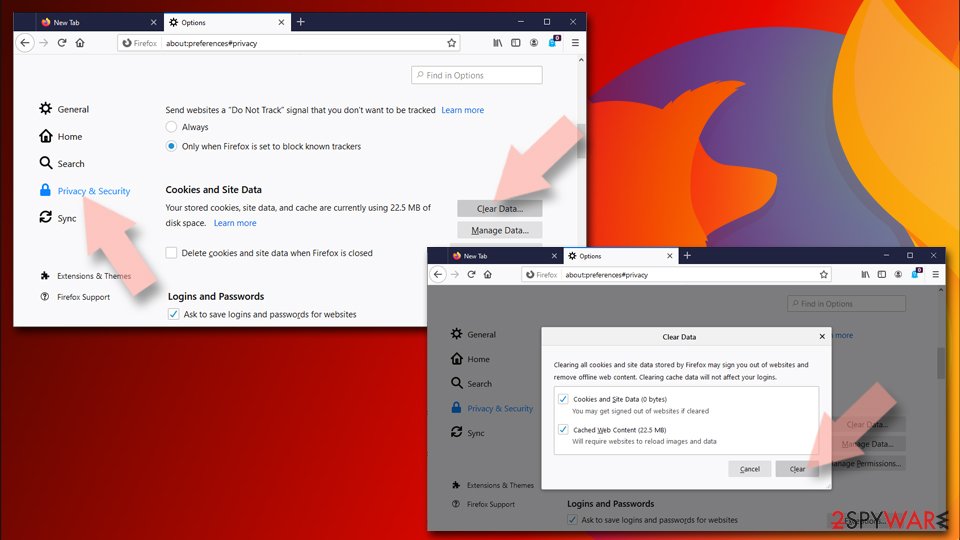
- Click Menu and pick Settings.
- Go to Privacy & Security section.
- Scroll down to locate Cookies and Site Data.
- Click on Clear Data…
- Select Cookies and Site Data and Temporary cached files and pages, then click Clear.

Reset Mozilla Firefox
If clearing the browser as explained above did not help, reset Mozilla Firefox:
- Open Mozilla Firefox browser and click the Menu.
- Go to Help and then choose Troubleshooting Information.
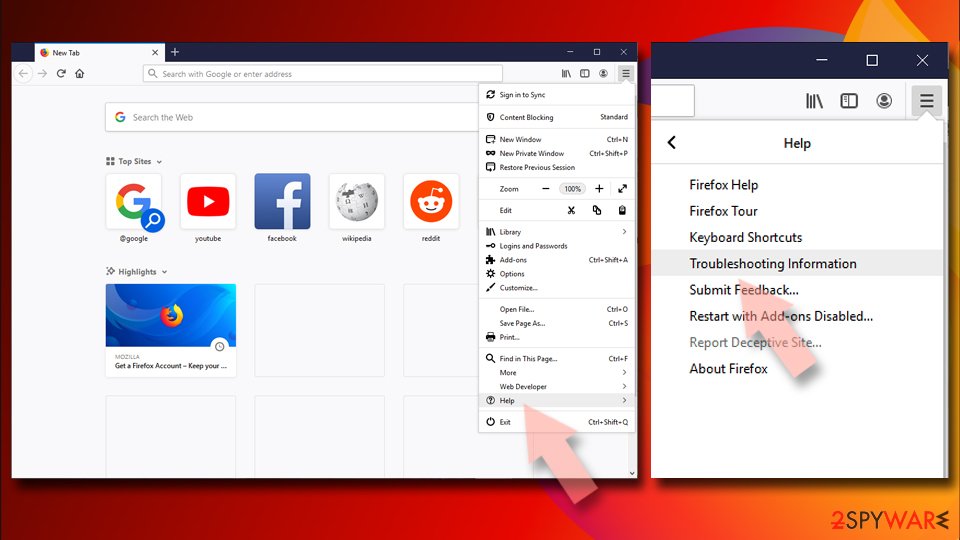
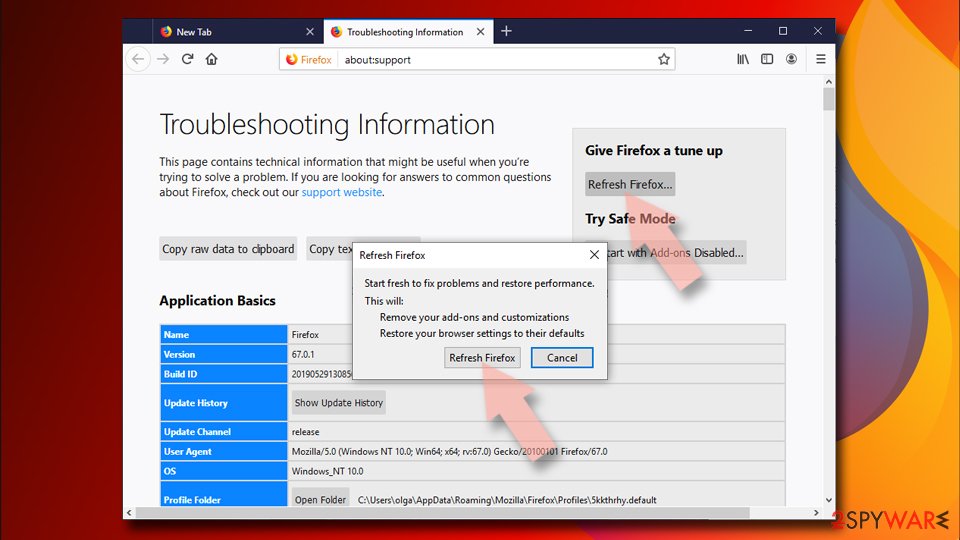
- Under Give Firefox a tune up section, click on Refresh Firefox…
- Once the pop-up shows up, confirm the action by pressing on Refresh Firefox.


Remove from Google Chrome
Delete malicious extensions from Google Chrome:
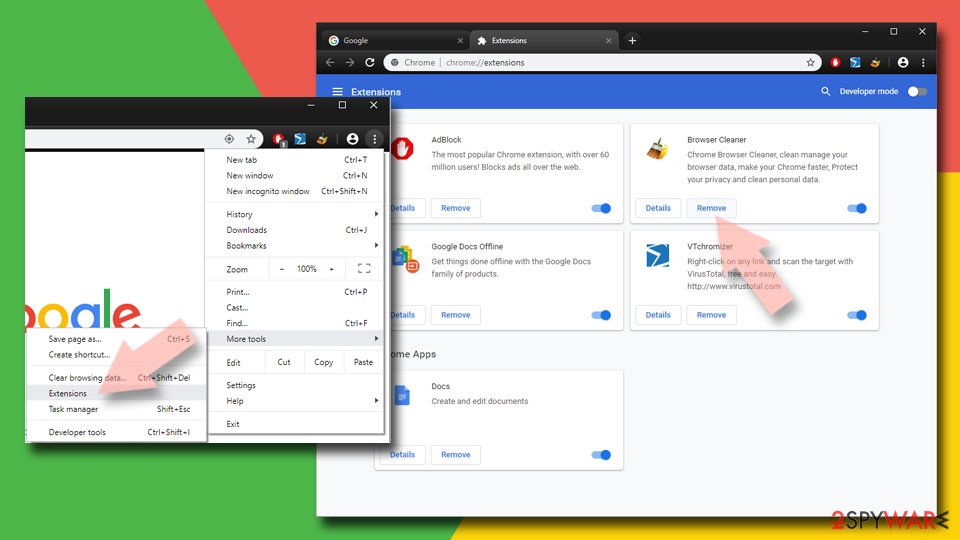
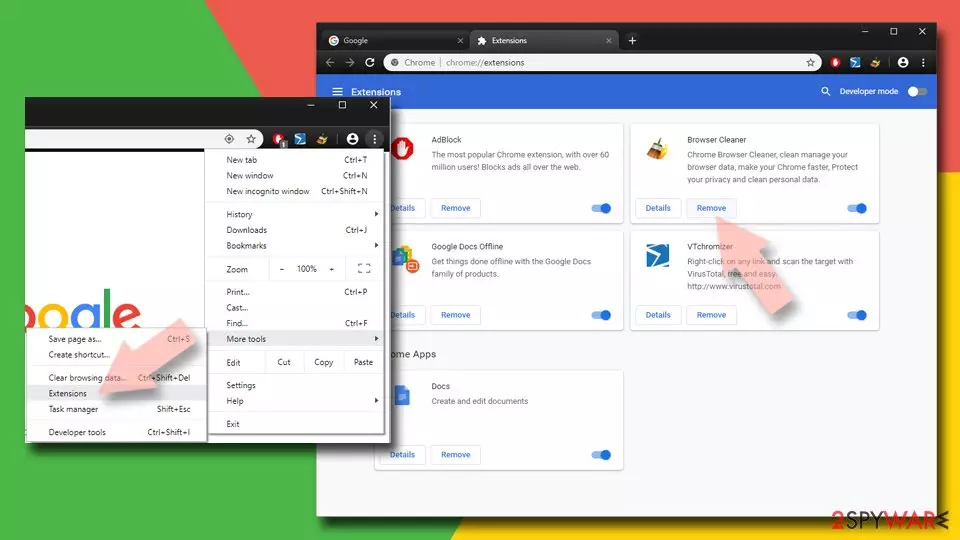
- Open Google Chrome, click on the Menu (three vertical dots at the top-right corner) and select More tools > Extensions.
- In the newly opened window, you will see all the installed extensions. Uninstall all suspicious extensions related to the unwanted program by clicking Remove.
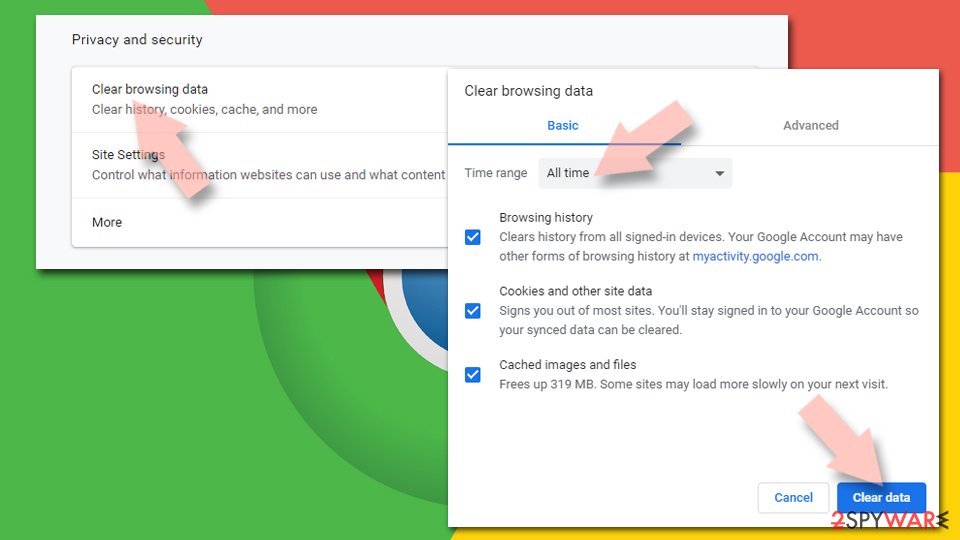
Clear cache and web data from Chrome:
- Click on Menu and pick Settings.
- Under Privacy and security, select Clear browsing data.
- Select Browsing history, Cookies and other site data, as well as Cached images and files.
- Click Clear data.

Change your homepage:
- Click menu and choose Settings.
- Look for a suspicious site in the On startup section.
- Click on Open a specific or set of pages and click on three dots to find the Remove option.
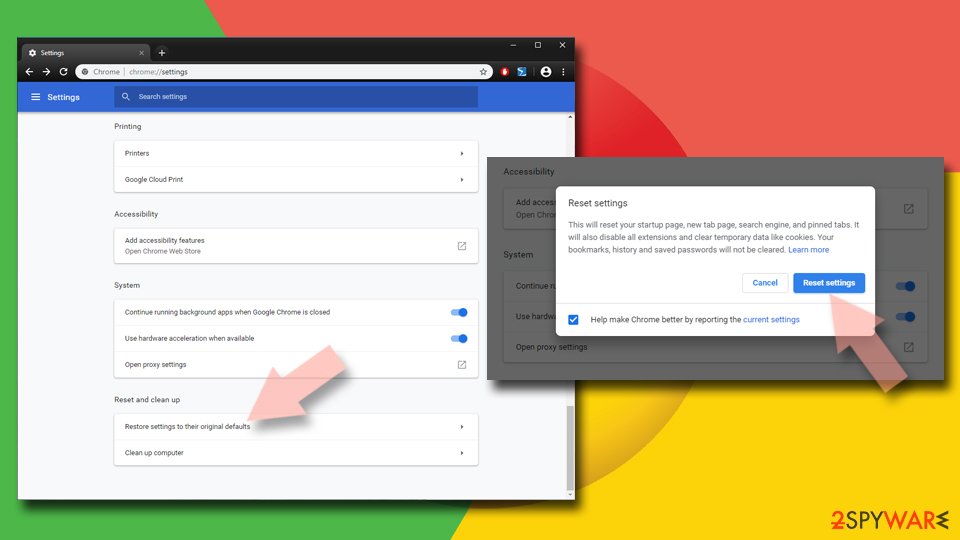
Reset Google Chrome:
If the previous methods did not help you, reset Google Chrome to eliminate all the unwanted components:
- Click on Menu and select Settings.
- In the Settings, scroll down and click Advanced.
- Scroll down and locate Reset and clean up section.
- Now click Restore settings to their original defaults.
- Confirm with Reset settings.

Delete from Safari
-
Remove dangerous extensions
Open Safari web browser and click on Safari in menu at the top left of the screen. Once you do this, select Preferences.
-
Here, select Extensions and look for iLivid or other suspicious entries. Click on the Uninstall button to get rid each of them.

-
Reset Safari
Open Safari browser and click on Safari in menu section at the top left of the screen. Here, select Reset Safari....
-
Now you will see a detailed dialog window filled with reset options. All of those options are usually checked, but you can specify which of them you want to reset. Click the Reset button to complete iLivid removal process.


After uninstalling this potentially unwanted program (PUP) and fixing each of your web browsers, we recommend you to scan your PC system with a reputable anti-spyware. This will help you to get rid of iLivid registry traces and will also identify related parasites or possible malware infections on your computer. For that you can use our top-rated malware remover: FortectIntego, SpyHunter 5Combo Cleaner or Malwarebytes.
How to prevent from getting adware
Choose a proper web browser and improve your safety with a VPN tool
Online spying has got momentum in recent years and people are getting more and more interested in how to protect their privacy online. One of the basic means to add a layer of security – choose the most private and secure web browser. Although web browsers can't grant full privacy protection and security, some of them are much better at sandboxing, HTTPS upgrading, active content blocking, tracking blocking, phishing protection, and similar privacy-oriented features. However, if you want true anonymity, we suggest you employ a powerful Private Internet Access VPN – it can encrypt all the traffic that comes and goes out of your computer, preventing tracking completely.
Lost your files? Use data recovery software
While some files located on any computer are replaceable or useless, others can be extremely valuable. Family photos, work documents, school projects – these are types of files that we don't want to lose. Unfortunately, there are many ways how unexpected data loss can occur: power cuts, Blue Screen of Death errors, hardware failures, crypto-malware attack, or even accidental deletion.
To ensure that all the files remain intact, you should prepare regular data backups. You can choose cloud-based or physical copies you could restore from later in case of a disaster. If your backups were lost as well or you never bothered to prepare any, Data Recovery Pro can be your only hope to retrieve your invaluable files.

If this free guide helped you and you are satisfied with our service, please consider making a donation to keep this service alive. Even a smallest amount will be appreciated.
- ^ Potentially unwanted program. Wikipedia. The free encyclopedia.
- ^ iLividSetupV1_1032444936.exe. Hybrid Analysis. Sandbox file testing.
- ^ 768cde8dd81258cc2502b579d18e079e48b28e29e3b6a213e41eafaaf733d11f. Virus Total. File and URL analyzer.
- ^ JavaScript Malware Finds New Life. Sophos. Security research blog.
- ^ Number of apps available in leading app stores as of 3rd quarter 2019. Statista. Statistics portal.