
SpywareStrike: what it is and how to remove it
SpywareStrike — a fake PC security program that has been added to the rogue anti-spyware category. It claims that it is supposed to increase PC's security, but all it does is displaying fake pop-up ads that are used to push people into buying the full version of this fake anti-spyware tool.
Facts checked October 6, 2026. Removal steps tested on Windows 11 (26H2) and checked against Microsoft's and the browser makers' current documentation. Sections marked as our earlier report are the original text: they describe the threat as it was then and have not been reviewed since. The 2026 status, the removal steps and the questions are current.
Automatic
Get a free scan and check if your PC is infected.
Fortect finds malware, unwanted programs and the Windows damage they leave behind, and repairs it in one pass.
Unsure whether spywarestrike.exe is safe? A free scan checks the file and what starts it.
Do it yourself · free Remove SpywareStrike yourself 6 steps, about 18 minutes, no software needed.
Start the steps
SpywareStrike: summary
| Distribution | Social engineering, bundling, etc. |
|---|---|
| Name | SpywareStrike |
| Type | Rogue anti-spyware |
| File | spywarestrike.exe |
| Symptoms | Displays intrusive scanners, fake scan reports, and error messages |
| Main danger | Can swindle the money for a fake license, can initiate system changes, cause damage |
| Removal | Scan the PC with security software to find and remove the malware and anything installed with it. Fortect scans Windows for malware and repairs the system files and settings it damaged. Remove it nowTo use the full-featured product, you have to purchase a license for Fortect. The scan is free. |
Show 6 more facts
| Detection names | No Microsoft detection name is known |
|---|---|
| Damage | Not recorded in the old report |
| Evidence | 4 write-ups by security sites; details still limited |
| File names | spywarestrike.exe |
| First seen | 10 July 2018 |
| Facts checked | 6 October 2026 |
What SpywareStrike does on an infected PC
From our report of Jul 2018 · not reviewed since
SpywareStrike is a rogue anti-spyware which can affect your PC's performance
SpywareStrike — a fake PC security program that has been added to the rogue anti-spyware category.
It claims that it is supposed to increase PC's security, but all it does is displaying fake pop-up ads that are used to push people into buying the full version of this fake anti-spyware tool. Spyware Strike is using misleading advertising to get into users' systems and claims to be a legitimate spyware remover.
However, its main file spywarestrike.exe and other components are used just to mislead users. The recommended "licensed" version has nothing to do with computer's security, so make sure you stay away from it and get rid of the app without any delay.
SpywareStrike virus has been actively promoted as a legitimate and useful program. However, all it does is displaying fake system scanners that report about non-existent threats. The program creates a broad list of fake threats and suggests downloading its full version to remove these alleged infections.
The main thing here is that the full version of this malware is commercial. You can also start seeing banner ads, pop-up windows, and other advertisements on your browser trying to trick you into buying it. However, no matter how safe it seems, it should never be purchased. You must remove SpywareStrike instead because entering your credit card details can lead you to the loss of the personal information.
Additionally, in the long run, its main file spywarestrike.exe and other components can be used to access your system files and initiate more damage. Since the program has nothing to do with the improved PC's performance, you should think about the SpywareStrike removal.
The best option when dealing with fake anti-spyware tools, trojans, and similar viruses is using anti-malware software. Our recommended programs are: , and . These programs can easily be used for deleting this rogue anti-spyware and also preventing other threats in the future.


From our report of Jul 2018 · not reviewed since
You can download this threat after being convinced that it is legitimate
This rogue anti-spyware has been actively spread using misleading websites which are claiming that it is an effective way to improve PC's performance.
Such viruses have cleverly-designed sites that seem legitimate and trustworthy. However, they aim to trick victims into downloading the trial version of the fake tool which has nothing to do with PC security. If you happen to find yourself redirected to one of such domains, make sure you leave it without clicking on any links or ads.
Additionally, don't get tricked by fake warning messages that show up while browsing the web and offer to check your PC for free. It is just another way used to spread rogues around. Once they get into the system, they block your daily routine with fake system scanners and alerts reporting about malware detected on your computer.
From our report of Jul 2018 · not reviewed since
More from our earlier report on SpywareStrike
- Use if you got infected.
- The program will also help you prevent this threat
How to check the PC for SpywareStrike
- File:
spywarestrike.exe
How to remove SpywareStrike
A loader's job is to install other malware, so treat the PC as infected with more than one program until the scans are clean.
Step 1: Check where spywarestrike.exe runs from and stop it
In Task Manager (Ctrl + Shift + Esc) find
spywarestrike.exeon Processes, right-click it and choose Open file location before ending anything.Windows' own files live in
C:\Windows\System32; the same name in%AppData%, %Temp% or C:\Users\Public is an impostor. If the folder is wrong, right-click the process again, choose End task and delete the file.If it starts again within seconds, a task or another process restarts it, so run the scan step in Safe Mode. Task Manager works the same in Windows 11 and Windows 10.
Full procedure with screenshots: Close a frozen app (Task Manager, Force Quit) On uGetFix
Step 2: Delete scheduled tasks that bring it back
Programs like SpywareStrike add a scheduled task so they return after an uninstall or reopen a page at every sign-in. Start Task Scheduler, open Task Scheduler Library and sort by Last Run Time to see what ran recently.
On the Actions tab, a program in a user folder, a script or a web address is a warning sign; right-click such a task and choose Delete.
Tasks with names copying Google, Edge or Windows updaters but pointing to an odd folder are typical. The tool looks the same in Windows 11 and Windows 10.
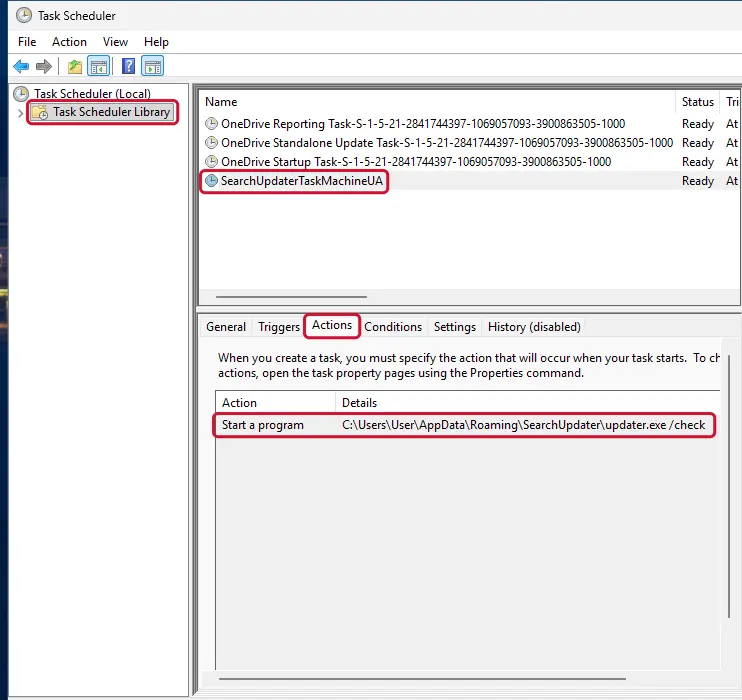
Windows 11: Task Scheduler Library, the task selected, the Actions tab shows the file it runs. Full procedure with screenshots: Remove what malware leaves behind in Windows
Step 3: Remove it from startup
Press Ctrl + Shift + Esc to open Task Manager and select Startup apps (Windows 11) or the Startup tab (Windows 10). Disable entries you do not recognise, especially ones with no publisher or with a name that copies a Windows component.
Right-click an entry and choose Open file location to see where it runs from: programs in
%AppData%or%Temp%deserve a closer look. Some entries are not listed there but in the registry Run keys, which the procedure below shows how to check.Full procedure with screenshots: Stop apps from opening at startup On uGetFix
Step 4: Delete the folders left behind
Uninstalling often leaves the program's folders, and some threats reinstall themselves from them.
Press Windows + R, type
%LocalAppData%and press Enter, then do the same for%AppData%and %ProgramData%, and look for folders named after SpywareStrike, its publisher or created on the day the problem started. Delete those folders, and check C:\Program Files and C:\Program Files (x86) too.If Windows says a file is in use, end it in Task Manager or delete the folder after a restart in Safe Mode. The folders are the same in Windows 11 and Windows 10.
Full procedure with screenshots: Remove what malware leaves behind in Windows
Step 5: Scan the PC, then run the offline scan
A scan finds the parts of SpywareStrike that the manual steps cannot see. In Windows Security > Virus & threat protection > Scan options, start a Full scan and quarantine what it reports.
Follow it with Microsoft Defender Antivirus (offline scan) > Scan now, which restarts the PC and checks the disk while Windows and the malware are not running.
It takes about 15 minutes and works the same in Windows 11 and Windows 10. If either scan finds something, run the full scan again after removal until it comes back clean.
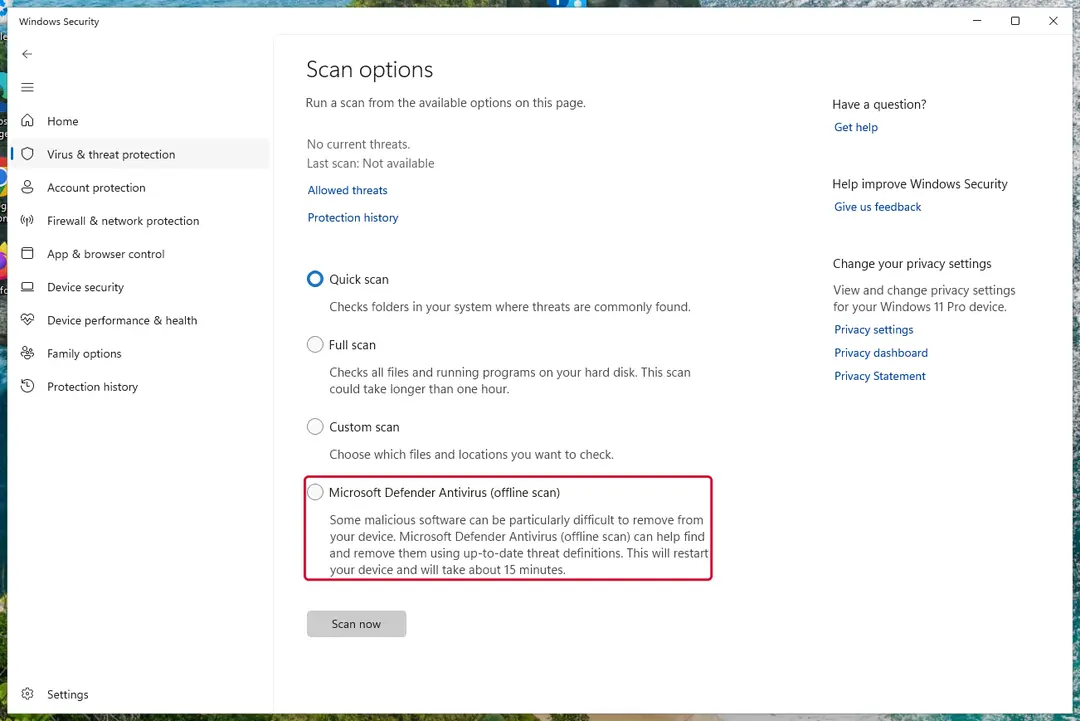
Windows 11: Windows Security > Virus & threat protection > Scan options. Full procedure with screenshots: Run a Microsoft Defender Offline scan
Step 6: Change passwords from another device and sign out other sessions
SpywareStrike can copy saved passwords, cookies and session tokens and send them out in seconds, so cleaning the PC does not undo the theft.
Change your passwords on a device that was never infected, starting with the e-mail account, since every other reset goes through it. On each account, end all other sessions and check the recovery e-mail, phone number and forwarding rules.
Then turn on two-step verification. Sign in on the Windows 11 or Windows 10 PC again only after the offline scan is clean.
Full procedure with screenshots: Turn on two-step verification / secure a hacked account
From our report of Jul 2018 · not reviewed since
Terminate SpywareStrike immediately with the help of the following steps
To remove SpywareStrike virus or other intruders, you should use professional tools like anti-malware programs.
It is the most reliable method that ensures a full removal of the malware. To make your computer system clean again and start using your computer normally, use , and that have been added to the most effective removers list by our experts.
After performing a full system scan and receiving the list of all malicious files, proceed with the suggested SpywareStrike removal. Finally, make sure you avoid similar malware in the future.
After removal: passwords, accounts and prevention
Your passwords after SpywareStrike
Removing SpywareStrike does not undo what it may already have sent out while the PC showed an unfamiliar process called spywarestrike.exe in Task Manager.
Treat saved browser passwords and logged-in sessions on this PC as known to the attacker.
From another device, change the e-mail password first and end all its sessions. Then do the same for the bank, PayPal, Microsoft, Google and Apple accounts. Stolen session cookies keep working after a password change until you sign out everywhere.
Move crypto to a new wallet created on a clean device. A step-by-step order for every kind of account is in our guide to account security after an infection.
Do not let government spy on you
The government has many issues in regards to tracking users' data and spying on citizens, so you should take this into consideration and learn more about shady information gathering practices.
Avoid any unwanted government tracking or spying by going totally anonymous on the internet.
You can choose a different location when you go online and access any material you want without particular content restrictions. You can easily enjoy internet connection without any risks of being hacked by using VPN.
Control the information that can be accessed by government any other unwanted party and surf online without being spied on. Even if you are not involved in illegal activities or trust your selection of services, platforms, be suspicious for your own security and take precautionary measures by using the VPN service.
Backup files for the later use, in case of the malware attack
Computer users can suffer from data losses due to cyber infections or their own faulty doings.
Ransomware can encrypt and hold files hostage, while unforeseen power cuts might cause a loss of important documents. If you have proper up-to-date backups, you can easily recover after such an incident and get back to work. It is also equally important to update backups on a regular basis so that the newest information remains intact - you can set this process to be performed automatically.
When you have the previous version of every important document or project you can avoid frustration and breakdowns. It comes in handy when malware strikes out of nowhere. Use for the data restoration process.
Questions about SpywareStrike
What is spywarestrike.exe and why is it running?
Every process is started by something:
- a program you installed
- a Windows service
- a scheduled task
- a startup entry
To learn why spywarestrike.exe runs, find its file with Open file location in Task Manager, then look for an entry pointing to that file in Settings > Apps > Startup and in Task Scheduler.
Sort Installed apps by date to see what arrived when the process first appeared. Once you know the owner, you can decide whether to keep it, switch it off at startup or uninstall it completely.
spywarestrike.exe keeps coming back. What should I do?
A process that returns after you end it has a restart mechanism, and that is a reason to treat spywarestrike.exe as unwanted. Check Settings > Apps > Startup, Task Scheduler and the Services list for entries pointing to its folder, and disable them.
Look in Installed apps for anything added the same day and uninstall it. Then delete the folder and run a Microsoft Defender Offline scan, which works before Windows starts and can remove files that are locked or hidden while the system is running.
Is spywarestrike.exe a virus?
If it sits outside the Windows and Program Files folders and your antivirus links it to SpywareStrike, yes. spywarestrike.exe is the file name used by this trojan. Some trojans borrow the names of real Windows components, so the name alone does not decide it:
- right-click the process in Task Manager
- choose Open file location
- look at the folder and the publisher under Properties > Details
A file in a user folder with no publisher is the trojan. Do not delete it by hand while it runs; use the offline scan in the plan above.
Is SpywareStrike a known trojan?
Not as a documented family, at least not yet. What is known is the visible sign, an unfamiliar process called spywarestrike.exe in Task Manager, which matches a hidden program working for someone else.
New threats are often seen by victims weeks before researchers publish anything about them. Treat SpywareStrike as you would any trojan:
- remove what starts it
- run an offline scan
- change passwords from another device
If a scan reports a detection name, keep it; it usually reveals the family and whether it is known to download other malware. We update this guide when an analysis appears.
How do I know if my PC has SpywareStrike?
Often you do not, which is the point of a trojan. Possible signs are an antivirus alert naming SpywareStrike or a generic trojan detection, unknown programs or scheduled tasks, processes with random names in Task Manager, browser extensions you did not add, security settings turned off, slower performance, or account alerts about logins from unknown places.
The reliable check is a full scan followed by Microsoft Defender's offline scan. If you recently ran a crack, a fake installer or a command a website told you to paste, scan even without symptoms.
I found AnyDesk or ScreenConnect that I did not install. Is that SpywareStrike?
Not necessarily SpywareStrike, but it is a warning sign. These are legitimate remote support tools, and criminals use them as ready-made backdoors, especially after tech support scams or fake invoice calls.
If you did not install it and no one you trust set it up, uninstall it, change passwords from a clean device and check your bank account. If someone connected to your PC through it, follow the steps for remote access trojans and consider a Windows reset. Installed apps sorted by date shows when it appeared.
Should I report SpywareStrike?
Report it if you lost money, if accounts were taken over, if you are a business, or if the trojan came through a scam call. A police or national cybercrime report gives you a reference number for your bank and insurer and helps link cases.
You do not need to report a trojan that antivirus blocked before it ran. Before reporting, write down the dates, the detection name, file names and any messages or transactions linked to the attack; screenshots of antivirus alerts are useful evidence. The country list is in the report section above.
My antivirus was on. How did a trojan get past it?
Antivirus programs see a file only when it is written or run, and criminals test each new build against popular scanners before release. Detection catches up within hours or days, which is often after the first victims ran it.
Archives with passwords, installers that fetch the malware later, and scripts run through PowerShell make the job harder. That is why behaviour such as downloading cracks or pasting commands matters more than any setting. Keep Windows and Defender updated, and turn on Reputation-based protection in App & browser control.
Should I check my other computers too?
Yes, it takes little time and removes doubt. SpywareStrike itself usually stays on one PC, but the download that carried it may have been copied to other computers, shared drives may hold the same installer, and an attacker who had access could have tried saved passwords on other devices.
Run a full scan on every Windows PC in the home or office, check shared folders for the original download, and change Wi-Fi and router passwords if they were stored on the infected machine.
Will Fortect remove SpywareStrike?
Fortect scans Windows for malware and unwanted programs and repairs the system files and settings they change, and its free scan shows what it finds on your PC before you decide anything.
For SpywareStrike, follow the plan above as well: the browser steps take back permissions and settings that no scanner treats as a threat, and uninstalling the program that brought it removes the source.
Run Microsoft Defender's full scan and, if anything was found, its offline scan as a second opinion. If the symptoms are gone after the plan and both scans are clean, there is nothing more to do.
Sources
- Wikipedia: Pop-up ad (read October 6, 2026)
- Virusai: Virusai (read October 6, 2026)
- FTC: How to recognize, remove and avoid malware (read October 6, 2026)
- Microsoft Learn: Microsoft Defender Offline (read October 6, 2026)
- Microsoft Learn: How Microsoft names malware (read October 6, 2026)