
Preinstalled Android Malware 2026: Is Your Cheap Phone Safe?
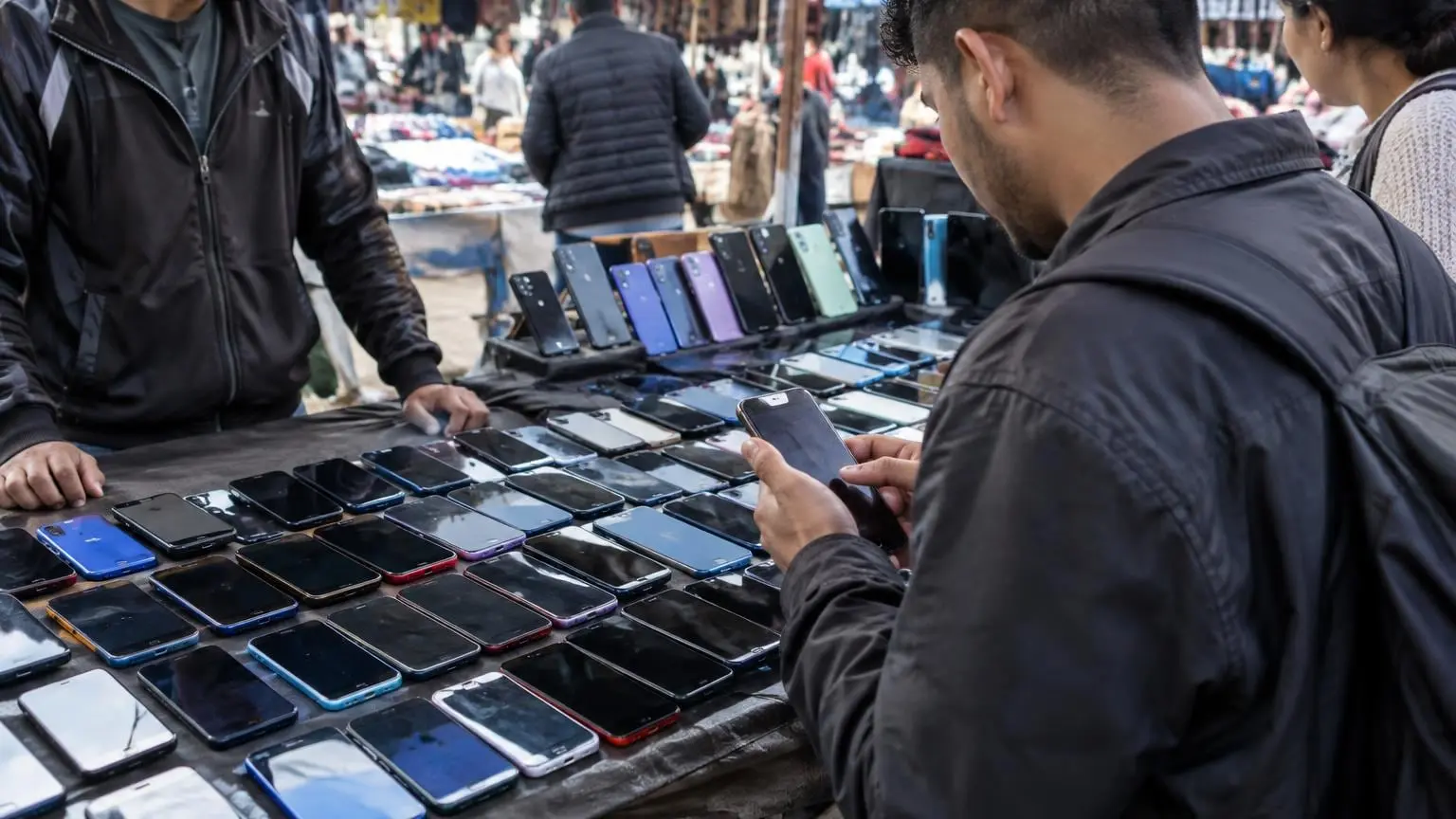
- Preinstalled Android malware timeline
- What Bitdefender found on these phones
- How the fraud works and where the money comes from
- Which phones and brands are named
- Who put the malware there
- How it avoids Google Play Protect
- Signs your phone may be affected
- How to check your phone: six steps
- What you can and cannot do about it
- Why cheap phones are a target
- What is still unknown
- Related guides on 2-Spyware
Bitdefender has found malware built into the firmware of low-cost Android phones. The campaign is called Midnight Mimosa. It runs on budget phones from several brands that use MediaTek chips, it is on the phone before the owner switches it on for the first time, and it cannot be uninstalled in the normal way.[1][2]
If you own a very cheap phone bought from an online marketplace, especially a copy of a famous flagship, this story is for you. Below are the facts that have been confirmed, the two brands named, the signs to look for, how to check your own phone, and what you can and cannot do about it. Our own advice is labeled as ours.
| Question | Answer |
|---|---|
| Who found it | Bitdefender researchers, published October 8, 2026 and updated October 9[1] |
| What it is | Malware in the phone firmware, running as a system app with the label 'System' and no icon[1][2] |
| Which phones | Low-cost, multi-brand Android devices built on MediaTek platforms; the most common models are the Doogee S200 X and the Cubot KINGKONG X[1][2] |
| How big | Thousands of unique devices in more than 150 countries over about two years[1][2] |
| What it does | Ad and click fraud, collects device and app information, and turns phones into residential proxy relay nodes[1] |
| Can you uninstall it | No. Removal needs firmware-level cleanup or disabling the component over ADB[1][2] |
| Who is behind it | Not attributed to any threat actor. How it entered the supply chain is not known[4][1] |
| Main risk to you | Hidden ads, slower phone, your connection used by others, and powers that could be turned on later[1][2] |
Preinstalled Android malware timeline
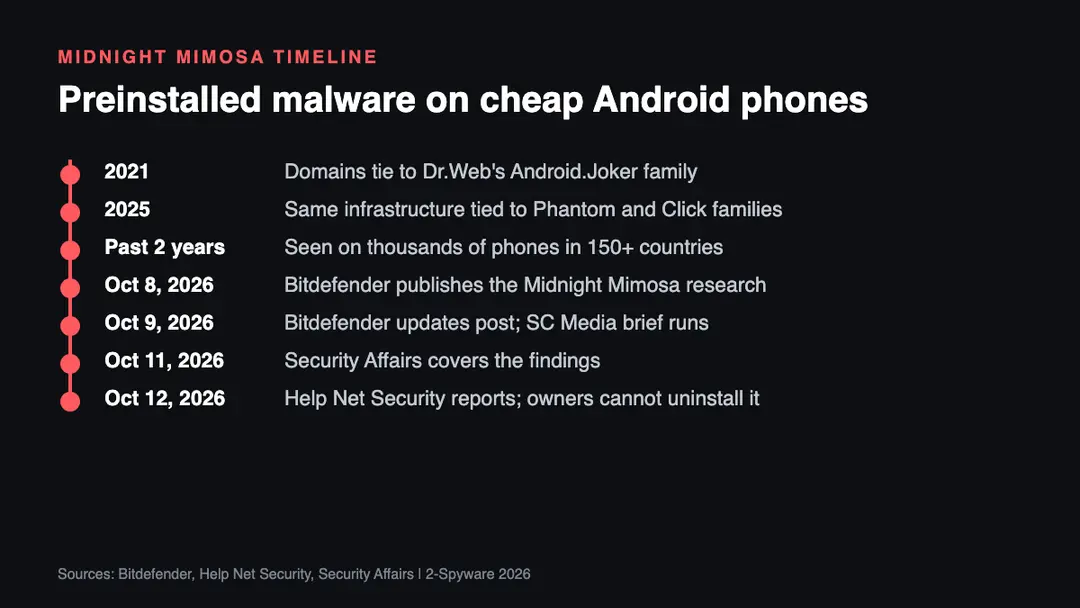
The dates below come from Bitdefender's report and the articles that followed it. The campaign itself ran for roughly two years before it was made public.
- 2021. Bitdefender links the malware's infrastructure through shared domains to Dr.Web's Android.Joker family, which was known for premium SMS fraud.[1][3]
- 2025. The same infrastructure is tied to Dr.Web's Android.Phantom and Click families.[1][3]
- Past two years. The Midnight Mimosa family is seen on thousands of unique devices in more than 150 countries.[1]
- October 8, 2026. Bitdefender publishes its research, titled 'The phone was compromised before the user turned it on'. The post was updated on October 9.[1]
- October 9, 2026. SC Media runs a brief based on The Record's report.[5]
- October 11 and 12, 2026. Security Affairs, Cybernews and Help Net Security cover the findings.[2][3][4]
What Bitdefender found on these phones
The first clue was a package called com.android.system.lite. Bitdefender's App Anomaly Detection flagged it because it looked like a core Android component but did not behave like one. It repeatedly switched on Accessibility and Notification Access and silently installed and removed unrelated apps.[1][2]
The package is a platform-signed system app. It runs as the system user and holds permissions that let it install and delete packages and grant permissions to other apps without any user interaction. Its app label is just 'System', it has no icon, and it does not appear in the launcher.[1][2]
Bitdefender calls this component the enabler. The same code also ships under other names, including com.android.sys.prot, com.android.sys.gmsprot and com.android.sys.bcprot. The researchers stress that the package name is not the threat. The shared code underneath is, which means a block list of package names ages out quickly.[1][2]
The enabler's real code hides in a native library called libeasy.so. At runtime it decrypts a hidden framework, which asks a remote server for a configuration. The server is disguised as a weather service. The framework then loads further plugins that run the fraud and the silent installs.[1][3]
The researchers also describe a layered design that makes analysis harder. Plugins travel as files with misleading extensions, such as code packages named .o and apps served as .png files. A sample examined offline can therefore contain no active payload at all.[1][3]
How the fraud works and where the money comes from
Bitdefender believes the scheme exists mainly to make money. The operators run ad and click fraud, collect device and installed-app information, and turn infected phones into residential proxy relay nodes. Botnet access for DDoS attacks is, in the researchers' words, a hot commodity, and a bigger botnet earns more.[1][3]
The system app does not register the fraudulent clicks itself. It silently installs a rotating set of at least 32 disguised apps, among them app lockers, weather apps, note tools, file managers, icon tools, OCR tools and audio editors. These cover apps load real ads through a legitimate ad SDK, and an invisible window on top registers the ads as shown.[1][3]
A hidden plugin also shows ads the owner never asked for, in full-screen windows and overlays, for example when the display turns on. Those windows are marked as secure, a flag meant to keep banking screens out of screenshots, so you cannot capture them. Settings from the server decide how often a tap is faked and where it lands, so the traffic looks human.[2][3]
One dropped app, com.mobile.applock.en, is something else. It has no ads and no interface. It is a single-purpose proxy that enrolls the phone as a relay node, so other people's traffic can pass through your phone and your home or mobile connection.[1][3]
The cover apps are installed and removed again and again on the same phones. Bitdefender says this churn shortens the time a payload is visible in the app list, rotates file hashes and changes the active money-making module, while the system component stays in place.[1]
Which phones and brands are named
The report names two real brands. The two most common models among infected devices are the Doogee S200 X and the Cubot KINGKONG X.[1][2] Bitdefender notes that these brand names also appeared in a public XDA forum report. Owners there found a hidden com.android.sys package that came back under a new name after removal. Bitdefender says this may point to a broader pattern in the supply chain.[1]
Naming two brands does not mean every phone from those brands is infected. The reports we read give no list of affected firmware versions, no serial numbers and no way to check a single unit by model alone. Treat the brand names as a warning to check, not as a verdict.
The second group is counterfeit or look-alike phones. Many infected devices report model names that borrow famous flagships, such as 'i17 Pro Max', 'i16_Pro_Max', 'S24 Ultra', 'S25 Ultra' and 'Note 18 Ultra'. Some phones that are not made by Samsung even report the real Galaxy S25 Ultra model code SM-S938B.[1][2]
| Detail | What was reported |
|---|---|
| Chip platform | MediaTek[1][2] |
| Named brands | Doogee (S200 X) and Cubot (KINGKONG X) were the two most common models[1][2] |
| Fake model names | i17 Pro Max, i16_Pro_Max, S24 Ultra, S25 Ultra, Note 18 Ultra, Honor Magic 15 MAX[1] |
| Spoofed model code | SM-S938B (a real Galaxy S25 Ultra code) on phones that are not Samsung[1][2] |
| Signing certificate | Some firmware signed with certificates bearing the name Shenzhen Zediel; other infected phones are not Zediel-signed[1][2] |
| Top countries | Mexico, France and Italy, then the United States, Germany, Brazil and Spain[1][2] |
Who put the malware there
Nobody has been named. Bitdefender confirms only that certificates bearing the name Shenzhen Zediel signed firmware on some affected devices. It says it cannot tell how those certificates ended up on the phones, or whether the certificate owner knew about the malware.[1][2]
The researchers say the malware could have been added by an ODM (a company that designs and builds phones for other brands), a firmware integrator, a logistics partner or another party further down the chain. They also note that cheap phones are sometimes loaded with money-making software to recover the cost of selling hardware so cheaply.[1][5]
Cybernews adds a caution. It reports that Zediel appears to be a Chinese maker of smart hardware and boards for Rockchip processors, and that the researchers could not establish whether the company was involved. It also says the campaign is not attributed to any threat actor.[4]
Cybernews also points to an earlier case, the BADBOX 2.0 botnet, in which malware came preinstalled on cheap off-brand Android hardware. The pattern is not new. What is new here is the proxy component and the active effort to switch off Google Play Store scanning during installs.[4][1]
How it avoids Google Play Protect
Right before installing a payload app, the malware disables the Google Play Store app, which hosts Play Protect's on-device scanner. After the install it turns the store back on. A separate safeguard re-enables the store when the user is present, so nothing looks odd.[1][2]
Some samples also record Google Play as the place they were installed from, even though they never came from the store. Apps that really come from Play carry a server-side signature block that Bitdefender calls frosting, and the forged ones lack it. This is a detail for researchers, not something you can check by eye.[1][3]
The same ad-fraud code was found in 13 apps on Google Play itself. They talk to the same servers, were signed with 13 different certificates, and were published under at least two developer accounts. They passed Play review and give a real function such as a weather app or QR scanner, but they also show ads outside the app, sometimes while the phone is idle.[1][2]
These Play apps lack the system-level rights of the preinstalled version. Bitdefender still calls them dangerous. The reports we read do not list their names in a form we can verify, so check Bitdefender's full indicator list if you are a security professional.
Signs your phone may be affected
This section is our analysis, built from the behavior Bitdefender describes. None of these signs proves infection on its own, and a clean phone can show some of them for other reasons.
- Full-screen ads or overlays that appear when you wake the phone, or while you are not using any app, and that do not show up in screenshots.[2][3]
- Apps you never installed, such as a weather app, app lock, OCR tool or file manager, that appear, disappear and return.[1][2]
- A package named like an Android part (com.android.system.lite, com.android.sys.prot and similar) or an app labeled only 'System' with no icon.[1][2]
- Accessibility or Notification Access switched on for something you did not approve, and switching itself back after you turn it off.[1]
- The Play Store turned off when you did not touch it, or an app that claims Google Play as its source but behaves oddly.[1][2]
- An unexplained drain on battery or data, which is what a hidden relay node and constant ad loading would cause.[1]
- A phone that reports a famous model name but has the wrong screen, camera, weight or software for that model. A price far below the real flagship is the first warning.[4][1]
How to check your phone: six steps
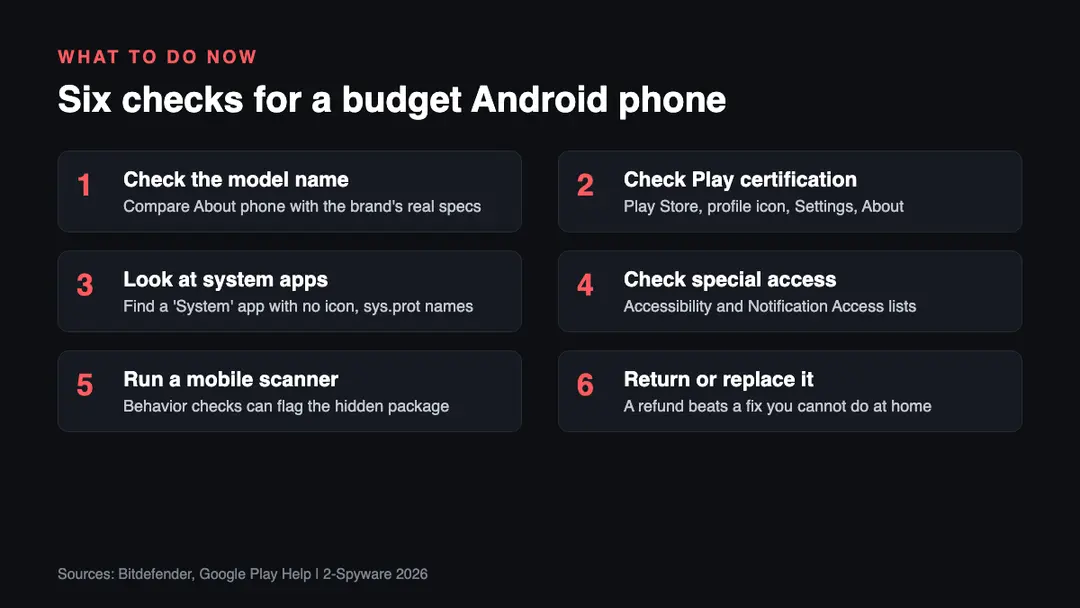
1. Check that the model is what the seller says. Open Settings, About phone, and read the model name and number. Compare them with the real brand's own specification page. A phone sold as an iPhone or a Galaxy Ultra that shows up as something else, or that reports a Samsung code but is not a Samsung, is a strong warning. Bitdefender's list of fake names above is a good start.[1][2]
2. Check Play Protect certification. Google explains how to do this. Open the Play Store, tap your profile icon, open Settings, then About, and look at the Play Protect certification line. If it says the device is not certified, check whether the model is on Google's list of certified devices. If it is not listed, the phone is not Play Protect certified.[6]
Google's own advice for an uncertified phone is to contact the manufacturer or the retailer and ask for a fully tested, Play Protect certified device.[7] Certification is not proof that a phone is clean, and the reports we read do not say whether the infected models were certified. It does mean the phone passed Android compatibility testing, which an off-brand clone usually has not.[6]
3. Look at the app list, including system apps. Open Settings, Apps, and show system apps if your phone offers that option. Look for the package names listed above and for an app labeled only 'System' with no icon. Menu names differ by brand and Android version, so use the search box in Settings if you cannot find it. Finding nothing does not clear the phone, because the same malware ships under rotating names.[1]
4. Check the permissions that matter. Look at which apps have Accessibility and Notification Access. On a normal phone, only apps you chose should be on those lists. If something you do not recognize is listed, or it comes back after you turn it off, that matches the behavior Bitdefender saw.[1][2] Do not log in to your bank on a phone that shows this.
5. Run a behavior-based mobile scanner. Bitdefender found this campaign through behavior, not through a signature, and says that watching behavior was the only thing left to catch a preinstalled app.[1][2] Our guide to how to check for malware on Android lists the tools and the steps, and our Android virus removal guide covers ordinary infections.
6. Decide whether to keep the phone. This is our advice. If the phone is a counterfeit, shows these signs, or you cannot verify it, return it for a refund while you still can, and use a certified phone from a known maker. A factory reset removes apps you installed, but Bitdefender states that the root component sits in the system partition, so a reset is not a fix for firmware malware.
If the phone has been used for banking, email or two-factor codes, change those passwords and sign-in methods from a different, trusted device. Accessibility, Notification Access and SMS powers are what let a phone read screens, chat messages and one-time codes, and Bitdefender says those powers were present and could be switched on by the operators.[1][2]
What you can and cannot do about it
| Option | Does it work | What to know |
|---|---|---|
| Uninstall the app | No | The root component is in the system partition and cannot be uninstalled in the normal way[1][2] |
| Factory reset | Not by itself | Firmware malware sits outside the data a reset wipes; this is our reading of Bitdefender's description of a system partition component[1] |
| Disable it over ADB | In theory | Bitdefender says disabling the component over ADB is not realistic for most owners[1][2] |
| Firmware cleanup | In theory | Needs a clean firmware image from the maker; Bitdefender says this is not realistic for most owners[1][2] |
| Return the phone | Yes | The cleanest option if the seller allows it; keep order records and screenshots (our advice) |
| Replace with a certified phone | Yes | Google recommends a fully tested, Play Protect certified device[7] |
ADB stands for Android Debug Bridge. It is a developer tool that controls a phone from a computer, and the reports describe disabling the malicious component through it as a possible but unrealistic route.[2] We do not publish ADB steps here. A wrong command on a phone you cannot verify can break it, and the package names change from build to build, so a command copied from a forum may miss the real component.
The more important point is whose job this is. Bitdefender says the durable fix sits with the vendors and the marketplaces that ship and sell the affected firmware.[1][2] Preinstalled malware, in its words, is a different threat class, because every defense that depends on the owner, such as the install prompt, store review, Play Protect and uninstalling, never gets a chance to act.[1][3]
Why cheap phones are a target
This part is our analysis. A phone sold far below the cost of its parts has to make its money somewhere. Bitdefender says one way to make the money back on very cheap hardware is to load it with software that earns afterwards.[1] Ad fraud and proxy access are two ways to earn from a device that already belongs to someone else.[1]
The geography points the same way. Bitdefender sees two regional centers, Western Europe and the Americas, with a long tail across Africa, Southeast Asia and the Middle East. It says this is not what a single carrier or a national retailer produces. It is what hardware moving through international online marketplaces looks like.[1]
Cybernews describes the shopping warning signs in plain terms: a current flagship at a ridiculously low price, an unknown seller, or a listing that hides the real manufacturer.[4] If a deal fails those three tests, the risk is yours, not the seller's.
What is still unknown
- Who inserted the malware into the firmware, and at which point in the supply chain.[1][5]
- Whether Shenzhen Zediel, the company named in some signing certificates, knew about it. Bitdefender says this is unclear.[1][2]
- Which exact firmware versions, brands and models beyond the two most common ones are affected. No full public list has been published in the reports we read.
- Whether Doogee, Cubot or any marketplace has issued a clean firmware update. We found no statement from them in the reports we read.
- How many of the thousands of infected phones are still active.
- Whether the Accessibility, Notification and SMS powers have ever been used on real owners. Bitdefender did not see it, but says the operators could switch it on.[1][2]
We will update this article when Bitdefender, the phone makers or the marketplaces publish more. It was last checked on October 12, 2026.
Related guides on 2-Spyware
Frequently asked questions
Can malware really come preinstalled on a new Android phone?
Yes. Bitdefender found the Midnight Mimosa malware in the firmware of low-cost Android phones built on MediaTek platforms. It is present before the owner first switches the phone on. Cybernews also points to an earlier botnet, BADBOX 2.0, in which malware came preinstalled on cheap off-brand hardware.
Which Android phone brands have preinstalled malware?
Bitdefender named Doogee and Cubot. The two most common infected models were the Doogee S200 X and the Cubot KINGKONG X. Many other infected phones are counterfeits that report fake flagship names. The reports give no complete list, so not every phone from those brands is affected.
Can I uninstall preinstalled Android malware?
Not in the normal way. The root component is a system app in the system partition, so it has no uninstall option. Bitdefender says clearing the phone needs firmware-level cleanup or disabling the component over ADB, and that neither is realistic for most owners. Returning the phone is usually simpler.
How do I check if my Android phone is Play Protect certified?
Open the Google Play Store, tap your profile icon, open Settings, then About, and look at the Play Protect certification line. If it says the device is not certified, check Google's list of certified devices. A phone that is not on the list is not Play Protect certified.
Will a factory reset remove preinstalled malware?
Probably not. Bitdefender says the root component sits in the system partition, which is part of the firmware. A reset wipes your apps and data, not the firmware. Our reading is that a reset helps against apps you installed but not against this campaign. Replacing the phone is the safer fix.
What does the Midnight Mimosa malware do to my phone?
It runs ad and click fraud, collects device and installed-app information, and can turn the phone into a residential proxy relay node. It installs hidden cover apps, shows ads outside apps, and holds Accessibility, Notification Access and SMS powers. Bitdefender did not see those powers used, but they are available to the operators.
How can I tell if a cheap Android phone is a counterfeit?
Compare the model in Settings, About phone with the maker's own specification page. Fake models report names such as i17 Pro Max, S25 Ultra or Note 18 Ultra, and some report a real Samsung code on non-Samsung hardware. A flagship price far below normal, an unknown seller and a hidden manufacturer are the other warning signs.
Should I still use a phone that may have preinstalled malware?
We advise against using it for banking, email or two-factor codes. The malware has system-level power and could read screens, notifications and text messages if the operators turn those powers on. Return the phone if you can, change your passwords from another device, and replace it with a certified phone.
Log in to comment
No comments yet. Be the first.