
WhatsApp Malware Gets SYSTEM Access on Windows: Check Now
- WhatsApp malware timeline
- How the WhatsApp malware chain works
- Why Task Scheduler gives the malware SYSTEM rights
- What VulcanRAT207.A can do on your PC
- Who is targeted
- Does it affect WhatsApp Desktop and WhatsApp Web
- Signs your PC may be infected
- How to check Task Scheduler for the malware
- How to remove it and what to do now
- Six steps to take now
- Safer WhatsApp settings on Windows and phones
- How this compares with the March WhatsApp campaign
- What is still unknown
- Related guides on 2-Spyware
A new Windows malware campaign spreads through WhatsApp attachments and ends with a remote access trojan running with SYSTEM rights, the highest level on a Windows PC. Security firm Morphisec traced the chain, which starts with a ZIP file holding a fake financial document named Statement.exe, then injects code into the Windows Task Scheduler service.[1][2]
If you opened a file like that, treat the PC as compromised. The malware is named VulcanRAT207.A. It can run commands, log keystrokes, capture the screen and create new administrator accounts.[1][2] Below you will find how the chain works, who is at risk, the signs to look for in Task Scheduler, what to do if you find them, and the WhatsApp settings that lower your risk. Our own advice is marked as ours.
| Question | Answer |
|---|---|
| What it is | A multistage Windows intrusion chain ending in a remote access trojan called VulcanRAT207.A[1][2] |
| How it arrives | A ZIP archive sent over WhatsApp, holding an executable such as Statement.exe with a financial-document lure[1][2] |
| How it gets SYSTEM rights | It injects code into the Windows Task Scheduler service, which runs as LocalSystem, so later parts inherit that access[1] |
| Persistence | A scheduled task named USOPrivate Kit or USOPrivate that starts a signed VulkanInfo program at boot[1][2] |
| Files to look for | vulkaninfo-64.exe, vulkan-1.dll and vulkan-1.bin in C:\Program Files\Common Files[1][2] |
| Server it contacts | 61.18.208.27 on port 8888, written defanged as 61[.]18[.]208[.]27 in the reports[1] |
| Security software attacked | A signed driver ends selected Baidu security processes[1][2] |
| First reported | Press coverage on October 12, 2026; the first sighting date is not stated in the reports we read[2][3] |
WhatsApp malware timeline
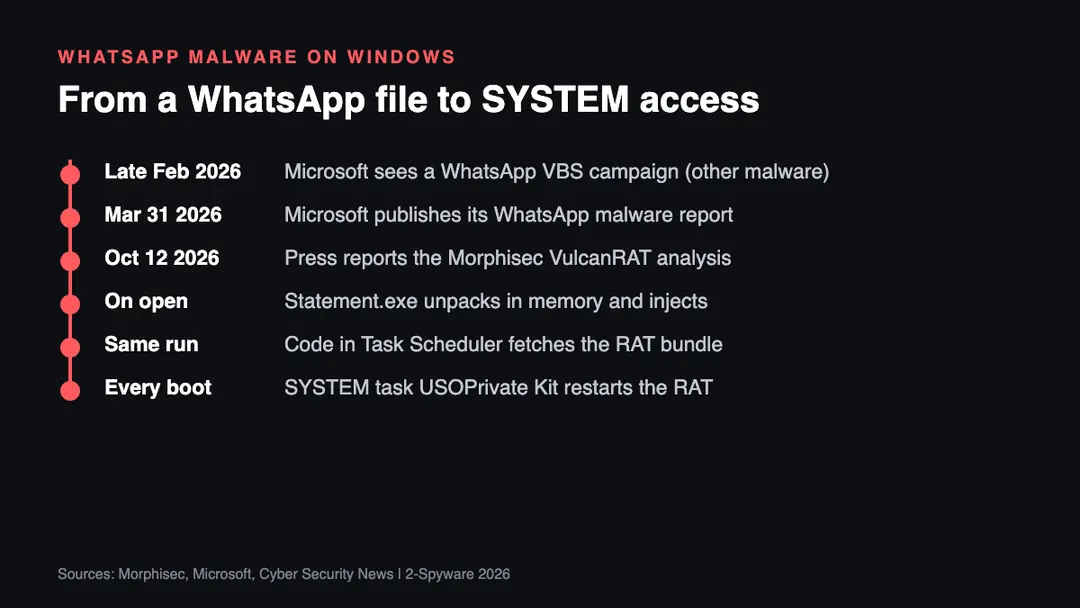
The dates matter less here than the order of events. Microsoft Defender Experts reported a different WhatsApp campaign that began in late February 2026. It delivered Visual Basic Script files and ended with remote access installers, and Microsoft published its findings on March 31, 2026.[4] It is a separate family from the one described here, but it shows that WhatsApp has been a steady delivery route for Windows malware all year.
The VulcanRAT207.A report was covered by Cyber Security News on October 12, 2026, with GBHackers also covering it that day.[2][3] The coverage credits Morphisec for the analysis.[2] Neither report we read says when the first victim was hit, so we cannot give you a start date for this campaign.
How the WhatsApp malware chain works
Morphisec describes eight numbered stages. Each one inherits its rights from the stage before it, so the attackers do not need to break into SYSTEM separately at the end.[1] In plain terms, this is what happens.
First, the victim receives a ZIP archive over WhatsApp. Inside is an executable, Statement.exe in Morphisec's example, with a financial-document lure. Cyber Security News also lists a file called Tax-202609078869.exe as a WhatsApp-delivered wrapper.[1][2] The outer file is compressed so that its real code stays hidden from a quick scan. When you run it, it unpacks itself in memory and writes nothing to disk at that point.[1]
Second, the unpacked loader checks whether it is on a real computer. Morphisec says it reads the screen size, disk space, memory and CPU, reviews Windows event log entries, looks for certain Registry keys and tests how fast the system responds. If any check fails, the chain stops.[1][2] This is meant to defeat the sandboxes that security researchers use.
Third, the loader tries to get administrator rights. If the account is not already an administrator, it tries a Windows COM elevation trick and falls back to the standard runas prompt. Morphisec stresses that both depend on the User Account Control settings, so success is an attempt, not a guarantee.[1]
Fourth, the loader copies a clean version of ntdll.dll over the loaded copy to remove hooks that security products place there. It then injects a small downloader into the process that hosts the Task Scheduler service, using a method called PoolParty Variant 7 instead of the more commonly watched CreateRemoteThread call.[1][2]
Why Task Scheduler gives the malware SYSTEM rights
Task Scheduler is a Windows service that runs as LocalSystem. Once code runs inside its process, that code uses the same token. Morphisec says every component after the injection runs under the inherited LocalSystem token and none has to elevate again.[1][2]
The injected code contacts 61[.]18[.]208[.]27 on port 8888 and receives a bundle of files in memory. The bundle holds a genuine Intel-signed VulkanInfo utility, a malicious vulkan-1.dll, a data file called vulkan-1.bin and a deployment DLL.[1][2] The malicious DLL is loaded by the genuine program through DLL sideloading, a trick where a trusted program loads an attacker's library from its own folder.[1]
The deployment DLL then does three things at once. It starts the final RAT straight from memory. It installs a signed driver, GoFly64.sys, and uses it to end Baidu security processes named bdservicehost.exe and bduserhost.exe. It also writes three files into C:\Program Files\Common Files and registers a SYSTEM scheduled task so the RAT returns after every reboot.[1][2]
This is our analysis: the task name is the part most likely to fool a human reviewer. USOPrivate Kit sits under the Microsoft\Windows folder in Task Scheduler, next to real update tasks, and the name resembles Windows update orchestration wording. Morphisec notes the strings superficially look like legitimate Microsoft update metadata.[1]
What VulcanRAT207.A can do on your PC
The final payload talks to its server over a WebSocket connection after first using HTTP to fetch the stages.[2] According to the coverage, the operator can collect system, account, network and process details, open remote command shells, capture the desktop, log keystrokes, control the mouse and keyboard, and change clipboard contents.[2]
Morphisec's command table also lists creating a local account and adding it to the Administrators group, and changing a local account password.[1] The reports add that it can download and run further files and register additional drivers.[2] In practice, that means an attacker could read what you type into your bank, email and work accounts and could return later even if you change your own password.
Who is targeted
The reports do not name a country, an industry or a group of victims. Cyber Security News calls the file a serious risk for organizations where staff receive invoices, statements, tax files or payment documents through messaging apps.[2] That fits the lure: a fake statement or tax file is something an accountant, a shop owner or a freelancer might open without a second thought.
There is one clue in the code. The loader looks for Baidu security products, the GoFly driver ends Baidu processes, and one path changes behavior when Tencent QQ PC Manager files are present or the 360 Total Security process is running.[1][2] Those are security products popular in China. This is our reading, not a finding in the reports: the authors expected at least some victims to run that software, but nobody has said who the victims are.
Do not assume you are safe if you use other security software. The malware attacks the Windows service layer and tries to remove user-mode hooks, so it is not limited to PCs that run Baidu software. A US home user who opens an unknown executable from a WhatsApp chat takes the same risk as anyone else.
Does it affect WhatsApp Desktop and WhatsApp Web
The reports describe a ZIP file that arrives as a WhatsApp attachment and runs on Windows. They do not say which WhatsApp client was used to receive it, and they do not describe a flaw in WhatsApp itself.[1][2] The malware only starts if someone extracts the archive and runs the executable on a Windows PC.
This is our analysis: if you receive the ZIP on your phone, the file cannot hurt the phone, but you might forward it, save it to cloud storage or open it later on a computer. WhatsApp Desktop and WhatsApp Web make it easy to save a file straight to a Windows folder, which is why the desktop client needs the same care. Treat any executable inside an archive from chat as unsafe.
Signs your PC may be infected
No single sign proves an infection, and the malware tries to hide. These are the items the reports list as indicators, and each is easy to check.
- A scheduled task named USOPrivate Kit or USOPrivate, usually under Microsoft\Windows.[1][2]
- Files named vulkaninfo-64.exe, vulkan-1.dll or vulkan-1.bin in C:\Program Files\Common Files. Most home PCs have no reason to hold them there.[1][2]
- Your security software stopping without your input. The campaign ends selected security processes with a signed driver.[1]
- A new local user account that you did not create, since the RAT can create administrator accounts.[1][2]
- Outbound network traffic to 61.18.208.27 on port 8888, which is easiest to see in a router log or firewall log.[1][2]
- A file you opened from WhatsApp that looked like a statement, invoice or tax document and ended in .exe or arrived in a ZIP file.
How to check Task Scheduler for the malware
This section is our practical guidance based on the indicators above. Open it on the PC you suspect. If you believe the PC is already infected, use another device for your passwords.
- Press the Windows key, type Task Scheduler and open it.
- In the left pane, open Task Scheduler Library, then Microsoft, then Windows. Look for a task named USOPrivate Kit or USOPrivate. Morphisec says the fallback location is Microsoft\Windows\AppID, so check that folder too.[1]
- Click the task and open its Actions tab. If it starts vulkaninfo-64.exe from C:\Program Files\Common Files, that matches the report.[1][2]
- For a faster check, open Command Prompt as administrator and run: schtasks /query /fo LIST /v and look for USOPrivate in the output.
- Open File Explorer and go to C:\Program Files\Common Files. Look for the three Vulkan files named above.
Genuine Windows update tasks have similar looking names, so compare the exact spelling and the file path rather than the general appearance. If you find nothing, that does not prove the PC is clean, because the RAT can run only in memory before the task exists.[1]
How to remove it and what to do now
Removing one scheduled task is not enough. The malware runs with SYSTEM rights, can install a kernel driver and can create accounts.[1][2] A manual cleanup can miss pieces. The steps below are our recommendation and match the usual advice for a trojan with this access. The image below sums them up.
Six steps to take now
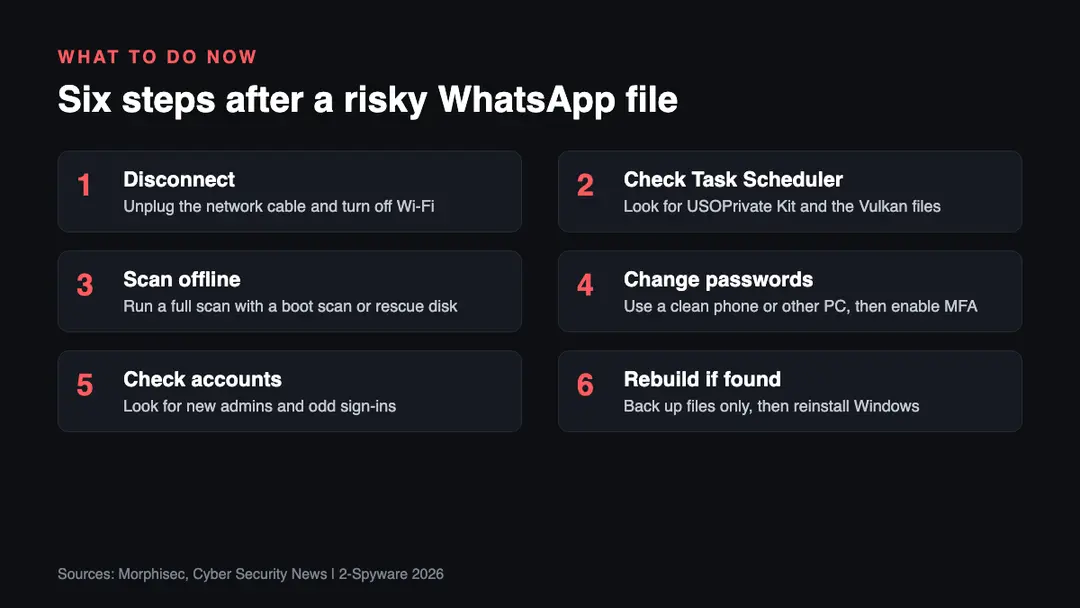
1. Disconnect the PC from the network. Unplug the cable and turn off Wi-Fi. The RAT talks to a server over port 8888, and cutting the connection stops the operator from using it while you work.[1]
2. Check Task Scheduler and the Common Files folder. Use the steps in the section above. Write down what you find, including file names and the task action, before you delete anything, because it will help if you contact support or an IT team.
3. Scan the PC offline. Because the malware can end selected security processes, run a full scan from a boot or rescue disk of a reputable antivirus product, or use Microsoft Defender Offline. Our Windows malware help page walks through scanning step by step, and our virus guides cover specific families.
4. Change your passwords from a clean device. Use your phone on mobile data or another computer, not the suspect PC. Start with email, banking and work accounts, then turn on multi-factor authentication. Keystroke logging is one of the listed abilities, so anything typed on the infected PC should be treated as seen.[2]
5. Check for accounts and sign-ins you do not recognize. The RAT can create a local administrator account.[1][2] Open Settings, then Accounts, then Other users, and remove anything you do not know. Also review sign-in history on your email, bank and social accounts.
6. Rebuild the PC if you find any indicator. This is our recommendation: when malware has had SYSTEM rights and a kernel driver, a clean Windows reinstall is the only way to be sure it is gone. Copy only your documents and photos to external storage first, scan them on a clean device, and do not reuse programs or scripts from the old PC.
If you also want to unlink WhatsApp from the PC, see our guide on how to remove the WhatsApp virus, and use the website safety checker before you open a link from any message.
Safer WhatsApp settings on Windows and phones
WhatsApp Help Center explains how to control automatic downloads. On WhatsApp for Windows and WhatsApp Web, click Settings or your profile picture, then Chats, then Media auto-download, and choose what to download automatically. On Android, tap More, then Settings, then Storage and data. On iPhone, open Settings, then Storage and data.[5]
This is our analysis: turning off auto-download is useful but does not stop this attack. The malware needs you to extract the ZIP and run the executable, so a file that sits unopened in a download folder does no harm. The settings give you time to look at a file before it lands on the PC. Use these habits as well.
- Turn off auto-download for documents and other files, and keep it off for chats with people you do not know.
- Never run an .exe file that arrived in a chat, even from a contact. A hijacked account can send the same file.
- Ask the sender on a phone call whether they really sent a statement or tax file before you open it.
- In Windows, show file extensions in File Explorer (View, then Show, then File name extensions) so Statement.pdf.exe cannot pass as a PDF.
- Keep Windows and your security software updated, and keep tamper protection on if your product offers it.[4]
- Use a standard user account for daily work. The malware tries to reach administrator rights first, and a standard account makes that step harder.[1]
How this compares with the March WhatsApp campaign
Microsoft Defender Experts described a campaign that began in late February 2026 and delivered malicious VBS files through WhatsApp messages.[4] Those scripts created hidden folders in C:\ProgramData, dropped renamed copies of the Windows tools curl.exe and bitsadmin.exe, and downloaded more scripts from trusted cloud services.[4]
In that campaign the malware changed a Registry value, ConsentPromptBehaviorAdmin, to suppress User Account Control prompts, and the final stage delivered unsigned MSI installers that gave attackers remote access.[4] Microsoft advised blocking script hosts in untrusted paths, turning on cloud-delivered protection and training staff to spot suspicious WhatsApp attachments.[4]
| Point | Microsoft campaign (from late Feb 2026) | VulcanRAT207.A chain (reported Oct 12, 2026) |
|---|---|---|
| File sent | Malicious VBS scripts[4] | ZIP with an executable such as Statement.exe[1][2] |
| How it gets rights | Suppresses UAC prompts through the Registry[4] | Injects into the SYSTEM Task Scheduler service[1] |
| Final payload | Unsigned MSI remote access installers[4] | VulcanRAT207.A over WebSocket[1][2] |
| Persistence | Registry changes and scripts[4] | SYSTEM task USOPrivate Kit and sideloaded DLL[1][2] |
The pattern is the same in both: a trusted app brings the file, the user runs it, and the attacker then works to gain administrator rights. The defense is also the same. Do not run files from chats, and keep your security software working.
What is still unknown
- Who is behind the campaign and who the victims are. The reports we read name no group or target list.[1][2]
- When the campaign started and how many PCs were infected.
- Which WhatsApp client received the ZIP in the reported cases. The reports describe a WhatsApp attachment but not the client.[1][2]
- Whether WhatsApp has taken action against the sending accounts. We found no statement from WhatsApp on this campaign.
- The full text of the GBHackers report. The site blocked our reader, so we relied on its summary line and on the Morphisec and Cyber Security News write-ups.[3]
We will update this article if Morphisec, Microsoft or WhatsApp publish more. It was last checked on October 12, 2026.
Related guides on 2-Spyware
Frequently asked questions
What is the WhatsApp malware that gets SYSTEM access on Windows?
It is a Windows intrusion chain that ends in a remote access trojan called VulcanRAT207.A. It arrives as a ZIP file with an executable such as Statement.exe, injects code into the Task Scheduler service and then runs with SYSTEM rights. Morphisec analyzed it, and press covered it on October 12, 2026.{1}{2}
Can malware in a WhatsApp attachment infect me without opening it?
The reports describe a chain that starts when someone extracts the ZIP and runs the executable on Windows. They do not describe an infection from merely receiving the message. Turn off auto-download anyway and never run an executable from a chat, even if the sender is a contact.{1}{2}{5}
How do I check Task Scheduler for this malware?
Open Task Scheduler, expand Task Scheduler Library, then Microsoft, then Windows, and look for a task named USOPrivate Kit or USOPrivate. Also check Microsoft\Windows\AppID and the folder C:\Program Files\Common Files for vulkaninfo-64.exe, vulkan-1.dll and vulkan-1.bin.{1}{2}
Is deleting the scheduled task enough to remove it?
No. Deleting the task stops the boot restart, but the malware can also run from memory, end security processes with a signed driver and create administrator accounts. Disconnect the PC, scan offline, change passwords from a clean device and reinstall Windows if you find any indicator.{1}{2}
Does turning off WhatsApp auto-download stop this attack?
It helps but does not stop it. The malware needs you to extract the archive and run the program, so a file that stays unopened is harmless. Auto-download off gives you time to check a file first. The WhatsApp setting is under Settings, Chats, Media auto-download on desktop.{1}{5}
Is this a security flaw in WhatsApp?
The reports do not describe a flaw in WhatsApp. They describe attackers using the app to deliver a malicious file, in the same way an email attachment is used. The danger comes from running the file on Windows. Report suspicious senders inside WhatsApp and block them.{1}{2}
What is the USOPrivate Kit scheduled task?
It is the persistence task that the malware creates to run as SYSTEM. It starts a signed VulkanInfo program from C:\Program Files\Common Files, which loads the attacker's vulkan-1.dll and restarts the RAT after a reboot. The name resembles Microsoft update wording, which helps it blend in.{1}{2}
Log in to comment
No comments yet. Be the first.