
Google Calendar Phishing Scam 2026: Fake Meeting Invites

- Calendar phishing scam timeline
- How fake invites reach your calendar
- What the fake events say and what the links do
- Why a calendar entry feels more trustworthy than an email
- How to stop fake invites in Google Calendar
- How to remove and report fake events on Google, iPhone and iCloud
- What to do now: six steps
- If you already clicked, typed a password or called
- What is still unknown
- Related guides on 2-Spyware
Scammers are sending fake calendar invitations that can appear in Google Calendar without you accepting them. The events carry titles such as a meeting, a voicemail or a subscription renewal, and each one holds a link or phone number meant to steal your login or your money.[1][2] Nothing is taken from you until you click or call.
If you use Google Calendar, change one setting today: Settings, Event settings, Add invitations to my calendar, then choose Only if the sender is known.[2][4] If a suspicious event is already on your calendar, report it as spam instead of declining it.[1][4] Below you will find how the trick works, what the links do, exact steps for Google, iPhone and iCloud, and what is still unknown.
| Question | Answer |
|---|---|
| What it is | Phishing delivered as a calendar invitation, so the lure sits next to your real appointments[1][2] |
| Do I have to accept it | No. Depending on your settings, Google Calendar can add invitations automatically[1][2] |
| What the event contains | A link to a fake Microsoft, Google or PayPal login page, or a phone number for fake support[1] |
| Common titles | New voicemail, payment receipt, unusual PayPal activity, auto-payment notice, contract bid[1] |
| Am I hacked if I see one | No. Until you click or call, the scammers do not have access to your calendar[1] |
| Reported growth | Sublime Security says calendar-based attacks it saw rose 1,216% in August over July[2][3] |
| Best fix in Google Calendar | Add invitations to my calendar: Only if the sender is known[2][4] |
| How to get rid of one | Report it as spam (Google) or Report Junk (Apple). Do not click Decline[1][4][6] |
Calendar phishing scam timeline
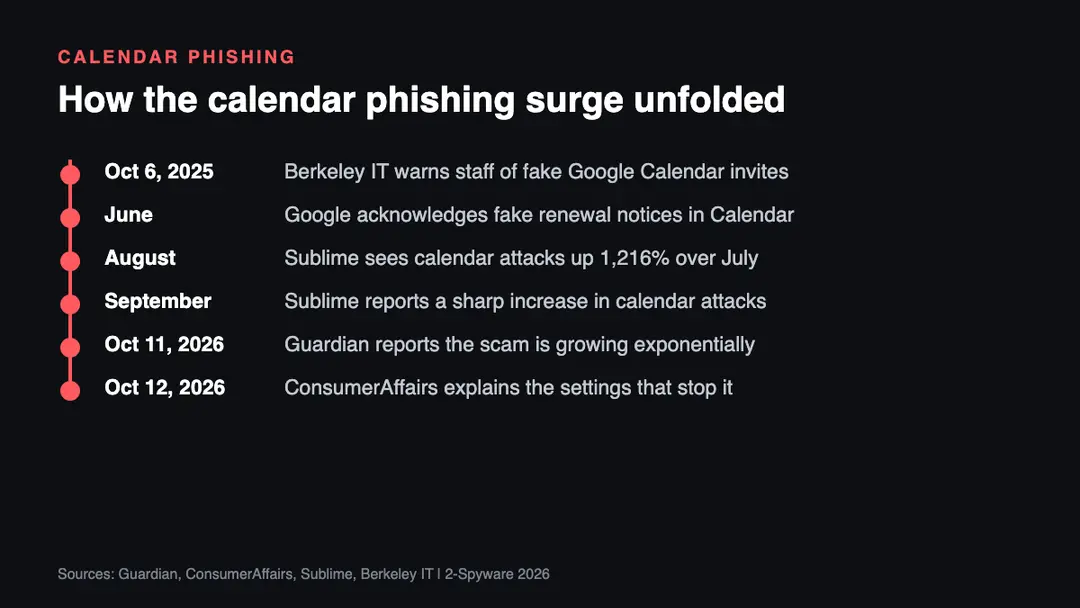
The technique is not new. The University of California, Berkeley warned its IT community about fake Google Calendar invites in October 2025.[5] ConsumerAffairs reports that Google acknowledged fake renewal notices inside Calendar invitations in a June fraud and scams advisory, and that Sublime Security saw a sharp rise in September.[2] The Guardian published its warning on October 11, 2026, and ConsumerAffairs followed on October 12.[1][2]
How fake invites reach your calendar
The scammer sends an email to your work or personal address with a calendar request attached. The Guardian says it does not matter if you miss the email or if it lands in your spam folder.[1] The event can still end up in your calendar.
A security expert named Wescott told the Guardian that calendar apps, Google Calendar included, can add invitations automatically without users accepting them. In his words, scammers do not even need you to open the email.[1] ConsumerAffairs ties this to Google Calendar's From everyone invitation setting, which adds events to the recipient's calendar automatically.[2]
Sublime Security adds a second problem. Email security tools and calendar processing do not treat a message the same way, so a malicious event can stay visible on your calendar even when the matching email was caught and blocked.[2] That is why a clean inbox does not prove a clean calendar.
Some senders borrow trusted platforms. Max Gannon, an intelligence analysis manager at the security company Cofense, told the Guardian that scammers use legitimate services such as Zoom to send invitations. That makes the messages look more convincing to people and to security software, and hard to block.[1] He notes that a filter against these platforms would also block real meeting invitations.[1]
What the fake events say and what the links do
The Guardian saw three main forms: a fake meeting, a notice of a voicemail, and a prompt to renew a service you pay for. Wescott lists typical titles such as New voicemail received, Payment receipt confirmation of $298.99, PayPal unusual activity, Your auto-payment will be processed within 24 hours, and an invitation to bid on a contract.[1]
Berkeley IT lists similar warning signs: urgent titles such as Invoice, Payment Overdue or Crypto Purchase, and descriptions that push you to log in, pay or hand over personal details.[5] Gannon says an invitation can even be made to look internal, with your company's logo added.[1]
| Lure in the event | What it wants | What happens next |
|---|---|---|
| Meeting, project review, voicemail | A click on the link for details | A fake Microsoft, Google or PayPal login page asks for your password[1] |
| Subscription renewal or payment receipt | A call to the support number | You are pressured to give card or bank details, install remote-access software or send money[2] |
| Credit note or invoice | A download from the linked site | In one case Sublime analysed, the file was an installer for ScreenConnect, a real remote-management tool set up for abuse[2] |
| Contract bid | A click or a reply | A phishing page or a conversation that leads to one[1] |
The login page is the common endpoint. The Guardian says the stolen details are sold in batches, used to break into work email, or used to persuade you that your bank is contacting you.[1] The phone-number version works differently. Malwarebytes documented a campaign that impersonated its own billing department, with calendar entries claiming recipients had paid several hundred dollars for a renewal and urging them to call a number to dispute it.[2] The calendar entry charged nothing. The invented bill was the bait.[2]
Sublime also published an example of a link wrapped in a Google redirect address, which makes the link start with google.com even though the final page is somewhere else.[3] This is our reading, not a claim by Sublime: a link that starts with a trusted name tells you nothing about where it ends. Paste it into our website safety checker before you decide anything.
Why a calendar entry feels more trustworthy than an email
Most people have learned to distrust an email from a stranger. A calendar entry gets less suspicion. Wescott told the Guardian that it can create borrowed credibility by showing up in the same place as your dentist appointment or a weekly meeting with your boss.[1]
He also describes it as the same technique as standard phishing, only with a different delivery method.[1] The skill you need is the one you already have: ask who sent it, whether you expected it, and what it wants you to do. A request to log in or call to cancel a charge is the red flag, whether it arrives in your inbox or in your calendar.
How to stop fake invites in Google Calendar
Google's help page and ConsumerAffairs agree on the setting. On a computer, open Google Calendar and click Settings, then Settings again. On the General tab choose Event settings, then Add invitations to my calendar, and select Only if the sender is known.[2][4]
Google says this adds an event only if the sender is in your contacts, part of your organization, or someone you have interacted with. Google also warns that the option might reveal to senders that they are not in your contacts.[4] ConsumerAffairs lists a second option, When I respond to the invitation in email, which adds an event only after you respond.[2]
- The change applies to new invitations. It does not remove events that are already on your calendar.[2]
- Work or school administrators may restrict which options you can choose.[2]
- Google lists an Android page for blocking calendar spam. We did not review it, so check Google's help for the current Android steps.[4]
- We did not find verified menu steps for Outlook or other calendar apps in the sources we read. Check your provider's help page or ask your administrator.
How to remove and report fake events on Google, iPhone and iCloud
Berkeley IT advises reporting a suspicious invite as spam before deleting it.[5] In Google Calendar on a computer, click the event, then More actions, then Report as spam. Google says the event is removed from your calendar and, for a recurring event, the whole series is removed.[4]
There is one limit. Google says an event must have been sent from Google Calendar to be reported as spam. Events created by another provider, app or service cannot be reported this way.[4] In that case, delete the event and report the email that carried it to your email provider.
On an iPhone with iOS 26 or later, open the Calendar app and tap the unwanted event. Tap Delete Event, then confirm. If the event came from an unknown contact, tap Report Junk, then Delete and Report Junk.[7] For a Mac, see our Mac help center, and for an iPhone, our iPhone help center.
On iCloud.com, go to icloud.com/calendar, sign in, open the event and select Report Junk. Apple says the event is then deleted from your calendar on all devices signed in to the same Apple Account.[6]
Do not click Decline on a suspicious invite. The Guardian quotes Wescott saying a decline can tell the sender that your address is live.[1] Reporting does not carry that risk in the same way, though we did not find a source that tests it, so treat that as our caution rather than a confirmed fact.
What to do now: six steps
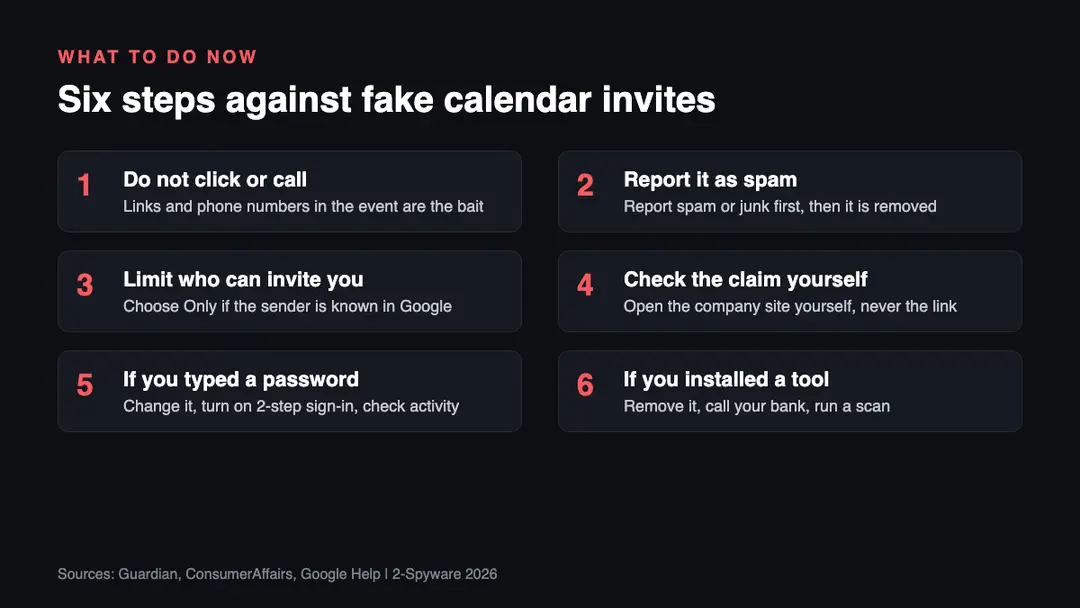
1. Do not click, call or reply. Treat the event like an unexpected email. The Guardian's advice is to be suspicious of everything, even an invitation that appears to come from a colleague two desks away.[1] Berkeley IT adds that you should not open links or attachments or call numbers in unexpected calendar events.[5]
2. Report the event as spam, then delete it. Use More actions, then Report as spam in Google Calendar, or Report Junk in Apple Calendar and iCloud.[4][6][7] The steps are in the section above. Do not use Decline.
3. Change who can add events. In Google Calendar, set Add invitations to my calendar to Only if the sender is known.[2][4] Do this on every account where you use Google Calendar, including a work or school account if your administrator allows it.
4. Check the claim at the real source. Google advises visiting a company's official website on your own, rather than following links or calling numbers in unexpected notices. Check a renewal through your actual account or your bank statement.[2] If you want to see what a link points to first, use our link checker.
5. If you typed a password, act at once. This step is our advice, not a quote from the reports. Change the password on the real site, turn on two-step sign-in, and change the same password anywhere else you used it. Then review recent sign-in activity and forwarding rules on your email account. Our guide on how to report phishing covers where to send the details.
6. If you installed software or paid, treat it as a break-in. This is also our advice. ConsumerAffairs describes callers who push victims to install remote-access software or send money.[2] Uninstall any remote-access tool you did not choose, run a full scan, and call your bank or card issuer using the number on your card. Our guide to removing a calendar virus explains how to clean the calendar itself.
If you already clicked, typed a password or called
The Guardian is clear on one point that helps: until you click the link or make the call, you are not compromised, and the scammers do not have access to everything in your calendar.[1] If you only saw the event, report it and delete it, and move on.
If you did click, the question is what the page asked for. A login page means your password may be in the hands of the sender, so use step 5. A download means software may be on your device, so use step 6. A phone call to a fake support line is the riskiest case, because the caller can talk you into payments or into giving them remote control of your computer.[2]
If someone already has remote access to your device, disconnect it from the internet first. This is our advice. Then remove the tool and change your passwords from a different, clean device. If you gave card details, call the card issuer and ask for a replacement. If you sent money, contact your bank immediately and ask if the payment can be stopped.
What is still unknown
- How many people have received a fake invite. Sublime's 1,216% figure reflects only what its own systems saw, and ConsumerAffairs says it is not a measurement of all attacks worldwide.[2]
- Who is behind the campaigns. The reports we read describe fraudsters in general and name no group or country.[1]
- Whether Google will change the default invitation setting. We found no announcement.
- Which exact steps work for Outlook and other calendar apps. We did not find a verified source for them.
- How many of the fake events used platforms such as Zoom, versus plain email, to deliver the invitation.[1]
We will update this article when Google, Microsoft or the security companies publish more. It was last checked on October 12, 2026.
Related guides on 2-Spyware
- Remove a calendar virus: how to clean spam events from your calendar.
- How to report phishing: where to send a scam email, text or invite.
- Website safety checker: test a link before you open it.
- iPhone help center: guides for Apple Calendar and other iPhone problems.
Frequently asked questions
Why is there a meeting in my Google Calendar that I never accepted?
Google Calendar can add invitations automatically, depending on your settings. Scammers send an email with a calendar request, and the event can appear even if the email lands in spam. Set Add invitations to my calendar to Only if the sender is known, then report the event as spam instead of declining it.
What is the 'You have a meeting' calendar scam?
It is phishing delivered as a calendar invitation. The event may claim to be a meeting, a voicemail or a renewal, and it holds a link to a fake login page or a number for fake support. The Guardian says the aim is to steal your login details or push you into calling.
Am I hacked if a fake event appears on my calendar?
No. The Guardian says you are not compromised until you click the link or make the call, and the scammers do not have access to everything in your calendar. Do not click, report the event as spam, and change your invitation settings so it does not happen again.
How do I stop Google Calendar adding invitations automatically?
On a computer, open Google Calendar, click Settings, then Settings again. Under General choose Event settings, then Add invitations to my calendar, and select Only if the sender is known. Google says this adds events only from contacts, your organization or people you have interacted with. It applies to new invitations.
Should I click Decline on a suspicious calendar invite?
No. The Guardian quotes an expert saying that declining can tell the sender your address is live. Open the event and report it as spam instead. In Google Calendar use More actions, then Report as spam. On an iPhone use Report Junk, then Delete and Report Junk.
How do I report a fake calendar invite on iPhone or iCloud?
On an iPhone with iOS 26 or later, tap the event, tap Report Junk, then tap Delete and Report Junk. On iCloud.com open the event and select Report Junk. Apple says the event is then deleted from your calendar on all devices signed in to the same Apple Account.
What happens if I clicked the link in a fake calendar invite?
It depends on the page. A fake login page can capture your password, so change it on the real site and turn on two-step sign-in. A download may install remote-access software, so remove it and run a scan. If you gave payment details, call your bank or card issuer.
Can Outlook or other calendars get these fake invites?
The reports we read focus on Google Calendar, but the Guardian says calendar apps in general can add invitations automatically. Gannon of Cofense says scammers can make an invite look like it came from inside your company. We did not find verified Outlook menu steps, so check Microsoft's help or ask your administrator.
Log in to comment
No comments yet. Be the first.