
astroliper.ac: a botnet file server for Linux machines entered through SSH, and what to do
astroliper.ac is a web address that URLhaus lists four times for nodewatchd, one Linux program built for four processor types and tagged ssh: the kind of file botnets put on servers, routers and boards after guessing an SSH password.
It cannot run on a Windows PC, a Mac or a phone. If you only saw the name in a log or a block, nothing is proven. If a Linux machine of yours asked for it, treat that machine as entered:
- isolate it
- change its secrets from another device
- rebuild it
Facts checked October 6, 2026. Removal steps tested on Windows 11 (26H2) and checked against Microsoft's and the browser makers' current documentation.
Automatic
Get a free scan and check if your PC is infected.
Fortect finds malware, unwanted programs and the Windows damage they leave behind, and repairs it in one pass.
Programs like a script or program on a Linux machine that downloads nodewatchd from astroliper.ac usually arrive in groups; a free scan lists the companions that are easy to miss.
Do it yourself · free Remove astroliper.ac (nodewatchd, Linux SSH botnet files) yourself 5 steps, about 15 minutes, no software needed.
Start the steps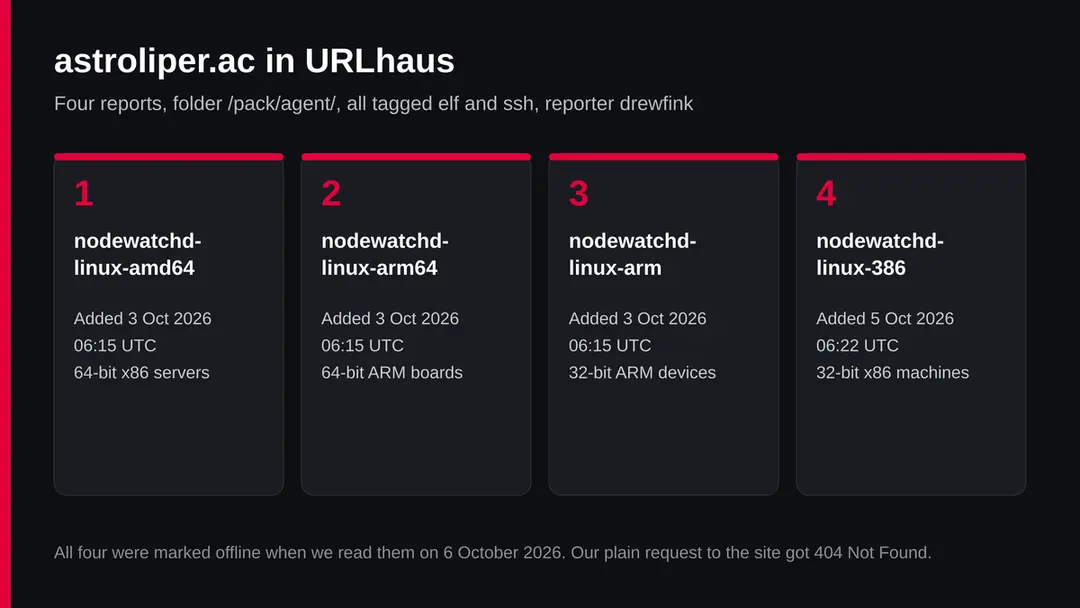
Astroliper.ac (nodewatchd, Linux SSH botnet files): summary
| Type | A malware server for Linux: URLhaus lists four ELF builds of nodewatchd tagged ssh, the pattern of an SSH botnet |
|---|---|
| Risk | High for a Linux machine that fetched it: someone had a login and may use the machine for attacks. None for Windows, Mac or phones |
| Symptoms | Often none. Unknown SSH keys, users or cron jobs, files in /tmp, many outgoing SSH connections |
| How to get rid of it | On Linux: isolate, change every secret from a clean device, rebuild, turn off SSH password login. On Windows: nothing to remove, find what asked for the name |
| Our check (6 October 2026) | One plain request from our server: 404 Not Found from Cloudflare. It clears nothing |
| Running since / first seen | First files reported 3 October 2026; registration date not known |
| Removal | Scan the PC with security software to find and remove the malware and anything installed with it. Fortect scans Windows for malware and repairs the system files and settings it damaged. Remove it nowTo use the full-featured product, you have to purchase a license for Fortect. The scan is free. |
Show 8 more facts
| Platform | Linux (amd64, arm64, arm, 386). Not Windows, Mac or phones |
|---|---|
| Detection names | No Microsoft detection name is known to us for nodewatchd; these are Linux files that Microsoft Defender on a Windows PC would not run |
| Name | Astroliper.ac |
| Evidence | 4 write-ups by security sites; details still limited |
| First seen | 3 October 2026 |
| Distribution | Typically fake installers, cracked programs, e-mail attachments, fake "verify you are human" pages and ads for popular apps |
| Damage | Installs other malware, often several programs at once |
| Facts checked | 6 October 2026 |
Facts checked on 6 October 2026 against the URLhaus data for astroliper.ac held in our database, an RDAP lookup that found no record, one plain request from our server, and published material from SANS ISC, FortiGuard Labs, Elastic, MITRE ATT&CK and Ubuntu. We did not download the files and infected no machine; the steps follow those pages and were not tried on a live infection.
What astroliper.ac is, and what we know about it
astroliper.ac is not a program on your PC. It is a web address that the abuse.ch project URLhaus lists four times, between 3 and 5 October 2026, for Linux programs called nodewatchd, built for four kinds of processor and tagged elf and ssh. Botnets put programs like this on Linux servers, routers and boards after getting in through SSH.
We found no public write-up of nodewatchd or of this address. What follows is what URLhaus shows, what our plain request showed, and what researchers have published about SSH botnets that work the same way.
- 1
What URLhaus lists
Four file addresses, all in a folder called /pack/agent/: nodewatchd-linux-amd64, nodewatchd-linux-arm64 and nodewatchd-linux-arm, added at about 06:15 UTC on 3 October 2026, and nodewatchd-linux-386, added at about 06:22 UTC on 5 October. All carry the threat label malware_download and the tags elf and ssh. The reporter is drewfink. All four were marked offline when we read our copy of the data on 6 October.
- 2
What the tags and names mean
elf is the file format of programs on Linux, the way .exe is on Windows. ssh is the remote login service that Linux servers and many routers use, so the tag ties these files to SSH, usually to break ins through it. amd64, arm64, arm and 386 are processor types: one program built four times so it runs on a cloud server, an ARM board, an older router or an old 32 bit PC.
- 3
What the name suggests
nodewatchd sounds like a harmless monitoring service; the d at the end is how Linux names background services. That is our reading of the name. We found no legitimate project of that name that these files belong to.
- 4
What we could not confirm
We did not download the files, so we cannot say what nodewatchd does once it runs: mine cryptocurrency, take part in attacks, open a back door, or scan for the next victim. The folder name agent suggests a program that stays on the machine and takes orders, which is our reading, not a report.
- 5
What this means for you
If you only saw the address in a firewall log, a DNS block or a security alert on a Windows PC, nothing points to an infection: these files cannot run on Windows. If you run a Linux server, a VPS, a NAS, a router or a board with SSH open to the internet, and that machine asked for this address, treat it as broken into.
- Kind of threat
- A server that handed out Linux programs (ELF files) named nodewatchd, tagged ssh, for four processor types
- Where the files were
- hxxps://astroliper[.]ac/pack/agent/nodewatchd-linux-amd64, -arm64, -arm and -386
- URLhaus entries
- 4 file addresses added on 3 and 5 October 2026 by drewfink; all 4 offline on 6 October 2026
- Domain registration
- Not known. Our RDAP lookup on 6 October 2026 found no record for the .ac domain; that says nothing about the site
- Who can meet it
- Linux machines reachable over SSH: servers, cloud machines, NAS boxes, routers and small boards. Not Windows, Mac or phones
- What is unknown
- What nodewatchd does, who runs it, and how many machines fetched it
What astroliper.ac (nodewatchd, Linux SSH botnet files) does on an infected PC
What we checked on 6 October 2026, and what we could not
We sent one plain request to the home page of the domain from our server on 6 October 2026. It was not a browser visit: nothing was drawn, clicked or downloaded. A quiet answer clears nothing.
Our plain request, 6 October 2026
- The answerHTTP 404 Not Found. The home page does not exist. File servers for botnets usually have nothing at the front door.
- Who answeredThe server header said cloudflare, a service that sits in front of a great many websites and hides where the real server is. It is not proof of anything on its own.
- Notification requests, pop-upsNone. There was no page.
- URLhaus listing4 Linux programs tagged elf and ssh, reported within three days. All marked offline on 6 October 2026.
- The filesWe did not request the file addresses. Offline today does not mean gone: the same files can come back at another address.
Dangerous for Linux machines: treat it as a botnet file server The rating comes from the four URLhaus reports and their tags, not from our request. If a Linux machine of yours asked for this address, assume someone already had a login on it.
What happened to astroliper.ac, report by report
All four reports fall within three days. Dates and times come from the URLhaus data we hold and are in UTC.
3 October 2026, 06:15
Three builds are reported
drewfink adds nodewatchd-linux-amd64, nodewatchd-linux-arm64 and nodewatchd-linux-arm within a few seconds of each other. The tags are elf and ssh. Reporting three builds at once suggests they were seen together, for example in one download script or in a honeypot, which is our reading.
5 October 2026, 06:22
A fourth build for old x86
The same reporter adds nodewatchd-linux-386, a build for 32 bit x86 processors. Covering old hardware too is typical of botnets that take whatever machine they can get.
The four URLhaus entries for astroliper.ac as we read them on 6 October 2026: one Linux program built for four processor types. 6 October 2026
Offline, and our request
All four file addresses are marked offline. Our plain request to the home page gets 404 Not Found from Cloudflare.
What the pattern suggests: a short burst of reports and then the files taken down or moved is common for botnet file servers, which change address often. It does not mean the machines that already ran the files are clean.
How SSH botnets take over Linux machines
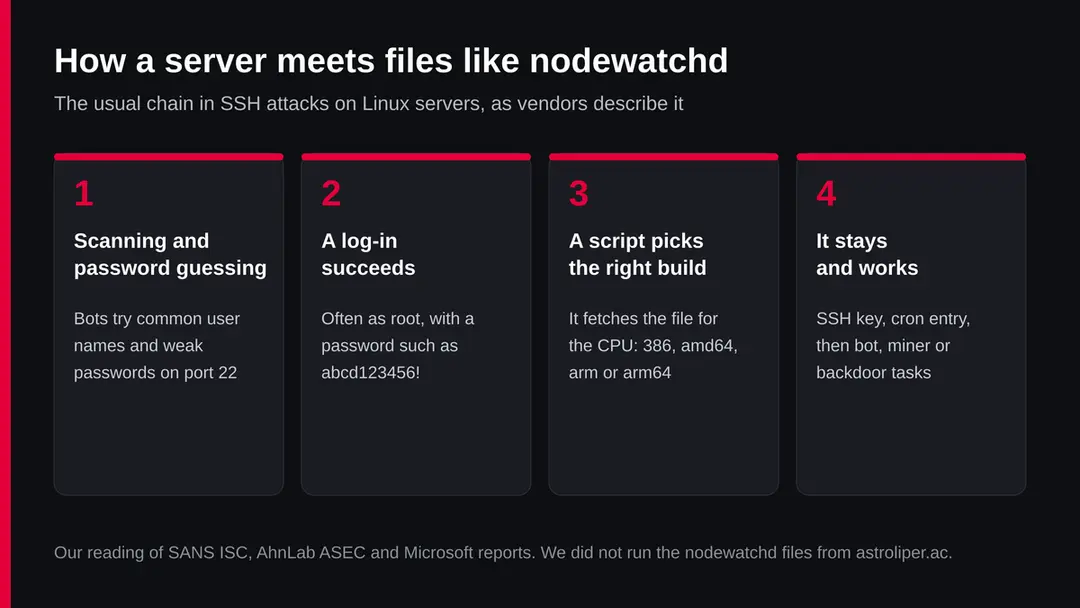
We did not see how nodewatchd reached any machine. The steps below are how researchers describe SSH botnets that hand out several builds of one program, which is exactly what the file names on this address show.
- 1
Guessing passwords on SSH
MITRE ATT&CK lists brute force (T1110) as guessing passwords again and again, spraying common passwords over many accounts, or trying passwords leaked elsewhere. Bots do this all day against every address with SSH open.
- 2
One weak login is enough
In a SANS Internet Storm Center diary from 13 June 2025, a honeypot was entered with the login root and the password abcd123456!. Within 15 seconds the attacker uploaded files, added their own SSH key and ran a clean-up script.
- 3
Checking the processor
The same diary describes the attacker running uname to see the system type, and four builds of one program (arm7, arm8, i686, x86_64) ready to go. The four nodewatchd builds fit that pattern.
- 4
Staying in
SANS saw the attacker's key written to ~/.ssh/authorized_keys and then locked with chattr +ai so it could not easily be removed. FortiGuard Labs describes RapperBot adding its key to authorized_keys, adding a root user called suhelper and an hourly cron job that puts it back.
- 5
Spreading
Elastic describes a detection rule for exactly this: one process on a Linux host making many outgoing SSH connections to outside addresses, which is what a machine does once it has become part of the botnet.
What astroliper.ac (nodewatchd, Linux SSH botnet files) can steal or download
What this can cost you
The risks apply to a Linux machine that fetched and ran nodewatchd. For a Windows PC that only saw the name in a log, the cost is nothing.
- High
Someone has a login on your machine
The files are fetched after a break in. Whoever got in can read your data, your databases and any keys and passwords stored on the machine.
- High
Your machine attacks others
Botnet machines scan and break into other servers. Your hosting provider may suspend the server and your address may land on block lists.
- Medium
Bills and slow service
Many SSH botnets mine cryptocurrency or send traffic, which costs CPU time, bandwidth and, on cloud machines, money. We do not know whether nodewatchd does this.
- Medium
Other machines that share keys
An SSH key or password that worked on this machine may open others. Treat every machine reachable with the same login as exposed.
- Low
Nothing, on Windows, Mac or a phone
ELF programs for Linux do not run there. A name in a log or a block list is not an infection.
What a Linux owner may notice
The signs below come from the research on SSH botnets. None is certain for nodewatchd, and a careful attacker leaves few.
| Sign | What the reports show |
|---|---|
| A process or file called nodewatchd | The file names on this address. The process name can be changed, so its absence proves nothing |
| A key in authorized_keys you did not add | SANS and Fortinet both describe attackers adding their own SSH key |
| authorized_keys you cannot edit | SANS saw chattr +ai used to lock the file; lsattr shows such flags |
| A new user or cron job | Fortinet describes a hidden root user and an hourly cron job |
| Many outgoing SSH connections | Elastic's rule looks for one process connecting to many outside addresses on SSH ports |
| High CPU, a hosting abuse notice | Common results of mining or scanning; our reading |
| Thousands of failed SSH logins in the log | The guessing that comes before a break in; normal on any open server, so it shows exposure, not infection |
How to check the PC for astroliper.ac (nodewatchd, Linux SSH botnet files)
Who meets astroliper.ac, and how
Nobody visits this address by hand. A script on a Linux machine asks for it after someone got in. Most people who search for the name met it in one of the ways below.
- 1
In a server log or a security alert
A Linux machine you run asked for the address. This is the case that matters: the machine was very likely entered first.
- 2
In a DNS or firewall block on a home network
A router, NAS or board on your network asked for it. Find which device it was; it is the one to check.
- 3
On a block list or in a threat feed
Security tools list the address because of the URLhaus reports. Seeing it there means nothing for your own machines.
- 4
On a Windows PC
These files cannot run on Windows. If a Windows PC asked for the address, a script or tool on it may be used to manage Linux machines; check what it is, but the infection risk is on the Linux side.
If you run a Linux machine: check before you delete anything
These checks are for a Linux server, VPS, NAS, router or board that asked for astroliper.ac. They change nothing. Write down what you find before you remove anything, and do them from a console or a login you trust.
If the machine matters (customer data, payments, other people's accounts), stop here and get help from your hosting provider or a professional: an attacker with root can hide from every command below.
- 1
Cut it off first
Elastic's response steps start with isolating the host from the network. On a cloud server, a firewall rule that allows only your own address is enough.
- 2
Look for the file and the process
Search for anything named nodewatchd, and look at running processes for names you do not know, high CPU or programs started from /tmp, /var/tmp or /dev/shm. SANS saw the files downloaded to /tmp.
- 3
Read authorized_keys
Open ~/.ssh/authorized_keys for root and every user and compare each key with the ones you added. Run lsattr on the file: an i or a flag you did not set is the lock SANS describes.
- 4
Look at users and scheduled jobs
Look in /etc/passwd for users you did not create, especially any with user ID 0, and in crontab -l for every user and /etc/cron* for jobs you do not know. Fortinet's example was a user called suhelper and an hourly cron job.
- 5
Read the SSH log
On Ubuntu, Ubuntu's documentation shows the SSH service log with journalctl -u ssh.service. Look for a successful login you did not make around 3 to 5 October 2026 or earlier.
- 6
Look at outgoing connections
Many outgoing connections on port 22 to outside addresses mean the machine is scanning for others, the pattern Elastic's rule looks for.
How to remove astroliper.ac (nodewatchd, Linux SSH botnet files)
How to remove astroliper.ac
A loader's job is to install other malware, so treat the PC as infected with more than one program until the scans are clean.
Step 1: Delete scheduled tasks that bring it back
Open Task Scheduler from the Start menu and click Task Scheduler Library. Select each task you do not recognise and read the Actions tab:
- a task that starts a file in
%AppData%or%Temp% - runs
powershellwith a long encoded line - opens a web address belongs to astroliper.ac or a similar program
Right-click such a task and choose Delete, and check the subfolders too. Leave tasks from Microsoft, your PC's maker and programs you use. Task Scheduler is the same in Windows 11 and Windows 10.

Windows 11: Task Scheduler Library, the task selected, the Actions tab shows the file it runs. Full procedure with screenshots: Remove what malware leaves behind in Windows
- a task that starts a file in
Step 2: Remove it from startup
Whatever astroliper.ac installed usually starts with Windows. Open Task Manager with Ctrl + Shift + Esc, go to Startup apps in Windows 11 or the Startup tab in Windows 10, and disable what you do not know, starting with entries that have an empty Publisher column.
Open file location on the right-click menu shows the file, which helps you decide and tells you what to delete later. Disabling is safe: if something you need stops working, switch it back on.
Full procedure with screenshots: Stop apps from opening at startup On uGetFix
Step 3: Delete the folders left behind
What the uninstaller leaves behind is usually in the user folders. Open File Explorer, switch on View > Show > Hidden items (in Windows 10 View > Hidden items), and go through
%LocalAppData%,%AppData%, %ProgramData% and the two Program Files folders.Sort by Date modified and delete folders that appeared together with the problem and belong to no program you use. Folders with random names that hold
.exe,.dll, .js or .ps1 files are the strongest sign.Full procedure with screenshots: Remove what malware leaves behind in Windows
Step 4: Scan the PC, then run the offline scan
Open Windows Security > Virus & threat protection > Scan options, run a Full scan and remove everything it finds. Then select Microsoft Defender Antivirus (offline scan) and click Scan now: the PC restarts and scans before Windows loads, which finds files that hide while Windows runs.
Save your work first, because the offline scan takes about 15 minutes. Both scans are built into Windows 11 and Windows 10, and a second scanner from another vendor is a useful extra opinion.

Windows 11: Windows Security > Virus & threat protection > Scan options. Full procedure with screenshots: Run a Microsoft Defender Offline scan
Step 5: Change passwords from another device and sign out other sessions
Assume that the passwords saved in this PC's browsers, and the accounts that were open in them, are known to the attacker. From a phone or a clean computer, change the e-mail password first, then banking, shopping, social and gaming accounts.
Use each service's option to sign out of all other sessions, because stolen cookies keep a session open even after a password change. Turn on two-step verification on each account. Wait with the infected Windows 11 or Windows 10 PC until the scans are clean.
Full procedure with screenshots: Turn on two-step verification / secure a hacked account
If you use Windows, a Mac or a phone
The files on astroliper.ac are Linux programs. Nothing we read says they affect anything else.
| Your device | What we know | What to do |
|---|---|---|
| Windows PC | ELF programs do not run on Windows | Nothing to remove for this threat. If you saw the name on this PC, find what asked for it. The Windows plan on this page is the general check for that case |
| Mac | ELF programs do not run on macOS | Nothing to remove |
| iPhone or Android | Not affected by these files | Nothing to remove |
| Router, NAS, board on your network | These can run Linux on arm or arm64 and often have SSH or a web login | Change the default password, update the firmware, turn off remote access you do not use |
After removal: passwords, accounts and prevention
If a Linux machine ran it: clean, rebuild and close the door
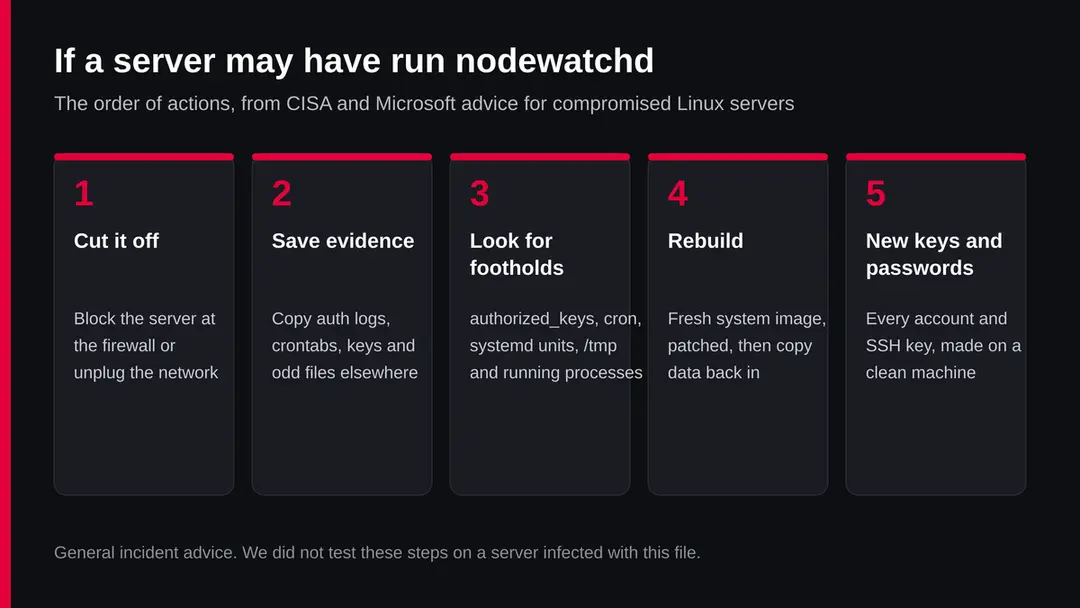
A machine that someone logged in to as root cannot be fully trusted again. The safe answer is to rebuild it and change every secret it held. Do it in this order.
- 1
Keep a copy of what you found
Save the log lines, the unknown keys and the cron entries. Your hosting provider or a professional will ask for them.
- 2
Change every password and key from a clean device
Elastic says to reset credentials for any account that may have been targeted. That includes SSH passwords, database passwords, API keys and cloud keys stored on the machine. Create new SSH keys; Ubuntu recommends ssh-keygen -t ed25519.
- 3
Rebuild rather than repair
Install a fresh system from a clean image and restore your data, not programs or scripts, from a backup made before the break in. SANS recommends offline backups for exactly this.
- 4
Turn off password logins on SSH
SANS and Fortinet both say to disable password authentication. In /etc/ssh/sshd_config or a file in /etc/ssh/sshd_config.d/ set PasswordAuthentication no, test the file with sudo sshd -t, then restart with sudo systemctl restart ssh.service, as Ubuntu's documentation shows. Keep a second session open while you test, so you do not lock yourself out.
- 5
Patch and watch
Apply updates, as Elastic advises, and watch outgoing traffic for a while. Watch authorized_keys for changes, as SANS recommends.
- 6
Check the rest of the network
Any machine that shared a password or key with this one is in question too.
How to keep SSH bots out
SSH botnets live on weak passwords. Closing that door stops the whole chain this page describes.
Do
- Log in with SSH keys and set PasswordAuthentication no
- Change every default password on routers, NAS boxes and boards
- Keep the system and firmware updated
- Allow SSH only from addresses you use, or put it behind a VPN
- Watch authorized_keys and the SSH log for changes
Don't
- Leave root login with a password open to the internet
- Reuse one password on several servers
- Leave a test server or old board online and forgotten
- Trust a machine again after deleting one file
Questions about astroliper.ac (nodewatchd, Linux SSH botnet files)
What is astroliper.ac?
It is a web address that URLhaus lists four times, on 3 and 5 October 2026, for a Linux program called nodewatchd built for amd64, arm64, arm and 386 processors and tagged elf and ssh.
It is a file server for SSH botnets, not a site for people. All four files were offline on 6 October 2026. We did not download them, so what nodewatchd does is not confirmed.
What is nodewatchd?
We found no public analysis of it. The name sounds like a monitoring service, the four builds cover the common processor types, and the files sit in a folder called agent, which together fit a botnet program that is put on Linux machines after an SSH break in.
That is our reading. Its exact functions are not known to us.
Can astroliper.ac infect my Windows PC?
No. The files are ELF programs, the format Linux uses, and they do not run on Windows, macOS, iPhone or Android. If a Windows PC asked for the address, look for the script or tool that did, but the infection risk is on Linux machines you manage. A name in a log or a block list is not an infection.
Is astroliper.ac safe to open?
No reason to open it. Our plain request on 6 October 2026 got 404 Not Found from Cloudflare, and the listed files were offline, but a quiet server clears nothing: botnet file servers move files and come back.
The danger rating rests on the URLhaus reports. There is nothing on it for a person to see anyway.
My Linux server contacted astroliper.ac. What should I do?
Isolate it, then check authorized_keys, users, cron jobs, /tmp and the SSH log before deleting anything. Change every password and key it held from a clean device.
Rebuild it from a clean image and restore only data from an older backup. Then turn off password logins for SSH. A server someone entered as root should not be trusted again after a simple clean up.
How did they get into my server?
In most SSH botnet cases it is a guessed or reused password. MITRE lists guessing, spraying and stuffing leaked passwords as the ways, and SANS documented a honeypot entered with root and the password abcd123456!. A vulnerable service is another route; we do not know which one applies to nodewatchd.
Why are there four files with different endings?
amd64, arm64, arm and 386 are processor types. Botnets check the processor of the machine they entered, for example with uname, and fetch the matching build.
SANS describes the same thing with four builds of the redtail program, and Fortinet describes RapperBot built for ARM, MIPS, SPARC and x86. The 386 build added on 5 October covers older 32 bit hardware.
Is my router or NAS at risk?
It can be, if it runs Linux on an ARM chip and has SSH or remote login open with a default or weak password. Change the default password, update the firmware and turn off remote access you do not use. If your router logs show it asked for this address, reset it to factory settings and set it up again.
Does a malware scan clear a Linux server?
No. A scan can find known files, but an attacker with root can hide files and processes, and the stolen passwords stay stolen. Treat a clean scan as one data point.
Rebuilding and changing every secret is the answer that does not depend on finding every piece. Ask your hosting provider for help if the server holds other people's data.
Will Fortect remove astroliper.ac?
Fortect scans Windows for malware and unwanted programs and repairs the system files and settings they change, and its free scan shows what it finds on your PC before you decide anything.
For astroliper.ac, follow the plan above as well: the browser steps take back permissions and settings that no scanner treats as a threat, and uninstalling the program that brought it removes the source.
Run Microsoft Defender's full scan and, if anything was found, its offline scan as a second opinion. If the symptoms are gone after the plan and both scans are clean, there is nothing more to do.
Sources
- SANS Internet Storm Center: Anatomy of a Linux SSH Honeypot Attack (diary 32024, 13 June 2025) (read October 6, 2026)
- FortiGuard Labs: So RapperBot, What Ya Bruting For? (RapperBot SSH botnet) (read October 6, 2026)
- Elastic Security: Potential Malware-Driven SSH Brute Force Attempt (detection rule) (read October 6, 2026)
- MITRE ATT&CK: Brute Force, T1110 (modified 12 May 2026) (read October 6, 2026)
- Ubuntu Server documentation: OpenSSH server (read October 6, 2026)
- Microsoft Support: Help protect my PC with Microsoft Defender Offline (read October 6, 2026)
- URLhaus (abuse.ch) entries for astroliper.ac, from the data held in our database (read October 6, 2026)