
chibomaydan.devs.surf: a download server for Mirai botnet programs aimed at routers and other Linux devices
chibomaydan.devs.surf is a web address that URLhaus lists 13 times on 3 October 2026 for Linux programs (ELF files) tagged mirai and botnetdomain, one file for each chip type that routers, cameras and small servers use.
It is not a website for people and not a program on your computer: it is a place that a script on an already broken device would call to fetch the botnet program that fits its chip. If you only saw the name in a log, nothing is proven, but the device that asked for it should be found, cut off the network and cleaned or reset.
Facts checked October 13, 2026. Removal steps tested on Windows 11 (26H2) and checked against Microsoft's and the browser makers' current documentation.
Automatic
Get a free scan and check if your PC is infected.
Fortect finds malware, unwanted programs and the Windows damage they leave behind, and repairs it in one pass.
Programs like a router, camera, server or script that downloads files from chibomaydan.devs.surf usually arrive in groups; a free scan lists the companions that are easy to miss.
Do it yourself · free Remove chibomaydan.devs.surf (Mirai botnet downloads) yourself 5 steps, about 15 minutes, no software needed.
Start the steps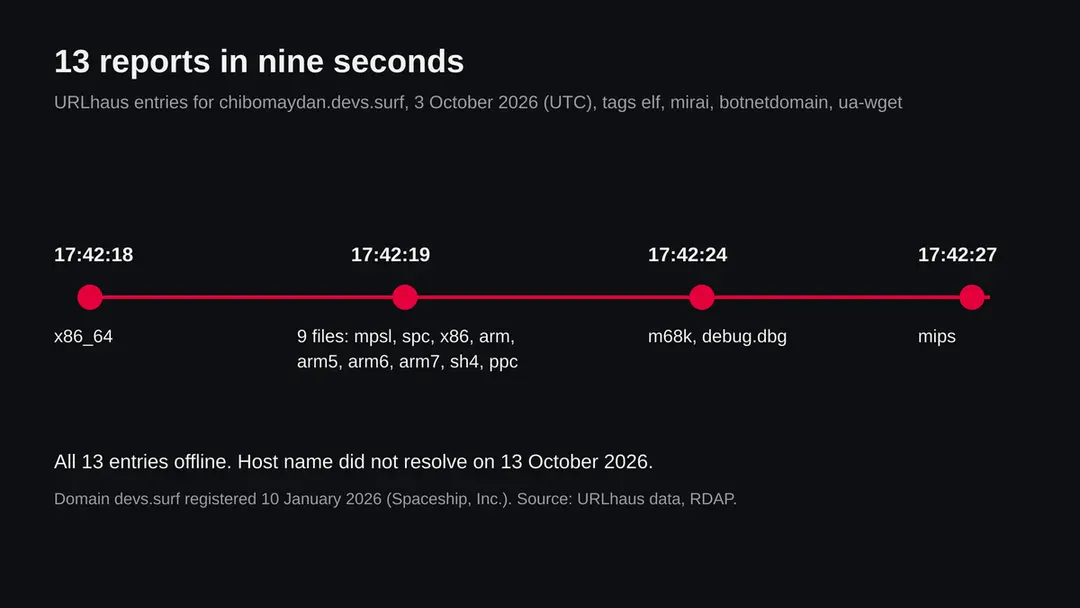
Chibomaydan.devs.surf (Mirai botnet downloads): summary
| Type | A malware download host: 13 Linux (ELF) programs tagged mirai and botnetdomain, one per chip type, for routers, cameras and servers |
|---|---|
| Risk | High for a router, camera or server that fetched the files. None for a PC that only saw the name, but the device that asked for it needs checking |
| Symptoms | Often none. Slowdowns, heavy outgoing traffic, restarts, changed settings and unknown processes or files in /tmp on a server |
| How to get rid of it | Find the device that asked, take it off the network, factory reset or rebuild, update firmware, set new passwords, close remote access |
| Our check (13 October 2026) | One plain request from our server: the host name did not resolve. A failed lookup clears nothing; the rating comes from 13 URLhaus reports |
| Running since / first seen | Domain devs.surf registered 10 January 2026; the 13 files reported 3 October 2026 |
| Removal | Scan the PC with security software to find and remove the malware and anything installed with it. Fortect scans Windows for malware and repairs the system files and settings it damaged. Remove it nowTo use the full-featured product, you have to purchase a license for Fortect. The scan is free. |
Show 9 more facts
| Platform | Linux based devices (routers, cameras, servers). Nothing we read says Windows, Mac or phones are affected |
|---|---|
| Detection names | No Microsoft name is known for these 13 files, because we did not open them. For Mirai in general Microsoft uses Backdoor:Linux/Mirai.A. URLhaus tags are elf, mirai, botnetdomain and ua-wget |
| Name | Chibomaydan.devs.surf |
| Domain registered | 10 January 2026 |
| Evidence | 13 write-ups by security sites; details still limited |
| First seen | 3 October 2026 |
| Distribution | Typically fake installers, cracked programs, e-mail attachments, fake "verify you are human" pages and ads for popular apps |
| Damage | Installs other malware, often several programs at once |
| Facts checked | 13 October 2026 |
Facts checked on 13 October 2026 against the URLhaus data for chibomaydan.devs.surf held in our database (we did not fetch the abuse.ch site), the RDAP record for devs.surf, one plain request from our server, Microsoft's entry for Backdoor:Linux/Mirai.A, and the search summaries of two published reports about Mirai variants.
We did not download the files and we infected no device; the cleaning steps are general good practice and were not tried on a live infection.
What chibomaydan.devs.surf is, and what we know about it
chibomaydan.devs.surf is not a program on your PC and not a page you are meant to visit. It is a web address that the abuse.ch project URLhaus lists as a place where malware was served. We found no public write-up of this one address, so this page rests on what URLhaus shows, what our own server saw, and what security vendors have published about Mirai botnets in general.
- 1
What URLhaus lists
Thirteen file addresses on chibomaydan.devs.surf, all on plain http with no port and all in the top folder of the host. Twelve are named after a processor type (mips, mpsl, arm, arm5, arm6, arm7, x86, x86_64, ppc, sh4, m68k, spc) and one is called debug.dbg. They were added on 3 October 2026 between 17:42:18 and 17:42:27 UTC, nine seconds in all, by one reporter. Every entry carries the threat label malware_download and was marked offline when we read the data.
- 2
What the tags mean
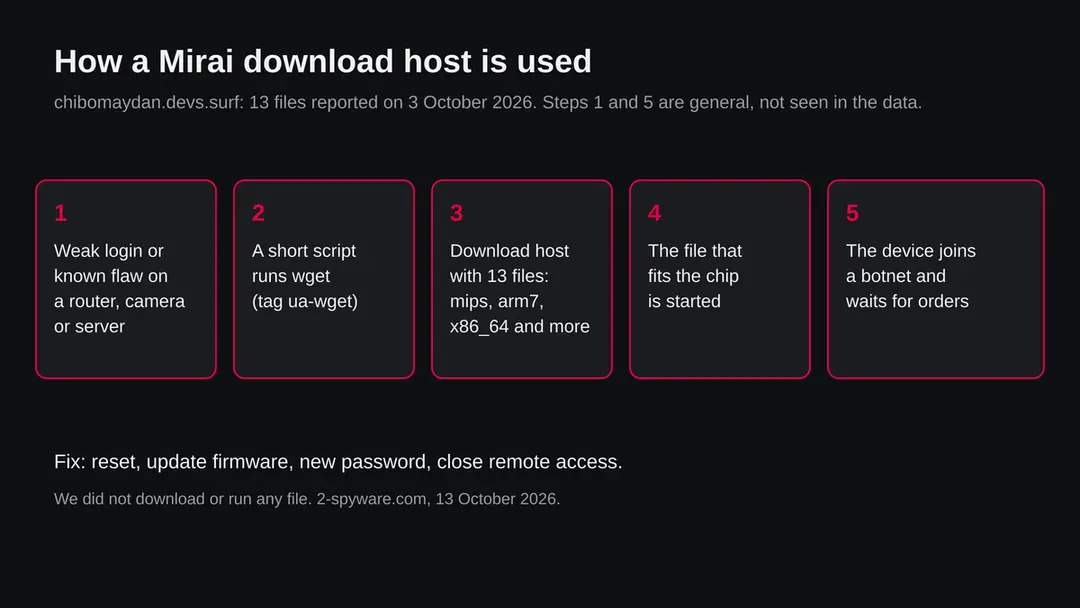
elf means the file is an ELF executable, the program format of Linux and similar systems, not of Windows. mirai names the Mirai family of botnet programs, which turn routers, cameras and other small connected devices into remote controlled machines. botnetdomain means the address is used by a botnet to hand out its files. ua-wget means the fetch that URLhaus recorded came from the command line tool wget, which is how a script on a Linux device downloads a file.
- 3
What the file names suggest
A Mirai style installer usually tries several downloads in turn and keeps the one that runs on the chip it finds. Twelve names, one per chip type, fit that pattern. Our reading, not a fact from a source: mpsl is the little endian MIPS build, spc is the SPARC build, and debug.dbg is a test or debug copy. We did not download any file, so we cannot tell you what is inside them.
- 4
What this means for you
If you only saw the name in a firewall, DNS or router log, you are not infected by that alone. The name does mean that some device on your network, or a server you run, asked for it, and a person does not normally do that by hand. That device is the one to find first.
- Kind of threat
- A host that handed out 13 Linux (ELF) programs tagged mirai and botnetdomain, one per chip type
- Which devices
- Linux based devices: home and office routers, IP cameras, recorders, small servers, some smart TVs. Not Windows PCs, not Mac, not iPhone
- Status when we looked
- All 13 entries offline in URLhaus; the host name did not resolve from our server on 13 October 2026
- Registration
- The registered domain devs.surf was created on 10 January 2026 at the registrar Spaceship, Inc.
- Not the same as
- A virus on a PC. The files are botnet programs for other kinds of devices
- What we do not know
- What the files contain, who runs the botnet, how many devices fetched them, and whether other hosts serve the same files
What chibomaydan.devs.surf (Mirai botnet downloads) does on an infected PC
What we checked on 13 October 2026, and what we could not
Our check was one plain request from our server, not a visit with a browser, and we downloaded nothing. The request failed at the first step: the name chibomaydan.devs.surf did not resolve to an address. That tells you the situation on one day, from one place, and it does not clear anything.
Our check, 13 October 2026
- The reports13 URLhaus entries for 13 files, all tagged elf and mirai, all added on 3 October 2026. That is the reason this page exists.
- Is it still onlineNo answer on 13 October 2026: the lookup of the host name failed (error ENOTFOUND). URLhaus also marks all 13 entries offline. A name that stops resolving usually means the entry was removed or the host was taken down, but a botnet can move the same files to a new name within minutes.
- RegistrationThe public record (RDAP) for devs.surf shows creation on 10 January 2026, registrar Spaceship, Inc., status client transfer prohibited. We do not know whether devs.surf is one owner's domain or a service that gives out sub names, so the record says nothing about who created the chibomaydan part.
- What the files doNot checked. We did not fetch or run any file. The tags are URLhaus's, not our analysis.
- A quiet testDoes not clear this address or any device that used it. Nothing on this one day, from one place, does not mean the files cannot come back or that no device was infected earlier.
Treat it as a malware address, offline today The rating rests on 13 reports that tag the files as Mirai. The failed lookup on 13 October 2026 is one data point. If a device of yours asked for this name, treat the device as taken over until you have cleaned or reset it.
The reports, second by second, and what changed since
All 13 reports arrived in a burst. A burst like that is typical of a sensor or a person who found a script, read the list of files in it and submitted every address at once. It shows when the files were seen, not when the server was set up.
10 January 2026
devs.surf is registered
The registry record for the domain devs.surf shows creation on this date at the registrar Spaceship, Inc. We cannot tell when the chibomaydan name was created under it.
3 October 2026, 17:42:18
First report: x86_64
URLhaus adds the build for 64 bit PC type processors first. The host is tagged botnetdomain, elf, mirai and ua-wget.
3 October 2026, 17:42:19
Nine more reports in one second
The files mpsl, spc, x86, arm, arm6, sh4, arm7, ppc and arm5 are added in the same second. They cover ARM, MIPS, SPARC, PowerPC, SuperH and 32 bit x86 chips.
3 October 2026, 17:42:24
m68k and debug.dbg
Two more files appear: m68k, an old Motorola chip family, and debug.dbg, a name that does not match any chip.
3 October 2026, 17:42:27
Last report: mips
The 13th file is added. All 13 entries carry the same four tags and the same reporter.
13 October 2026
Our check: no such host
A plain request from our server fails with ENOTFOUND, and URLhaus lists all entries as offline. No new reports have been added since 3 October 2026 in the data we hold.
The 13 files and the chips they are named after
One file per chip type is the signature of a botnet that wants to run on whatever it finds. The reading of each name below is ours from common usage, except where URLhaus gives a tag. We have not opened a single file.
| File name | Most likely chip family (our reading) | Where such chips are found |
|---|---|---|
| x86_64 | 64 bit Intel or AMD | Servers, virtual machines, some network boxes |
| x86 | 32 bit Intel or AMD | Older servers, thin clients, some appliances |
| arm, arm5, arm6, arm7 | ARM, several generations | Routers, cameras, TV boxes, Raspberry Pi type boards |
| mips | MIPS, big endian | Many home routers and access points |
| mpsl | MIPS, little endian (mipsel) | Many home routers and access points |
| ppc | PowerPC | Older network gear and set top boxes |
| sh4 | SuperH 4 | Older set top boxes and recorders |
| spc | SPARC | Older servers |
| m68k | Motorola 68000 family | Very old embedded devices |
| debug.dbg | Unclear | Possibly a test or debug copy; we cannot say |
What Mirai variants are known to do
We found no report on the files from this host, so we cannot say which Mirai variant they belong to. What is published for other Mirai variants shows the range, and it explains why the tag matters.
| Variant or report | What it shows | Source |
|---|---|---|
| ECHOBOT | A Mirai variant that bundled many public exploits for routers and other devices, including D-Link, MiCasaVerde Veralite, Realtek SDK based devices, ZyXEL, Dasan GPON and Huawei HG532 | Trend Micro |
| A variant with nine exploits | A Mirai version that attacked flaws in IP cameras, smart TVs and routers, among them a Comtrend router flaw (CVE-2020-10173); the other seven flaws were already used by other malware | Dark Reading |
| This host | Thirteen files tagged mirai; no technical report found, so no list of exploits or targets | URLhaus data |
From these reports the useful point is the way in: a device is taken over because it has a known, unpatched flaw, and the botnet programs are then fetched by a short script. Sources for the weak password route, which is also widely documented, are not among the pages we read for this guide, so we state it as general background and not as a finding about this host.
What chibomaydan.devs.surf (Mirai botnet downloads) can steal or download
What a taken over device can cost you
We found no report on the files of this host. These are the risks that follow in general for a router, camera or server that fetched a file from this host, shown by how likely they are.
- High
Your device attacks other people
A Mirai style bot waits for orders and can be used to flood other sites with traffic. Your connection is slower, and your address may be blocked or blamed.
- High
A router that is not yours any more
If the router was taken over, the person in control sits between you and the internet. We found no report that this host's files change DNS settings, so we do not claim that, but a router that fetched botnet code cannot be trusted.
- Medium
Slowdowns and drops
Heavy outgoing traffic, overheating and restarts are the usual signs on small devices. They also have ordinary causes.
- Medium
The way in stays open
The flaw or password that let the first script in is still there after you delete a file. A cleaned device that is not fixed is infected again, often within hours.
- Low
If you only saw the name
A blocked request in a log is the firewall doing its job. The risk is the device that sent it.
Who can meet this address, and how it shows up
People rarely meet a download host of this kind in a browser. They meet it in a log, a security alert or a notice from a provider.
| Who you are | What you may have seen | What it means |
|---|---|---|
| Home user | A DNS filter, router log or security app blocked chibomaydan.devs.surf | Some device on the network, probably a router, camera or smart device, asked for it. Find which one |
| Owner of a small server or VPS | A line with wget or curl and this name in a shell history, a cron job or a web log | Someone ran a script on the server. Treat the server as taken over and rebuild it |
| Owner of a website or a container | A strange file or a process you did not start, fetched by a web app flaw | The site or the container was used to run a download. Patch the flaw and rebuild |
| Security analyst | The name in a feed or an alert | Use the 13 file names as indicators and check which of your devices asked for them |
| Windows or Mac user | A warning that names the address | The files are not for your system. Check the router and other devices, not your PC alone |
How to check the PC for chibomaydan.devs.surf (Mirai botnet downloads)
The goal is to name one device. The steps below are general and need no special tools. Menu names differ by maker, so look for the closest match in your own device.
- 1
Write down where you saw the name
Note the log or alert, the time and the device or address that made the request. A DNS log or firewall log normally shows the internal address of the device that asked. If the name came from a provider's notice, ask them which address and which time.
- 2
Map the address to a device
In your router's page, open the list of connected devices or the DHCP lease list and match the internal address to a name or a hardware (MAC) address. If the address is the router itself, treat the router as the suspect.
- 3
Look for the signs on the router
Open the router's admin page and check whether remote management from the internet is switched on, whether there are port forwards you did not make, and whether the DNS servers are ones you set. Compare the firmware version with the maker's latest.
- 4
Look at the device that asked
For a camera or recorder, look for a changed password, a changed time or an unfamiliar user. For a server, run
last, checkcrontab -lfor each user, look in/tmpand/var/tmpfor files you did not create, and runss -tupnto see which programs hold network connections. - 5
Check the web logs on a server
Search the access and error logs of the website for requests around the time that contain wget, curl, sh or a long string of encoded characters. This shows the page or program flaw that was used.
- 6
Do not trust a quiet result
A device can run a bot with no sign you can see. If the name was asked for and you cannot explain why, go on to the cleaning steps.
How to remove chibomaydan.devs.surf (Mirai botnet downloads)
How to remove chibomaydan.devs.surf
A loader's job is to install other malware, so treat the PC as infected with more than one program until the scans are clean.
Step 1: Delete scheduled tasks that bring it back
Programs like chibomaydan.devs.surf add a scheduled task so they return after an uninstall or reopen a page at every sign-in. Start Task Scheduler, open Task Scheduler Library and sort by Last Run Time to see what ran recently.
On the Actions tab, a program in a user folder, a script or a web address is a warning sign; right-click such a task and choose Delete.
Tasks with names copying Google, Edge or Windows updaters but pointing to an odd folder are typical. The tool looks the same in Windows 11 and Windows 10.

Windows 11: Task Scheduler Library, the task selected, the Actions tab shows the file it runs. Full procedure with screenshots: Remove what malware leaves behind in Windows
Step 2: Remove it from startup
Press Ctrl + Shift + Esc to open Task Manager and select Startup apps (Windows 11) or the Startup tab (Windows 10). Disable entries you do not recognise, especially ones with no publisher or with a name that copies a Windows component.
Right-click an entry and choose Open file location to see where it runs from: programs in
%AppData%or%Temp%deserve a closer look. Some entries are not listed there but in the registry Run keys, which the procedure below shows how to check.Full procedure with screenshots: Stop apps from opening at startup On uGetFix
Step 3: Delete the folders left behind
Uninstalling often leaves the program's folders, and some threats reinstall themselves from them.
Press Windows + R, type
%LocalAppData%and press Enter, then do the same for%AppData%and %ProgramData%, and look for folders named after chibomaydan.devs.surf, its publisher or created on the day the problem started. Delete those folders, and check C:\Program Files and C:\Program Files (x86) too.If Windows says a file is in use, end it in Task Manager or delete the folder after a restart in Safe Mode. The folders are the same in Windows 11 and Windows 10.
Full procedure with screenshots: Remove what malware leaves behind in Windows
Step 4: Scan the PC, then run the offline scan
A scan finds the parts of chibomaydan.devs.surf that the manual steps cannot see. In Windows Security > Virus & threat protection > Scan options, start a Full scan and quarantine what it reports.
Follow it with Microsoft Defender Antivirus (offline scan) > Scan now, which restarts the PC and checks the disk while Windows and the malware are not running.
It takes about 15 minutes and works the same in Windows 11 and Windows 10. If either scan finds something, run the full scan again after removal until it comes back clean.

Windows 11: Windows Security > Virus & threat protection > Scan options. Full procedure with screenshots: Run a Microsoft Defender Offline scan
Step 5: Change passwords from another device and sign out other sessions
Chibomaydan.devs.surf can copy saved passwords, cookies and session tokens and send them out in seconds, so cleaning the PC does not undo the theft.
Change your passwords on a device that was never infected, starting with the e-mail account, since every other reset goes through it. On each account, end all other sessions and check the recovery e-mail, phone number and forwarding rules.
Then turn on two-step verification. Sign in on the Windows 11 or Windows 10 PC again only after the offline scan is clean.
Full procedure with screenshots: Turn on two-step verification / secure a hacked account
Clean the device, then close the way in
We did not run these steps against a live infection. They are general good practice for taken over routers and Linux devices and are not tested for the files of this host.
- 1
Take the device off the network
Unplug the cable or switch off Wi-Fi on the suspect device. For a router, do the next steps with a computer connected by cable and the internet cable unplugged where possible.
- 2
Reset to factory settings
On a router, camera or recorder the most reliable fix is a factory reset with the maker's method (usually a reset button held for several seconds). Mirai style bots normally live in memory, so a restart alone may remove them, but a restart does not close the way in.
- 3
Update the firmware before you connect again
Download the newest firmware from the maker's own site and install it. If the maker no longer provides updates for the model, replace the device; a device without updates cannot be made safe.
- 4
Set new passwords
Set a long, unique admin password for the device and for any Wi-Fi network. Never keep the factory login. Turn off remote management from the internet, Telnet and UPnP unless you need them.
- 5
Rebuild a server
For a server or a VPS the safe way is a fresh install from a clean image, then restoring only data. Change every password and key that was on it, and patch the flaw that let the script in before it goes online.
- 6
Check the rest of the network
Other devices on the same network may have been scanned or taken over. Repeat the check for every camera, recorder and smart device, and watch the router log for the name again.
- 7
Change passwords on your accounts
If a router was taken over, change the passwords of your important accounts from a device on a different network, email first, and turn on two step sign in.
If your own website or server was used
A download host is often somebody's hacked site or a rented server. If this address or a link to it was found on something you run, this is what to do.
- 1
Find how it got there
Look at the web server and application logs for the time of the first report, 3 October 2026. Look for a new account, a new file in the web folder, an outdated plugin or an open admin page.
- 2
Remove and rebuild
Take the site offline, restore from a backup made before the first sign, update everything and change all passwords and keys. If you cannot show the backup is clean, rebuild from a fresh install.
- 3
Ask for a review
When the files are gone and the flaw is closed, tell your host and the abuse team of the listing service so the entry can be reviewed. We do not know the review process of every service, so ask each one directly.
- 4
Report the abuse
If you only found the files and the host is not yours, report the address to the host's abuse contact and to the security authority of your country. The contact for devs.surf at the registrar is the place to start because we do not know who runs the sub name.
What is still unknown
Saying plainly what we do not know matters more here than a long list of guesses.
Do
- We know that 13 files were reported, all tagged mirai and elf, within nine seconds on 3 October 2026.
- We know that all were offline in URLhaus and that the name did not resolve from our server on 13 October 2026.
- We know that the domain devs.surf was created on 10 January 2026 at Spaceship, Inc.
Don't
- We do not know what the files do, because we did not fetch them.
- We do not know who runs the host, how many devices fetched files or whether the files are on other names now.
- We do not know whether devs.surf is one person's domain or a shared service, so we say nothing about its owner.
After removal: passwords, accounts and prevention
Most steps are free and take a few minutes. They matter most for devices that face the internet.
Do
- Change the factory admin password on every router, camera and recorder the day you install it.
- Install firmware updates, and replace devices that no longer get them.
- Turn off remote management, Telnet and UPnP on the router unless you need them.
- Put cameras and smart devices on a guest or separate network.
- On servers, keep software updated, use keys instead of passwords for SSH, and watch for outgoing wget or curl calls that you did not set up.
- Use a DNS filter that blocks known malware names, and look at its log once a month.
Don't
- Do not leave a device with a factory password reachable from the internet.
- Do not open ports on the router for a camera without a firewall rule and a strong login.
- Do not trust a device that cannot be updated.
- Do not run a script from a stranger on a server.
- Do not rely on one quiet scan or one restart as proof of a clean device.
Questions about chibomaydan.devs.surf (Mirai botnet downloads)
What is chibomaydan.devs.surf?
It is a web address that URLhaus, the malware tracking project run by abuse.ch, lists 13 times for Linux program files tagged mirai, elf and botnetdomain. The files are named after processor types such as mips, arm7 and x86_64, and they were reported within nine seconds on 3 October 2026.
It is not a program on your computer and not a site anyone is meant to visit. We did not download the files, so what they contain is not confirmed by us.
Is chibomaydan.devs.surf safe to open?
No. Do not request files from it and do not run anything that does. When we sent one plain request on 13 October 2026 the name did not resolve, and URLhaus marks all 13 entries offline.
That proves nothing about tomorrow: a botnet can bring the same files back under a new name quickly. The rating comes from the 13 reports and their tags, not from a look at a page.
What does Mirai mean in the URLhaus tags?
Mirai is the name of a family of botnet programs that take over routers, cameras and other small connected devices and use them as a group, a botnet, for attacks on other sites. URLhaus uses the tag when the file looks like one of these programs.
We found no report on the files of this host, so we cannot say which variant they are. Published write-ups of other variants, such as ECHOBOT, show that they spread by exploiting known flaws in devices.
I saw chibomaydan.devs.surf in my router or DNS log. Am I infected?
Not necessarily, and the name alone proves nothing. A blocked request may be your filter working. It does mean that a device on your network asked for the name, and a person does not do that by hand.
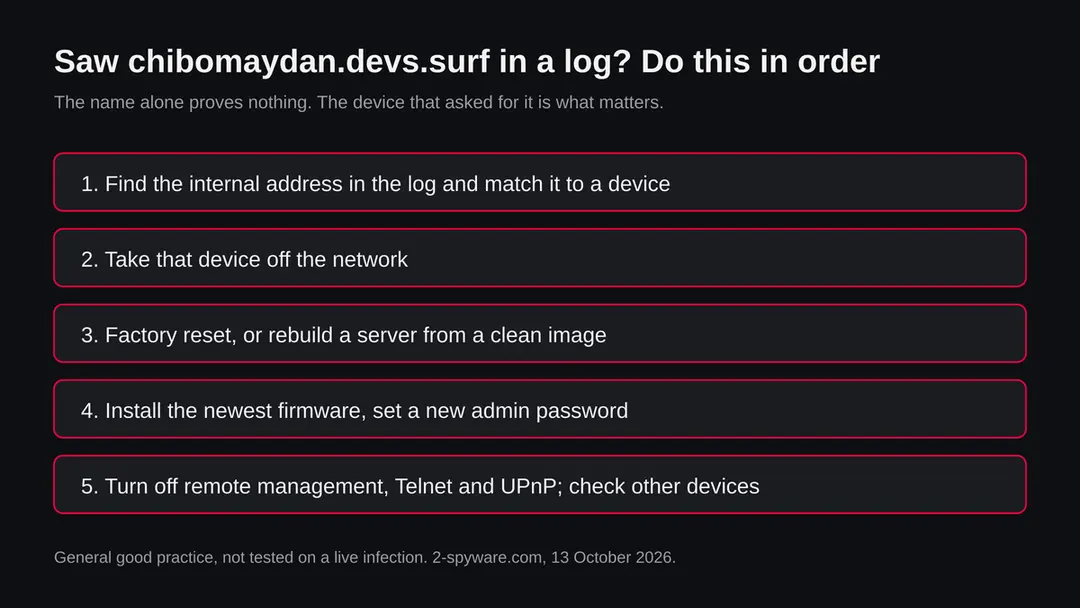
Find the internal address in the log, match it to a device in the router's list, take that device off the network and run the check and cleaning steps on this page. If the address is the router, reset and update it.
Does this affect Windows, Mac, iPhone or Android?
We found nothing that says so. The files are tagged elf, the program format of Linux, and their names are chip types used in routers and embedded devices. A Windows PC or a Mac cannot run them.
Android is built on Linux, but nothing we read ties these files to phones. If a router at home was taken over, though, every device behind it is affected indirectly, so check the router and change important passwords.
How do I remove Mirai from a router?
Take the router off the internet, reset it to factory settings with the maker's method, install the newest firmware from the maker's own site, and set a new long admin password before reconnecting. Turn off remote management, Telnet and UPnP unless you need them.
If the maker no longer issues updates for the model, replace it, because the flaw that let the bot in will still be there. We followed general good practice and did not test the steps on an infected router.
What if the address was on my own server or website?
Treat the server as taken over. Look at the logs around 3 October 2026 for the first sign, such as a new account, a new file or a request containing wget or curl.
Restore from a backup made before that, or better rebuild from a fresh install, update everything, change every password and key, and close the flaw. Then tell your host. Cleaning the files without closing the flaw only invites the next script.
Who runs chibomaydan.devs.surf?
We do not know. The public record for the domain devs.surf shows creation on 10 January 2026 at the registrar Spaceship, Inc., with the status client transfer prohibited.
We cannot tell whether devs.surf belongs to one owner or hands out sub names to many, so the record says nothing about who created the chibomaydan part. We name no person or company. If you need to report it, start with the abuse contact of the registrar.
Why is it offline, and is the problem over?
URLhaus marks all 13 entries offline and our request on 13 October 2026 found no such host. That fits a takedown, a deleted record or a host that moved, but we cannot tell which. It is not proof that the threat is over.
A device that fetched a file earlier can still run it, and the same files may be offered from another name. Check the devices that asked for the name, whatever the state of the host is now.
Will Fortect remove chibomaydan.devs.surf?
Fortect scans Windows for malware and unwanted programs and repairs the system files and settings they change, and its free scan shows what it finds on your PC before you decide anything.
For chibomaydan.devs.surf, follow the plan above as well: the browser steps take back permissions and settings that no scanner treats as a threat, and uninstalling the program that brought it removes the source.
Run Microsoft Defender's full scan and, if anything was found, its offline scan as a second opinion. If the symptoms are gone after the plan and both scans are clean, there is nothing more to do.
Sources
- URLhaus (abuse.ch): reported URLs for chibomaydan.devs.surf, 13 entries of 3 October 2026, from the data held in our database (read October 13, 2026)
- RDAP registration record for devs.surf (created 10 January 2026, registrar Spaceship, Inc.) (read October 13, 2026)
- Trend Micro: Mirai Variant Spotted Using Multiple Exploits, Targets Various Routers (ECHOBOT) (read October 13, 2026)
- Dark Reading: New Mirai Variant Surfaces with Exploits for 9 Vulnerabilities Products (read October 13, 2026)
- Microsoft Security Intelligence: Backdoor:Linux/Mirai.A (published 19 October 2016, updated 15 September 2017) (read October 13, 2026)