
csgroup.host: a download address reported for Mozi, the router and camera botnet, and what to do if a device asked for it
csgroup.host is a web address that URLhaus lists 12 times between 13 and 15 October 2026 as a place that served malware, and six of those entries are tagged Mozi, mips and elf:
- a small Linux program for routers
- cameras and video recorders
- not for a PC
The domain was registered on 11 October 2026, all 12 entries are marked offline, and the name did not resolve from our server on 17 October. If you only saw the name in a log, nothing is proven; if a router, DVR or camera on your network asked for it, treat that device as taken over, reset it, update its firmware and change its password.
Facts checked October 17, 2026. Removal steps tested on Windows 11 (26H2) and checked against Microsoft's and the browser makers' current documentation.
Automatic
Get a free scan and check if your PC is infected.
Fortect finds malware, unwanted programs and the Windows damage they leave behind, and repairs it in one pass.
Programs like a router, camera, DVR or other Linux device that downloads files from csgroup.host usually arrive in groups; a free scan lists the companions that are easy to miss.
Do it yourself · free Remove csgroup.host (Mozi, MIPS ELF files) yourself 5 steps, about 15 minutes, no software needed.
Start the steps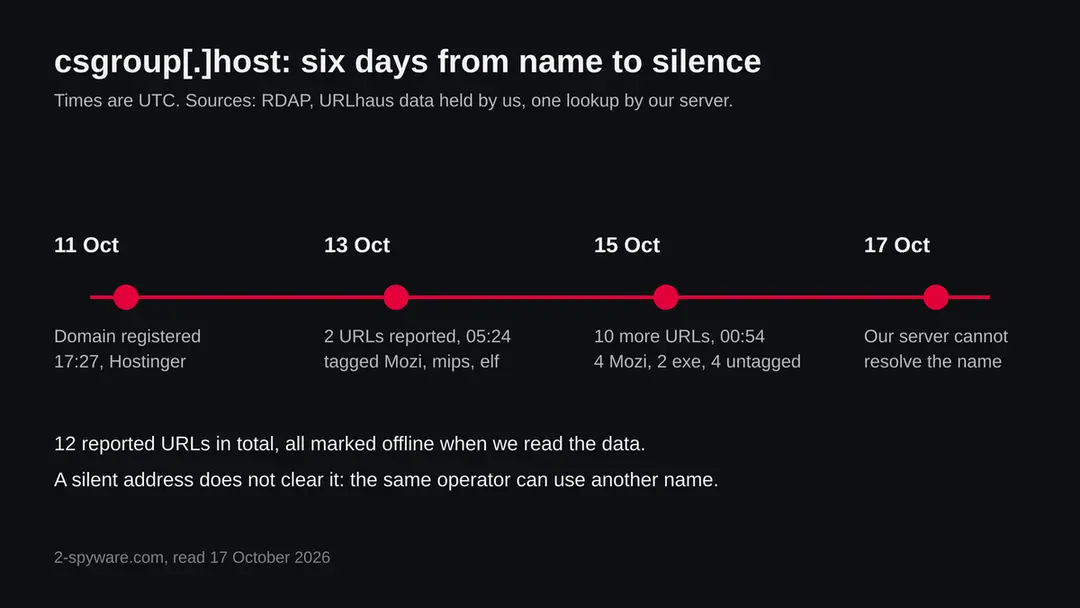
Csgroup.host (Mozi, MIPS ELF files): summary
| Type | A malware download address: URLhaus lists 12 entries, six tagged Mozi, mips and elf (a botnet for routers, cameras and recorders), two tagged exe, four untagged |
|---|---|
| Risk | High for a router, DVR or camera that fetched its files: it may be used in attacks and may alter your traffic. Low if you only saw the name |
| Symptoms | Often none. A slow or restarting device, telnet that stopped working, or odd pages on plain http are the signs in the reports |
| How to get rid of it | Disconnect the device, factory reset it, install the newest firmware, set a new password, turn off remote access, and replace it if it gets no updates |
| Our check (17 October 2026) | One plain request from our server: the name did not resolve. That clears nothing; the danger rating comes from URLhaus |
| Running since / first seen | Domain registered 11 October 2026; first entries reported 13 October 2026 |
| Removal | Scan the PC with security software to find and remove the malware and anything installed with it. Fortect scans Windows for malware and repairs the system files and settings it damaged. Remove it nowTo use the full-featured product, you have to purchase a license for Fortect. The scan is free. |
Show 9 more facts
| Platform | MIPS Linux devices such as routers and cameras. Nothing we read says phones or computers are affected by the Mozi files |
|---|---|
| Detection names | No Microsoft detection name is known for the files on this address, because we did not open them. Microsoft's Mozi blog post does not list a detection name |
| Name | Csgroup.host |
| Domain registered | 11 October 2026 |
| Evidence | 12 write-ups by security sites; details still limited |
| First seen | 13 October 2026 |
| Distribution | Typically fake installers, cracked programs, e-mail attachments, fake "verify you are human" pages and ads for popular apps |
| Damage | Installs other malware, often several programs at once |
| Facts checked | 17 October 2026 |
Facts checked on 17 October 2026 against the URLhaus data for csgroup.host held in our database (we did not open the abuse.ch site), RDAP read on 13 October 2026, one plain request from our server, and published reports by Netlab 360 and Microsoft, which we read in full.
The ESET, The Hacker News and Security Affairs entries were seen only as search result summaries, and we used from them only the points stated here. We did not download the files and we infected no device; the cleaning steps follow Microsoft's advice and common router practice and were not tried on a live infection.
What csgroup.host is, and what we know about it
csgroup.host is not a program on your computer. It is a web address that the abuse.ch project URLhaus lists as a place where malware files were offered for download. We found no public write-up of this one address, so what follows is what URLhaus shows, what our own lookups showed, and what Netlab 360 and Microsoft have published about Mozi, the malware family that half of the entries are tagged with.
- 1
What URLhaus lists
Twelve addresses on csgroup.host, all marked malware_download and all offline when we read the data. They come in pairs: each of six short codes (CbjJTwu7, qWYVS376, DrkJmzRN, 6fneq9D6, ZvUyHX8H and vQbdtAeK) appears once under /d/ and once under /f/. Two were added on 13 October 2026 and ten on 15 October 2026, within about 40 seconds of each other, which looks like one person or one script reporting a batch.
- 2
What the tags say
Six entries, the pairs CbjJTwu7, qWYVS376 and DrkJmzRN, carry the tags 32-bit, elf, mips and Mozi. One of them is tagged elft instead of elf, which looks like a typing slip by the reporter. Two entries (the pair vQbdtAeK) are tagged exe. Four entries (the pairs 6fneq9D6 and ZvUyHX8H) have no tags at all.
- 3
What we could not confirm
We did not download any file and the address no longer answers, so we cannot tell you what is inside any of them. The tags are the reporters' own labels, not a proof. We also do not know whether csgroup.host is a server built by the attacker, a hacked site, or a file sharing service that someone abused. The short codes in the paths look like the ones a file sharing or link shortening service hands out; that is our reading and nothing we confirmed.
- 4
What this means for you
If you only saw the name in a firewall log, a DNS filter or a warning, you are not infected by that alone. The risk is for a device that already had a way in and went to fetch one of these files. Normal visitors have no reason to request these paths.
- Kind of threat
- A download address for malware files; six of 12 entries are tagged Mozi, a peer to peer botnet that lives on routers, DVRs and cameras
- Where the files were
- hxxps://csgroup[.]host/d/<code> and hxxps://csgroup[.]host/f/<code>, six codes, each under both paths
- Domain registered
- 11 October 2026 at 17:27 UTC, registrar HOSTINGER operations, UAB; RDAP status client transfer prohibited and add period, read 13 October 2026
- URLhaus entries
- 12 addresses: 2 added on 13 October 2026, 10 on 15 October 2026; all 12 offline in our copy of the data
- Reporters
- Two names appear: an account called xxKLY (4 entries) and anonymous (8 entries)
- Platform
- MIPS Linux devices (routers, cameras, recorders). Two entries tagged exe point to a Windows style file, which we could not check
What csgroup.host (Mozi, MIPS ELF files) does on an infected PC
What we checked on 17 October 2026, and what we could not
Our check was a plain request from our server on 17 October 2026, and it never reached a website: the lookup failed with the error ENOTFOUND, which means the name did not resolve to any address. That is a fact about one moment. It does not tell you why, and it clears nothing.
Our check, 17 October 2026
- The name did not resolveOur server got ENOTFOUND for csgroup.host. The domain may have been suspended, the DNS records may have been removed, or the operator may have moved on. We cannot tell which, and a different network or a different day could give another answer.
- Why that is not a clean resultServers that hand out malware are often short lived and are replaced by another name when one is reported. A dead address today says nothing about the next one.
- Notification request, pop-ups, redirects, ad networksNone seen. There was nothing to see: no page loaded.
- URLhaus listingTwelve malware_download entries, six tagged Mozi, mips and elf, two tagged exe, four untagged. All offline in our copy of the data.
- Downloads and the files themselvesWe did not download any file and could not have: the address does not resolve. We cannot say what the files contain.
Dangerous: treat it as a malware address Our check was one plain request that failed, so it proves nothing either way. The danger rating comes from the URLhaus entries and their Mozi tags, not from our request. Do not request files from this address, and do not run anything that does.
What happened to csgroup.host, from registration to our check
This is a very young domain: the first report came two days after it was registered. The dates come from RDAP and from the URLhaus data we hold; times are UTC.
11 October 2026
The domain is registered
RDAP shows csgroup.host registered on 11 October 2026 at about 17:27 UTC through HOSTINGER operations, UAB. The status add period means it was still inside the first days after registration when we read it on 13 October.
13 October 2026
The first two addresses are reported
At about 05:24 UTC two addresses with the code CbjJTwu7, one under /d/ and one under /f/, are added. Both carry the tags 32-bit, elf, mips and Mozi, and the reporter is anonymous. Our RDAP lookup ran at about 07:26 UTC the same day.
15 October 2026
Ten more addresses in under a minute
Between about 00:54:06 and 00:54:27 UTC ten entries are added. Four are tagged Mozi (codes qWYVS376 and DrkJmzRN), two are tagged exe (vQbdtAeK) and four have no tags (6fneq9D6 and ZvUyHX8H). The reporters are xxKLY and anonymous.
17 October 2026
Our request finds no address
Our server cannot resolve csgroup.host. All twelve entries are marked offline. We do not know when the files went offline or whether the domain was taken down.
The life of csgroup.host in our data, from registration to the failed lookup. Dates are UTC.
What the pattern suggests, and what it does not: a new domain, two reports, then a batch of ten two days later, then silence, fits a short lived delivery address. That is our reading of the dates. No report says who runs it.
What Mozi is
Mozi is a botnet: a network of hijacked devices that take orders from nobody in particular, because the network has no central server. Netlab 360 named it after the file names Mozi.m and Mozi.a in samples it caught, and described it on 23 December 2019 after a first suspicious file on 3 September 2019.
| Question | What the sources say | Source |
|---|---|---|
| What is it? | A peer to peer botnet that reuses some code of the older Gafgyt botnet. Most antivirus engines first labelled the sample Gafgyt, but the authors concluded it was a new network | Netlab 360, 23 December 2019 |
| What does it run on? | Linux based internet of things devices. The sample Netlab analysed was a 32 bit ARM program; the entries on csgroup.host are tagged mips, a different processor family used in many routers and cameras | Netlab 360; URLhaus tags |
| How does it find victims? | It tries weak telnet passwords and known holes in router, DVR and camera software, then makes the new victim download the program | Netlab 360; Microsoft, 19 August 2021 |
| How is it controlled? | Through a DHT network, the same kind of peer to peer system that file sharing programs use, so its traffic hides among normal traffic. Commands are signed, and a bot accepts a configuration only if the signature checks out | Netlab 360 |
| What can it do? | Run denial of service attacks, report details of the device, download and run another program, update itself and run system commands | Netlab 360 |
| Can it read your traffic? | Microsoft found a module that runs where a device forwards traffic, as a router does. It can answer DNS questions with a false address and insert content into plain web pages | Microsoft |
| Is it still active? | ESET reports that activity fell sharply in India and China in August 2023 after a kill switch was sent to bots. Whether new Mozi files on csgroup.host are old copies, a rebuilt version or mislabelled files, we do not know | ESET, 1 November 2023 (seen as a search summary) |
| Which build is on csgroup.host? | Not known. URLhaus gives only the tags; we did not open the files | Not available |
How a device ends up fetching a file from an address like this
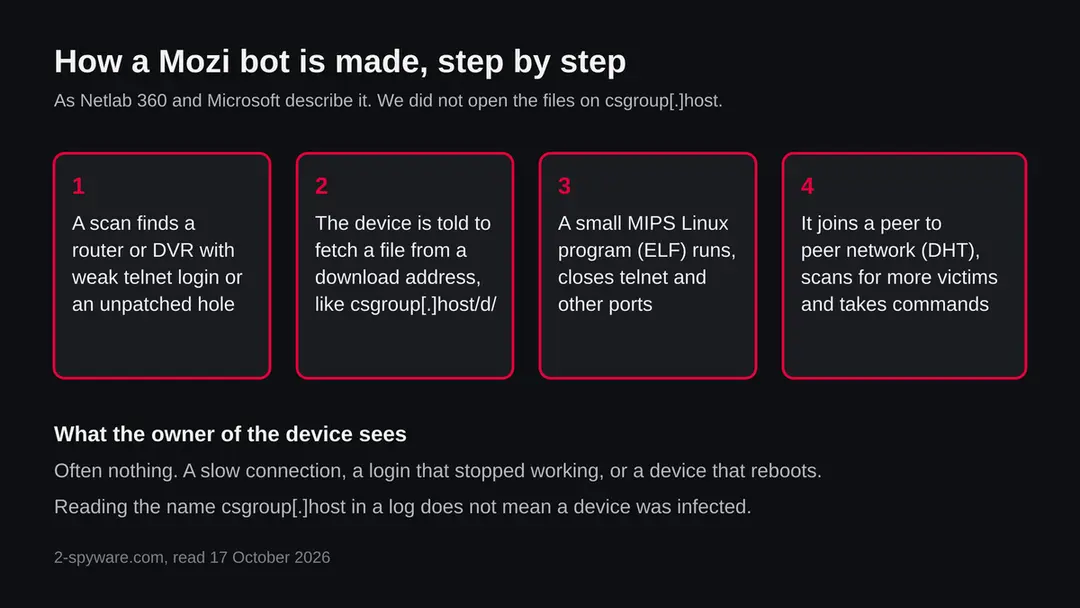
Nobody visits csgroup.host by hand. The request comes from a device that someone else already got into, or from a script that attackers run against a vulnerable device. The picture shows the steps vendors describe for Mozi; the first step on the victim, for this address, is not something we saw.
- 1
A device is found with an open door
Netlab describes bots that log in over telnet with weak passwords and writes a small downloader onto the device. Microsoft says Mozi also uses unpatched vulnerabilities. Netlab lists holes in Netgear, D-Link, Huawei HG532, GPON and Realtek based devices, and in some DVRs and cameras.
- 2
The device fetches the program
The downloader asks an address for the file. In Netlab's description the address can be another bot, or one named in the configuration. A site like csgroup.host, with files under /d/ and /f/, would fit this step, but we have no proof that it served this role.
- 3
The program shuts the door behind it
Netlab says the sample changes firewall rules to block some ports, including telnet and SSH, so other attackers cannot reuse the hole, and renames its process to sshd or dropbear. Microsoft lists blocked ports 23, 2323, 7547, 35000, 50023 and 58000.
- 4
It joins the network and keeps working
The bot talks to others over DHT, scans for more victims and waits for signed orders. Microsoft says it adds startup scripts on some Netgear, Huawei and ZTE gateways so it returns after a reboot. Not every device keeps it after a restart, and we do not know how these particular files behave.
The two entries tagged exe do not fit the picture above, because a Mozi file for a router is not an exe file. They may be a Windows program, a mislabelled file or something unrelated. We could not check, and no source we read covers it.
What csgroup.host (Mozi, MIPS ELF files) can steal or download
What Mozi can do to a device and to the network around it
The device is the target, but the person who owns it carries the cost. The list below is what the sources say Mozi can do, not what every infected device does.
Reported as possible
- Take part in denial of service attacks
- Report the device's address, port and gateway
- Download and run another program
- Update itself from a link
- Run system commands sent by a peer
- Answer DNS questions with a false address
- Insert content into plain web pages
- Close telnet and other ports
- Disable remote management on some gateways
| Ability | Detail | Source |
|---|---|---|
| Attacks on others | Commands in the configuration start HTTP, TCP and UDP floods, using code taken from Gafgyt | Netlab 360 |
| Extra programs | A command makes the bot download and run a file from a link, or replace itself with a newer copy | Netlab 360 |
| DNS spoofing | Where the device forwards traffic, it can answer matching DNS queries with an address chosen by the attacker, on UDP port 53 | Microsoft |
| Web page hijacking | It injects content into outgoing plain HTTP requests (port 80), with nine hijack types including redirects and script injection. Pages that use HTTPS are not affected by this module | Microsoft |
| Locking you out | On some ZTE and Huawei gateways it turns off remote management or points it to 127.0.0.1, which can block your provider's own tools | Microsoft |
What this can cost you
Seeing the name costs nothing. The risks below apply to a router, camera or recorder that a Mozi bot actually took over.
- High
A router you cannot trust
A router sits between every device at home and the internet. If it answers DNS questions with false addresses, a visit to a known site can land on a copy. Microsoft describes exactly this ability. Pages protected by HTTPS are safer, but a warning in your browser about a certificate on a familiar site should never be clicked away.
- High
Your device used to attack others
A bot can be told to join a flood against a third party. Your connection is the one that shows up in their logs, and your provider may cut you off if it notices.
- Medium
A slow, unstable connection
Scanning and attack traffic use the small processor and the upload speed of the device. Slowdowns and reboots are common on infected devices, though they also have many harmless causes.
- Medium
Loss of control of the device
Mozi closes telnet and other ports, and on some gateways changes the remote management settings. You may find that a login or a provider setting no longer works.
- Medium
More malware later
The bot can download and run any program its controller sends. What else it fetches is not visible from the outside.
- Low
Nothing, if you only saw the name
A name in a block list, a DNS report or a log is not an infection.
What you may notice, and what you may not
Botnet software is built to stay quiet on small devices that nobody looks at. The signs below follow from the sources; none is certain, and many owners notice nothing.
| Sign | What the reports show |
|---|---|
| The device is slow or restarts on its own | Scanning and attacks use the device's processor and upload bandwidth. Many other things cause the same, so this alone proves nothing |
| Telnet or other remote ports stopped working | Netlab and Microsoft both say the sample blocks telnet and other ports to keep out other attackers. If you used telnet on purpose, the change is a sign; if you never did, there is nothing to see |
| A process called sshd or dropbear that you did not start | Netlab says the sample renames itself like this. Only people who can open a shell on the device will see it |
| Strange web pages or wrong addresses on sites you know | Microsoft describes DNS spoofing and HTTP hijacking on infected routers. If a familiar site suddenly shows a different page or extra ads on plain http, check the router |
| Your provider's remote management stopped working | Microsoft describes Mozi disabling TR-069 on a ZTE gateway and changing the management server on a Huawei one |
| Nothing at all | A bot that only waits for orders may show no sign for months |
How to check the PC for csgroup.host (Mozi, MIPS ELF files)
Who can meet this, and who cannot
The people at risk are the owners of internet facing routers, network video recorders, IP cameras and similar small Linux devices. A phone, a Mac or a normal PC is not what these files are for, as far as the tags and sources show.
- 1
A device with a default or weak password
Netlab says Mozi starts with weak telnet passwords. A device whose admin login is still the one printed on the box, or one that any person on the internet can reach on telnet, is the easiest target.
- 2
A device with old firmware
Microsoft names unpatched vulnerabilities as the second route. Older routers, cameras and recorders often get no updates after a few years, so the hole stays open.
- 3
A device reachable from the internet
Remote management, port forwarding to a camera, or a recorder that shows its picture on the web all make a device easier to reach. Devices behind a router that has nothing forwarded are far harder to reach from outside.
- 4
A site owner whose server is being used
If csgroup.host was a hacked or abused hosting account, the real owner may not know. If you run a site and see odd files under short random paths, check who can upload to it and read your server logs. We do not know who runs this domain.
Check your device and network before you change anything
Start with the question that matters: which device on your network asked for csgroup.host, and what kind of device is it? If you saw the name in a router log, a DNS filter or a security alert, the alert normally names the device or its address. Only that device is in question. Do the checks below before you reset anything, and write down what you find.
No vendor publishes a removal procedure for these particular files and we did not infect a device. The order below is our judgement from Microsoft's advice and common router practice, not a tested result.
- 1
Find the device
Open the log or alert that showed the name and note the device address and the time. In your router's page, usually under a list of connected devices or DHCP clients, match the address to a name or a maker. A router or a camera that asked for a file is a very different case from a laptop that opened a link.
- 2
Note the model and the firmware version
Look at the label on the device and at the status page of its settings. Search the maker's support page for that model and see whether it still gets updates. A device that no longer gets any is a risk that a reset cannot fix.
- 3
Look at the admin login
Ask yourself whether the password was ever changed from the one on the box, and whether anyone else knows it. Do the same for any camera or recorder app. A default password is the usual way in, according to Netlab.
- 4
Look for remote access you did not set up
In the router settings, check whether remote management, telnet, SSH or port forwarding is on. Turn off anything you do not use. The exact menu differs by maker, so use the maker's support page for the path.
- 5
Check the DNS settings
In the router's internet settings, see which DNS servers are set. If you did not choose them and they are not your provider's, write them down and ask the provider. Microsoft says Mozi can spoof DNS answers at the router; a changed setting is not proof, and an unchanged one does not clear the router.
- 6
Check a PC that was involved
If the log came from a PC or a laptop rather than from a router, that is a different case from the one the Mozi tags point to. Run a full scan with the security program you already have, look at its detection history, and treat a detection there as the real lead.
- 7
A scan does not clear a router
Most home routers cannot be scanned by antivirus at all. Treat the absence of any sign the way you treat a quiet site test: one data point.
How to remove csgroup.host (Mozi, MIPS ELF files)
How to remove csgroup.host
A loader's job is to install other malware, so treat the PC as infected with more than one program until the scans are clean.
Step 1: Delete scheduled tasks that bring it back
Open Task Scheduler from the Start menu and click Task Scheduler Library. Select each task you do not recognise and read the Actions tab:
- a task that starts a file in
%AppData%or%Temp% - runs
powershellwith a long encoded line - opens a web address belongs to csgroup.host or a similar program
Right-click such a task and choose Delete, and check the subfolders too. Leave tasks from Microsoft, your PC's maker and programs you use. Task Scheduler is the same in Windows 11 and Windows 10.

Windows 11: Task Scheduler Library, the task selected, the Actions tab shows the file it runs. Full procedure with screenshots: Remove what malware leaves behind in Windows
- a task that starts a file in
Step 2: Remove it from startup
Whatever csgroup.host installed usually starts with Windows. Open Task Manager with Ctrl + Shift + Esc, go to Startup apps in Windows 11 or the Startup tab in Windows 10, and disable what you do not know, starting with entries that have an empty Publisher column.
Open file location on the right-click menu shows the file, which helps you decide and tells you what to delete later. Disabling is safe: if something you need stops working, switch it back on.
Full procedure with screenshots: Stop apps from opening at startup On uGetFix
Step 3: Delete the folders left behind
What the uninstaller leaves behind is usually in the user folders. Open File Explorer, switch on View > Show > Hidden items (in Windows 10 View > Hidden items), and go through
%LocalAppData%,%AppData%, %ProgramData% and the two Program Files folders.Sort by Date modified and delete folders that appeared together with the problem and belong to no program you use. Folders with random names that hold
.exe,.dll, .js or .ps1 files are the strongest sign.Full procedure with screenshots: Remove what malware leaves behind in Windows
Step 4: Scan the PC, then run the offline scan
Open Windows Security > Virus & threat protection > Scan options, run a Full scan and remove everything it finds. Then select Microsoft Defender Antivirus (offline scan) and click Scan now: the PC restarts and scans before Windows loads, which finds files that hide while Windows runs.
Save your work first, because the offline scan takes about 15 minutes. Both scans are built into Windows 11 and Windows 10, and a second scanner from another vendor is a useful extra opinion.

Windows 11: Windows Security > Virus & threat protection > Scan options. Full procedure with screenshots: Run a Microsoft Defender Offline scan
Step 5: Change passwords from another device and sign out other sessions
Assume that the passwords saved in this PC's browsers, and the accounts that were open in them, are known to the attacker. From a phone or a clean computer, change the e-mail password first, then banking, shopping, social and gaming accounts.
Use each service's option to sign out of all other sessions, because stolen cookies keep a session open even after a password change. Turn on two-step verification on each account. Wait with the infected Windows 11 or Windows 10 PC until the scans are clean.
Full procedure with screenshots: Turn on two-step verification / secure a hacked account
If you use a PC, a Mac, an iPhone or an Android phone
The tags and the sources we read describe a threat for small Linux devices, not for these. A phone or a computer that only connected through an infected router is not itself infected by Mozi.
| Your device | What we know | What to do |
|---|---|---|
| PC or Mac | The Mozi entries are tagged elf and mips, which are Linux files for routers and cameras, not programs for these systems. Two other entries are tagged exe, and we could not check them | Nothing to remove for the Mozi files. If you downloaded something from csgroup.host, scan it and do not run it |
| iPhone or iPad | No source describes Mozi on iOS | Nothing to remove for this threat. Watch for odd pages on plain http while on an infected router |
| Android | Android is Linux based, but the sources describe routers, DVRs and cameras and no source says Android phones are affected | Nothing to remove for this threat. Keep Play Protect on and update the phone |
After removal: passwords, accounts and prevention
How to clean a router, camera or recorder that may carry Mozi
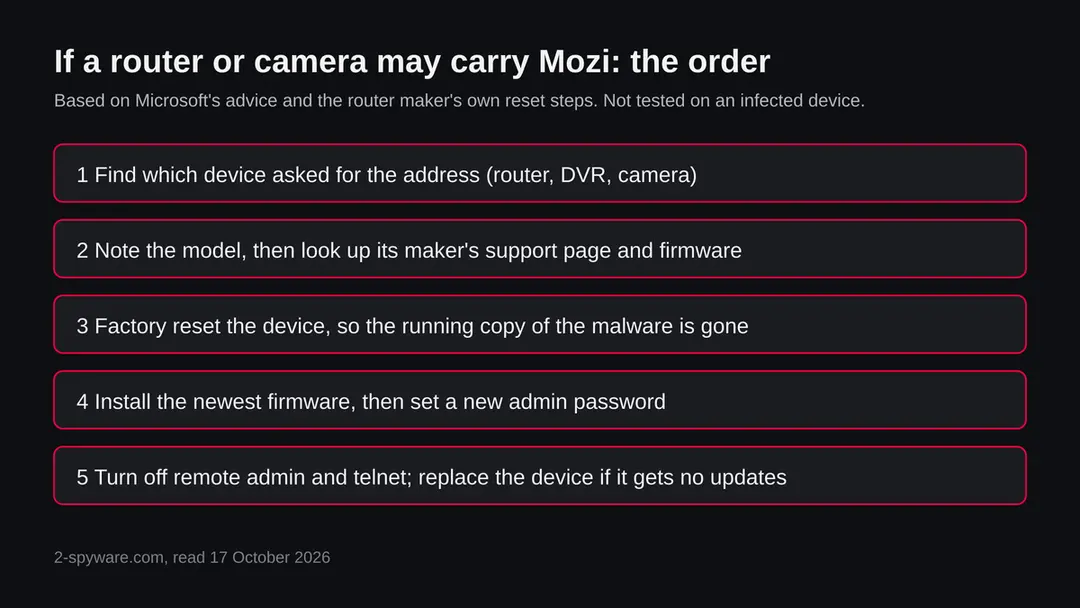
The safe order is to reset the device to factory state, install the newest firmware and only then set a new password. A reset removes a copy that runs in memory or sits in the device's writable storage; it cannot help if the hole is still open when the device goes back online.
- 1
Disconnect the device from the internet
Unplug the cable that goes to your provider, or turn the device's network off. A bot cannot take orders or attack others while it has no connection. Keep the rest of your home network if you can.
- 2
Find the maker's reset and firmware instructions
Search the maker's support site for your model and read how to factory reset it and how to install firmware from a downloaded file. Use only the maker's site, never a page offered in an advert. Microsoft's advice for Mozi is short: strong passwords and updated firmware.
- 3
Download the newest firmware to a clean computer
Download it before the reset, so you do not need to put the device back online first. Note the version and compare it with what the device runs now.
- 4
Factory reset
Most routers have a small reset button that you hold for around ten seconds while the device is powered, but times differ by model, so use the maker's page. Do not restore a saved settings file from before the problem, because it may contain what the attacker changed.
- 5
Install the firmware and set a new admin password
Connect a computer to the device by cable, install the downloaded firmware, then set a long, unique admin password and a new Wi-Fi password. Choose WPA2 or WPA3 for Wi-Fi if the device offers it.
- 6
Turn off what you do not use
Switch off remote management, telnet, SSH, UPnP and port forwarding unless you need them. Many Mozi targets were reachable through exactly these. For a camera or recorder, view it through the maker's cloud service or a VPN instead of opening a port.
- 7
Replace the device if it gets no updates
If the maker has stopped issuing firmware for the model, a reset leaves the original hole in place and the device can be taken again. In that case buying a supported model is the real fix; this is our judgement, not a vendor rule.
- 8
Watch for a return
After a few days, look at the router's log or your DNS filter for the same names. If the device is taken again right after a reset, a hole is still open or the firmware is old.
After a clean device: protect the accounts
Mozi, as described, is not a program that steals your passwords. But a router that spoofed DNS answers or injected content into plain web pages could have sent you to a copy of a page, so the cautious step is to change a few passwords.
- 1
Change the router password first
If you used the same password on any other account, change those too, from a device you trust.
- 2
Change passwords you typed on plain http pages
Pages on https were not touched by the web hijacking module Microsoft describes, but a page on http was. If you logged in on any such page while the device was infected, change that password.
- 3
Turn on two step sign in
Use an authenticator app or a security key for email, bank and shopping accounts, so one stolen password is not enough.
- 4
Check the other devices on the network
If one camera or recorder was taken, check the others the same way. Bots like Mozi scan for the same weak spots on every device they can reach.
- 5
Tell your provider if it keeps coming back
A provider can tell you whether a gateway of theirs needs a firmware update that you cannot do yourself.
Keep devices out of this kind of botnet
Mozi is old, and the ways in have not changed: weak passwords and old software. Both are within your control.
Do
- Change the default admin password on every router, camera and recorder the day you install it.
- Update the firmware regularly, or turn on automatic updates if the maker offers them.
- Buy devices from makers that still publish updates for the model.
- Turn off telnet, remote management and UPnP unless you need them.
- Put cameras and recorders behind the router, and reach them through a VPN or the maker's cloud service.
- Use a DNS filter that logs requests, so a name like this one is visible and attributed to a device.
Don't
- Do not forward a port to a camera or recorder just to see it from outside.
- Do not keep the password printed on the label.
- Do not restore an old settings backup onto a reset device.
- Do not download router firmware from a site that is not the maker's.
- Do not take a quiet log as proof that a device is safe.
Questions about csgroup.host (Mozi, MIPS ELF files)
What is csgroup.host?
It is a web address that URLhaus, the malware tracking project run by abuse.ch, lists 12 times as a place that served malware files. The entries were added on 13 and 15 October 2026, two days after the domain was registered.
Six are tagged Mozi, mips and elf, two are tagged exe and four have no tags. It is not a program on your device. We did not download the files, so what they contain is not confirmed by us.
Is csgroup.host safe to open?
No. Do not request files from it and do not run anything that does. Our own request on 17 October 2026 failed because the name did not resolve, which proves nothing: servers that hand out malware are often short lived, and an operator can move to another name.
The rating comes from the twelve URLhaus entries and their tags, not from what we saw on a page, because there was no page.
What is Mozi?
Mozi is a peer to peer botnet for internet of things devices such as routers, DVRs and cameras. Netlab 360 described it on 23 December 2019 after finding a sample on 3 September 2019, and named it after the file names Mozi.m and Mozi.a.
It spreads through weak telnet passwords and known holes, talks over a DHT network and can run attacks, download programs and update itself.
Is csgroup.host a virus?
The address itself is not a virus. It is a name that served files, and the tags say six of them are Mozi, a botnet program. A virus is a program on a device; a web address is only where it came from.
If you saw the name in a warning or a log, that does not mean you have a virus. The risk is for a device that downloaded and ran one of the files, and it is a router, camera or recorder far more than a computer.
I saw csgroup.host in my router or DNS log. Am I infected?
Not necessarily, and the name alone proves nothing. It does mean that a device on your network asked for it, and a person rarely does that by hand. Find which device it was, note its model and firmware, and read the checks on this page.
If it is a router, camera or recorder with old firmware or a default password, follow the cleaning steps. If it was a computer, scan it with the security program you already use.
How do I remove Mozi from a router or camera?
Disconnect the device from the internet, factory reset it using the maker's instructions, install the newest firmware from the maker's site, set a long unique admin password, and turn off remote management and telnet.
Microsoft's advice for Mozi is strong passwords and updated firmware. If the maker no longer publishes updates for the model, replace it. We followed Microsoft's page and common practice and did not test these steps on an infected device.
Can Mozi steal my passwords or read my traffic?
Netlab and Microsoft do not describe password theft. Microsoft does describe a module that runs on a device that forwards traffic, such as a router. It can answer DNS questions with a false address and insert content into plain http pages.
Pages on https are not changed by that module. So the sensible step after cleaning a router is to change passwords that you typed on plain http pages while it was infected.
Does csgroup.host affect my PC, Mac, iPhone or Android phone?
The Mozi entries are tagged elf and mips, which are Linux files for routers and cameras, so they do not run on a PC, a Mac or an iPhone, and no source we read says they affect Android phones.
Two entries are tagged exe, and we could not check what those are. If you downloaded a file from csgroup.host on a computer, do not run it and scan it. A device that only connected through an infected router is not infected by Mozi itself.
Is Mozi still active in 2026?
We do not know. ESET reported that Mozi activity fell sharply in India and China in August 2023, after a kill switch signed with the original operators' key was sent to bots. ESET named the original authors or Chinese law enforcement as the possible source.
Mozi files were tagged again on csgroup.host in October 2026, but a tag is a label by a reporter, and we could not open the files to tell a new build from an old copy.
Will Fortect remove csgroup.host?
Fortect scans Windows for malware and unwanted programs and repairs the system files and settings they change, and its free scan shows what it finds on your PC before you decide anything.
For csgroup.host, follow the plan above as well: the browser steps take back permissions and settings that no scanner treats as a threat, and uninstalling the program that brought it removes the source.
Run Microsoft Defender's full scan and, if anything was found, its offline scan as a second opinion. If the symptoms are gone after the plan and both scans are clean, there is nothing more to do.
Sources
- Netlab 360: Mozi, Another Botnet Using DHT (23 December 2019) (read October 17, 2026)
- Microsoft Security blog: How to proactively defend against Mozi IoT botnet (19 August 2021) (read October 17, 2026)
- ESET Research: Infamous IoT botnet Mozi taken down via a kill switch (1 November 2023; seen as a search result summary) (read October 17, 2026)
- The Hacker News: Mozi IoT Botnet now also targets Netgear, Huawei and ZTE devices (August 2021; seen as a search result summary) (read October 17, 2026)
- Security Affairs: Mozi P2P Botnet also targets Netgear, Huawei, and ZTE devices (seen as a search result summary) (read October 17, 2026)