
donutclientsmods.xyz: fake DonutSMP Minecraft mods tagged SilentNet, and what to do if you ran one
donutclientsmods.xyz is a three day old site that offers free DonutSMP clients, mods and add-ons for Minecraft 1.21.11. On 8 October 2026 URLhaus listed eleven of its downloads as malware tagged SilentNet, and ten were still online.
If you only saw the site, nothing is proven. If you put one of its .jar files in your mods folder or ran its macro tool, treat your Discord, browser and game accounts as exposed: change passwords from another device, then clean the Windows PC.
Facts checked October 8, 2026. Removal steps tested on Windows 11 (26H2) and checked against Microsoft's and the browser makers' current documentation.
Automatic
Get a free scan and check if your PC is infected.
Fortect finds malware, unwanted programs and the Windows damage they leave behind, and repairs it in one pass.
An automatic scan checks installed programs, startup items and browser extensions for anything that came with a Minecraft mod (.jar) or macro tool (.exe) downloaded from donutclientsmods.xyz.
Do it yourself · free Remove donutclientsmods.xyz (fake Minecraft mods, SilentNet) yourself 5 steps, about 15 minutes, no software needed.
Start the steps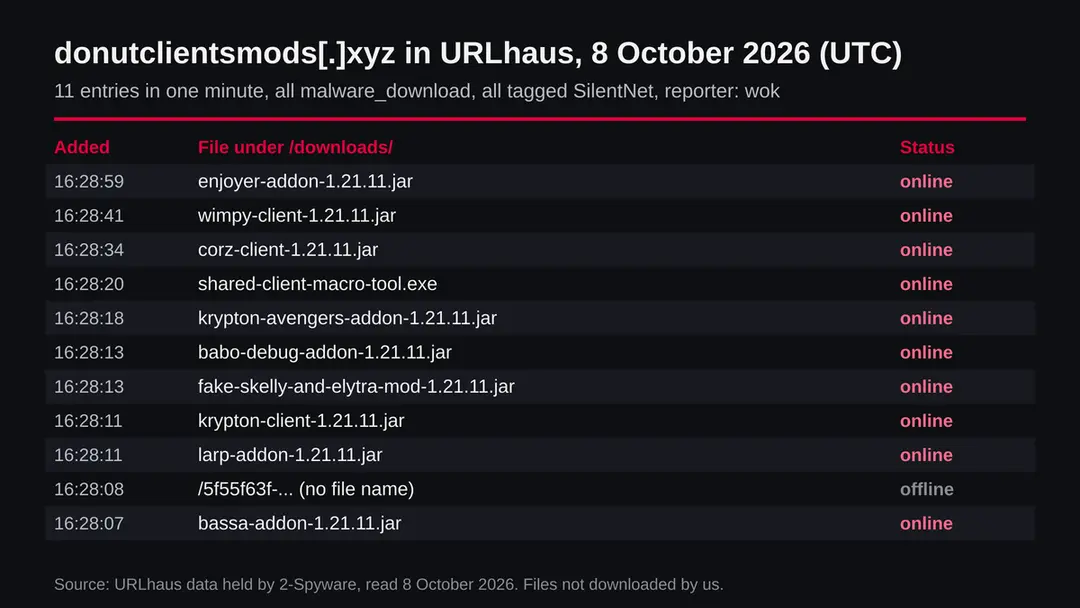
Donutclientsmods.xyz (fake Minecraft mods, SilentNet): summary
| Type | A download site for fake Minecraft client mods and add-ons; URLhaus tags its files SilentNet malware |
|---|---|
| Risk | High if you ran one of its files: Discord, browser, game and wallet data may be taken. Low if you only opened the page |
| Symptoms | Often none. Discord logouts, messages you did not send, or a scheduled task that runs a .jar file are signs |
| How to get rid of it | Secure accounts from another device, delete the mod, remove unknown tasks, run Microsoft Defender Offline, reinstall Discord, reset Windows if unsure |
| Our check (8 October 2026) | One plain request: status 200 from Netlify, title offers DonutSMP clients and mods. A normal answer clears nothing |
| Running since / first seen | Domain registered 5 October 2026; files reported 8 October 2026 |
| Removal | Scan the PC with security software to find and remove the malware and anything installed with it. Fortect scans Windows for malware and repairs the system files and settings it damaged. Remove it nowTo use the full-featured product, you have to purchase a license for Fortect. The scan is free. |
Show 9 more facts
| Platform | Windows PCs with Minecraft Java Edition; the .jar files may also run where Java runs. Not phones or consoles |
|---|---|
| Detection names | URLhaus family tag SilentNet. No Microsoft detection name is known for these files, because we did not scan them; for malicious Java files in general Microsoft Defender uses generic names such as Trojan:Java/Agent |
| Name | Donutclientsmods.xyz |
| Domain registered | 5 October 2026 |
| Evidence | 11 write-ups by security sites; details still limited |
| First seen | 8 October 2026 |
| Distribution | Typically fake installers, cracked programs, e-mail attachments, fake "verify you are human" pages and ads for popular apps |
| Damage | Installs other malware, often several programs at once |
| Facts checked | 8 October 2026 |
Facts checked on 8 October 2026 against the URLhaus data for donutclientsmods.xyz held in our database, RDAP, one plain request from our server, and published research by G DATA and Check Point on other fake Minecraft mods, plus Microsoft Support and Microsoft Security Intelligence pages. We did not download the files and infected no PC; the removal steps follow Microsoft's pages and were not tried on a live infection.
What donutclientsmods.xyz is, and what we know about it
donutclientsmods.xyz is a web address that presents itself as a download hub for DonutSMP clients, mods and add-ons.
DonutSMP is a Minecraft survival server, and the files on this site are named like client mods and add-ons for Minecraft 1.21.11. On 8 October 2026 the malware tracking project URLhaus listed eleven addresses on this domain as malware downloads, every one of them tagged SilentNet.
The domain itself was registered only three days earlier. We found nothing that links the site to the people who run DonutSMP, and the name alone proves nothing about who is behind it.
- 1
What URLhaus lists
Eleven addresses on donutclientsmods.xyz, all added on 8 October 2026 between 16:28:07 and 16:28:59 UTC by the reporter wok. Nine are .jar files in a folder called downloads, with names such as krypton-client-1.21.11.jar, wimpy-client-1.21.11.jar and fake-skelly-and-elytra-mod-1.21.11.jar. One is a Windows program, shared-client-macro-tool.exe. One is a long random address with no file name. All carry the threat label malware_download.
- 2
Which are still online
When we read the data, ten of the eleven addresses were marked online, meaning the file was still being handed out. Only the address without a file name was marked offline. Online in URLhaus means the file answered when it was last checked, not that it is safe to try.
- 3
What the SilentNet tag means
SilentNet is the family name the reporter gave these files. We did not find a full vendor write-up of a family called SilentNet that we could read and cite, so we do not claim details about it. What we can say is what vendors found in other fake Minecraft mods that were analysed in depth, and we label that clearly below.
- 4
What we could not confirm
We did not download or run any of the files. We cannot tell you which accounts this particular build targets, where it sends data or whether every file on the list carries the same code. The danger rating on this page comes from the reports, not from our own analysis of the files.
- Kind of threat
- A download site for fake or trojanized Minecraft client mods and add-ons, tagged SilentNet in URLhaus
- Where the files are
- hxxps://donutclientsmods[.]xyz/downloads/ followed by a .jar or .exe name
- Files reported
- 11 addresses on 8 October 2026: 9 .jar mods for Minecraft 1.21.11, 1 .exe macro tool, 1 address with no name
- Still online when read
- 10 of 11
- Domain registered
- 5 October 2026 through Porkbun LLC; still in its add period (RDAP, read 8 October 2026)
- Web host
- The home page answered from Netlify with the title DonutSMP Clients, Mods, Add-ons & More | NexusHub
What donutclientsmods.xyz (fake Minecraft mods, SilentNet) does on an infected PC
What we checked on 8 October 2026, and what we could not
Our check this time was one plain request from our server to the home page, without a browser and without clicking anything.
That kind of request shows what the server says about itself, but not what a visitor would see after scripts run, and it never downloads the files.
Our request, 8 October 2026
- The site answeredHTTP status 200, no redirect. The site is live and serves a page.
- The page titleDonutSMP Clients, Mods, Add-ons & More | NexusHub. The title advertises exactly the kind of files URLhaus lists as malware.
- The hostThe server header said Netlify, a hosting service many legitimate sites use. Being on a known host says nothing about the files.
- Notification requestsNone mentioned in the page we received. This does not matter much here: the danger is the files, not pop-ups.
Dangerous: treat it as a malware download site A page that answers normally clears nothing. Ten of the eleven reported files were still online when we read the data, all tagged as malware downloads, so do not download anything from this address.
What happened to donutclientsmods.xyz, from registration to our check
The whole story so far fits into four days.
That is short, and it is typical of throwaway download sites that are set up, pushed to players and replaced when they are reported.
5 October 2026
The domain is registered
RDAP shows donutclientsmods.xyz registered on 5 October 2026 at 15:14 UTC through Porkbun LLC. The status still includes add period, which registries use for a domain in its first days.
8 October 2026, 16:28 UTC
Eleven files are reported
Within one minute URLhaus adds eleven addresses on the domain, all labelled malware_download and tagged SilentNet. Ten are online when listed.
8 October 2026
Our request
The home page answers with status 200 from Netlify. The title offers DonutSMP clients, mods and add-ons.
What the pattern suggests, and what it does not: a domain that is three days old and already serves a whole catalogue of named client mods looks like a site built to look established quickly. That is our reading of the dates, not something a report says.
How a Minecraft mod can carry a stealer
A Minecraft mod is a .jar file, a package of Java code.
When you drop it into the mods folder of a mod loader such as Fabric or Forge and start the game, the code in it runs with the same rights as the game itself. That is why mods are so useful, and why a fake mod is such an easy way in. Nothing asks for permission a second time.
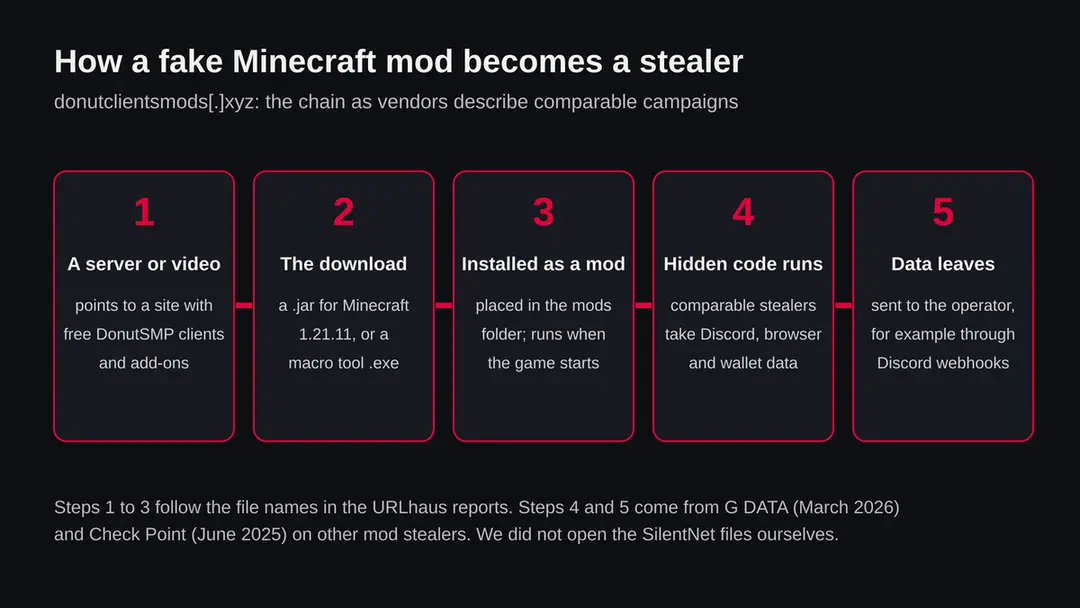
- 1
The lure
Players of a popular server want clients and add-ons that give them an edge or a cosmetic, such as a fake elytra or a macro tool. A site that collects them in one place, with familiar names, looks like a shortcut. G DATA described a fake server community in March 2026 that used a website, Discord invitations, listing sites and a staged YouTube stream to make its download look real.
- 2
The file
The download is a .jar that claims to be a client or add-on for Minecraft 1.21.11, or in one case a Windows .exe macro tool. In the case G DATA analysed, the stealer was hidden inside a working copy of a real mod, so the game behaved normally and nothing seemed wrong.
- 3
It runs with the game
G DATA found that its stealer ran every time the player started the game with the mod in place. Check Point described a first stage that checked whether it was inside a virtual machine or analysis tool before it fetched the next stage, which makes such files harder for researchers to catch.
- 4
Data leaves
In both cases the stolen data was sent out through Discord: G DATA saw Discord webhooks with GoFile for larger files, and Check Point says the data was bundled and sent through Discord.
We present this as the closest documented picture. The SilentNet files on this site may differ in details we could not see.
What donutclientsmods.xyz (fake Minecraft mods, SilentNet) can steal or download
What comparable mod stealers took from players
None of the sources below analysed the SilentNet files on donutclientsmods.xyz.
They describe other fake Minecraft mods, and we list their findings so you know what to protect if you ran one of these files.
Reported in comparable mod stealers
- Discord tokens and account details
- Discord payment sources and friend lists
- Browser passwords and cookies
- Crypto wallet extensions and wallet apps
- Steam logins
- Telegram desktop sessions
- Screenshots
- System details and IP address
| Data | What the research says | Source |
|---|---|---|
| Discord | Tokens, payment sources, friend lists; it also caught login, password change and two step sign in events by injecting code into Discord | G DATA, 17 March 2026 |
| Browsers | Saved credentials and cookies from Chromium and Gecko browsers | G DATA; Check Point |
| Crypto | Wallet browser extensions and local wallet apps | G DATA; Check Point |
| Games and chat | Steam credentials, Telegram sessions, sessions of services such as TikTok and Roblox | G DATA; Check Point |
| The PC | Screenshots and system information | G DATA; Check Point |
What this can cost you
If one of these files ran on your PC, the cost is rarely the PC itself.
It is the accounts and money that the PC could reach, and the people who trust those accounts.
- High
Your Discord and game accounts
A stolen Discord token lets someone use your account without your password. G DATA saw the stealer catch password changes too, so changing your password on the same PC does not help while the stealer is still there.
- High
Money and crypto
Saved cards in the browser, Discord payment sources and wallet data are on the lists. G DATA advises moving funds to a new wallet and never reusing the old seed phrase.
- High
Extortion
G DATA reports that the operators in their case demanded 300 dollars from one victim and threatened to publish the stolen data.
- Medium
Friends and servers
A hijacked Discord account is often used to send the same fake mod to friends, so the infection spreads through people who trust you.
What you may notice, and what you may not
Most people notice nothing.
A good fake mod keeps the game working. These are the signs the research describes.
| Sign | What it can mean |
|---|---|
| Discord logs you out, or friends get messages you did not send | Your token or account may be in someone else's hands |
| A scheduled task you did not make, especially one that runs a .jar file | G DATA found a task named ExplorerStartup that started a copy called FileExplorer.jar in AppData\Local\Microsoft\Windows |
| Discord behaves oddly after an update | G DATA saw code injected into Discord's index.js file, which survives restarts until Discord is reinstalled |
| Logins from new places in your accounts' security pages | Stolen browser cookies or passwords being used |
| Nothing at all | Common. The absence of signs is not a clean result |
How to check the PC for donutclientsmods.xyz (fake Minecraft mods, SilentNet)
How players end up on this site
Nobody lands on a site like this by chance.
Someone or something sends them there, and these are the routes the research describes.
- 1
A link in Discord or chat
Someone in a server, a direct message or a group shares a link to free clients or add-ons. In the case G DATA described, Discord invitations were part of the lure.
- 2
A video or a listing
Video descriptions and server listing sites can point to a download. G DATA describes a staged YouTube stream and listing sites used to make a fake server look real.
- 3
A search for a client by name
Searching for a named client or add-on for a popular server can lead to a fresh site that copies those names. Check Point describes hundreds of fake GitHub pages that posed as Minecraft cheats and tools.
- 4
A friend's hacked account
If a friend's Discord was taken, the link may arrive from someone you trust. Ask them in another way before you download anything.
Check your PC before you delete anything
If you only visited the page and downloaded nothing, there is nothing to remove; clear the browser's download list and move on.
If you downloaded a file, do these checks first, then follow the plan.
- 1
Find the file
Look in your Downloads folder and in the mods folder of your Minecraft launcher for any of the names on the list above, such as krypton-client-1.21.11.jar or shared-client-macro-tool.exe. Note the date you put it there.
- 2
Did it run?
A .jar in the mods folder runs when you start the game with that mod loader. An .exe runs when you open it. If you started the game or opened the program after the download, assume it ran.
- 3
Open Task Scheduler
Search for Task Scheduler in the Start menu and look through the Task Scheduler Library for tasks you did not create, especially any that start java or javaw with a .jar file, or a task named ExplorerStartup as in G DATA's case. Write down the name and path before you delete anything.
- 4
Look at what starts with Windows
Open Settings > Apps > Startup and switch off entries you do not recognise. Write them down so you can look them up.
- 5
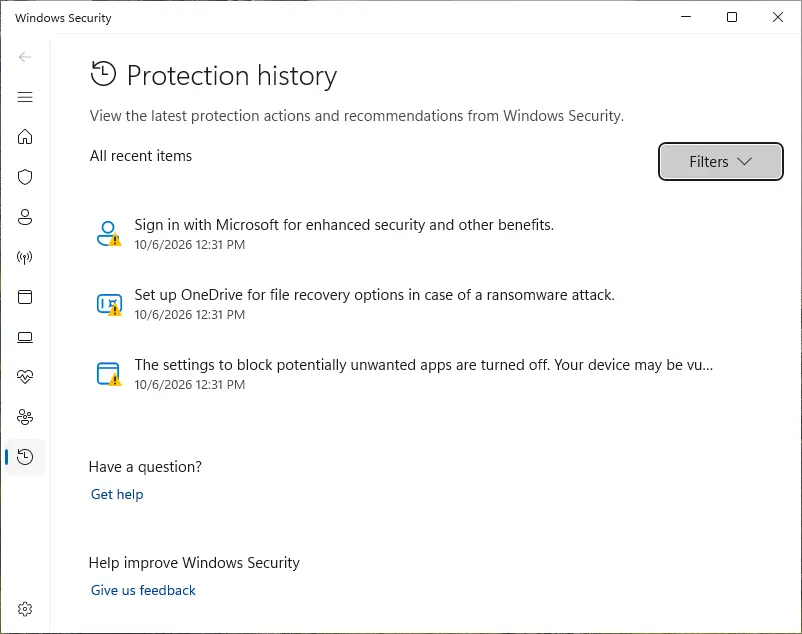
Check Protection history
Open Windows Security > Protection history to see whether Microsoft Defender already found and quarantined something, and when.
If you find any of these signs, or if you know the mod ran, go straight to the order of actions below and secure your accounts from another device first.
How to remove donutclientsmods.xyz (fake Minecraft mods, SilentNet)
How to remove donutclientsmods.xyz
A loader's job is to install other malware, so treat the PC as infected with more than one program until the scans are clean.
Step 1: Delete scheduled tasks that bring it back
Programs like donutclientsmods.xyz add a scheduled task so they return after an uninstall or reopen a page at every sign-in. Start Task Scheduler, open Task Scheduler Library and sort by Last Run Time to see what ran recently.
On the Actions tab, a program in a user folder, a script or a web address is a warning sign; right-click such a task and choose Delete.
Tasks with names copying Google, Edge or Windows updaters but pointing to an odd folder are typical. The tool looks the same in Windows 11 and Windows 10.

Windows 11: Task Scheduler Library, the task selected, the Actions tab shows the file it runs. Full procedure with screenshots: Remove what malware leaves behind in Windows
Step 2: Remove it from startup
Press Ctrl + Shift + Esc to open Task Manager and select Startup apps (Windows 11) or the Startup tab (Windows 10). Disable entries you do not recognise, especially ones with no publisher or with a name that copies a Windows component.
Right-click an entry and choose Open file location to see where it runs from: programs in
%AppData%or%Temp%deserve a closer look. Some entries are not listed there but in the registry Run keys, which the procedure below shows how to check.Full procedure with screenshots: Stop apps from opening at startup On uGetFix
Step 3: Delete the folders left behind
Uninstalling often leaves the program's folders, and some threats reinstall themselves from them.
Press Windows + R, type
%LocalAppData%and press Enter, then do the same for%AppData%and %ProgramData%, and look for folders named after donutclientsmods.xyz, its publisher or created on the day the problem started. Delete those folders, and check C:\Program Files and C:\Program Files (x86) too.If Windows says a file is in use, end it in Task Manager or delete the folder after a restart in Safe Mode. The folders are the same in Windows 11 and Windows 10.
Full procedure with screenshots: Remove what malware leaves behind in Windows
Step 4: Scan the PC, then run the offline scan
A scan finds the parts of donutclientsmods.xyz that the manual steps cannot see. In Windows Security > Virus & threat protection > Scan options, start a Full scan and quarantine what it reports.
Follow it with Microsoft Defender Antivirus (offline scan) > Scan now, which restarts the PC and checks the disk while Windows and the malware are not running.
It takes about 15 minutes and works the same in Windows 11 and Windows 10. If either scan finds something, run the full scan again after removal until it comes back clean.

Windows 11: Windows Security > Virus & threat protection > Scan options. Full procedure with screenshots: Run a Microsoft Defender Offline scan
Step 5: Change passwords from another device and sign out other sessions
Donutclientsmods.xyz can copy saved passwords, cookies and session tokens and send them out in seconds, so cleaning the PC does not undo the theft.
Change your passwords on a device that was never infected, starting with the e-mail account, since every other reset goes through it. On each account, end all other sessions and check the recovery e-mail, phone number and forwarding rules.
Then turn on two-step verification. Sign in on the Windows 11 or Windows 10 PC again only after the offline scan is clean.
Full procedure with screenshots: Turn on two-step verification / secure a hacked account
If you play on a Mac, Linux, a phone or a console
The reports name Minecraft Java Edition files and one Windows program.
Here is what that means for other devices.
| Your device | What we know | What to do |
|---|---|---|
| Mac or Linux | A .jar file is Java and can run wherever Minecraft Java Edition runs. We do not know whether the SilentNet code does anything outside Windows | Delete the file from the mods folder, change passwords from another device, and check the login items your system shows |
| iPhone, iPad or Android | These files are not apps for phones and the reports name no phone file | Nothing to remove. Change passwords if you typed them on a PC that ran the mod |
| Console or Bedrock Edition | Bedrock and console editions do not load Java .jar mods | Nothing to remove for this threat |
After removal: passwords, accounts and prevention
After you ran a mod from this site: protect what was taken
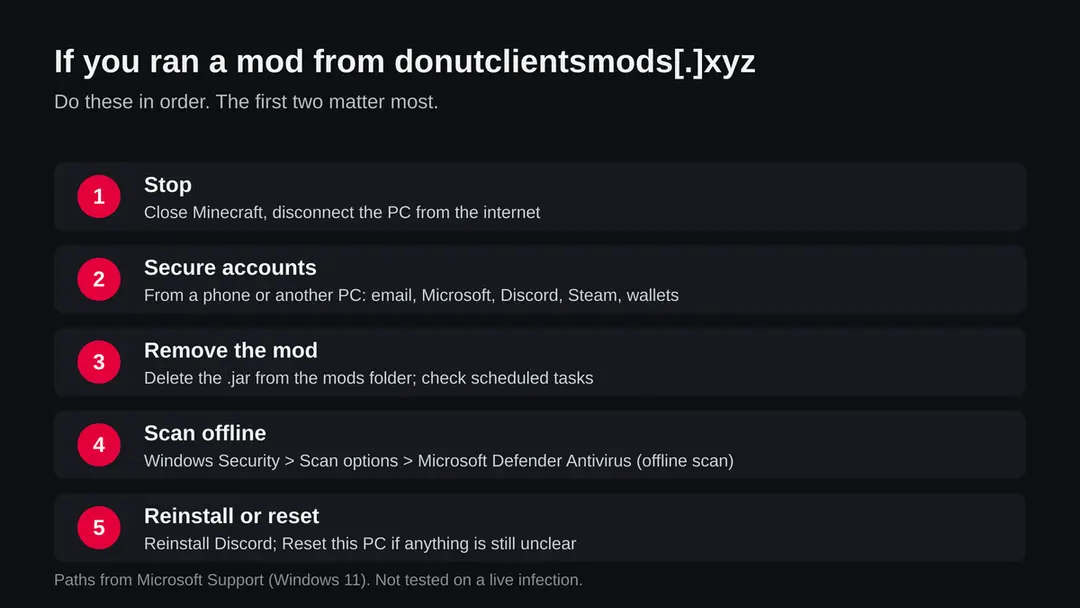
The order matters.
Accounts first, from a clean device, because a stealer reads what you type on the infected PC.
- 1
Change passwords from a clean device
Use a phone or another computer. Start with your email, then your Microsoft account, which Minecraft uses, then Discord, Steam, banks and anything saved in the browser on the PC.
- 2
Sign out everywhere and reset Discord security
G DATA advises logging out of browser and Discord sessions, generating new Discord backup codes for two step sign in, and removing unknown entries under Settings > Authorized Apps in Discord.
- 3
Move crypto to a new wallet
If a wallet extension or app was on the PC, move funds to a new wallet created on a clean device. Do not reuse the old seed phrase.
- 4
Reinstall Discord
G DATA found Discord injection that survives restarts until Discord is reinstalled. Uninstall it, then install a fresh copy from Discord's own site.
- 5
Watch your accounts
Check login activity in your email, Microsoft and Discord accounts for the next weeks. Tell friends not to trust messages from your old sessions with download links.
Keep your Minecraft PC out of this
Fake mods work because a mod is trusted code.
A few habits make it much harder for a site like this one to reach you.
Do
- Get mods from the author's own page or from well known mod sites, and check the author's name and download count.
- Ask a friend in another way before you download a file they sent, in case their account was taken.
- Keep Windows and Microsoft Defender updated and scan every .jar or .exe before you use it.
- Use a separate Minecraft profile for new mods so you see what you added and when.
Don't
- Do not download clients, cheats or macro tools from fresh sites that collect many of them in one place.
- Do not trust a site because it uses the name of a popular server.
- Do not run an .exe that comes with a mod. A mod does not need one.
- Do not keep passwords and wallet keys in the same browser you use to look for mods.
Questions about donutclientsmods.xyz (fake Minecraft mods, SilentNet)
What is donutclientsmods.xyz?
It is a website registered on 5 October 2026 through Porkbun that offers free clients, mods and add-ons for the DonutSMP Minecraft server, all named for Minecraft 1.21.11.
On 8 October 2026 URLhaus, the malware tracking project of abuse.ch, listed eleven of its download addresses as malware, all tagged SilentNet. Ten were still online when we read the data, so the site was still handing them out.
Is donutclientsmods.xyz part of DonutSMP?
We found nothing that links it to the people who run DonutSMP. The site only borrows the server's name, which is a common lure because players of a popular server look for add-ons by that name.
The domain is three days old and is hosted on Netlify. Get add-ons only from places the server itself points to in its own announcements.
Is donutclientsmods.xyz safe?
No. Ten of the eleven reported files were still online when we read the URLhaus data, and all eleven are labelled malware downloads.
Our own plain request got a normal page back with status 200. That clears nothing, because the danger is in the files you download, not in the page itself. Do not download anything from it.
What is SilentNet?
It is the family tag the reporter gave these files in URLhaus. We found no full vendor write-up of SilentNet that we could read and cite, so we do not claim details about it.
Instead we describe what comparable fake Minecraft mod stealers did according to G DATA and Check Point, and we say clearly that the SilentNet files may differ.
I downloaded a jar but never started the game. Am I infected?
Probably not, because a mod runs when the game loads it from the mods folder. Delete the file, empty the recycle bin and run a full Microsoft Defender scan. If you are not sure whether you started the game after you placed the file, or if you opened the macro tool .exe, follow the full plan on this page.
Does deleting the mod remove everything?
Not always. G DATA found a mod stealer that copied itself to AppData as FileExplorer.jar, created a scheduled task named ExplorerStartup and injected code into Discord.
Deleting the mod stops only the first route. Check Task Scheduler, reinstall Discord, run Microsoft Defender Offline and reset Windows if you are still unsure.
Should I change my passwords on the same PC?
No. Use a phone or another computer that never had the mod on it. A stealer that is still running can read the new passwords as you type them, and G DATA saw one that caught Discord password changes. Clean the PC first, or at least change passwords elsewhere first, then sign out every other session.
Can my friends get it from me?
Not from your PC directly, but through your accounts. A stolen Discord account is often used to send the same download link to friends, who trust the message because it comes from you. Warn them in another way, and tell them not to open download links that arrived from your account around the time you ran the mod.
Do I need to reset Windows?
If the scans find nothing but you know the mod ran, or anything still looks wrong, Reset this PC is the safest way to be sure.
In Windows 11 it is under Settings > System > Recovery. Back up your own files first and scan them before you copy them back. Do not back up programs, mods or launchers.
Will Fortect remove donutclientsmods.xyz?
Fortect scans Windows for malware and unwanted programs and repairs the system files and settings they change, and its free scan shows what it finds on your PC before you decide anything.
For donutclientsmods.xyz, follow the plan above as well: the browser steps take back permissions and settings that no scanner treats as a threat, and uninstalling the program that brought it removes the source.
Run Microsoft Defender's full scan and, if anything was found, its offline scan as a second opinion. If the symptoms are gone after the plan and both scans are clean, there is nothing more to do.
Sources
- URLhaus (abuse.ch): host donutclientsmods.xyz, 11 entries tagged SilentNet (data held in our database, read 8 October 2026) (read October 8, 2026)
- G DATA: Malicious Minecraft mod in the SugarSMP modpack, Spark stealer (Karsten Hahn, 17 March 2026; a different campaign, used for how mod stealers work) (read October 8, 2026)
- Check Point Research: Minecraft players targeted in sophisticated malware campaign (18 June 2025; a different campaign) (read October 8, 2026)
- Microsoft Support: Help protect my PC with Microsoft Defender Offline (read October 8, 2026)
- Microsoft Security Intelligence: Trojan:Java/Agent (published 26 June 2012) (read October 8, 2026)