
sqpengg.com: a server handing out crypted PowerShell scripts, and what to do if one ran on your PC
sqpengg.com is a web address that URLhaus lists for six PowerShell script files, all reported on 30 September 2026, with names such as Crypted.ps1 and secured_stub.ps1 and one file tagged expiro, a Windows virus family. These are files that a first stage already on a Windows PC fetches and runs, not a page anyone visits.
If you only saw the name in a blocked request, nothing is proven. If a script from it may have run, disconnect the PC, change your passwords from another device and run Microsoft Defender Offline, or reset Windows if unsure.
Facts checked October 8, 2026. Removal steps tested on Windows 11 (26H2) and checked against Microsoft's and the browser makers' current documentation.
Automatic
Get a free scan and check if your PC is infected.
Fortect finds malware, unwanted programs and the Windows damage they leave behind, and repairs it in one pass.
An automatic scan checks installed programs, startup items and browser extensions for anything that came with a script, shortcut or program that runs PowerShell to fetch .ps1 files from sqpengg.com.
Do it yourself · free Remove sqpengg.com (crypted PowerShell scripts, Expiro tag) yourself 5 steps, about 15 minutes, no software needed.
Start the steps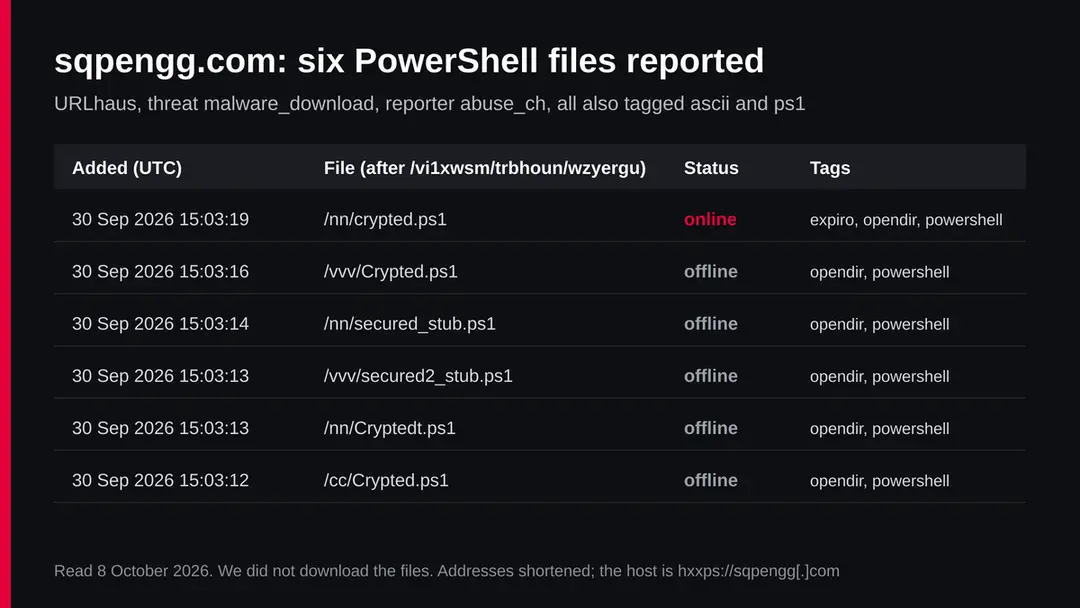
Sqpengg.com (crypted PowerShell scripts, Expiro tag): summary
| Type | A malware server: URLhaus lists six PowerShell (.ps1) files with crypter style names, one tagged expiro |
|---|---|
| Risk | High if a script from it ran on your PC: unknown payload, possible file infector. Low if you only saw the name in a blocked request |
| Symptoms | Often none. Slow PC, changed program files, unknown scheduled tasks or a PowerShell window that flashes are the signs to look for |
| How to get rid of it | Disconnect, change passwords from another device, run Microsoft Defender Offline, remove unknown startup entries and tasks, reset Windows if unsure |
| Our check (8 October 2026) | A plain request from our server timed out. A quiet test clears nothing; URLhaus still lists one file online |
| Running since / first seen | Registration date unknown (no RDAP record); files first reported 30 September 2026 |
| Removal | Scan the PC with security software to find and remove the malware and anything installed with it. Fortect scans Windows for malware and repairs the system files and settings it damaged. Remove it nowTo use the full-featured product, you have to purchase a license for Fortect. The scan is free. |
Show 8 more facts
| Platform | Windows. Nothing we read says Mac or phones are affected |
|---|---|
| Detection names | No Microsoft detection name is known for these exact files, because we did not open them. For the family named in the expiro tag Microsoft uses Virus:Win32/Expiro |
| Name | Sqpengg.com |
| Evidence | 6 write-ups by security sites; details still limited |
| First seen | 30 September 2026 |
| Distribution | Typically fake installers, cracked programs, e-mail attachments, fake "verify you are human" pages and ads for popular apps |
| Damage | Installs other malware, often several programs at once |
| Facts checked | 8 October 2026 |
Facts checked on 8 October 2026 against the URLhaus data for sqpengg.com held in our database, an RDAP lookup that returned no record, one plain request from our server that timed out, and published pages by Microsoft, MITRE ATT&CK and the FTC. We did not download the files and we infected no PC; the removal steps follow Microsoft's pages and were not tried on a live infection.
What sqpengg.com is, and what we know about it
sqpengg.com is not a program on your PC. It is a web address that the abuse.ch project URLhaus lists for six PowerShell script files, all reported on 30 September 2026 within about seven seconds of each other. The files carry names such as Crypted.ps1 and secured_stub.ps1. We found no public write-up of this address, so this page says what the reports show, what our own check found, what such files are usually used for according to MITRE ATT&CK and Microsoft, and what is still unknown.
- 1
What URLhaus lists
Six file addresses on sqpengg.com, all under one long folder path, /vi1xwsm/trbhoun/wzyergu/, split into three subfolders called nn, vvv and cc. Every file ends in .ps1, the ending of a Windows PowerShell script. All six carry the threat label malware_download and the reporter abuse_ch.
- 2
Which file is still online
When we read the data on 8 October 2026, one entry was marked online: crypted.ps1 in the nn folder. The other five, including Crypted.ps1 in vvv and cc, Cryptedt.ps1, secured_stub.ps1 and secured2_stub.ps1, were marked offline. Offline means the file did not answer at the last check, not that the server is clean.
- 3
What the tags say
All six are tagged ascii, opendir, powershell and ps1. Ascii means the file is plain text. Opendir means the folder could be listed in a browser, an open directory, which is how many such files are found. The online file is also tagged expiro, the name of an old Windows file infector family.
- 4
What the names suggest
Crypted and stub are words used for crypters: tools that wrap a malicious program in an encrypted shell so antivirus does not recognise it. A stub is the small piece that unpacks and starts the hidden program. That is our reading of the file names, not something URLhaus confirms about the contents.
- Kind of threat
- A server listed for malicious PowerShell scripts with crypter style names; one is tagged expiro
- Where the files are
- hxxps://sqpengg[.]com/vi1xwsm/trbhoun/wzyergu/ followed by nn/, vvv/ or cc/ and a .ps1 file name
- URLhaus entries
- 6 file addresses, all added on 30 September 2026 between 15:03:12 and 15:03:19 UTC; 1 online, 5 offline when read on 8 October 2026
- Domain registration
- Not known: the public registration lookup (RDAP) returned no record to us on 8 October 2026
- Our check
- A plain request to the address from our server on 8 October 2026 timed out
- Platform
- Windows, where PowerShell is built in
What sqpengg.com (crypted PowerShell scripts, Expiro tag) does on an infected PC
What we checked on 8 October 2026, and what we could not
We did not open a browser on the site and we did not download any of the files.
In this setup our check is a plain request from our own server to the address, the same kind of request any program makes. It tells us whether the server answers, not what it serves to a victim.
Our check, 8 October 2026
- The address did not answerOur plain request to sqpengg.com timed out. No page, no error page, no redirect came back within our time limit.
- Why a timeout is not a clean resultA server that hands out script files may answer only for exact file paths, only for some countries, only at some hours, or only to PowerShell itself. A quiet test never clears a site.
- One file was still listed onlineURLhaus still marked crypted.ps1 in the nn folder online when we read the data. That is the most recent outside view we have, and it is stronger evidence than our single timeout.
- No registration dataThe RDAP lookup gave us no record, so we cannot say when the domain was registered, through which registrar, or when it expires.
What happened to sqpengg.com so far
The record is short.
Everything we know happened on one afternoon, and since then only the status of the files has changed.
Unknown
The domain is registered
RDAP returned no record to us, so the registration date is not known. We do not guess it.
30 September 2026, 15:03 UTC
Six PowerShell files are reported
Within seven seconds abuse.ch adds six .ps1 files from three subfolders of the same path. That pattern fits a whole open folder being found and submitted at once.
By 8 October 2026
Five files go offline
Five of the six entries are marked offline. crypted.ps1 in the nn folder, the only one tagged expiro, is still marked online.
8 October 2026
Our check
Our plain request to the address times out. We publish this guide with the reports as the main evidence.
What the pattern suggests, and what it does not: several versions of a file called Crypted in different folders, plus stubs with a version number, look like an operator testing or rotating builds. That is our reading of the names and dates, not a fact any report states.
What a crypted PowerShell stub does
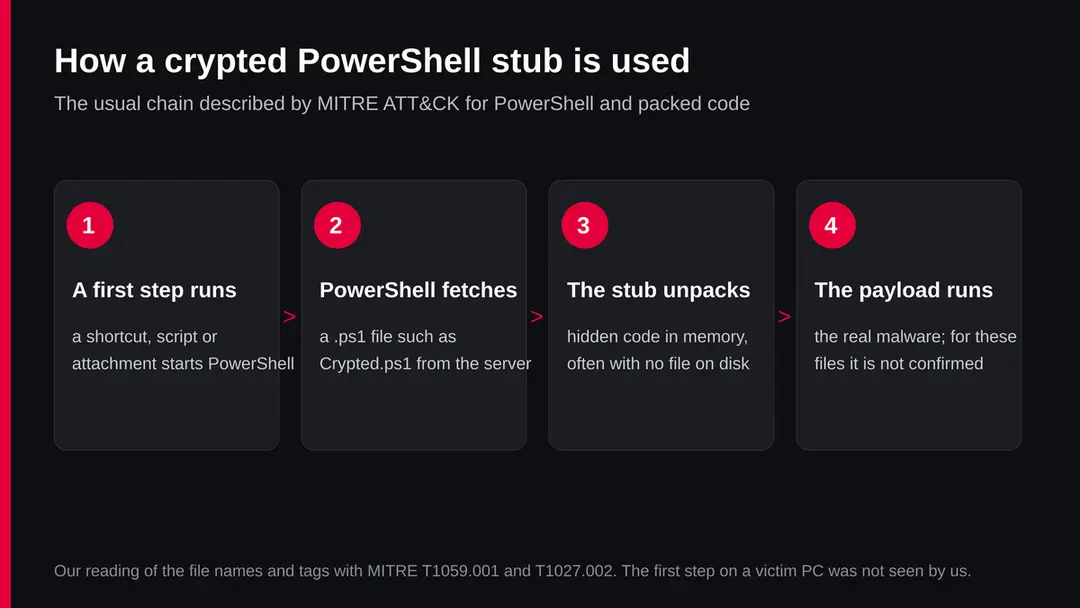
To understand why a file called Crypted.ps1 matters, it helps to know two things that MITRE ATT&CK, the public knowledge base of attacker techniques, describes in detail: how attackers use PowerShell, and how they hide programs inside packers and crypters.
- 1
PowerShell is built into Windows
MITRE calls PowerShell a powerful command line interface and scripting environment included in Windows. Attackers use it to discover things about a PC and to run code. It is a normal part of the system, which is why its use alone does not raise an alarm.
- 2
It can download and run code in memory
MITRE notes that PowerShell can download and run programs from the internet, either from disk or in memory without touching disk. A script that never writes the real program to a file leaves less for a scanner to find.
- 3
A crypter changes how the program looks
MITRE describes packing as compressing or encrypting an executable, with most unpacking happening in memory when it runs. It says this changes the file signature in an attempt to avoid signature based detection, and that attackers build custom packers that do not leave known traces.
- 4
The stub is the key
A stub is the small unpacking part. In a file like secured_stub.ps1 the stub would hold the encrypted program as text and the few lines that decode and start it. The ascii tag on every file fits this: the whole thing is plain text that only becomes a program when PowerShell runs it.
MITRE lists antivirus with heuristic detection, signed script rules and application control among the defences. For a home user the practical point is simpler: the file on the server is not dangerous until something on your PC asks PowerShell to fetch and run it.
What the expiro tag means
The newest online file is tagged expiro.
Expiro is a long known family that Microsoft lists as Virus:Win32/Expiro, a virus in the strict sense: it changes other program files on the PC so that they carry its code too.
| Question | What the sources say | Source |
|---|---|---|
| What is it? | A Windows virus family. Microsoft's entry was first published on 22 January 2014 | Microsoft Security Intelligence |
| What can it do? | Microsoft says the threat can perform a number of actions of a malicious actor's choice on your device. Its public entry gives no further technical details | Microsoft Security Intelligence |
| What may you notice? | Slow performance, added or changed files, changed desktop settings, freezing or crashing, and less free storage | Microsoft Security Intelligence |
| How is it removed? | Microsoft Defender Antivirus detects and removes it. Microsoft advises updated definitions and a full scan, because remnants can stay | Microsoft Security Intelligence |
| Is it confirmed in this file? | No. The tag comes from the URLhaus listing. We did not open the file and found no analysis of it | Our check |
Why this matters for cleaning: a file infector does not sit in one place. If a virus of this kind ran, many program files can be changed, and deleting one file is not enough. That is why a full offline scan and, if in doubt, a reset of Windows are the safer path than hunting for single files by hand.
What sqpengg.com (crypted PowerShell scripts, Expiro tag) can steal or download
What a payload from a server like this can do
We do not know which program the stubs on sqpengg.com unpack.
Crypted PowerShell stubs are a delivery method, not a family, and the same method carries many different payloads. Based on the expiro tag and on what Microsoft and MITRE describe, these are the things that are possible if one ran.
Possible, not confirmed for these files
- Program files on the PC changed by a file infector
- Further malware downloaded and started
- Commands run by a remote operator
- Saved passwords and browser data read
- Security settings weakened
- The PC slowed down or unstable
| Effect | Detail | Source |
|---|---|---|
| Actions of the attacker's choice | Microsoft's Expiro entry says the threat can perform a number of actions of a malicious actor's choice | Microsoft |
| Code run in memory | PowerShell can download and run programs without touching disk | MITRE T1059.001 |
| Hidden from signatures | Packing changes the file signature to avoid signature based detection | MITRE T1027.002 |
| Visible damage | Slow PC, changed files and settings, crashes, less storage | Microsoft |
What this can cost you
The risk depends entirely on whether something on your PC ran one of these scripts.
Seeing the name in a list costs you nothing; a script that ran can cost a lot.
- High
Passwords and accounts
An unknown payload may include a password or browser data stealer. Anything typed or saved on the PC while it ran should be treated as known to someone else.
- High
A PC that is no longer yours
Microsoft says Expiro can carry out actions of the attacker's choice. A PC that runs code chosen by someone else can be used to fetch more malware at any time.
- Medium
Damaged program files
A file infector changes executable files. After a clean up some programs may need to be reinstalled, and Windows itself may need a reset.
- Medium
Other PCs on the network
Infected program files copied to a shared folder or a USB drive can carry the virus to another PC. Scan removable drives before using them elsewhere, as the FTC advises.
- Low
Only a name in a log
If you saw sqpengg.com in a firewall, DNS or browser log and the request was blocked, nothing ran. Check the device anyway, because something asked for the address.
What you may notice, and what you may not
Crypted scripts are built to be quiet, so the most honest answer is that you may notice nothing at all.
These are the signs the sources do mention.
| Sign | What it can mean |
|---|---|
| The PC is slow, freezes or crashes | Microsoft lists these for Expiro, and the FTC lists them as general signs of malware |
| Program files changed, storage shrinking | Microsoft lists added or changed files and reduced storage for Expiro |
| A PowerShell window that flashes and closes | A script started by a shortcut, attachment or scheduled task; worth checking which one |
| A scheduled task or startup entry you did not create | A common way for a script to run again after a restart |
| Task Manager or other tools will not open | The FTC lists disabled system tools as a sign of malware |
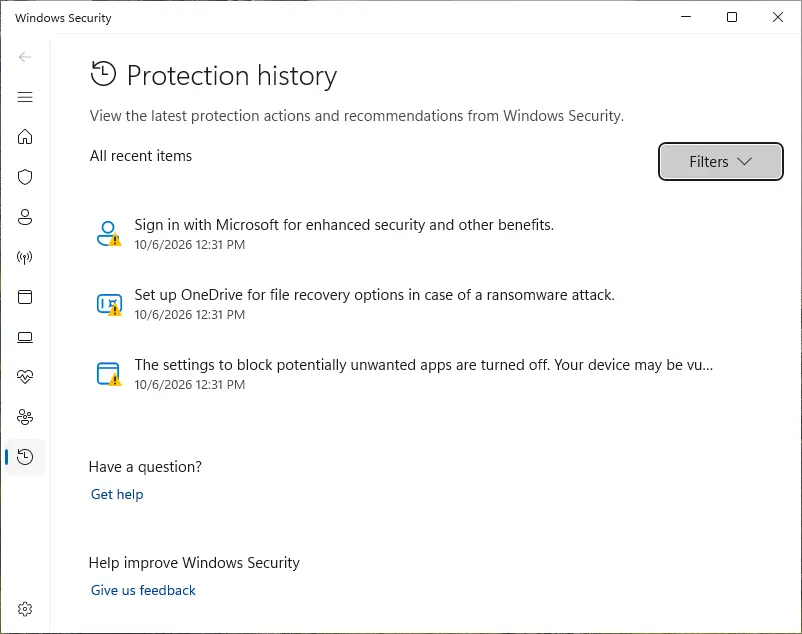
| A Defender detection that names a PowerShell script or Expiro | Look in Windows Security, Protection history, for the name, date and file path |
How to check the PC for sqpengg.com (crypted PowerShell scripts, Expiro tag)
How a PC ends up asking for these files
A .ps1 file on a server does nothing by itself.
Something on the PC has to ask PowerShell to fetch it. We did not see the first step for sqpengg.com, but these are the usual ways the FTC and MITRE describe for scripts of this kind to start.
- 1
An attachment or a link in an email
The FTC warns not to open attachments or click links in unexpected emails. A shortcut file, a script or a document that asks you to enable content can start PowerShell with one line that fetches the stub.
- 2
A fake download or a cracked program
The FTC warns against downloading software from ads and against sites offering free films, music and games. Such downloads often carry a small first stage that later pulls a script like these.
- 3
A page that asks you to paste a command
Some fake check pages tell visitors to press keys that paste and run a PowerShell command. Any page that asks you to run a command to prove you are human is an attack.
- 4
Malware already on the PC
A first infection can fetch further stages. If your PC asked for sqpengg.com on its own, the question is what told it to, and that program must go too.
Check your PC before you delete anything
Work through these checks on the PC that asked for the address.
Write down what you find, with dates, before you remove it, so you know what ran and when.
If you find nothing, that does not prove the PC is clean. Crypted scripts are made to avoid signatures, so the offline scan below is still worth running.
- 1
Disconnect first
Turn off Wi-Fi or unplug the network cable. A script that downloads further parts needs the connection.
- 2
Find which device asked
If you came here from a router page, a DNS filter or a firewall alert, note the device name and the time. Only that device is in question.
- 3
Look at Protection history
Open Windows Security and select Protection history. Look for detections that name a .ps1 file, PowerShell or Expiro, and note the file path.
- 4
Open Task Scheduler
Press Start, type Task Scheduler and open it. In Task Scheduler Library look for tasks you do not know, with random names, or whose action starts powershell.exe with a long line of text.
- 5
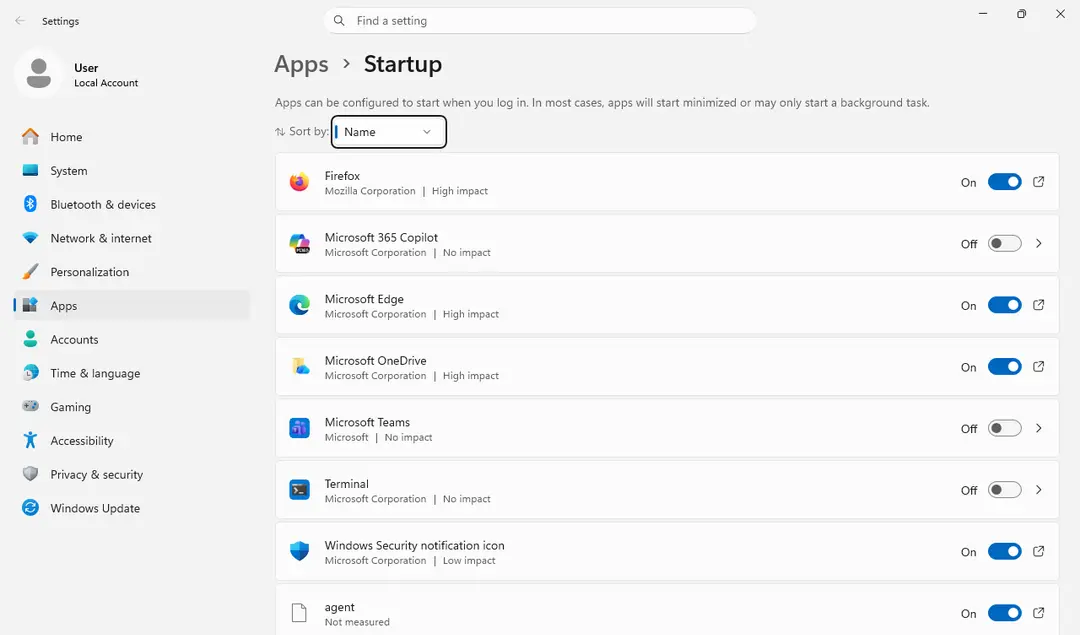
Check startup apps
Open Settings > Apps > Startup and switch off anything you do not recognise. Note its name first.
How to remove sqpengg.com (crypted PowerShell scripts, Expiro tag)
How to remove sqpengg.com
A loader's job is to install other malware, so treat the PC as infected with more than one program until the scans are clean.
Step 1: Delete scheduled tasks that bring it back
Programs like sqpengg.com add a scheduled task so they return after an uninstall or reopen a page at every sign-in. Start Task Scheduler, open Task Scheduler Library and sort by Last Run Time to see what ran recently.
On the Actions tab, a program in a user folder, a script or a web address is a warning sign; right-click such a task and choose Delete.
Tasks with names copying Google, Edge or Windows updaters but pointing to an odd folder are typical. The tool looks the same in Windows 11 and Windows 10.

Windows 11: Task Scheduler Library, the task selected, the Actions tab shows the file it runs. Full procedure with screenshots: Remove what malware leaves behind in Windows
Step 2: Remove it from startup
Press Ctrl + Shift + Esc to open Task Manager and select Startup apps (Windows 11) or the Startup tab (Windows 10). Disable entries you do not recognise, especially ones with no publisher or with a name that copies a Windows component.
Right-click an entry and choose Open file location to see where it runs from: programs in
%AppData%or%Temp%deserve a closer look. Some entries are not listed there but in the registry Run keys, which the procedure below shows how to check.Full procedure with screenshots: Stop apps from opening at startup On uGetFix
Step 3: Delete the folders left behind
Uninstalling often leaves the program's folders, and some threats reinstall themselves from them.
Press Windows + R, type
%LocalAppData%and press Enter, then do the same for%AppData%and %ProgramData%, and look for folders named after sqpengg.com, its publisher or created on the day the problem started. Delete those folders, and check C:\Program Files and C:\Program Files (x86) too.If Windows says a file is in use, end it in Task Manager or delete the folder after a restart in Safe Mode. The folders are the same in Windows 11 and Windows 10.
Full procedure with screenshots: Remove what malware leaves behind in Windows
Step 4: Scan the PC, then run the offline scan
A scan finds the parts of sqpengg.com that the manual steps cannot see. In Windows Security > Virus & threat protection > Scan options, start a Full scan and quarantine what it reports.
Follow it with Microsoft Defender Antivirus (offline scan) > Scan now, which restarts the PC and checks the disk while Windows and the malware are not running.
It takes about 15 minutes and works the same in Windows 11 and Windows 10. If either scan finds something, run the full scan again after removal until it comes back clean.

Windows 11: Windows Security > Virus & threat protection > Scan options. Full procedure with screenshots: Run a Microsoft Defender Offline scan
Step 5: Change passwords from another device and sign out other sessions
Sqpengg.com can copy saved passwords, cookies and session tokens and send them out in seconds, so cleaning the PC does not undo the theft.
Change your passwords on a device that was never infected, starting with the e-mail account, since every other reset goes through it. On each account, end all other sessions and check the recovery e-mail, phone number and forwarding rules.
Then turn on two-step verification. Sign in on the Windows 11 or Windows 10 PC again only after the offline scan is clean.
Full procedure with screenshots: Turn on two-step verification / secure a hacked account
Run Microsoft Defender Offline
Because a file infector changes many files and a crypted script hides from signatures while Windows runs, scan from outside Windows.
Microsoft Defender Offline does exactly that: it restarts the PC and scans from the Windows Recovery Environment, without loading Windows.
- 1
Save your work
Microsoft warns that the scan restarts the device, so save and close open files first.
- 2
Open the scan options
Open Windows Security, select Virus & threat protection, and under Current threats select Scan options.
- 3
Start the offline scan
Select Microsoft Defender Antivirus (offline scan) and start it. The PC restarts, scans, and restarts again by itself when it is done.
- 4
Read the result
Back in Windows, open Windows Security > Protection history to see what was found and removed.
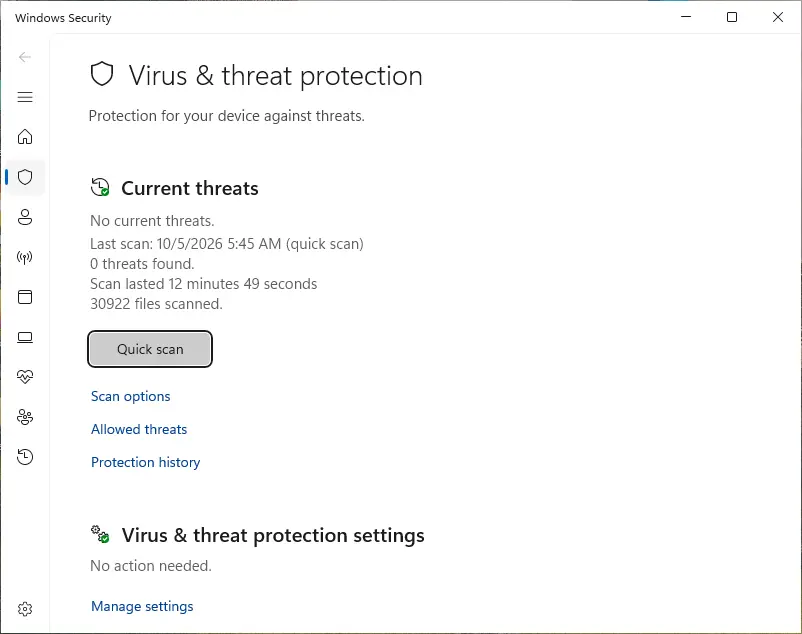
If the scan reports Expiro or many infected program files, Microsoft notes that remnant files and changes can stay. In that case a reset of Windows is the cleaner end point: Settings > System > Recovery > Reset this PC. Back up your documents first, but not programs, which may be infected.
If you use a Mac, an iPhone or an Android phone
PowerShell scripts and Expiro are Windows threats.
Nothing we read describes these files on other systems.
| Your device | What we know | What to do |
|---|---|---|
| Mac | The files are Windows PowerShell scripts; Microsoft lists Expiro as a Win32 virus | Nothing to remove for this threat. Do not follow the Windows steps on a Mac |
| iPhone or iPad | No source describes these files on iOS | Nothing to remove. If you typed passwords on a Windows PC that ran the script, change them from here |
| Android | No source mentions them on Android | Nothing to remove for this threat. A clean phone is a good device for changing passwords |
After removal: passwords, accounts and prevention
After a clean PC: protect what may have been taken
Even when the scan finds nothing, act as if a password stealer could have run, because the payload is unknown.
- 1
Stop signing in on the PC
The FTC says to stop logging into shopping, banking and other sensitive accounts on a PC you think has malware, until it is clean.
- 2
Change passwords from a clean device
Use a phone or another computer. Start with email, because it resets everything else, then bank, work and cloud storage. The FTC also advises turning on two factor authentication.
- 3
Watch your accounts
Look at recent sign ins, forwarding rules in email and new payees in online banking. Anything you did not do is a sign that data was taken.
- 4
Report it
In the United States the FTC takes reports of malware spreading sites and emails at ReportFraud.ftc.gov. You can also tell abuse.ch through URLhaus if you find a new file address.
If sqpengg.com is your domain
Not every address listed by URLhaus belongs to a criminal.
Sometimes a real company's hosting is broken into and a folder of files is planted. If you own sqpengg.com, the open folder with nonsense names such as vi1xwsm, trbhoun and wzyergu is the first thing to look at: you did not make it, so someone else has write access to your server.
Remove the folder, turn off directory listing, change every hosting, control panel and FTP password, update the site software and plugins, and look in the server logs for the upload on or before 30 September 2026. Then ask URLhaus to recheck the entries. We do not know whether the owner of this domain is a victim or the operator, because no registration data was available to us.
Keep a PC out of this kind of chain
The chain only works if a first step runs on your PC.
Most of the defence is about that step.
Do
- Keep Microsoft Defender on, updated and set to scan new files, as the FTC advises.
- Show file endings in File Explorer, so a .ps1, .lnk or .js file posing as a document is visible.
- Get programs from their makers' own sites or from the Microsoft Store.
- Use a password manager and two step sign in, so one stolen password is not enough.
- Scan USB drives before you open files from them.
- Keep a backup of documents on a disk you unplug after use.
Don't
- Do not open attachments in unexpected emails, even if they look like invoices.
- Do not paste and run commands a web page tells you to run.
- Do not download software from ads or from sites offering free paid programs.
- Do not call a phone number shown in a pop up warning.
- Do not keep using a PC for banking while you suspect it is infected.
For people who manage PCs for others, MITRE lists further controls for PowerShell: allow only signed scripts, use application control and Constrained Language mode, and restrict who can change the execution policy. MITRE also warns that the execution policy alone can be bypassed.
Questions about sqpengg.com (crypted PowerShell scripts, Expiro tag)
What is sqpengg.com?
It is a web address that URLhaus, the malware tracking project of abuse.ch, lists for six PowerShell script files reported on 30 September 2026.
Their names, such as Crypted.ps1 and secured_stub.ps1, point to crypters, and one file is tagged expiro. It is not a program on your PC. We did not download the files, so their contents are not confirmed by us.
Is sqpengg.com still active?
Partly. When we read URLhaus on 8 October 2026, one of the six files, crypted.ps1 in the nn folder, was still marked online and five were offline.
Our own plain request to the server timed out the same day. A timeout does not clear a site, so treat the address as dangerous.
I saw sqpengg.com in a log. Am I infected?
Not necessarily. If the request was blocked, nothing was downloaded. But something on that device asked for the address, so check Protection history, Task Scheduler and startup apps on it, and run a Microsoft Defender Offline scan to be sure.
Note the time and the device from the log, because that tells you which PC to clean and when the request happened.
What is a crypted PowerShell stub?
It is a plain text PowerShell script that holds a hidden, encrypted program and the few lines that decode and start it. MITRE ATT&CK explains that packing changes a file's signature to avoid signature based detection and that PowerShell can run downloaded code in memory without touching disk. The script only becomes dangerous when PowerShell runs it.
What is Expiro?
Expiro is a Windows virus family that Microsoft lists as Virus:Win32/Expiro. Microsoft says it can perform actions of a malicious actor's choice and lists slow performance, changed files and less storage as symptoms.
The tag on the sqpengg.com file comes from URLhaus; we did not confirm it ourselves. Microsoft Defender Antivirus detects and removes it, and Microsoft advises a full scan afterwards.
Which malware do these files install?
That is unknown. We found no analysis of these exact files, and a crypter can wrap many different programs. The only family name in the reports is the expiro tag on the file that is still online.
Treat any PC that ran one of these scripts as fully compromised, because the payload could be a password stealer, a remote access tool or a file infector.
How do I remove it?
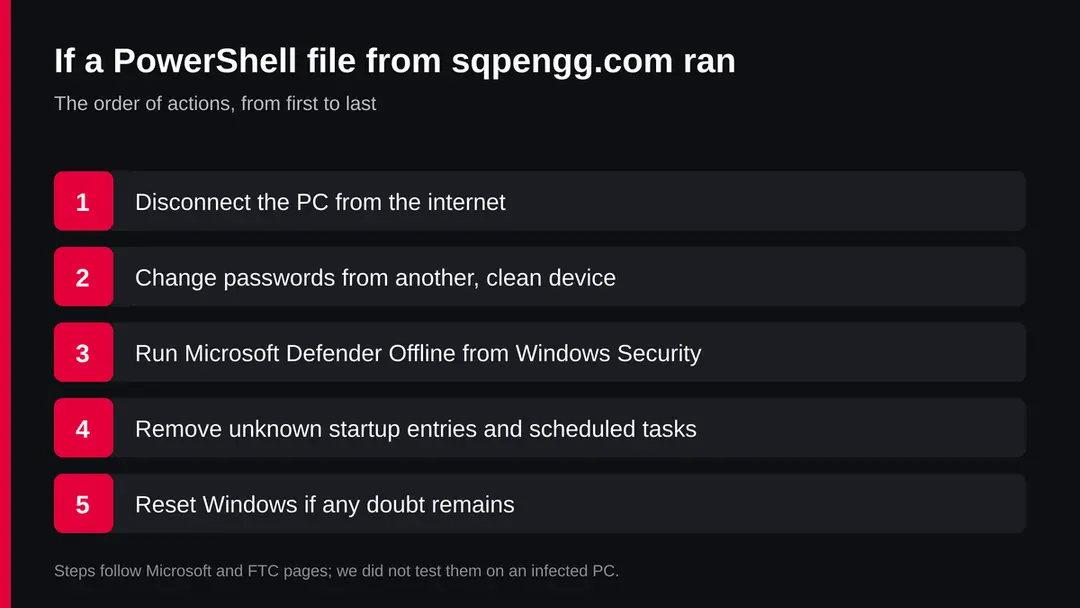
Disconnect the PC, change passwords from another device, run Microsoft Defender Offline from Windows Security, Virus & threat protection, Scan options, and remove unknown scheduled tasks and startup entries. If the scan finds a file infector or you remain unsure, reset Windows from Settings, System, Recovery. Back up documents first, but not programs, which a file infector may have changed.
Can it affect my Mac or phone?
Nothing we read says so. The files are Windows PowerShell scripts and Expiro is listed by Microsoft as a Win32 virus. Use your Mac or phone as the clean device for changing passwords.
Do not follow Windows removal steps on a Mac, and do not install cleaning apps on a phone because of this address. Nothing in the reports points to them.
Who owns sqpengg.com?
We do not know. The public registration lookup returned no record to us on 8 October 2026. The address could belong to an operator or to a site owner whose server was broken into.
The random folder names on the server do not tell us either. If you own the domain, the section above explains how to remove the planted folder and secure the hosting.
Will Fortect remove sqpengg.com?
Fortect scans Windows for malware and unwanted programs and repairs the system files and settings they change, and its free scan shows what it finds on your PC before you decide anything.
For sqpengg.com, follow the plan above as well: the browser steps take back permissions and settings that no scanner treats as a threat, and uninstalling the program that brought it removes the source.
Run Microsoft Defender's full scan and, if anything was found, its offline scan as a second opinion. If the symptoms are gone after the plan and both scans are clean, there is nothing more to do.
Sources
- Microsoft Security Intelligence: Virus:Win32/Expiro (published 22 January 2014) (read October 8, 2026)
- MITRE ATT&CK: Command and Scripting Interpreter: PowerShell, T1059.001 (modified 12 May 2026) (read October 8, 2026)
- MITRE ATT&CK: Obfuscated Files or Information: Software Packing, T1027.002 (modified 12 May 2026) (read October 8, 2026)
- Microsoft Support: Help protect my PC with Microsoft Defender Offline (read October 8, 2026)
- FTC Consumer Advice: How To Recognize, Remove, and Avoid Malware (April 2025) (read October 8, 2026)