
donutsmpcheats.org: fake Minecraft cheat mods with the SilentNet stealer, and what to do if you installed one
donutsmpcheats.org is a site registered in September 2026 that offered Minecraft cheat clients such as LiquidBounce, Wurst and Meteor Client as .jar files. URLhaus listed seven of them on 30 September 2026 as malware tagged stealer and SilentNet.
Downloading alone does nothing; the danger starts when the .jar goes into the mods folder and Minecraft loads it. If you did that, treat your Minecraft, Discord, email and browser logins as stolen: change them from another device, then scan and clean the PC.
Facts checked October 8, 2026. Removal steps tested on Windows 11 (26H2) and checked against Microsoft's and the browser makers' current documentation.
Automatic
Get a free scan and check if your PC is infected.
Fortect finds malware, unwanted programs and the Windows damage they leave behind, and repairs it in one pass.
An automatic scan checks installed programs, startup items and browser extensions for anything that came with a Minecraft mod (.jar) downloaded from donutsmpcheats.org.
Do it yourself · free Remove donutsmpcheats.org (fake Minecraft mods, SilentNet stealer) yourself 5 steps, about 15 minutes, no software needed.
Start the steps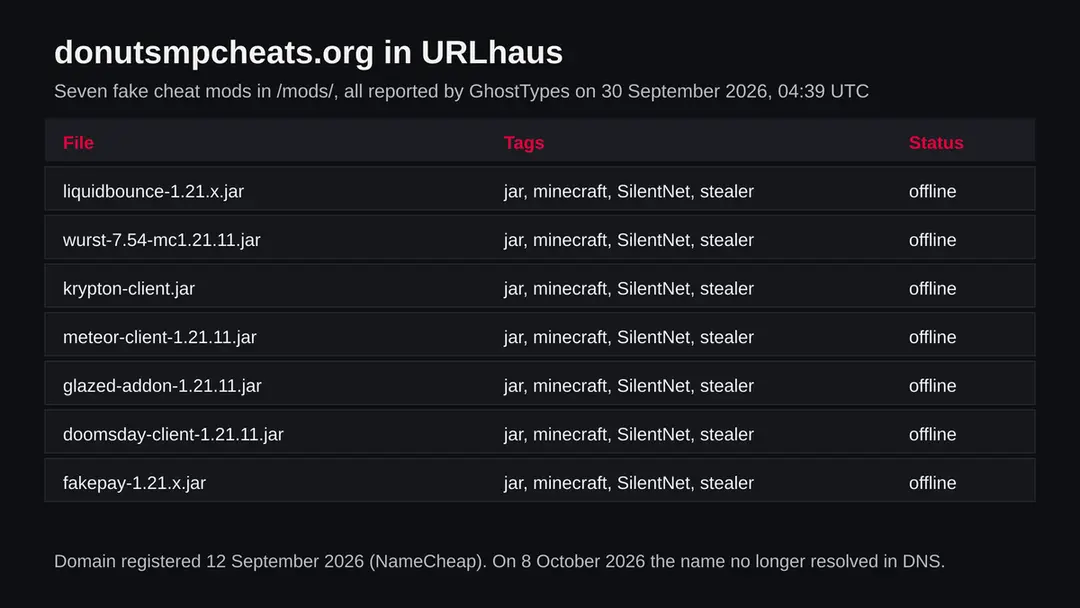
Donutsmpcheats.org (fake Minecraft mods, SilentNet stealer): summary
| Type | A site that handed out fake Minecraft cheat mods; URLhaus tags all seven .jar files stealer and SilentNet |
|---|---|
| Risk | High if you put one of the mods into Minecraft: game, Discord, email, browser and wallet logins may be taken. Low if you only visited or downloaded |
| Symptoms | Often none on the PC. Stolen accounts, Discord messages you did not send and sign in alerts are the usual first sign |
| How to get rid of it | Delete the .jar, change passwords from another device, run Microsoft Defender Offline, and reset Windows if you are not sure |
| Our check (8 October 2026) | One plain request from our server: the name no longer resolves in DNS. Offline clears nothing for files already downloaded |
| Running since / first seen | Domain registered 12 September 2026; files reported 30 September 2026 |
| Removal | Scan the PC with security software to find and remove the malware and anything installed with it. Fortect scans Windows for malware and repairs the system files and settings it damaged. Remove it nowTo use the full-featured product, you have to purchase a license for Fortect. The scan is free. |
Show 9 more facts
| Platform | Any PC running Minecraft Java Edition with mods; later stages in similar campaigns were Windows programs |
|---|---|
| Detection names | No Microsoft detection name is known for these files, because we did not open them. Sandbox services name the family SilentNet |
| Name | Donutsmpcheats.org |
| Domain registered | 12 September 2026 |
| Evidence | 7 write-ups by security sites; details still limited |
| First seen | 30 September 2026 |
| Distribution | Typically fake installers, cracked programs, e-mail attachments, fake "verify you are human" pages and ads for popular apps |
| Damage | Installs other malware, often several programs at once |
| Facts checked | 8 October 2026 |
Facts checked on 8 October 2026 against the URLhaus data for donutsmpcheats.org held in our database, RDAP, one plain request from our server, the Triage report for Krypton_Client.jar, and published pages by Check Point Research, Microsoft Support and Microsoft Learn. We did not download the files and infected no PC; the steps follow Microsoft's pages and were not tried on a live infection.
What donutsmpcheats.org is, and what we know about it
donutsmpcheats.org is a website that offered Minecraft cheat mods as .jar files. On 30 September 2026 the URLhaus project of abuse.ch listed seven of those files as malware, tagged stealer and SilentNet. The site's own name points at DonutSMP, the name of a public Minecraft server; we found nothing linking that server's team to this site. This page sets out what the reports show, what researchers publish about fake Minecraft mods, and what to do if you ran one.
- 1
What URLhaus lists
Seven file addresses in a folder called mods: liquidbounce-1.21.x.jar, wurst-7.54-mc1.21.11.jar, krypton-client.jar, meteor-client-1.21.11.jar, glazed-addon-1.21.11.jar, doomsday-client-1.21.11.jar and fakepay-1.21.x.jar. All were added within four seconds on 30 September 2026 by the reporter GhostTypes, all carry the label malware_download, and all were offline on 8 October 2026.
- 2
What the tags mean
jar is the Java file type that Minecraft Java Edition mods use. minecraft says the files target the game. stealer says the code takes data from the computer it runs on. SilentNet is the name of the malware family the reporter matched.
- 3
What the file names copy
The names copy cheat clients and addons that players search for, with version numbers like 1.21.11 that match current Minecraft releases. A player looking for an advantage on a server is the target. The original projects are not the danger here; the files on this site were.
- 4
What this means for you
If you only opened the site and downloaded nothing, a mod file cannot run by itself. The risk is for a player who put one of these .jar files into the Minecraft mods folder and started the game. Then the code ran with the same access as Minecraft: your files, your browser data and your saved logins.
- Kind of threat
- A site that handed out fake Minecraft cheat mods; URLhaus tags all seven files stealer and SilentNet
- Where the files were
- hxxps://donutsmpcheats[.]org/mods/ followed by the .jar file name
- Domain registered
- 12 September 2026, registrar NameCheap, Inc., status client transfer prohibited (RDAP, read 8 October 2026)
- URLhaus entries
- 7 file addresses, all added 30 September 2026 at 04:39 UTC by GhostTypes; all 7 offline on 8 October 2026
- Our request
- 8 October 2026: the name did not resolve in DNS (ENOTFOUND), so there was no server to ask
- Platform
- Any computer that runs Minecraft Java Edition with mods. The extra stages researchers found in similar campaigns were Windows programs
What donutsmpcheats.org (fake Minecraft mods, SilentNet stealer) does on an infected PC
What we checked on 8 October 2026, and what we could not
We sent one plain request to donutsmpcheats.org from our server on 8 October 2026: no browser, no clicks, no downloads. It failed before it started, because the name no longer resolved in DNS. That means the site is unreachable today. It does not clear the site and it does nothing for a PC where one of the mods already ran.
Our check, 8 October 2026
- The name does not resolveOur request ended with getaddrinfo ENOTFOUND: no address was returned for donutsmpcheats.org. The DNS records may have been removed by the owner, the registrar or the hosting company. We cannot tell which.
- Why that is not a clean resultSites like this often move to a new name with the same files. A mod you downloaded before it went down keeps working, because it needs no site to run; it only needs a place to send what it takes.
- Pop ups, notification requests, redirectsNone seen. There was no page to see.
- URLhaus listingSeven .jar files tagged jar, minecraft, SilentNet and stealer, all added on 30 September 2026, all offline on 8 October 2026.
- The files themselvesWe did not download them. We cannot tell you exactly what each one takes or where it sends it.
Dangerous: treat every file from it as a stealer The site being offline proves nothing about the files people already took from it. The rating comes from the seven URLhaus reports and their stealer tags. If you ran one, follow the steps on this page.
What happened to donutsmpcheats.org, from registration to our check
The whole story fits into four weeks. Dates come from RDAP and from the URLhaus data we hold; times are UTC.
12 September 2026
The domain is registered
RDAP shows donutsmpcheats.org registered on 12 September 2026 at 17:23 UTC through NameCheap, Inc., with the status client transfer prohibited, a common default lock.
30 September 2026
Seven fake mods are reported
At 04:39 UTC the reporter GhostTypes adds seven .jar files from the mods folder to URLhaus within four seconds, all tagged jar, minecraft, SilentNet and stealer. The site had been up for less than three weeks.
The seven URLhaus entries for donutsmpcheats.org, all added on 30 September 2026 and all offline when we read them on 8 October 2026. 8 October 2026
All files offline, and our check
All seven entries are marked offline, and our plain request finds that the name no longer resolves in DNS.
What the pattern suggests, and what it does not: a new domain, a name built around one popular server, and many well known cheat names in one folder look like a site made only to spread these files. That is our reading of the dates and names, not something the report says.
How a fake Minecraft mod gets onto a PC
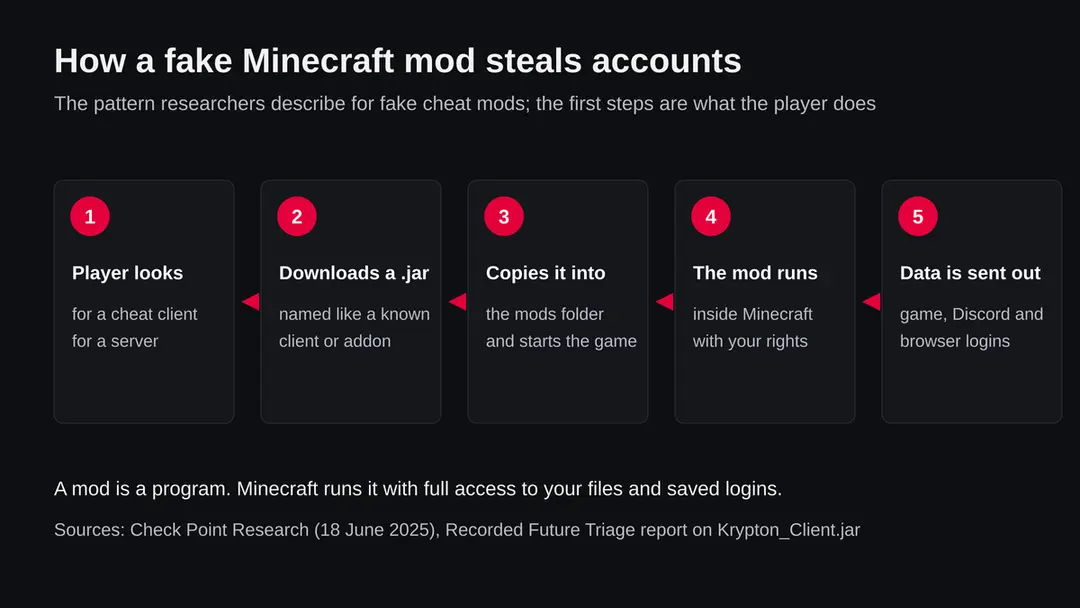
Nobody is infected by looking at a cheat site. The player downloads the .jar, puts it in the mods folder and starts the game; from then on it runs as part of Minecraft. We did not see these files run; this is how Check Point Research describes a campaign of the same kind.
- 1
The lure is a cheat
Check Point (18 June 2025) found fake mods posing as cheat tools such as Oringo and Taunahi, spread through GitHub pages that looked popular because many accounts had starred them. donutsmpcheats.org used the names of other cheat clients, but the idea is the same.
- 2
The player installs it by hand
Check Point notes that victims had to download the .jar and copy it into the Minecraft mods folder themselves. No exploit is needed; the player's own trust does the work.
- 3
The mod checks where it is
In Check Point's case the Java code first looked for signs of a virtual machine or of network analysis tools and quit if it found any. That is one reason Check Point says the downloader was detected by no antivirus engine on VirusTotal at the time.
- 4
It fetches more code
The first stage downloaded a second Java stealer into memory, which then pulled a third stage written in .NET for Windows. Each stage takes a different kind of data.
- 5
SilentNet itself
For the family named in these reports, the sandbox service Triage describes a file called Krypton_Client.jar, the same name as one of this site's files, as a Minecraft SilentNet RAT, a Fabric mod stealer with blockchain C2. Fabric is a common Minecraft mod loader; blockchain C2 means it reads its instructions or server address from a public blockchain, which is hard to take down.
We found no vendor report that analyses SilentNet in depth. The family name, the RAT label and the blockchain detail come from sandbox tags, so treat them as strong indicators rather than a full analysis.
What donutsmpcheats.org (fake Minecraft mods, SilentNet stealer) can steal or download
What a fake Minecraft mod can take
We did not run the files from donutsmpcheats.org, so this list comes from Check Point's analysis of a similar campaign and from the stealer and RAT labels on SilentNet. Not every build takes everything.
Reported for fake Minecraft mods
- Minecraft account tokens
- Launcher account files
- Discord tokens
- Telegram data
- Browser saved passwords
- Crypto wallets
- VPN settings
- Steam and FileZilla data
- Clipboard contents
- A screenshot
| Data | Detail | Source |
|---|---|---|
| Minecraft | Minecraft session tokens and account files from the Feather, Essential and Lunar launchers | Check Point |
| Chat | Discord tokens and Telegram data | Check Point |
| Browsers | Saved browser logins, taken by the third stage | Check Point |
| Money | Crypto wallets | Check Point |
| Other accounts | VPN settings, Steam and FileZilla | Check Point |
| Screen and clipboard | A screenshot and what you copied | Check Point |
| Remote control | The RAT label on SilentNet means it may also let someone send commands to the PC | Triage tags |
What this can cost you
Visiting the site or seeing its name costs nothing. The risks below apply to a computer where one of these mods was started with Minecraft.
- High
Your Minecraft and Microsoft account
A session token lets someone use your account without the password. Accounts are sold or used to cheat and spam on servers, and a ban for that can land on you.
- High
Your Discord account
A stolen Discord token is used to message your friends with the same kind of fake mod or a scam link, which spreads the infection.
- High
Browser logins and email
Saved passwords in the browser can open email, shops and school or work accounts. Email is the key to resetting everything else.
- High
Crypto and game items
Wallets and Steam items can be emptied. Crypto transfers cannot be reversed.
- Medium
Someone controlling the PC
The RAT label means remote control may be possible. That is why a reset is the safe answer if you cannot confirm the PC is clean.
- Low
Nothing, if you only saw the site
A downloaded .jar that was never put into Minecraft or opened with Java did not run.
What you may notice, and what you may not
Stealers are built to be fast and quiet: they take what they want in seconds. The signs below are what usually follows; most players notice the stolen accounts before anything on the PC.
| Sign | What it points to |
|---|---|
| The cheat did not work, or the game crashed | A fake mod often does nothing useful. That is our reading, not a quote, but many players only notice this |
| Friends get Discord messages you did not send | A stolen Discord token. This follows from the reports |
| You are signed out of Minecraft or Discord, or cannot sign in | Someone changed the password after taking a token |
| Sign in alerts from Microsoft, Google or your email | Browser passwords being used |
| Items or coins gone from Steam, a wallet or a server | Stolen logins or wallet data |
| A Defender alert on a .jar in the mods folder | Detection of the mod itself; check Protection history |
| Nothing at all | Check Point says the Java stage was missed by every antivirus engine at the time |
How to check the PC for donutsmpcheats.org (fake Minecraft mods, SilentNet stealer)
How players end up on a site like this
A site like donutsmpcheats.org needs players to come to it. We do not know how this one was advertised; the routes below are the ones researchers describe for fake mods.
- 1
Search results for cheats
A player searches for a cheat client for a server and a new site with the server's name in its address looks made for exactly that.
- 2
Links in Discord, YouTube or comments
Videos and chats showing a cheat often link to a download. A stolen Discord account sending the link to its friends is a common way the next victims arrive.
- 3
Pages that look popular
Check Point describes GitHub pages made to look trusted with stars from fake accounts. Popularity on a page is not proof that a file is safe.
Check your PC before you delete anything
Start with one question: did you put any .jar from donutsmpcheats.org into Minecraft and start the game? If you are sure you did not, delete the download and you are done. If you did, or you are not sure, assume your logins were taken and do the checks below. They do not delete anything.
Make your account changes from another device, such as your phone, not from the PC that ran the mod.
- 1
Look in the mods folder
On Windows, press Windows + R, type %appdata%\.minecraft\mods and press Enter. If you use a launcher such as Prism, CurseForge or Modrinth, open the mods folder of each instance from the launcher. Look for the names on this page and for any .jar you did not get from the mod's official page. Write down what you find.
- 2
Check other launchers and instances
Check Point found stealers that read files of the Feather, Essential and Lunar launchers. If you use those, check their mod folders too.
- 3
Open Protection history
In Windows Security > Virus & threat protection > Protection history, look for any detection around the day you added the mod.
- 4
Look at what starts with Windows
Open Settings > Apps > Startup and look for names you do not know. A stealer that also works as a RAT needs a way to start again.
- 5
Look at running programs
Open Task Manager and look for java.exe or javaw.exe running when Minecraft is closed, or any unknown process with network use. Right click and choose Open file location to see where it lives.
- 6
Check your accounts from your phone
Look at recent sign ins for your Microsoft account, Discord and email. This shows quickly whether the stolen data is already being used.
How to remove donutsmpcheats.org (fake Minecraft mods, SilentNet stealer)
How to remove donutsmpcheats.org
A loader's job is to install other malware, so treat the PC as infected with more than one program until the scans are clean.
Step 1: Delete scheduled tasks that bring it back
Programs like donutsmpcheats.org add a scheduled task so they return after an uninstall or reopen a page at every sign-in. Start Task Scheduler, open Task Scheduler Library and sort by Last Run Time to see what ran recently.
On the Actions tab, a program in a user folder, a script or a web address is a warning sign; right-click such a task and choose Delete.
Tasks with names copying Google, Edge or Windows updaters but pointing to an odd folder are typical. The tool looks the same in Windows 11 and Windows 10.

Windows 11: Task Scheduler Library, the task selected, the Actions tab shows the file it runs. Full procedure with screenshots: Remove what malware leaves behind in Windows
Step 2: Remove it from startup
Press Ctrl + Shift + Esc to open Task Manager and select Startup apps (Windows 11) or the Startup tab (Windows 10). Disable entries you do not recognise, especially ones with no publisher or with a name that copies a Windows component.
Right-click an entry and choose Open file location to see where it runs from: programs in
%AppData%or%Temp%deserve a closer look. Some entries are not listed there but in the registry Run keys, which the procedure below shows how to check.Full procedure with screenshots: Stop apps from opening at startup On uGetFix
Step 3: Delete the folders left behind
Uninstalling often leaves the program's folders, and some threats reinstall themselves from them.
Press Windows + R, type
%LocalAppData%and press Enter, then do the same for%AppData%and %ProgramData%, and look for folders named after donutsmpcheats.org, its publisher or created on the day the problem started. Delete those folders, and check C:\Program Files and C:\Program Files (x86) too.If Windows says a file is in use, end it in Task Manager or delete the folder after a restart in Safe Mode. The folders are the same in Windows 11 and Windows 10.
Full procedure with screenshots: Remove what malware leaves behind in Windows
Step 4: Scan the PC, then run the offline scan
A scan finds the parts of donutsmpcheats.org that the manual steps cannot see. In Windows Security > Virus & threat protection > Scan options, start a Full scan and quarantine what it reports.
Follow it with Microsoft Defender Antivirus (offline scan) > Scan now, which restarts the PC and checks the disk while Windows and the malware are not running.
It takes about 15 minutes and works the same in Windows 11 and Windows 10. If either scan finds something, run the full scan again after removal until it comes back clean.

Windows 11: Windows Security > Virus & threat protection > Scan options. Full procedure with screenshots: Run a Microsoft Defender Offline scan
Step 5: Change passwords from another device and sign out other sessions
Donutsmpcheats.org can copy saved passwords, cookies and session tokens and send them out in seconds, so cleaning the PC does not undo the theft.
Change your passwords on a device that was never infected, starting with the e-mail account, since every other reset goes through it. On each account, end all other sessions and check the recovery e-mail, phone number and forwarding rules.
Then turn on two-step verification. Sign in on the Windows 11 or Windows 10 PC again only after the offline scan is clean.
Full procedure with screenshots: Turn on two-step verification / secure a hacked account
If you play on a Mac, a console or a phone
A .jar mod runs wherever Minecraft Java Edition runs, so a Mac or Linux PC with these mods is not automatically safe. The later stages researchers found in similar campaigns were Windows programs.
| Your device | What we know | What to do |
|---|---|---|
| Mac or Linux with Minecraft Java | The Java part can run there; whether SilentNet takes the same data on a Mac is not known | Delete the mod, change passwords from another device, and treat Minecraft and Discord tokens as stolen |
| Console or Bedrock Edition | These mods are .jar files for Java Edition; consoles cannot load them | Nothing to remove. Change passwords only if you typed them on the site |
| iPhone or Android | No source mentions these files on phones | Nothing to remove. Use the phone for your password changes |
After removal: passwords, accounts and prevention
After you remove the mod: protect what was taken
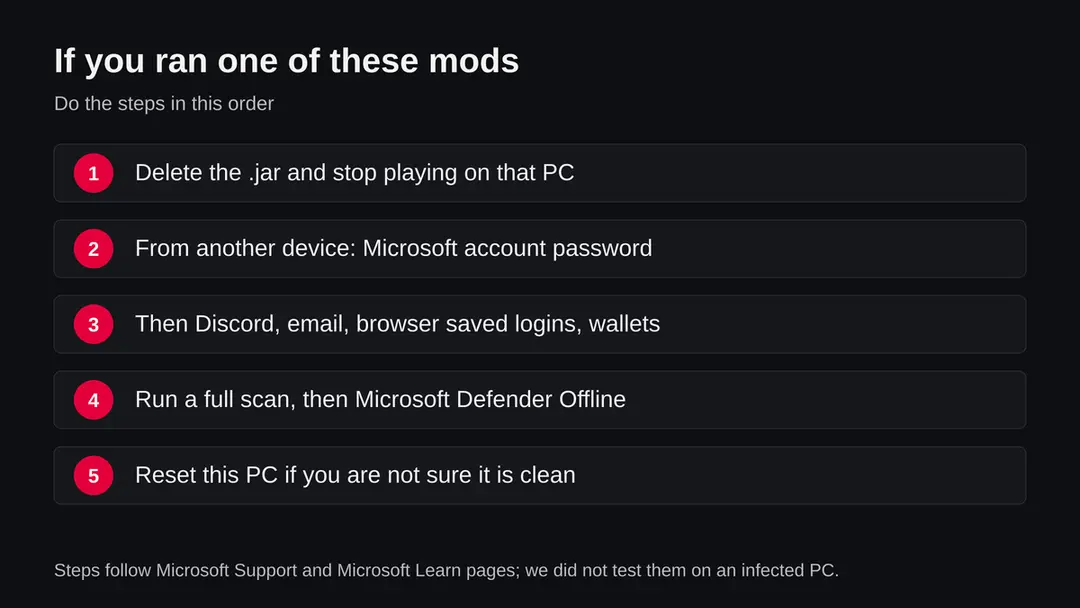
Removing the .jar stops it from running again, but what it already took is gone. The order matters: accounts from another device first, then the PC.
- 1
Delete the mod
Remove the .jar from every mods folder you found. Do not keep a copy, and do not open it to see what it does.
- 2
Secure your Microsoft account first
Your Minecraft Java account is a Microsoft account. Microsoft's page on hacked accounts says to clean the PC of malware with a full scan before you change the password, then change or reset it, then check settings such as connected accounts, forwarding and automatic replies. Until the PC is clean, make the change from your phone or another computer.
- 3
Then Discord, email and saved browser logins
Change the Discord password, which also signs out stolen tokens, and turn on two step sign in. Then change your email password and every password your browser had saved. Check which devices are signed in and sign out the ones you do not know.
- 4
Move crypto and check game items
If a wallet was on the PC, create a new wallet on a clean device and move the funds. Check Steam and server accounts for trades or purchases you did not make.
- 5
Run Microsoft Defender Offline
Microsoft Learn says to open Windows Security > Virus & threat protection > Scan options, choose Microsoft Defender Offline scan and select Scan now. Save your work first: Windows restarts and the scan takes about 15 minutes outside normal Windows. If BitLocker is on, suspend it first. Results appear under Protection history.
- 6
If you are not sure, reset Windows
Because SilentNet is also labelled a RAT, a PC you cannot confirm as clean should be reset. Microsoft Support calls Reset this PC the most disruptive recovery option; it is under Settings > System > Recovery, removes apps and settings, and lets you keep or remove personal files. Back up your worlds and documents first.
- 7
Tell your friends
If your Discord sent links, tell your friends not to open them or install the file, and to follow this page if they did.
For parents of young players
Many players who search for cheat mods are young, and a stolen account is often the first thing a parent hears about. A calm talk helps more than a ban: the child needs to tell you quickly next time.
- 1
Ask what was installed
Ask which file came from where and when it was added. The date helps you find matching sign in alerts.
- 2
Change the accounts together
Use your phone to change the Microsoft, Discord and email passwords, and turn on two step sign in with a device you control.
- 3
Agree on where mods come from
Only from the mod's own official page or a well known mod site, never from a site named after a server or a link in a chat.
Keep fake mods off your PC
A mod is a program with the same access as the game. The safest cheat mod is the one you do not install.
Do
- Get mods from their official project pages or well known mod sites.
- Keep a separate Minecraft instance for testing, and look at what is in its mods folder.
- Use two step sign in on your Microsoft account, Discord and email.
- Keep Windows and Microsoft Defender updated.
- Back up your worlds on a disk or cloud folder you control.
Don't
- Do not download cheat clients from new sites named after a server.
- Do not trust a download because a video, a friend's Discord or many stars point to it.
- Do not let a browser save passwords on a PC where you test unknown mods.
- Do not take a quiet scan or an offline site as proof that you are safe.
Questions about donutsmpcheats.org (fake Minecraft mods, SilentNet stealer)
What is donutsmpcheats.org?
It is a website, registered on 12 September 2026, that offered Minecraft cheat clients and addons as .jar files. On 30 September 2026 URLhaus listed seven of those files as malware, tagged stealer and SilentNet.
The name refers to DonutSMP, a Minecraft server, but we found nothing linking the server's team to it. On 8 October 2026 the name no longer resolved.
Is donutsmpcheats.org safe?
No. All seven files URLhaus listed from it are tagged as a stealer. The site was unreachable on 8 October 2026, but that only means it is offline now. A mod downloaded earlier still works after the site disappears, and sites like this often return under a new name with the same files.
I downloaded a cheat from donutsmpcheats.org but never started Minecraft with it. Am I infected?
Most likely not. A .jar mod runs when Minecraft loads it from the mods folder, or when you open it with Java yourself.
If it only sat in your Downloads folder, delete it and empty the recycle bin. If you are not sure whether it reached the mods folder, check there and follow the steps on this page.
What is SilentNet?
SilentNet is the name a malware family is tracked under in sandbox services. Triage describes a file called Krypton_Client.jar as a Minecraft SilentNet RAT, a Fabric mod stealer with blockchain C2. We found no vendor report that analyses it in depth, so details about what it takes come from similar fake mod campaigns that Check Point analysed.
What does a fake Minecraft mod steal?
In Check Point's analysis of a similar campaign the stages took Minecraft tokens, launcher account files, Discord tokens, Telegram data, browser passwords, crypto wallets, VPN settings, Steam and FileZilla data, the clipboard and a screenshot. We did not run the files from this site, so we cannot say which of these each one takes.
Are LiquidBounce, Wurst or Meteor Client viruses?
This page is about the files on donutsmpcheats.org, which only copied those names. Fake mods use well known names because players search for them.
Whether any cheat client is allowed on a server is a separate question; using one can get you banned. If you want a mod, get it only from its own official project page.
How do I get my Minecraft account back?
Your Minecraft Java account is a Microsoft account. Microsoft's page on hacked accounts says to run a full scan first, then change or reset the password, then check settings that may have been changed. If you cannot sign in, use the reset flow on Microsoft's sign in page from a clean device, and turn on two step sign in afterwards.
Does this affect a Mac?
It can. A .jar mod runs wherever Minecraft Java Edition runs, including a Mac.
The later stages researchers found in similar campaigns were Windows programs, so a Mac may lose less, but you should still delete the mod and treat your Minecraft, Discord and browser logins as stolen. Change them from another device.
Will an antivirus catch it?
Not reliably. Check Point says the Java downloader it studied was missed by every antivirus engine on VirusTotal at the time, partly because sandboxes lack Minecraft. A scan is still worth running, especially Microsoft Defender Offline, but a clean result does not mean your accounts are safe; change the passwords anyway.
Will Fortect remove donutsmpcheats.org?
Fortect scans Windows for malware and unwanted programs and repairs the system files and settings they change, and its free scan shows what it finds on your PC before you decide anything.
For donutsmpcheats.org, follow the plan above as well: the browser steps take back permissions and settings that no scanner treats as a threat, and uninstalling the program that brought it removes the source.
Run Microsoft Defender's full scan and, if anything was found, its offline scan as a second opinion. If the symptoms are gone after the plan and both scans are clean, there is nothing more to do.
Sources
- Check Point Research: Fake Minecraft mods distributed by the Stargazers Ghost Network to steal gamers' data (18 June 2025) (read October 8, 2026)
- Recorded Future Triage: static report for Krypton_Client.jar, family SilentNet (read October 8, 2026)
- Microsoft Support: How to recover a hacked or compromised Microsoft account (read October 8, 2026)
- Microsoft Learn: Microsoft Defender Offline scan in Windows (updated 25 August 2026) (read October 8, 2026)
- Microsoft Support: Recovery options in Windows (Reset this PC) (read October 8, 2026)