
genovaw.com: a Mac stealer download site (AMOS, MacSync, ClickFix) and what to do if you pasted its command
genovaw.com is a website that URLhaus lists for serving Mac malware tagged Amos, MacSync and ClickFix, and today the name no longer resolves from our server. If you pasted a command from it into Terminal on a Mac, treat the Mac as compromised:
- change your passwords from another device
- move any crypto
- then erase the Mac
Facts checked October 18, 2026. Removal steps checked against Apple's current documentation and the security vendors' reports. We have not run the malware on a Mac.
Automatic
Get a free scan and check if your Mac is infected.
Fortect for Mac scans for malware and unwanted programs, and its free scan shows what it finds before you decide anything.
An automatic scan checks installed programs, startup items and browser extensions for anything that came with a download or a pasted command from genovaw.com.
Do it yourself · free Remove genovaw.com (Amos, MacSync, ClickFix) yourself 7 steps, about 21 minutes, no software needed.
Start the steps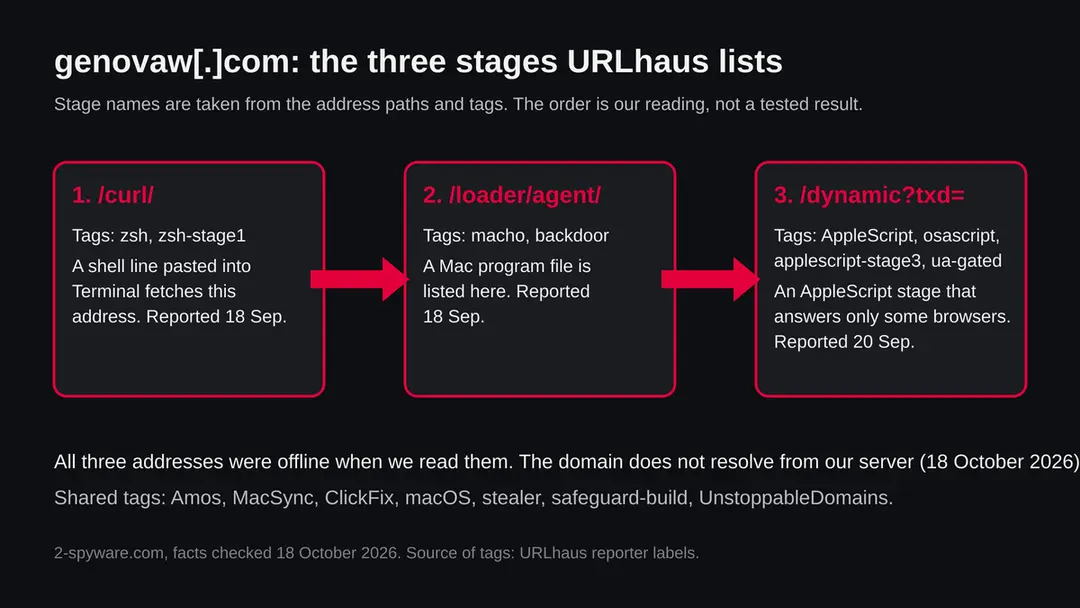
Genovaw.com (Amos, MacSync, ClickFix): summary
| Type | A malware download site for Macs: URLhaus tags it Amos, MacSync, stealer and ClickFix |
|---|---|
| Risk | High if you pasted its command or ran its files: passwords, cookies, Keychain, wallets and files may have been taken |
| Symptoms | Often none. A fake password box, Terminal asking for access and hidden folders are the signs in the reports |
| How to get rid of it | Change passwords from another device, move crypto, revoke sessions and keys, then back up documents and erase the Mac |
| Our check (18 October 2026) | A plain request from our server: the name did not resolve (ENOTFOUND). A dead address clears nothing; the danger rating comes from URLhaus |
| Running since / first seen | Domain registered 17 November 2025; malware URLs reported 18 and 20 September 2026 |
| Removal | Scan the Mac with security software to find the malware and anything installed with it. Fortect for Mac scans for malware and unwanted programs. Remove it nowTo use the full-featured product, you have to purchase a license for Fortect. The scan is free. |
Show 10 more facts
| Platform | macOS, by the tags; no source says other systems are affected |
|---|---|
| Detection names | No Microsoft detection name is known (a Mac threat). No vendor detection name for these files was checked |
| Registrar | Unstoppable Domains Inc.; registry status includes client hold |
| Name | Genovaw.com |
| Domain registered | 17 November 2025 |
| Evidence | 3 write-ups by security sites; details still limited |
| First seen | 18 September 2026 |
| Distribution | Typically fake installers, cracked programs, e-mail attachments, fake "verify you are human" pages and ads for popular apps |
| Damage | Installs other malware, often several programs at once |
| Facts checked | 18 October 2026 |
Facts checked on 18 October 2026 against the URLhaus rows for genovaw.com, RDAP, one plain request from our server, and published pages by Kaspersky, Unit 42, Apple and The Hacker News. We did not download any file and we infected no Mac; the removal steps follow Apple's pages and the vendors' advice and were not tried on a live infection.
What genovaw.com is, and what we know about it
genovaw.com is not a program on your Mac. It is a web address that the abuse.ch project URLhaus lists as a place where Mac malware was served. We found no public write-up of this one site, so what follows is what URLhaus shows, what our own server saw, and what security vendors have published about the malware families named in the tags.
- 1
What URLhaus lists
Three addresses on genovaw.com. Two were added on 18 September 2026 (a path starting /curl/ and a path starting /loader/agent/) and one on 20 September 2026 (a path /dynamic with a long token). All three are marked offline. The same anonymous-style reporter name, c4ffeine, filed all three, and all three carry the same long token in the address.
- 2
What the tags mean
Amos is the Atomic macOS Stealer, a password and wallet thief for Macs. MacSync is the name of another Mac stealer. ClickFix is a trick in which a fake verification page makes you run a command yourself. macOS says the target is the Mac. Tags such as zsh-stage1, macho, applescript-stage3 and osascript describe the kind of file at each address. ua-gated, safeguard-build and token-001e07c9 are the reporter's own labels, and URLhaus gives no explanation for them.
- 3
What we could not confirm
We did not download any file and we never saw the page that tells visitors to paste a command, because the name does not resolve for us. So we do not know what lure genovaw.com used, what exactly each file did, or whether anything beyond macOS is affected. The family labels are the reporter's tags; the URLhaus rows we hold show no malware signature.
- 4
What this means for you
If you only saw the name in a log, a link or a warning, you are not infected by that alone. The risk is for people who pasted a command it showed them into Terminal on a Mac, or who ran a file that came from it.
- Kind of threat
- A malware download site for macOS; the malware is tagged Amos and MacSync (Mac information stealers)
- Delivery trick
- ClickFix: a fake verification page that asks you to copy a command and paste it into Terminal
- Domain registered
- 17 November 2025, registrar Unstoppable Domains Inc. (RDAP, read 18 October 2026)
- Registry status today
- client hold, client delete prohibited, client transfer prohibited, client update prohibited
- URLhaus entries
- 3 addresses, added 18 and 20 September 2026; all 3 offline when we read them
- Platform
- macOS, by the tags. Whether Windows, iPhone or Android are hit is not stated by any source we read
What genovaw.com (Amos, MacSync, ClickFix) does on an infected Mac
What we checked on 18 October 2026, and what we could not
Our check was a plain request from our own server, not a browser visit. It never reached a page: the name genovaw.com did not resolve. That is a fact about today, and it clears nothing about September.
Our check, 18 October 2026
- The name did not resolveOur server's request failed with getaddrinfo ENOTFOUND genovaw.com. No web server answered, so there was no page, no redirect and no file to look at.
- Why that is not a clean resultThe registry lists the status client hold. In the usual meaning of that status the registrar has switched the domain off in the DNS. We do not know who asked for it or when it happened. Criminals also move to new names quickly, so a dead name does not mean the campaign ended.
- Notification request, pop-ups, redirects, ad networksNone seen. There was nothing to see: the request never reached a site.
- URLhaus listingThree malware URLs on this domain, tagged Amos, MacSync, ClickFix, macOS and stealer. All three were offline when we read them.
- Downloads and the page itselfWe did not download anything and we did not reach the page that shows the command. We cannot tell you what the page said or what the files did.
- Browser type mattersOne address carries the tag ua-gated, which the reporter uses for a file that answers only some browsers. A plain request like ours would likely be turned away even if the site were alive.
Dangerous: treat it as a malware site The check itself found nothing, because nothing answered. The danger rating comes from the three URLhaus reports, not from our request. If the name ever comes back, do not open it, and do not run anything it gives you.
What happened to genovaw.com, from registration to today
The timeline has four dates. Two come from RDAP and URLhaus rows, one from our own request. The long gap before the first report is unexplained.
17 November 2025
The domain is registered
RDAP shows genovaw.com registered on 17 November 2025 at 20:39 UTC through Unstoppable Domains Inc. The reports tag the registrar as UnstoppableDomains. We do not know who owns the name and no source we read says.
18 September 2026
Two addresses are reported
At about 19:12 UTC the reporter c4ffeine adds the /curl/ address (tags zsh and zsh-stage1) and eight seconds later the /loader/agent/ address (tags macho and backdoor). Both also carry Amos, MacSync, ClickFix, macOS and stealer. The domain is nearly ten months old at that point.
20 September 2026
A third address is reported
At about 05:32 UTC the same reporter adds the /dynamic address, tagged AppleScript, applescript-stage3, osascript and ua-gated. This is the last report we hold.
18 October 2026
The name does not resolve
Our plain request from our server fails before it reaches any web server. RDAP, read the same day, shows the status client hold among its flags.
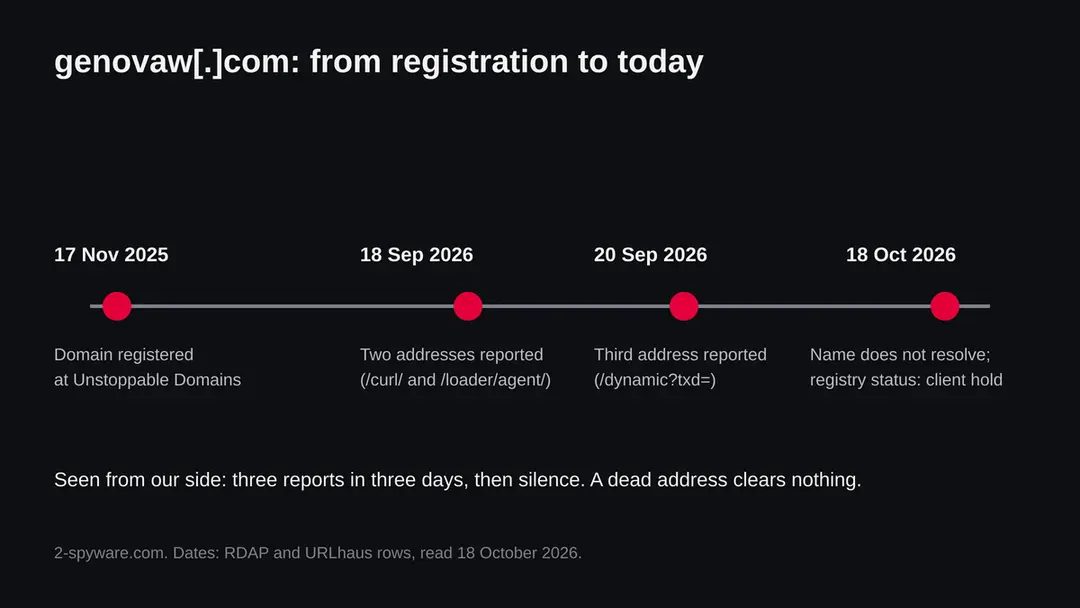
The dated events for genovaw.com. Registration and report dates come from RDAP and URLhaus rows; the last point is our own request.
The three addresses: what each stage of the attack probably did
The path names and tags show a chain of stages. We did not fetch the files, so the table below is our reading of the tags and of how vendors describe similar chains. It is not a tested result.
| Address path | Tags | Our reading |
|---|---|---|
| /curl/ plus a token | zsh, zsh-stage1, ClickFix | The first stage. A one-line command pasted into Terminal (curl is the standard Mac tool for fetching a file) pulls a shell script. This matches how Kaspersky and Unit 42 describe the first step of the Mac version of ClickFix. |
| /loader/agent/ plus a token | macho, backdoor, zsh | A Mach-O file, the native program format on a Mac. The reporter calls it a backdoor, a program that stays and takes orders. Unit 42 describes a similar chain in which a script fetches and runs a Mach-O installer saved as /tmp/helper. |
| /dynamic?txd= plus a token | AppleScript, osascript, applescript-stage3, ua-gated | A later stage written in AppleScript and run through the osascript tool. Press coverage of MacSync describes a payload in AppleScript that is fetched and run, and it fits the tags. ua-gated means the reporter saw it answer only to some user agents. |
| All three | Amos, MacSync, safeguard-build, token-001e07c9 | The same token appears in each address. We read it as one infection session or one campaign identifier. safeguard-build is the reporter's label; we cannot say what it means. |
The reporter uses both Amos and MacSync as tags on the same addresses. They may mean that the reporter was unsure, that the chain mixes pieces from both, or that one family borrowed code from the other. No source we read settles it, and we do not pick one.
How the ClickFix trick works on a Mac
ClickFix does not use a security hole. It makes you do the infecting yourself, so your Mac's own warnings are part of the instructions you ignore. We did not see genovaw.com's page; this is how Kaspersky and Unit 42 describe the trick on Macs.
- 1
A page asks you to prove something
The bait can be a human check, a browser repair prompt or a setup guide for a tool. Kaspersky documents a verification page; Unit 42 documents one selling a macOS toolkit. Either way the page hands you a line of text and asks you to copy it.
- 2
You are sent to Terminal
The page walks you through opening Terminal, pasting and pressing Return. Because you typed it yourself, the system does not see a download, which is why Kaspersky's test raised no alert.
- 3
The pasted line fetches the next stage
The line contacts the attackers' server. In Kaspersky's case a disk image lands in /tmp under a random name and is mounted out of sight. In Unit 42's case a Zsh script unpacks a Mach-O installer at /tmp/helper. For genovaw.com the tags suggest a shell script, a Mach-O file and an AppleScript stage.
- 4
A fake password request
A system-looking window asks for your login password. Typing it gives the malware administrator rights. Unit 42 also watched Terminal ask for access to Finder, Desktop, Documents and Notes.
- 5
The victim sees almost nothing
A Terminal window that closes, or a check that never completes, is often all there is to notice.
Unit 42 points out that a quick-setup page like the one it studied is not strictly ClickFix, because ClickFix usually poses as a check on the way to a site you wanted. The copy-and-paste step and the result are the same.
What Amos and MacSync are
Both are ready-made stealers for Macs that criminals use rather than write. The sources agree on the basics and are thin on this particular site.
| Question | What the sources say | Source |
|---|---|---|
| What is Amos? | An information stealer for macOS that takes system information, logins and other data from browsers and crypto wallets. It was advertised on Telegram as early as April 2024 | Unit 42 |
| How does Amos arrive? | ClickFix commands, malicious ads and fake cracked-software sites | Unit 42; Kaspersky |
| Does Amos change? | Unit 42 tracks changing paths and installers; in its lab case the persistence folders were hidden and named like Apple's own | Unit 42 |
| What is MacSync? | A Mac stealer. Press coverage in The Hacker News describes campaigns that spread it through ClickFix, with an AppleScript payload that is fetched and run, and a script that removes evidence of the theft. It lists credentials, browser data, keychain databases, SSH keys, cloud configuration and crypto wallet material as targets | The Hacker News, 2026 coverage of Sophos research |
| Is it the same as Amos? | Not known. The reporter tags both names on the same addresses. We found no primary source that links them | Our reading |
| Which one is on genovaw.com? | Not known. URLhaus shows tags, not a signature, for these addresses | URLhaus rows |
What genovaw.com (Amos, MacSync, ClickFix) can steal or download
What these stealers take from a Mac
The list is long because a stealer collects everything it can find in one sweep and zips it for the attackers. Each item below is named by at least one source; no single report lists all of them, and we do not know which version ran from genovaw.com.
Reported as taken by Amos or MacSync
- Browser passwords
- Browser cookies and session tokens
- Autofill data
- Saved bank cards
- Apple Keychain
- Your Mac login password
- Safari cookies
- Apple Notes
- Crypto wallet apps
- Crypto browser extensions
- Telegram and Discord data
- PDF, TXT and RTF files
- SSH keys
- Cloud and server config files (aws, docker, gcloud, FileZilla)
- Shell history (zsh_history)
| Data | Detail | Source |
|---|---|---|
| Browsers | Cookies, saved logins, autofill and saved cards from Chromium-based and Firefox-based browsers | Kaspersky |
| Crypto | Desktop wallets and data from more than 200 wallet browser extensions. Unit 42 named Binance and TonKeeper data in its test | Kaspersky; Unit 42 |
| Hardware wallets | Replaces the Ledger Wallet and Trezor Suite apps with malicious fakes. The seed phrase, not the device, is the target | Kaspersky; Hacker News coverage for Ledger |
| Apple's own data | Safari cookies, Apple Notes and passwords in the Keychain | Kaspersky |
| Developer files | In Unit 42's test: folders for aws, docker, filezilla and gcloud, and the zsh history, packed into a file called out.zip | Unit 42 |
| How it leaves | Packed into a ZIP and uploaded to the attackers' server | Kaspersky; Unit 42 |
What this can cost you
Reading the site name costs nothing. The risks below apply to a Mac where the command was pasted or a file from the site was run.
- High
Someone logs in as you
Stolen browser cookies can open your mail, social and work accounts with no password typed, so the attacker simply becomes you online.
- High
Lost cryptocurrency
Every report we read puts wallets and recovery phrases first on the target list. A transfer on a blockchain is final; neither you nor the wallet maker can pull it back.
- High
Your Mac login password leaks
The fake prompt exists to capture it. Holding it, an attacker can unlock the Keychain and approve changes on the Mac, so replace it along with your web passwords.
- Medium
Developer secrets
In Unit 42's lab run, folders for aws, docker, filezilla and gcloud were packed up. Anyone who keeps keys or API tokens on the Mac should assume they are known.
- Medium
A helper that survives a restart
The reporter tags one address backdoor, and Unit 42 saw hidden scripts that relaunch the malware. While they remain, the Mac may keep contacting the attackers.
- Low
No risk from the name alone
Seeing genovaw.com in a log, a blocked link or a warning does not mean anything ran on your Mac.
What you may notice, and what you may not
Most victims notice nothing. The signs below are the ones the reports describe, and the first two happen during the infection, not after it.
| Sign | What the reports show |
|---|---|
| An unexpected login prompt | A system-style window asking for your Mac password (Kaspersky, Unit 42) |
| Terminal wants access | During Unit 42's lab infection Terminal asked to control Finder and to read Desktop, Documents and Notes |
| A Terminal window that closes by itself | Press coverage of MacSync describes a script that removes evidence of the theft; a closing window is consistent with that |
| Hidden folders and files | Names that start with a dot, for example .com.apple.accountsd and .com.apple.metadata.mds in /Library/Application Support (Unit 42) |
| Accounts you did not touch | Logins from new places, password-reset emails and messages sent from your accounts. This follows from stolen sessions; it is our reading, not a quote |
| Missing crypto | Balances that fall after the infection |
| Nothing at all | Stealers are built to finish in minutes and stay quiet |
How to check the Mac for genovaw.com (Amos, MacSync, ClickFix)
How people end up on a page like this
We do not know how visitors reached genovaw.com, and no source says. The routes below are the ones the sources name for Amos, MacSync and ClickFix on Macs.
- 1
A fake human check on a site you wanted
A hacked or fake page shows a verification and sends you on. Kaspersky describes this form.
- 2
A fake setup or toolkit page
Unit 42's case began on a page that offered a macOS toolkit quick setup. Coverage of MacSync campaigns names fake pages posing as well-known services and tools.
- 3
A malicious ad or a search result
Unit 42 says Amos has been spread through malicious ads and ClickFix campaigns.
- 4
A cracked or free copy of Mac software
Unit 42 also names fake cracked-software sites as a delivery route.
- 5
A link in a message
A link sent by email, chat or social media can lead to any of the pages above. We have no evidence which one led to genovaw.com.
Check your Mac before you delete anything
Start with the question that matters: did you paste a command from a website into Terminal, or run a file from genovaw.com? If yes, stop here and follow the numbered plan on this page, because a clean-looking check does not clear a Mac. If you are not sure, do these checks first. None of them deletes anything.
While you check, stop using the Mac for banking, email, work or crypto, and disconnect it from Wi-Fi and network cables if you can.
- 1
Look at what you pasted
Open Terminal and scroll back through the window to find the line you pasted. Leave it unrun. A blank history is no comfort, because some malware wipes it.
- 2
Visit the folders named in Unit 42's lab case
In Finder pick Go > Go to Folder, enter
/Library/Application Support/and look for dot-prefixed folders called .com.apple.accountsd or .com.apple.metadata.mds. Names vary by version: finding one is a strong sign, finding none proves little. - 3
List hidden files at the top of your home folder
The Terminal command
ls -la ~only prints names. Note anything unfamiliar and delete nothing yet. - 4
Read the Login Items list
Go to Apple menu > System Settings > General > Login Items & Extensions and look for entries you never added, especially ones that borrow Apple-like names such as accountsd or mdworker.
- 5
Watch the running processes
Launch Activity Monitor from Applications > Utilities. Unit 42's test showed AccountsHelper and mdworker_shared posing as system tasks. Record names first; quit nothing on a guess.
- 6
Review account activity
Open the security pages of your email, Apple Account, banks and exchanges and look for unknown devices or locations, then compare crypto balances. This beats any file check for speed.
- 7
A clean scan is not a clearance
A Mac security scanner may spot known files, yet a clean result is one data point only. We found no vendor procedure for these files and infected no Mac, so the plan's order is our judgement from Apple, Kaspersky and Unit 42, not a tested result.
How to remove genovaw.com (Amos, MacSync, ClickFix)
How to remove genovaw.com from a Mac
Start with the passwords and crypto, from another device: a stealer copies them in seconds.
Then clean the Mac, or erase it.
Step 1: Change passwords from another device first
If you pasted a command into Terminal or opened a downloaded file from genovaw.com, assume the passwords saved in the browsers and in Keychain on this Mac are known to the attacker.
From a phone or a clean computer, change the e-mail password first, then banking, shopping, social and work accounts, and sign out of all other sessions on each one.
Move any cryptocurrency to a new wallet created on a clean device, because a seed phrase that was stored on this Mac is compromised. Do this before cleaning the Mac: cleaning does not undo the theft.
Full procedure with screenshots: Turn on two-step verification / secure a hacked account
Step 2: Quit what is running that you do not recognize
Open Activity Monitor (in Applications > Utilities, or search for it with Command + Space).
In the CPU or Network tab, look for a process you did not install or whose name is random, select it, click the stop button (the octagon with an X) and choose Quit or Force Quit.
Note the name first: you will look for the same name in the next steps. Malware that comes back after a restart is handled in the next two steps.
Step 3: Remove unknown login items and background items
Open System Settings > General > Login Items & Extensions. Under Open at Login and Allow in the Background, switch off or remove anything you do not recognize, especially items whose developer is shown as an unknown name or that appeared on the day you ran the command.
Then open Finder, choose Go > Go to Folder and check
~/Library/LaunchAgents,/Library/LaunchAgentsand /Library/LaunchDaemons for property list (.plist) files you did not add. Drag suspicious ones to the Bin, then restart the Mac.Step 4: Delete apps and downloads you did not intend to install
Open the Applications folder and your Downloads folder. Drag any app you did not install, and any disk image (
.dmg), installer (.pkg) or archive (.zip) that came from genovaw.com or a site you do not trust, to the Bin, then empty the Bin.Also check
~/Library/Application Supportfor a folder with the same name as the app you removed.Step 5: Check the browsers for extensions and changed settings
In Safari open Settings > Extensions and General (homepage). In Chrome open
chrome://extensions, in Firefoxabout:addons.Remove any extension you did not add, and reset the homepage and search engine if they changed. Browsers hold saved passwords and cookies, which is why the password step comes first.
Step 6: If it was an infostealer, erase and reinstall macOS
Stealers copy data and often leave persistence you cannot be sure you found.
The only complete fix is to back up your personal files only (documents, photos, not apps or settings), then open System Settings > General > Transfer or Reset > Erase All Content and Settings, or use macOS Recovery to erase the disk and reinstall macOS, as Apple describes in its support articles.
Restore only your files afterwards, and install apps again from their official sources.
Step 7: Report it and watch your accounts
Report the site and the command to the authorities in your country, and tell your bank if any card was saved in a browser or in Keychain.
Over the next weeks watch your e-mail, bank and exchange accounts for sign-ins and transfers you did not make. Keep the notes you made, such as the process names and the file dates, in case a bank or the police ask for them.
Full procedure with screenshots: Report a cyber attack or scam to the authorities
If you use Windows, an iPhone or an Android phone
The tags and every source we read describe a Mac threat. We found nothing that says the genovaw.com files run on anything else.
| Your device | What we know | What to do |
|---|---|---|
| Windows PC | The tags name macOS, and a Mac program cannot run on Windows. ClickFix also exists in a Windows form (Kaspersky), but what genovaw.com showed a Windows visitor is unknown to us | A command pasted on Windows is a different case: use our Windows guides and skip the Mac steps |
| iPhone or iPad | No source places these stealers on iOS, and iPhones have no Terminal for the trick to use | Nothing to remove; change any password you typed on a suspicious page |
| Android | No source mentions Android | Nothing to remove for this Mac malware; change any password you entered |
After removal: passwords, accounts and prevention
After a clean Mac: protect what was taken
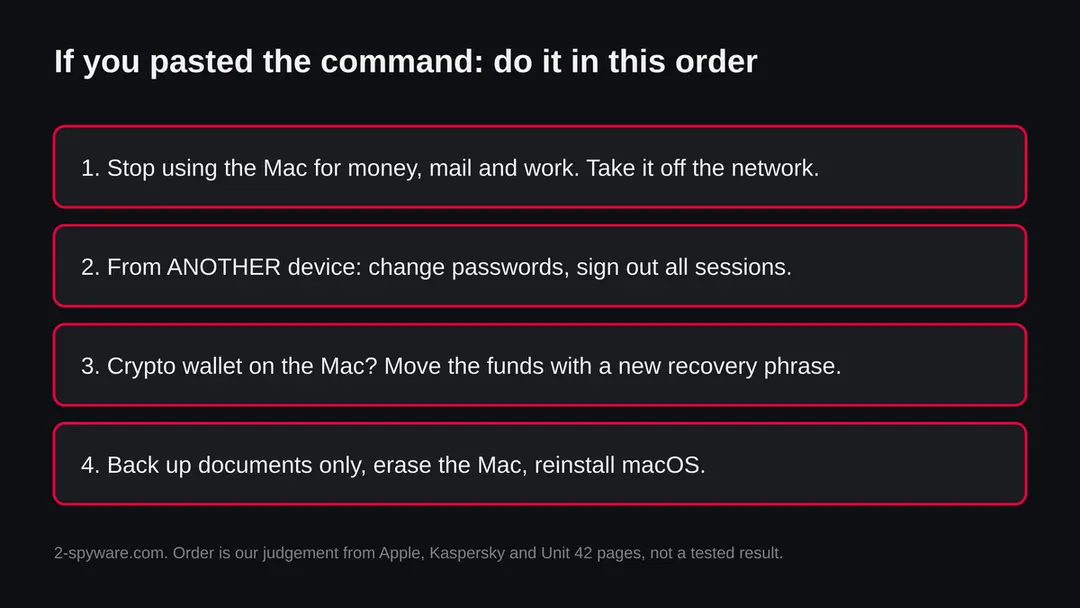
The Mac is one half. The other half is everything that was on it, which the attackers may already have. The order matters: other device first, then crypto, then the Mac.
- 1
Change your Apple Account password from a clean device
Apple's page says: on an iPhone open Settings, tap your name, then Sign-In & Security > Change Password; on a Mac open System Settings, click your name, then Sign-In & Security > Change Password. Use a device that was never touched by the command. Stolen Device Protection may make you wait an hour on an iPhone.
- 2
Change other passwords and sign out other sessions
Go in this order: email, banks, exchanges, work. Stolen cookies can outlive a password change, so use each service's sign out everywhere option too. Cancel any API tokens, SSH keys and cloud keys that sat on the Mac.
- 3
Deal with crypto before the Mac
A seed phrase or wallet file on the Mac must be treated as known to the thieves. On a clean device make a new wallet with its own recovery phrase and send the funds over. The old phrase never goes into the infected Mac again.
- 4
Erase the Mac: what to keep and how
Erasing is the only step that removes unknown leftovers. Back up your documents and photos to an external drive and leave out apps and system folders. On a Mac with Apple silicon, or an Intel Mac with the T2 chip, on macOS 12 or later, open System Settings > General > Transfer or Reset > Erase All Content and Settings, enter your administrator information, click Unlock and follow the prompts (Apple). On other Macs, Apple points to its article on erasing and reinstalling macOS.
- 5
Set up as new and restore only your files
A whole-machine backup restore might carry the malware back in. Bring documents over one folder at a time, reinstall apps from their makers, and change your passwords again once the Mac is confirmed clean.
- 6
Keep an eye on balances and statements
For several weeks read card statements and exchange histories, and enable alerts. Funds can be drained slowly.
- 7
Move logins into a password manager
After the erase, leave browser password saving off. A password manager plus app-based or key-based two-step sign-in is safer than text messages.
- 8
Log out Telegram and Discord
Both appear in the target lists. End other sessions and remove unknown devices.
- 9
Report the theft
Tell your national cybercrime service, such as IC3 in the US or Action Fraud in the UK; banks and exchanges usually want the police report number. A complaint about the domain can also go to its registrar, Unstoppable Domains.
- 10
Warn your contacts
If your accounts sent out links, tell the people who received them not to open anything.
If you own a site and found this name in your logs
genovaw.com has its own registration at Unstoppable Domains and no sign of being a hacked normal site. If a script on your site or a link in your pages points to it, something on your side was changed.
- 1
Find where the name appears
Search your pages, theme files, plugins and database for the text genovaw. A hit means someone added a script or a link. Do not click it from a Mac that you use for work.
- 2
Remove it and find how it got there
Delete the code, then look for the way in: an old plugin, a reused admin password or a stolen login. Change all admin and hosting passwords and update everything.
- 3
Ask for a review
After cleaning, ask your search engine and browser vendors to review the site if it was flagged. We do not know of any reports that a normal site served these files.
Keep a Mac out of this kind of trap
The rule that would have stopped this site is one line: a website never needs you to paste something into Terminal.
Do
- Close any tab that tells you to paste text into Terminal, whatever reason it gives.
- Type your Mac password only when you yourself started the action that asks for it.
- Turn on automatic macOS updates under System Settings > General > Software Update.
- Download apps from the App Store or the developer's own site.
- Keep a document backup on a drive that is unplugged when not in use.
- Store a wallet recovery phrase on paper, away from every computer.
Don't
- Do not paste a command to get past a CAPTCHA, repair a browser or prove you are human.
- Do not run cracked Mac software or files from sites offering paid apps for free.
- Do not count on macOS to raise an alarm: Kaspersky's test on macOS Tahoe 26.5.2 got none.
- Do not open a file that reaches you by link or message and calls itself an app.
- Do not take a quiet scan as proof that the Mac is safe.
Questions about genovaw.com (Amos, MacSync, ClickFix)
What is genovaw.com?
It is a website that URLhaus lists for handing out Mac malware, not a program on your computer. Three addresses on it, added on 18 and 20 September 2026, carry the tags Amos, MacSync, ClickFix, macOS and stealer. The domain was registered on 17 November 2025 at Unstoppable Domains.
On 18 October 2026 the name did not resolve from our server, so we cannot say what it shows visitors today. If you only saw the name in a warning or a log, you are not infected by that. If you ran a command or a file from it, use the cleaning steps on this page.
Is genovaw.com safe to open?
No, do not open it. URLhaus lists three malware downloads on the domain, and the tags describe a Mac stealer delivered by ClickFix. Our one check on 18 October 2026 never reached a page, because the name did not resolve, so it tells you nothing good about the site and clears nothing.
Sites that spread malware often show different content by country, device or browser, and one address here is tagged ua-gated. Loading a page is a smaller risk than running what it tells you to run, but there is no reason to take either risk. Close the tab and block the domain.
Is genovaw.com a virus?
The site itself is not a virus; it is an address that was used to hand out malware. The files behind the three listed addresses are tagged as Mac information stealers (Amos and MacSync) with a shell script, a Mach-O program and an AppleScript stage.
A web address cannot harm your Mac until you run something it gives you, and ClickFix works by getting you to run it yourself in Terminal. We did not download the files, so we cannot name a detection from any antivirus. A dead or blocked address does not mean the files stopped working on Macs that already ran them.
What is ClickFix and why does a page ask me to paste a command?
ClickFix is a social trick: instead of exploiting a flaw, it talks you into launching the malware. The page imitates a verification, an error message or a setup guide, then instructs you to copy a line, open Terminal and run it.
As you launched it, macOS sees no download and may stay silent, as it did in Kaspersky's test on macOS Tahoe 26.5.2. A genuine site never needs a Terminal command from you. Close such a page at once, and if the command already ran, act on the cleaning plan above without waiting for symptoms.
I pasted the command into Terminal. What do I do now?
First, take the Mac off the network and stop doing anything sensitive on it. Next, pick up a different, clean device and change your passwords, email and Apple Account first, ending every other login session. Anyone with a crypto wallet on that Mac should create a new wallet with a fresh recovery phrase and send the funds across.
Only then copy your documents to an external drive and erase the Mac. Never type the new passwords on the infected machine, as it may still be watched. Hidden folders and Login Items are extra clues, not a verdict.
How do I remove Amos or MacSync from my Mac?
The only way that leaves no unknown leftovers is to erase the Mac and set it up again. We found no vendor procedure for this site's files, so the cleaning steps are our reading of Apple's pages and of Kaspersky's and Unit 42's advice.
You can look for the hidden folders and launch items the reports name and delete them, but those names change between versions. On a Mac with Apple silicon or a T2 chip, use System Settings, General, Transfer or Reset, Erase All Content and Settings, after backing up documents.
What do these stealers take?
They take whatever they find in one sweep. Reports name browser passwords, cookies, autofill and saved cards, the Keychain, Safari cookies, Apple Notes, desktop crypto wallets and wallet browser extensions, Telegram and Discord data, text and document files, SSH keys, and in one test cloud and server config folders and shell history.
They also ask for your Mac login password with a fake prompt, which lets them act as an administrator. Some versions replace the Ledger and Trezor apps with fakes. No single report lists everything, and versions differ.
Does genovaw.com affect Windows, iPhone or Android?
No source we read says so. The URLhaus tags point to macOS only, and the vendor reports on these stealers all describe Macs. Mac programs cannot run on Windows, and an iPhone has no Terminal for the trick to use.
The Windows form of ClickFix is real, but we never saw what genovaw.com showed a visitor on a PC. Pasting a command on Windows is a separate infection with its own steps, not the Mac plan. On any device where you typed passwords for this site, change them.
Will erasing my Mac remove it, and are my accounts and crypto safe?
An erase wipes the Mac clean, hidden leftovers included, but it cannot take back what the attackers already hold. Passwords, cookies and wallet files that were sent out stay in their hands, so renew passwords and sessions from a clean device and move crypto to a wallet with a new recovery phrase.
Blockchain transfers are final, and only the police can go after the thief. Copy documents back one by one instead of restoring a whole backup, which might contain the malware. Keep watching accounts and balances for several weeks.
Will Fortect remove genovaw.com?
Fortect for Mac scans for malware and unwanted programs, and its free scan shows what it finds on your Mac before you decide anything.
For genovaw.com, follow the plan on this page as well: removing a launch item or an app is done in macOS itself, and a scanner cannot undo what was typed or entered on the infected Mac, such as saved passwords that were copied.
Change your passwords from another device first, and if the page tells you to erase the Mac, a scan is not a substitute. The free scan costs nothing and the full-featured product needs a license.
Sources
- Palo Alto Networks Unit 42: Atomic macOS (AMOS) Stealer Activity (read October 18, 2026)
- Kaspersky: ClickFix on macOS, how the Terminal-based attack works (read October 18, 2026)
- The Hacker News: ClickFix campaigns spread MacSync on macOS (read as a search summary) (read October 18, 2026)
- Apple Support: Erase your Mac (Erase Assistant) (read October 18, 2026)
- Apple Support: Change your Apple Account password (read October 18, 2026)