
Hello pervert, l've sent this message from your iCloud mail" scam: how to spot it and what to do
The 'Hello pervert' email is a sextortion scam that falsely claims to have recorded you and threatens to distribute videos unless you pay. First reported in 2024, these scams use fear and deception but make entirely false claims.
Facts checked October 13, 2026. Removal steps tested on Windows 11 (26H2) and checked against Microsoft's and the browser makers' current documentation. Sections marked as our earlier report are the original text: they describe the threat as it was then and have not been reviewed since. The 2026 status, the removal steps and the questions are current.
Automatic
Get a free scan and check if your PC is infected.
Fortect finds malware, unwanted programs and the Windows damage they leave behind, and repairs it in one pass.
Do it yourself · free Remove Hello pervert, l've sent this message from your iCloud mail" scam yourself 4 steps, about 12 minutes, no software needed.
Start the steps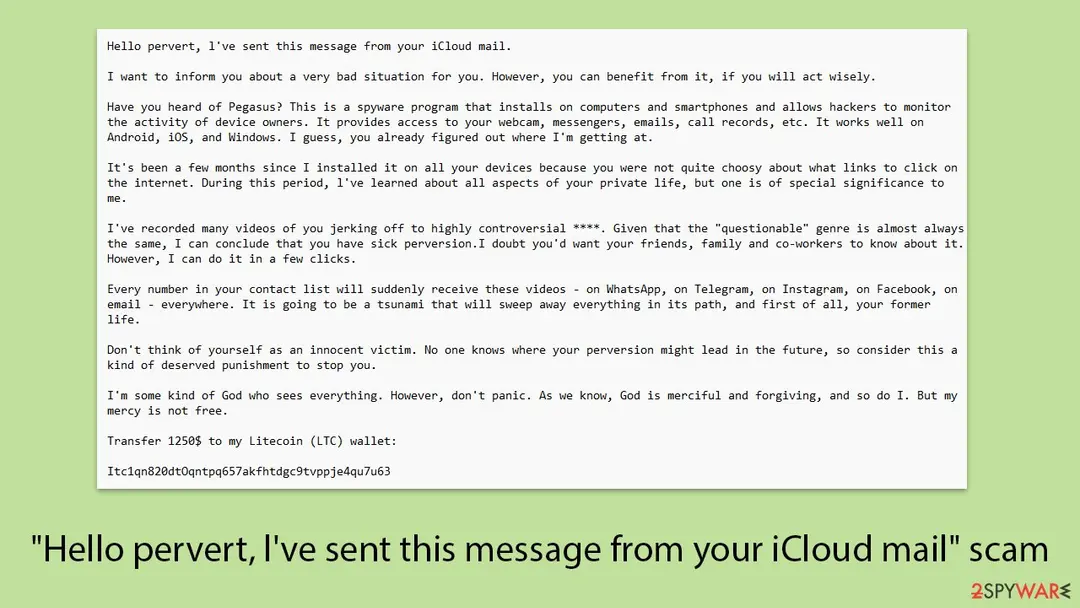
Hello pervert, l've sent this message from your iCloud mail" scam: summary
| Name | Hello pervert, l've sent this message from your iCloud mail" scam |
|---|---|
| Type | Phishing message |
| Symptoms | A phishing e-mail asking you to sign in |
| Evidence | One write-up by a security site; details still limited |
| Arrives as | |
| Pretends to be | Amazon |
| Removal | Scan the PC with security software to find and remove the malware and anything installed with it. Fortect scans Windows for malware and repairs the system files and settings it damaged. Remove it nowTo use the full-featured product, you have to purchase a license for Fortect. The scan is free. |
Show 4 more facts
| Claim | Your account needs urgent attention |
|---|---|
| Asks for | Your password |
| First seen | 1 July 2024 |
| Facts checked | 5 October 2026 |
What the Hello pervert, l've sent this message from your iCloud mail" scam message looks like
Hello pervert, l've sent this message from your iCloud mail.
I want to inform you about a very bad situation for you. However, you can benefit from it, if you will act wisely.
Have you heard of Pegasus? This is a spyware program that installs on computers and smartphones and allows hackers to monitor the activity of device owners. It provides access to your webcam, messengers, emails, call records, etc. It works well on Android, iOS, and Windows. I guess, you already figured out where I'm getting at.
It's been a few months since I installed it on all your devices because you were not quite choosy about what links to click on the internet. During this period, l've learned about all aspects of your private life, but one is of special significance to me.
I've recorded many videos of you jerking off to highly controversial ****. Given that the "questionable" genre is almost always the same, I can conclude that you have sick perversion.I doubt you'd want your friends, family and co-workers to know about it. However, I can do it in a few clicks.
Every number in your contact list will suddenly receive these videos - on WhatsApp, on Telegram, on Instagram, on Facebook, on email - everywhere. It is going to be a tsunami that will sweep away everything in its path, and first of all, your former life.
Don't think of yourself as an innocent victim. No one knows where your perversion might lead in the future, so consider this a kind of deserved punishment to stop you.
I'm some kind of God who sees everything. However, don't panic. As we know, God is merciful and forgiving, and so do I. But my mercy is not free.
Transfer 1250$ to my Litecoin (LTC) wallet:
Itc1qn820dtOqntpq657akfhtdgc9tvppje4qu7u63
Once I receive confirmation of the transaction, I will permanently delete all videos compromising you, uninstall Pegasus from all of your devices, and disappear from your life. You can be sure - my benefit is only money. Otherwise, I wouldn't be writing to you, but destroy your life without a word in a second.
I'll be notified when you open my email, and from that moment you have exactly 48 hours to send the money. If cryptocurrencies are unchartered waters for you, don't worry, it's very simple. Just google "crypto exchange" or "buy Litecoin" and then it will be no harder than buying some useless stuff on Amazon.Itc1qn820dtOqntpq657akfhtdgc9tvppje4qu7u63
Once I receive confirmation of the transaction, I will permanently delete all videos compromising you, uninstall Pegasus from all of your devices, and disappear from your life. You can be sure - my benefit is only money. Otherwise, I wouldn't be writing to you, but destroy your life without a word in a second.
I'll be notified when you open my email, and from that moment you have exactly 48 hours to send the money. If cryptocurrencies are unchartered waters for you, don't worry, it's very simple. Just google "crypto exchange" or "buy Litecoin" and then it will be no harder than buying some useless stuff on Amazon.
I strongly warn you against the following:
Also, don't forget that cryptocurrencies are anonymous, so it's impossible to identify me using the provided address.
Good luck, my perverted friend. I hope this is the last time we hear from each other.
And some friendly advice: from now on, don't be so careless about your online security.
Was my iCloud hacked because of the porn claim?
No, this email does not show that your iCloud account was hacked.
The message only says it was sent from your own iCloud address, and that is a common trick. Scammers can fake the sender line so the email looks like it came from you, which is meant to make the threat feel real.
The claim about porn videos of you is a bluff. The sender names a type of website you supposedly visited, because that is embarrassing and makes people panic. Nothing in the email proves that any recording exists. Our earlier report found no evidence of spyware behind this message, only text meant to scare you.
To check your account yourself, sign in to your Apple Account on the official Apple website, look at the list of devices and recent sign ins, and change the password if anything looks unfamiliar. Turn on two factor authentication. If everything looks normal, the email was most likely a spoofed message.
Warning: Do not reply, do not pay, and do not open links or files in the email.
Keep it as evidence, mark it as junk, and delete it. If a real password of yours appears in the message, change that password everywhere you used it, because it probably comes from an old leak of another site.
How to tell the Hello pervert, l've sent this message from your iCloud mail" scam message is fake
From our report of Jul 2024 · not reviewed since
- I've sent it from your iCloud mail.
- Do not contact the police.
- I have access to all your devices, and as soon as I find out you ran to the cops, videos will be published.
- Don't try to reset or destroy your devices.
- As I mentioned above: I'm monitoring all your activity, so you either agree to my terms or the videos are published.
- Do not reply to this email.
Is Hello pervert, l've sent this message from your iCloud mail" scam dangerous? What the senders want
From our report of Jul 2024 · not reviewed since
"Hello pervert, l've sent this message from your iCloud mail" is an email scam that attempts to extort money from you
The "Hello pervert, I've sent this message from your iCloud mail" scam is a deceptive email campaign designed to extort money from recipients through fear and manipulation.
In these emails, scammers claim to have compromised the recipient's device, alleging they've recorded embarrassing activities via the device's camera. They threaten to distribute these fabricated recordings to the recipient's contacts unless a ransom is paid, typically in cryptocurrency.
To appear more convincing, the emails often seem to originate from the recipient's own email address, a tactic known as email spoofing, and may include personal information obtained from data breaches. It's important to recognize that these claims are baseless; the scammers have not accessed your device or personal files.
Such sextortion scams have been prevalent for years, with recent variations incorporating references to spyware like Pegasus or even images of the recipient's neighborhood to intensify fear. Experts advise not to respond to these emails, avoid making any payments, and report them as phishing attempts
From our report of Jul 2024 · not reviewed since
Scammers reference Pegasus - a real malware
By referencing Pegasus, the scammer uses a real and widely-feared piece of spyware to add credibility to their claims.
However, in reality, installing such spyware on multiple devices is highly unlikely without physical access or severe security lapses on the victim's part.
Next, the email mentions that the scammer has recorded compromising videos of the victim engaging in private activities. This is a common psychological trick used in extortion scams known as sextortion.
The scammer relies on the victim's fear and embarrassment, suggesting that these videos will be shared with all of their contacts, including friends, family, and colleagues. This threat is designed to push the victim into complying with the scammer's demands out of panic and shame.
To further manipulate the victim, the scammer sets a strict deadline, usually 48 hours, to make the payment in cryptocurrency. The use of cryptocurrency, such as Litecoin, adds another layer of intimidation because it is often perceived as complex and untraceable.
The email author reassures the victim that their privacy will be restored once the payment is made, claiming they will delete the videos and remove the spyware. This promise is entirely false, as scammers rarely follow through on their promises even after receiving payment.
The email also contains warnings against seeking help or taking any actions to protect oneself. The scammer advises against contacting the police, destroying devices, or attempting to reset accounts, claiming they are monitoring all activity and will immediately release the videos if they detect such actions. These threats are baseless, as most scammers do not have the technical capability to monitor devices in real time.
In reality, the claims made by the scammer are almost always false. They rely on the psychological impact of their threats rather than any actual evidence or technical ability. The goal is to create a sense of urgency and helplessness, making the victim feel that paying the ransom is the only way to avoid public humiliation.
Here's the full email message you might receive one day:
Scammers often acquire email addresses through various methods such as data breaches, purchasing lists on the dark web, or using automated software to scrape the internet for contact information. These large pools of email addresses allow scammers to cast a wide net, increasing their chances of finding someone who will respond out of fear or confusion.
While most email filters are designed to catch and quarantine such scam attempts, these filters can sometimes be bypassed. Scammers constantly refine their techniques to evade detection by using unpredictable email formats and engaging subject lines that provoke curiosity or urgency.
This increases the likelihood that their message will reach your primary inbox rather than being relegated to the spam folder. By invoking the name of sophisticated malware like Pegasus, scammers exploit a general lack of detailed technical knowledge among the public, making their threats seem more credible and urgent.
What to do after the Hello pervert, l've sent this message from your iCloud mail" scam e-mail
If you only received the message and clicked nothing, step 3 is all you need.
If you clicked the link or typed anything on the page it opened, do every step, starting with the password.
Step 1: Change the password you typed on the fake page
If you typed a password on the page the Hello pervert, l've sent this message from your iCloud mail" scam message opened, assume the sender has it.
Go to the real site by typing its address yourself and change the password there, choosing one you have never used.
Change it anywhere else the same password was used, and sign out all other sessions if the service offers it. Any browser on Windows 11 or Windows 10 will do, as long as you do not follow the e-mail's link.
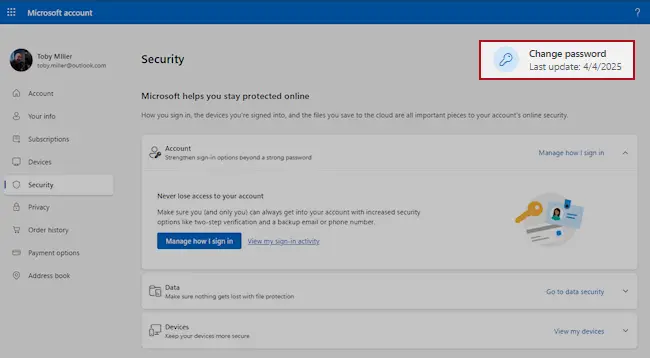
Microsoft account, Security page (account.microsoft.com/security): Change password. Full procedure with screenshots: Turn on two-step verification / secure a hacked account
Step 2: Turn on two-step verification
With two-step verification on, a stolen password alone no longer opens the account, because a sign-in from a new device also needs a code from your phone.
Switch it on for the e-mail account first, then for banking, shopping and social accounts that use that address.
Check the recovery phone, the recovery e-mail and any forwarding rules while you are in the settings, since attackers change them to come back. The pages are the same on Windows 11 and Windows 10.
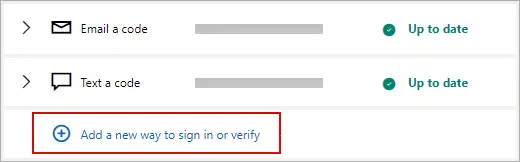
Microsoft account: Manage how I sign in, where two-step verification and the sign-in methods are. Full procedure with screenshots: Turn on two-step verification / secure a hacked account
Step 3: Report the e-mail and delete it
Do not reply and do not click anything else in the message. In Outlook select the e-mail and choose Report > Report phishing; in Gmail open the three-dot menu next to Reply and pick Report phishing.
That trains the filter for everyone on the service, and the message goes to the junk folder. If the e-mail came to a work address, forward it to your IT team as an attachment first.
The steps are the same in the web mail and the mail apps on Windows 11 and Windows 10.
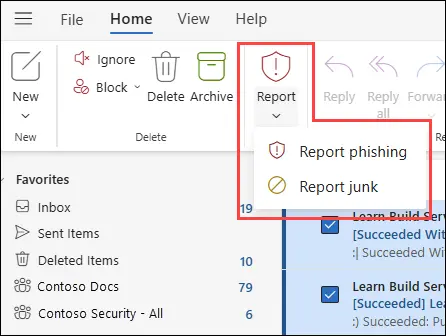
New Outlook for Windows and Outlook on the web: Report > Report phishing. Full procedure with screenshots: Report a phishing e-mail
Step 4: Scan the PC if you opened a file from the message
A fake sign-in page only steals what you type, so most readers can skip this step. If the Hello pervert, l've sent this message from your iCloud mail" scam e-mail made you download or open a file, delete it and scan the PC.
In Windows Security > Virus & threat protection > Scan options, run a Full scan and then Microsoft Defender Antivirus (offline scan) > Scan now. The offline scan restarts Windows 11 or Windows 10 and takes about 15 minutes.

Windows 11: Windows Security > Virus & threat protection > Scan options. Full procedure with screenshots: Run a Microsoft Defender Offline scan
Protect your privacy - employ a VPN
There are several ways how to make your online time more private - you can access an incognito tab.
However, there is no secret that even in this mode, you are tracked for advertising purposes. There is a way to add an extra layer of protection and create a completely anonymous web browsing practice with the help of VPN. This software reroutes traffic through different servers, thus leaving your IP address and geolocation in disguise.
Besides, it is based on a strict no-log policy, meaning that no data will be recorded, leaked, and available for both first and third parties. The combination of a secure web browser and VPN will let you browse the Internet without a feeling of being spied or targeted by criminals.
No backups? No problem. Use a data recovery tool
If you wonder how data loss can occur, you should not look any further for answers - human errors, malware attacks, hardware failures, power cuts, natural disasters, or even simple negligence.
In some cases, lost files are extremely important, and many straight out panic when such an unfortunate course of events happen. Due to this, you should always ensure that you prepare proper data backups on a regular basis.
If you were caught by surprise and did not have any backups to restore your files from, not everything is lost. is one of the leading file recovery solutions you can find on the market - it is likely to restore even lost emails or data located on an external device.
From our report of Jul 2024 · not reviewed since
Steps to take after receiving the "Hello pervert, l've sent this message from your iCloud mail" scam message
If you come across an email like this, the most important thing is to stay calm.
Avoid replying to the email or making any payments, as this only confirms to the scammers that your email is active and you might be susceptible to future scams.
The best course of action is to report the email to your local law enforcement or a cybercrime agency. Sharing details about the email can assist authorities in tracking down and addressing these kinds of cyber threats. Providing comprehensive information will aid their investigation.
To protect your devices, conduct a thorough scan using up-to-date antivirus software such as or to check for any malicious programs, even though it's highly unlikely that the threats mentioned in the email are real. Ensuring your devices are clean is a good precautionary measure.
If you have already sent money, it is crucial to contact your bank right away to report the fraud and explore options for recovering the funds. Additionally, change your passwords, especially for your email account, and enable multi-factor authentication to add an extra layer of security. This helps prevent unauthorized access and enhances overall protection.
Questions about Hello pervert, l've sent this message from your iCloud mail" scam
What is the 'Hello pervert' email scam?
The 'Hello pervert, I've sent this message from your iCloud mail' scam is an extortion email campaign designed to manipulate recipients through fear and deception. According to 2024-2025 guides, scammers claim to have compromised the recipient's device and recorded embarrassing activities via the device's camera.
They threaten to distribute these fabricated recordings to contacts unless ransom is paid in cryptocurrency, typically Litecoin. To appear convincing, the emails use email spoofing to seem like they originate from the recipient's own email address and may include personal information obtained from data breaches. This is a variation of sextortion scams that have been prevalent for years.
Is the scammer really monitoring my device?
No. The 2024-2025 guides confirm that the claims made by the scammer are almost always false. Scammers do not have the technical capability to monitor devices in real time, and most cannot access webcams or personal data as they claim.
The threat that they're monitoring activity and will release videos if you contact police or attempt to reset your device is baseless.
This psychological manipulation tactic is designed to create a sense of urgency and helplessness, making victims feel that paying is the only solution. In reality, the scammers are casting a wide net to recipients and rely on threats rather than actual evidence or technical ability.
Should I pay the ransom?
No, you should not pay. The 2024-2025 guide emphasized that the scammer's promise to delete videos and remove spyware after payment is entirely false. Scammers rarely follow through on their promises even after receiving payment.
Paying the ransom only encourages more scams and does not stop the scammer from keeping your information or sending additional extortion demands. Experts advise not to respond to these emails, avoid making any payments, and report them as phishing attempts. The best action is to ignore the email and move forward.
Did the scammer actually record me or install spyware?
Almost certainly not. The 2024-2025 guide confirmed that these claims are baseless; the scammers have not accessed your device or personal files. They referenced Pegasus, a real piece of spyware, to add credibility to their false claims, but installing such spyware on multiple devices is highly unlikely without physical access or severe security lapses.
The recorded videos they claim to have are fabrications. This is a common psychological trick used in extortion scams known as sextortion. The goal is to create fear and embarrassment so victims comply with ransom demands out of panic and shame.
What should I do if I receive this email?
Do not reply to the email, do not contact the scammer, and do not pay any money. The 2024-2025 guide recommended reporting the email as a phishing attempt to your email provider. You can forward it to your email service's abuse department or use their spam reporting features.
Consider changing your email password if you're concerned about account security. Do not click any links in the email. If you're worried about your actual device security, run a full system scan with Windows Defender or another reputable antivirus tool to verify that no malware is present, though the scammer's claims are almost certainly false.
How did the scammer get my email address?
According to the 2024-2025 guide, scammers acquire email addresses through various methods including data breaches, purchasing lists on the dark web, or using automated software to scrape the internet for contact information. These large pools of email addresses allow scammers to cast a wide net, increasing their chances of finding someone who will respond out of fear or confusion.
The fact that they have your email address does not mean they have successfully compromised your device. Your email address is widely accessible and is frequently sold or shared after security breaches at legitimate companies.
Is Pegasus really installed on my computer?
No. While Pegasus is a real and widely-feared piece of spyware, the 2024-2025 guide confirmed it is highly unlikely to be installed on your devices. Installing Pegasus requires either physical access to the device or severe security lapses on your part.
The scammer references Pegasus by name specifically to add credibility to their extortion demands, exploiting the known reputation of this malware. The claim that they've installed it on all your devices is part of the psychological manipulation tactic. Most recipients do not have Pegasus or any spyware installed by these scammers.
Why does the scammer set a 48-hour deadline?
The strict 48-hour deadline is a psychological pressure tactic designed to prevent victims from thinking clearly or seeking advice. The 2024-2025 guide explained that the scammer wants to rush the victim into complying with demands out of panic and shame.
The deadline creates artificial urgency and prevents victims from verifying the scam or reporting it to authorities. Cryptocurrency payments like Litecoin are mentioned because they are often perceived as complex, untraceable, and irreversible, adding another layer of intimidation. The entire structure of the email is designed to manipulate emotions rather than reflect any actual threat or capability.
Will Fortect remove Hello pervert, l've sent this message from your iCloud mail" scam?
Fortect scans Windows for malware and unwanted programs and repairs the system files and settings they change, and its free scan shows what it finds on your PC before you decide anything.
For Hello pervert, l've sent this message from your iCloud mail" scam, follow the plan above as well: the browser steps take back permissions and settings that no scanner treats as a threat, and uninstalling the program that brought it removes the source.
Run Microsoft Defender's full scan and, if anything was found, its offline scan as a second opinion. If the symptoms are gone after the plan and both scans are clean, there is nothing more to do.
Sources
- FTC: How to recognize and avoid phishing scams (read October 5, 2026)
- CISA: Recognize and report phishing (read October 5, 2026)
- Microsoft Support: Protect yourself from phishing (read October 5, 2026)
- NCSC: Phishing attacks, dealing with suspicious e-mails and messages (read October 5, 2026)
- FTC: How to recognize, remove and avoid malware (read October 5, 2026)