
Hacktool:win32/keygen: what it is and how to remove it
Hacktool:win32/keygen is a representation of a cracking tool, which is often detected by anti-malware applications. While not all the cracks are malicious, they are often boobytrapped or distributed with a variety of malware, such as Remote Access Trojans, ransomware, crypto miners, backdoors, worms, etc.
Facts checked October 13, 2026. Removal steps tested on Windows 11 (26H2) and checked against Microsoft's and the browser makers' current documentation. Sections marked as our earlier report are the original text: they describe the threat as it was then and have not been reviewed since. The 2026 status, the removal steps and the questions are current.
Automatic
Get a free scan and check if your PC is infected.
Fortect finds malware, unwanted programs and the Windows damage they leave behind, and repairs it in one pass.
Unsure whether KMSSS.exe is safe? A free scan checks the file and what starts it.
Do it yourself · free Remove Hacktool:win32/keygen yourself 6 steps, about 18 minutes, no software needed.
Start the steps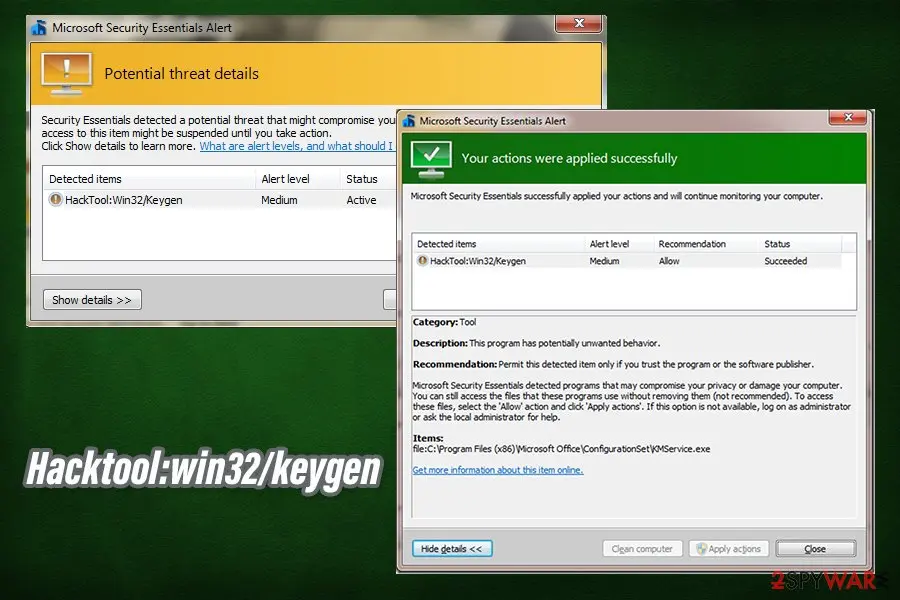
Hacktool:win32/keygen: summary
| Distribution | Hack tools and keygens are acquired from insecure third-party websites that host pirated software (torrents, warez) |
|---|---|
| Name | Hacktool:win32/keygen |
| Type | Malware, Trojan |
| Related | KMSpico, AutoKMS |
| Symptoms | Symptoms vary greatly, as malware behind crack tools can be different; symptoms range from total lockdown of personal files, high CPU usage, system crashes, to no visible signs of intrusion |
| Dangers | Further infection of malware, loss of personal files, sensitive information disclosure to cybercriminals, high electricity bills, etc. |
| Removal | Scan the PC with security software to find and remove the malware and anything installed with it. Fortect scans Windows for malware and repairs the system files and settings it damaged. Remove it nowTo use the full-featured product, you have to purchase a license for Fortect. The scan is free. |
Show 6 more facts
| Detection names | No Microsoft detection name is known |
|---|---|
| Damage | Not recorded in the old report |
| Evidence | 4 write-ups by security sites; details still limited |
| File names | KMSSS.exe |
| First seen | 23 October 2020 |
| Facts checked | 6 October 2026 |
What Hacktool:win32/keygen does on an infected PC
Private Internet Access keygen: what a PIA crack really is
A Private Internet Access keygen is a pirated tool that claims to produce free subscription keys for the PIA VPN, and our reading is that it is not safe to run. We found no official or trusted source for such a tool. Antivirus programs commonly flag this kind of file as Hacktool:Win32/Keygen.
Such a download is a bad idea even if it works, because a VPN is meant to protect your traffic and a cracked one is run by strangers. A booby trapped keygen can install a remote access trojan, a stealer or a miner. The VPN itself then adds nothing, and your passwords may be the first thing taken.
If you already ran a PIA keygen or a cracked PIA installer, treat the PC as possibly infected. Disconnect it from the network, run a full scan and a Microsoft Defender Offline scan, and look at Startup apps and Installed apps for anything you did not add. A quiet scan does not prove the PC is clean.
Change the passwords you typed on that PC, starting with email, banking and the PIA account if you have one, and do it from a different, clean device. Turn on two step sign in where it exists. If the scan finds a hacktool, follow the removal steps earlier in this guide.
The safe options are a paid PIA plan from the provider's own website, a free trial or money back offer if the provider currently has one, or a reputable free VPN with a clear privacy policy. Check the current terms on the provider's official site, because we did not verify them for this page.
From our report of Oct 2020 · not reviewed since
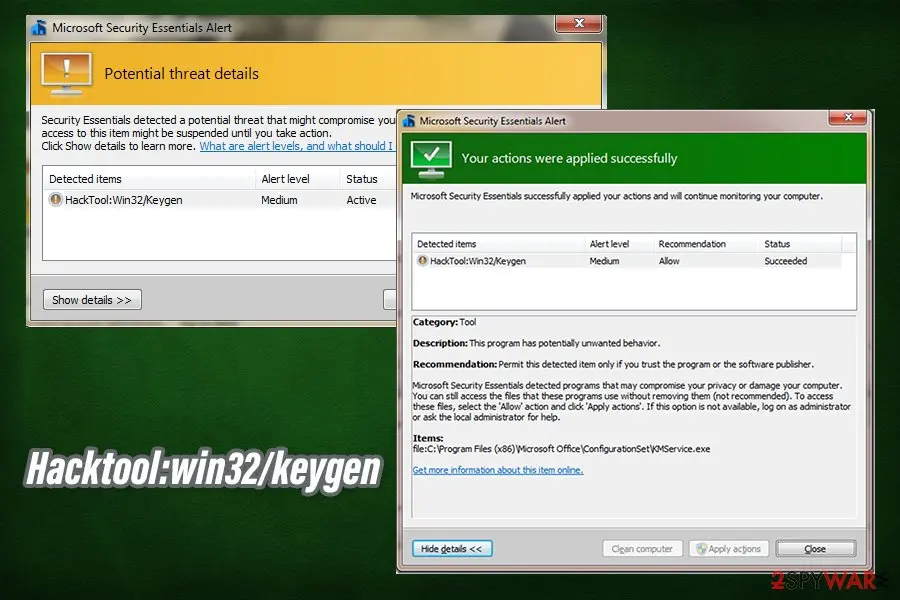
Hacktool:win32/keygen is a generic detection name that points to the pirated software for cracking software licenses
Hacktool:win32/keygen is a representation of a cracking tool, which is often detected by anti-malware applications.
While not all the cracks are malicious, they are often boobytrapped or distributed with a variety of malware, such as Remote Access Trojans, ransomware, crypto miners, backdoors, worms, etc.
In case Hacktool win32 keygen is programmed to infect the machine with malware, it can result in serious consequences, although these depend on the infection type. For example, ransomware could result in permanent personal file loss, while a stealthy backdoor can proliferate more malware and gather sensitive information (such as banking credentials, log in details, etc.) in the background, without emitting any symptoms.
It is a very rare occasion when users spot a Hacktool:win32/keygen pop-up of their anti-malware tool while being unaware of its presence. In other words, users download keygens deliberately to avoid licensing fees or other restrictions. Thus, users typically get infected with keygen virus after they visit insecure sites that host pirated programs and software cracks, such as torrent websites.
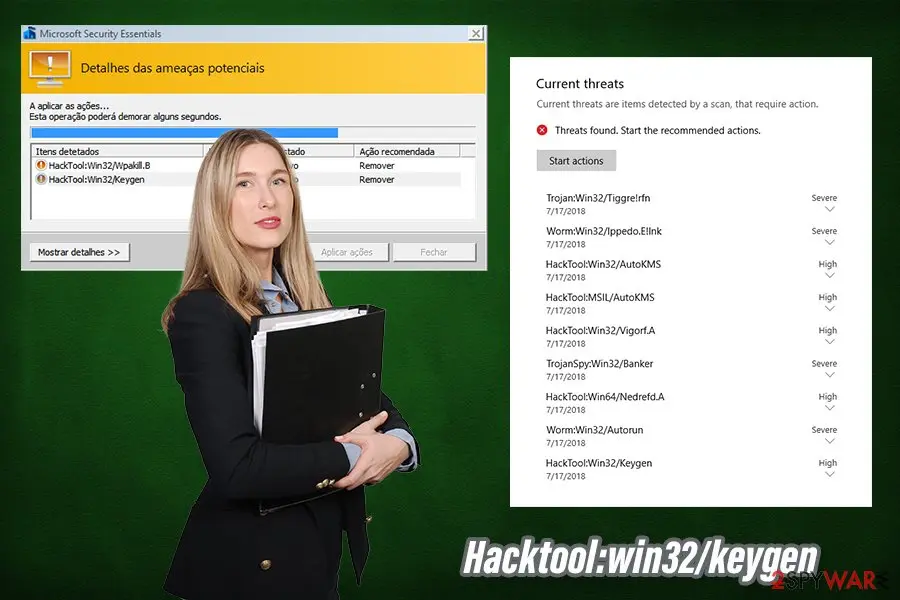
Possibly the most used cracks are AutoKMS (hacktool:win32/autokms) and KMSpico (used to bypass the licensing process of MS Office suite, as well as Windows OS) - these can most commonly be detected as Hacktool:win32/keygen.
Since Hacktool:win32/keygen is a heuristic detection name, it can represent a variety of different files, each having different functionality. For example, some hack tools are simply applied as executable files, while others generate keys that can be inserted directly into an application or a video game. Besides the tool's functionality, malware that can be related to win32/keygen can vary greatly, and so will the symptoms of the infection.
While Hacktool:win32/keygen malware can be classified as a Trojan (users believe they install a hack tool, but instead they infect computers), the functionality of each particular infection and ramifications of such can vary greatly. Here are a few examples of possible keygen virus executed on your PC:
As evident, threats that could be installed via Hacktool:win32/keygen can be extremely devastating to every user, and can also result in further computer compromise. To make matters worse, most of the info-stealing malware is programmed to remain on the system unnoticed for long periods of time - this is another reason to ensure that a powerful anti-malware is employed at all times.
As for Hacktool win32 keygen removal, you should always employ reputable anti-malware software for the job. While manual termination is possible, it is a complete opposite for regular computer users, and an automatic option should always be chosen.
Thus, download powerful anti-malware and perform a full system scan. In case this process fails, you can access Safe Mode with Networking and perform a scan from there, although most modern AVs should be able to remove Hacktool:win32/keygen virus easily.
Additionally, once malware infects your machine, it might not run at its full capacity anymore, even after it is terminated. Therefore, if you are experiencing any issues post-termination of Hacktool win32 keygen, you can employ to repair virus damage with ease.
- Ransomware. Possibly the most devastating malware - it encrypts all personal files on the system, and only the attackers can return the access to it. Typically, hackers ask for ransoms raging anything between $100 to $1,000 in Bitcoin per PC, with payments rising to thousands of dollars for corporations. One of the best examples that are being distributed via cracks is Djvu ransomware - one of the most widely-spread crypto-malware in the wild.
- RATs (Remote Access Trojans). These parasites can allow malicious actors to control the machine remotely, execute malicious commands, and even lockout users from their computers.
- Rootkits gain one of the highest levels of permissions on the system, and typically are very difficult to eliminate (if not impossible, in some cases).
- Cryptominers use around 90% or more CPU (sometimes GPU as well) to mine digital currency to cybercriminals' wallets, while users suffer from errors, crashes, and increased electricity bills.
- Banking trojans enable the attacks to perform web injects and other tactics to steal financial and other sensitive information from users' machines.
- Keyloggers can log all the information typed on a keyboard and utilize it for malicious purposes.
From our report of Oct 2020 · not reviewed since
Here is why you should not be downloading software cracks and hack tools
First of all, we should talk about intellectual property.
Application and video game developers all put a lot of effort to deliver results, and each need to be paid a salary. By downloading software cracks, users simply strip creators of their earned money, which can be devastating to some companies or entities.
If morality is not an issue, you should keep in mind that pirating software is illegal and punishable by law. Copyright laws were not immediately implemented, although even now, torrent and other illegal software distribution sites still manage to bypass restrictions implemented to protect the intellectual property of others.
In the meantime, crack sites also became a hub for malware distribution, as there are by far less regulated, even though site owners not necessarily want to infect users with malware.
Ad space can be bought by hackers, which allows the deployment of malicious ads. As a result, some users can get infected as soon as they access such a website - and this is another reason to stay away from pirated software and its distribution sources.
Finally, most of the anti-malware tools will flag cracks as malicious, regardless if they actually are. This is because hack tools are designed to break the code of an application, which is essentially malicious activity.
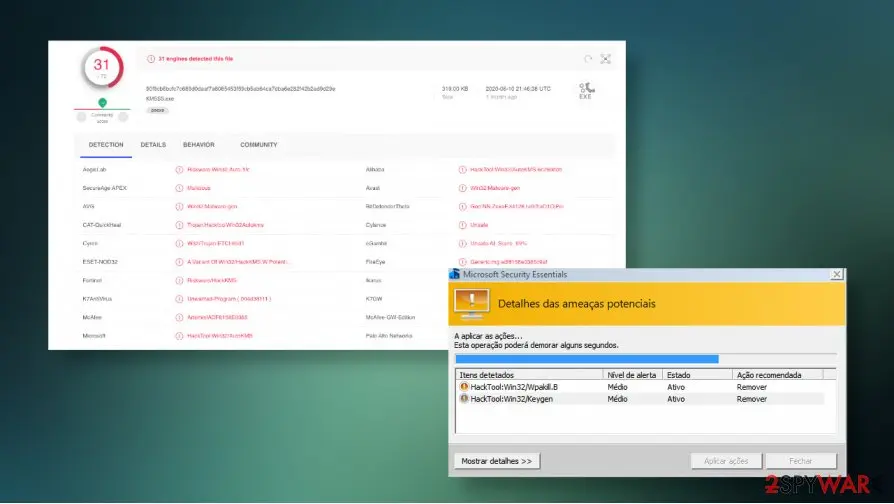
Therefore, even if the installer is not boobytrapped with malware, there is no way to check, even by uploading it to analysis tools like Virus Total. Next time you click on a crack, remember that it can result in severe computer infection, such as ransomware.
From our report of Oct 2020 · not reviewed since
More from our earlier report on Hacktool:win32/keygen
- To get rid of malware behind Hacktool:win32/keygen, users should immediately scan their machines with reputable anti-virus, such as or .
- In case the virus is tampering with security software, Safe Mode with Networking can be used - check the bottom section for more details
- In some cases, malware can permanently damage Windows systems and render them useless.
- To fix all the damage done by the virus an remediate the system, use repair tools like
How to check the PC for Hacktool:win32/keygen
- File:
KMSSS.exe
How to remove Hacktool:win32/keygen
A loader's job is to install other malware, so treat the PC as infected with more than one program until the scans are clean.
Step 1: Check where KMSSS.exe runs from and stop it
In Task Manager (Ctrl + Shift + Esc) find
KMSSS.exeon Processes, right-click it and choose Open file location before ending anything.Windows' own files live in
C:\Windows\System32; the same name in%AppData%, %Temp% or C:\Users\Public is an impostor. If the folder is wrong, right-click the process again, choose End task and delete the file.If it starts again within seconds, a task or another process restarts it, so run the scan step in Safe Mode. Task Manager works the same in Windows 11 and Windows 10.
Full procedure with screenshots: Close a frozen app (Task Manager, Force Quit) On uGetFix
Step 2: Delete scheduled tasks that bring it back
Programs like Hacktool:win32/keygen add a scheduled task so they return after an uninstall or reopen a page at every sign-in. Start Task Scheduler, open Task Scheduler Library and sort by Last Run Time to see what ran recently.
On the Actions tab, a program in a user folder, a script or a web address is a warning sign; right-click such a task and choose Delete.
Tasks with names copying Google, Edge or Windows updaters but pointing to an odd folder are typical. The tool looks the same in Windows 11 and Windows 10.

Windows 11: Task Scheduler Library, the task selected, the Actions tab shows the file it runs. Full procedure with screenshots: Remove what malware leaves behind in Windows
Step 3: Remove it from startup
Press Ctrl + Shift + Esc to open Task Manager and select Startup apps (Windows 11) or the Startup tab (Windows 10). Disable entries you do not recognise, especially ones with no publisher or with a name that copies a Windows component.
Right-click an entry and choose Open file location to see where it runs from: programs in
%AppData%or%Temp%deserve a closer look. Some entries are not listed there but in the registry Run keys, which the procedure below shows how to check.Full procedure with screenshots: Stop apps from opening at startup On uGetFix
Step 4: Delete the folders left behind
Uninstalling often leaves the program's folders, and some threats reinstall themselves from them.
Press Windows + R, type
%LocalAppData%and press Enter, then do the same for%AppData%and %ProgramData%, and look for folders named after Hacktool:win32/keygen, its publisher or created on the day the problem started. Delete those folders, and check C:\Program Files and C:\Program Files (x86) too.If Windows says a file is in use, end it in Task Manager or delete the folder after a restart in Safe Mode. The folders are the same in Windows 11 and Windows 10.
Full procedure with screenshots: Remove what malware leaves behind in Windows
Step 5: Scan the PC, then run the offline scan
A scan finds the parts of Hacktool:win32/keygen that the manual steps cannot see. In Windows Security > Virus & threat protection > Scan options, start a Full scan and quarantine what it reports.
Follow it with Microsoft Defender Antivirus (offline scan) > Scan now, which restarts the PC and checks the disk while Windows and the malware are not running.
It takes about 15 minutes and works the same in Windows 11 and Windows 10. If either scan finds something, run the full scan again after removal until it comes back clean.

Windows 11: Windows Security > Virus & threat protection > Scan options. Full procedure with screenshots: Run a Microsoft Defender Offline scan
Step 6: Change passwords from another device and sign out other sessions
Hacktool:win32/keygen can copy saved passwords, cookies and session tokens and send them out in seconds, so cleaning the PC does not undo the theft.
Change your passwords on a device that was never infected, starting with the e-mail account, since every other reset goes through it. On each account, end all other sessions and check the recovery e-mail, phone number and forwarding rules.
Then turn on two-step verification. Sign in on the Windows 11 or Windows 10 PC again only after the offline scan is clean.
Full procedure with screenshots: Turn on two-step verification / secure a hacked account
Instructions for each browser and system
The detailed steps for every browser and system this guide covers. Open the one you use.
Manual removal using Safe Mode
Important! →
Manual removal guide might be too complicated for regular computer users. It requires advanced IT knowledge to be performed correctly (if vital system files are removed or damaged, it might result in full Windows compromise), and it also might take hours to complete. Therefore, we highly advise using the automatic method provided above instead.
Step 1. Access Safe Mode with Networking
Manual malware removal should be best performed in the Safe Mode environment.
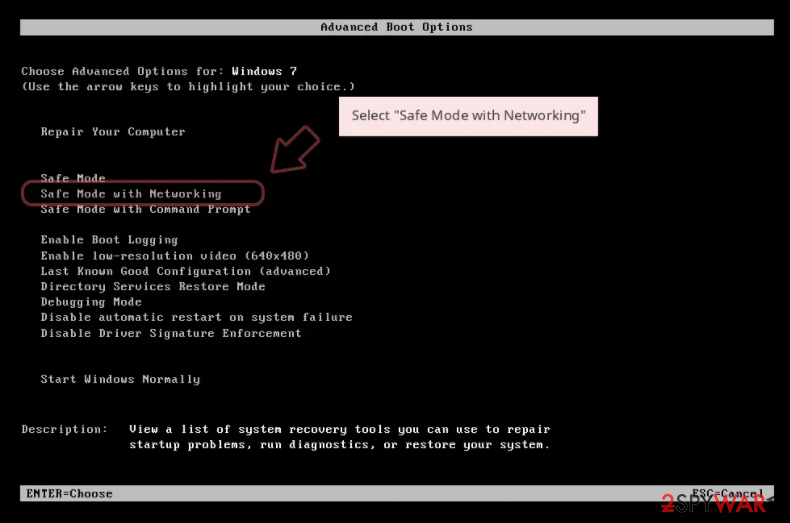
Windows 7 / Vista / XP
- Click Start > Shutdown > Restart > OK.
- When your computer becomes active, start pressing F8 button (if that does not work, try F2, F12, Del, etc. - it all depends on your motherboard model) multiple times until you see the Advanced Boot Options window.
- Select Safe Mode with Networking from the list.
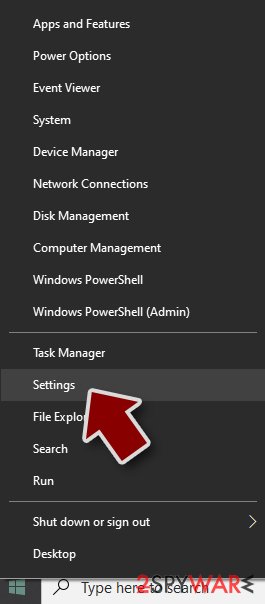
Windows 10 / Windows 8
- Right-click on Start button and select Settings.
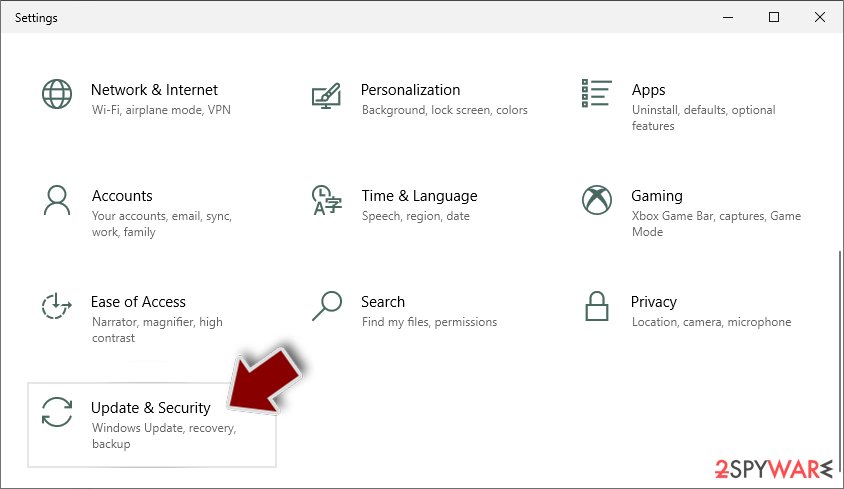
- Scroll down to pick Update & Security.
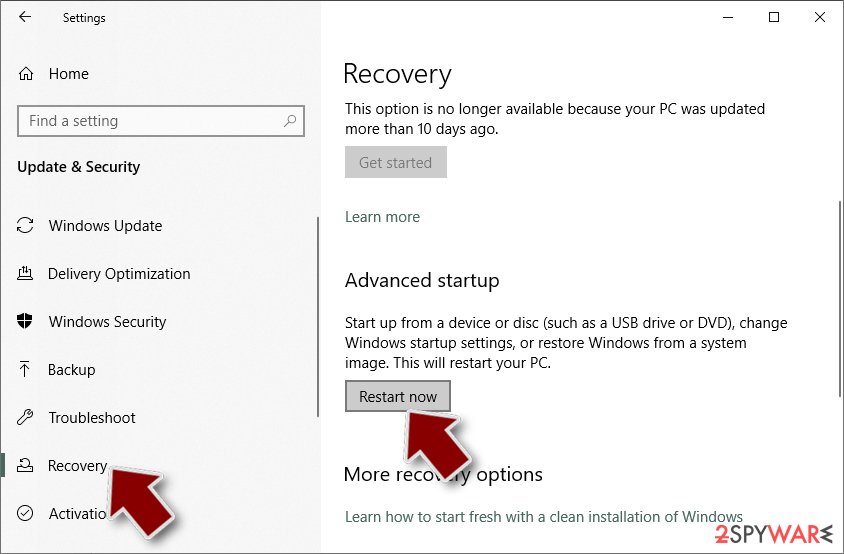
- On the left side of the window, pick Recovery.
- Now scroll down to find Advanced Startup section.
- Click Restart now.
- Select Troubleshoot.
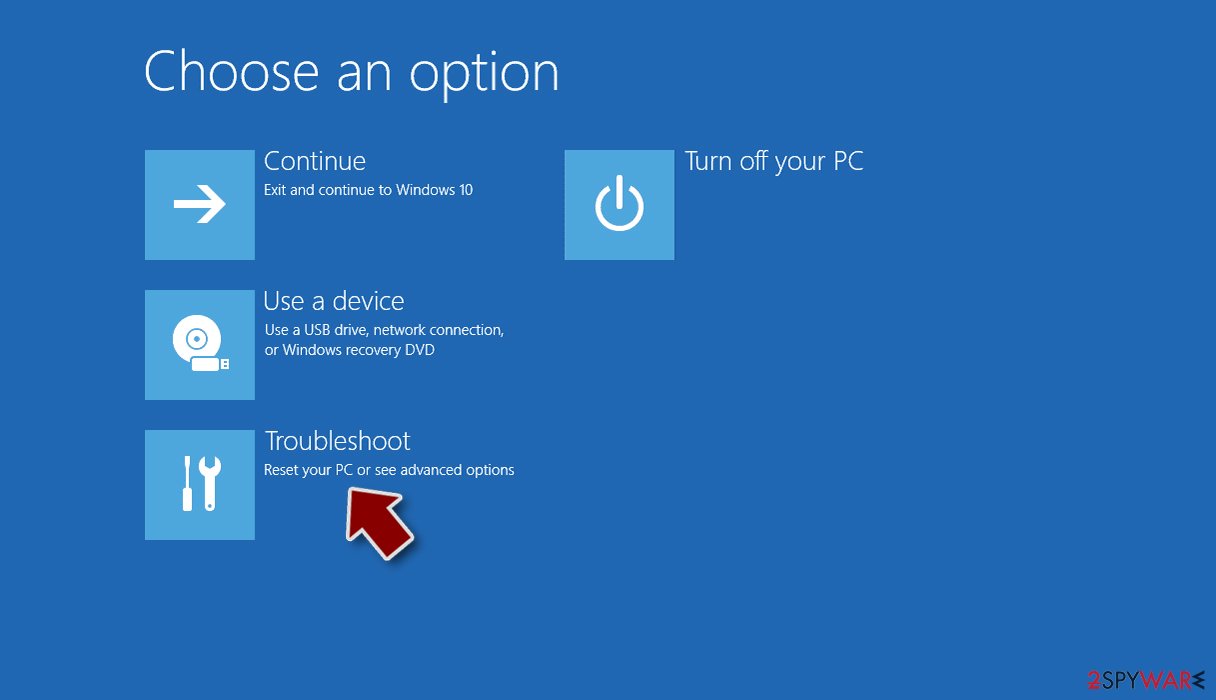
- Go to Advanced options.
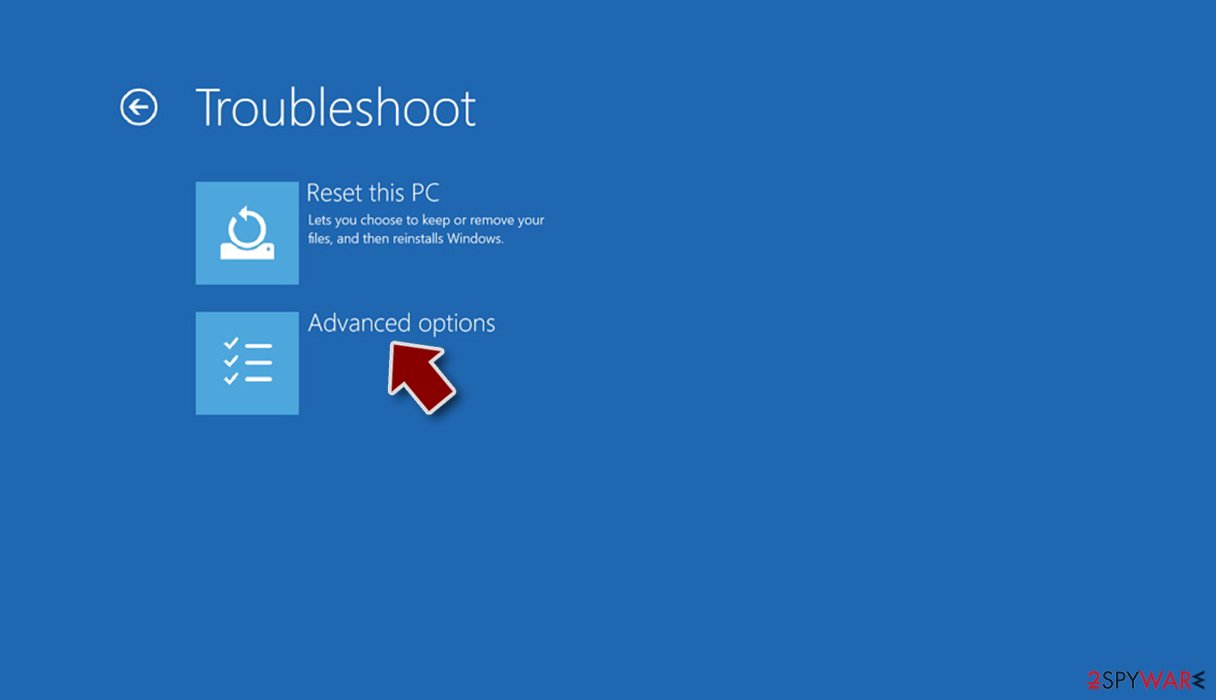
- Select Startup Settings.
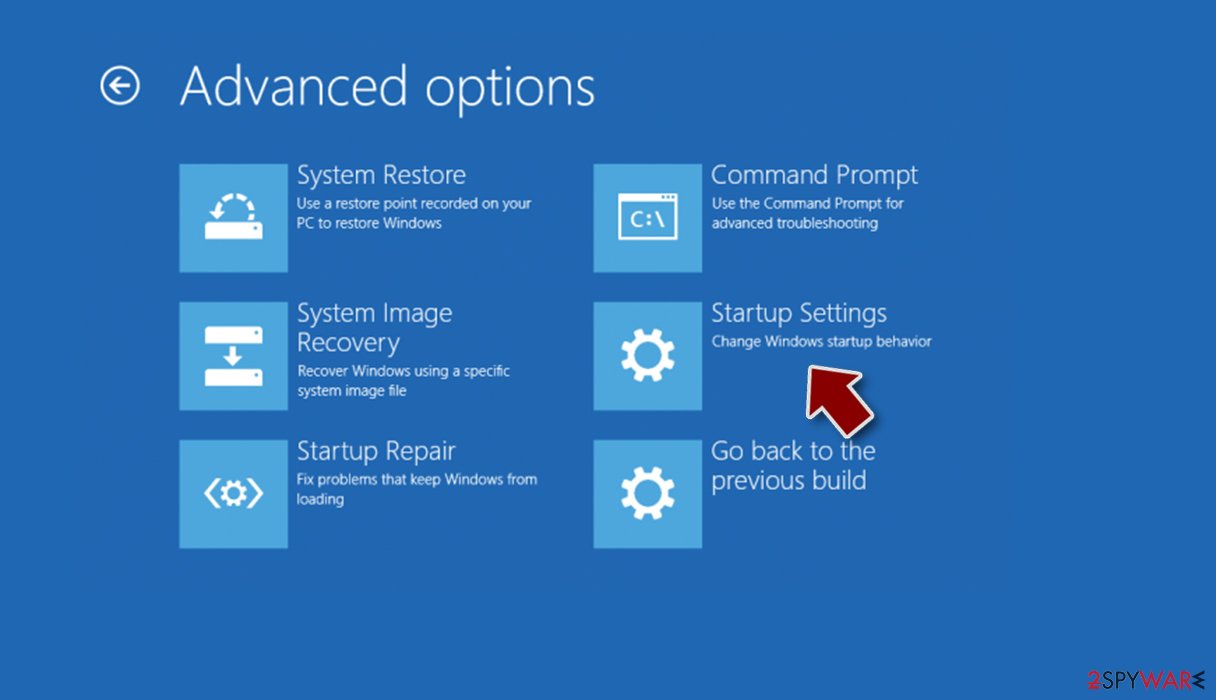
- Press Restart.
- Now press 5 or click 5) Enable Safe Mode with Networking.
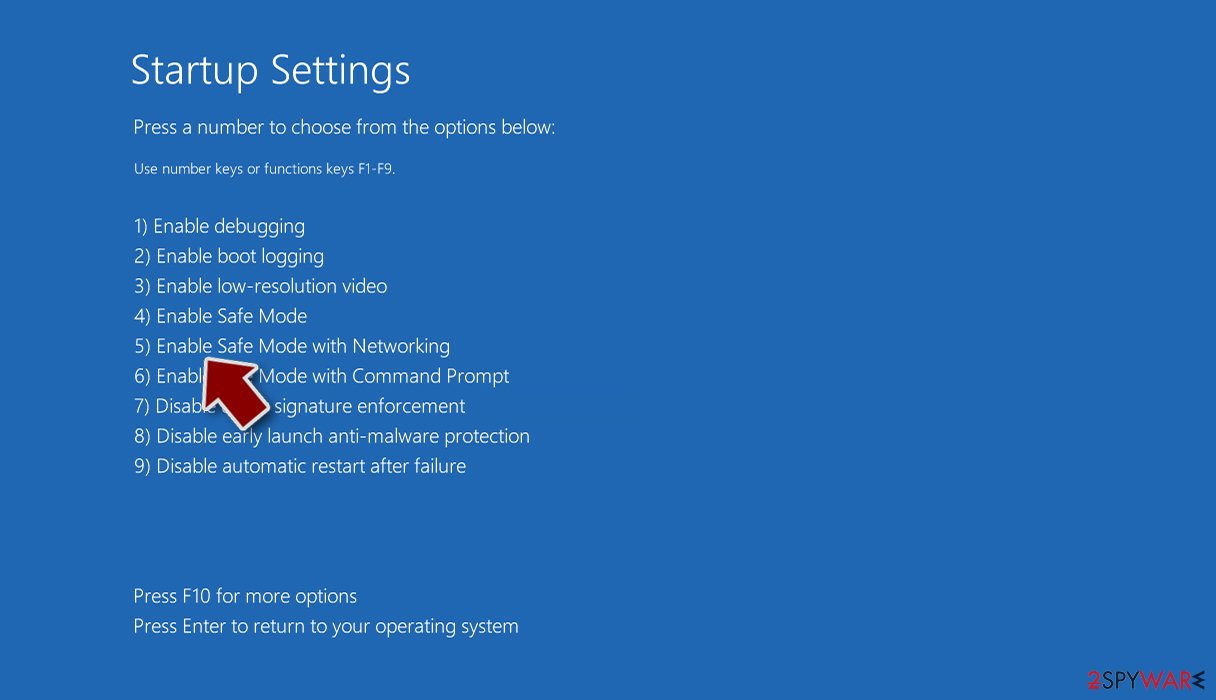
Step 2. Shut down suspicious processes
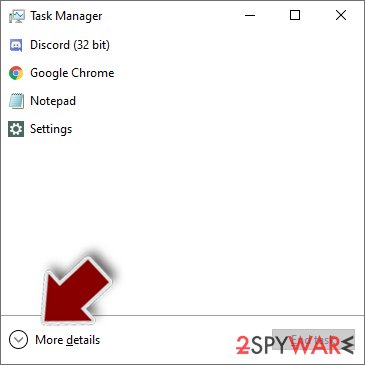
Windows Task Manager is a useful tool that shows all the processes running in the background. If malware is running a process, you need to shut it down:
- Press Ctrl + Shift + Esc on your keyboard to open Windows Task Manager.
- Click on More details.
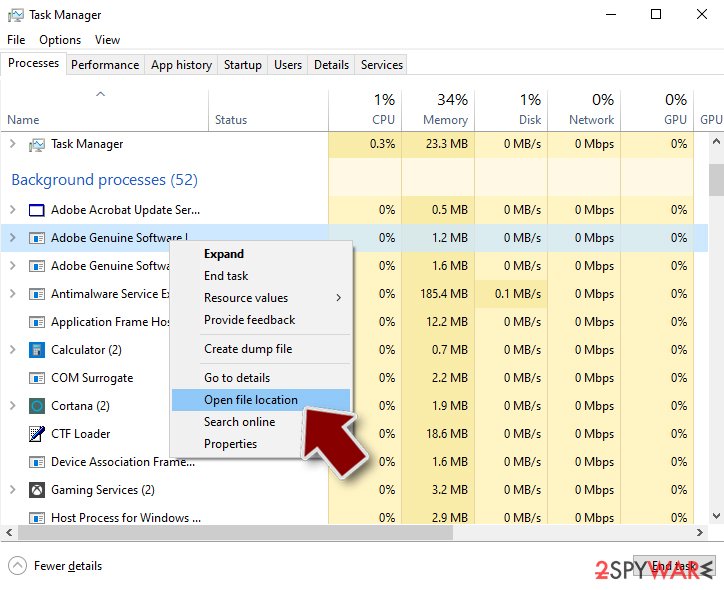
- Scroll down to Background processes section, and look for anything suspicious.
- Right-click and select Open file location.
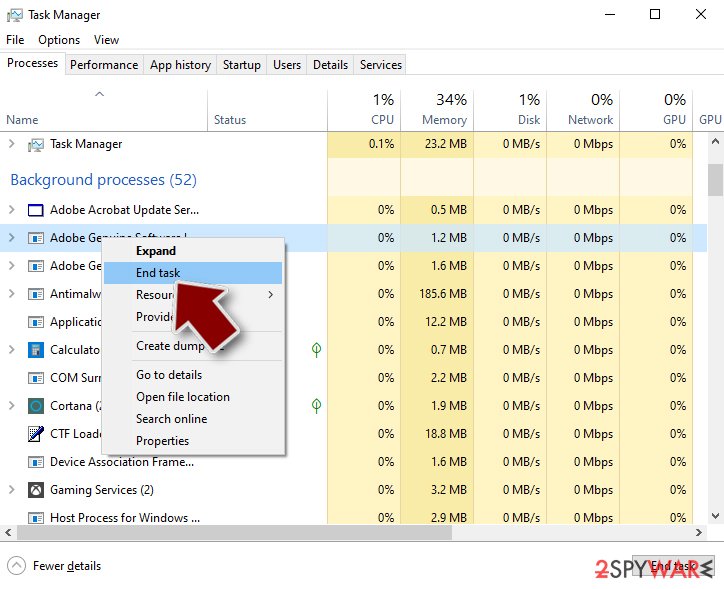
- Go back to the process, right-click and pick End Task.
- Delete the contents of the malicious folder.
Step 3. Check program Startup
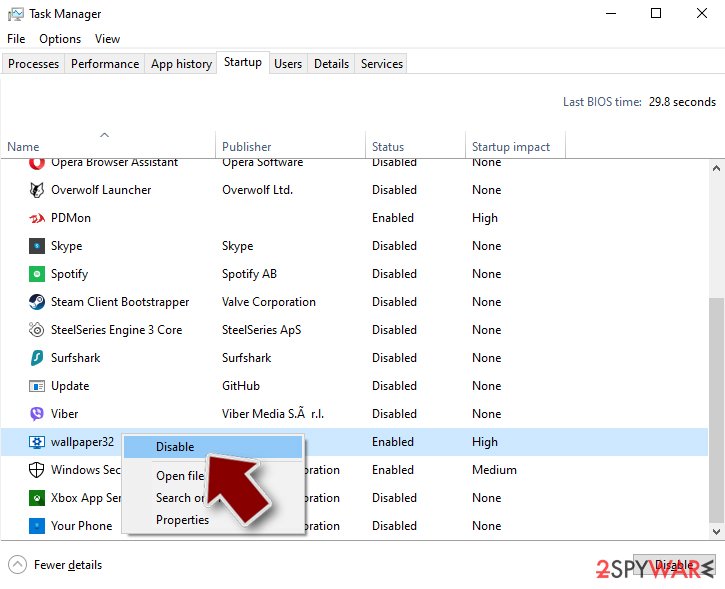
- Press Ctrl + Shift + Esc on your keyboard to open Windows Task Manager.
- Go to Startup tab.
- Right-click on the suspicious program and pick Disable.
Step 4. Delete virus files
Malware-related files can be found in various places within your computer. Here are instructions that could help you find them:
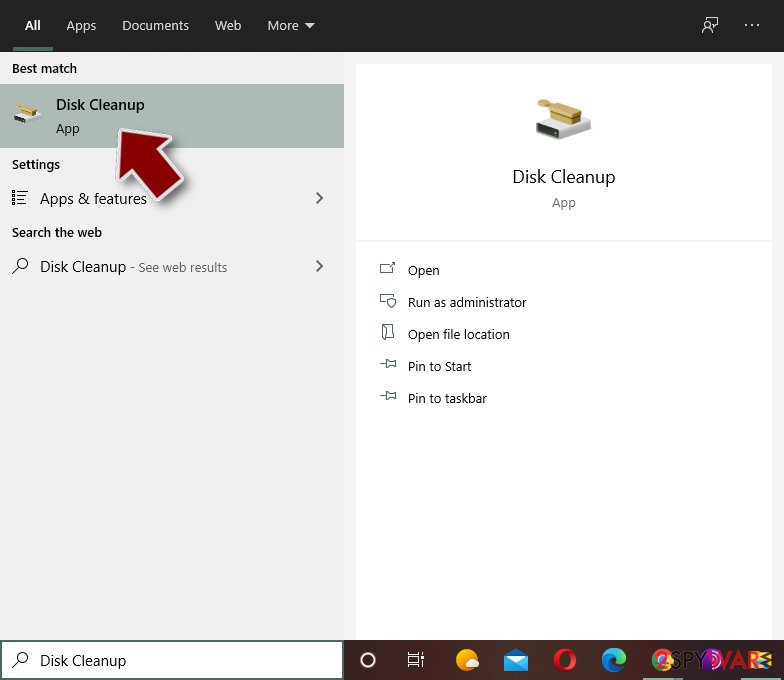
- Type in Disk Cleanup in Windows search and press Enter.
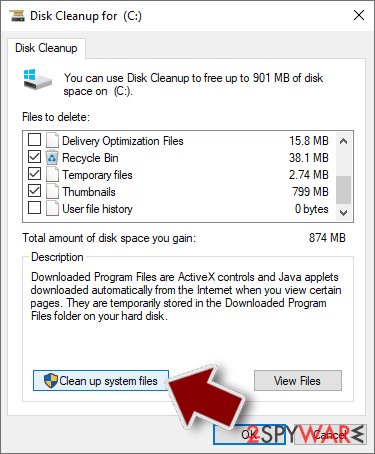
- Select the drive you want to clean (C: is your main drive by default and is likely to be the one that has malicious files in).
- Scroll through the Files to delete list and select the following:
Temporary Internet Files
Downloads
Recycle Bin
Temporary files - Pick Clean up system files.
- You can also look for other malicious files hidden in the following folders (type these entries in Windows Search and press Enter):
%AppData%
%LocalAppData%
%ProgramData%
%WinDir%
After you are finished, reboot the PC in normal mode.
From our report of Oct 2020 · not reviewed since
Remove Hacktool:win32/keygen malware without a delay
Keep in mind that, while some malware installers might be named as software crack (for example, KMSSS.exe), others can function as a crack, providing the promised functionality, all while executing code in the background and downloading malicious payload.
As a result, you might not know that malware is running in the background and also might not realize that you need to remove Hacktool virus to protect your personal safety and privacy.
Since the malware embedded in cracks can vary greatly, Hacktool:win32/keygen removal can sometimes also be complicated. For example, the rootkit can be difficult to eliminate and need specific tools, while other malware might disable anti-virus tools altogether. If any difficulties arise, you can always access Safe Mode with Networking and perform a full system scan from there - instructions on how to reach it are listed below.
[GI=method-1]In case you are having issues with Hacktool:win32/keygen removal, you should access Safe Mode with Networking and perform a full system scan with anti-malware from there:
After removal: passwords, accounts and prevention
Secure your accounts after the clean-up
Assume that whatever was saved in the browsers on this PC while the PC showed an unfamiliar process called KMSSS.exe in Task Manager has been copied:
- passwords
- cookies
- autofill data
Work from a clean device, or from this PC once the offline scan finds nothing.
Start with your main e-mail account, because it can reset everything else, then banking and payment, then social and gaming accounts. Change each password, sign out of all sessions and turn on two-step verification: Turn on two-step verification / secure a hacked account.
The full order, including crypto wallets and card replacement, is in securing your accounts after malware.
Access your website securely from any location
When you work on the domain, site, blog, or different project that requires constant management, content creation, or coding, you may need to connect to the server and content management service more often. The best solution for creating a tighter network could be a dedicated/fixed IP address.
If you make your IP address static and set to your device, you can connect to the CMS from any location and do not create any additional issues for the server or network manager that needs to monitor connections and activities. VPN software providers like can help you with such settings and offer the option to control the online reputation and manage projects easily from any part of the world.
Recover files after data-affecting malware attacks
While much of the data can be accidentally deleted due to various reasons, malware is one of the main culprits that can cause loss of pictures, documents, videos, and other important files.
More serious malware infections lead to significant data loss when your documents, system files, and images get encrypted. In particular, ransomware is is a type of malware that focuses on such functions, so your files become useless without an ability to access them.
Even though there is little to no possibility to recover after file-locking threats, some applications have features for data recovery in the system. In some cases, can also help to recover at least some portion of your data after data-locking virus infection or general cyber infection.
Questions about Hacktool:win32/keygen
Is KMSSS.exe safe?
It depends on where the file is and who signed it, not on the name. Open Task Manager, go to the Details tab, right-click KMSSS.exe and choose Open file location. A file inside Program Files or System32 with a valid digital signature from a known company is usually part of a legitimate program.
A file in AppData, Temp or ProgramData with no signature, especially one that restarts itself after you end it, is suspicious. If you cannot tie the process to anything you installed, uninstall recent unfamiliar programs and run a Microsoft Defender Offline scan.
Can I delete the KMSSS.exe file?
Only after you know what it belongs to. If KMSSS.exe is part of a program, uninstall that program through Settings instead, so its services and tasks go too. If it belongs to nothing and is unsigned, end the process, disable whatever starts it and then delete its folder.
Do not delete files from the Windows folder or files signed by Microsoft: those are part of the system, and removing them can stop Windows from starting. When in doubt, run a Microsoft Defender scan first and let it decide.
Is KMSSS.exe a virus?
If it sits outside the Windows and Program Files folders and your antivirus links it to Hacktool:win32/keygen, yes. KMSSS.exe is the file name used by this trojan. Some trojans borrow the names of real Windows components, so the name alone does not decide it:
- right-click the process in Task Manager
- choose Open file location
- look at the folder and the publisher under Properties > Details
A file in a user folder with no publisher is the trojan. Do not delete it by hand while it runs; use the offline scan in the plan above.
Is it safe to do online banking after seeing an unfamiliar process called KMSSS.exe in Task Manager?
Not on that PC until it is clean. A program that produces an unfamiliar process called KMSSS.exe in Task Manager runs with your rights and could read what you type or what the browser shows. Use a phone or another computer for banking and for changing passwords.
When the offline scan of the affected PC is clean and nothing suspicious starts with Windows any more, you can go back to using it. Check your bank statements for the past weeks either way, and call the bank if anything looks unfamiliar; banks can block cards and reset access quickly.
Should I report Hacktool:win32/keygen?
Report it if you lost money, if accounts were taken over, if you are a business, or if the trojan came through a scam call. A police or national cybercrime report gives you a reference number for your bank and insurer and helps link cases.
You do not need to report a trojan that antivirus blocked before it ran. Before reporting, write down the dates, the detection name, file names and any messages or transactions linked to the attack; screenshots of antivirus alerts are useful evidence. The country list is in the report section above.
Should I check my other computers too?
Yes, it takes little time and removes doubt. Hacktool:win32/keygen itself usually stays on one PC, but the download that carried it may have been copied to other computers, shared drives may hold the same installer, and an attacker who had access could have tried saved passwords on other devices.
Run a full scan on every Windows PC in the home or office, check shared folders for the original download, and change Wi-Fi and router passwords if they were stored on the infected machine.
I found AnyDesk or ScreenConnect that I did not install. Is that Hacktool:win32/keygen?
Not necessarily Hacktool:win32/keygen, but it is a warning sign. These are legitimate remote support tools, and criminals use them as ready-made backdoors, especially after tech support scams or fake invoice calls.
If you did not install it and no one you trust set it up, uninstall it, change passwords from a clean device and check your bank account. If someone connected to your PC through it, follow the steps for remote access trojans and consider a Windows reset. Installed apps sorted by date shows when it appeared.
How do I know if my PC has Hacktool:win32/keygen?
Often you do not, which is the point of a trojan. Possible signs are an antivirus alert naming Hacktool:win32/keygen or a generic trojan detection, unknown programs or scheduled tasks, processes with random names in Task Manager, browser extensions you did not add, security settings turned off, slower performance, or account alerts about logins from unknown places.
The reliable check is a full scan followed by Microsoft Defender's offline scan. If you recently ran a crack, a fake installer or a command a website told you to paste, scan even without symptoms.
My antivirus was on. How did a trojan get past it?
Antivirus programs see a file only when it is written or run, and criminals test each new build against popular scanners before release. Detection catches up within hours or days, which is often after the first victims ran it.
Archives with passwords, installers that fetch the malware later, and scripts run through PowerShell make the job harder. That is why behaviour such as downloading cracks or pasting commands matters more than any setting. Keep Windows and Defender updated, and turn on Reputation-based protection in App & browser control.
Will Fortect remove Hacktool:win32/keygen?
Fortect scans Windows for malware and unwanted programs and repairs the system files and settings they change, and its free scan shows what it finds on your PC before you decide anything.
For Hacktool:win32/keygen, follow the plan above as well: the browser steps take back permissions and settings that no scanner treats as a threat, and uninstalling the program that brought it removes the source.
Run Microsoft Defender's full scan and, if anything was found, its offline scan as a second opinion. If the symptoms are gone after the plan and both scans are clean, there is nothing more to do.
Sources
- Threat Post: Stealthy Malware Flies Under AV Radar with Advanced Obfuscation (read October 6, 2026)
- Virus Total: KMSSS.exe (read October 6, 2026)
- FTC: How to recognize, remove and avoid malware (read October 6, 2026)
- Microsoft Learn: Microsoft Defender Offline (read October 6, 2026)
- Microsoft Learn: How Microsoft names malware (read October 6, 2026)