
melonandworld.top: a domain that served Linux botnet programs for routers and smart devices, and what to do if one of your devices fetched them
melonandworld.top is a web address that URLhaus lists 14 times on 15 October 2026: one shell script (1.sh) and 13 Linux programs named Space.arm, Space.mips, Space.x86 and so on, one for each type of chip, tagged botnetdomain. That pattern is typical of malware that turns routers, cameras and small Linux servers into remote controlled bots, not of anything that runs on a normal Windows PC.
If you only saw the name in a log, nothing is proven; if a router, camera, NAS or Linux server of yours asked for these files, treat that device as taken over, wipe it, update it and set a new password before it goes back online.
Facts checked October 17, 2026. Removal steps tested on Windows 11 (26H2) and checked against Microsoft's and the browser makers' current documentation.
Automatic
Get a free scan and check if your PC is infected.
Fortect finds malware, unwanted programs and the Windows damage they leave behind, and repairs it in one pass.
If a script, device or program that downloads files from melonandworld.top keeps coming back after uninstalling, a scan can find what reinstalls it.
Do it yourself · free Remove melonandworld.top (Linux botnet files, Space.* programs) yourself 5 steps, about 15 minutes, no software needed.
Start the steps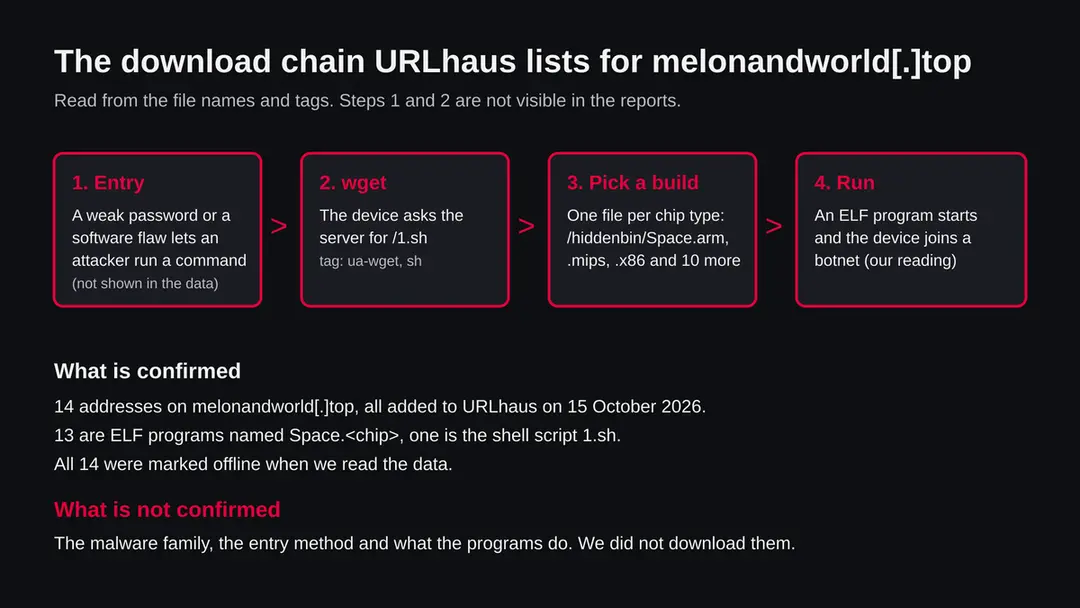
Melonandworld.top (Linux botnet files, Space.* programs): summary
| Type | A malware server: URLhaus lists a shell script and 13 Linux programs for different chip types, tagged botnetdomain |
|---|---|
| Risk | High for a router, camera or Linux server that fetched and ran the files: it may be taken over and used for attacks. Low if you only saw the name |
| Symptoms | Often none. Slowness, restarts, unknown processes in /tmp and unknown cron jobs are the signs in the research on similar files |
| How to get rid of it | Take the device offline, factory reset it, load new firmware, set a new password, close remote access; rebuild a server from a clean image |
| Our check (17 October 2026) | One plain request from our server: the name did not resolve. That clears nothing; the danger rating comes from URLhaus |
| Running since / first seen | Domain registered 9 August 2026; the 14 files were reported on 15 October 2026 |
| Removal | Scan the PC with security software to find and remove the malware and anything installed with it. Fortect scans Windows for malware and repairs the system files and settings it damaged. Remove it nowTo use the full-featured product, you have to purchase a license for Fortect. The scan is free. |
Show 9 more facts
| Platform | Linux based devices and servers. A Windows PC or Mac cannot run these files as they are |
|---|---|
| Detection names | No detection name is known for these exact files: we did not open them and the rows carry no family name. For Mirai style Linux bots, which this file set resembles, Microsoft uses names of the form Trojan:Linux/Mirai.A!MTB. We did not read that entry and do not claim it matches these files |
| Name | Melonandworld.top |
| Domain registered | 9 August 2026 |
| Evidence | 14 write-ups by security sites; details still limited |
| First seen | 15 October 2026 |
| Distribution | Typically fake installers, cracked programs, e-mail attachments, fake "verify you are human" pages and ads for popular apps |
| Damage | Installs other malware, often several programs at once |
| Facts checked | 17 October 2026 |
Facts checked on 17 October 2026 against the URLhaus rows for melonandworld.top held in our database (the abuse.ch site itself is not read by our tools), RDAP, one plain request from our server, and published reports by the SANS Internet Storm Center, the FBI, CSO Online, GovInfoSecurity and The Hacker News on CISA.
We did not download the files and infected no device; the cleaning steps follow the cited advice and were not tried on a live infection.
What melonandworld.top is, and what we know about it
melonandworld.top is not a program on your computer. It is a web address that the abuse.ch project URLhaus lists as a place where malware files were served. We found no public write up of this one address, so what follows is what the URLhaus rows show, what our own server saw, and what published research says about the same pattern of files.
- 1
What URLhaus lists
Fourteen file addresses on melonandworld.top, all plain http, all added on 15 October 2026 between 18:52 and 19:07 UTC by one reporter. Thirteen sit in a folder called hiddenbin and are named Space followed by a chip type: arm, arm5, arm6, arm7, arc, m68k, mips, mpsl, ppc, sh4, x86, x86_64 and i686. The fourteenth is a shell script, 1.sh, in the top folder. Every row carries the threat label malware_download. When we read our copy of the data, all 14 were marked offline.
- 2
What the tags mean
elf marks a program file for Linux and similar systems. sh marks a shell script. ua-wget means the file was fetched with the download tool wget, which is built into most Linux and router firmware. botnetdomain is a tag we could not find defined on an official abuse.ch page; our reading is that the domain is used as botnet infrastructure. No row carries a malware family name, so we do not name one. We do not say this is Mirai, Gafgyt or anything else.
- 3
What we could not confirm
We did not download any of the files, so we cannot tell you what is inside them, where they report to, or which devices they run on in practice. URLhaus shows tags, not proof. We also do not know how a device first came to ask for 1.sh. That first step is not visible from the server side.
- 4
What this means for you
If you only saw the name in a firewall log, a DNS block or a warning, you are not infected by that alone. The risk is for a device where something already ran and went to fetch these files. A normal visitor with a browser has no reason to request them, and a Windows PC cannot run a Linux ELF file as it is.
- Kind of threat
- A domain that served a shell script and 13 Linux programs, one per chip type, tagged botnetdomain, elf, sh and ua-wget
- Where the files are
- hxxp://melonandworld[.]top/1.sh and hxxp://melonandworld[.]top/hiddenbin/Space.<chip>: plain http on the normal web port
- Domain registered
- 9 August 2026 through Global Domain Group LLC, status client transfer prohibited (RDAP, read 15 October 2026)
- URLhaus entries
- 14 file addresses, all added 15 October 2026; all 14 marked offline in our copy of the data
- Platform
- Linux based devices: routers, cameras, recorders, NAS boxes, small servers. The chip names (arm, mips, ppc, sh4, m68k, arc) are those of embedded hardware
- Family
- Not stated in the rows. We do not name one
What melonandworld.top (Linux botnet files, Space.* programs) does on an infected PC
What we checked on 17 October 2026, and what we could not
There is no screenshot of a site here. Our check was one plain request from our server to melonandworld.top on 17 October 2026, and it did not get an answer: the name could not be resolved (error ENOTFOUND). That clears nothing, because the reports are two days old and the name may have been removed, suspended or moved.
Our check, 17 October 2026
- The name did not resolveOur server asked for the address of melonandworld.top and got no answer. It can mean the domain was taken down, that the record was removed, or that the server was moved. It does not tell us the files are gone from everywhere, and a copy may exist on another address.
- Why that is not a clean resultServers that hand out botnet programs are often short lived and switch names. A name that is dead today says nothing about a device that already downloaded and ran a file while it was alive.
- Notification request, pop-ups, redirects, ad networksNone seen. There was nothing to see: no page answered.
- URLhaus listingFourteen files, 13 of them Linux programs tagged elf, all added on 15 October 2026; all marked offline when we read the data.
- Downloads and the files themselvesWe did not download any file, so we cannot tell you what they contain or what they connect to.
Dangerous: treat it as a malware server Our check was one plain request that ended in a name error, so it proves nothing either way. The danger rating comes from the URLhaus reports and their tags, not from our request. Do not request files from this address and do not run anything that does.
What happened to melonandworld.top, from registration to our check
The domain is about two months old. All 14 reports were filed within 15 minutes on one day. The dates come from RDAP and from the URLhaus rows we hold; times are UTC.
9 August 2026
Domain registered
RDAP shows melonandworld.top registered on 9 August 2026 at 17:14 UTC through Global Domain Group LLC. The only status is client transfer prohibited, a common lock that stops the domain being moved by accident. It says nothing about who runs it.
15 October 2026, 18:52
Twelve Space programs reported in 22 seconds
Between 18:52:17 and 18:52:39 URLhaus received twelve programs: Space.mpsl, arm5, m68k, x86_64, sh4, mips, ppc, arm7, arc, arm6, i686 and x86. Such a tight burst fits a script or a person walking through a folder listing, but the rows do not say which.
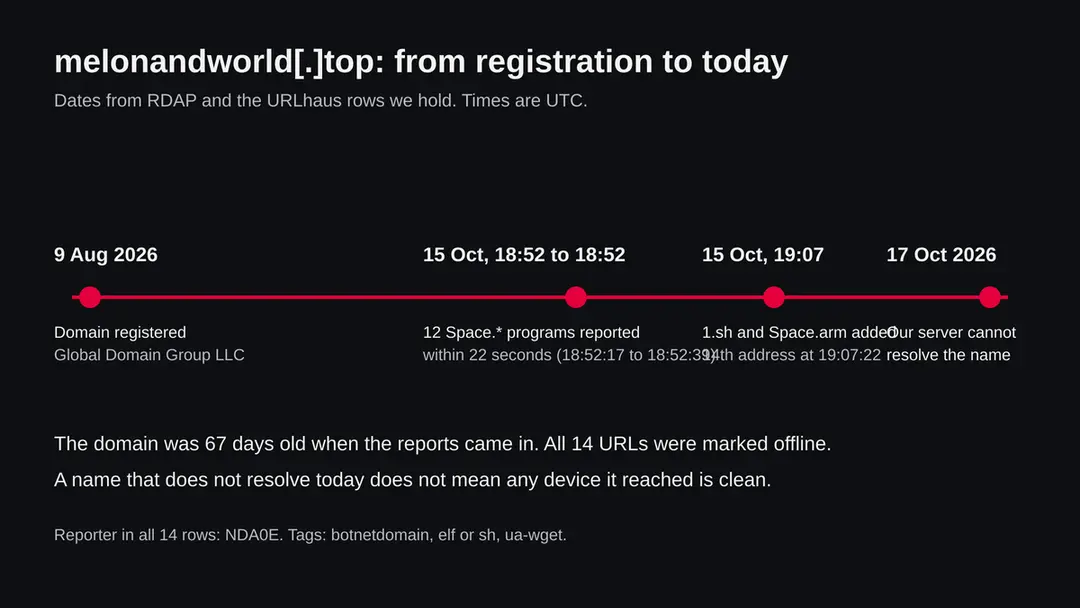
Registration, the two report bursts on 15 October 2026 and our failed lookup two days later. 15 October 2026, 19:07
The shell script and the last program
At 19:07:20 the shell script 1.sh was added, and at 19:07:22 the thirteenth program, Space.arm. The script is the file a device would fetch first; the programs are what it would then choose between.
17 October 2026
Our request does not resolve
Our server could not find the address of melonandworld.top. We keep the guide as it is and will add a dated line if new reports appear.
The 14 files, one by one
The file names are the most useful clue in the data: a program that exists in 13 builds is built to run on whatever device it lands on. Chip names below follow common usage; they are our reading of the file names, not something URLhaus states.
| File | Likely target hardware (our reading) | Added (UTC, 15 Oct 2026) |
|---|---|---|
| /1.sh | A shell script, run by the device's own shell | 19:07:20 |
| /hiddenbin/Space.arm | ARM chips, the most common type in routers and cameras | 19:07:22 |
| /hiddenbin/Space.arm5, .arm6, .arm7 | Older and newer generations of ARM | 18:52:17, 18:52:25, 18:52:25 |
| /hiddenbin/Space.mips | MIPS chips, common in older home routers, big endian | 18:52:25 |
| /hiddenbin/Space.mpsl | MIPS chips, little endian | 18:52:17 |
| /hiddenbin/Space.x86 and .i686 | 32 bit Intel or AMD, such as old servers and small boxes | 18:52:39, 18:52:33 |
| /hiddenbin/Space.x86_64 | 64 bit Intel or AMD, normal Linux servers and many NAS boxes | 18:52:24 |
| /hiddenbin/Space.ppc | PowerPC, some network gear and set top boxes | 18:52:25 |
| /hiddenbin/Space.sh4 | SuperH, found in older set top boxes and recorders | 18:52:24 |
| /hiddenbin/Space.m68k | Motorola 68000 family, rare and old | 18:52:24 |
| /hiddenbin/Space.arc | ARC chips, used in some embedded boards | 18:52:25 |
The SANS Internet Storm Center describes the same pattern for another campaign: a shell script works out the architecture of the victim device and then downloads the matching build, with a list that includes mips, mpsl, x86, arm, arm5, arm6, arm7, sh4, ppc and arc. That is the same list as the file names here. It shows how such a set is used, not that this domain belongs to that campaign.
What programs like this usually do, and what we cannot say about these
We did not open the files, so nothing in this chapter is a finding about them. It is what published research says about the kind of script and programs this naming points to, and it is marked as such.
| Behaviour | Where it comes from | How far it can be trusted for these files |
|---|---|---|
| A script finds the chip type and downloads the matching program | SANS Internet Storm Center diary on a campaign using a CVE-2023-1389 exploit | The file names match the pattern; what 1.sh actually does is not confirmed |
| The program is made executable and started, often from a writable folder such as /tmp | Write ups of similar scripts summarised in our research | General for the pattern, not read in these files |
| The device becomes a bot that takes orders and joins denial of service attacks | Reports on Mirai, whose 2016 attack on the Dyn DNS provider is the best known case | Possible; no row names a family or a command server |
| The bot scans the internet for more devices with open Telnet and weak default logins | Press and vendor reports on Mirai, which tried a built in list of about 60 default logins | Only if these programs descend from that code, which we do not know |
| Nothing visible happens to the owner | Common in every report we read: the device keeps working, a little slower | Likely. The absence of symptoms proves nothing |
What melonandworld.top (Linux botnet files, Space.* programs) can steal or download
What this can cost you
The harm depends on whether a device of yours fetched and ran a file. The list below is ranked by how likely each risk is for an infected router, camera or small server.
- High
Your device used to attack others
A bot does work for a stranger: sending floods of traffic at a target. Your internet address may end up in the target's logs and on block lists, and your line can slow down.
- High
A permanent open door
If the way in was a default or weak password, wiping the device without changing the password lets the same attacker, or the next one, in again within hours.
- Medium
Traffic seen or redirected
A router that is controlled by someone else sits on all your traffic. Whether these programs read it is not known; VPNFilter, a different router botnet, could collect traffic according to the FBI.
- Medium
A slow or unstable device
High load, dropped connections and restarts are possible. They also have ordinary causes.
- Low
Nothing at all
If you only saw the name in a log, or the device blocked the download, no harm was done. The danger is the case you cannot yet tell apart.
Who can meet this, and who cannot
The page exists because our /check tool saw this address reported. These are the realistic readers and what each should take from it.
| You are | What it means | What to do |
|---|---|---|
| Someone who saw melonandworld.top in a router, firewall or DNS log | A device on your network asked for it, or something asked a resolver. Which device is the question that matters | Find the device from the log (step 1 below). If the log says the request was blocked, note it and still check the device |
| Someone whose antivirus or browser warned about the address | The warning came from a block list. A warning is not an infection | Leave the page, do not retry it, and run a scan on the device that showed it |
| The owner of a small Linux server, VPS or NAS | Your machine can run these files if an attacker got a command onto it, for example through a weak password or an old web app | Check running processes and cron jobs, see the check chapter, rebuild from a clean image if unsure |
| The owner of a website that looks hacked | We do not know that this domain is a hacked site. If your own site was involved, an attacker may have used it to fetch files | Restore from a clean backup, update the software, change every password and key, and look for files you did not upload |
| A user of an ordinary Windows PC or Mac | These are Linux programs; a Windows PC cannot run them as they are. Your router may still be the target | Check the router, not the computer. Your computer is only affected if the attacker used it for something else |
How to check the PC for melonandworld.top (Linux botnet files, Space.* programs)
How a device ends up fetching files like these
The URLhaus rows do not say how any victim was reached. These are the routes that published research describes for this kind of file set.
- 1
A default or weak password on a remote login
The best known botnet of this type, Mirai, found devices by looking for open Telnet ports (23 and 2323) and trying a built in list of default logins. CSO Online reported a list of 61 username and password pairs, and later reports say botnets still try that list and many more.
- 2
A flaw in the web page of the device
The SANS diary describes a campaign that used a command injection flaw (CVE-2023-1389) in a router web interface to run a command that fetched a shell script, followed by programs for several chip types. Devices that never receive updates stay open to such flaws for years.
- 3
A server with a weak SSH login or an old web app
The x86 and x86_64 builds suggest ordinary Linux servers are also in scope. A guessed SSH password or an unpatched web application can give an attacker the shell they need to run one wget command.
- 4
A device exposed to the internet by mistake
Port forwarding, a camera set up for remote viewing or a router with remote administration switched on puts the login page in front of every scanner on the internet.
Check your network before you reset anything
Write down what you see first. The device name and the time of the request decide how serious this is. The steps are written for a home or small office network and use no special tools.
- 1
Find which device made the request
Open your router's admin page and look for a log or a list of connected devices. Match the time of the log line to a device name or address. If you only have a DNS or firewall log from a security product, the entry usually names the machine. If the router does not keep logs, say so in your notes; do not guess.
- 2
Look for devices you do not know
In the router's list of connected devices, note every name and address. A camera, a recorder, a printer or a smart plug you forgot about is exactly what these programs aim at. Unplug each unknown device one at a time.
- 3
Check remote access settings
In the router's settings look for Remote administration, Telnet, SSH, UPnP and port forwarding. Switch off what you do not use. On a camera or recorder, look for the same options in its own menu.
- 4
On a Linux server, look at what is running
Run
ps auxand look for programs with names like Space or odd names running from /tmp, /var/run or /dev/shm. Runcrontab -lfor each user and look in /etc/cron.d for jobs you did not add. Runss -tulpnand look for unknown listeners. We did not run these against the real files, so no match does not clear the server. - 5
Search for the file names
On a Linux server run
find / -name 'Space.*' -o -name '1.sh' 2>/dev/null. A match in a temporary folder is a strong sign. Do not run any program you find; copy it aside for analysis if you need it. - 6
Check the firmware version
On the router or device admin page find the firmware version and compare it with the newest version on the maker's support page. A device that has received no update for years is exposed whatever else you do.
How to remove melonandworld.top (Linux botnet files, Space.* programs)
How to remove melonandworld.top
A loader's job is to install other malware, so treat the PC as infected with more than one program until the scans are clean.
Step 1: Delete scheduled tasks that bring it back
Open Task Scheduler from the Start menu and click Task Scheduler Library. Select each task you do not recognise and read the Actions tab:
- a task that starts a file in
%AppData%or%Temp% - runs
powershellwith a long encoded line - opens a web address belongs to melonandworld.top or a similar program
Right-click such a task and choose Delete, and check the subfolders too. Leave tasks from Microsoft, your PC's maker and programs you use. Task Scheduler is the same in Windows 11 and Windows 10.

Windows 11: Task Scheduler Library, the task selected, the Actions tab shows the file it runs. Full procedure with screenshots: Remove what malware leaves behind in Windows
- a task that starts a file in
Step 2: Remove it from startup
Whatever melonandworld.top installed usually starts with Windows. Open Task Manager with Ctrl + Shift + Esc, go to Startup apps in Windows 11 or the Startup tab in Windows 10, and disable what you do not know, starting with entries that have an empty Publisher column.
Open file location on the right-click menu shows the file, which helps you decide and tells you what to delete later. Disabling is safe: if something you need stops working, switch it back on.
Full procedure with screenshots: Stop apps from opening at startup On uGetFix
Step 3: Delete the folders left behind
What the uninstaller leaves behind is usually in the user folders. Open File Explorer, switch on View > Show > Hidden items (in Windows 10 View > Hidden items), and go through
%LocalAppData%,%AppData%, %ProgramData% and the two Program Files folders.Sort by Date modified and delete folders that appeared together with the problem and belong to no program you use. Folders with random names that hold
.exe,.dll, .js or .ps1 files are the strongest sign.Full procedure with screenshots: Remove what malware leaves behind in Windows
Step 4: Scan the PC, then run the offline scan
Open Windows Security > Virus & threat protection > Scan options, run a Full scan and remove everything it finds. Then select Microsoft Defender Antivirus (offline scan) and click Scan now: the PC restarts and scans before Windows loads, which finds files that hide while Windows runs.
Save your work first, because the offline scan takes about 15 minutes. Both scans are built into Windows 11 and Windows 10, and a second scanner from another vendor is a useful extra opinion.

Windows 11: Windows Security > Virus & threat protection > Scan options. Full procedure with screenshots: Run a Microsoft Defender Offline scan
Step 5: Change passwords from another device and sign out other sessions
Assume that the passwords saved in this PC's browsers, and the accounts that were open in them, are known to the attacker. From a phone or a clean computer, change the e-mail password first, then banking, shopping, social and gaming accounts.
Use each service's option to sign out of all other sessions, because stolen cookies keep a session open even after a password change. Turn on two-step verification on each account. Wait with the infected Windows 11 or Windows 10 PC until the scans are clean.
Full procedure with screenshots: Turn on two-step verification / secure a hacked account
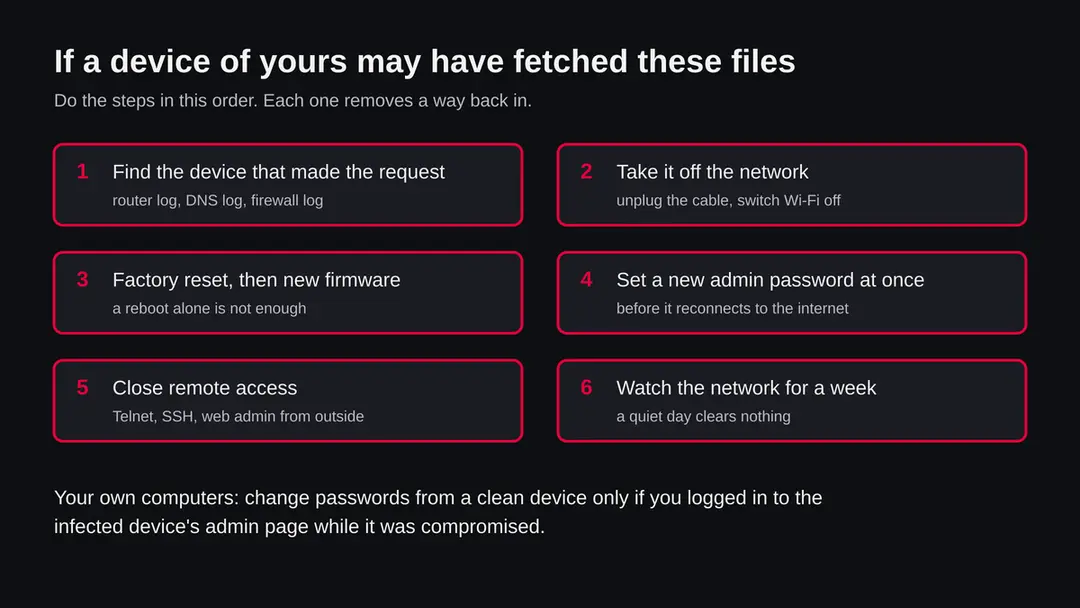
Clean a router, camera or small Linux device
Do the steps in order. We did not run any of these against the real files; they follow the FBI's advice for router botnets, the maker's usual reset procedure and the research cited at the end. Menu names differ by brand, so use your device's manual for the exact buttons.
- 1
Take the device off the network
Unplug the internet cable and switch Wi-Fi off, or pull the power if it has no such control. This stops it taking orders and attacking others while you work.
- 2
Reboot does not clean it
The FBI advised owners of routers hit by VPNFilter to reboot, but called it a temporary measure to disrupt the malware and said firmware must also be updated. For programs started by a script from /tmp a reboot may remove them, but a reboot does not close the hole they came through.
- 3
Factory reset the device
Use the reset button or the reset option in the admin page. Reset returns the device to its default password, which is why the next two steps matter. If you cannot reset it, replace it.
- 4
Update the firmware before connecting to the internet
Download the newest firmware from the maker's own support page on another device and load it through the admin page over a cable. If the maker no longer issues updates, the device will stay vulnerable; plan to replace it.
- 5
Set a new admin password straight away
Use a long, unique password, not the one printed on the label. Also change the Wi-Fi password and any other account on the device. CISA has urged makers to end shared default passwords because they are a main way in for attackers.
- 6
Switch off what you do not need
Turn off Telnet, remote administration and UPnP. If you need remote access, use the maker's cloud service with two step sign in or a VPN you run yourself.
- 7
For a Linux server: rebuild from a clean image
If you found any of the file names or unknown cron jobs, do not try to clean the machine by hand. Back up your data (not programs), reinstall from a clean image, patch, and restore the data. Change SSH keys and passwords from another device.
- 8
Watch for a week
Look at the router log every day for repeated requests to unknown addresses and for new devices. A quiet day does not clear the network.
If you run a website or server that may have been used
We do not know whether melonandworld.top is a site built for the purpose or a site that was hacked. URLhaus itself says its list does not tell the two apart. If you own a server that hosted these files, this is your list.
Do
- Take the server off the network, or at least stop the web service, before you investigate.
- Keep a copy of the logs and of the unknown files for analysis, and then rebuild from a clean image.
- Look for web shells, unknown users, SSH keys you did not add and cron jobs.
- Update the operating system, the web software and every plugin, and change all passwords and API keys.
- Ask your host or registrar to check whether the domain or the server was used without your knowledge.
Don't
- Do not just delete the files and leave the hole that let them in.
- Do not reuse old passwords or keys after a break in.
- Do not run the unknown programs to see what they do.
- Do not assume the problem is gone because the address no longer answers.
After removal: passwords, accounts and prevention
Most devices that join botnets fall to a short list of mistakes, all within your control.
Do
- Change the default password of every router, camera, recorder and NAS the day you plug it in.
- Turn on automatic updates where the device offers them, and check for firmware twice a year where it does not.
- Keep cameras and smart devices on a guest network, apart from your computers.
- Switch off remote administration, Telnet and UPnP unless you need them.
- Replace devices the maker no longer updates.
Don't
- Do not forward ports to a camera or recorder to see it from outside.
- Do not keep the password printed on the label.
- Do not buy no name devices with no update page.
- Do not ignore a log line only because it was blocked.
Questions about melonandworld.top (Linux botnet files, Space.* programs)
What is melonandworld.top?
It is a web address that URLhaus, the malware tracking project run by abuse.ch, lists for 14 files added on 15 October 2026. One is a shell script called 1.sh and 13 are Linux programs named Space followed by a chip type, such as Space.arm or Space.mips.
The tags are botnetdomain, elf, sh and ua-wget. It is not a program on your computer and not a site anyone is meant to visit. We did not download the files, so what they contain is not confirmed by us, and no row names a malware family.
Is melonandworld.top a virus or a scam?
It is neither a scam page nor a virus in the usual sense. It is the server side of a malware download: files sitting at an address for devices to fetch. The danger is for a device that fetched and ran them, not for a person who sees the name.
Our own request on 17 October 2026 got no answer because the name did not resolve, which clears nothing. Treat the address as dangerous, do not request files from it, and check the device that made any request.
Is melonandworld.top safe to open?
No, and there is no reason to. The listed addresses are programs and a script, not web pages. A browser would at most download a file, and a file that comes from a malware server should not be run.
Our check was one plain request from our server, and the name did not resolve, so we have nothing to say about what a visitor would see today. A quiet result on one visit never clears a server like this. Leave it alone and block the name on your router or DNS filter if you can.
Can melonandworld.top infect my Windows PC or Mac?
Not through the files listed. The 13 programs are in the ELF format used by Linux and similar systems, and a Windows PC or a Mac cannot run them as they are.
The chip names in the file names, such as arm, mips, ppc and sh4, point to embedded devices like routers and cameras, with x86 builds for Linux servers. Your router, camera, recorder or NAS is the likelier target. Check those devices, and do not assume your computer is safe if the device next to it was taken over.
What are the Space.arm, Space.mips and Space.x86 files?
They are the same kind of program built for different chips. Embedded devices use different processors, and a program built for one will not start on another, so the people behind such a set offer one file per chip.
A shell script then picks the right one. The SANS Internet Storm Center describes the same pattern for another campaign. Which program these files contain, and what it does once running, is not confirmed: we did not open them and the rows carry no family name.
How do I check if my router or device fetched these files?
Open your router's log and look for requests to melonandworld.top around or after 15 October 2026, then match the time to a device on your list of connected devices. On a Linux server run ps aux, crontab -l and ss -tulpn, and search for files called Space.* or 1.sh.
If the router keeps no log you cannot prove it either way, so check remote access settings and the firmware version instead. A clean result is one data point, not a clearance, because the programs may have been removed or never started.
How do I remove it from my router or camera?
Take the device off the network, factory reset it, load the newest firmware from the maker's own page before reconnecting it, and set a new admin password at once. Then switch off Telnet, remote administration and UPnP.
A reboot alone is not enough: the FBI said so for a different router botnet, noting that firmware must be updated too. If the maker no longer issues updates, replace the device. We did not test these steps against the real files; they follow the cited advice and your device manual.
Do I need to change my passwords?
Change the admin password of the affected device as part of cleaning it, and its Wi-Fi password. Change other passwords only if you have a reason to think the device could see them, such as logins typed on a router that was controlled by someone else, or if you reused the device's password elsewhere.
For a server, change SSH keys and every password stored on it from another device. The rows do not say these files steal anything, so this is caution, not a finding.
The address no longer works. Does that mean the problem is over?
No. All 14 URLs were marked offline when we read the data and our own request on 17 October 2026 could not find the name. That means the server stopped serving the files from this address, not that devices which already ran them are clean.
Botnet programs usually keep running after the download address dies. Servers also reappear under new names. Check the devices on your network, close remote access and update firmware regardless of the state of the address, and treat any new request to it as a warning.
Will Fortect remove melonandworld.top?
Fortect scans Windows for malware and unwanted programs and repairs the system files and settings they change, and its free scan shows what it finds on your PC before you decide anything.
For melonandworld.top, follow the plan above as well: the browser steps take back permissions and settings that no scanner treats as a threat, and uninstalling the program that brought it removes the source.
Run Microsoft Defender's full scan and, if anything was found, its offline scan as a second opinion. If the symptoms are gone after the plan and both scans are clean, there is nothing more to do.
Sources
- SANS Internet Storm Center: Prophetic Post by Intern on CVE-2023-1389 Foreshadows Mirai Botnet Expansion Today (diary 30442) (read October 17, 2026)
- FBI IC3: Foreign Cyber Actors Target Home and Office Routers and Networked Devices Worldwide (PSA180525) (read October 17, 2026)
- CSO Online: Here are the 61 passwords that powered the Mirai IoT botnet (read October 17, 2026)
- GovInfoSecurity: Botnets keep brute forcing Internet of Things devices (read October 17, 2026)
- The Hacker News: CISA urges manufacturers to eliminate default passwords (read October 17, 2026)