
plochcarsportsball.top: a server that handed out Linux malware files for routers and other devices, and what to do
plochcarsportsball.top is a web address that URLhaus lists 14 times on 15 October 2026 for a shell script (1.sh) and 13 Linux programs named Space.arm7, Space.mips, Space.x86 and so on, all tagged botnetdomain. These are files for routers, cameras and small Linux servers, not for a Windows PC or a phone, and nobody opens them by browsing.
If you only saw the name in a log, nothing is proven; if a device on your network fetched one of these files, treat that device as taken over, reset it, update it and change its password.
Facts checked October 17, 2026. Removal steps tested on Windows 11 (26H2) and checked against Microsoft's and the browser makers' current documentation.
Automatic
Get a free scan and check if your PC is infected.
Fortect finds malware, unwanted programs and the Windows damage they leave behind, and repairs it in one pass.
An automatic scan checks installed programs, startup items and browser extensions for anything that came with a script or device that downloads files from plochcarsportsball.top.
Do it yourself · free Remove plochcarsportsball.top (Linux botnet malware files) yourself 5 steps, about 15 minutes, no software needed.
Start the steps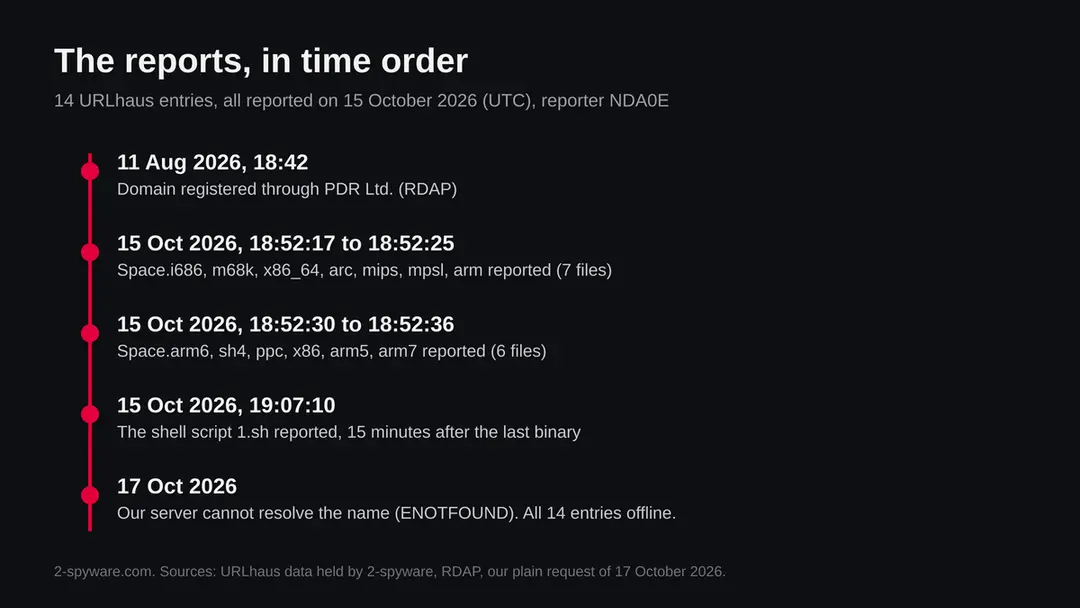
Plochcarsportsball.top (Linux botnet malware files): summary
| Type | A malware server: URLhaus lists a shell script and 13 Linux programs for different processors, all tagged botnetdomain |
|---|---|
| Risk | High for a router, camera or Linux server that ran the script. Low if you only saw the name |
| Symptoms | Often none. A hot, slow or restarting device, or log entries for the name, are the hints |
| How to get rid of it | Factory reset the device, install the maker's newest firmware, set a new admin password, turn off remote access; replace the device if it gets no updates |
| Our check (17 October 2026) | One plain request from our server: the name could not be found. That clears nothing; the rating comes from URLhaus |
| Running since / first seen | Domain registered 11 August 2026; all 14 files reported on 15 October 2026 |
| Removal | Scan the PC with security software to find and remove the malware and anything installed with it. Fortect scans Windows for malware and repairs the system files and settings it damaged. Remove it nowTo use the full-featured product, you have to purchase a license for Fortect. The scan is free. |
Show 9 more facts
| Platform | Linux on many chip types (ARM, MIPS, x86 and others): routers, cameras, recorders, servers. Not Windows, Mac or iPhone |
|---|---|
| Detection names | Microsoft: no name confirmed for these files, because we did not open them and did not read a Microsoft entry for them. For Linux Mirai programs Microsoft's scheme would give a name of the form Trojan:Linux/Mirai.<letters> (our reading, not confirmed). Files with the same Space.arm7 name on MalwareBazaar are flagged by vendors as Mirai |
| Name | Plochcarsportsball.top |
| Domain registered | 11 August 2026 |
| Evidence | 14 write-ups by security sites; details still limited |
| First seen | 15 October 2026 |
| Distribution | Typically fake installers, cracked programs, e-mail attachments, fake "verify you are human" pages and ads for popular apps |
| Damage | Installs other malware, often several programs at once |
| Facts checked | 17 October 2026 |
Facts checked on 17 October 2026 against the URLhaus data for plochcarsportsball.top held in our database (we did not fetch the abuse.ch host page), the RDAP record, one plain request from our server, and abuse.ch pages (YARAhub and MalwareBazaar) and the FBI's 2018 router advisory. We did not download the files and we infected no device; the steps follow general guidance and were not tried on a live infection.
What plochcarsportsball.top is, and what we know about it
plochcarsportsball.top is not a program on your computer and not a site for people. It is a web address that the abuse.ch project URLhaus lists as a place where malware files were served. We found no public write-up of this one address, so what follows is what URLhaus shows, what we saw ourselves, and what abuse.ch and the FBI have published about the kind of malware these file names point to.
- 1
What URLhaus lists
Fourteen file addresses, all on plain http, all added on 15 October 2026 by one reporter (NDA0E). Thirteen sit in a folder called hiddenbin and are named Space followed by a dot and a processor name: i686, m68k, x86_64, arc, mips, mpsl, arm, arm6, sh4, ppc, x86, arm5 and arm7. The fourteenth is a shell script called 1.sh in the top folder. Every entry carries the threat label malware_download. In the data we hold, all 14 are marked offline.
- 2
What the tags mean
The 13 programs are tagged elf, which is the standard program format of Linux. The script is tagged sh, a shell script. All 14 carry ua-wget, meaning the request that reported them came from the download tool wget. All 14 also carry botnetdomain. We read that as URLhaus saying the domain serves a botnet; we did not read URLhaus's own definition of that tag, so treat that reading as ours.
- 3
What we could not confirm
We did not download any of the files, so we cannot say what they contain, which malware family they belong to, or where they report to. None of the 14 entries carries a family tag such as Mirai or Gafgyt. The name Space is the file name chosen by whoever runs the server; we found no source that explains it.
- 4
What this means for you
If you saw the name in a firewall, router or DNS log, or in a security alert, you are not infected by that alone. The risk is for a device that ran the script and fetched a program. The files are not Windows programs, so a Windows PC that merely sees the name is not the target. The devices to think about are routers, IP cameras, video recorders and other small Linux based equipment, and Linux servers.
- Kind of threat
- A server that hands out a shell script and 13 Linux programs for different processor types, listed by URLhaus as malware_download and botnetdomain
- Where the files are
- hxxp://plochcarsportsball[.]top/1.sh and hxxp://plochcarsportsball[.]top/hiddenbin/Space.<processor>, plain http on the normal web port
- Domain registered
- 11 August 2026, registrar PDR Ltd., status client transfer prohibited (RDAP, read 15 October 2026)
- URLhaus entries
- 14 file addresses, all added on 15 October 2026 between 18:52 and 19:07 UTC; all 14 offline in our data
- Our check
- One plain request from our server on 17 October 2026: the name could not be found (ENOTFOUND). That clears nothing
- Platform
- Linux on many chip types: routers, cameras, recorders and servers. Not Windows, not Mac, not iPhone, not Android as a phone app
What plochcarsportsball.top (Linux botnet malware files) does on an infected PC
What we checked on 17 October 2026, and what we could not
We did not browse to this address and we did not download any file. What we have is one plain request made by a program on our server, the URLhaus entries held in our database and the public registration record. That is much less than a test of a live site, and the result is a mix of facts and gaps.
Our check, 17 October 2026
- The name did not resolve from our serverA plain request to plochcarsportsball.top returned the error ENOTFOUND on 17 October 2026, which means our server's DNS lookup found no address for the name. That can mean the domain was taken down, suspended or removed from DNS, or that the lookup failed. We cannot tell which, from one request.
- Why that is not a clean resultServers that hand out malware are often switched on for hours and then moved to a new name. A name that no longer resolves says the files are probably not available there now. It does not say that any device which already ran them is clean.
- URLhaus listing14 file addresses on 15 October 2026: one shell script and 13 Linux programs for different processors, all tagged botnetdomain. All 14 were marked offline in our data.
- Notification request, pop-ups, redirects, ad networksNone seen. There was no page to see: the name did not resolve.
- Files and what they doWe did not download or run anything. We cannot tell you what the programs do, which malware family they are, or whether they match samples that other researchers have named.
- Domain ageRegistered 11 August 2026, about two months before the reports. A new name is common for a throwaway malware server, but age alone proves nothing.
Dangerous: treat it as a malware server Our check was one request that found nothing, so it proves nothing either way. The danger rating comes from the 14 URLhaus entries and their tags, not from our request. Do not request files from this address and do not run anything that does.
What happened to plochcarsportsball.top, from registration to our check
The domain is about two months old, and every report was made within a quarter of an hour. The times are UTC and come from the URLhaus data we hold and from RDAP.
11 August 2026
The domain is registered
RDAP shows plochcarsportsball.top registered on 11 August 2026 at about 18:42 UTC through the registrar PDR Ltd. The status is client transfer prohibited, which is a standard lock that stops the domain being moved to another registrar. It says nothing about who runs the server.
15 October 2026, 18:52
Thirteen programs are reported in 20 seconds
Between 18:52:17 and 18:52:36 UTC the reporter adds Space.i686, m68k, x86_64, arc, mips, mpsl, arm, arm6, sh4, ppc, x86, arm5 and arm7, in that order. All carry the tags botnetdomain, elf and ua-wget. The speed fits a script that tries every file in a list one after another, which is our reading and not something the entries state.
15 October 2026, 19:07
The shell script 1.sh is reported
At 19:07:10 UTC, 15 minutes after the last program, the script 1.sh is added with the tags botnetdomain, sh and ua-wget. The order suggests the reporter found the programs first and the script that fetches them afterwards.
All 14 URLhaus entries for plochcarsportsball.top in order. The folder, the file name pattern and the tags are the same across the 13 programs. 15 October 2026
All 14 entries are offline
In the data we hold, read on 15 October 2026, every entry has the status offline. The reports therefore describe files that were reachable at some moment on that day and were not reachable when we read them.
17 October 2026
Our request finds no address
A plain request from our server fails with ENOTFOUND, so the name does not resolve for us.
What the pattern suggests, and what it does not: a new domain, a full set of programs for 13 processor types and a script, all gone within days, looks like a short run of a malware server rather than a long running one. That is our reading of the dates, not something any report says.
How a list of files like this is normally used
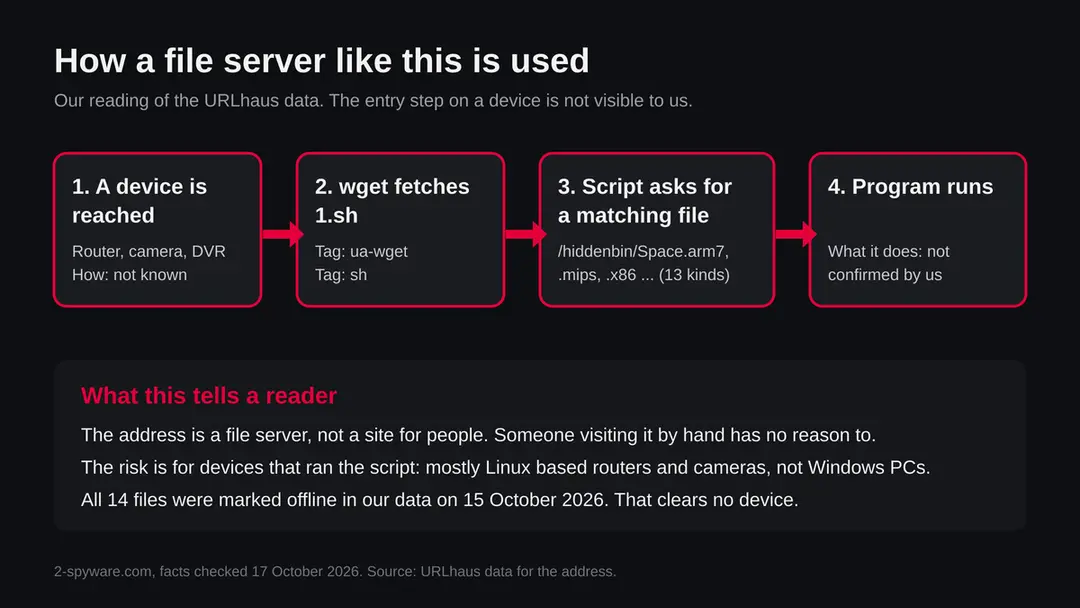
A folder with the same program built for many processor types is the sign of a dropper. The script does not know what kind of device it landed on, so it tries to fetch them all or picks the one that matches. The picture below shows the order. The first step, how the script got onto a device, is not visible from the server side.
- 1
A script is started on a device
How that happens is not in the URLhaus entries. For devices like routers and cameras, the usual reports are open remote login with a default or weak password, or a known flaw in the device's web interface. The FBI's advisory on the VPNFilter router malware (2018) says the entry route was not known at first and that the FBI suspected known flaws and default passwords that owners had not changed or patched.
- 2
The script uses wget
All 14 entries carry the tag ua-wget, so the request that reported them used wget, a small download tool found on most Linux systems and on many routers. abuse.ch describes related shell droppers in MalwareBazaar as using wget, ftpget or curl, depending on what the device has installed.
- 3
The script picks a file for the processor
The suffixes are processor names. In the same MalwareBazaar family of samples, abuse.ch notes names such as arm, arm5, arm7, mips, mpsl and x86_64 on one server. A script can try each in turn until one starts. Programs for the wrong processor simply fail to run, which is why one operator hosts thirteen.
- 4
The program runs on the device
Public records of files with the same Space.arm7 name (see the next section) describe them as Linux programs flagged by vendors as Mirai. We cannot say that the files on this server are the same, only that the names match a known pattern.
What the 13 file names say about the devices they aim at
Each name ending is a processor family. Together they cover almost every kind of small networked device sold in the last twenty years. The meanings below are standard chip names; the device examples are our reading of where such chips are common, not a statement from any source.
| File ending | Processor family | Where such chips are common (our reading) |
|---|---|---|
| arm, arm5, arm6, arm7 | ARM, older to newer versions | Home routers, IP cameras, set top boxes, smart TVs, single board computers |
| mips, mpsl | MIPS, big endian and (our reading of mpsl) little endian | Many home and small office routers, access points, network storage |
| x86, i686, x86_64 | Intel and AMD, 32 and 64 bit | Linux servers, virtual machines, appliances and some firewalls |
| ppc | PowerPC | Older routers, industrial and telecom equipment |
| sh4 | SuperH | Older set top boxes and embedded devices |
| m68k | Motorola 68000 family | Very old embedded devices; rare today |
| arc | ARC processors | Some embedded chips in network and storage equipment |
A set this wide is the mark of a bot that wants to run on whatever it reaches. The abuse.ch YARAhub rule for Linux Mirai programs looks for ELF files that contain several of these architecture strings, which shows that this naming habit is widespread. It does not mean every server with such names runs Mirai.
Which malware family is this? What is known and what is not
The URLhaus entries for this address name no family. Related records point to Mirai style botnets, but that is a pattern match, not a finding about these 14 files.
| Question | What we found | How far it can be trusted |
|---|---|---|
| Do the 14 entries name a family? | No. The tags are botnetdomain, elf or sh, and ua-wget | Certain; it is what the entries say |
| Is the Space.arm7 name known elsewhere? | MalwareBazaar lists files with that name from July to November 2025, several UPX packed ARM programs, flagged by 11 to 13 vendors as Mirai | Medium; we read the entries in search results and did not match any hash to this server |
| Is the hiddenbin folder name known elsewhere? | URLhaus lists files in a hiddenbin folder on other servers in November 2025, tagged Mirai and fetched with wget | Medium; the same reasoning applies. The folder name is a habit of operators, not a family |
| Do the shell droppers look alike? | Yes. abuse.ch lists many shell script droppers that fetch per processor files with wget, ftpget or curl from one server; some are tagged Mirai, some Gafgyt, some Mozi | Low to medium; abuse.ch itself notes the family tags do not always agree |
| Do we know what these 13 programs do? | No. We did not download or run them | Unknown |
| Is there a Microsoft detection name? | Not for these files. Microsoft's malware names mostly cover Windows, and these are Linux programs | Our reading |
Mirai is the best known botnet of this type. Its source code was published in 2016, and many groups have reused it since, so a Mirai tag today says more about the code lineage than about who runs a given server. Bots built on it typically scan the internet for devices with open remote login and weak passwords, join them to a network and use them to flood targets with traffic. We state that as background, not as a finding about this address.
What plochcarsportsball.top (Linux botnet malware files) can steal or download
What this can cost you
Seeing the name costs nothing. The risks below apply to a device that ran the script and then one of the programs. We do not know what these programs do, so the list is based on what such botnet programs generally do, and on what the FBI said about a router botnet.
- High
Your router or camera works for someone else
A device that joins a botnet takes orders from a controller. Typical jobs are attacking other sites with traffic and scanning for more devices. You may see none of it, but your connection and your address are used.
- High
Control of the device itself
Whoever controls it can usually change settings on it, such as DNS servers, and can see traffic that passes through a router. We found no report that these exact files do that.
- Medium
A slow or unstable connection
A bot sending traffic or scanning uses the device's processor and your upload speed. A router that is hot, slow or restarts often can be a sign. These signs also have ordinary causes.
- Medium
Your address is blocked or blamed
Attack traffic comes from your address. Some services may block it and your internet provider may contact you.
- Medium
It returns after a restart
The FBI said in 2018 that a reboot disrupts only part of the VPNFilter router malware and that a factory reset is needed to remove it. Another botnet may behave differently, but the advice to reset is sound.
- Low
Nothing, if you only saw the name
A name in a block list, a log or a warning is not an infection. The files were also marked offline.
What you may notice, and what you may not
Most infected routers and cameras show no sign at all. The signs below are possible hints, not proof; none is documented for these exact files.
| Sign | What it may mean |
|---|---|
| The device is hot, slow or restarts on its own | A program is using its processor. It can also be a failing power supply or old firmware |
| Your internet is slow with nothing running | A bot may be sending traffic. A busy neighbour, a bad line or a provider fault are far more common causes |
| Your router logs show requests to plochcarsportsball.top | A device on your network asked for the name. That is the strongest hint, and the log shows which device |
| Unknown programs or processes on a Linux server | Look for files named Space.something, a script named 1.sh, or a program in a temporary folder that you did not install |
| Your admin password no longer works, or settings changed | Someone may have taken the device over. It can also be a forgotten change |
| A letter from your internet provider about attack traffic | Your address may have been seen in an attack. Check every device on the network |
| Nothing at all | The usual case. Bots are built to be quiet |
How to check the PC for plochcarsportsball.top (Linux botnet malware files)
How a device ends up asking for these files
Nobody visits this address on purpose. The request comes from a script on a device, so the question is how the script got there. We cannot say for this server; the routes below are the ones public sources give for this kind of botnet.
- 1
Remote login with a default or weak password
Bots of this type scan the internet for Telnet or SSH and try lists of common passwords. A device with remote login open to the internet and a factory password is the easiest target.
- 2
A flaw in the web interface
Routers, cameras and recorders often have a web admin page with known flaws that the maker never fixed. A flaw lets an attacker run a command that starts wget and the script. The FBI's VPNFilter advisory points to known flaws that owners had not patched.
- 3
Remote management left on
The FBI advised owners in 2018 to consider turning off remote management on a router. If the admin page can be reached from the internet, it can be tried by anyone.
- 4
An old device that is no longer updated
A router, camera or recorder that has not had a firmware update in years stays open to every flaw found since. This is the common situation for the many cheap devices that such botnets live on.
- 5
A Linux server with a weak login or an old web application
The x86 and x86_64 files show that servers are in scope too. A weak SSH password or an unpatched web application lets an attacker type the same download command.
Check your network before you change anything
Start with the question that matters: did a device of yours contact plochcarsportsball.top? If you came here from a log, a router page or an alert, that log names the device. Only that device is in question, not every device on the network.
No vendor publishes a removal procedure for these files, and we did not infect a device. The steps below are general checks that fit any router or Linux box; they are our judgement, not a tested result.
- 1
Find the device that asked
Open your router's log or DNS history and look for plochcarsportsball.top. Note the device name or address and the time. If the router itself asked, treat the router as the device. If you cannot see any log, treat the router as the one to reset.
- 2
Check whether remote access is open
Sign in to the router's admin page from inside your home network. Look for settings named remote management, remote administration, WAN access, Telnet or SSH. Any of them enabled for the internet should be off unless you set it up on purpose.
- 3
Look at the list of connected devices
Your router lists every device on the network. Write down names you do not recognise. Cameras and recorders often have odd names, so check each against what you own.
- 4
Check the firmware version
Find the version on the admin page and compare it with the newest one on the maker's support page. If the model no longer gets updates, that device is a risk whatever else you do.
- 5
On a Linux server, look for the files
Search for a file named 1.sh and files whose names start with Space. in temporary folders such as /tmp, and look at the list of running processes and the scheduled tasks for anything you did not add. A match is a strong sign. No match does not clear the server.
- 6
Do not trust a quiet result
A router that looks normal can still be part of a botnet. If the device asked for this address, or if its login was open with a weak password, go on to the plan whatever the checks show.
How to remove plochcarsportsball.top (Linux botnet malware files)
How to remove plochcarsportsball.top
A loader's job is to install other malware, so treat the PC as infected with more than one program until the scans are clean.
Step 1: Delete scheduled tasks that bring it back
Open Task Scheduler from the Start menu and click Task Scheduler Library. Select each task you do not recognise and read the Actions tab:
- a task that starts a file in
%AppData%or%Temp% - runs
powershellwith a long encoded line - opens a web address belongs to plochcarsportsball.top or a similar program
Right-click such a task and choose Delete, and check the subfolders too. Leave tasks from Microsoft, your PC's maker and programs you use. Task Scheduler is the same in Windows 11 and Windows 10.

Windows 11: Task Scheduler Library, the task selected, the Actions tab shows the file it runs. Full procedure with screenshots: Remove what malware leaves behind in Windows
- a task that starts a file in
Step 2: Remove it from startup
Whatever plochcarsportsball.top installed usually starts with Windows. Open Task Manager with Ctrl + Shift + Esc, go to Startup apps in Windows 11 or the Startup tab in Windows 10, and disable what you do not know, starting with entries that have an empty Publisher column.
Open file location on the right-click menu shows the file, which helps you decide and tells you what to delete later. Disabling is safe: if something you need stops working, switch it back on.
Full procedure with screenshots: Stop apps from opening at startup On uGetFix
Step 3: Delete the folders left behind
What the uninstaller leaves behind is usually in the user folders. Open File Explorer, switch on View > Show > Hidden items (in Windows 10 View > Hidden items), and go through
%LocalAppData%,%AppData%, %ProgramData% and the two Program Files folders.Sort by Date modified and delete folders that appeared together with the problem and belong to no program you use. Folders with random names that hold
.exe,.dll, .js or .ps1 files are the strongest sign.Full procedure with screenshots: Remove what malware leaves behind in Windows
Step 4: Scan the PC, then run the offline scan
Open Windows Security > Virus & threat protection > Scan options, run a Full scan and remove everything it finds. Then select Microsoft Defender Antivirus (offline scan) and click Scan now: the PC restarts and scans before Windows loads, which finds files that hide while Windows runs.
Save your work first, because the offline scan takes about 15 minutes. Both scans are built into Windows 11 and Windows 10, and a second scanner from another vendor is a useful extra opinion.

Windows 11: Windows Security > Virus & threat protection > Scan options. Full procedure with screenshots: Run a Microsoft Defender Offline scan
Step 5: Change passwords from another device and sign out other sessions
Assume that the passwords saved in this PC's browsers, and the accounts that were open in them, are known to the attacker. From a phone or a clean computer, change the e-mail password first, then banking, shopping, social and gaming accounts.
Use each service's option to sign out of all other sessions, because stolen cookies keep a session open even after a password change. Turn on two-step verification on each account. Wait with the infected Windows 11 or Windows 10 PC until the scans are clean.
Full procedure with screenshots: Turn on two-step verification / secure a hacked account
If you use a Windows PC, a Mac, an iPhone or an Android phone
The files on this server are Linux programs. We found nothing that says they affect a PC, a Mac or a phone directly.
| Your device | What we know | What to do |
|---|---|---|
| Windows PC | The tags say elf, which is the Linux program format. A Windows PC cannot run these files | Nothing to remove for this threat. Do not run a Windows removal procedure because of this name |
| Mac | Same: ELF programs do not run on macOS | Nothing to remove for this threat |
| iPhone or iPad | No source describes this on iOS | Nothing to remove for this threat |
| Android phone | Android is built on Linux, and ARM files exist, but nothing we read says these files target phones or that they run as normal apps | Nothing known to remove; keep the phone updated and install apps only from Google Play |
| Router, camera, recorder, NAS | These are the likely targets, especially ARM and MIPS ones | Follow the plan below |
After removal: passwords, accounts and prevention
What to do if a device may have run the files
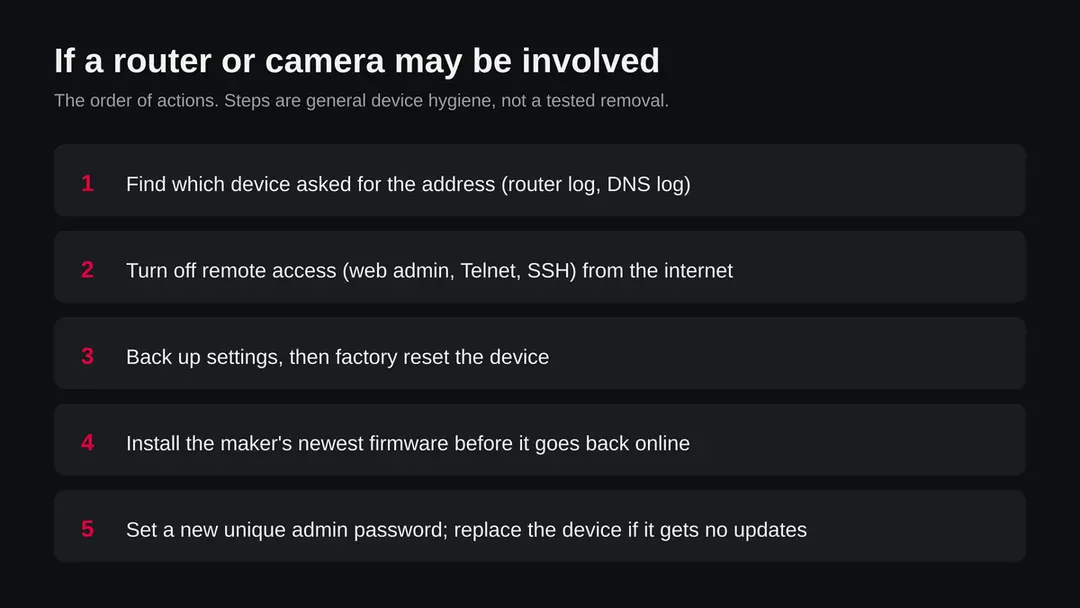
The goal is a device that is clean and closed, not a device you have only restarted. The order matters: reset, update, then lock it down, before it goes back online.
- 1
Disconnect the device from the internet
Unplug the cable that links the router to your internet line, or take the camera or recorder off the network. A bot needs the connection to take orders. Your other devices lose the internet while you work, which is fine.
- 2
Write down the settings you need
Note your internet login details, Wi-Fi name and any port settings you set on purpose. Do not restore a saved settings file from before the problem, because it could carry the changes back.
- 3
Reset the device to factory settings
Use the reset button on the device, usually a small hole held for about ten seconds, or the reset option in the admin page. The FBI said in 2018 that a reboot is not enough for the router malware it described and that a factory reset is needed. A reset removes programs copied into the device's memory in most cases; we cannot promise it for every device.
- 4
Update the firmware before it goes back online
Download the newest firmware from the maker's own support page, check that it is for your exact model, and install it while the device is still cut off from the internet. If the maker no longer offers updates, plan to replace the device.
- 5
Set a new admin password and the basics
Choose a long password that you use nowhere else. Turn off remote management, Telnet and, unless you need it, SSH on the internet side. Turn off features such as UPnP if you do not use them. Change the Wi-Fi password too.
- 6
Reconnect and watch the logs
Plug the internet line back in. Check the log over the next days for requests to unknown names, and look at whether the device is hot or slow again.
- 7
Replace the device if it cannot be updated
An old camera or recorder with no updates and a known flaw will be taken over again. A new device, or one from a maker that publishes updates, is the lasting fix.
- 8
On a Linux server, rebuild if unsure
Delete the script and the Space files you found, kill the processes, change every password and key, update the system and remove open services. If you cannot be sure what ran, rebuild the server from a clean image and restore only your data.
- 9
Tell your provider if they wrote to you
If your internet provider sent a notice about attack traffic, reply after the reset and say what you did.
Keep your devices out of a botnet
Every step below closes a door that botnets of this type use: open remote login, weak passwords and unpatched flaws.
Do
- Change the factory admin password on every router, camera and recorder the day you install it.
- Turn off remote management and Telnet on the internet side of the router.
- Install firmware updates from the maker, and check for them every few months.
- Buy devices from makers that publish security updates and say for how long.
- Put cameras and smart devices on a guest network, apart from your computers.
- Replace routers and cameras that no longer get updates.
Don't
- Do not leave the admin page reachable from the internet.
- Do not keep the password printed on the sticker.
- Do not forward ports to a device without a clear reason.
- Do not rely on a reboot to clean an infected device.
- Do not assume a quiet router is a clean router.
Questions about plochcarsportsball.top (Linux botnet malware files)
What is plochcarsportsball.top?
It is a web address that URLhaus, the malware tracking project run by abuse.ch, lists 14 times on 15 October 2026. One entry is a shell script called 1.sh and 13 are Linux programs named Space followed by a processor name such as arm7, mips or x86. All carry the tag botnetdomain.
It is not a program on your computer and not a site meant for visitors. The domain was registered on 11 August 2026. We did not download the files, so what they contain is not confirmed by us.
Is plochcarsportsball.top safe to open?
No. Do not request files from it and do not run anything that does. Our own request on 17 October 2026 found no address for the name, which proves nothing: servers that hand out malware are often moved or switched off within days, and a device that already fetched a file stays affected.
The rating comes from the 14 URLhaus entries and their tags. All were marked offline in our data, so the files were probably not available when we looked, but that is not a guarantee for the future.
Is plochcarsportsball.top a virus on my computer?
Not on a Windows PC, a Mac or a phone, as far as we can tell. The 13 programs are tagged elf, the standard Linux program format, and the script is a shell script. A Windows PC cannot run them.
The danger is to routers, IP cameras, video recorders and Linux servers. If you saw the name in a router log, the device that asked is the one to check. A PC on the same network is not infected just because the router is.
What are Space.arm7, Space.mips and the other files?
They are the same kind of program built for different processors. Arm, arm5, arm6 and arm7 are ARM chips, mips and mpsl are MIPS chips common in routers, x86, i686 and x86_64 are Intel and AMD, and ppc, sh4, m68k and arc are older or rarer chips.
A script can try each until one runs on the device it landed on. Files named Space.arm7 appear on MalwareBazaar with Mirai labels from vendors, but we did not match any of them to this server.
Is it Mirai?
We do not know. The 14 URLhaus entries carry no family tag, only botnetdomain, elf or sh, and ua-wget. Files with the same Space.arm7 name and servers with a hiddenbin folder have been tagged Mirai on abuse.ch sites, so Mirai or a copy of it is a reasonable guess.
It is only a guess until someone analyses these exact files. Mirai's source code was published in 2016 and has been reused many times, so the label tells you about code lineage more than about who runs the server.
I saw plochcarsportsball.top in my router or firewall log. Am I infected?
Not necessarily. The name in a log proves that something on your network asked for it, or that a filter blocked the request, not that a file was run.
Find out which device made the request and when. If it was a router, camera or recorder, treat that device as suspect:
- turn off remote access
- factory reset it
- install the newest firmware
- set a new admin password
If a filter blocked the request, the file may never have arrived. A quiet device still does not prove it is clean.
How do I remove this from a router or camera?
Disconnect the device from the internet, write down the settings you need, and factory reset it with the reset button or the admin page. Install the newest firmware from the maker while it is still offline, set a new long admin password, and turn off remote management and Telnet before reconnecting.
The FBI said in 2018 that a simple reboot is not enough for the router malware it described. If the device no longer gets updates, replace it. We did not test these steps on an infected device; they are general guidance.
Does a reboot or a factory reset clean it?
A reboot may not. The FBI said in 2018 that rebooting disrupted only part of the VPNFilter router malware and that a factory reset was needed to remove it.
Many simple bots live only in memory and vanish on restart, but they come back at once if the device is still reachable with the same weak password or flaw. So a reset, a firmware update and a new password belong together. A reset without the update and the password will leave the door open.
Can my Windows PC, Mac or phone be affected by these files?
We found nothing that says so. The programs are in the Linux format and do not run on Windows or macOS, and no source we read ties them to iPhone or Android apps. The affected devices are routers, cameras, recorders and Linux servers.
If you want to be careful, check your router first, since it sits in front of every other device, and keep your phone and computers updated. You do not need a Windows removal procedure for this name.
Will Fortect remove plochcarsportsball.top?
Fortect scans Windows for malware and unwanted programs and repairs the system files and settings they change, and its free scan shows what it finds on your PC before you decide anything.
For plochcarsportsball.top, follow the plan above as well: the browser steps take back permissions and settings that no scanner treats as a threat, and uninstalling the program that brought it removes the source.
Run Microsoft Defender's full scan and, if anything was found, its offline scan as a second opinion. If the symptoms are gone after the plan and both scans are clean, there is nothing more to do.
Sources
- abuse.ch URLhaus: host page for plochcarsportsball.top (the 14 entries as held in our database; the page itself was not fetched) (read October 17, 2026)
- abuse.ch YARAhub: rule ELF_Mirai (ELF files with several architecture strings) (read October 17, 2026)
- abuse.ch MalwareBazaar: sample entries for Space.arm7 files, flagged as Mirai (read October 17, 2026)
- abuse.ch MalwareBazaar: sample entry for a shell script dropper using wget, ftpget or curl (read October 17, 2026)
- FBI IC3: Foreign Cyber Actors Target Home and Office Routers and Networked Devices Worldwide (25 May 2018) (read October 17, 2026)