
Mymojito.xyz ads: what it is and how to remove it
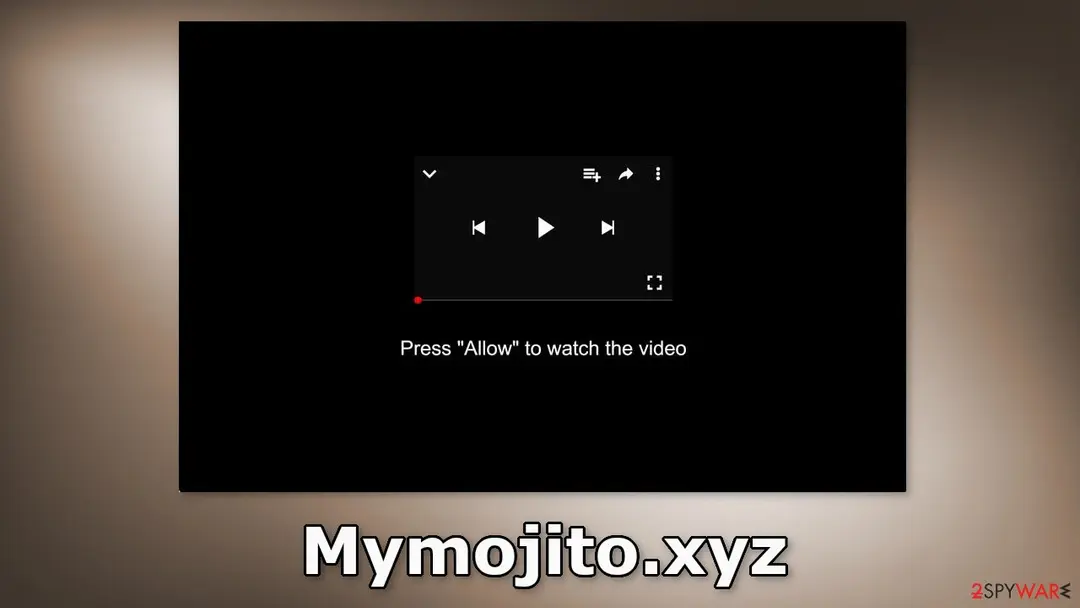
Mymojito.xyz is a fake website generated by crooks. It is designed to trick people into subscribing to push notifications.
Facts checked October 7, 2026. Removal steps tested on Windows 11 (26H2) and checked against Microsoft's and the browser makers' current documentation. Sections marked as our earlier report are the original text: they describe the threat as it was then and have not been reviewed since. The 2026 status, the removal steps and the questions are current.
Automatic
Get a free scan and check if your PC is infected.
Fortect finds malware, unwanted programs and the Windows damage they leave behind, and repairs it in one pass.
If notifications from mymojito.xyz led you to download something, a free scan can check the PC for anything that came with it.
Do it yourself · free Remove Mymojito.xyz ads yourself 2 steps, about 6 minutes, no software needed.
Mymojito.xyz ads: summary
| Distribution | Shady websites, deceptive ads, redirects, freeware installations |
|---|---|
| NAME | Mymojito.xyz |
| TYPE | Push notification spam; adware |
| SYMPTOMS | Pop-up ads start appearing in the corner of the screen after the "Allow" button is pressed |
| DANGERS | Links embedded in the push notifications can lead to dangerous websites where users can be tricked into providing their personal information and suffer from monetary losses |
| Detection names | No Microsoft detection name is known |
| Removal | Scan the PC with security software to find and remove the malware and anything installed with it. Fortect scans Windows for malware and repairs the system files and settings it damaged. Remove it nowTo use the full-featured product, you have to purchase a license for Fortect. The scan is free. |
Show 11 more facts
| Damage | Not recorded in the old report |
|---|---|
| Name | Mymojito.xyz |
| Type | Push-notification spam site |
| Symptoms | Notification spam from a website |
| Evidence | 5 write-ups by security sites; details still limited |
| Domains | mymojito.xyz |
| Ads shown as | Desktop notifications |
| Browsers | Chrome, Edge and Firefox |
| Installed on the PC | Nothing; a browser notification permission only |
| First seen | 16 August 2022 |
| Facts checked | 7 October 2026 |
Is Mymojito.xyz ads dangerous?
From our report of Aug 2022 · not reviewed since
Mymojito.xyz spams users with pop-up ads to generate revenue for crooks
Mymojito.xyz is a fake website generated by crooks.
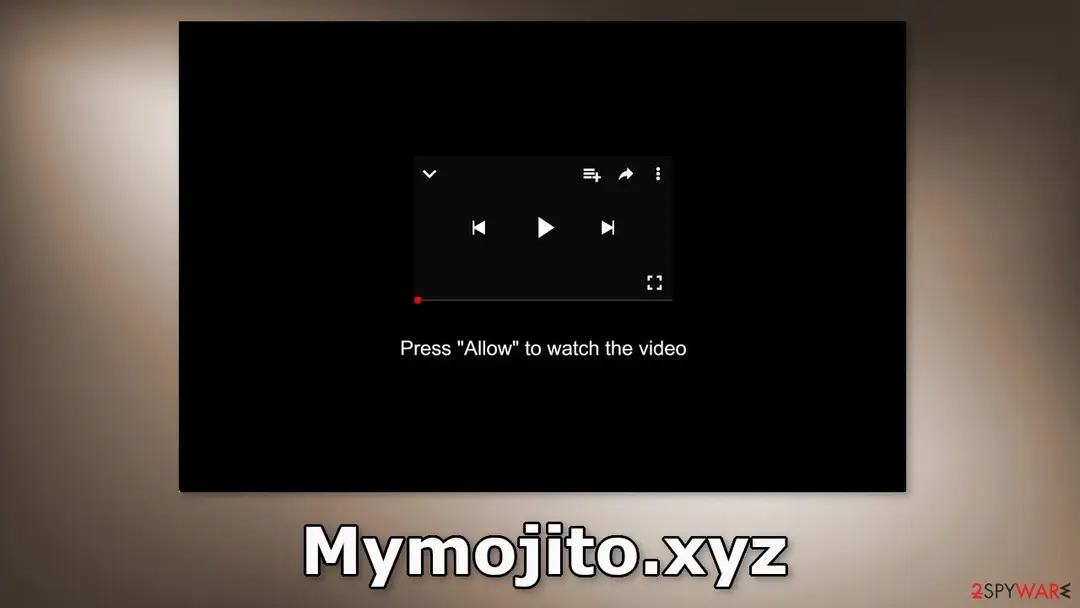
It is designed to trick people into subscribing to push notifications. Fraudsters use a deceptive message to make people click on the "Allow" button which adds them to the push notification subscribers' list. Users are told that if they press it, they will be able to watch some kind of video.
In reality, people start getting spammed with annoying pop-up ads that can appear even when the browser is closed. Unfortunately, these are not just regular ads because crooks may be using rogue advertising networks that place ads leading to dangerous websites.
Users can end up on pages, that try to lure out personal information, fool them into downloading PUPs (potentially unwanted programs), or even malware. People affected by ad spam from shady sites describe seeing advertisements promoting adult websites, fake antivirus programs, software deals, surveys, and giveaways.
From our report of Aug 2022 · not reviewed since
Block Mymojito.xyz notifications
Because push notifications are subscription-based, they can be turned on and off only manually.
We have a detailed guide for the most popular browsers below:
Google Chrome (desktop):
Google Chrome (Android):
MS Edge (Chromium):
- Open Google Chrome browser and go to Menu > Settings.
- Locate the Privacy and security section and pick Site Settings > Notifications.
- Look at the Allow section and look for a suspicious URL.
- Click the three vertical dots next to it and pick Block. This should remove unwanted notifications from Google Chrome.
- Open Google Chrome and tap on Settings (three vertical dots).
- Select Notifications.
- Locate the unwanted URL and toggle the button to the left (Off setting).
- Open Mozilla Firefox and go to Menu > Options.
- Click on Privacy & Security section.
- Under Permissions, you should be able to see Notifications. Click Settings button next to it.
- In the Settings – Notification Permissions window, click on the drop-down menu by the URL in question.
- Select Block and then click on Save Changes. This should remove unwanted notifications from Mozilla Firefox.
- Click on Safari > Preferences...
- Go to Websites tab and, under General, select Notifications.
- Select the web address in question, click the drop-down menu and select Deny.
- Open Microsoft Edge, and click the Settings and more button (three horizontal dots) at the top-right of the window.
- Select Settings and then go to Advanced.
- Under Website permissions, pick Manage permissions and select the URL in question.
- Toggle the switch to the left to turn notifications off on Microsoft Edge.
- Open Microsoft Edge, and go to Settings.
- Select Site permissions.
- Go to Notifications on the right.
- Under Allow, you will find the unwanted entry.
- Click on More actions and select Block.
From our report of Aug 2022 · not reviewed since
Clear your browsers
After an encounter with such a website, it is strongly recommended to clear your browsers.
Websites and web-based applications can use various tracking technologies to collect data like your IP address, geolocation, websites you visit, links you click on, and things you purchase online. All of this is done with the use of cookies and cache.
These small data files are not inherently bad. Legitimate sites use them to personalize the user experience by showing relevant results, etc. However, they can also be used to generate revenue by selling them to advertising networks, and other third parties.
There is an automatic solution to this problem - . This powerful software can stop the tracking and delete the existing information, as well as fix serious system errors with a click of a button.
From our report of Aug 2022 · not reviewed since
Check your machine for an adware infection
Unwanted browser behavior can also be caused by PUPs.
Sometimes pages like Mymojito.xyz show up without any user input at all. This can be caused by adware which is a program that can generate commercial content in the machine without the users' knowledge. Many of them are disguised as "handy" tools so they would be more difficult to identify for average users.
That is why having professional security tools like and is essential. A PC without an antivirus is like a home without a door. Anti-malware solutions can scan the machine and detect suspicious processes running in the background. Besides, it can prevent such infections by warning users about dangerous files trying to enter the system.
However, if you still want to do this yourself, you can follow our step-by-step instructions for Windows and Mac machines:
To fully remove an unwanted app, you need to access Application Support, LaunchAgents, and LaunchDaemons folders and delete relevant files:
- Enter Control Panel into Windows search box and hit Enter or click on the search result.
- Under Programs, select Uninstall a program.
- From the list, find the entry of the suspicious program.
- Right-click on the application and select Uninstall.
- If User Account Control shows up, click Yes.
- Wait till uninstallation process is complete and click OK.
- Click on Windows Start > Control Panel located on the right pane (if you are Windows XP user, click on Add/Remove Programs).
- In Control Panel, select Programs > Uninstall a program.
- Pick the unwanted application by clicking on it once.
- At the top, click Uninstall/Change.
- In the confirmation prompt, pick Yes.
- Click OK once the removal process is finished.
- From the menu bar, select Go > Applications.
- In the Applications folder, look for all related entries.
- Click on the app and drag it to Trash (or right-click and pick Move to Trash)
- Select Go > Go to Folder.
- Enter /Library/Application Support and click Go or press Enter.
- In the Application Support folder, look for any dubious entries and then delete them.
- Now enter /Library/LaunchAgents and /Library/LaunchDaemons folders the same way and terminate all the related .plist files.
From our report of Aug 2022 · not reviewed since
More from our earlier report on Mymojito.xyz
- Users can block push notifications via browser settings
How Mymojito.xyz ads got into your browser
From our report of Aug 2022 · not reviewed since
Bogus push notification spam pages are rarely found in the search results.
Usually, users stumble upon them when browsing through other shady pages that are unregulated. For example, illegal streaming sites are full of deceptive ads and sneaky redirects. They can also display fake "Download" and "Play" buttons that take users to other pages.
If a user is looking for a movie or TV show to watch illegally for free, presses a "Play" button, and a site appears saying everything he has to do to watch it is only to click "Allow," it is not hard to understand how so many people fall for these deceptive messages.
It is best to only visit pages that you know and trust. Do not click on random links, and ads, even if they seem to be promoting legitimate websites.
Crooks can use various social engineering methods to disguise their scams. It is also better to use legitimate streaming services. They require only a small monthly subscription fee and users are able to watch as much content as they want.
Check your browser and PC
- Address:
mymojito.xyz
How to remove Mymojito.xyz ads
How to stop Mymojito.xyz notifications
Do this in every browser you use, and in every profile inside it: each keeps its own list of sites allowed to send notifications.
Nothing has to be uninstalled for the notifications themselves.
Which browser shows the ads?
Step 1: Remove mymojito.xyz from Chrome's notification list
Chrome keeps a list of every site you once allowed to send notifications, and
mymojito.xyzis on it. Pastechrome://settings/content/notificationsinto the address bar, find mymojito.xyz under Allowed to send notifications, open the three-dot menu next to it and pick Remove.Then click Add next to Not allowed to send notifications and type mymojito.xyz, so the site cannot ask a second time. Repeat it in every Chrome profile you use on Windows 11 or Windows 10, since each profile has its own list.
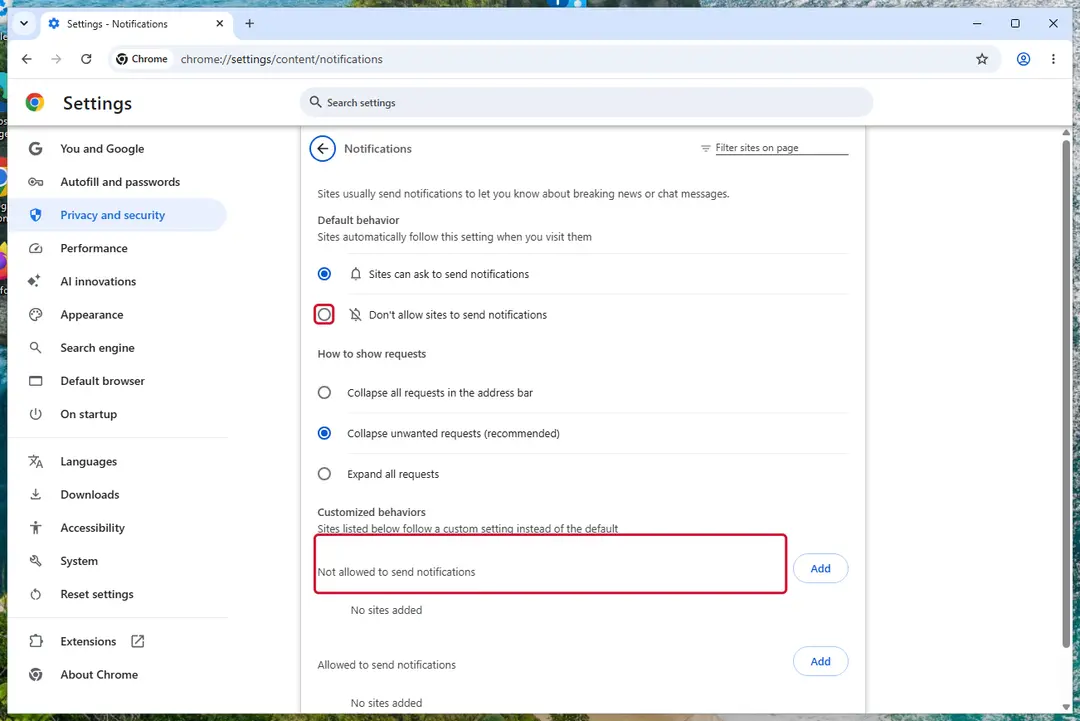
Chrome on Windows 11: Settings > Privacy and security > Site settings > Notifications. Full procedure with screenshots: Stop website notifications and pop-ups
Step 1: Remove mymojito.xyz from Edge's notification list
Open Settings and more (the three dots) > Settings > Privacy, search, and services > Site permissions > All permissions > Notifications. Remove
mymojito.xyzfrom the Allowed list, then click Add site next to Not allowed to send notifications and enter it there.Edge is built into both Windows 11 and Windows 10, so check it even if you normally use another browser. If the notifications came with the Edge logo, this is the browser that holds the permission.
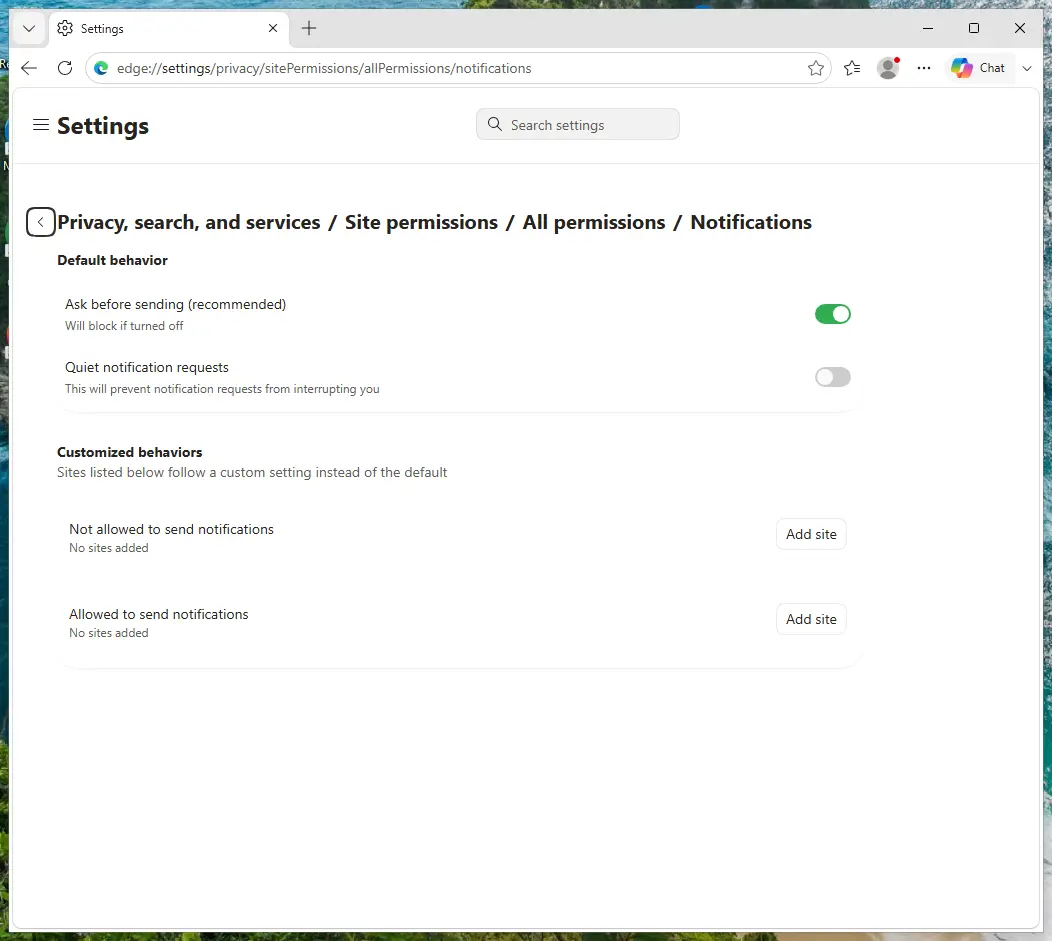
Edge on Windows 11: Site permissions > All permissions > Notifications. Full procedure with screenshots: Stop website notifications and pop-ups
Step 1: Remove mymojito.xyz from Firefox's notification permissions
Open the menu (three lines) > Settings and click Permissions and data in the left list, then Notifications. Select
mymojito.xyz, click Remove Website and confirm with Save Changes.In versions older than Firefox 152 the same list sits under Privacy & Security, behind a Settings button next to Notifications. Firefox shows these notifications only while it is running, on Windows 11 and Windows 10 alike.
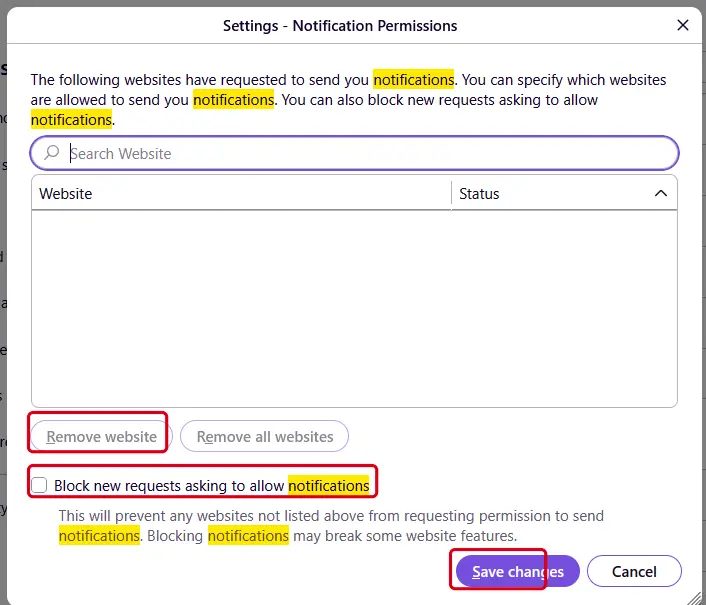
Firefox on Windows 11: the Notification Permissions window. Full procedure with screenshots: Stop website notifications and pop-ups
Then, whichever browser you use
Step 2: Scan the PC if you downloaded anything from the ads
If you only saw the notifications and clicked nothing, you can stop before this step. If a notification led you to download or run something, delete that file, then scan Windows.
In Windows Security > Virus & threat protection > Scan options, run a Full scan, then choose Microsoft Defender Antivirus (offline scan) and Scan now. The offline scan restarts the PC and takes about 15 minutes on Windows 11 and Windows 10.

Windows 11: Windows Security > Virus & threat protection > Scan options. Full procedure with screenshots: Run a Microsoft Defender Offline scan
Do not let government spy on you
The government has many issues in regards to tracking users' data and spying on citizens, so you should take this into consideration and learn more about shady information gathering practices.
Avoid any unwanted government tracking or spying by going totally anonymous on the internet.
You can choose a different location when you go online and access any material you want without particular content restrictions. You can easily enjoy internet connection without any risks of being hacked by using VPN.
Control the information that can be accessed by government any other unwanted party and surf online without being spied on. Even if you are not involved in illegal activities or trust your selection of services, platforms, be suspicious for your own security and take precautionary measures by using the VPN service.
Backup files for the later use, in case of the malware attack
Computer users can suffer from data losses due to cyber infections or their own faulty doings.
Ransomware can encrypt and hold files hostage, while unforeseen power cuts might cause a loss of important documents. If you have proper up-to-date backups, you can easily recover after such an incident and get back to work. It is also equally important to update backups on a regular basis so that the newest information remains intact - you can set this process to be performed automatically.
When you have the previous version of every important document or project you can avoid frustration and breakdowns. It comes in handy when malware strikes out of nowhere. Use for the data restoration process.
Questions about Mymojito.xyz ads
mymojito.xyz keeps sending notifications. Is it a virus?
No. Notifications from mymojito.xyz come from a permission stored in the browser, not from a program installed in Windows. Someone clicked Allow on a prompt from that site, usually without realising what it meant, and the site now sends ads through the browser's notification system.
Antivirus scans often find nothing because there is nothing to find on the disk. Removing mymojito.xyz from the browser's list of allowed sites stops the messages for good. A scan is still useful if you clicked a notification and downloaded or ran something from the page it opened, because those downloads can be unwanted programs.
I clicked a notification from mymojito.xyz. What should I do?
If you only opened the page and closed it, nothing else is needed besides removing the permission from mymojito.xyz. If the page asked for card details, a phone number or a password and you entered them, act on that: call the bank to block the card, or change the password from another device.
If it offered a download, delete the file unopened, or uninstall it from Installed apps if you ran it, then run a full scan. If you called a number shown on the page, follow the steps for callers in this guide. Finally, remove the permission so that no more messages arrive.
Why does Mymojito.xyz show me ads?
Because that is its whole purpose. Mymojito.xyz is a push-notification spam site, and its operators are paid for every ad it displays and every click it gets. In this case the ads take the form of desktop notifications.
They are chosen by ad networks that accept almost any advertiser, which is why so many look like warnings or prizes. The ads are not a sign that your PC is broken or infected with something worse; they are a sign that something on it, or in the browser, has permission to advertise. Removing that permission or program stops them.
Is mymojito.xyz safe to visit?
No. The site mymojito.xyz exists to push visitors towards ads, and the pages it leads to include fake virus warnings, fake updates, prize scams and notification prompts. Visiting it once does not infect an up-to-date PC, but anything you click or download there is a gamble.
Do not enter personal details, do not allow notifications and do not call phone numbers it shows. If it opens by itself, close the tab and check the browser's extensions and notification permissions. Blocking the single domain helps little, because the operators register new names regularly.
Which browser is sending the mymojito.xyz notifications?
Each notification shows the name of the browser and the site in its small print. In the cases we saw, the messages from mymojito.xyz came through Chrome, Edge and Firefox. Permissions are stored per browser and per profile, so removing the site in one browser does not affect another.
If you use several Chrome or Edge profiles, check each one. If you sync the browser with an account, remove the permission while signed in, otherwise another computer may still hold it and keep receiving the same messages.
How do I know the ads come from Mymojito.xyz?
Look for notifications from mymojito.xyz. That is the trace Mymojito.xyz leaves, and it shows up as desktop notifications. Ads that appear on every site, including ones that never carried ads before, point to something on your PC or in the browser rather than to the sites themselves.
A quick test is a private window, where extensions are off by default: if the ads disappear there, an extension is responsible. If they appear even with the browser closed, the source is a notification permission or a program in Windows.
Did clicking Allow install anything on my PC?
No. Allowing notifications stores a permission in the browser and nothing else. No file is downloaded and no program is added to Windows, which is also why antivirus scans find nothing. The risk comes later, from the notifications themselves: they lead to scam pages, fake updates and phishing forms.
Remove the permission in each browser where you allowed it. If you clicked a notification and downloaded something afterwards, delete that file and run a Microsoft Defender full scan and offline scan.
An ad showed a phone number and I called it. What now?
The number belongs to scammers, not to Microsoft or an antivirus company. If you only talked, hang up and do not call back. If you let them connect to the PC, disconnect it from the internet, uninstall the remote access program they used, such as AnyDesk, TeamViewer, ScreenConnect or UltraViewer, and run a full and offline scan.
If you paid or gave bank details, call your bank at once on the number printed on your card. Change any passwords you typed while they were connected, and report the call.
Will Focus or Do not disturb stop the notifications?
Only for as long as it is on. Do not disturb in Windows 11 holds back notifications from all apps, including browsers, and releases them to the notification centre later. The site still has permission and the messages still arrive.
Use the browser's notification settings to remove the site instead: once its permission is gone, it cannot send anything, whatever Windows is set to. Keep Do not disturb for what it is meant for, such as meetings, presentations and quiet hours.
Will Fortect remove Mymojito.xyz?
No program removes Mymojito.xyz itself, because there is nothing on the PC to remove: the notifications come through a permission saved in the browser, and only the browser's settings take it away, as the steps above show.
What Fortect can do is check the rest of Windows. Its free scan looks for malware, unwanted programs and damaged system files, which is useful if you clicked the ads, downloaded something from the pages they opened, or are not sure what else changed on the PC.
If the scan finds nothing and the notifications stopped after you removed the permission, this problem is solved. Use Microsoft Defender as a second opinion whenever you have downloaded files from pages like these.
Sources
- Howtogeek: PUPs Explained: What is a "Potentially Unwanted Program"? (read October 7, 2026)
- Torrentfreak: Google Targets Fake 'Download' and 'Play' Buttons (read October 7, 2026)
- Imperva: Social Engineering (read October 7, 2026)
- Malwarebytes: Adware (read October 7, 2026)
- Google Chrome Help: Use notifications to get alerts (no longer online) (read October 7, 2026)