
Sys Stasl on Tecno and Infinix phones: what it is, is it malware, and how to disable it
Sys Stasl is a preinstalled Transsion system app, com.transsion.statisticalsales, that sends a sale record of your Tecno or Infinix phone, with its IMEI and location, to Transsion. It is not the Triada malware found on Tecno W2 phones in 2020, but it collects more than it needs, so check it and disable it if your phone lets you.
Facts checked October 9, 2026. Steps checked against Apple's and Google's current documentation and the reports we cite. We have not run the app or the link on a phone ourselves.
Do it yourself · free Remove Sys Stasl yourself 6 steps, about 18 minutes, no software needed.
Start the steps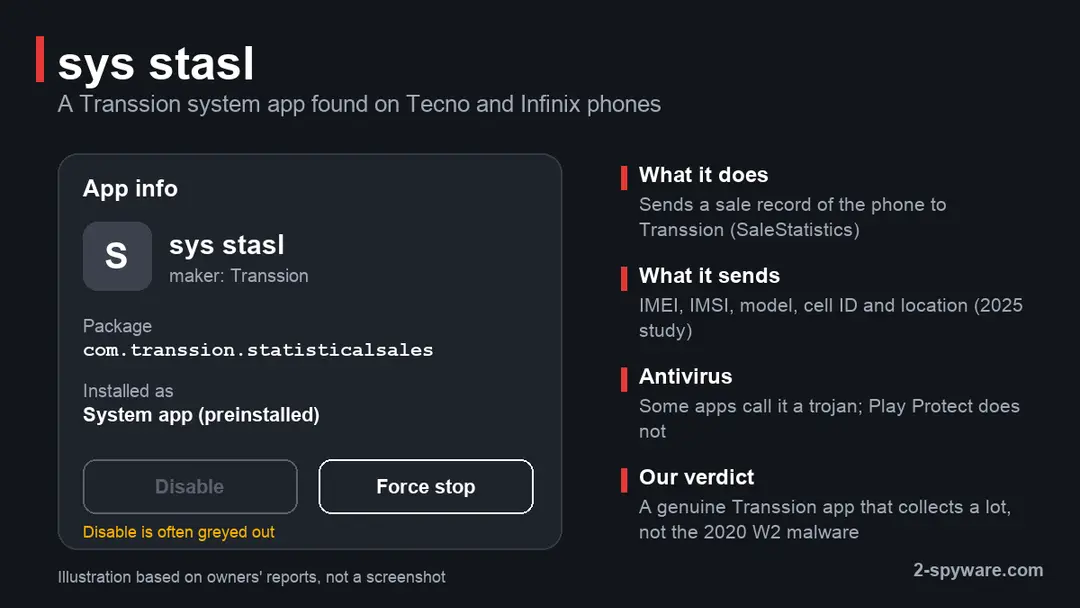
Sys Stasl: summary
| What it is | Transsion system app com.transsion.statisticalsales that sends a sale record of the phone to Transsion |
|---|---|
| Type | Preinstalled maker app (data collection), not a virus that infected the phone; not the 2020 Triada malware |
| Risk | Medium for privacy (IMEI, IMSI, phone number, location); low for money, data use and battery |
| Symptoms | Avast, Malwarebytes and other antivirus warnings; listed under system apps with no Uninstall and often no Disable |
| How to get rid of it | Limit permissions or tap Disable in Settings; if locked, pm disable-user over ADB. A factory reset does not remove it |
| Our check (9 October 2026) | Desk check of a 2025 code study, the Secure-D report, BBC and Google forum; no phone tested |
Show 7 more facts
| First reported | Owners' reports from 2020; code study published September 2025 |
|---|---|
| Phones | Tecno (HiOS) and Infinix (XOS) models in owners' reports; itel not confirmed |
| Microsoft detection | No Microsoft detection name is known: Sys Stasl is an Android app. Avast and Malwarebytes users report a trojan warning; Play Protect does not flag it |
| Damage | Phone and SIM identifiers, number and location sent to asv.transsion.com |
| File name | com.transsion.statisticalsales |
| Distribution | Part of Windows; malware sometimes copies the name in another folder |
| Facts checked | 9 October 2026 |
Facts checked on 9 October 2026 against a September 2025 study that read the app's code, Upstream's Secure-D report of August 2020, the BBC's report of Tecno's reply and Google's Android community forum. We did not test a Tecno or Infinix phone; HiOS menu paths are from our knowledge of the skin and may differ on your version.
What Sys Stasl is
Sys Stasl is a system app that Transsion, the maker of Tecno, Infinix and itel phones, puts on its phones at the factory. Its package name is com.transsion.statisticalsales, which reads as "statistical sales". It has no screen of its own, and you only meet it in the app list or in an antivirus warning.
- 1
The phone leaves the factory with it
Sys Stasl sits in the read-only system part of the phone together with HiOS (Tecno) or XOS (Infinix), the Android skins Transsion builds. You did not install it, and a normal uninstall cannot reach it.
- 2
It reports the sale to Transsion
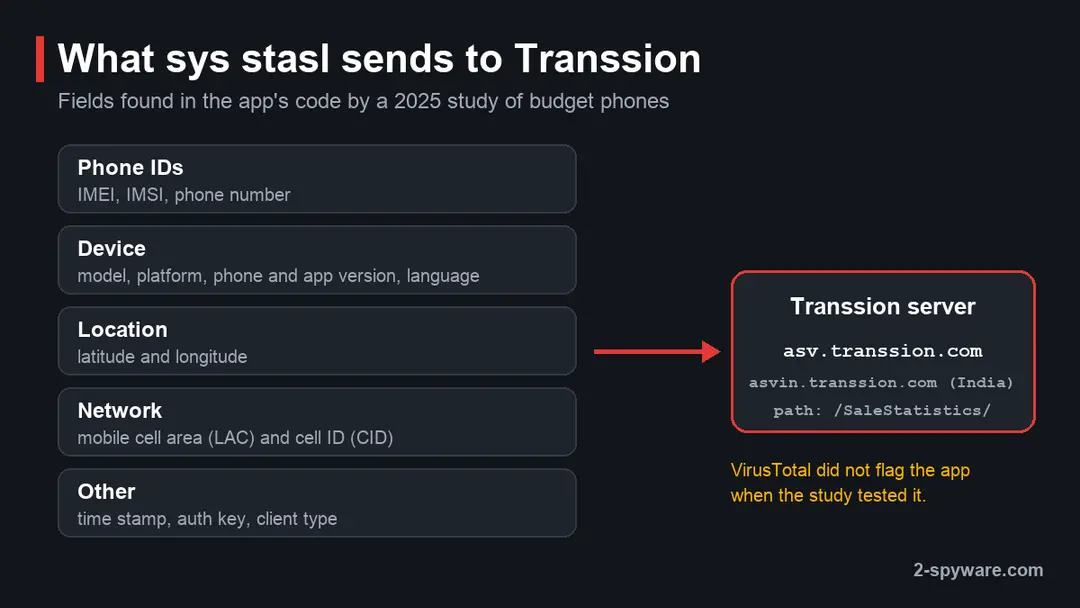
A 2025 study of apps on budget phones sold in Africa read its code. The app posts phone details to
asv.transsion.com/SaleStatistics/sendsale/sendSale, or toasvin.transsion.comfor phones sold in India. - 3
The record carries your identifiers
The request carries the IMEI, the SIM's IMSI, the phone number, the model, the mobile cell ID and the latitude and longitude. That is far more than a maker needs to count phones sold.
- 4
Some antivirus apps call it a trojan
Because a system app with many permissions sends phone identifiers to a server, some Android antivirus apps flag it. Owners have reported Avast and Malwarebytes warnings since 2020. Google Play Protect does not flag it.
- Package name
com.transsion.statisticalsales- Maker
- Transsion Holdings, which sells the Tecno, Infinix and itel brands
- Uninstall button
- None, because it is a system app. Disable is often greyed out too
What the Sys Stasl file is
What we checked, and what we could not
We did not have a Tecno or Infinix phone for this guide. The facts come from a published code study, the 2020 Secure-D investigation, the BBC's report of Tecno's reply and owners' posts on Google's Android forum.
Desk check, 9 October 2026
- Package and purposeThe study names
com.transsion.statisticalsalesand quotes the code that sends the sale record to Transsion's servers. - Data it sendsIMEI, IMSI, phone number, location and cell ID, according to the same code. We found no notice from Transsion that tells buyers this.
- Antivirus warningsOwners report Avast and Malwarebytes warnings. We could not see the exact detection names those apps show today.
- Link to the 2020 W2 malwareNone found. The Secure-D report names different components (
com.mufc.umbttsand othercom.mufcapps), not Sys Stasl.
Genuine Transsion app that collects too much Sys Stasl is a real Transsion component, not a virus that got onto your phone. It sends identifiers and location that most buyers would not agree to, so disabling it is reasonable. If your phone also shows the signs listed below, look for real malware next to it.
The reader's question: a Tecno phone that dies with a full battery
In 2020 a reader asked about a Tecno phone on Android 7.0 that switched itself off with the battery suddenly at zero, after an antivirus called Sys Stasl malware. Here is what the facts support.
My Tecno Android 7.0 phone, one of system app called sys stasl infected with malware and created a problem, unexpectedly switched off, battery to zero. How can I solve the problem?
The reader's words as sent, with spelling kept.
- 1
The warning and the shutdown are two problems
Sys Stasl sends one small sale record, and no source links it to battery drain. A sudden drop to zero and a power off is far more often a worn battery, a faulty charging port or an app that runs all the time.
- 2
Then rule out real malware
An Android 7.0 Tecno sold in Africa is the kind of phone where Secure-D found Triada in 2020. Check data use and airtime as shown below. Charges you did not make point to malware, not to Sys Stasl.
Is Sys Stasl safe or a virus?
No, not in the sense of a virus that infected your phone. It is Transsion's own app, put there on purpose. But it sends your phone's identifiers and location to the maker without telling you, which is why some antivirus apps treat it as a trojan or a risky app.
| Sys Stasl | Triada and xHelper on the Tecno W2 | |
|---|---|---|
| What it is | Transsion's sale reporting app | A backdoor in the firmware that downloads more malware |
| Package names | com.transsion.statisticalsales | com.mufc.umbtts and other com.mufc apps, plus patched system libraries |
| Who put it there | Transsion, as part of the system | A supplier in the supply chain, according to Transsion |
| What it does | Sends a sale record with IMEI, IMSI, number and location | Clicks ads in the background and signs you up for paid services |
| What it costs you | Privacy | Airtime and mobile data |
| Survives a factory reset | Yes, as every system app does | Yes, Secure-D found it reinstalled itself |
How to check the Sys Stasl file
Signs of the real preinstalled malware problem
Triada style malware works out of sight, so you notice its effects rather than the app. Secure-D advised owners to check their airtime records for unexpected charges and their mobile data use.
Signs worth acting on
- Airtime gone faster than your calls explain
- Text messages confirming services you never joined
- Mobile data use you cannot account for
- Apps that come back a few minutes after you remove them
- New apps you did not install
- Pop-up ads outside any app
- A phone that is warm while you are not using it
One sign alone proves nothing. Several together, on an older budget phone, are a reason to act.
- 1
Check data use per app
Open Settings > Network & internet (on some HiOS versions SIM & mobile network) > Data usage or App data usage. Note any app that used data while you were not using it.
- 2
Check your airtime and subscriptions
Ask your mobile operator for a list of paid services on your number, or use its USSD code or app. Cancel what you did not sign up for and ask about a refund.
Check Sys Stasl in HiOS settings
These steps show you what the app is allowed to do on your phone and whether HiOS lets you switch it off. They take about five minutes.
- 1
Open the full app list
Open Settings > Apps (called App management on some HiOS and XOS versions) and tap the list of all apps. Tap the three-dot menu and choose Show system so that system apps appear.
- 2
Find sys stasl
Scroll to sys stasl or search for it. Open it to reach its App info page, which shows its storage, battery and data use.
- 3
Read its permissions
Tap Permissions. Owners report that it holds every permission it asks for, with the switches locked. On some newer HiOS versions you may be able to set Location to Don't allow.
- 4
Look at its battery and data use
On the same page, open Battery and the data use entry (names vary). Near zero is what you would expect from an app that sends one small record. An app named sys stasl with a working Uninstall button is not the system app: remove it.
- 5
Try Disable
If the Disable button is active, tap it and confirm. If it is greyed out, as many owners report, HiOS protects the app, and only the computer method in the plan below can switch it off.
Where Sys Stasl comes from
Two stories got mixed together in 2020: the Triada and xHelper malware that Secure-D found in Tecno W2 firmware, and Sys Stasl, which antivirus apps began flagging on many Transsion phones.
March 2018
Tecno ships a fix for the W2
Tecno later told the BBC that it had released an over-the-air fix for the Triada problem on the W2 in March 2018, and called it an old and solved issue.
March 2019
Secure-D starts blocking W2 traffic
Upstream's anti-fraud platform began blocking an unusual number of paid subscription requests from Tecno W2 phones, mostly in Ethiopia, Cameroon, Egypt, Ghana and South Africa.
2020
Owners ask about Sys Stasl
Malwarebytes for Android users on Reddit report that a system app named sys stasl is flagged as a trojan and cannot be removed. Our reader asked the same year.
24 August 2020
Secure-D publishes its findings
It counts 19.2 million suspicious transactions from more than 200,000 W2 phones in 19 countries, and xHelper or Triada parts on 53,000 of them.
25 August 2020
Transsion and Tecno reply
Transsion tells BuzzFeed the malware was added in the supply chain without its knowledge. Tecno tells the BBC that W2 owners should install the over-the-air fix or contact after-sales service.
September 2022
Avast flags it, Google's forum answers
An owner on Android 10 posts that Avast calls sys Stasl a trojan with all permissions and no Disable button. A Google Product Expert calls it a likely false positive.
September 2025
A study reads its code
Researchers checking preinstalled apps on budget African phones single out
com.transsion.statisticalsalesfor sending IMEI, IMSI and location. VirusTotal did not flag it.
What to do with Sys Stasl
How to check, disable or remove Sys Stasl on a Tecno or Infinix phone
These steps follow Google's Android help pages and the 2020 advice from Tecno and Secure-D. HiOS and XOS menu names are from our knowledge of those skins; we did not test them on a phone, so look for the nearest match on yours.
Step 1: Install the latest system update
Open Settings > System > System update (on some HiOS versions Settings > About phone > System update) and install what is offered. Tecno fixed the W2 Triada problem with an over-the-air update.
Phones still on Android 7.0 or 8 get no updates any more, which is a reason to consider replacing the phone.
Step 2: Scan with Play Protect
Open the Google Play Store, tap your profile icon, then Play Protect. Under Settings, turn on Scan apps with Play Protect.
Go back and tap Scan. Play Protect does not flag Sys Stasl, so a clean result is about your other apps.
Step 3: Restart in safe mode to test the shutdowns
Press and hold the Power key, then touch and hold Power off and tap OK when asked about safe mode. Apps you installed do not run in safe mode.
If the phone stops dying there, one of your own apps is the cause: remove recent ones one at a time. If it still dies, have the battery tested.
Step 4: Limit or disable it in Settings
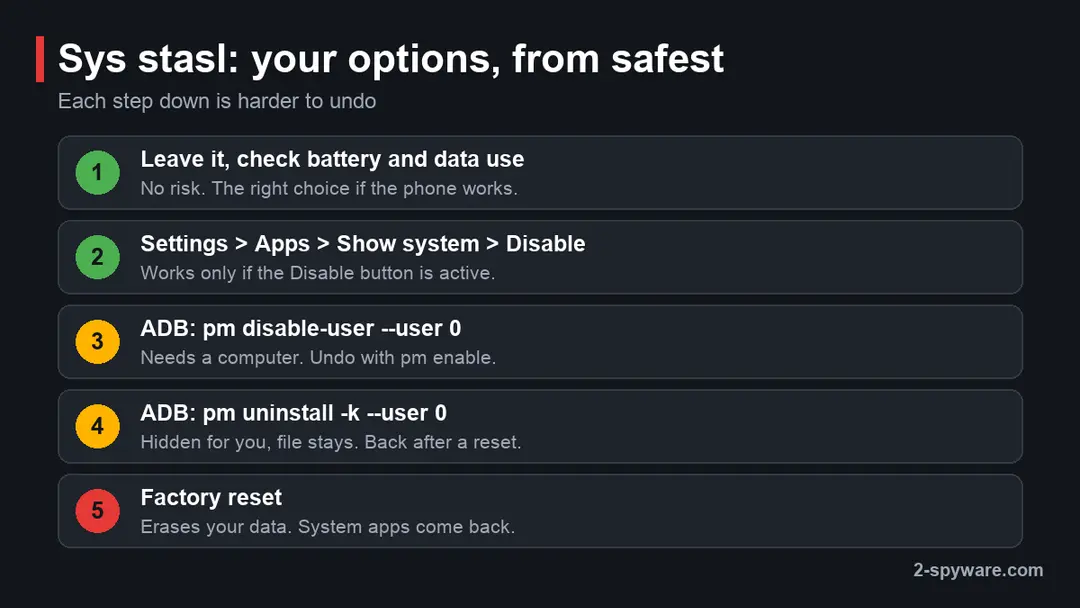
Open Settings > Apps > three-dot menu > Show system > sys stasl. Tap Permissions and set Location and Phone to Don't allow where HiOS lets you.
Then tap Disable if the button is active. If both are locked, use the next step.
Step 5: Disable it from a computer with ADB
On the phone, open Settings > About phone and tap Build number seven times, then turn on USB debugging in Developer options. Install Google's Android SDK Platform Tools on a computer, connect the phone, allow the prompt, and run
adb shell pm disable-user --user 0 com.transsion.statisticalsales.To undo it later, run
adb shell pm enable com.transsion.statisticalsales. Some HiOS builds refuse this command for protected apps; in that caseadb shell pm uninstall -k --user 0 com.transsion.statisticalsaleshides it for your user and adb shell cmd package install-existing com.transsion.statisticalsales brings it back.Step 6: Back up, then decide on a reset or service visit
If the malware signs remain, back up photos and contacts and check that you know your Google account password. A factory reset under Settings > System > Reset options > Erase all data (factory reset) removes apps you installed, but not firmware malware or Sys Stasl.
For a W2 or another model named in the 2020 reports, ask a Tecno or Carlcare service centre for a firmware reflash, as Tecno advised.
Which step fits your phone
If Sys Stasl is the only worry and the phone works well, leaving it or disabling it is enough. Computer tools and a reset are for phones that show the signs of real malware.
| Your situation | What to do |
|---|---|
| An antivirus flags sys stasl, the phone works fine | Disable it if you do not accept the sale record (plan steps 4 and 5), or mark the warning as known |
| The phone shuts off or the battery drops fast | Check the battery list and the battery itself first |
| Airtime charges, new apps, apps that return | Follow the whole plan, including the maker's service centre |
Why a factory reset does not remove it
A factory reset erases your apps, accounts and files. It does not touch the system part of the phone, where both Sys Stasl and firmware malware live, so both are there again when the phone restarts.
Secure-D found that the W2 malware survived reboots, removal attempts and factory resets, and Sys Stasl is enabled again after a reset even if you disabled it with ADB. Only a full system update from the maker, or a firmware reflash at an authorised Tecno or Carlcare service centre, replaces the system part.
Keep a budget Android phone clean
Do
- Install every HiOS or XOS update and Android security patch the phone offers.
- Keep Google Play Protect on and let it scan apps from outside Google Play.
- Check your airtime and the paid services on your number once a month.
- See more on Android threats in our guide to removing malware from Android.
Don't
- Root the phone to delete one system app: it weakens the protections that stop real malware.
- Flash firmware files from forums or YouTube links.
- Assume an antivirus warning about a system app means the phone is infected; check what the app is first.
Similar questions are answered in our guides to Config APK and ads on the Android lock screen. Our phone spyware check and Android security update guide cover the next steps.
Questions about Sys Stasl
What is Sys Stasl on my phone?
Sys Stasl is a system app that Transsion, the company behind Tecno, Infinix and itel, installs at the factory. Its package name is com.transsion.statisticalsales.
A 2025 study that read its code found it sends a sale record of the phone to Transsion's server at asv.transsion.com, with the IMEI, the SIM's IMSI, the phone number, the model, the cell ID and the location.
It has no screen you can open and no Uninstall button. You see it only in the system app list or when an antivirus app warns about it.
Is Sys Stasl a virus or malware?
It is not a virus that infected your phone. Transsion put it there on purpose, and Google Play Protect and VirusTotal do not flag it. It is still fair to call it unwanted: it sends identifiers and your location to the maker without telling you, and it holds permissions you cannot take away on many HiOS versions.
That is why Avast, Malwarebytes and some other antivirus apps for Android report it as a trojan or a risky app. Think of it as maker data collection, and disable it if you do not accept that.
Is Sys Stasl the Triada malware found on Tecno W2 phones?
No. The malware Secure-D found on Tecno W2 phones in 2020 was Triada, a backdoor hidden in the firmware, which downloaded xHelper apps such as com.mufc.umbtts. Those apps clicked ads and tried to sign owners up for paid services, which eats prepaid airtime.
Secure-D's report does not mention Sys Stasl. The two were mixed up because both appeared in the news about Tecno phones the same year. If your phone shows airtime charges or apps that reinstall themselves, look for Triada style malware, not Sys Stasl.
Can Sys Stasl drain my battery or switch off my phone?
We found no source that ties Sys Stasl to battery drain or sudden shutdowns. The code the 2025 study quoted sends one small sale record, which takes almost no power.
A phone that shows a reasonable charge and then switches off at zero usually has a worn battery or a faulty charging port, or an app running all the time. Open Settings > Battery and look at the usage list, then restart in safe mode. If the phone still dies in safe mode, have the battery tested.
Why can't I disable or uninstall Sys Stasl?
Sys Stasl lives in the read-only system part of the phone, so there is never an Uninstall button. HiOS also marks some system apps as protected, which greys out Disable and locks their permission switches. Owners on Google's Android forum and on Infinix's own forum describe exactly this.
Without rooting, the way around it is a computer with ADB: adb shell pm disable-user --user 0 com.transsion.statisticalsales switches it off for your user and can be undone. Some builds refuse even that, and then pm uninstall -k --user 0 is the remaining option.
Is it safe to remove Sys Stasl with ADB?
Disabling or hiding it for your user does not delete the file and can be undone, so the risk is small.
We did not find any report of a Tecno or Infinix phone failing to start after Sys Stasl was disabled, but we could not test it, and we could not confirm whether Transsion uses the sale record for your warranty start date.
Keep your receipt in case. Never root the phone just to delete this app: rooting switches off protections that matter far more than one sale record.
Will a factory reset remove Sys Stasl or the preinstalled malware?
No. A factory reset erases the apps, accounts and files you added, but it leaves the system part of the phone alone. Sys Stasl comes back enabled after a reset, even if you disabled it with ADB.
Secure-D also found that the Triada malware on the Tecno W2 survived reboots, removal attempts and factory resets, because it patched system files. What replaces the system part is a full update from Tecno or a firmware reflash at an authorised service centre. Back up your photos and contacts before any reset.
My antivirus keeps warning about Sys Stasl. What should I do?
First check that it really is the system app: open its App info page and confirm the package is com.transsion.statisticalsales with no Uninstall button. Then decide. If you accept that Transsion receives the sale record, mark the warning as ignored or trusted in the antivirus so it stops repeating.
If you do not, limit its permissions and disable it with the steps in this guide. An app called sys stasl that you can uninstall with one tap is not the system app, so remove it.
Which phones have Sys Stasl?
Owners report it on Tecno phones running HiOS and on Infinix phones running XOS, both made by Transsion. The 2025 study found it while checking budget phones sold in Africa, and its code holds a separate server address for phones sold in India.
We found no report from an itel owner, so we cannot say whether itel phones carry it. The version and whether you can disable it vary between models and HiOS releases, which is why some owners have a working Disable button and others do not.
Sources
- arXiv: Security Evaluation of Android apps in budget African Mobile Devices (September 2025) (read October 9, 2026)
- Upstream: Well-known malware committing click ad fraud on low-end devices in emerging markets uncovered by Secure-D (read October 9, 2026)
- Upstream press release: xHelper/Triada malware pre-installed on thousands of low cost Chinese Android devices (24 August 2020) (read October 9, 2026)
- BBC News: Chinese phones with built-in malware sold in Africa (25 August 2020) (read October 9, 2026)
- Android Community (Google): Avast antivirus is showing sys Stasl as malware, Trojan (September 2022) (read October 9, 2026)
- Google Account Help: Remove malware or unsafe software (Android) (no longer online) (read October 5, 2026)
- Android Help: Use Google Play Protect (no longer online) (read October 5, 2026)
- Pixel Phone Help: Find problem apps by rebooting to safe mode (no longer online) (read October 5, 2026)