
Who can spy on your phone, and how
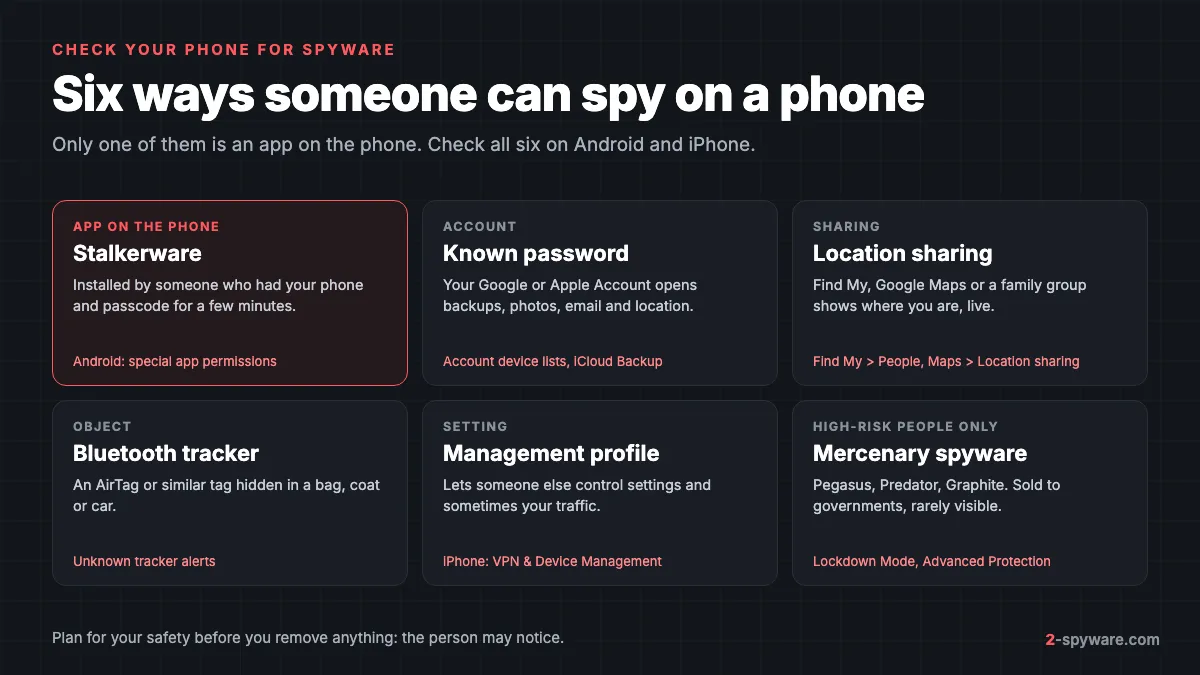
Phone spying usually takes one of six forms, and only one is an app. Our spyware guide covers every device; this page is about phones and the person who wants to watch you.
| Method | What the person needs | What they can see | Where you find it |
|---|---|---|---|
| Stalkerware app | Your phone and passcode for a few minutes | Messages, calls, photos, location | App permissions (mostly Android) |
| Known account password | Your Google or Apple Account password | Backups, photos, email, location | Account device lists |
| Location sharing | A moment with your phone, or a family group | Your live location | Find My, Google Maps, family groups |
| Bluetooth tracker | Access to your bag or car | Where the tag goes | Unknown tracker alerts |
| Management profile | Your phone and passcode | Settings, sometimes traffic | VPN & Device Management (iPhone) |
| Mercenary spyware | A government client | Everything | Rarely visible |
The Coalition Against Stalkerware says the clearest sign is often not on the phone at all. It is a person who knows too much about your messages, plans or movements with no other explanation [6]. Battery drain and data spikes can be signs, but some stalkerware shows none [6]. Keep a dated log of what the person knew and when.
Before you check: plan for your safety
Looking at settings is silent; changing them may not be. The Coalition warns that removing stalkerware can be detected and can make the abuse worse [6].
- Search and ask for help from a phone or computer the person has never had access to. If your phone is monitored, they can see what you search [6].
- Talk to a domestic abuse or stalking service about a safety plan before you remove anything [6]. The help lines are at the end of this page.
- Collect evidence first. Removing stalkerware also removes the evidence of it [6]. Screenshot what you find and store it where the person cannot reach.
- On iPhone, Safety Check has a Quick Exit button in the top-right corner that closes Settings at once, and changes you already made are kept [1].
How to check an Android phone for spyware
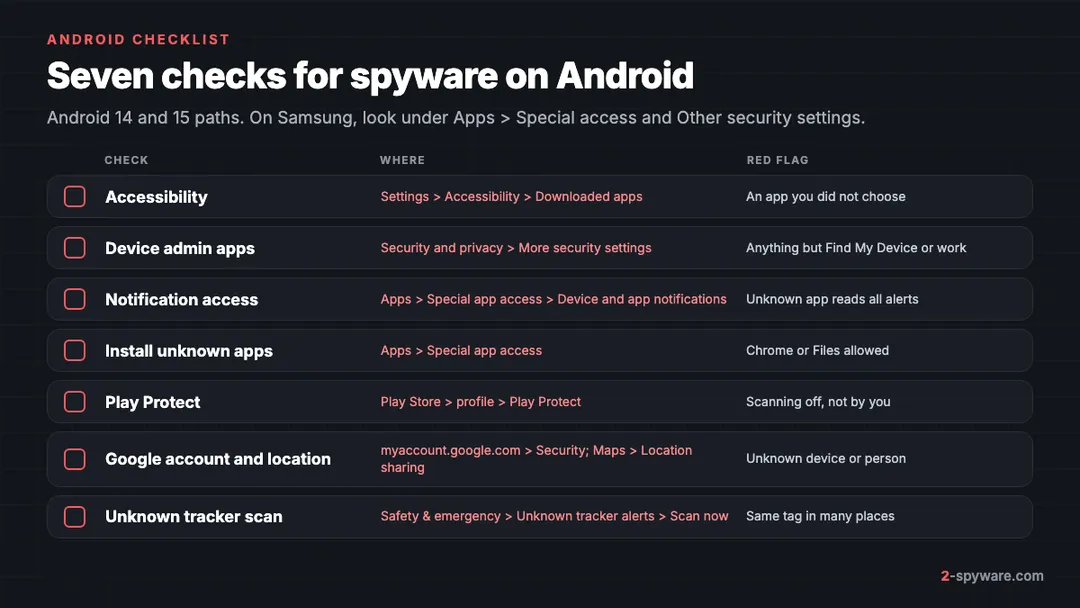
Android stalkerware such as mSpy, FlexiSpy or Spyzie is installed by hand from a website, not from Google Play. It needs a few special permissions, and those are your best evidence.
1. Check the four permissions stalkerware needs
Banking trojans abuse the same permissions; our guide to removing malware from Android shows each screen in detail. Here is what each one means for stalkerware.
| Permission | Stock Android 14 and 15 | What stalkerware uses it for |
|---|---|---|
| Accessibility | Settings, Accessibility, Downloaded apps (Installed apps on Samsung) | Reads chats in WhatsApp, Signal and Messenger straight off the screen, and logs what you type |
| Device admin | Settings, Security and privacy, More security settings, Device admin apps | Stops you from uninstalling it; the Uninstall button turns gray |
| Notification access | Settings, Apps, Special app access, Device and app notifications | Copies every message preview and code as it arrives |
| Install unknown apps | Settings, Apps, Special app access, Install unknown apps | Shows which app was used to install it, usually Chrome or Files |
Stalkerware often uses a dull name such as System Service, Sync Services or Device Health. Tap any unknown entry, then App info, and note the install date. A date when the person had your phone is strong evidence.
2. Look for apps that did not come from Google Play
Compare Settings, then Apps, then See all apps with Google Play, then your profile picture, then Manage apps and device, then Manage. A non-system app that is missing from the Play list came from somewhere else.
3. Make sure Play Protect is on
Open Google Play, tap your profile picture, then Play Protect. If scanning is off and you did not turn it off, treat that as a warning sign, because stalkerware setup guides tell the buyer to disable it. Turn it back on only when your safety plan allows.
4. Check your Google account from a safe device
Your Google account can leak location, photos and email with no app on the phone. From a safe device, open myaccount.google.com, then Security, then Your devices, and look for devices you do not own. Check Recent security activity, and in Gmail settings look for forwarding addresses you did not add.
5. Check who can see your location
- Google Maps: tap your profile picture, then Location sharing. Anyone listed sees your live location.
- Family Link: if your account is supervised, the parent account can see the phone's location. Check Settings, then Google, then Parental controls.
- Samsung: open SmartThings, then Find, and check who is in your location sharing group.
6. Scan for unknown trackers
Android 6 and newer can warn you when someone else's tracker moves with you, and the alerts cover AirTags and Find Hub network tags [5]. To scan by hand, open Settings, then Safety & emergency, then Unknown tracker alerts, then Scan now. The scan takes about 10 seconds [5].
Turning on Airplane mode or turning off Bluetooth does not stop the owner from seeing the tracker's location [5]. Tap the alert for a map, then Play sound; the owner is not told [5]. Screenshot the alert and map, because Android deletes old alerts after 48 hours [5].
How to check an iPhone for spyware
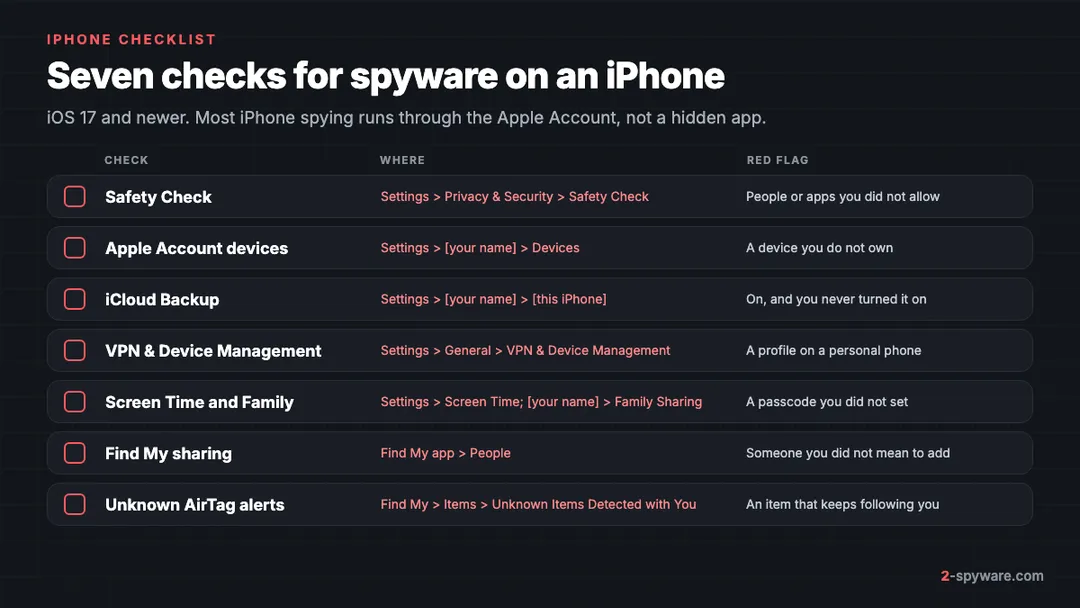
iOS does not let an app hide and read other apps, so most iPhone spying uses your Apple Account instead. Some iPhone stalkerware simply pulls data from your iCloud backups [6]. Apple's Personal Safety guide lists the checks below [2].
1. Run Safety Check
Open Settings, then Privacy & Security, then Safety Check [1]. It needs iOS 16 or later and an Apple Account with two-factor authentication [1]. Choose Manage Sharing & Access to review each person and app one at a time [1]. Emergency Reset stops all sharing with everyone at once, which is fast but very noticeable [1].
It also lists devices on your Apple Account, phone numbers that receive your codes, synced computers on iOS 17 and Macs set up for iPhone Mirroring on iOS 18 [1]. It cannot see non-Apple accounts [1].
2. Review Apple Account devices and Face ID
Go to Settings, then your name, then Devices. Tap any device you do not recognize and choose Remove from Account [2]. Then check for a Face ID alternate appearance or a Touch ID fingerprint you did not add, and review trusted devices for two-factor codes [2].
3. Check iCloud Backup
Go to Settings, tap your name, scroll down, tap your iPhone and see whether iCloud Backup is on [6]. If it is on and you never turned it on, someone may have done it to read your backups from another device [6]. The fix is a new Apple Account password.
4. Look in VPN & Device Management
Open Settings, then General, then VPN & Device Management. If no profiles are listed, none are installed [3]. Management profiles are normally installed by employers, schools or other organizations [2]. Tap it, then Delete Profile, and restart the phone [3]. On a work phone, ask your IT team first.
5. Check Screen Time and Family Sharing
In Settings, then Screen Time, a passcode you did not set or Communication Limits you did not choose mean someone else controls the phone. Then open Settings, your name, Family Sharing, and check who the organizer is. The Coalition also lists sudden jumps in weekly Screen Time reports as a possible sign [6].
6. Check Find My sharing
Open the Find My app and tap People. Anyone you share with sees where you are. Safety Check lets you stop sharing one person at a time [1].
7. Turn on unknown tracker alerts
Your iPhone warns you when someone else's AirTag or Find My accessory travels with you [4]. Make sure alerts reach you:
- Update to iOS 17.5 or later, which adds alerts for compatible trackers from other makers [4].
- Go to Settings, then Privacy & Security, then Location Services, and turn it on. Under System Services, turn on Significant Locations [4].
- Turn on Bluetooth, and under Settings, then Notifications, then Tracking Notifications, turn on Allow Notifications [4].
- Keep Airplane mode off. In Airplane mode you get no tracking alerts [4].
Past alerts are in the Find My app, under Items, then Unknown Items Detected with You [4]. If you find an AirTag, hold the top of your iPhone near its white side. A page opens with its serial number and the last four digits of the owner's phone number [4]. Screenshot it before you disable the tag, which means removing its battery [4].
What each finding means
| What you found | What it most likely means | Safer next step |
|---|---|---|
| Unknown app with Accessibility or Device admin | Stalkerware is installed | Screenshot, plan, then remove |
| Unknown device on your Google or Apple Account | Someone uses your password | New password from a safe device |
| iCloud Backup on, not by you | Someone may read your backups | New Apple Account password |
| A person in Find My or Maps sharing | They see your location | Stop sharing when safe |
| Unknown management profile | Someone manages the phone | Screenshot, delete, restart |
| Repeated tracker alert | A tag is following you | Find it; call police if unsafe |
| Nothing found, but they still know things | A shared computer, car or friend | Keep the log, call a support service |
Apple and Google both advise that if you find a tracker and feel at risk, you go to a safe public place and contact the police [4][5]. Police can ask Apple for information about an AirTag's owner [4].
How to remove stalkerware and cut off access
Work in this order, because removing the app while the person still has your passwords lets them set it up again [6].
- Change your passwords from a safe device: your Google account or Apple Account first, then email, then social media and banking. Turn on two-step verification for each.
- Sign out every device you do not own from your accounts, as described above.
- Change the phone's passcode to one the person cannot guess, and set the screen to lock after 30 seconds. Stalkerware usually needs physical access [6].
- On Android, turn off Device admin for the app first so the Uninstall button works, then uninstall it from Settings, then Apps.
- Delete unknown profiles on iPhone and stop location sharing you did not agree to.
- Run a scan with a security app. The Coalition says good antivirus apps detect most stalkerware and can remove it [6].
Our checklist for securing your accounts after malware covers recovery emails and phone numbers an attacker may have changed.
When to factory reset, or get a new phone
The Coalition says a new phone is the surest way to get rid of stalkerware, and a factory reset is almost as effective [6]. Reset when the app returns after removal or you cannot tell what else was changed.
- Change your account passwords before the reset. If the person still knows them, they can sign in again on the clean phone.
- Back up photos and contacts, but do not restore apps and settings from a backup made while the phone was monitored.
- Android: Settings, then System, then Reset options, then Erase all data. Samsung: Settings, then General management, then Reset, then Factory data reset.
- iPhone: Settings, then General, then Transfer or Reset iPhone, then Erase All Content and Settings.
- Reinstall only the apps you use, from Google Play or the App Store [6].
Mercenary spyware: when it is a real risk
Pegasus, Predator and Graphite are sold to governments and aimed at journalists, activists, lawyers and politicians. They can arrive without a click and leave nothing you can see in Settings. An ordinary abuser cannot buy it [6].
- If you are in one of those groups, turn on Lockdown Mode on iPhone under Settings, then Privacy & Security, then Lockdown Mode. On Android 16, turn on Advanced Protection under Settings, then Security and privacy.
- Apple sends threat notifications by email and iMessage to users it believes were targeted, and shows a banner at account.apple.com. Treat one as serious.
- Ask for a forensic check from Access Now's Digital Security Helpline or Amnesty International's Security Lab.
Emails that say "Pegasus has been installed on your device" and demand payment are scams, not real infections. See our page on the Pegasus email scam.
Where to get help
Apple and Google both point people who fear for their safety to the same organizations [4][5]:
- United States: the Safety Net Project at the National Network to End Domestic Violence (techsafety.org) and the National Center for Victims of Crime [4]. The National Domestic Violence Hotline is 1-800-799-7233.
- United Kingdom: Refuge [4][5], which runs the National Domestic Abuse Helpline on 0808 2000 247.
- Australia: WESNET Safety Net Australia [4][5], and 1800RESPECT.
- Elsewhere: the Coalition Against Stalkerware keeps a list of local services by country [6].
Installing spyware on another adult's phone is a crime in many countries, and so is tracking a person with an AirTag without consent [4]. To report it, use our list of where to report cybercrime by country. More cases are on our stalkerware topic page and in the Android and iPhone help hubs. Look up a suspicious app name with our checker.
Frequently asked questions
How can I tell if someone is spying on my phone?
Check for unknown apps with Accessibility or Device admin on Android, unknown devices on your accounts, location sharing and unknown profiles on iPhone. The most common sign is a person who knows things they should not.
Can someone spy on my phone without touching it?
Yes, if they know your Google account or Apple Account password. They can then read synced photos, backups, email and location from their own device.
Can an iPhone have stalkerware?
Hidden stalkerware apps are rare on iPhone because iOS does not let apps read other apps. Most iPhone spying uses the Apple Account instead, for example by reading iCloud backups, sharing Find My location or installing a management profile.
Will the person know if I remove the spyware?
Possibly. They may notice that reports stop, that your location disappears or that they are signed out. Make a safety plan and collect evidence first.
Does a factory reset remove spyware?
A factory reset removes stalkerware apps and profiles, and the Coalition Against Stalkerware rates it almost as effective as a new phone. It does not help if the person still knows your account passwords, so change those first and do not restore apps from an old backup.
Does Airplane mode stop an AirTag from tracking me?
No. Turning on Airplane mode, or turning off Bluetooth or Location Services, does not stop the owner from seeing the tracker's location. You have to find the tag and disable it, which for an AirTag means removing the battery.
Can antivirus apps find stalkerware?
Good mobile security apps detect most known stalkerware on Android and can remove it. A scan cannot see account-based spying such as shared backups or location sharing, so do the manual checks too.
Can someone read my texts through iCloud?
If someone knows your Apple Account password and can get past two-factor authentication, they can see iCloud data such as Messages in iCloud, photos and backups. Check the device list in Settings under your name, remove unknown devices and change the password.
Sources
- Apple Personal Safety User Guide: Safety Check for an iPhone with iOS 16 or later read 2026-10-08
- Apple Personal Safety User Guide: Checklist 1, Limit device and account access read 2026-10-08
- Apple Personal Safety User Guide: Review and delete configuration profiles read 2026-10-08
- Apple Support: What to do if you get an alert that an AirTag or Find My accessory is with you read 2026-10-08
- Android Help: Find unknown trackers read 2026-10-08
- Coalition Against Stalkerware: Stalkerware detection, removal and prevention (information for survivors) read 2026-10-08
 What is spyware and how to remove it
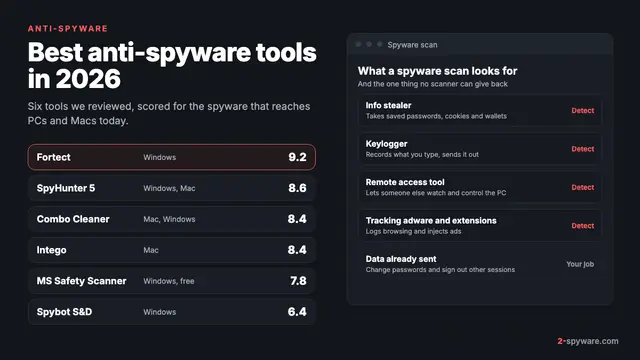 Best anti-spyware tools in 2026