
What an Android security update contains
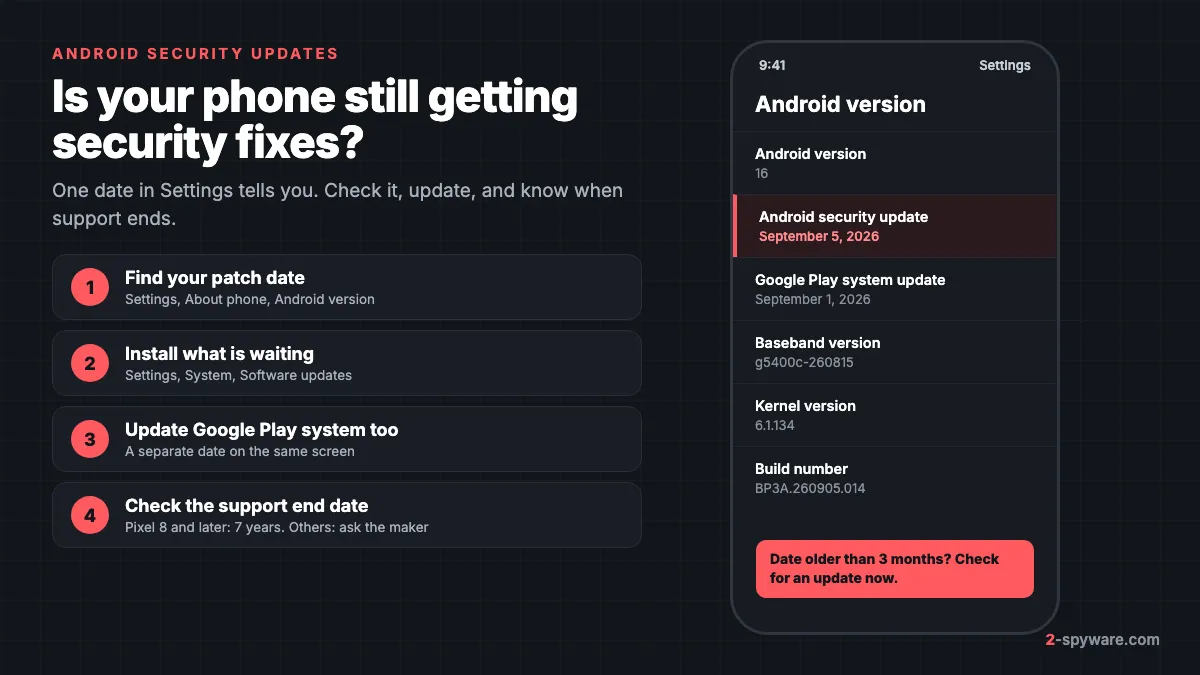
An Android security update is a firmware update that closes known holes in the operating system, the Linux kernel and the chip drivers of your phone. It is the main defence against attacks that need no app install at all. Our malware guide covers threats on every platform; this page is only about keeping an Android phone patched.
Your phone gets fixes through three separate channels. Each one has its own date and its own schedule, so it helps to know which is which.
| Channel | Who ships it | What it fixes | Where you see the date |
|---|---|---|---|
| Android Security Bulletin | Google publishes it, your phone maker ships it | Android framework, system, kernel and chip vendor components | Android security update (Security patch level on Samsung) |
| Maker and device bulletins | Google for Pixel, Samsung, Motorola and others | Flaws specific to that brand's software, modem or drivers | Same patch date, listed in the maker's own bulletin |
| Google Play system updates | Google, directly through Google Play | Core modules Google can update without the phone maker | Google Play system update |
The monthly Android Security Bulletin
Google posts the Android Security Bulletin on source.android.com. It is split into Android platform fixes, upstream Linux kernel fixes and fixes from the chip makers (SoC manufacturers) such as Qualcomm, MediaTek and Arm [1]. Google tells its Android partners about every issue at least a month before the bulletin goes public, so makers have time to build their update [2].
Each bulletin has two patch levels. A date ending in 01, such as 2025-12-01, covers the core set of fixes that apply to all Android devices. A date ending in 05 covers everything in that bulletin and all earlier ones, including the kernel and chip fixes [2]. If your phone shows the 05 date for a month, it has the full set.
Maker and chip bulletins
Some fixes are not required to claim a patch level. These appear in the device and partner bulletins: the Pixel Update Bulletin, Samsung's monthly security update page, and those of Motorola and other makers [2]. Samsung says its updates combine Google's Android patches with fixes for Samsung's own software, and that some chip vendor patches can slip to a later month [5].
Google Play system updates
Google Play system updates (Project Mainline) let Google patch some core parts of Android directly, without waiting for the phone maker. Each monthly bulletin says whether any security issue was fixed this way that month [2]. The date appears as Google Play system update on the same screen as your security patch [3]. On many phones it lags a month or two behind; that is normal.
How to check your Android security patch level
The patch level is a date, not a version number. It tells you the most recent bulletin your phone has fully applied.
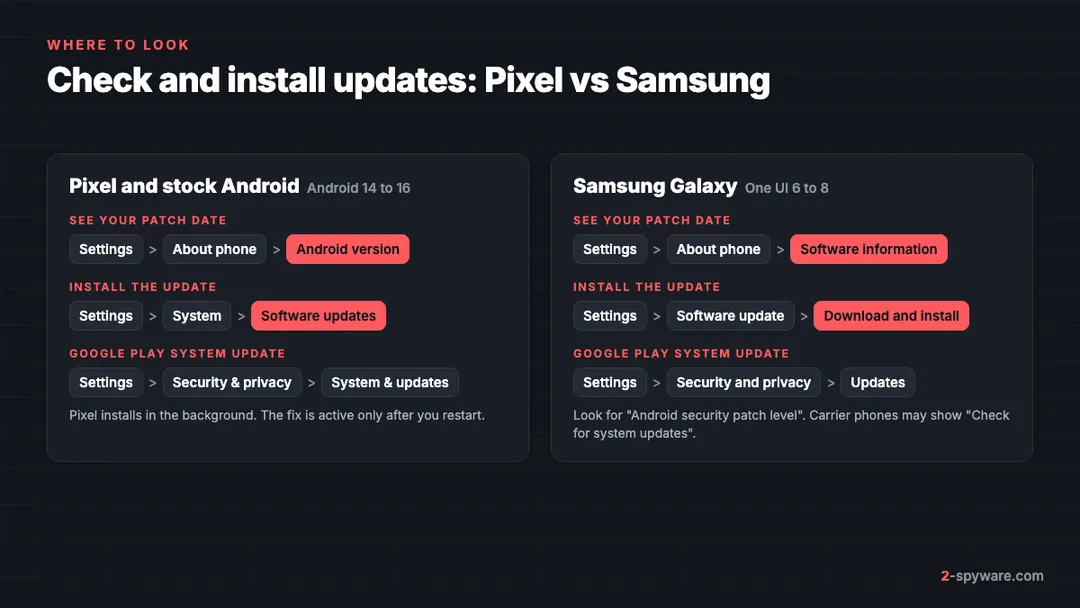
Pixel and stock Android 14, 15 and 16
- Open the Settings app.
- Tap About phone (About tablet on a tablet), then Android version [3].
- Read three lines: Android version, Android security update and Google Play system update [3]. The second line is your security patch level.
Samsung Galaxy with One UI 6, 7 and 8
- Open Settings and scroll to the bottom.
- Tap About phone, then Software information.
- Find Android security patch level. The Google Play system update date is shown on the same screen.
Motorola, OnePlus, Xiaomi and other phones
Menu names differ by maker, but the date is almost always under About phone. The fastest route on any Android phone is the search bar at the top of Settings. Type security patch and tap the result.
How to install an Android security update
Most phones download and install security patches on their own and show a notification when a restart is needed [3]. If you dismissed that notification or the phone was offline, start the update by hand. Connect to Wi-Fi and charge to at least 75% first, because updates can be large [3].
Pixel and stock Android
- Open Settings, then System, then Software updates [3]. On some Pixels the item is called Software update [4].
- Follow the on-screen steps to download and install.
- Restart when asked. Pixels install in the background, and the fix becomes active only after the next restart [3].
- For the Google Play system update, open Settings, then Security & privacy, then System & updates, then Google Play system update.
Samsung Galaxy
- Open Settings, then Software update.
- Tap Download and install. On some carrier models the button reads Check for system updates or Check for software updates [6].
- When the download finishes, follow the on-screen steps to install [6]. You can usually install now or schedule it for the night.
- For the Google Play system update, open Settings, then Security and privacy, then Updates.
When the update does not show up
- Updates roll out gradually and can take a few weeks to reach every Pixel, depending on carrier and model [4]. Samsung timing also varies by region, carrier and model [5].
- If a download fails, Android tries again over the next few days [3]. A "not enough space available" message means you must free storage first [3].
- Install the newest Android version offered to your phone. Google notes that the latest security update may need the latest Android version for your device [3].
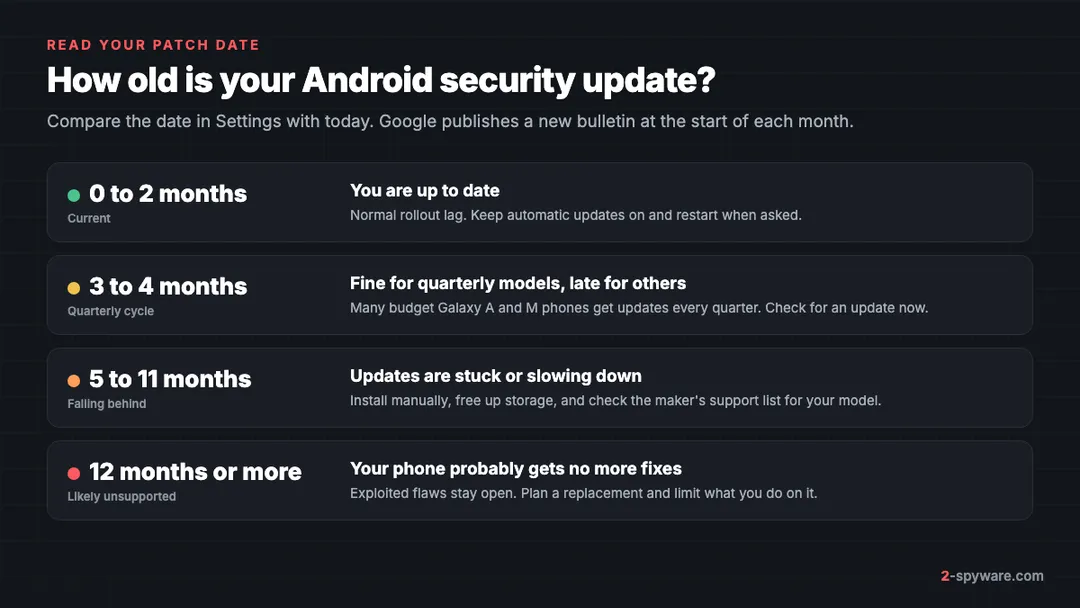
How to read your patch date
Compare the date in Settings with today. A phone on a monthly update plan should rarely be more than two months behind. Samsung puts many budget Galaxy A and M phones on quarterly updates, so a date three or four months old is expected there [5].
What "limited, targeted exploitation" means
Most bulletin entries are flaws found by researchers or Google's own teams, with no known attacks. When Google has evidence that attackers already use a flaw, the bulletin says there are indications it may be under limited, targeted exploitation. That wording means real attacks against a small number of chosen people, often with commercial spyware or forensic tools, not a mass campaign.
Limited does not mean harmless. Once a fix ships, attackers can study it and reuse the flaw more widely. Install such an update the day it reaches your phone.
The US Cybersecurity and Infrastructure Security Agency (CISA) adds confirmed cases to its Known Exploited Vulnerabilities catalogue [7]. Our database tracks that catalogue, and it holds over 50 actively exploited flaws in Android, Samsung, Qualcomm, Arm Mali, MediaTek and Google Pixel components. Recent examples:
- CVE-2026-58704: an authorization bug in the Pixel cellular modem that can let an attacker bypass permission checks. Added in September 2026 and fixed in that month's Pixel update.
- CVE-2025-48572 and CVE-2025-48633: a privilege escalation and an information leak in the Android Framework, both fixed in the December 2025 bulletin.
- CVE-2026-21385: memory corruption in many Qualcomm chipsets, listed in the March 2026 Android bulletin.
- CVE-2025-21042: an out-of-bounds write in Samsung's image codec library that allows remote code execution, fixed in Samsung's April 2025 update.
- CVE-2025-48543: a use-after-free in Android Runtime that can help an attacker escape the Chrome sandbox, fixed in September 2025.
Note the pattern. Chip and GPU driver flaws from Qualcomm and Arm Mali appear again and again, and they can only be fixed by your phone maker's firmware update. The full list of exploited flaws is on our exploited vulnerabilities page, and the Android entries are also shown below this guide.
How long will your phone get security updates?
Every maker sets its own support period.
| Phones | Support period | Notes |
|---|---|---|
| Pixel 8, 8a, 9, 9a, 10, 10a, 11 and their Pro and Fold models | 7 years of OS and security updates [4] | Counted from the date the phone first went on sale in the US Google Store [4] |
| Pixel 6, 6a, 6 Pro, 7, 7a, 7 Pro and Pixel Fold | 5 years of OS and security updates [4] | Same start date rule [4] |
| Pixel 5a and older | No more updates [4] | Replace or limit use |
| Samsung Galaxy S23 to S26, Z Fold5 to Fold8, Z Flip5 to Flip8, A54 to A57 | Monthly security updates [5] | Samsung extended support to up to 7 years from January 2024 [5] |
| Samsung Galaxy S22, Z Fold4, Z Flip4, most A, M and F series, Tab S8 to S11 | Quarterly security updates [5] | Models drop off the list when their support period ends [5] |
| Other Android brands | Varies by maker and carrier | Google says to contact the maker or carrier [3] |
Samsung's lists change as models age, so check the current Samsung security updates scope page for your exact model. If your Galaxy is missing from both the monthly and quarterly lists, it no longer gets regular patches.
Your phone no longer gets updates: what to do
An unsupported phone still works, but every new flaw found in its Android version, kernel or chip stays open for good. You do not have to throw it away today, but change how you use it.
- Move banking, your main email and your password manager to a supported device. These are what attackers want, and an unpatched phone is the easiest way in.
- Do not use it as your only two-factor device. If you rely on it for sign-in codes, add a second method such as a hardware key or a supported phone first.
- Keep apps and Chrome updated through Google Play. App updates still arrive for a while, and the browser is where many attacks start. They do not fix flaws in the system underneath.
- Install apps only from Google Play and leave Install unknown apps off. Malware that needs a system bug to gain control still has to get onto the phone first.
- Plan a replacement. When you buy, check the maker's stated update period and how many years of it are left, not just the price.
Some owners install a community-built Android version to keep an old phone patched. These can bring a newer Android release, but they rarely include the closed chip and modem firmware fixes, so many of the exploited flaws listed above stay open. Very cheap unbranded phones can also ship with malware built into the firmware, as in the Triada case, and a phone like that may never get a real fix.
What Play Protect covers, and what it does not
Google Play Protect is on by default on phones with Google Mobile Services. It scans apps and warns about potentially harmful applications, and Google says it matters most if you install apps from outside Google Play [2]. Leave it on: open the Play Store, tap your profile picture, then Play Protect, and check that Scan apps with Play Protect is enabled.
Play Protect does not patch the operating system. A flaw in the kernel, the modem or a GPU driver is fixed only by the firmware update from your phone maker. A phone with Play Protect on and a two-year-old patch date is still exposed to every exploited flaw fixed since then.
Signs your phone may already be compromised
Exploited flaws are mostly used against chosen targets such as journalists, activists, officials and people in legal disputes. If that describes you, or if your phone was unpatched for a long time, look for these signs:
- Battery drain and heat while the phone is idle, with no app in Battery usage to explain it.
- Apps in Device admin apps, Accessibility or Notification access that you did not set up.
- Security settings that switch themselves back, such as Play Protect turning off.
- Unknown sign-ins on your Google account, or forwarding rules in your email that you did not create.
- Crashes of messaging apps or the browser right after you receive an unusual message or link.
None of these proves an infection on its own. Our guide on how to check your phone for spyware walks through each check on Android and iPhone, including what to do first if someone close to you may be watching. If you find a malicious app, follow our steps to remove malware from Android. After any infection, secure your accounts from a different, clean device.
Where to go next
- Ads covering the screen rather than signs of spying: see remove adware from Android.
- Worried about stalkerware or commercial spyware: read our spyware guide.
- A suspicious link or domain in a message: look it up with our link checker before you tap it.
- Questions about a specific phone problem: ask in the Android help forum, or the iPhone forum for Apple devices.
- More cases and threats that target phones: our Android topic page.
Frequently asked questions
How do I check my Android security patch level?
On a Pixel or stock Android phone, open Settings, then About phone, then Android version, and read the Android security update date. On a Samsung Galaxy, open Settings, then About phone, then Software information, and find Android security patch level.
How do I install an Android security update?
On Pixel and stock Android, open Settings, then System, then Software updates. On Samsung, open Settings, then Software update, then Download and install. Connect to Wi-Fi, charge to at least 75 percent and restart when asked, because the fix is active only after the restart.
Is my Android phone still getting updates?
Check the patch date in Settings. If it is more than a year old, your phone has most likely reached the end of support. Then confirm on the maker's page: Google lists support periods for each Pixel and Samsung keeps lists of models on monthly and quarterly updates.
How long do Pixel phones get security updates?
Pixel 8 and later models get 7 years of Android and security updates. Pixel 6, 6a, 7, 7a and Pixel Fold get 5 years. Both periods count from the date the phone first went on sale in the US Google Store. Pixel 5a and older no longer get updates.
How long do Samsung phones get security updates?
Samsung extended security support to up to 7 years for many Galaxy devices from January 2024. Recent flagships such as the S23 to S26 and the newest foldables get monthly updates, while many Galaxy A, M and F phones get quarterly ones. Samsung's security website lists the current models.
What is the difference between the 01 and 05 patch levels?
Each monthly bulletin has two patch levels. The 01 date covers the core fixes that apply to all Android devices. The 05 date covers every fix in that bulletin and earlier ones, including kernel and chip vendor fixes. A phone on the 05 date has the full set.
What is a Google Play system update?
It is a separate update that Google sends through Google Play to patch core parts of Android without waiting for the phone maker. Its date appears next to the security update date in Settings. It is often a month or two behind, which is normal.
Is it safe to keep using a phone that no longer gets updates?
For calls, music or a camera it is usually fine. For banking, your main email or sign-in codes it is not, because new flaws in Android and the chip stay open for good. Move those accounts to a supported device and plan a replacement.
Sources
- Android Open Source Project: Android Security and Update Bulletins read 2026-10-09
- Android Open Source Project: Android Security Bulletin, December 2025 read 2026-10-09
- Android Help: Check and update your Android version read 2026-10-09
- Pixel Phone Help: Learn when you'll get software updates on Google Pixel phones read 2026-10-09
- Samsung Mobile Security: Security Updates Scope read 2026-10-09
- Samsung US Support: How to update your Galaxy phone or tablet read 2026-10-09
- CISA: Known Exploited Vulnerabilities Catalog read 2026-10-09
 What is malware and how to remove it
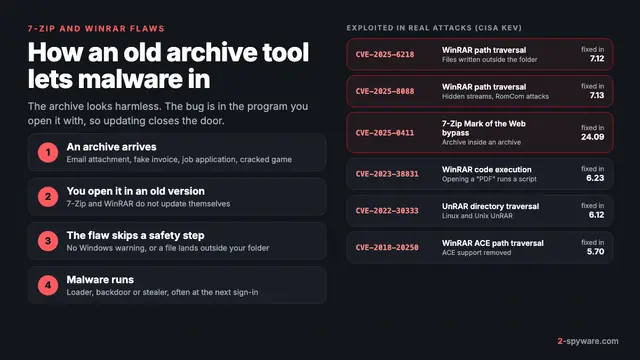 7-Zip and WinRAR vulnerabilities: what was exploited and what to do
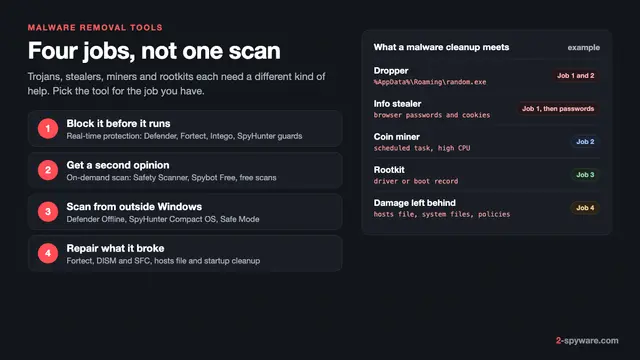 Best malware removal tools in 2026
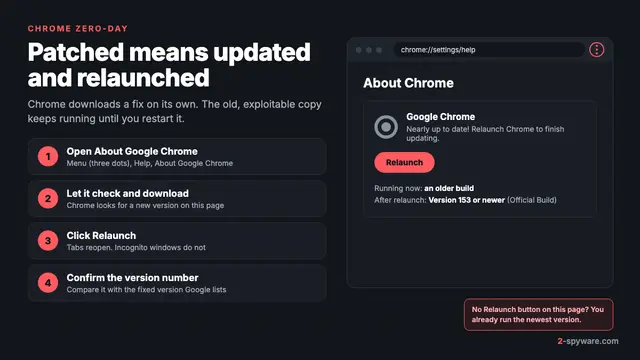 Chrome zero-day: what it is and how to update Chrome now
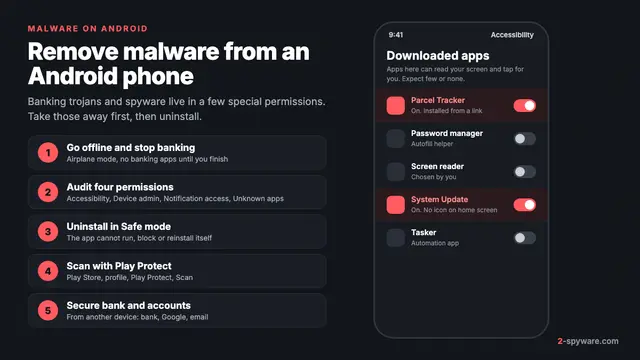 How to remove a virus or malware from an Android phone
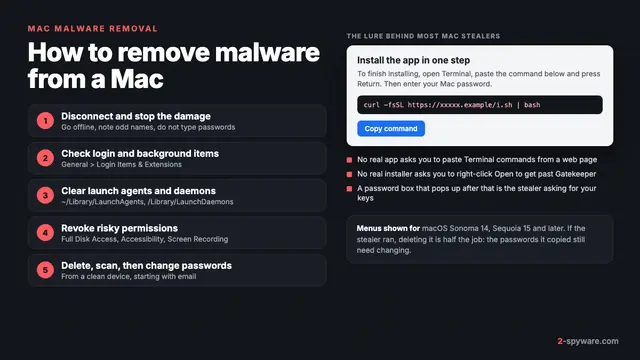 How to remove a virus or malware from a Mac
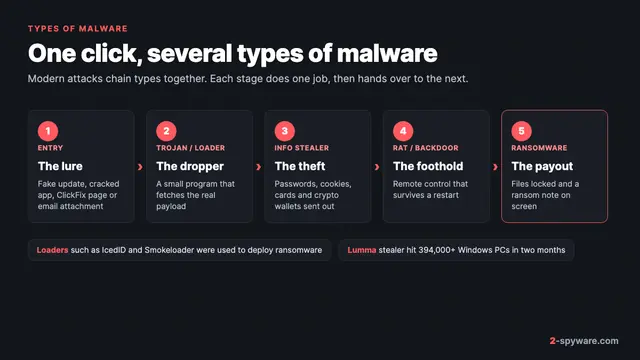 Types of malware: what each kind does and how to spot it
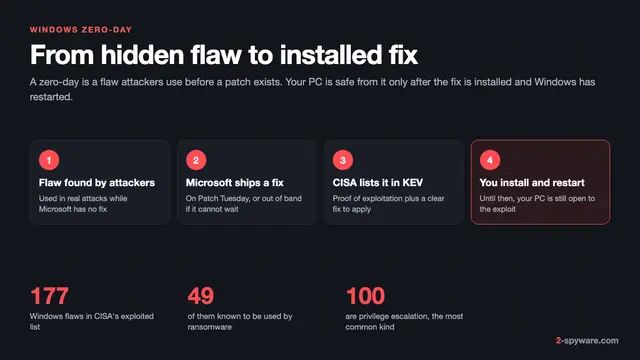 Windows zero-day vulnerabilities: what they are and how to close them