
vtivision-fi.com: an open folder of PowerShell files tagged Formbook, and what to do if a PC fetched them
vtivision-fi.com is a web address that URLhaus lists eight times on 16 October 2026 for PowerShell files named *secured_stub.ps1, two of them tagged Formbook, a password and form stealer for Windows. A script file like that is not something you meet by browsing; it is the next stage that a program already running on a PC asks for.
If you only saw the name in a log, nothing is proven. If something on your PC may have fetched these files, change your passwords from another device first, then scan and clean or reset Windows.
Facts checked October 17, 2026. Removal steps tested on Windows 11 (26H2) and checked against Microsoft's and the browser makers' current documentation.
Automatic
Get a free scan and check if your PC is infected.
Fortect finds malware, unwanted programs and the Windows damage they leave behind, and repairs it in one pass.
Programs like a script, loader or program that downloads PowerShell files from vtivision-fi.com usually arrive in groups; a free scan lists the companions that are easy to miss.
Do it yourself · free Remove vtivision-fi.com (PowerShell stub files, Formbook tag) yourself 5 steps, about 15 minutes, no software needed.
Start the steps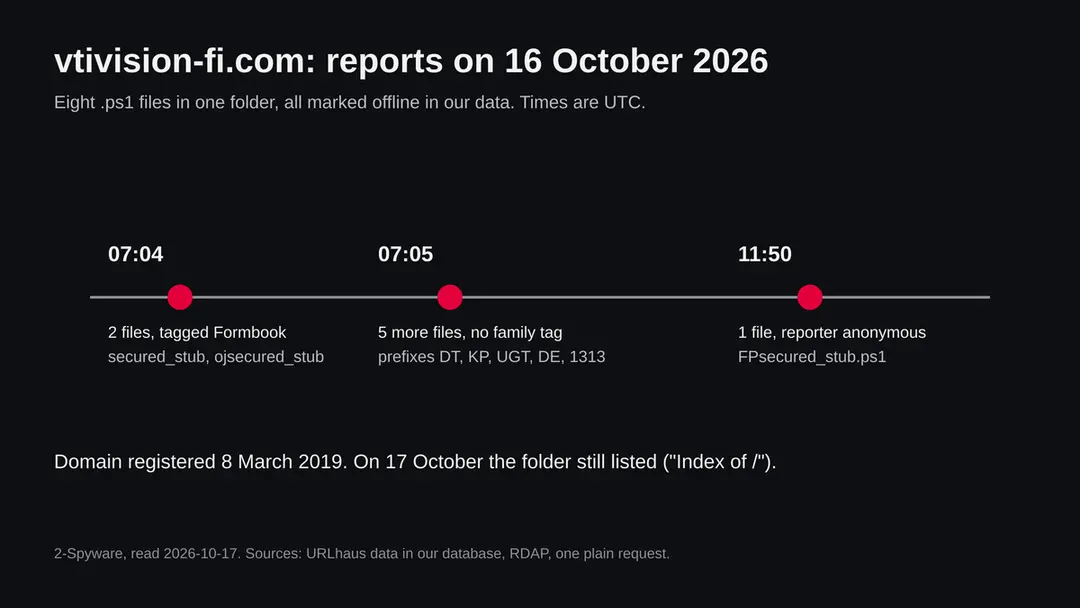
Vtivision-fi.com (PowerShell stub files, Formbook tag): summary
| Type | A malware server: URLhaus lists eight PowerShell files (*secured_stub.ps1) in an open folder, two tagged Formbook, a stealer for Windows |
|---|---|
| Risk | High if a program on your PC fetched and ran its scripts: typed form data, saved logins and mail data may be taken. Low if you only saw the name |
| Symptoms | Often none. Unknown scheduled tasks or startup entries, a Formbook detection in Protection history, or accounts used by someone else |
| How to get rid of it | Change passwords from another device, run Microsoft Defender Offline, remove unknown startup entries, and reset Windows if you are not sure |
| Our check (17 October 2026) | One plain request from our server: HTTP 200, page title Index of /, an open folder listing. No browser, no download. It clears nothing; the rating comes from URLhaus |
| Running since / first seen | Domain registered 8 March 2019; first files reported 16 October 2026 |
| Removal | Scan the PC with security software to find and remove the malware and anything installed with it. Fortect scans Windows for malware and repairs the system files and settings it damaged. Remove it nowTo use the full-featured product, you have to purchase a license for Fortect. The scan is free. |
Show 9 more facts
| Platform | Windows. Nothing we read says Mac or phones are affected |
|---|---|
| Detection names | No detection name is known for the scripts on this server, because we did not open them. For the Formbook family Microsoft lists Trojan:Win32/Formbook and TrojanSpy:Win32/FormBook |
| Name | Vtivision-fi.com |
| Domain registered | 8 March 2019 |
| Evidence | 8 write-ups by security sites; details still limited |
| First seen | 16 October 2026 |
| Distribution | Typically fake installers, cracked programs, e-mail attachments, fake "verify you are human" pages and ads for popular apps |
| Damage | Installs other malware, often several programs at once |
| Facts checked | 17 October 2026 |
Facts checked on 17 October 2026 against the URLhaus data for vtivision-fi.com held in our database (the abuse.ch site itself was not opened), RDAP, one plain request from our server, the Malpedia entry for Formbook, the Microsoft Security Intelligence threat list, and Microsoft and FTC help pages.
We did not download the files and we infected no PC; the removal steps follow Microsoft and FTC pages and were not tried on a live infection.
What vtivision-fi.com is, and what we know about it
vtivision-fi.com is not a program on your PC. It is a web address that the abuse.ch project URLhaus lists as a place where malware files were served. We found no public write-up of this one address, so what follows is what URLhaus shows, what our own plain request found, and what Malpedia and Microsoft list about the family named in two of the tags.
- 1
What URLhaus lists
Eight file addresses on vtivision-fi.com, all in the same folder (three levels deep, with random looking folder names) and all ending in secured_stub.ps1, with a different short prefix on seven of them: oj, FP, 1313, DE, UGT, KP and DT. All eight were added on 16 October 2026, all carry the threat label malware_download, and all are marked offline in our copy of the data. Seven were added by abuse_ch and one by an anonymous reporter.
- 2
What the tags mean
ps1 is the ending of a PowerShell script, a text file that Windows can run. ascii says the file is plain readable text. powershell says the same thing in words. opendir means the folder could be listed by anyone who asked the server. Formbook is the name of a data stealing program for Windows. Six files carry the tags ascii, opendir, powershell and ps1; the two oldest also carry Formbook; the anonymous report carries no tags at all.
- 3
What we could not confirm
We did not download any of the scripts, so we cannot tell you what is inside them, whether they really install Formbook, or where anything reports to. The Formbook tag is a label set by a reporter, not a proof we checked. We also do not know which program or message makes a victim's PC ask for these files. That first step is not visible from the server side.
- 4
What this means for you
If you only saw the name in a firewall log, a blocked request or a warning, you are not infected by that alone. The risk is for a PC where something already ran and went to fetch one of these scripts. A normal visitor has no reason to ask for a file called secured_stub.ps1.
- Kind of threat
- A server that handed out PowerShell script files; two are tagged Formbook, an information stealer for Windows
- Where the files are
- hxxps://vtivision-fi[.]com/suzxwgr/afwugem/aimxfrz/ followed by a name ending in secured_stub.ps1
- Domain registered
- 8 March 2019, registrar GoDaddy.com, LLC; the record carries four client locks (delete, renew, transfer and update prohibited). RDAP read on 16 October 2026
- URLhaus entries
- 8 file addresses, all added on 16 October 2026 between 07:04 and 11:50 UTC; all 8 offline in our copy of the data
- Our request on 17 October 2026
- The home page answered HTTP 200 with the title Index of /, from an Apache server: an open folder listing
- Platform
- Windows. PowerShell scripts and the Formbook family are Windows threats. Nothing we read says these files affect Mac, iPhone or Android
What vtivision-fi.com (PowerShell stub files, Formbook tag) does on an infected PC
What we checked on 17 October 2026, and what we could not
Our check was one plain request to the address from our server: no browser, no clicks, no download. It got an answer, and the answer was an open folder listing. That tells us a little about the server and clears nothing.
Our request, 17 October 2026
- The home page is an open folder listingThe server answered with status 200, no redirect, the page title Index of / and the server name Apache. A folder listing on the front door means nobody has put a normal web page there. The opendir tag in the URLhaus rows says the same about the folder with the scripts.
- Why the URLhaus rows say offlineAll eight rows are marked offline, yet the front page still answered. We do not know whether the files were removed, whether the server stopped serving them to our region, or whether it answers only some visitors. A file that is offline today can come back.
- Notification requestNone found in the page text. A plain request does not run scripts, so this says little.
- URLhaus listingEight PowerShell files reported on 16 October 2026; two tagged Formbook.
- Downloads and the files themselvesWe did not download any script and did not open the folder. We cannot tell you what the files contain.
Dangerous: treat it as a malware server Our test was one plain request, so it proves nothing either way. The rating comes from the eight URLhaus reports and their tags, not from our request. Do not request files from this address and do not run anything that does.
What happened to vtivision-fi.com, from registration to our check
The domain is more than seven years old, but every report is from a single day. The dates come from RDAP and from the URLhaus data we hold; the times are UTC.
8 March 2019
The domain is registered
RDAP shows vtivision-fi.com registered on 8 March 2019 through GoDaddy.com, LLC. The record carries the locks client delete prohibited, client renew prohibited, client transfer prohibited and client update prohibited. Those are common default locks; they say nothing about who uses the domain now.
16 October 2026, 07:04 UTC
Two files tagged Formbook
abuse.ch adds ojsecured_stub.ps1 and secured_stub.ps1. Both are tagged ascii, Formbook, opendir, powershell and ps1.
16 October 2026, 07:05 UTC
Five more files, no family tag
abuse.ch adds DTsecured_stub.ps1 and KPsecured_stub.ps1 at 07:05:12, then UGTsecured_stub.ps1, DEsecured_stub.ps1 and 1313secured_stub.ps1 at 07:05:14. They carry the tags ascii, opendir, powershell and ps1, but not the Formbook tag.
16 October 2026, 11:50 UTC
An eighth file from an anonymous reporter
FPsecured_stub.ps1 is added by an anonymous reporter, with no tags. Every one of the eight is marked offline in our copy of the data.
The three groups of URLhaus entries for vtivision-fi.com on 16 October 2026. The folder and the file ending stay the same; only the prefix changes. 17 October 2026
Our plain request
Our server asks for the home page and gets status 200 with the title Index of /. The folder is still listed.
What the pattern suggests, and what it does not: eight files with the same ending and different short prefixes, uploaded within hours, look like one operator preparing variants for different targets or campaigns. That is our reading of the names and times, not something any report says. We also cannot say whether the domain was bought for this or whether an older site was taken over; a seven year old registration fits both.
How a PowerShell file can start a chain on a PC
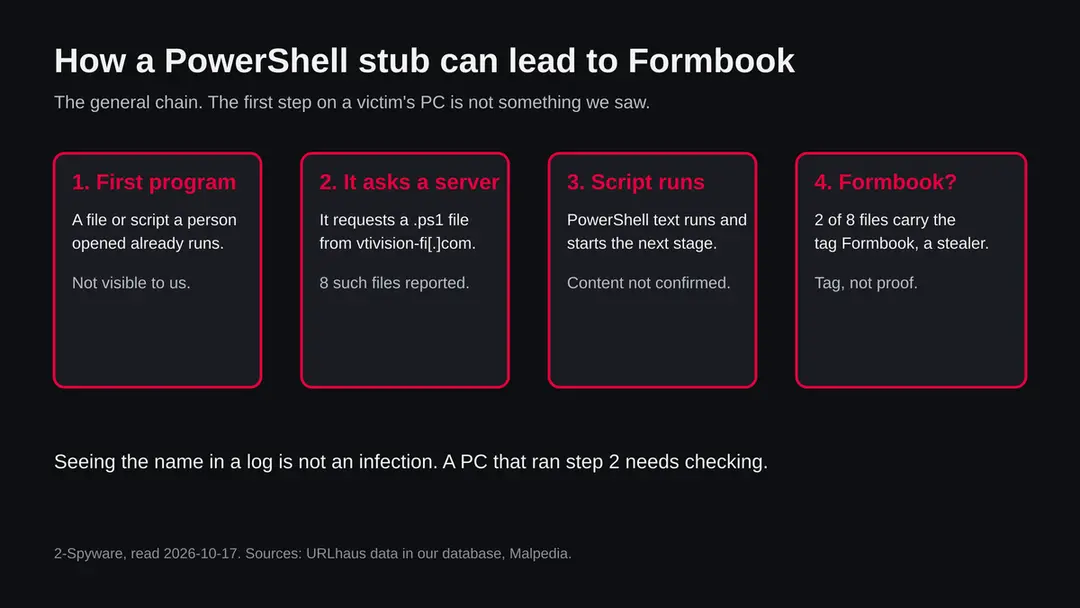
A .ps1 file does nothing while it sits on a server or in your downloads folder. It matters when something on the PC runs it or feeds its text to PowerShell. We did not read the files on vtivision-fi.com, so this section describes the general chain, not these scripts.
- 1
A first program is already running
The request for the script comes from a program, not from a person. It can be a document that was opened and allowed to run content, a shortcut, a script or an installer. Malpedia lists phishing emails, trojanized OneNote documents, Excel documents that exploit an Office flaw and PowerShell droppers among the ways Formbook has been delivered, each in a separate report.
- 2
It asks the server for a script
The first program contacts the address and reads the text of the .ps1 file, often straight into PowerShell without saving it. This is why a file listed on a server can matter even when nobody ever sees it on disk.
- 3
The script starts the next stage
The name stub suggests a short piece whose job is to load something larger. That is our reading of the file name, not a finding. What the stub loads on this server is not known to us.
- 4
A stealer may follow
Two of the eight files carry the tag Formbook. Malpedia describes Formbook as an information stealer and form grabber sold as a service, with targets that include Chrome, Firefox, Opera, Thunderbird, Outlook, Internet Explorer and Safari. It lists the family under the alias XLoader as well.
The useful defences are therefore earlier (do not run the first program) and later (notice the stealer and change your logins). The script itself is a short middle step.
What Formbook is, from the sources we read
Formbook is an information stealer for Windows that criminals buy or rent. Our sources are Malpedia, a research catalogue, and the Microsoft Security Intelligence list of detection names. Neither tells us what the files on vtivision-fi.com contain.
| Question | What the sources say | Source |
|---|---|---|
| What is it? | An information stealer and form grabber, described in a 2018 reference as Malware as a Service; the catalogue lists it together with the alias XLoader | Malpedia, read 17 October 2026 |
| How old is it? | No first seen date is given on the page. The earliest dated reference is a 2016 post on a form grabber and the earliest named analysis is from 2017 | Malpedia |
| What does it go after? | Reference titles speak of data theft and form grabbing; a 2016 reference lists browsers and mail programs (Chrome, Firefox, Opera, Thunderbird, Outlook, Internet Explorer, Safari) as targets | Malpedia |
| How has it been delivered? | Phishing emails, trojanized OneNote documents, Excel documents exploiting a known Office flaw, PowerShell droppers and encrypted spreadsheets, each in a separate report | Malpedia |
| How does it hide? | A packer with a RunPE routine, which starts a program and replaces its contents in memory, is described for the family | Malpedia |
| Which Microsoft names exist? | Trojan:Win32/Formbook (listed as severe, updated 7 January 2019) and TrojanSpy:Win32/FormBook (severe, updated 5 September 2018) | Microsoft Security Intelligence list |
| Is every tag correct? | Not known. The tag on these two files was set by a reporter and we did not open the files | Not available |
| Which build is this site's? | Not known | Not available |
What vtivision-fi.com (PowerShell stub files, Formbook tag) can steal or download
What a stealer of this kind can take from a Windows PC
The list below is what the family is described as going after. It is not a statement about what any file on vtivision-fi.com did, because we did not open them.
Reported as possible for the Formbook family
- Data typed into web forms
- Saved logins in browsers
- Mail program data
- Passwords that pass through the browser
- Extra malware loaded after it
| Data | Detail | Source |
|---|---|---|
| Form data | The family is called a form grabber: it reads what is typed into web forms | Malpedia reference titles |
| Browser and mail data | A 2016 reference lists Chrome, Firefox, Opera, Thunderbird, Outlook, Internet Explorer and Safari | Malpedia |
| Anything beyond that | We did not find a source we could read in full that lists more, so we do not claim more | Not available |
What this can cost you
Reading this page or seeing the name costs nothing. The risks below apply to a Windows PC where a program fetched one of these scripts and a stealer then ran.
- High
Passwords and accounts
A stealer that reads forms and saved logins gets the passwords you type and those the browser stores. Changing passwords on the infected PC does not help; the new ones can be read the same way.
- High
Banking and shop logins
Card numbers and bank logins typed into web forms are the kind of data a form grabber exists for. Watch statements and turn on alerts.
- Medium
Email
Mail program data is on the list of targets. Email is the key to resets for every other account, so treat it first.
- Medium
More malware on the same PC
A short stub that loads a larger stage can load anything, not only one family. We do not know what these stubs load.
- Low
Nothing, if you only saw the name
A name in a block list, a log or a warning is not an infection.
What you may notice, and what you may not
Stealers are built to be quiet. The signs below follow from how such programs work; none is certain, and most victims notice nothing until an account is misused.
| Sign | What it means |
|---|---|
| A PowerShell window that flashes and closes | A script was run. It also happens with normal admin tools, so it is a reason to look, not a proof |
| A scheduled task or startup entry you did not make | Many malware families start again after a restart this way. We do not know whether these scripts do |
| A Defender detection with the name Formbook | Microsoft lists Trojan:Win32/Formbook and TrojanSpy:Win32/FormBook. A detection with such a name is a reason to run the full checks below |
| Accounts you did not touch | Logins from new places, password reset emails and messages sent from your accounts. This follows from stolen logins; it is our reading |
| Nothing at all | A stealer that runs in memory and sends data out once can leave no visible sign |
How to check the PC for vtivision-fi.com (PowerShell stub files, Formbook tag)
How a person ends up asking for these files
Nobody visits vtivision-fi.com on purpose. The request comes from a program, so the real question is how that program got on the PC. We cannot say for this server; the routes below are the ones Malpedia's references list for Formbook.
- 1
An Office attachment that wants content enabled
Malpedia lists Excel documents that exploit an Office flaw and OneNote documents carrying a trojan. Opening the file and clicking to allow content or to open an embedded item is what starts the chain.
- 2
A phishing email with a link or a file
Several references in the catalogue (2022, 2025) describe phishing emails as the way in. The message pretends to be an invoice, an order or a shared document.
- 3
A script that was pasted or run by hand
PowerShell droppers are on the same list. A page that tells you to copy a line into a Windows terminal to fix something or prove you are human is the version a person runs themselves. We have no evidence that this happened with vtivision-fi.com.
Check your PC before you delete anything
Start with the question that matters: did something on this PC contact vtivision-fi.com, or did you open an unexpected Office attachment, script or installer, or paste a command from a web page? If you saw the name in a firewall or DNS log on your own network, the device that asked is the one to check. If the answer is yes or you are not sure, do the checks below. None of them deletes anything.
While you check, stop using the PC for banking, email, work or crypto, and disconnect it from the network if you can.
- 1
Disconnect first
Turn off Wi-Fi or unplug the network cable. A stealer or a loader needs the connection to send data out or fetch more.
- 2
Find which device asked for the address
If you came here from a log, a router page or an alert, note the device and the time. Only that device is in question, not every device on the network.
- 3
Open Protection history
In Windows Security > Virus & threat protection > Protection history, look for a detection called Formbook, a PowerShell related detection, or anything blocked or quarantined around the time of the first contact. Microsoft says the results of an offline scan also appear there.
- 4
Open Task Scheduler
Press Start, type Task Scheduler and open it. Look in Task Scheduler Library for tasks you do not know, with random names, or that start PowerShell or a program from a user folder. Do not delete yet; write the name and the program it runs.
- 5
Look at Startup apps
Go to Settings > Apps > Startup and look for names you did not install. Entries here start with your Windows sign in.
- 6
Look at running processes
Open Task Manager and look at the Processes tab for names you do not know, or for a PowerShell or other system program using the network with no reason. Normal Windows programs can be abused, so a known name is not a proof of safety, and an empty list does not clear the PC.
- 7
Check your accounts from another device
Look at the sign in activity of your email, bank and exchange accounts. The FTC lists unexpected changes to email, phone number or password and unknown login attempts as warning signs. This is quicker than any file check.
- 8
A scan helps, but it does not clear the PC
A scan with Microsoft Defender or another product can find known files. Treat a clean result the way you treat a clean site test: one data point. We did not infect a PC, so the order of the plan is our judgement from Microsoft's and the FTC's pages, not a tested result.
How to remove vtivision-fi.com (PowerShell stub files, Formbook tag)
How to remove vtivision-fi.com
A loader's job is to install other malware, so treat the PC as infected with more than one program until the scans are clean.
Step 1: Delete scheduled tasks that bring it back
Programs like vtivision-fi.com add a scheduled task so they return after an uninstall or reopen a page at every sign-in. Start Task Scheduler, open Task Scheduler Library and sort by Last Run Time to see what ran recently.
On the Actions tab, a program in a user folder, a script or a web address is a warning sign; right-click such a task and choose Delete.
Tasks with names copying Google, Edge or Windows updaters but pointing to an odd folder are typical. The tool looks the same in Windows 11 and Windows 10.

Windows 11: Task Scheduler Library, the task selected, the Actions tab shows the file it runs. Full procedure with screenshots: Remove what malware leaves behind in Windows
Step 2: Remove it from startup
Press Ctrl + Shift + Esc to open Task Manager and select Startup apps (Windows 11) or the Startup tab (Windows 10). Disable entries you do not recognise, especially ones with no publisher or with a name that copies a Windows component.
Right-click an entry and choose Open file location to see where it runs from: programs in
%AppData%or%Temp%deserve a closer look. Some entries are not listed there but in the registry Run keys, which the procedure below shows how to check.Full procedure with screenshots: Stop apps from opening at startup On uGetFix
Step 3: Delete the folders left behind
Uninstalling often leaves the program's folders, and some threats reinstall themselves from them.
Press Windows + R, type
%LocalAppData%and press Enter, then do the same for%AppData%and %ProgramData%, and look for folders named after vtivision-fi.com, its publisher or created on the day the problem started. Delete those folders, and check C:\Program Files and C:\Program Files (x86) too.If Windows says a file is in use, end it in Task Manager or delete the folder after a restart in Safe Mode. The folders are the same in Windows 11 and Windows 10.
Full procedure with screenshots: Remove what malware leaves behind in Windows
Step 4: Scan the PC, then run the offline scan
A scan finds the parts of vtivision-fi.com that the manual steps cannot see. In Windows Security > Virus & threat protection > Scan options, start a Full scan and quarantine what it reports.
Follow it with Microsoft Defender Antivirus (offline scan) > Scan now, which restarts the PC and checks the disk while Windows and the malware are not running.
It takes about 15 minutes and works the same in Windows 11 and Windows 10. If either scan finds something, run the full scan again after removal until it comes back clean.

Windows 11: Windows Security > Virus & threat protection > Scan options. Full procedure with screenshots: Run a Microsoft Defender Offline scan
Step 5: Change passwords from another device and sign out other sessions
Vtivision-fi.com can copy saved passwords, cookies and session tokens and send them out in seconds, so cleaning the PC does not undo the theft.
Change your passwords on a device that was never infected, starting with the e-mail account, since every other reset goes through it. On each account, end all other sessions and check the recovery e-mail, phone number and forwarding rules.
Then turn on two-step verification. Sign in on the Windows 11 or Windows 10 PC again only after the offline scan is clean.
Full procedure with screenshots: Turn on two-step verification / secure a hacked account
If you use a Mac, an iPhone or an Android phone
The file type, the tags and the family name all describe a Windows threat. We found nothing that says the files on vtivision-fi.com affect anything else.
| Your device | What we know | What to do |
|---|---|---|
| Mac | The files are PowerShell scripts and the tag names a Windows stealer. We did not open them | Nothing to remove for this threat. Do not follow the Windows steps on a Mac |
| iPhone or iPad | No source we read ties these files to iOS | Nothing to remove. If you typed passwords on a suspicious page, change them |
| Android | No source mentions it | Nothing to remove for this threat; change passwords if you entered any |
If you own vtivision-fi.com or the server behind it
A seven year old domain with an open folder can be a purpose made malware host or a real site that was taken over. We cannot tell which. If this is your site, treat it as hacked until you have proof otherwise.
- 1
Take the folder offline
The listing starts in the web root and the files sit in a folder with a random three part path. Remove the folder, turn off directory listing in the web server settings, and keep a copy of the files for a specialist, because the copy shows how the break in happened.
- 2
Find the way in
Check the logs for the first request or upload that created the folder, the accounts that logged in around that time, and any plugin, panel or remote login that was outdated. We have no data on how this server was entered.
- 3
Change every login
Change the hosting panel, FTP or SSH, database and admin passwords from a clean device, and remove accounts you do not know.
- 4
Ask for a review
After the clean up, ask the hosting company to check the server and ask the people who reported the address to look again. Registrar and hosting records for this domain are held by GoDaddy.com, LLC according to RDAP.
After removal: passwords, accounts and prevention
After a clean PC: protect what was taken
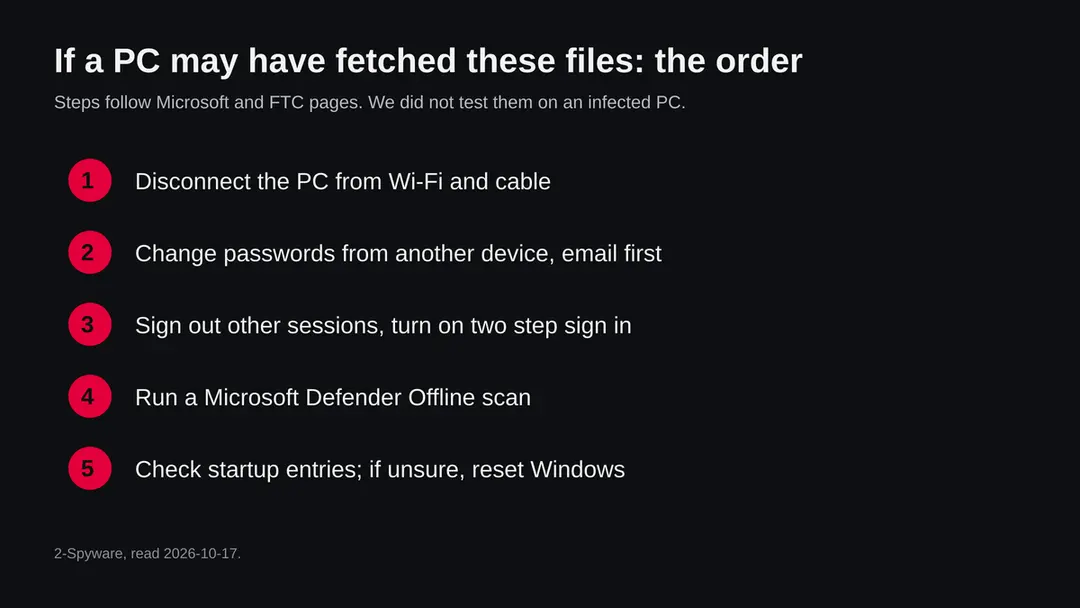
The PC is one half. The other half is everything you typed or stored on it while a stealer may have been there. The order matters: another device first, then the PC.
- 1
Change passwords from a clean device
Use a phone or another computer you trust. Start with email, because it resets everything else, then bank, work, cloud storage and crypto. Anything typed on the PC while a stealer was there may already be known.
- 2
Sign out other sessions and turn on two step sign in
The FTC says to change the password to a long one, sign out of all devices so anyone else logged in is removed, and turn on two factor authentication if it is offered. It also says to confirm that the recovery email and phone number are yours and to check mail for forwarding rules you did not create.
- 3
Move crypto first if a wallet was on the PC
If a seed phrase or wallet file was ever on the PC, assume it is known. Create a new wallet and recovery phrase on a clean device and move the funds there.
- 4
Run Microsoft Defender Offline
Microsoft says to open Windows Security > Virus & threat protection > Scan options, choose Microsoft Defender Offline scan and select Scan now. Save your work first: you are signed out, the PC restarts and the scan takes about 15 minutes. It runs outside the usual Windows environment. Results are under Protection history. If BitLocker is on, Microsoft says to suspend it first or the restart may ask for the recovery key. The page also says it does not apply to ARM versions of Windows and needs the Windows Recovery Environment enabled.
- 5
Remove what the check found, with care
If Task Scheduler or Startup apps showed an entry that you can tie to the malware, remove it. If you cannot tell, do not guess: the safe answer is the reset below.
- 6
If you are not sure, reset Windows
Microsoft's recovery page says Reset this PC can be started from Settings or from the Windows Recovery Environment (Troubleshoot > Reset this PC). Keep my files keeps personal files and removes apps and settings; Remove everything removes files, apps and settings. Microsoft calls the reset the most disruptive option, says to back up first and to have the BitLocker recovery key ready. For a PC that may have run a stealer, the full wipe is the answer that does not depend on finding every piece.
- 7
Restore only documents by hand
Copy back documents and photos, not programs, and not a full system image from after the first contact. Install apps from their makers' own sites.
- 8
Rebuild logins in a password manager
Do not let the browser save passwords again on a PC that may have been watched. Use a password manager and an authenticator app or security key for two step sign in.
- 9
Watch your money and your accounts
Check card statements and exchange logs for a few weeks and turn on alerts. The FTC says to report stolen personal information at IdentityTheft.gov, which gives a personal recovery plan.
- 10
Tell the people you message
If your accounts were used to send links, tell your contacts not to open them.
Keep a PC out of this kind of chain
The script is the middle of the chain. Every route we found starts earlier, with a file or a command that a person opened or ran.
Do
- Treat an unexpected Office attachment that asks you to enable content or macros as an attack, and close it.
- Keep Windows and Microsoft Defender updated; the offline scan uses the latest definitions.
- Show file endings in File Explorer so a script posing as a document is visible.
- Get programs from their makers' own sites or from the Microsoft Store.
- Use a password manager and two step sign in, so one stolen password is not enough.
- Keep a backup of documents on a disk that you unplug.
Don't
- Do not open attachments from senders you do not expect, even when the file looks like an invoice or an order.
- Do not paste a command from a web page into Windows Terminal or the Run box because a page says it fixes an error or proves you are human.
- Do not run cracked programs or bundles from sites that promise free versions of paid software.
- Do not change your passwords on the PC you suspect.
- Do not rely on a quiet scan to say that you are safe.
Questions about vtivision-fi.com (PowerShell stub files, Formbook tag)
What is vtivision-fi.com?
It is a web address that URLhaus, the malware tracking project run by abuse.ch, lists for eight PowerShell files named *secured_stub.ps1, all added on 16 October 2026. Two of them are tagged Formbook.
It is not a program on your PC and not a site anyone is meant to browse. Our plain request on 17 October 2026 got an open folder listing titled Index of /. We did not download the files, so what they contain is not confirmed by us.
Is vtivision-fi.com safe to open?
No. Do not request files from it, and do not run anything that does. Our request got status 200 and a bare folder listing, and the URLhaus rows are marked offline, which together prove nothing about safety: a server that hands out malware may answer only some visitors, and a file offline today can come back.
The rating comes from the eight URLhaus reports and their tags, not from our one request.
Is vtivision-fi.com a virus?
The address is not a virus; it is a place that served script files. A virus or trojan only matters if a program on your PC asked for those files and ran them.
Two files carry the tag Formbook, the name of a stealer for Windows. If you only saw the name in a log or a warning, you are not infected by that alone. If you opened something unexpected, follow the checks on this page.
What is a secured_stub.ps1 file?
It is a PowerShell script, a plain text file that Windows can run. The URLhaus rows tag it ascii, powershell and ps1. The word stub suggests a short piece that loads something larger, but that is our reading of the name, not a finding, because we did not open any file.
Seven of the eight names carry a short prefix (oj, FP, 1313, DE, UGT, KP, DT), which looks like variants for different targets or campaigns.
What is Formbook?
Formbook is an information stealer and form grabber for Windows. Malpedia, a research catalogue, describes it as Malware as a Service, lists the alias XLoader and cites reports of delivery by phishing emails, OneNote and Excel documents and PowerShell droppers.
A 2016 reference lists browsers and mail programs among its targets. Microsoft lists the names Trojan:Win32/Formbook and TrojanSpy:Win32/FormBook. Whether the two tagged files here really carry it is not confirmed.
I saw vtivision-fi.com in my firewall or DNS log. Am I infected?
Not necessarily, and the name alone proves nothing. It does mean that a device on your network asked for it, and a person does not usually do that by hand. Find which device it was, disconnect it, and run the checks on this page:
- Protection history
- Task Scheduler
- Startup apps
- a Microsoft Defender Offline scan
Do the account changes from another device, not from the one you suspect.
How do I remove Formbook or this script from Windows?
Change your passwords from another device first. Then run a Microsoft Defender Offline scan (Windows Security, Virus and threat protection, Scan options), check Task Scheduler and Startup apps for entries you did not make, and remove the ones you can tie to the malware.
If you are not sure, reset Windows with Remove everything and restore only documents. We followed Microsoft's pages for this and did not test the steps on an infected PC.
What can a stealer like Formbook see and take?
According to Malpedia's references, it reads what you type into web forms and goes after data of browsers and mail programs. We found no source we could read in full that lists more, so we claim no more.
Treat every password you typed and every login the browser saved on that PC as known, and change them from another device. The person who runs it decides what to do with the data.
Does vtivision-fi.com affect Mac, iPhone or Android?
We found nothing that says so. The files are PowerShell scripts and the tag names a Windows stealer. On a Mac, iPhone or Android phone there is nothing to remove for this threat.
If you typed a password on a suspicious page, change it and turn on two step sign in. If you own the site, see the section for owners on this page.
Will Fortect remove vtivision-fi.com?
Fortect scans Windows for malware and unwanted programs and repairs the system files and settings they change, and its free scan shows what it finds on your PC before you decide anything.
For vtivision-fi.com, follow the plan above as well: the browser steps take back permissions and settings that no scanner treats as a threat, and uninstalling the program that brought it removes the source.
Run Microsoft Defender's full scan and, if anything was found, its offline scan as a second opinion. If the symptoms are gone after the plan and both scans are clean, there is nothing more to do.
Sources
- Malpedia: Formbook (win.formbook), alias XLoader (read October 17, 2026)
- Microsoft Security Intelligence: threat list entries Trojan:Win32/Formbook and TrojanSpy:Win32/FormBook (read October 17, 2026)
- Microsoft Learn: Microsoft Defender Offline scan in Windows (updated 25 August 2026) (read October 17, 2026)
- Microsoft Support: Recovery options in Windows (Reset this PC) (read October 17, 2026)
- FTC: Email or social media hacked? Here's what to do (read October 17, 2026)