
Is Wave Browser malware? What it is and how to remove it from Windows
Wave Browser (WaveBrowser, from Wavesor Software) is not a classic virus, but Malwarebytes detects it as a potentially unwanted program, PUP.Optional.Wave, and says some copies are installed without the user's consent. If you did not choose it, uninstall it from Settings > Apps > Installed apps, remove what installed it, then scan and reset your own browser's search and home page.
Facts checked October 13, 2026. Removal steps tested on Windows 11 (26H2) and checked against Microsoft's and the browser makers' current documentation.
Automatic
Get a free scan and check if your PC is infected.
Fortect finds malware, unwanted programs and the Windows damage they leave behind, and repairs it in one pass.
Do it yourself · free Remove Wave Browser yourself 5 steps, about 15 minutes, no software needed.
Start the steps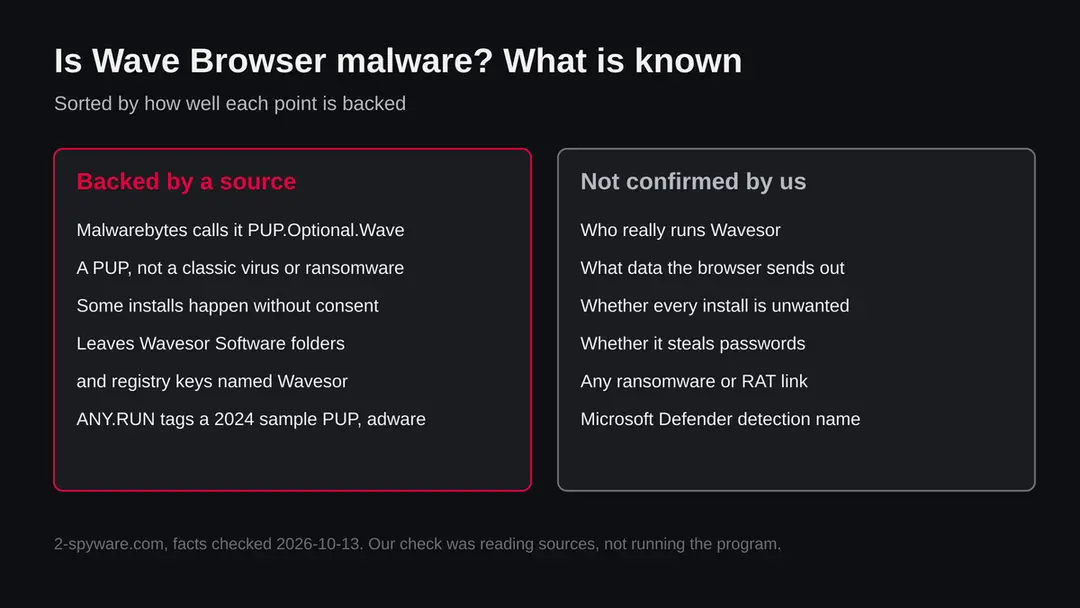
Wave Browser: summary
| Type | Potentially unwanted program (a browser); not ransomware, not a known data stealer |
|---|---|
| Risk | Medium: unwanted when it arrives without your choice; what it sends out is not documented in the sources we read |
| Symptoms | A WaveBrowser icon you did not add, opening at startup, prompts to become the default browser, hard to uninstall |
| How to get rid of it | Close it, uninstall it in Installed apps, remove what came with it, clean startup and leftovers, scan, then check your own browser |
| Our check (13 October 2026) | Desk research only: we did not run the program. A quiet result would not clear it, and we ran no test |
| First seen | Not established in the sources we read; a sandbox run of version 1.5.18.3 is dated October 2024 |
| Removal | Scan the PC with security software to find and remove the malware and anything installed with it. Fortect scans Windows for malware and repairs the system files and settings it damaged. Remove it nowTo use the full-featured product, you have to purchase a license for Fortect. The scan is free. |
Show 7 more facts
| Detection | Malwarebytes: PUP.Optional.Wave. Microsoft: no name for Wave Browser found; Microsoft names unwanted apps in the form PUA:Win32/Name, so check Protection history for a PUA:Win32/ entry |
|---|---|
| Traces | Wavesor Software folders, WaveBrowser shortcuts, registry keys named Wavesor and WaveBrowser |
| Distribution | Its own download page; bundled software; installs without consent according to Malwarebytes |
| Damage | No file damage reported in the sources we read |
| Name | Wave Browser |
| Evidence | 0 write-ups by security sites; details still limited |
| Facts checked | 13 October 2026 |
Facts checked on 13 October 2026 against the Malwarebytes detection page, Microsoft's and Google's help pages, an ANY.RUN public report summary and one consumer guide. Not done: we did not install or run Wave Browser, and we could not confirm who operates it or what data it sends.
Is Wave Browser malware? The short answer
Wave Browser is a web browser that security vendors treat as an unwanted program, not as a virus that destroys files. Malwarebytes classifies it as a potentially unwanted program (PUP) under the detection name PUP.Optional.Wave, and its own page says the browser is also distributed through channels that install it without the user's consent. That second point is what turns a browser nobody forces on you into a problem for the people who find it on their PC without having chosen it.
The honest answer therefore has two halves. If you went to its download page, installed it on purpose and like it, you have a working Chromium style browser, and Malwarebytes itself explains how to allow it. If it appeared on its own, came with another download, or keeps opening at startup, treat it as unwanted software:
- remove it
- find out what put it there
- check your real browser's settings
We did not run the program for this guide. Everything below comes from the sources listed at the end, and where the public record is silent we say so.
- What it is
- A web browser branded WaveBrowser, shipped by a company that names itself Wavesor Software. Its files sit in folders called Wavesor Software
- Verdict by a security vendor
- Malwarebytes: potentially unwanted program, detection name PUP.Optional.Wave
- Not
- Ransomware, a file encryptor or a remote access tool. We found no source that says it is any of these
- Why people call it malware
- It can arrive without being asked for, it can be hard to get rid of, and it may change how searching and browsing work
- What we could not confirm
- Who exactly stands behind it, what data it sends, and whether Microsoft Defender has a named detection for it
Is Wave Browser dangerous? What it collects
What our check was, and what it was not
Our check of this subject was reading, not running. The subject is a program name, not a web address, so our server made no request, and we did not install Wave Browser in a test machine for this guide. A site test from our server would say nothing about what the installed program does on your PC.
Wave Browser · desk research · 13 October 2026
- Security vendor classificationMalwarebytes lists the browser as PUP.Optional.Wave, a potentially unwanted program.
- Installs without consentMalwarebytes says the browser is also spread through channels that install it without the user's consent.
- Sandbox reportA public ANY.RUN run of a WaveBrowser installer (version 1.5.18.3, dated October 2024) carries a malicious activity verdict with the tags PUP and adware and the company name Wavesor Software. We read the summary, not every detail of the run.
- Ransomware or encryptionNo source we read says it encrypts files.
- Two similar addressesOne consumer guide reports two sites with the same name: wavebrowser[.]co, which it links to the PUP, and wavebrowser[.]com, which it calls potentially safe. We could not verify that split ourselves.
- Microsoft Defender nameWe found no Microsoft detection name for it. Do not assume Defender stays silent: its protection against potentially unwanted apps can be switched on or off.
Medium risk Unwanted software that is hard to remove and may change your browsing, not a known data wiper. Desk research only: a quiet result in a test would never clear a program, and we ran none. Nothing here proves what the version on your PC does.
Signs that Wave Browser is on your PC without your choice
One sign alone is weak evidence. Several together, especially after you installed something free, point to Wave Browser or a similar bundled browser.
What to look for
- WaveBrowser shortcut on the desktop or taskbar
- Folder Wavesor Software in AppData or Program Files
- WaveBrowser in Installed apps
- WaveBrowser opening at sign-in
- Prompts to make it the default browser
- Registry keys named Wavesor or WaveBrowser
- Reinstalls itself after you remove it
The folder and registry names come from the Malwarebytes detection page.
| Where | Path or name | Why it matters |
|---|---|---|
| Shortcuts | WaveBrowser.lnk in the Quick Launch and Programs locations | Shows the browser was set up for launching |
| Folders | %APPDATA%\Wavesor Software, %PROGRAMFILES%\Wavesor Software and a Wavesor Software folder in the user profile | Where the program and its data live |
| Registry | HKEY_CURRENT_USER\SOFTWARE\Wavesor, HKEY_CURRENT_USER\SOFTWARE\WaveBrowser and an Uninstall entry named WaveBrowser | Used by the uninstall list and by settings |
What if I want to keep Wave Browser?
That is your choice, and Malwarebytes explains how to allow the browser if you want it. Open Malwarebytes, go to Detection History and add it to the Allow List, which also lets it connect to the internet for updates.
Before you do, think about why you want it. It is built on a standard browser engine and does what a browser does, and its page advertises speed and security. Against that, a security vendor files it as unwanted, and we have no independent audit of what it collects.
If privacy matters to you, a browser from a large, well documented vendor with a public privacy policy is a safer default. Keep the one you chose, not the one that arrived.
What Microsoft Defender and other scanners call it
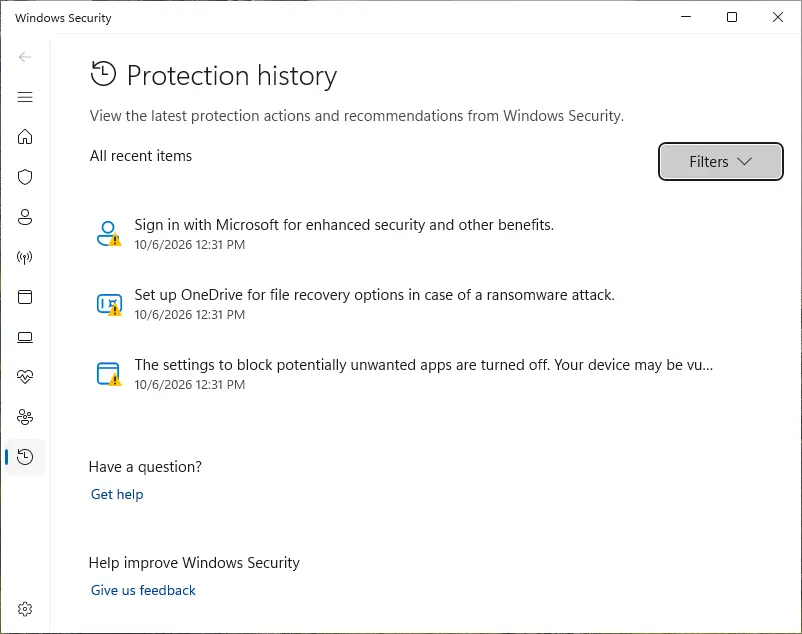
We found no Microsoft detection name for Wave Browser, and we will not guess one. Microsoft names unwanted applications in the form PUA:Win32/Name, where PUA stands for potentially unwanted application, so an entry beginning with PUA:Win32/ in your Protection history is the kind of record to look for. Whether that entry names Wave Browser on your PC depends on your Defender version and on whether its protection against unwanted apps is switched on.
Malwarebytes names it PUP.Optional.Wave. Other vendors may use other names, and a name from one vendor does not prove a second scanner agrees. If two scanners disagree, trust the facts you can check yourself:
- the program in Installed apps
- the Wavesor Software folders
- the install date
A detection also does not tell you how the program arrived, so keep looking at what else was installed that day.
| Scanner | Name we can source | How to look it up |
|---|---|---|
| Malwarebytes | PUP.Optional.Wave | Detection History in Malwarebytes |
| Microsoft Defender | No name found for Wave Browser; the naming form is PUA:Win32/Name | Windows Security > Virus & threat protection > Protection history |
| ANY.RUN sandbox | Tags PUP and adware on a 2024 installer; not a detection name | The public report listed in our sources |
- 1
Open Protection history
Open Windows Security > Virus & threat protection and click Protection history. Items are sorted with the newest first, and each shows the date and what Defender did.
- 2
Read the entry, do not just click Allow
Select an entry to see its name, the file path and the action taken. A path under a Wavesor Software folder ties the entry to this program. Do not choose Allow on device for something you did not install on purpose.
- 3
Write down the install date
The date of the first entry or of the program in Installed apps is your best clue to which installer brought it. Look at other apps from the same day and remove those you did not choose.
Names that get mixed up with Wave Browser
| Name | What it is | Same as Wave Browser? |
|---|---|---|
| WaveBrowser, Wavesor Software | The browser this guide covers | Yes |
| wavebrowser[.]co and wavebrowser[.]com | Two web addresses with the same name. One guide reports that only the .co address is flagged. We could not verify it | The browser's own pages; treat both with care |
| Windows Wave or audio wave drivers | Sound components of Windows or sound hardware | No. A sound driver is not a browser |
| Other bundled browsers | Other rebranded browsers sold or bundled with free software | No, but the removal steps are the same |
What can go wrong
Wave Browser is not described by any source we read as a data wiper or a stealer. The concerns are the ordinary ones of unwanted software, and they are real enough to remove it.
- Medium
A second browser you did not choose holds your browsing
Anything you type or sign into inside it is handled by software from a company you did not pick. We do not know what it sends out, and no source we read tells us.
- Medium
Search and start page changes
Consumer guides report changes to the search engine and home page. We did not see this ourselves, so check your own settings rather than assuming.
- Medium
Whatever installed it may have installed more
If a bundled installer added Wave Browser, it may have added other unwanted programs on the same day. That is why the install date list is the best clue.
- Low
Wasted time and a cluttered system
Extra startup entries, shortcuts and background updaters slow some PCs and make it harder to see what is yours.
- Low
Confusion with real malware
Because it is a PUP, a scanner will quarantine it but it is not a sign the PC is taken over. Do not pay for a cleaner because of this one detection.
How Wave Browser got into your browser
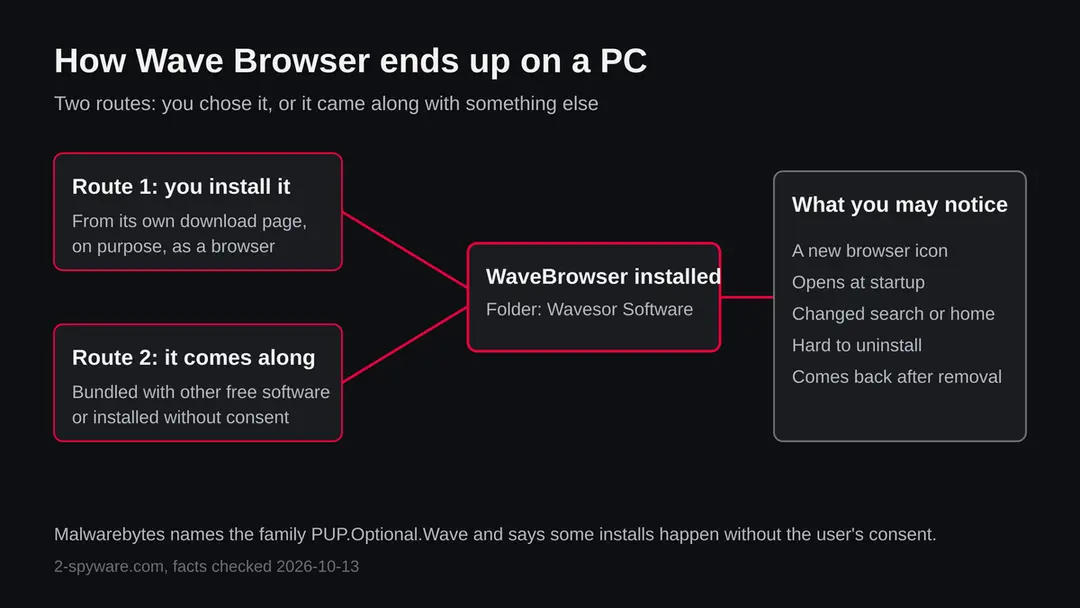
There are two routes, and which one applies to you decides how worried to be. Malwarebytes describes the first (a user installs it) and the second (it is installed without consent) on its detection page.
| Route | What you would see | How to check |
|---|---|---|
| You installed it from its own page | A WaveBrowser icon you remember adding | Settings > Apps > Installed apps, search for Wave |
| Bundled with other free software | WaveBrowser appears the day you installed a free tool or a converter | Sort Installed apps by install date |
| Installed without consent through another channel | A browser you never asked for, a desktop shortcut, and a startup entry | Check Settings > Apps > Startup and the folder %PROGRAMFILES%\Wavesor Software |
| Reinstalled by something else | You uninstall it and it is back after a restart or a few days | Look for other programs installed the same day, and for scheduled tasks |
- 1
A free download offers more than you asked for
Many installers show a second offer on a screen that looks like part of the setup. A box ticked by default can add a browser, a search tool or a toolbar.
- 2
A browser is installed next to yours
WaveBrowser installs under a Wavesor Software folder and creates shortcuts named WaveBrowser. Your own browser is still there, which is why people do not notice it at first.
- 3
It starts to compete for your attention
Reports from users describe it opening on its own, asking to be your default browser and being awkward to uninstall. These are reports, not something we saw.
How to remove Wave Browser
How to remove Wave Browser and get your search engine back
Remove the extension first.
The search settings only stay fixed once nothing on the PC can change them again.
Step 1: Remove extensions you did not add
Wave Browser often works through an extension, so go through the extension list of each browser:
chrome://extensionsedge://extensions- Extensions and themes in Firefox
Switch suspicious extensions off one at a time and reload the page where the problem shows, then remove the one that stops it, and any other you did not add.
Remember the other browsers and profiles on the PC. If Remove is missing or greyed out, a policy forces the extension, which the policy step deals with. Windows 11 and Windows 10 show the same pages.
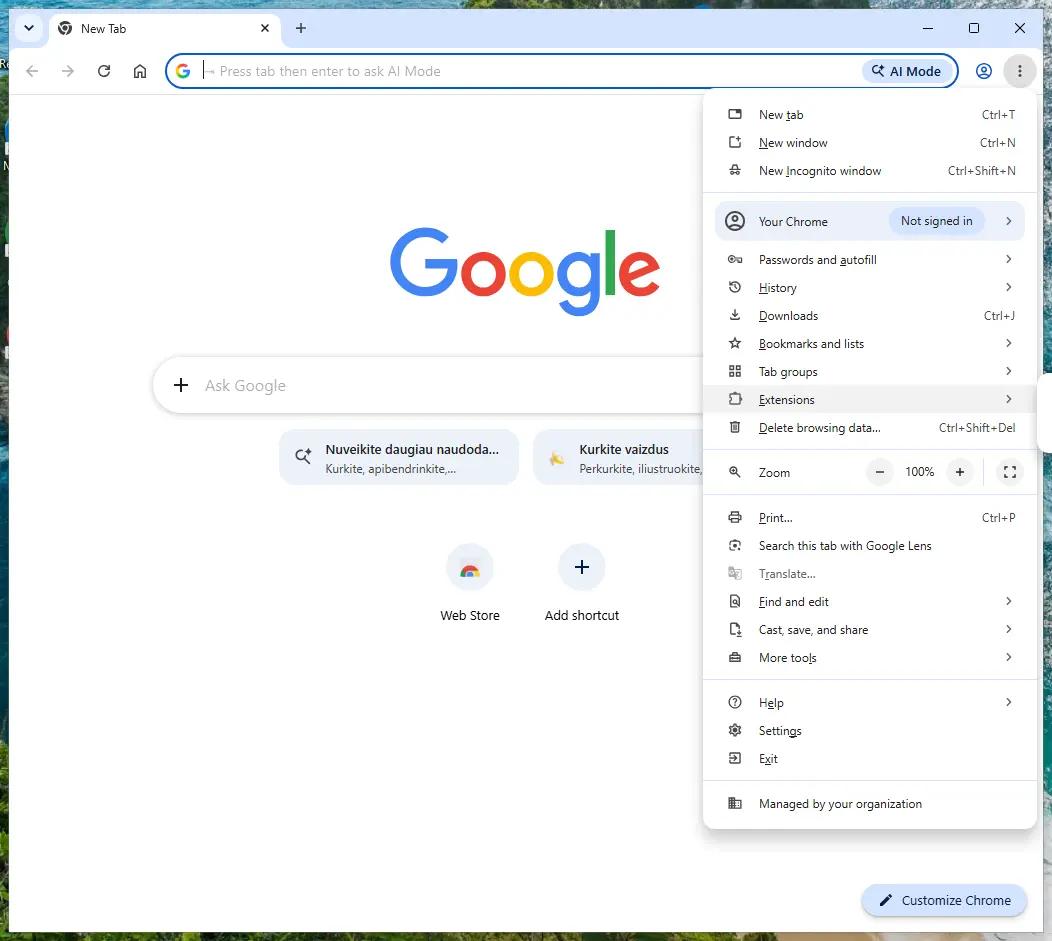
Chrome on Windows 11: More > Extensions > Manage extensions. Full procedure with screenshots: Remove a browser extension
Step 2: Put the search engine back
Wave Browser replaces the browser's default search engine, so searches pass through its own page first. Chrome: Settings > Search engine > Manage search engines and site search, then Make default on Google, Bing or another engine you chose, and Delete on the entries you never added.
Edge has the same list under Manage search engines (search the Settings page for it), and Firefox under Settings > Search.
Look at On startup and the homepage settings too and remove any address you did not set. Nothing in this step differs between Windows 11 and Windows 10.
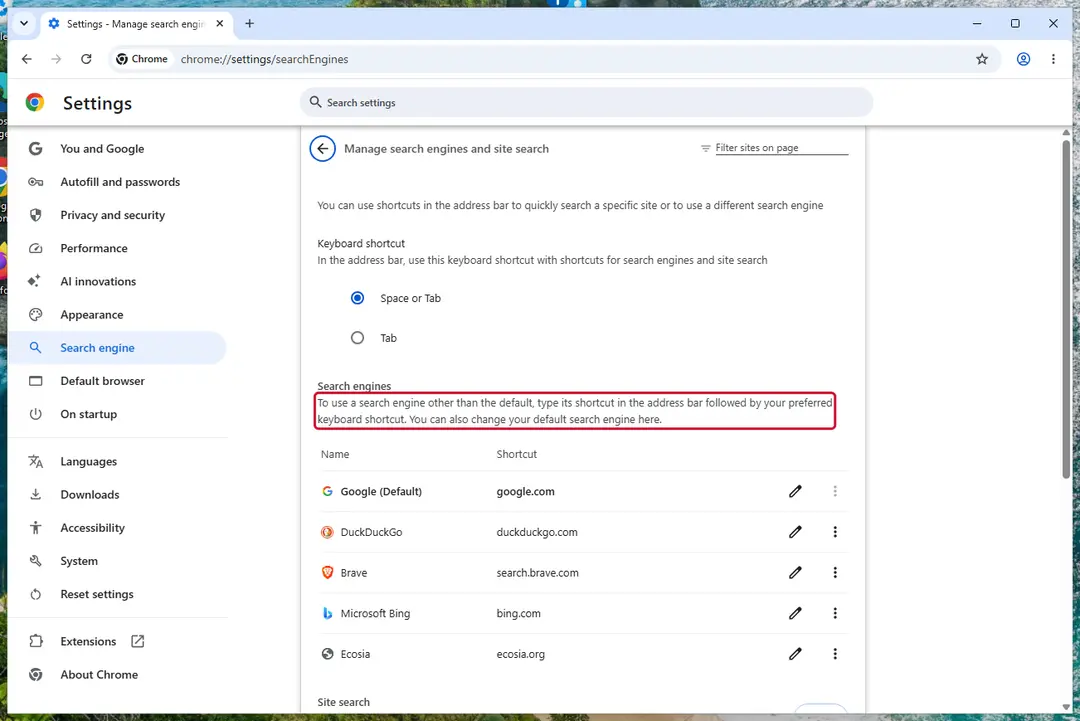
Chrome on Windows 11: check Search engine and On startup. Full procedure with screenshots: Reset a browser and fix a hijacked search engine
Step 3: Uninstall programs you did not mean to install
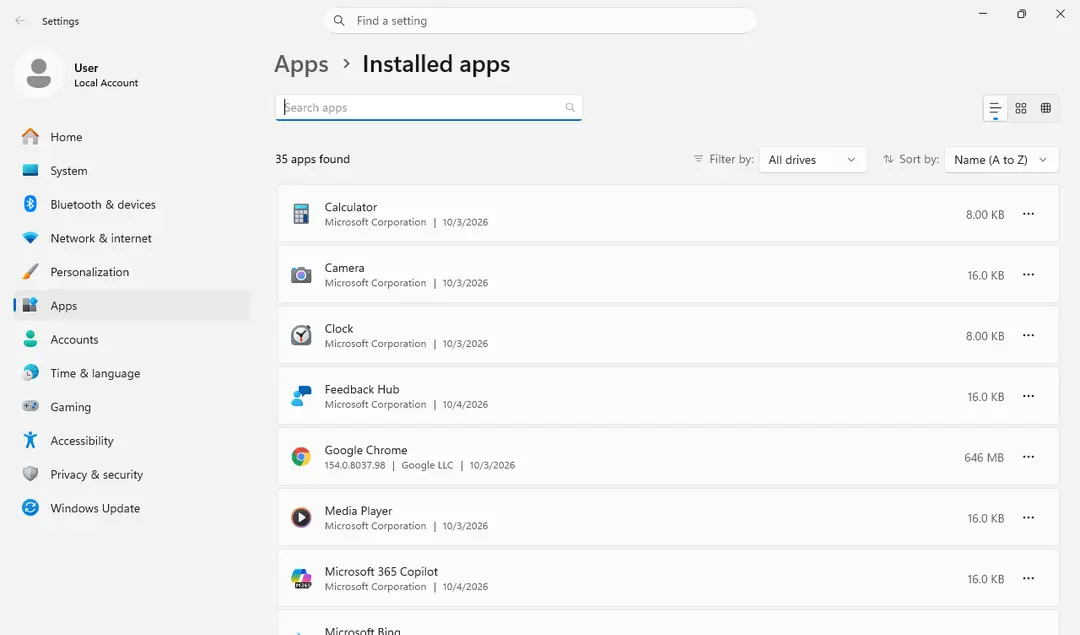
Open Settings > Apps > Installed apps in Windows 11, or Settings > Apps > Apps & features in Windows 10, and sort the list by install date. Look at what appeared around the day the problem started and uninstall every program you do not recognise or did not choose.
Free converters, PDF and video tools, "system optimizers" and unknown browsers are the usual carriers of Wave Browser. If a name is unclear, search for it before you remove it, so you do not uninstall a driver or a Windows component.
Full procedure with screenshots: Uninstall a program or app in Windows On uGetFix
Step 4: Reset the browser
Finish the browser part with a reset, which puts the search engine, start page, new tab page and site permissions back to their defaults and switches extensions off. Chrome: Settings > Reset settings > Restore settings to their original defaults.
Edge: Settings > Reset settings. Firefox: Help > More troubleshooting information > Refresh Firefox, which also removes its extensions. Your bookmarks and saved passwords are kept, and the menus are the same on Windows 11 and Windows 10.
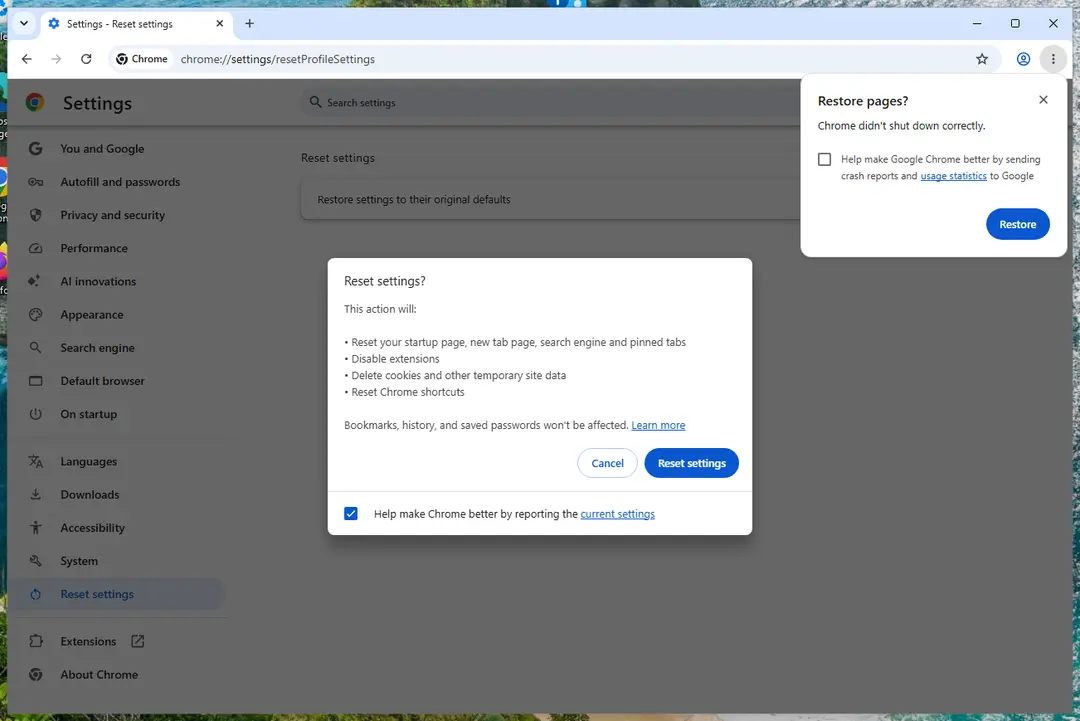
Chrome on Windows 11: Settings > Reset settings. Full procedure with screenshots: Reset a browser and fix a hijacked search engine
Step 5: Scan the PC, then run the offline scan
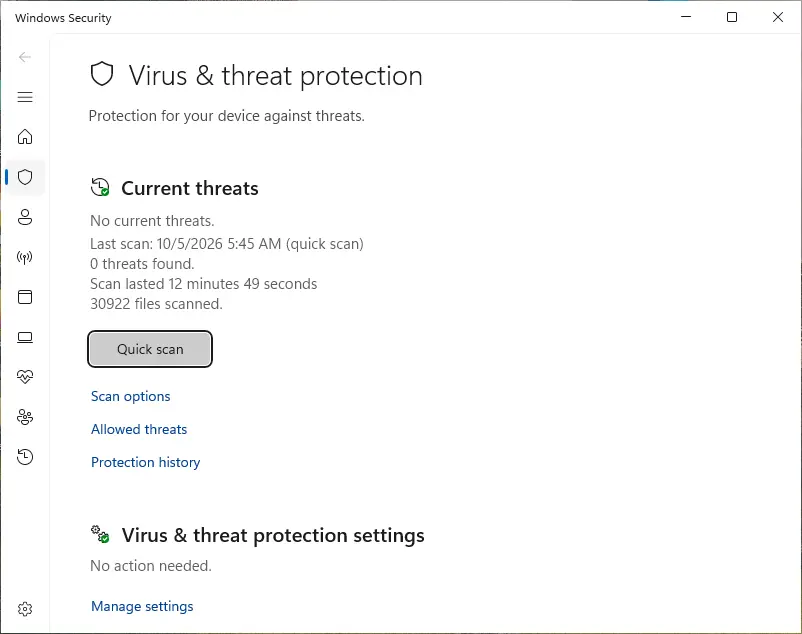
Open Windows Security > Virus & threat protection > Scan options, run a Full scan and remove everything it finds. Then select Microsoft Defender Antivirus (offline scan) and click Scan now: the PC restarts and scans before Windows loads, which finds files that hide while Windows runs.
Save your work first, because the offline scan takes about 15 minutes. Both scans are built into Windows 11 and Windows 10, and a second scanner from another vendor is a useful extra opinion.

Windows 11: Windows Security > Virus & threat protection > Scan options. Full procedure with screenshots: Run a Microsoft Defender Offline scan
How to remove Wave Browser from Windows 11 and 10
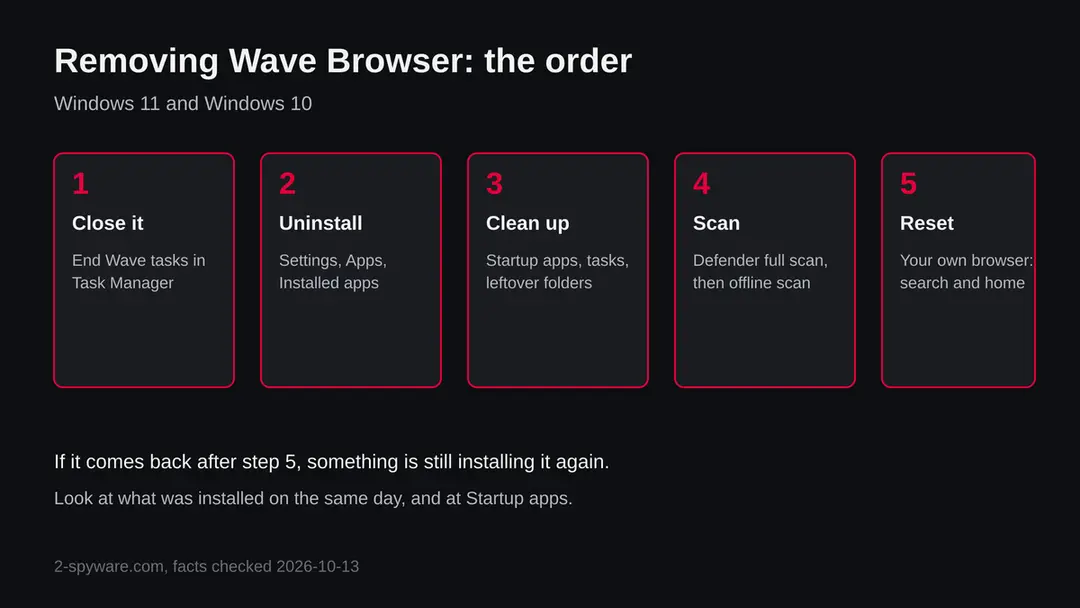
The steps below follow Microsoft's uninstall instructions and Malwarebytes' list of traces. Work in order; each step is short.
- 1
Close Wave Browser and its helpers
Press Ctrl + Shift + Esc to open Task Manager. On the Processes tab, select anything named WaveBrowser or Wave and click End task. Closing it first stops Windows from refusing to remove files that are in use.
- 2
Uninstall it
Open Settings > Apps > Installed apps (Windows 10: Settings > Apps > Apps & features). Find WaveBrowser, open the three-dot More menu and choose Uninstall. If the Settings app cannot remove it, open Control Panel > Programs > Programs and Features, right-click it and choose Uninstall.
- 3
Uninstall what came with it
Sort the same list by install date. Remove anything you did not install on purpose that appeared on the same day as Wave Browser, such as converters, download managers or search tools. If you are unsure of a name, search for the exact name with the word uninstall before you remove it.
- 4
Switch off what starts with Windows
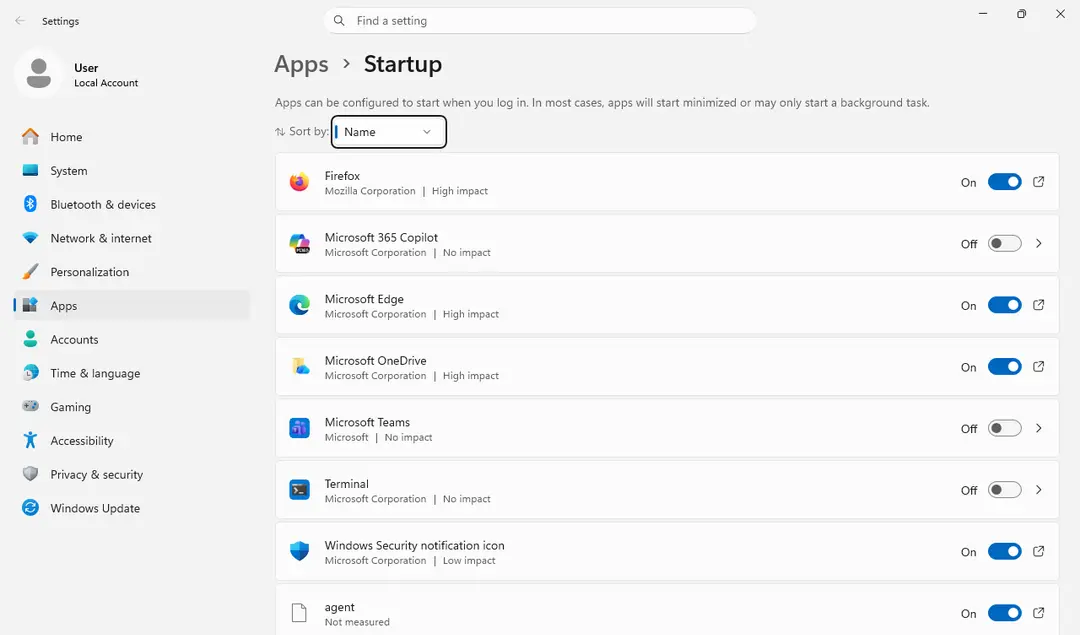
Open Settings > Apps > Startup and turn off any entry you do not recognise that mentions Wave or Wavesor. A startup entry that survives the uninstall is a sign something is still installing it again.
- 5
Look for leftovers
In File Explorer, check whether the Wavesor Software folders listed above still exist, and delete them once the program is uninstalled. Do the same for the WaveBrowser shortcuts on the desktop and in the Start menu.
- 6
Scan the PC
Open Windows Security > Virus & threat protection and run a Full scan. Then choose Scan options > Microsoft Defender Antivirus (offline scan), which finds things that hide while Windows is running. If you use Malwarebytes, run a Scan and click Quarantine for the threats it finds, as the vendor page describes.
- 7
Restart and check again
Restart Windows. Open Installed apps and the Wavesor Software folders once more. If Wave Browser is back, a program or a scheduled task is reinstalling it, and the install date list is where to look.
Check your own browser afterwards
Wave Browser is a separate program, so removing it does not touch the settings of Chrome, Edge or Firefox. Still, if you saw odd searches before, check them.
- 1
Chrome: search engine
Click the three-dot menu, choose Settings, then Search engine, and click Change next to the search engine used in the address bar. Pick the one you want, as Google's help page describes.
- 2
Edge: search engine
Open Settings > Privacy, search, and services > Address bar and search and choose the search engine used in the address bar. Remove entries under Manage search engines that you did not add.
- 3
Extensions
Open
chrome://extensionsoredge://extensionsand remove anything you do not remember installing. A bundled installer can add an extension next to the browser it installs. - 4
Default browser
Open Settings > Apps > Default apps and make sure your own browser is the default for web links.
After removal: keep your search engine and start page
Do
- Download programs from the maker's own site or the Microsoft Store, not from download portals.
- Choose Custom or Advanced setup and untick extra programs, browsers and search settings.
- Check Settings > Apps > Installed apps a few days after you install free software, sorted by install date.
- Keep Microsoft Defender on, and keep its protection against potentially unwanted apps switched on in Windows Security > App & browser control > Reputation-based protection.
- Keep a backup of your documents with File History or OneDrive, so a cleanup never costs you files.
- A VPN hides your address from the sites you visit; it does not stop a browser from being installed.
Don't
- Click through Quick or Recommended setup without reading it.
- Accept offers for a free browser, toolbar or search tool inside another installer.
- Pay for a cleaner because of one PUP detection.
- Delete registry keys by hand without a backup.
Questions about Wave Browser
Is Wave Browser malware or a virus?
It is not a virus in the classic sense, and no source we read says it encrypts files or steals passwords. Malwarebytes classifies it as a potentially unwanted program under the name PUP.Optional.Wave and notes that it is also distributed through channels that install it without the user's consent.
So the best description is unwanted software. If you installed it on purpose, it works as a browser. If it appeared by itself, treat it as unwanted:
- uninstall it
- remove whatever came with it
- scan the PC
We did not run the program ourselves, so we cannot describe its behaviour beyond what the sources say.
How do I remove Wave Browser from Windows 11?
End its processes in Task Manager first. Then open Settings > Apps > Installed apps, find WaveBrowser, open the three-dot menu and choose Uninstall. If that fails, use Control Panel > Programs > Programs and Features, right-click it and choose Uninstall.
Next, sort the list by install date and remove other programs that appeared the same day. Open Settings > Apps > Startup and switch off entries that mention Wave.
Delete leftover Wavesor Software folders, run a Windows Security Full scan, then an offline scan, and restart. Check that it has not returned. On Windows 10 the list is called Apps & features.
Why did Wave Browser install itself?
The likeliest reasons are a bundled installer or a consent-free install channel. Malwarebytes says the browser is distributed through channels that install it without the user's consent, and consumer guides name bundled free software as the usual route. A free tool can include a pre-ticked offer on an install screen that looks like part of the setup.
We cannot tell which route applies to your PC. Sort Installed apps by install date and look at what else appeared the same day; that is often the program that brought it, and it should be removed as well.
Is Wave Browser safe to use?
It is a working browser for many people, but a security vendor files it as unwanted and we have no independent audit of what it collects or sends. Safe is therefore not something we can promise. If privacy matters to you, a browser from a large vendor with a public privacy policy and a long record is a safer default.
If you still want Wave Browser, install it only from its own page, read the permissions it asks for, and do not sign in to important accounts such as your bank or email until you know more.
Why does Wave Browser keep coming back after I uninstall it?
Something is installing it again. Common causes are a program installed the same day that includes it, a startup entry, or a scheduled task.
Check Settings > Apps > Installed apps sorted by install date, and Settings > Apps > Startup. Remove the program that brought it, delete the Wavesor Software folders, and run a Microsoft Defender Full scan and an offline scan.
If it still returns, run Malwarebytes, whose detection page lists the files, shortcuts and registry keys, and check the Task Scheduler for tasks with a name you do not know. As a last resort, back up your files and use Reset this PC.
Does Wave Browser steal passwords or data?
None of the sources we read says that it steals passwords. That is not the same as proof that it does not, because we did not analyse the program and found no independent privacy audit. Any browser handles what you type, including saved passwords.
If Wave Browser was on your PC and you signed in to important sites in it, change those passwords from a clean browser after removal, turn on two step sign in, and look at recent activity on your bank and email accounts. That is a sensible precaution, not a sign of confirmed theft.
Does Microsoft Defender detect Wave Browser?
We found no Microsoft detection name for it, so we cannot say Defender flags it. Defender has protection against potentially unwanted apps, which can block or quarantine software of this kind, but it can be switched on or off, and a result depends on the version.
To check, open Windows Security > Virus & threat protection > Protection history and look for a recent item. To turn the protection on, open Windows Security > App & browser control > Reputation-based protection and switch on the potentially unwanted app blocking. Malwarebytes does list a detection, PUP.Optional.Wave, and offers removal.
Is the website wavebrowser.com or wavebrowser.co safe?
We could not verify either address, because we did not request them. One consumer guide reports that wavebrowser.co is linked to the unwanted program, and that wavebrowser.com is potentially safe, but we have only that one secondary source for the split. Do not rely on it.
Treat any page that offers a browser download with care, download programs only from a vendor you know, and never run an installer you did not look for. If you already ran one, follow the removal steps in this guide and scan the PC.
Will Fortect remove Wave Browser?
Fortect scans Windows for malware and unwanted programs and repairs the system files and settings they change, and its free scan shows what it finds on your PC before you decide anything.
For Wave Browser, follow the plan above as well: the browser steps take back permissions and settings that no scanner treats as a threat, and uninstalling the program that brought it removes the source.
Run Microsoft Defender's full scan and, if anything was found, its offline scan as a second opinion. If the symptoms are gone after the plan and both scans are clean, there is nothing more to do.
Sources
- Malwarebytes: PUP.Optional.Wave detection page (read October 13, 2026)
- Microsoft Support: Uninstall or remove apps and programs in Windows (read October 13, 2026)
- Google Chrome Help: Change your default search engine (no longer online) (read October 13, 2026)
- ANY.RUN sandbox report for a WaveBrowser installer (October 2024) (read October 13, 2026)
- Help Desk Geek: Is Wave Browser Safe? Everything You Should Know (read October 13, 2026)