WinPC Defender (fake) - Removal Guide
WinPC Defender Removal Guide
What is WinPC Defender?
WinPC Defender – scareware software that shows fake alerts

WinPC Defender is another fake anti-spyware application. The main goal of this parasite is to ruin and compromise system integrity and security instead of protecting it and removing malware (as it may seem initially).
The program is a clone of a malicious and infamous application called XP Police Antivirus and works identically. If you have noticed that this app is conducting scans on your system, you should hurry up and eliminate it with all the malicious components.
| Name | WinPC Defender |
| Type | Rogue antivirus, scam, malware |
| Distribution | Trojan Downloaders, fake codecs, Peer-to-peer websites, etc. |
| Operation | Shows false positives and fake scan results in order to mislead users and make them purchase program's “licensed version” |
| Removal | Uninstall the unwanted program manually as explained below of scan your PC with SpyHunter 5Combo Cleaner or another reputable anti-malware |
| System fix | After you delete the rogue, perform a full system scan with FortectIntego repair to fix virus damage and clean your web browsers automatically |
This parasite enters the system after the installation of a trojan application that pretends to be a video codec. In most cases, these malicious files are downloaded from third-party websites that offer free downloads for licensed software, such as warez or torrents.
Thus, in order to prevent infiltration of malicious programs, you should always be extremely cautious and never ignore the warnings of a legitimate security application that should be installed and running on Windows at all times.
Once installed and active, WinPCDefender performs a fake system scan and basically generates misleading pop-up windows and fake error messages attempting to scare the user and hoping to purchase a license for the program. Those who get tricked into buying it also a risk of exposing their credit card information to unknown parties or even cybercriminals.
Therefore, no matter what you do, you should never believe these fake notifications, pop-ups, alerts, and scan results of this rogue. The program itself is the reason why Windows is showing fake notifications on your screen, so you should hurry up and uninstall it. For that, you can follow the instructions below or employ SpyHunter 5Combo Cleaner or another reputable antivirus. Also, to fix virus damage quickly and effortlessly, we recommend using FortectIntego.
WinPC Defender is totally worthless application and should be removed immediately after first appearance. It is obvious that this rogue is unable to detect and of course to remove any kind of infections.
Keep in mind that there could be several malicious apps installed on your system, so scanning it with a reputable antivirus is highly recommended. Besides, cleaning web browsers is something that should be done at all times after malware is eliminated from the PC.
You may remove virus damage with a help of FortectIntego. SpyHunter 5Combo Cleaner and Malwarebytes are recommended to detect potentially unwanted programs and viruses with all their files and registry entries that are related to them.
Getting rid of WinPC Defender. Follow these steps
Uninstall from Windows
-
Click Start → Control Panel → Programs and Features (if you are Windows XP user, click on Add/Remove Programs).

-
If you are Windows 10 / Windows 8 user, then right-click in the lower left corner of the screen. Once Quick Access Menu shows up, select Control Panel and Uninstall a Program.

-
Uninstall WinPC Defender and related programs
Here, look for WinPC Defender or any other recently installed suspicious programs. -
Uninstall them and click OK to save these changes.


Remove from Microsoft Edge
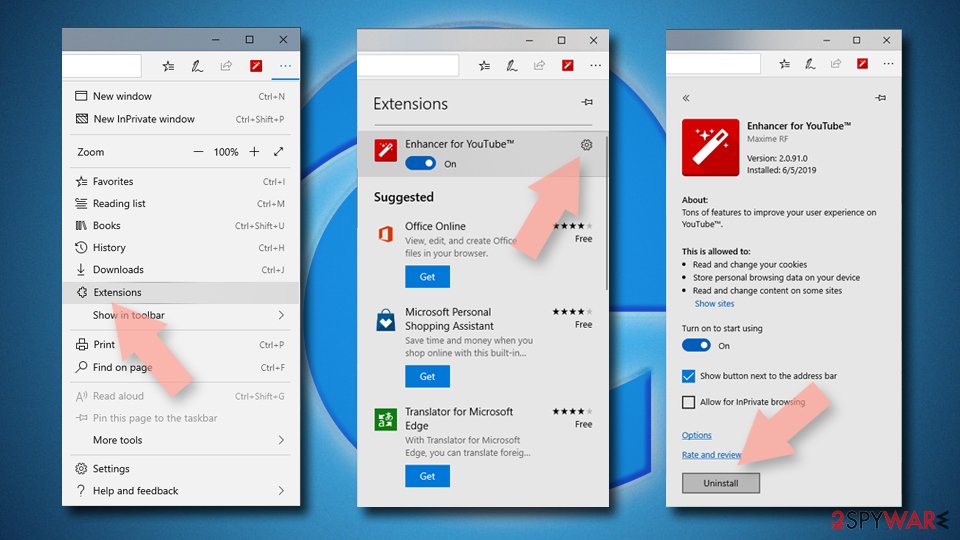
Delete unwanted extensions from MS Edge:
- Select Menu (three horizontal dots at the top-right of the browser window) and pick Extensions.
- From the list, pick the extension and click on the Gear icon.
- Click Remove.

Clear cookies and other browser data:
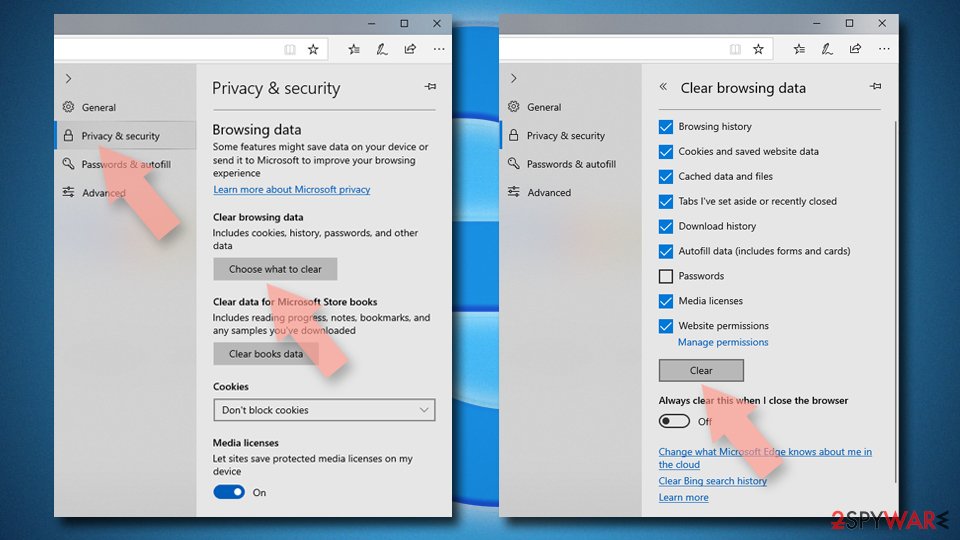
- Click on the Menu (three horizontal dots at the top-right of the browser window) and select Settings > Privacy, search, and services..
- Under Clear browsing data, pick Choose what to clear.
- Select Cookies and other site data and Cached images and files. (apart from passwords, although you might want to include Media licenses as well, if applicable) and click on Clear.

Restore new tab and homepage settings:
- Click the menu icon and choose Settings.
- Then find On startup section.
- Click Remove next to any suspicious startup page.
Reset MS Edge if the above steps did not work:
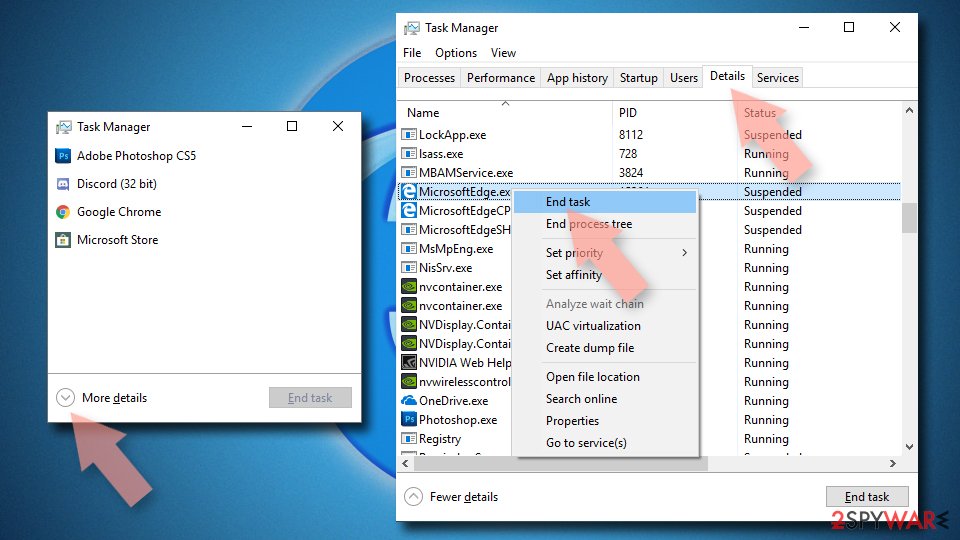
- Press on Ctrl + Shift + Esc to open Task Manager.
- Click on More details arrow at the bottom of the window.
- Select Details tab.
- Now scroll down and locate every entry with Microsoft Edge name in it. Right-click on each of them and select End Task to stop MS Edge from running.

Instructions for Chromium-based Edge
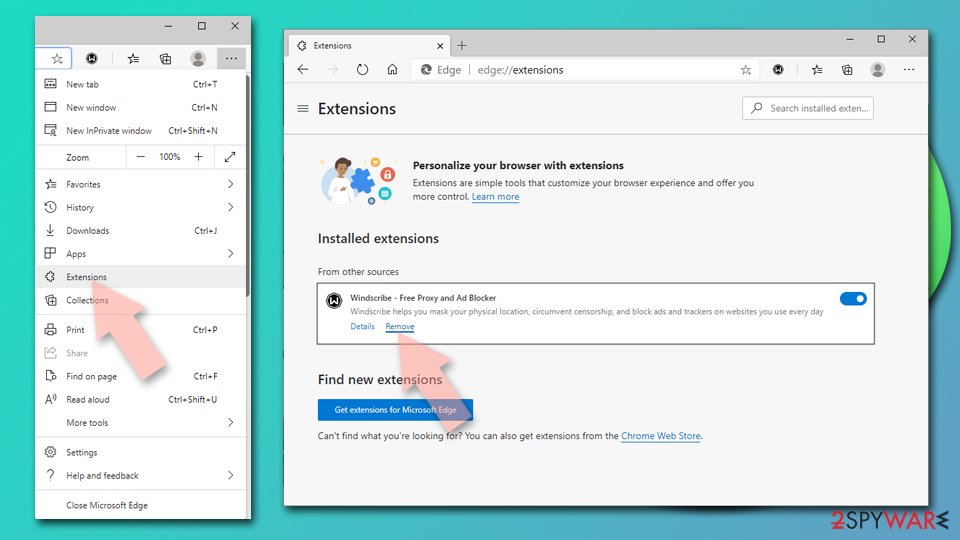
Delete extensions from MS Edge (Chromium):
- Open Edge and click select Settings > Extensions.
- Delete unwanted extensions by clicking Remove.

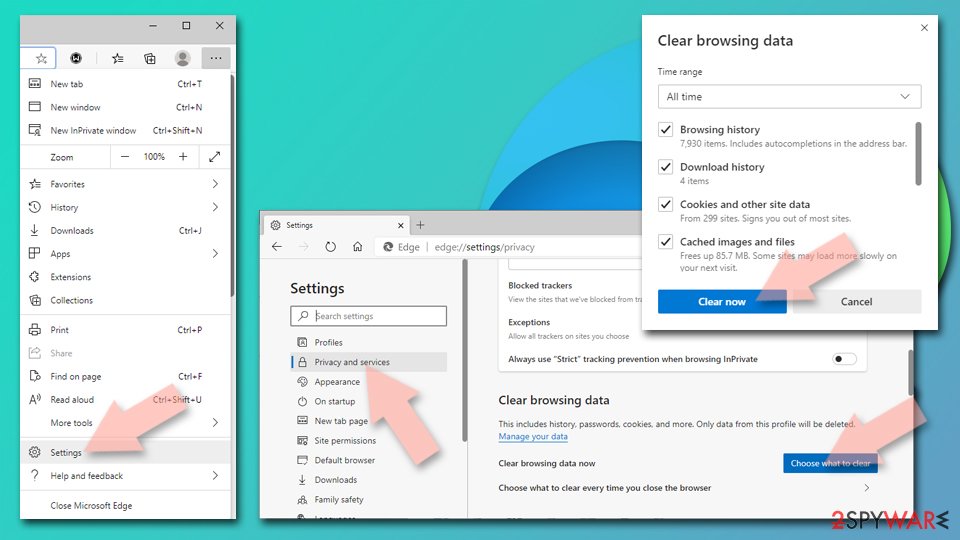
Clear cache and site data:
- Click on Menu and go to Settings.
- Select Privacy, search and services.
- Under Clear browsing data, pick Choose what to clear.
- Under Time range, pick All time.
- Select Clear now.

Reset Chromium-based MS Edge:
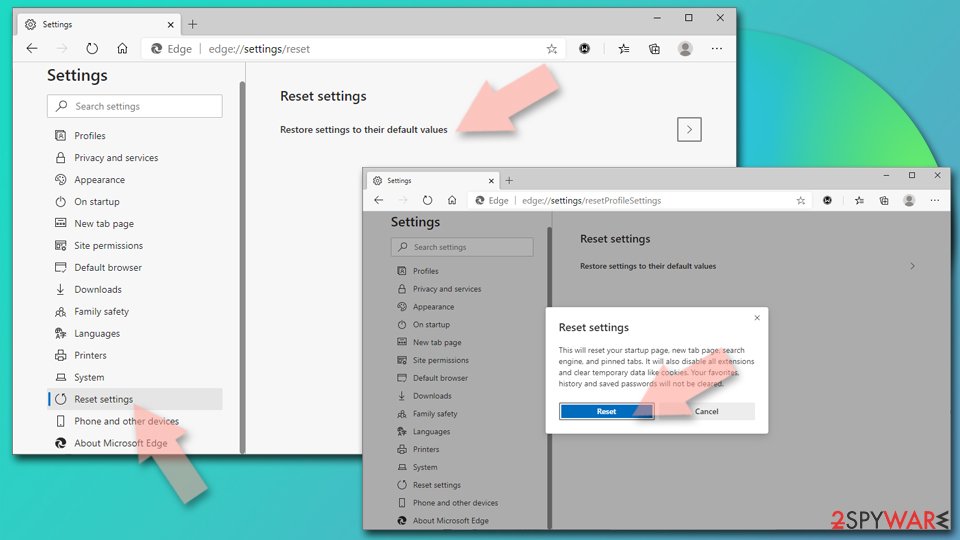
- Click on Menu and select Settings.
- On the left side, pick Reset settings.
- Select Restore settings to their default values.
- Confirm with Reset.
- This will disable extensions and reset startup pages but will not delete bookmarks, saved passwords, or browsing history.

Remove from Mozilla Firefox (FF)
Remove dangerous extensions:
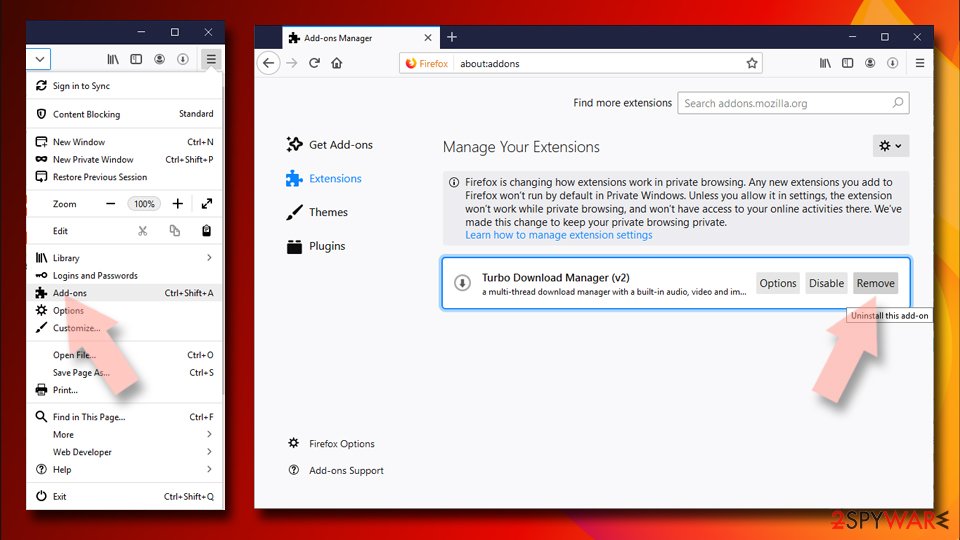
- Open Mozilla Firefox browser and click on the Menu (three horizontal lines at the top-right of the window).
- Select Add-ons.
- In here, select the unwanted extension and click Remove.

Reset the homepage:
- Click three horizontal lines at the top right corner to open the menu.
- Choose Settings.
- Under Home, set your preferred homepage and new tab settings.
Clear cookies and site data:
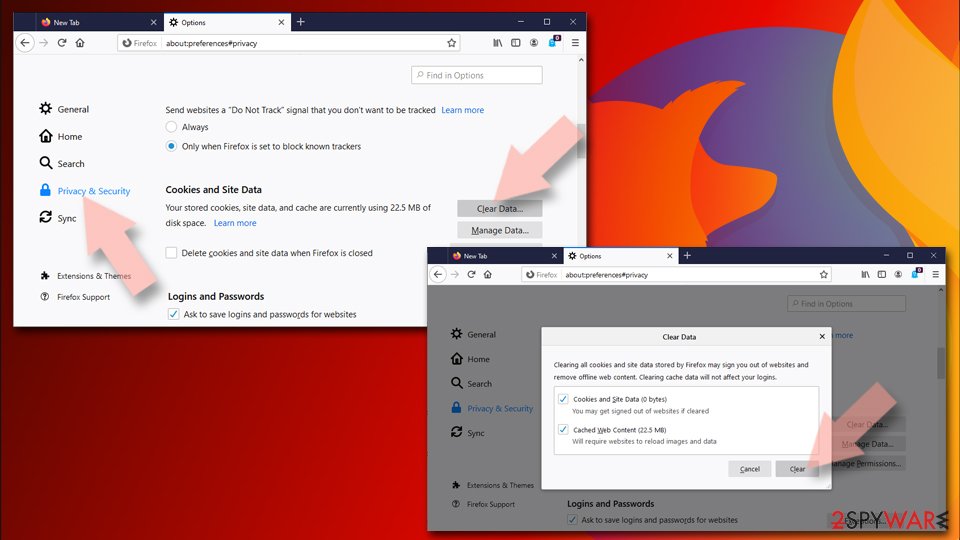
- Click Menu and pick Settings.
- Go to Privacy & Security section.
- Scroll down to locate Cookies and Site Data.
- Click on Clear Data…
- Select Cookies and Site Data and Temporary cached files and pages, then click Clear.

Reset Mozilla Firefox
If clearing the browser as explained above did not help, reset Mozilla Firefox:
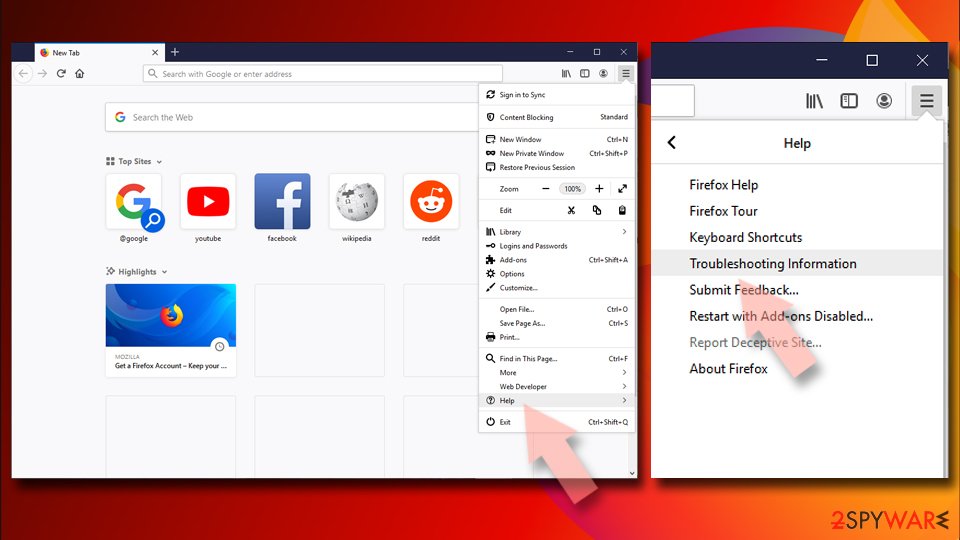
- Open Mozilla Firefox browser and click the Menu.
- Go to Help and then choose Troubleshooting Information.
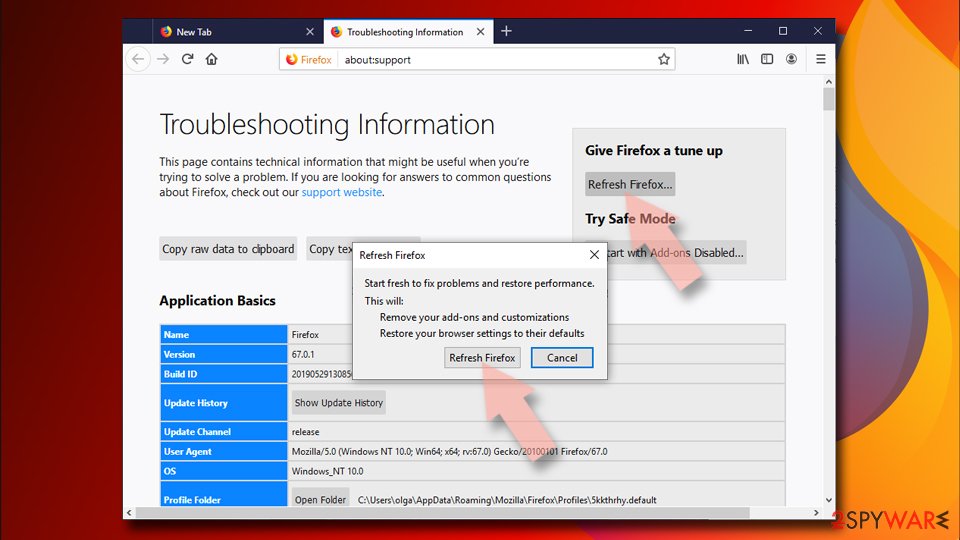
- Under Give Firefox a tune up section, click on Refresh Firefox…
- Once the pop-up shows up, confirm the action by pressing on Refresh Firefox.


Remove from Google Chrome
Delete malicious extensions from Google Chrome:
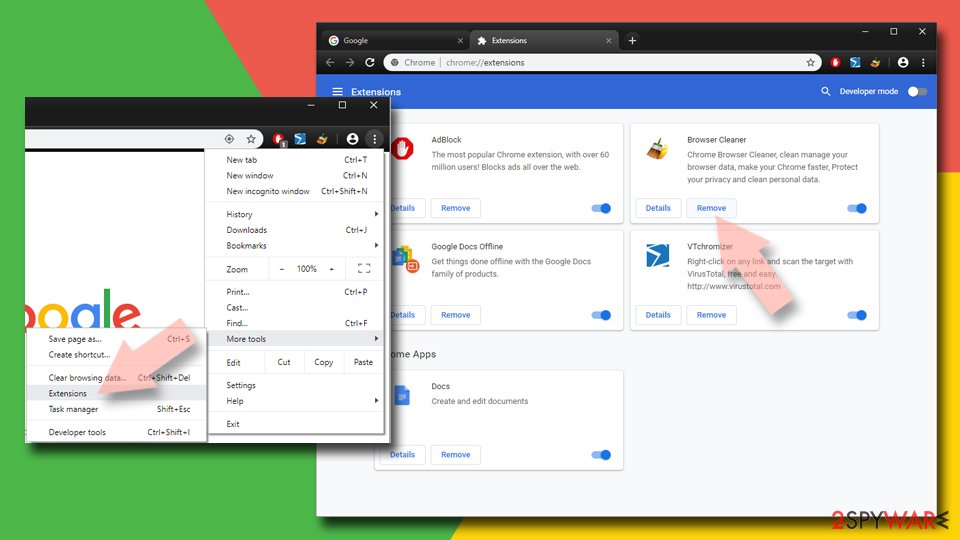
- Open Google Chrome, click on the Menu (three vertical dots at the top-right corner) and select More tools > Extensions.
- In the newly opened window, you will see all the installed extensions. Uninstall all suspicious extensions related to the unwanted program by clicking Remove.

Clear cache and web data from Chrome:
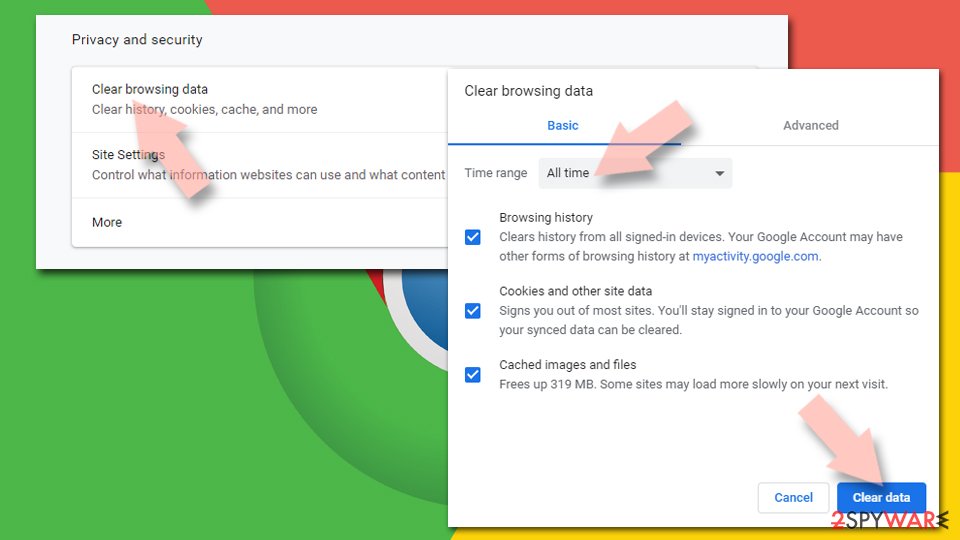
- Click on Menu and pick Settings.
- Under Privacy and security, select Clear browsing data.
- Select Browsing history, Cookies and other site data, as well as Cached images and files.
- Click Clear data.

Change your homepage:
- Click menu and choose Settings.
- Look for a suspicious site in the On startup section.
- Click on Open a specific or set of pages and click on three dots to find the Remove option.
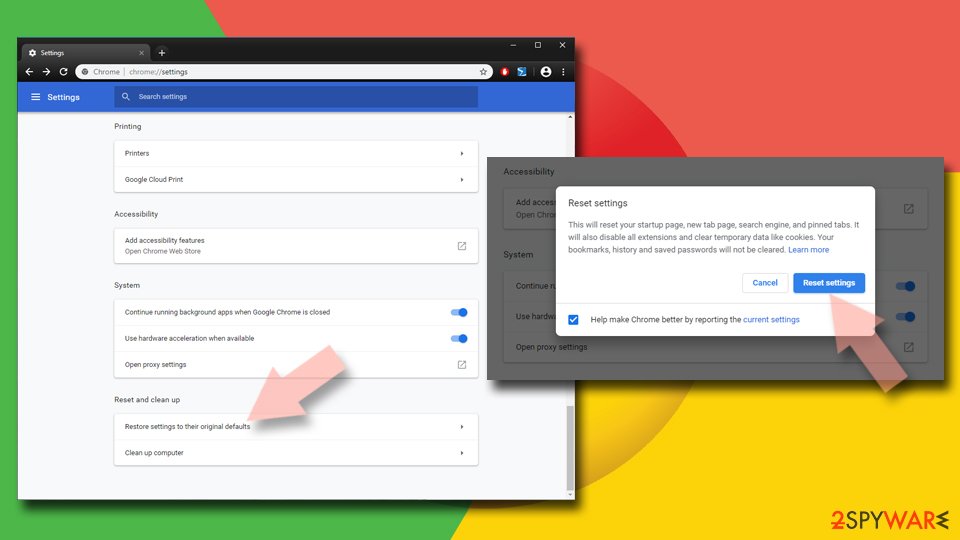
Reset Google Chrome:
If the previous methods did not help you, reset Google Chrome to eliminate all the unwanted components:
- Click on Menu and select Settings.
- In the Settings, scroll down and click Advanced.
- Scroll down and locate Reset and clean up section.
- Now click Restore settings to their original defaults.
- Confirm with Reset settings.

After uninstalling this potentially unwanted program (PUP) and fixing each of your web browsers, we recommend you to scan your PC system with a reputable anti-spyware. This will help you to get rid of WinPC Defender registry traces and will also identify related parasites or possible malware infections on your computer. For that you can use our top-rated malware remover: FortectIntego, SpyHunter 5Combo Cleaner or Malwarebytes.
How to prevent from getting rogue antispyware
Stream videos without limitations, no matter where you are
There are multiple parties that could find out almost anything about you by checking your online activity. While this is highly unlikely, advertisers and tech companies are constantly tracking you online. The first step to privacy should be a secure browser that focuses on tracker reduction to a minimum.
Even if you employ a secure browser, you will not be able to access websites that are restricted due to local government laws or other reasons. In other words, you may not be able to stream Disney+ or US-based Netflix in some countries. To bypass these restrictions, you can employ a powerful Private Internet Access VPN, which provides dedicated servers for torrenting and streaming, not slowing you down in the process.
Data backups are important – recover your lost files
Ransomware is one of the biggest threats to personal data. Once it is executed on a machine, it launches a sophisticated encryption algorithm that locks all your files, although it does not destroy them. The most common misconception is that anti-malware software can return files to their previous states. This is not true, however, and data remains locked after the malicious payload is deleted.
While regular data backups are the only secure method to recover your files after a ransomware attack, tools such as Data Recovery Pro can also be effective and restore at least some of your lost data.

If this free guide helped you and you are satisfied with our service, please consider making a donation to keep this service alive. Even a smallest amount will be appreciated.