
DuckAssist in 2026: Now DuckDuckGo Search Assist
- DuckAssist in 2026: the short answer
- Timeline: from DuckAssist to no-AI search
- What changed since 2023
- Risks and scams around DuckDuckGo AI (our analysis)
- How to control Search Assist in 6 steps
- What is still unknown
- Our original 2023 report
- DuckAssist Uses AI to Provide Instant Answers
- User Privacy focus
- Related guides on 2-Spyware
DuckAssist in 2026: the short answer
DuckAssist, the AI summary feature DuckDuckGo launched in 2023, now lives on as Search Assist. DuckDuckGo describes it as an optional feature that anonymously generates answers to search queries and always links to one or two sources.[4]
You decide how often it appears: often, sometimes (the default), on-demand or never.[4] Follow-up questions go to Duck.ai, the company's private chat service that offers models from OpenAI, Anthropic and others.[4] If you want no AI at all, DuckDuckGo runs a separate search page at noai.duckduckgo.com.[6]
| Question | 2023 (DuckAssist) | 2026 (Search Assist) |
|---|---|---|
| Name | DuckAssist[1] | Search Assist[4] |
| Sources shown | Wikipedia and Britannica[1] | One or two linked sources per answer[4] |
| Default setting | Beta, limited rollout[1] | Sometimes, can be set to never[4] |
| Follow-up questions | Not offered | In Duck.ai chat[4] |
| AI-free option | None | noai.duckduckgo.com[6] |
Timeline: from DuckAssist to no-AI search
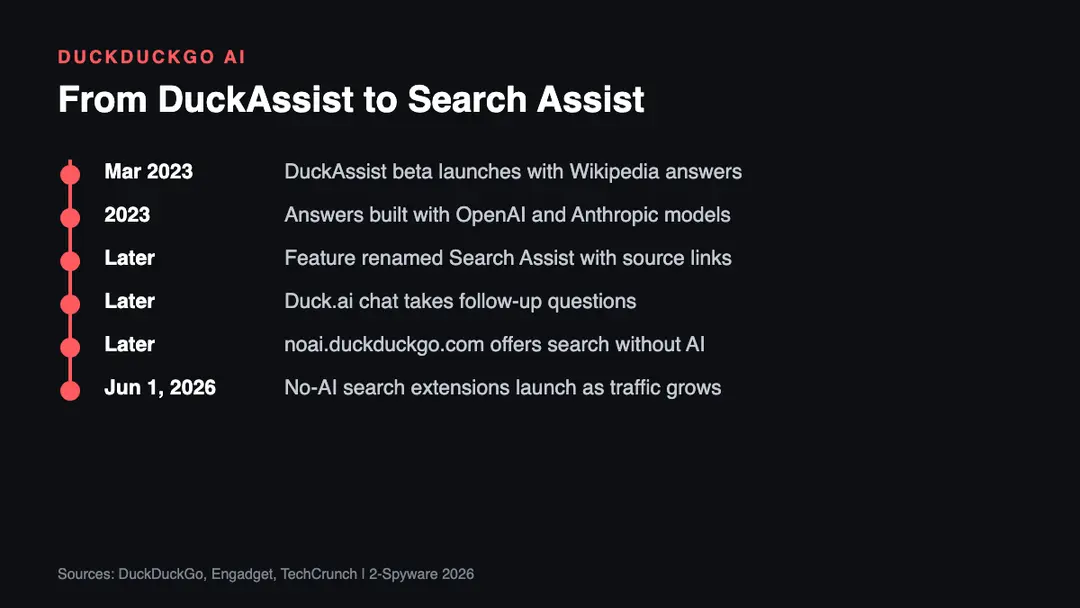
| Date | Event |
|---|---|
| March 2023 | DuckAssist launches as a beta in the DuckDuckGo app and extensions[1][3] |
| 2023 | DuckDuckGo says answers come from Wikipedia and Britannica[1] |
| By 2026 | Help pages describe the feature as Search Assist with frequency settings[4] |
| By 2026 | noai.duckduckgo.com runs as a search page without AI features[6] |
| June 1, 2026 | TechCrunch reports new extensions that set the no-AI page as default[7] |
What changed since 2023
The biggest change is control. In 2023 DuckAssist was a beta that showed a summary when it could answer from Wikipedia. Today Search Assist has a dropdown in Search Settings under AI Features, and choosing Never switches it off.[5] In the DuckDuckGo browser the same choice sits under Settings, AI Features.[4]
The second change is the split between short answers and chat. Search Assist shows a brief answer with a More button, while longer questions move to Duck.ai.[4] The third change is a full opt-out. DuckDuckGo says noai.duckduckgo.com will stay a way to search privately without AI even if it adds new AI products.[6]
Demand for that opt-out appears to be real. TechCrunch reported on June 1, 2026 that DuckDuckGo launched browser extensions that set the no-AI page as the default search, with no AI-assisted answers, no chat prompts and fewer AI images in results.[7]
Risks and scams around DuckDuckGo AI (our analysis)
Some people search for "DuckDuckGo spyware". In our searches we found no report that shows DuckDuckGo search or Search Assist is spyware. The real risks we see are the ones below, based on our own analysis.
- Wrong answers. DuckDuckGo said in 2023 that the feature will make mistakes, so check the linked source before you rely on an answer.[1]
- Fake extensions. Add-ons that copy the DuckDuckGo name can change your search engine or inject ads. Install extensions only from the official browser stores.
- Search hijackers. Adware often swaps your search engine for a lookalike page. If DuckDuckGo results suddenly look different, check your browser extensions.
- Oversharing in chat. Duck.ai is described as private, but do not paste passwords or ID numbers into any AI chat.
How to control Search Assist in 6 steps
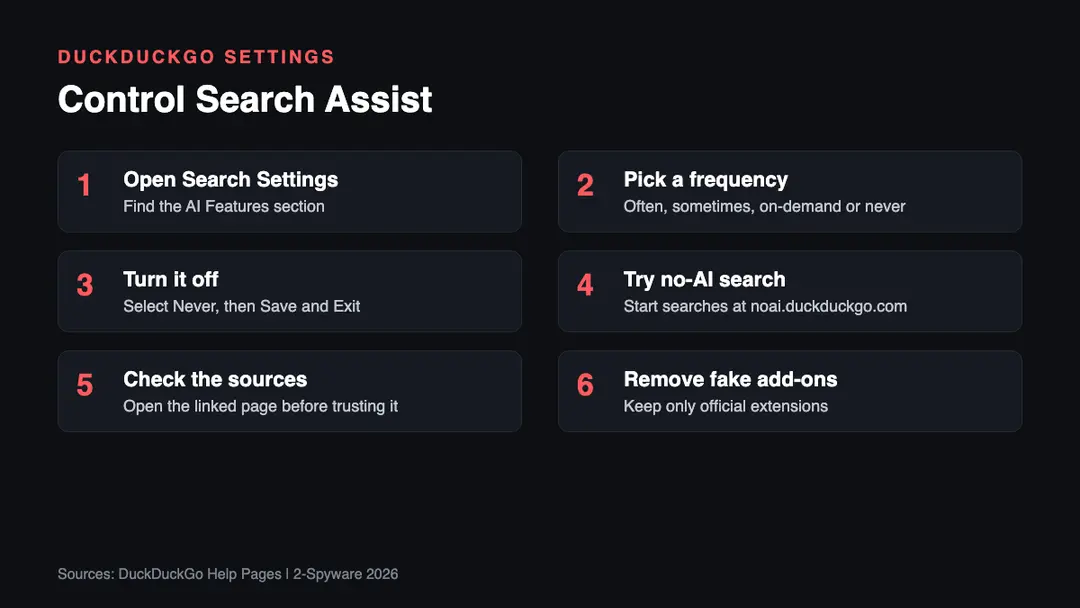
1. Open Search Settings. On duckduckgo.com open Settings and find AI Features, or click the gear icon in the corner of a Search Assist answer.[4]
2. Pick a frequency. Choose often, sometimes, on-demand or never. Sometimes is the default.[4]
3. Turn it off if you want. Select Never in the Search Assist dropdown, then Save and Exit.[5]
4. Try the no-AI page. Start your searches at noai.duckduckgo.com for results without AI features.[6]
5. Check the sources. Each answer links to one or two sources.[4] Open them before you act on health, money or legal information.
6. Remove fake add-ons. If your search engine changed on its own, review your extensions and read our browser hijacker and virus guides.
What is still unknown
- Which AI models power each Search Assist answer today. The help page names OpenAI and Anthropic only for Duck.ai.[4]
- Whether Wikipedia and Britannica are still the main sources. The current help page only says answers cite one or two sources.[4]
- How many users switch Search Assist off. We found no figure from DuckDuckGo.
Our original 2023 report
The text below is our report as first published in 2023. We keep it unchanged for the record; the sections above bring it up to date.
DuckDuckGo, the privacy-focused search engine, recently launched a new feature called DuckAssist, an AI-powered summarizer that provides direct responses to users' queries.[1] Unlike traditional search engines that offer a list of results, DuckAssist uses OpenAI's natural language technology to generate accurate summaries and display them at the top of the search results page.
To avoid the risks of providing incorrect information, DuckAssist sources its data from Wikipedia and Britannica, making it different from other generative AI search assistants that use input from thousands of websites.
DuckDuckGo says that Wikipedia was chosen as the primary data source because it is a reliable organization, and its sources are easily traceable through listed citations. The company also hopes to prevent incorrect information from being used when generating answers.
DuckAssist is fully integrated into DuckDuckGo's private search engine, ensuring the anonymity of users' search queries and browsing history. DuckDuckGo assures its users that no personally identifiable information or IP addresses are ever shared with search content partners such as OpenAI[2] and Anthropic. Furthermore, the feature is currently limited to user queries that its resources can provide straightforward answers for.
It is yet another AI tool that is taking over the world. These big technology companies release new additions to the arsenal of artificial intelligence tools every month, and people fear that this thing might get out of hand. Unfortunately, many of these new inventions and additions to AI make people mad and are not helping anyone, even though the purpose is to assist. However, it is a matter of time, and evolution and opinions might change.
DuckAssist Uses AI to Provide Instant Answers
DuckAssist will gradually roll out to users in the coming weeks, and the company promises that this will be the first of many AI-assisted features it plans to launch in the future. The company expects that using generative AI and Wikipedia will increase the number of Instant Answers it can provide, helping users find information faster than ever.
DuckAssist is a generative AI-powered tool that provides users with natural language responses to their queries. Users of DuckDuckGo's app or browser extension can access the beta version of the feature for free. When it generates an answer, it also links to the Wikipedia or Britannica article from which it pulled its answer.
The new AI tool uses technology from OpenAI and Anthropic to summarize answers and make responses more conversational. If it can summarize information for users, a magic wand icon appears on the results page. The feature won't be part of the entire DuckDuckGo experience right away, but users can expect more AI-enhanced features to arrive in the future.
User Privacy focus
DuckDuckGo acknowledges that DuckAssist is not perfect and will likely make mistakes, particularly when answering complex questions. For this reason, the company invites users to share their feedback anonymously via the link provided under the summaries box.
DuckDuckGo's commitment to user privacy is evident in the fact that the company does not require login to use the feature, and it won't share any of users' personal information with search content partners like OpenAI and Anthropic. Furthermore, AI-powered searches won't be used to train the partners' models, ensuring user privacy and data security.
DuckAssist is an exciting new feature that leverages the power of generative AI and Wikipedia to provide users with direct responses to their queries. Its limited sourcing, user privacy, and gradual rollout demonstrate DuckDuckGo's commitment to user privacy and data security.
With DuckAssist, users can expect to find information faster and more efficiently, making their online search experience more pleasant and convenient, albeit not always accurate. Nonetheless, there is no source of information that is accurate or unbias 100%, and it's an issue that's really hard to tackle in the grand scheme of things.
The CEO of DuckDuckGo, Gabriel Weinberg, said that this is just the first step into AI-assisted features, and more are still to come:[3]
This is the first in a series of generative AI-assisted features we hope to roll out in the coming months. We wanted DuckAssist to be the first because we think it can immediately help users find answers to what they are looking for faster.
Related guides on 2-Spyware
Frequently asked questions
What is DuckAssist?
DuckAssist was the AI summary feature DuckDuckGo launched in March 2023. It answered some search queries with a short summary drawn from Wikipedia and Britannica and linked to the article it used.{1}{3} The feature now appears in DuckDuckGo help pages as Search Assist, which cites one or two sources per answer.{4}
Is DuckAssist the same as Search Assist?
Yes, in practice. DuckDuckGo's current help pages describe Search Assist as the optional feature that anonymously generates answers to search queries, which is what DuckAssist did at launch.{4} We found no separate DuckAssist product still offered in 2026. Search Assist adds frequency settings and links to Duck.ai for follow-up questions.
How do I turn off DuckDuckGo AI answers?
Go to Search Settings, open AI Features, select Never in the Search Assist dropdown and choose Save and Exit.{5} In the DuckDuckGo browser the setting is under Settings, AI Features.{4} For search with no AI features at all, start your searches at noai.duckduckgo.com instead.{6}
Is DuckDuckGo spyware?
We found no evidence in our searches that DuckDuckGo is spyware. The company says Search Assist answers are generated anonymously, and in 2023 it said it shares no personal information with AI partners.{1}{4} The real risk is fake add-ons or hijackers that copy the DuckDuckGo name, so install extensions only from official stores.
What is Search Assist?
Search Assist is DuckDuckGo's optional AI feature that writes a short answer above the search results. Each answer links to one or two sources, and a More button expands it.{4} You can set it to appear often, sometimes, on-demand or never. Follow-up questions open in Duck.ai, the company's AI chat service.
Does DuckDuckGo AI search keep my privacy?
DuckDuckGo says it does. Its help pages describe Search Assist answers as generated anonymously, and in 2023 the company said AI searches would not train its partners' models.{1}{4} We cannot verify this from outside. If you prefer no AI involvement at all, use noai.duckduckgo.com.{6}
Log in to comment
No comments yet. Be the first.