
eScorcher: the ad-supported "free antivirus" and how to remove it
eScorcher was an ad-supported "free antivirus" for Windows 95 to XP that security forums flagged as spyware around 2002. Its site has been dead for years; if escorcher.exe still runs on a PC, uninstall it, delete its folder and scan with Windows Security.
Facts checked October 9, 2026. Removal steps tested on Windows 11 (26H2) and checked against Microsoft's and the browser makers' current documentation. Sections marked as our earlier report are the original text: they describe the threat as it was then and have not been reviewed since. The 2026 status, the removal steps and the questions are current.
Automatic
Get a free scan and check if your PC is infected.
Fortect finds malware, unwanted programs and the Windows damage they leave behind, and repairs it in one pass.
If eScorcher keeps coming back after uninstalling, a scan can find what reinstalls it.
Do it yourself · free Remove eScorcher yourself 5 steps, about 15 minutes, no software needed.
Start the steps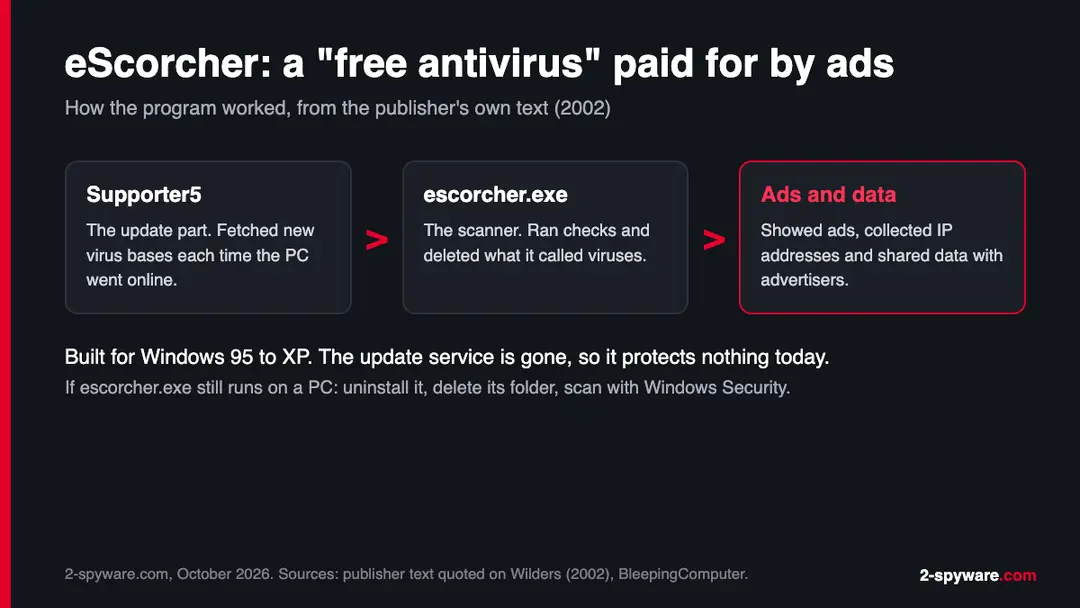
EScorcher: summary
| Type | Ad-supported "free antivirus" from the Windows XP era, treated as spyware and adware |
|---|---|
| Risk | Medium: no real protection, ads, IP and usage data shared with advertisers, doubtful virus detections |
| Symptoms | escorcher.exe in Task Manager or Startup, eScorcher or Supporter5 in Installed apps, ad windows, an eScorcher folder in Program Files |
| How to get rid of it | End escorcher.exe, uninstall eScorcher and Supporter5, delete the folder and startup entry, scan with Windows Security and the offline scan, check browsers |
| Our check | Desk check on 9 October 2026: escorcher.com is registered but has no DNS records; no live sample run |
| Running since | Domain registered in September 2000; forum reports from 2002 to 2004; abandoned since |
| Removal | Scan the PC with security software to find and remove the malware and anything installed with it. Fortect scans Windows for malware and repairs the system files and settings it damaged. Remove it nowTo use the full-featured product, you have to purchase a license for Fortect. The scan is free. |
Show 9 more facts
| Detection names | Microsoft: no Microsoft detection name is known for eScorcher. An old Ad-Aware log seen in a search excerpt labels it eTrust.EScorcher (not confirmed) |
|---|---|
| Distribution | Its own site, download portals, word of mouth and, per 2002 forum reports, drive-by installs and install pop-ups |
| Files | escorcher.exe (scanner), Supporter5 (updater), C:\Program Files\eScorcher |
| Damage | No working protection, ads, IP address and usage data passed to advertisers, clean files reported as viruses |
| Name | EScorcher |
| Domain registered | 18 September 2000 |
| Program | EScorcher |
| Publisher | Unknown company behind escorcher.com |
| Facts checked | 9 October 2026 |
Desk check on 9 October 2026: escorcher.com is still registered but resolves to nothing, and we ran no live sample. Behaviour comes from the publisher's text, 2002 to 2004 forum reports and BleepingComputer's startup database.
What eScorcher was and how it worked
eScorcher sold itself as a free virus scanner, but its income came from the ads it showed and the data it gathered about you. That made it adware with a security label, which is why our older entry called it spyware.
- 1
It got onto the PC
Some people downloaded it on purpose from escorcher.com or download portals, often because a friend called it a free backup scanner. A Wilders Security Forums expert wrote in September 2002 that she had seen reports of drive-by installs and a pop-up offering to install it.
- 2
It installed two parts
The publisher's own description, quoted on Wilders in 2002, says eScorcher came in two parts: Supporter5, which fetched new virus bases each time you went online, and eScorcher, which ran the scans and deletions.
- 3
It scanned and showed ads
The same text calls it free antivirus software supported by serving ads to its users. In practice that meant ad windows from a program you installed for protection.
- 4
It collected data
Its privacy text said eScorcher collected IP addresses, used what it gathered to tailor content and passed it in aggregate to advertisers. BleepingComputer's startup database lists escorcher.exe as undesirable because it collected information about the user.
- Kind of program
- Ad-supported "antivirus" treated as spyware and adware by security forums and databases of its time
- Main file
- escorcher.exe, the scanner; Supporter5 was the update part
- Systems it was built for
- Windows 95, 98, ME, 2000, NT4 and XP, per the publisher's own text
- Price
- Free; paid for by ads and by data shared with advertisers
- Website
- escorcher.com, registered on 18 September 2000; it has no web address records today
- Status in 2026
- Abandoned. BleepingComputer notes the web site is dead, and we found no current version
eScorcher belongs to a wider group of fake and doubtful security tools. Our rogue anti-spyware guide covers the type, and Windows Protection Suite is a later example that asked for money instead of showing ads. Because it collected data, the spyware and adware guides apply too.
Is eScorcher dangerous?
What eScorcher promised, and what people found
The sales text promised complete protection. The reports from the time describe ads, data collection and doubtful detections.
| The publisher said | What was reported | Source |
|---|---|---|
| It detects and deletes all popular Trojans, I-worms and virus scripts | A developer on a Borland Delphi newsgroup wrote that it flagged every DLL built with Delphi 5 Update Pack 1, even an empty project, as Trojan.win32.FakeDll. We read this only as a search excerpt | Google Groups, borland.public.delphi.non-technical (excerpt) |
| It is free | Free because it served ads; one forum member called it an antivirus with a spam box | Wilders Security Forums, 2002 |
| It tailors content to members' needs | It collected IP addresses and shared data in aggregate with advertisers, which databases treated as spyware | Publisher text quoted on Wilders; BleepingComputer |
| It protects Windows 95 to XP | After an install in December 2004, Avast flagged a file in the eScorcher folder, kernel40.dll, as Win95:SK. Forum helpers suspected unencrypted virus signatures and advised removing eScorcher either way | Avast Community, December 2004 |
| You choose to install it | One user found it installed on a shared PC without knowing how it got there; another forum post mentions drive-by installs | Virtual Dr forums (excerpt); Wilders |
A scanner that reports clean files as Trojans is not harmless even when it is free. People delete files they need, or they stop trusting real warnings. The Avast thread shows the other risk: two security programs side by side, each flagging the other.
Where eScorcher would show up on a PC today
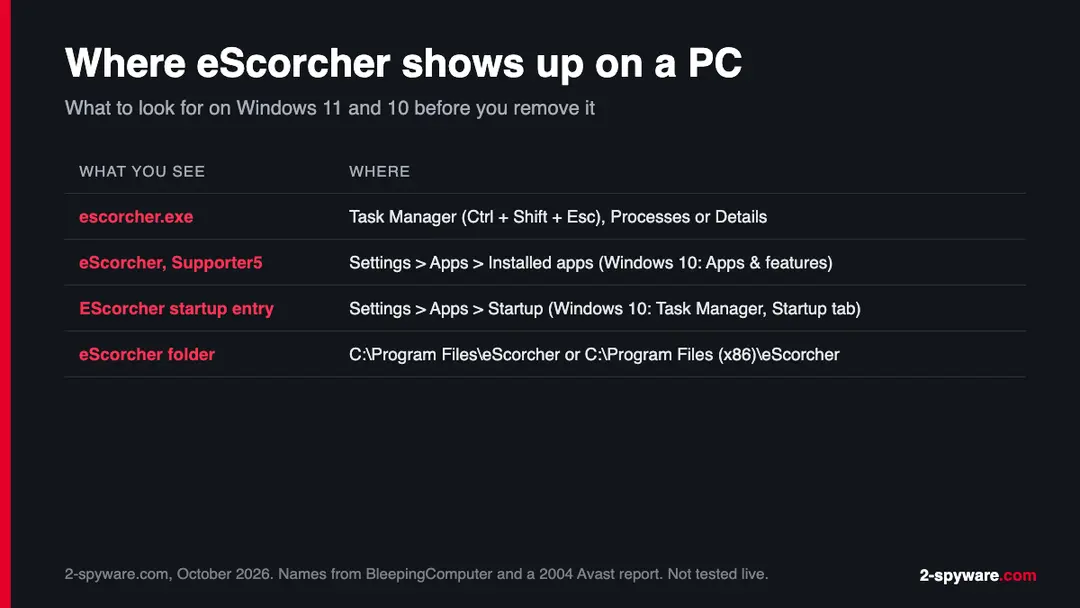
Most people who search the name in 2026 have found escorcher.exe in an old startup list, an old log or a PC that has not been cleaned in years. Here is where to look.
| Where to look | What you may see | What it means |
|---|---|---|
| Task Manager (Ctrl + Shift + Esc), Processes or Details tab | escorcher.exe running | The scanner part is active. End it before you uninstall |
| Windows 11: Settings > Apps > Installed apps; Windows 10: Settings > Apps > Apps & features | eScorcher or Supporter5 in the list | The program is installed. Uninstall both entries |
| Windows 11: Settings > Apps > Startup; Windows 10: Task Manager, Startup tab | An entry named EScorcher pointing to escorcher.exe | BleepingComputer lists this startup entry as undesirable |
| File Explorer: C:\Program Files\eScorcher, or C:\Program Files (x86)\eScorcher on 64-bit Windows | A folder with escorcher.exe and DLL files such as kernel40.dll | Leftovers. The first path comes from the 2004 Avast report; the x86 path is where 32-bit programs go on 64-bit Windows |
| Windows XP: Control Panel > Add or Remove Programs | eScorcher in the list | Uninstall it there. See the XP note further down |
The eScorcher timeline
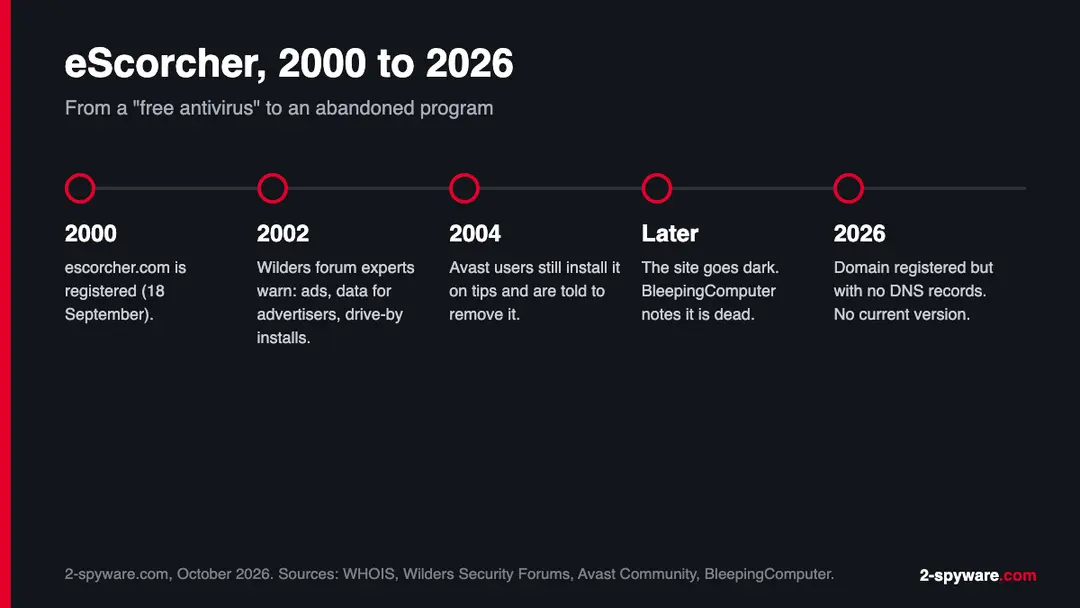
18 September 2000
Domain registered
escorcher.com was registered with eNom, according to the WHOIS record we read on 9 October 2026.
September 2002
Questions on Wilders
A reader asked whether the free eScorcher Antivirus was any good. Forum experts answered with the publisher's own ad and privacy text, reports of drive-by installs and the advice to stay away.
December 2004
Still spreading by word of mouth
An Avast user installed eScorcher on a friend's tip and saw Avast flag files, one of them in the eScorcher folder. Helpers linked the PestPatrol and CA entries that listed it as ad-supported and told him to remove it.
Later years
Site goes dark
BleepingComputer's startup database entry for escorcher.exe notes that the web site is dead. The entry does not say when that happened.
26 April 2021
Our first entry
We published a short note that eScorcher posed as a freeware antivirus, monitored browser activity, showed ads and could expose your IP address and list of visited sites.
9 October 2026
This rewrite
We checked the domain, collected the reports above and rewrote the removal steps for Windows 11 and 10. We did not run a live sample.
What we checked for this update
eScorcher is a program from the Windows XP era, so there was no live site to load. Our check was a desk check of the domain and the public record.
eScorcher · desk check · 9 October 2026
- escorcher.comStill registered (created 18 September 2000, paid up to September 2027 per WHOIS) but it returns no address and no name servers in DNS. We do not know who holds it now.
- Live sampleNot run. Behaviour on this page comes from the publisher's text, forum reports from 2002 to 2004 and BleepingComputer's database.
- Current versionNone found. The publisher listed Windows 95 to XP only, and we found no release for later Windows.
- Detection namesNo current Microsoft name confirmed. A search excerpt of an old Ad-Aware log shows the label eTrust.EScorcher; we could not open the full page, so it is not confirmed.
- Reader reportsNone. Our 2021 entry had no comments.
Old, but not something to keep eScorcher is abandoned and unlikely to reach a new PC in 2026. A copy that still runs is outdated security software that shows ads and sends data to a dead service. Remove it, and treat the PC as unprotected until Windows Security is on.
What it can do to you
The main harm was never a single dramatic act. It was false trust, ads and quiet data collection.
- High
No real protection
Its virus bases came from a service that no longer exists. A PC that relies on eScorcher has no working scanner at all.
- Medium
Data shared with advertisers
By its own text it collected IP addresses and shared data with advertisers. Our 2021 entry adds your list of visited websites, a claim we could not test on a sample.
- Medium
Wrong detections
Reports of clean DLLs flagged as Trojans mean you may have deleted or quarantined files on its advice. Programs that stopped working after a scan may need reinstalling.
- Low
Ads and slowdowns
Ad windows and a second resident scanner next to a real one slow an old PC and cause conflicts, as the 2004 Avast thread shows.
What eScorcher said or was reported to collect
- IP address
- Visited websites (our 2021 entry)
- Data for advertisers in aggregate
- Ad clicks
The first and third items come from the publisher's own privacy text. The second is from our 2021 entry and was not tested.
How to remove eScorcher
Uninstall first, then remove what stays behind, so the ads do not come back after a restart.
Step 1: Uninstall eScorcher
Open Settings > Apps > Installed apps in Windows 11, or Settings > Apps > Apps & features in Windows 10. Sort the list by install date and find eScorcher, then choose Uninstall from the three-dot menu next to it (in Windows 10, click the entry and then Uninstall).
Remove anything else installed on the same day that you do not recognise, because such programs usually arrive together in one installer. If the uninstaller opens a browser page with an offer or a survey, close it: the program is removed either way.
Full procedure with screenshots: Uninstall a program or app in Windows On uGetFix
Step 2: Remove it from startup
Whatever eScorcher installed usually starts with Windows. Open Task Manager with Ctrl + Shift + Esc, go to Startup apps in Windows 11 or the Startup tab in Windows 10, and disable what you do not know, starting with entries that have an empty Publisher column.
Open file location on the right-click menu shows the file, which helps you decide and tells you what to delete later. Disabling is safe: if something you need stops working, switch it back on.
Full procedure with screenshots: Stop apps from opening at startup On uGetFix
Step 3: Delete the folders left behind
What the uninstaller leaves behind is usually in the user folders. Open File Explorer, switch on View > Show > Hidden items (in Windows 10 View > Hidden items), and go through
%LocalAppData%,%AppData%, %ProgramData% and the two Program Files folders.Sort by Date modified and delete folders that appeared together with the problem and belong to no program you use. Folders with random names that hold
.exe,.dll, .js or .ps1 files are the strongest sign.Full procedure with screenshots: Remove what malware leaves behind in Windows
Step 4: Reset the browser
Finish the browser part with a reset, which puts the search engine, start page, new tab page and site permissions back to their defaults and switches extensions off. Chrome: Settings > Reset settings > Restore settings to their original defaults.
Edge: Settings > Reset settings. Firefox: Help > More troubleshooting information > Refresh Firefox, which also removes its extensions. Your bookmarks and saved passwords are kept, and the menus are the same on Windows 11 and Windows 10.
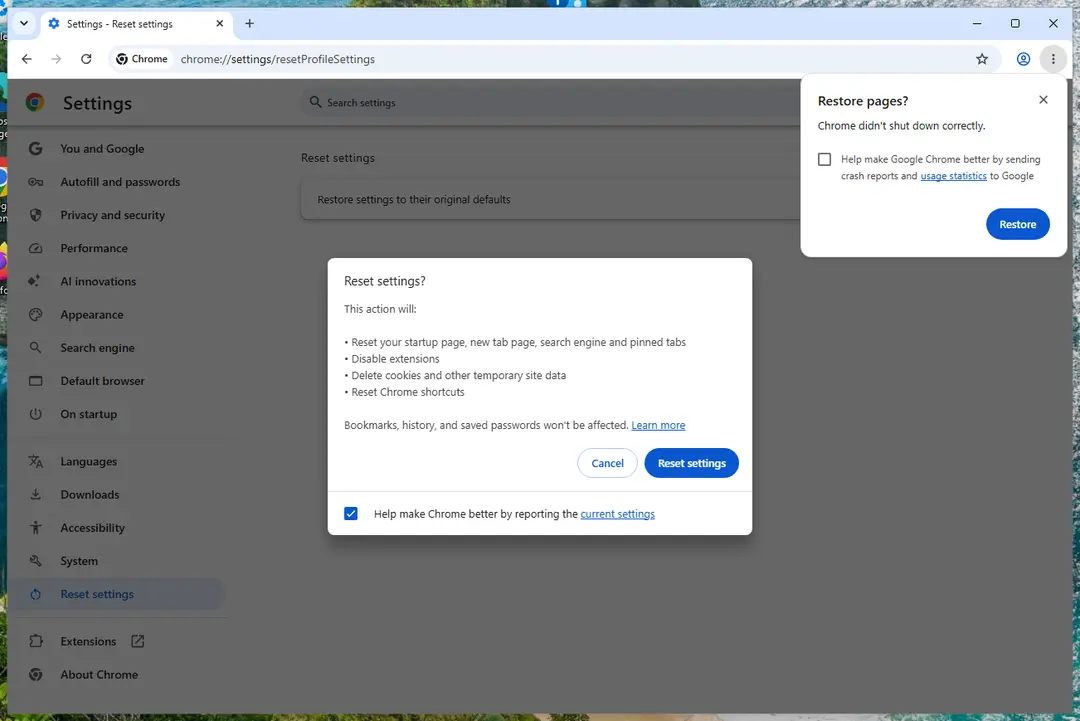
Chrome on Windows 11: Settings > Reset settings. Full procedure with screenshots: Reset a browser and fix a hijacked search engine
Step 5: Scan the PC, then run the offline scan
Open Windows Security > Virus & threat protection > Scan options, run a Full scan and remove everything it finds. Then select Microsoft Defender Antivirus (offline scan) and click Scan now: the PC restarts and scans before Windows loads, which finds files that hide while Windows runs.
Save your work first, because the offline scan takes about 15 minutes. Both scans are built into Windows 11 and Windows 10, and a second scanner from another vendor is a useful extra opinion.

Windows 11: Windows Security > Virus & threat protection > Scan options. Full procedure with screenshots: Run a Microsoft Defender Offline scan
From our report of Apr 2021 · not reviewed since
If eScorcher sits on an old Windows XP PC
eScorcher was built for Windows 95 to XP, so the PC that still has it is often an old one. The removal is simple; what to do with the PC afterwards is the bigger question.
- 1
Uninstall it the XP way
Open Start > Control Panel > Add or Remove Programs, select eScorcher and click Remove. Do the same for Supporter5 if it is listed, then restart.
- 2
Delete the folder
Open My Computer, go to C:\Program Files and delete the eScorcher folder if it is still there. Empty the Recycle Bin.
- 3
Clear the startup entry
Press Windows + R, type msconfig and press Enter. On the Startup tab, untick EScorcher and anything else pointing to escorcher.exe.
- 4
Take it off the internet
Windows XP no longer gets security updates from Microsoft, and current antivirus products have dropped it. Use the PC offline for old programs, or copy your files off it and retire it.
Copy your files from an old PC with a USB drive, then scan that drive on a current Windows 11 or 10 PC before you open anything from it.
After removal: keep the ads from coming back
eScorcher spread because a free scanner sounded like a good backup. These habits keep the next one off your PC.
Do
- Use Windows Security, which comes with Windows 11 and 10 and costs nothing
- Check a security product's results with independent labs such as AV-TEST and AV-Comparatives before you install it
- Run one real-time antivirus at a time; add a second opinion with an on-demand scanner only
- Keep a 3-2-1 backup: three copies of your files, on two kinds of storage, one kept offline or off site
- Use a VPN on public Wi-Fi if you like; it hides your IP address from sites, but it does not stop a program you installed from collecting data
Don't
- Install a "free antivirus" that pays for itself with ads
- Take a friend's tip as proof that a security program is real
- Accept a pop-up that offers to install a scanner
- Delete files only because a scanner you cannot verify called them Trojans
If you want more than Windows Security, compare tested options in our best anti-spyware and best malware removal tools pages. Unsure about a link before you click it? Paste it into our link check, or ask in the Windows help forum.
Questions about eScorcher
What is eScorcher?
eScorcher was a free "antivirus" program for Windows 95, 98, ME, 2000, NT4 and XP that paid for itself by showing ads and collecting data. It came from escorcher.com, a domain registered in 2000, and had two parts: Supporter5 for updates and escorcher.exe for scans.
Its own privacy text said it collected IP addresses and shared data in aggregate with advertisers. Security forums in 2002 told people to stay away from it, and BleepingComputer lists escorcher.exe as an undesirable program. The website is dead and no current version exists.
Is eScorcher a virus?
No, eScorcher is not a virus in the strict sense, because it did not copy itself to other files or computers. It was a program people installed, sometimes after a pop-up or a friend's tip, that showed ads and collected data about the user.
Databases of its time classed it as spyware and adware, and that is how you should treat it. There is no reason to keep it: its virus bases came from a service that is gone, so it gives no protection while still running at startup.
Is escorcher.exe safe to remove?
Yes, escorcher.exe is safe to remove, and you should. It is not a Windows file and nothing in Windows needs it. BleepingComputer's startup database marks the EScorcher entry that runs escorcher.exe as undesirable.
End the process in Task Manager, uninstall eScorcher and Supporter5 from Installed apps, delete the eScorcher folder in Program Files and turn off its startup entry. Then run a full scan with Windows Security so that you have working protection again.
Can I still download eScorcher antivirus?
No current download exists from the publisher, and you should not install one from anywhere else. escorcher.com is still registered, but on 9 October 2026 it returned no DNS records, so the site does not load.
Old copies may sit on archive and download sites, but they target Windows 95 to XP and get no virus updates. A scanner without updates misses every threat written in the last twenty years. Use Windows Security, or a product whose results you can check with AV-TEST or AV-Comparatives.
How do I remove eScorcher from Windows 11 or 10?
Start by ending escorcher.exe in Task Manager, which you open with Ctrl+Shift+Esc. On Windows 11 open Settings > Apps > Installed apps, on Windows 10 Settings > Apps > Apps & features, and uninstall eScorcher and Supporter5.
Delete the eScorcher folder from Program Files or Program Files (x86) and turn off its startup entry. If the uninstall fails, repeat it in Safe Mode. Finish with a full scan in Windows Security and a Microsoft Defender Offline scan, which Microsoft says takes about 15 minutes and restarts the PC.
What is Supporter5?
Supporter5 was the update part of eScorcher. The publisher's own description, quoted on Wilders Security Forums in 2002, says Supporter5 downloaded new virus bases every time you went online, while eScorcher did the scanning and deleting.
Because the update service is gone, Supporter5 has nothing left to fetch. If you see it in Installed apps or in your startup list, remove it together with eScorcher. It is not part of Windows and no other program depends on it.
Were the viruses eScorcher found real?
Some may have been, but you cannot trust its results. A Delphi developer reported that eScorcher flagged every DLL built with Delphi 5 Update Pack 1, even an empty project, as Trojan.win32.FakeDll, which points to false positives.
The only way to know is a second opinion from a scanner that still gets updates. Run a full scan in Windows Security. If a program stopped working after eScorcher deleted a file, reinstall that program from its maker's site rather than restoring the file from quarantine.
Does Windows Defender detect eScorcher?
We could not confirm a Microsoft detection name for eScorcher, so we do not claim Defender will flag it. Many old adware names were never added to current databases, or were added under another family name.
An old Ad-Aware log seen in a search excerpt labels it eTrust.EScorcher, but we could not open the full page. Do not wait for a detection:
- uninstall it by hand
- delete its folder and startup entry
- then run a full Windows Security scan
- check Protection history for any entries
Does eScorcher run on Windows 11?
eScorcher was written for Windows 95 to XP, and the publisher never listed anything newer. We did not try to install it on Windows 11, so we cannot say whether its installer still starts there.
Even if it did, it would have no virus updates and nowhere to send its data, because its service is gone. If you find it on a Windows 11 or 10 PC, it most likely came across with old files or a migrated program folder. Remove it the same way as any unwanted program.
Will Fortect remove eScorcher?
Fortect scans Windows for malware and unwanted programs and repairs the system files and settings they change, and its free scan shows what it finds on your PC before you decide anything.
For eScorcher, follow the plan above as well: the browser steps take back permissions and settings that no scanner treats as a threat, and uninstalling the program that brought it removes the source.
Run Microsoft Defender's full scan and, if anything was found, its offline scan as a second opinion. If the symptoms are gone after the plan and both scans are clean, there is nothing more to do.
Sources
- BleepingComputer startup database: EScorcher, escorcher.exe (read October 9, 2026)
- Wilders Security Forums: free antivirus (eScorcher thread, September 2002) (read October 9, 2026)
- Avast Community: Two virus entered after 'EScorcher' download (December 2004) (read October 9, 2026)
- Microsoft Learn: Run and review the results of a Microsoft Defender Offline scan (read October 9, 2026)
- Virtual Dr Forums: escorcher antivirus (search excerpt only) (read October 9, 2026)