
Disclosure: 2-spyware.com earns a commission if you buy Fortect through links on this page. We have no deal with the other vendors listed here. Every product fact below comes from our own published reviews, linked in each section, and from the vendor and lab pages listed under Sources.
Not sure what you are dealing with yet? Our spyware guide explains the types, the signs and the manual removal steps. This page is about the tool: which anti-spyware program to run on a PC or a Mac, what it can and cannot find, and what to use on a phone instead.
What anti-spyware has to catch in 2026
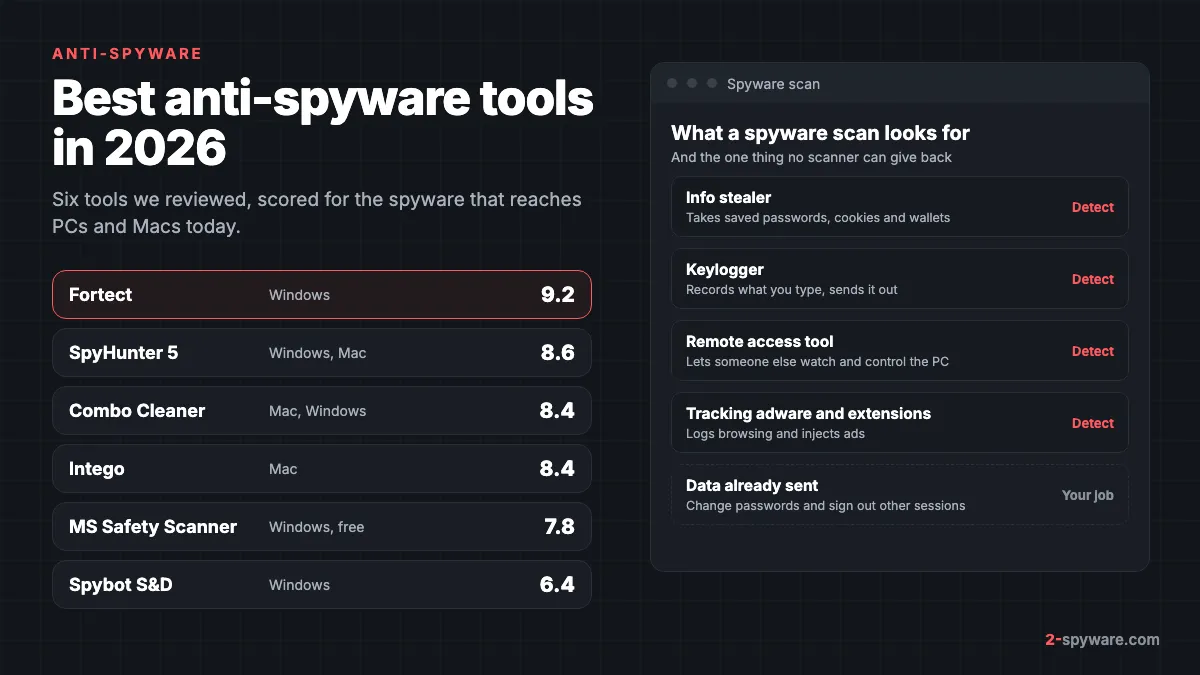
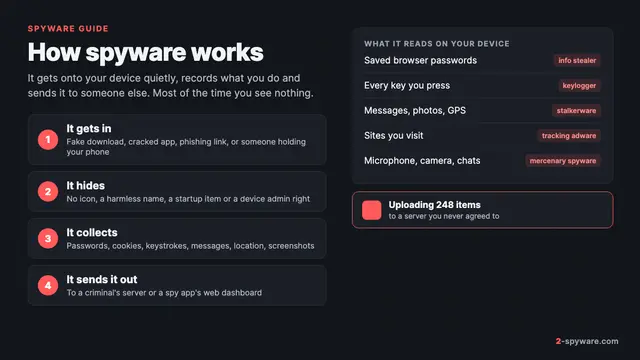
The word spyware covers several different programs. Judge any tool by these four groups, and by whether it also protects the browser, where most stolen data lives.
- Info stealers. They read saved passwords, session cookies, autofill data and crypto wallets from your browsers, upload them and often exit within a minute. Microsoft's analysis of Lumma lists Chromium and Firefox browser data, wallets, VPN profiles, e-mail clients and documents [20]. Our info stealer guide covers the rest.
- Keyloggers. Commercial loggers such as Perfect Keylogger and keylogging modules inside trojans record what you type. A scanner has to catch them as files and as running processes.
- Remote access tools. A remote access trojan lets someone watch the screen, switch on the webcam and download files. It stays on the PC, so a scanner has a real chance to find its startup entry.
- Tracking adware and browser extensions. These log the sites you visit and sell the data or inject ads. They sit in the browser, which is why browser coverage matters.
Microsoft's 2004 definition still fits: spyware ranges from unwanted pop-up ads to unseen programs that record keystrokes and steal passwords and personal information [7]. What changed is the scale, since stealers are now rented as a service.
Anti-spyware tools compared
| Tool | Platforms | Spyware coverage | Browser and privacy | Price from | Our score |
|---|---|---|---|---|---|
| Fortect | Windows 10 and later; separate Mac product | Viruses, spyware and PUA plus the system changes they leave; real-time monitoring | Free browser trace cleanup after the scan; site-blocking Chrome extension | 30.95 euros first year, 1 PC | 9.2 |
| SpyHunter 5 | Windows 7 to 11, macOS 10.13+ | Spyware, keyloggers, trojans, rootkits, hijackers, adware | Free tracking cookie removal; free Web Security extension | $29.70 per 6 months | 8.6 |
| Combo Cleaner | macOS and Windows | Mac malware, adware, unwanted apps | Privacy Scanner for Safari, Chrome, Firefox, Opera, Mail, Messages (paid) | $47.95 per 6 months | 8.4 |
| Intego | macOS 12.4 or later | Viruses, malware, spyware, adware; Windows malware on the Mac | Per-app firewall for outgoing traffic | $29.99 first year | 8.4 |
| Microsoft Safety Scanner | Windows 7 to 11 | Everything in Defender's definitions, on demand | None | Free | 7.8 |
| Spybot Search and Destroy | Windows 7 to 11 | Spyware, adware, tracking software, keyloggers | Immunization against known bad sites and trackers | Free; Home 18.99 euros a year | 6.4 |
Fortect: our pick for spyware on Windows
Fortect scores 9.2 in our review, the highest on this page. It is a Windows security and repair suite, and for spyware that pairing makes sense. Removing a stealer or keylogger is one half of the job. The other half is undoing the settings it changed and clearing the traces it used.
The free scan takes about five minutes. Its Malware and PUA stage searches for viruses, spyware and potentially unwanted applications, and for the system changes such software tends to leave, such as modified settings and damaged system files. You see every finding before anything is changed.
The Privacy Traces stage is where Fortect does extra work against spyware. It collects browser caches and cookies from Chrome, Edge, Firefox and Opera, and the app marks this cleanup as free once the scan is done. Clearing those cookies signs you out of sessions that a stealer may have copied.
- Real-time protection: every current plan includes an antivirus module that monitors new downloads, installs and files [1][2]. That is the layer meant to stop a stealer before it runs.
- Browser protection: Fortect offers a Chrome extension that blocks malicious websites [1], the kind of fake download pages that spread stealers.
- Price: Essential covers 1 PC for 30.95 euros in the first year, Multi-Device covers 3 PCs for 37.95 euros, and Ultimate covers 5 PCs for 53.95 euros [2].
- Refunds: a 60-day refund window on the first purchase, with refunds usually processed within 12 hours [2].
- Mac: Fortect for Mac is a separate security product with browsing and phishing protection [1].
SpyHunter 5: the name says what it hunts
SpyHunter 5 scores 8.6. EnigmaSoft lists spyware, keyloggers, trojans, rootkits, ransomware, browser hijackers and adware among the threats it removes [3]. Our review describes it as a long-standing anti-spyware program with daily definition updates. It was AV-TEST certified in 2024 with 15 of 18 points and detected every widespread sample in that test [4].
- Spyware features: real-time System Guards in the paid version, free removal of tracking cookies, and a free Web Security extension for Chrome, Firefox and Edge [3].
- Stubborn cases: Compact OS boots a small system beneath Windows to remove files that running malware locks, and the Spyware HelpDesk builds a custom fix from a diagnostic report at no extra cost.
- Mac: SpyHunter for Mac scans for keyloggers, trojans and adware, and checks browser cookies and privacy issues separately [3].
- Price: removal starts at $29.70 per six months for SpyHunter 5 Basic [3]. The trial asks for a card and bills after 7 days unless you cancel; purchases have a 30-day refund.
Choose SpyHunter if a keylogger or remote tool keeps coming back. Our SpyHunter vs Spybot comparison sets it against the other classic name.
Spybot Search and Destroy: the classic, honestly aging
Spybot Search and Destroy scores 6.4. It was created by Patrick Kolla and is one of the oldest anti-spyware names. Its engine looks for spyware, adware, tracking software and keyloggers [21]. Unlike most rivals, the free edition removes what it finds.
Immunization is still its most useful idea. It blocks known malicious sites, tracking cookies and harmful browser plugins before you reach them [21]. Startup Tools give a detailed view of what runs at boot, which helps when you hunt a keylogger by hand.
The honest status in 2026: the program build is 2.9.85.5 from February 2023 [6]. Detection updates still arrive, but there are no current lab results for Spybot itself. The free edition has no real-time protection or automatic updates, and paid purchases are not refundable. Home costs 18.99 euros and Professional 29.99 euros a year [5]. Use Spybot Free as a second opinion, not as your only defence.
Microsoft Defender: it started as Microsoft AntiSpyware
The free scanner in Windows has the strongest anti-spyware pedigree of all. In December 2004 Microsoft bought GIANT Company Software and announced a free spyware detection and removal tool based on GIANT AntiSpyware [7]. That beta, Microsoft AntiSpyware, was later renamed Windows Defender and built into Windows.
Today Microsoft Defender Antivirus is a full antivirus, not a spyware add-on. In AV-TEST's August 2026 test on Windows 11 it scored 6 of 6 for protection [8]. Two settings make it better against spyware:
- Turn on potentially unwanted app blocking, so bundled trackers and monitoring tools are caught too. Microsoft describes how to detect and block these apps [9].
- Run a Defender Offline scan when you suspect a keylogger or rootkit that hides while Windows runs. Our Defender Offline guide shows the steps in Windows 11 and 10.
Microsoft Safety Scanner: free second opinion
Microsoft Safety Scanner scores 7.8. It is a free, portable file that uses the same security intelligence as Defender, removes what it finds and leaves nothing installed [10]. Each copy expires 10 days after download, so you fetch a fresh one for every scan [10].
Do not confuse it with the Malicious Software Removal Tool that arrives through Windows Update. Microsoft states plainly that MSRT does not remove spyware [11]. If you want a free spyware check from Microsoft beyond Defender itself, Safety Scanner is the one to run.
Combo Cleaner and Intego: anti-spyware for a Mac
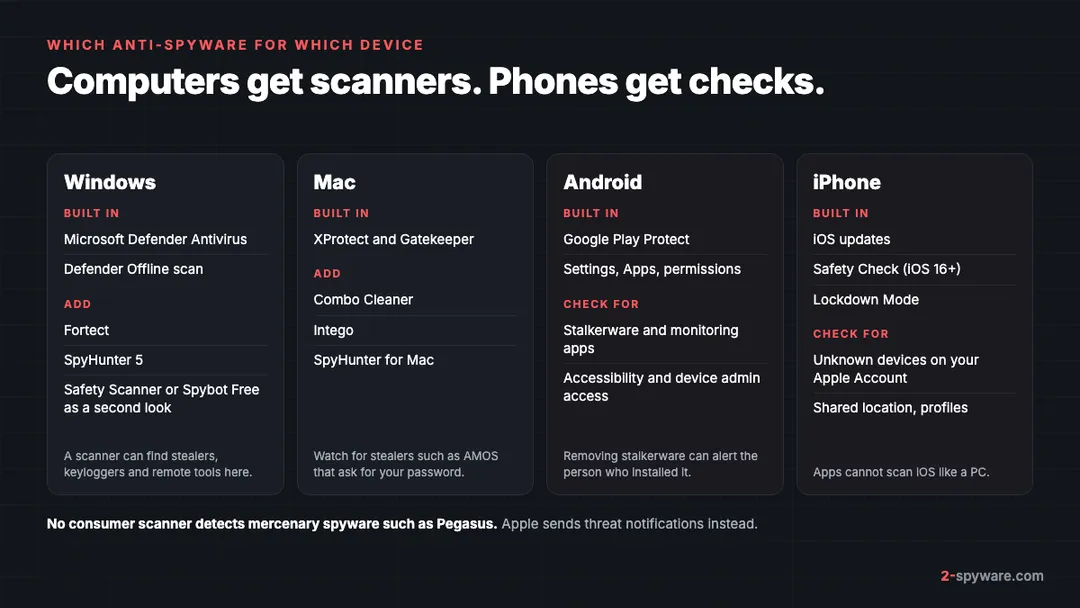
Mac spyware is mostly stealers such as AMOS that trick you into typing your password, plus tracking adware. Our Mac malware removal guide covers the manual side.
Combo Cleaner scores 8.4. It updates its Mac malware definitions hourly and removes malicious extensions in paid plans. Its Privacy Scanner finds cookies, history and cache in Safari, Chrome, Firefox, Opera, Mail and Messages, with removal in the paid version [12]. Essential costs $47.95 per six months for one device [13].
Intego also scores 8.4. Intego says its antivirus removes viruses, malware, spyware and adware [14]. Its firewall shows which apps try to connect to the internet and lets you block them per app [14], which is a direct check on spyware calling home. It got 6 of 6 for protection from AV-TEST in March 2026 [15]. Plans for one Mac start at $29.99 for the first year [14].
Phones: anti-spyware is a different product class
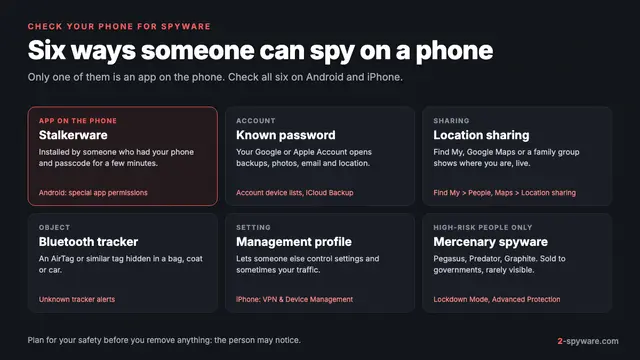
The tools above are for computers. Most phone spyware is stalkerware: monitoring apps sold as parental control or anti-theft tools and installed by someone with access to your phone.
Kaspersky counted 31,031 of its mobile users affected by stalkerware in 2023 and found 195 different stalkerware apps [18]. It notes that such apps rarely appear in the list of installed apps, and that on an iPhone the installer usually needs a jailbreak and physical access [18]. See our stalkerware topic and the Spyzie case for real examples.
- Android: keep Google Play Protect on. It checks apps from Google Play and other sources, warns about harmful ones and may disable or remove them [16]. Then review apps with Accessibility or device admin access.
- iPhone: open Settings, Privacy and Security, Safety Check (iOS 16 or later). It lets you review who has access to your information and location, remove unknown devices from your Apple Account and reset app privacy permissions [17].
- Both: follow our step-by-step check for spyware on a phone, and see Android help or iPhone help if you want a person to look at it.
One warning matters more than any app. Kaspersky advises that if you suspect stalkerware, you should think about your safety before you scan, because removing the app will most likely alert the person who installed it [18]. Its report points to the Coalition Against Stalkerware for local support organisations [18].
What no anti-spyware can do
Be wary of any product that promises to find every spyware on a phone. Mercenary spyware such as Pegasus from the NSO Group is used against a small number of people, often journalists, activists, politicians and diplomats [19]. Apple says these attacks cost millions of dollars and are much harder to detect than ordinary cybercrime [19].
No consumer scanner app is built to catch them. Apple detects them with its own threat intelligence and has sent threat notifications since 2021 to users in over 150 countries [19]. If you get one, Apple recommends Lockdown Mode and expert help, such as the Access Now Digital Security Helpline [19].
On a computer, the hard limit is time. A scanner removes the stealer, but it cannot pull back the passwords and cookies already uploaded. After any spyware detection, follow our steps to secure your accounts after malware from a clean device, and turn on two-step verification where you have not yet done so.
Where the anti-spyware category came from
Anti-spyware was once its own shelf in the software shop. In the early 2000s antivirus programs largely ignored adware and trackers, so separate tools filled the gap. Spybot Search and Destroy became one of the best known, and Microsoft's 2004 purchase of GIANT made spyware removal part of Windows itself [7].
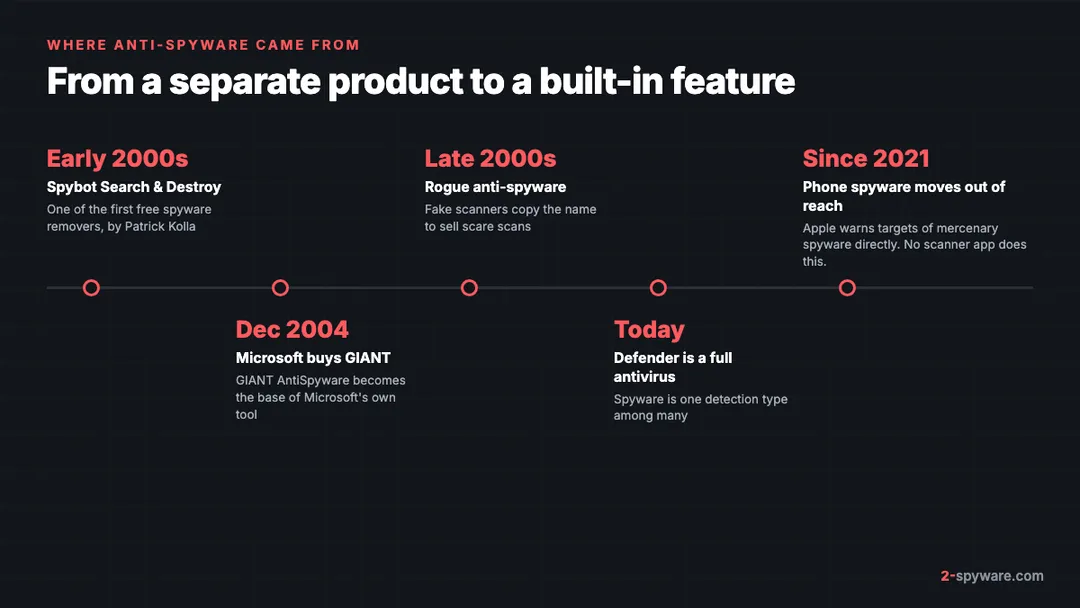
The name also attracted fraud. From the late 2000s, fake scanners with names like Spyware Protect 2009 used scare scans to sell licences. We list them under rogue anti-spyware, and the pattern still shows up in fake virus alerts on web pages. Check any unknown site with our website safety checker before you buy.
Today spyware is one detection type among many. For the wider comparison, our best malware removal tools page ranks the same products for general infections; this page stays with your typing, your browser and your saved logins.
How to run a spyware check on a PC
- Note what worries you: a remote access app you did not install, a webcam light, or logins from strange places. That points to a remote tool, a keylogger or a stealer.
- Run a full scan with Defender or your main tool, then a second opinion with Safety Scanner or Spybot Free. Read each detection name; a PWS or Keylogger label points to stolen data.
- Check browser extensions in every browser and remove the ones you did not add, with our extension removal guide.
- Look for remote access software in your installed apps. If you did not set it up, uninstall it.
- From a different, clean device, change your e-mail password first, then banking and other important accounts, and sign out of all other sessions.
- Scan again after a day. If the same item returns, run a Defender Offline scan or ask for help on our forum.
Frequently asked questions
What is the best anti-spyware software?
In our reviews Fortect scored highest at 9.2 for Windows, because it scans for spyware and unwanted programs, protects in real time and clears browser traces. On a Mac, Combo Cleaner and Intego both scored 8.4. Keep the built-in protection on alongside any of them.
Is anti-spyware the same as antivirus?
Not any more as a separate thing. Anti-spyware began as its own product type in the early 2000s. Today every serious antivirus detects spyware, and tools still sold as anti-spyware usually cover other malware too.
Does Windows Defender detect spyware?
Yes. Microsoft Defender Antivirus started life as Microsoft AntiSpyware and is now a full antivirus that scored 6 of 6 for protection in AV-TEST's August 2026 test. Turn on blocking of potentially unwanted apps to catch bundled trackers too.
What is the best free anti-spyware?
Microsoft Defender is already on Windows. For a free second opinion, Microsoft Safety Scanner removes what it finds, and Spybot Search and Destroy Free scans and removes spyware. Fortect also offers a free scan and free one-by-one repair.
Can anti-spyware detect Pegasus?
No consumer app is built to. Pegasus and similar mercenary spyware target a small number of people and are designed to evade detection. Apple warns targeted iPhone users with threat notifications and recommends Lockdown Mode and expert help.
What is the best anti-spyware for a phone?
On Android, keep Google Play Protect on and review apps with Accessibility or device admin access. On iPhone, use Safety Check and keep iOS updated. If you fear stalkerware, think about your safety first, because removing it can alert the person who installed it.
Do I still need to change passwords after removing spyware?
Yes. A scanner removes the program but cannot recall data that was already sent. Change your e-mail password first from a clean device, then other accounts, and sign out of all other sessions.
Does a Mac need anti-spyware?
macOS has XProtect, but Mac stealers that ask for your password and tracking adware still get through. Combo Cleaner adds a privacy scanner for browsers and apps, and Intego adds real-time scanning and a firewall that shows which apps connect out.
Sources
- Fortect homepage: All-in-One Security, Privacy and OS Health Suite (antivirus, Chrome extension, Fortect for Mac) read 2026-10-08
- Fortect pricing and checkout page (plans, included features, renewal and money-back terms) read 2026-10-08
- EnigmaSoft: SpyHunter product page (threats removed, System Guards, cookie removal, SpyHunter for Mac, prices) read 2026-10-08
- AV-TEST: Product Review and Certification Report, EnigmaSoft SpyHunter 5.16, Windows 11, March and April 2024 read 2026-10-08
- Safer-Networking: Compare Spybot Editions (features and prices) read 2026-10-08
- Safer-Networking: Spybot Free Edition and download page (current build) read 2026-10-08
- Microsoft Source: Microsoft Acquires Anti-Spyware Leader GIANT Company (16 December 2004) read 2026-10-08
- AV-TEST: Microsoft Defender Antivirus (Consumer) 4.18 for Windows 11, August 2026 read 2026-10-08
- Microsoft Learn: Detect and block potentially unwanted applications read 2026-10-08
- Microsoft Learn: Microsoft Safety Scanner Download (how it works, 10-day expiry) read 2026-10-08
- Microsoft Support: Remove specific prevalent malware with Windows Malicious Software Removal Tool (KB890830) read 2026-10-08
- Combo Cleaner homepage: Antivirus and system cleaner for Mac, PC and Android (Privacy Scanner) read 2026-10-08
- Combo Cleaner purchase page (plans, prices and renewal) read 2026-10-08
- Intego pricing page: Intego ONE plans, features, renewal prices and system requirements read 2026-10-08
- AV-TEST: Test antivirus software for MacOS Tahoe, March 2026 read 2026-10-08
- Google Play Help: Use Google Play Protect to help keep your apps safe and your data private read 2026-10-08
- Apple Personal Safety User Guide: Safety Check for an iPhone with iOS 16 or later read 2026-10-08
- Kaspersky Securelist: The State of Stalkerware in 2023 read 2026-10-08
- Apple Support: About Apple threat notifications and protecting against mercenary spyware read 2026-10-08
- Microsoft Security Blog: Lumma Stealer, breaking down the delivery techniques and capabilities of a prolific infostealer read 2026-10-08
- Safer-Networking: Spybot Professional Edition product page (engine, immunization) read 2026-10-08
 What is spyware and how to remove it
 How to check your phone for spyware