
Windows Protection Suite: what it is and how to remove it
Windows Protection Suite is a fake antivirus program that shows invented scan results and a payment button. It is not part of Windows:
- close it
- uninstall it
- scan with Windows Security
- do not pay
Facts checked October 5, 2026. Removal steps tested on Windows 11 (26H2) and checked against Microsoft's and the browser makers' current documentation.
Automatic
Get a free scan and check if your PC is infected.
Fortect finds malware, unwanted programs and the Windows damage they leave behind, and repairs it in one pass.
If Windows Protection Suite came bundled with something else, a free scan can list the other programs installed alongside it.
Do it yourself · free Remove Windows Protection Suite yourself 5 steps, about 15 minutes, no software needed.
Start the steps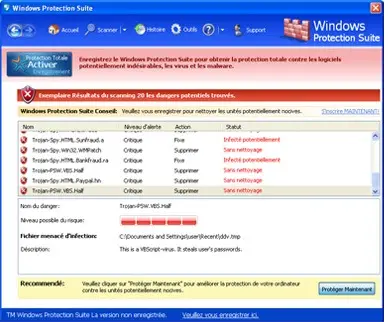
Windows Protection Suite: summary
| Type | Rogue antivirus (fake security software); not part of Windows |
|---|---|
| Risk | High if installed: it asks for payment for a cure to threats that do not exist; our 2021 report adds blocked security tools and hijacked browsers |
| Symptoms | A window called Windows Protection Suite with a scan listing dangers, taskbar alerts, and an "unregistered version" strip with a protect-now button |
| How to get rid of it | End it in Task Manager, uninstall it from Installed apps (Safe Mode if it refuses), scan with Windows Security and the offline scan, check the browsers; never pay |
| Our check | Desk check on 5 October 2026: its address no longer resolves; no live sample run |
| Running since | Our report 26 April 2021; the family's names go back to 2009 |
| Removal | Scan the PC with security software to find and remove the malware and anything installed with it. Fortect scans Windows for malware and repairs the system files and settings it damaged. Remove it nowTo use the full-featured product, you have to purchase a license for Fortect. The scan is free. |
Show 9 more facts
| Detection names | Microsoft: Rogue:Win32/FakeVimes (earlier Trojan:Win32/FakeVimes) is the family whose aliases include Extra Antivirus and Virus Melt; Windows Protection Suite itself is not in that list, so the match is not confirmed |
|---|---|
| Distribution | Trojans, fake online scanners and manual download from its own page (our 2021 report) |
| Same family | Windows Security Suite, Malware Destructor 2009, Virus Shield 2009, Extra Antivirus, Virus Sweeper, Virus Doctor, Virus Melt |
| Name | Windows Protection Suite |
| Evidence | One write-up by a security site; details still limited |
| Program | Windows Protection Suite |
| First seen | 26 April 2021 |
| Damage | Money paid for a useless licence, card details given to an unknown seller, real security tools blocked |
| Facts checked | 5 October 2026 |
Desk check on 5 October 2026: the address our 2021 report named no longer resolves and we ran no live sample. Facts about its behaviour are from our 2021 report and screenshot.
What Windows Protection Suite is and how it works
Windows Protection Suite is a fake antivirus: a program that looks like security software, reports infections that are not there and asks for money to remove them.
- 1
It gets onto the PC
Our 2021 report says it was pushed by Trojans and fake online scanners, and that it could also be downloaded by hand from its own web page. Either way a person or a loader had to run its installer.
- 2
It runs a scan nobody asked for
A program window opens in the style of an antivirus, with a progress bar and a list of Trojans and spyware. The list is generated by the program.
- 3
It raises the alarm
Alerts imitate the Windows Security Center and the Windows taskbar, saying that malicious applications were found and must be removed at once.
- 4
It offers one cure
Everything it lists can only be "removed" in the registered version. The window keeps a red strip with the words unregistered version and a button to protect the PC now, which opens the payment page.
- Kind of program
- Rogue antivirus (fake security software); Microsoft's naming scheme has its own detection type for this, Rogue
- Systems
- Windows
- What it asks for
- Payment for a "full version" that removes threats that do not exist
- Interface
- The window we kept from 2021 is in French; the product's web page was in English with a language switch
- Address in our 2021 report
- windowsprotectionsuite.com (does not resolve today)
- Same family, per our 2021 report
- Windows Security Suite, Malware Destructor 2009, Virus Shield 2009, Extra Antivirus, Virus Sweeper, Virus Doctor, Virus Melt
Is Windows Protection Suite a real security program?
What its alerts say, and where you see them
The alerts are text written by the program. Windows itself never asks you to buy anything.
| What you see | What it claims | What is really going on |
|---|---|---|
| A window titled Windows Protection Suite with a scan result | 20 dangers were found, such as Trojans and spyware | The list is part of the program and would read the same on a clean PC. Our screenshot lists names like Trojan-Spy.HTML.SunFraud.a and Trojan-PSW.VBS.Half |
| A message from the taskbar: "System Alert" | Malicious applications, which can contain trojans, were found and need to be removed immediately | The wording is from our 2021 report. It is a program drawing a Windows-style balloon, not a Windows Security notification |
| A page that looks like Windows Security Center | Your computer is unprotected or under attack from a remote machine | Windows Security Center is not the program that says this; the rogue imitates its look |
| A red strip with "unregistered version" and a protect-now button | You must register to clean the PC | This is the sales step: the button leads to a payment form |
| Browser start page or search results that changed | Not claimed by the program | Our 2021 report says it hijacks browsers and search results; we could not test that on a sample, so check your browsers (section below) |
Our 2021 report adds that the program is likely to delete system restore points and block the security programs it finds. We did not have a live sample to confirm that, so read it as a warning to check restore points and your security tools after removal, not as a measured fact.
"Windows Protection Suite" in the bottom left corner: what to check
Many readers arrive with this exact search. We cannot see your screen, so here is how to tell what you have in two minutes.
| What is in the bottom left | What it probably is | What to do |
|---|---|---|
| The edge of a program window, with a red unregistered version strip | The rogue program's own window, as in our 2021 screenshot | Do not click the protect-now button. End it in Task Manager and uninstall it (plan below) |
| A taskbar icon or balloon with the name Windows Protection Suite | The program is running and drawing alerts | Hover it, right-click and choose Close or Exit, then open Task Manager (Ctrl + Shift + Esc) and end the process |
| A start-menu or desktop shortcut with that name | The program is installed | Uninstall it from Settings > Apps > Installed apps |
| A web page with the name and a Download Now button | The product's sales page, if it is still online | Close the tab; do not download or run anything from it |
Genuine Windows protection is called Windows Security and sits in the notification area as a shield icon. A security product named Windows Protection Suite that you did not install yourself is not part of Windows.
Where the name comes from
2009 era
The family
The related names in our report include Malware Destructor 2009 and Virus Shield 2009.
26 April 2021
Our report
We described Windows Protection Suite as a misleading antivirus that uses false scan results and fake alerts. Our screenshots show its web page, whose feature list says it works with Windows XP and Windows Vista, and the program window.
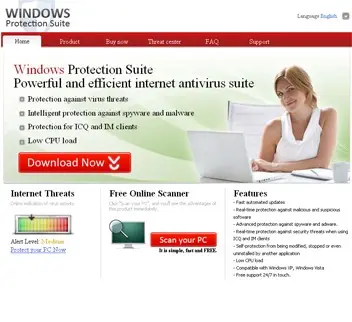
The product's web page from our 2021 report: Download Now and Scan your PC buttons, and a feature list that says it works with Windows XP and Windows Vista. 5 October 2026
This rewrite
We could not open a live sample or the vendor's page: the domain our report named does not resolve. The facts here come from our report, our screenshot and Microsoft's and the FTC's public advice.
What we checked for this update
This is a program, not a site we can open in a clean browser, so our check was a desk check and a look at the address our report named.
Windows Protection Suite · desk check · 5 October 2026
- Its web addresswindowsprotectionsuite.com, named in our 2021 report, does not resolve: the DNS query returns no such domain, and the .com registry's RDAP service has no record for it. We do not know when it went offline.
- Live sampleNot run. We did not install the program in 2026, so what it does on a PC today is from our 2021 report and screenshot, not from a new test.
- Microsoft's classificationMicrosoft's entry Rogue:Win32/FakeVimes (earlier Trojan:Win32/FakeVimes) lists Extra Antivirus and Virus Melt among its aliases, two names our 2021 report puts in this family. Windows Protection Suite itself is not in that alias list, so we do not say Defender detects it under that name.
- Recent reader reportsNone in our comments, and the old guide had no reader questions.
- Search interestSmall: about 40 searches a month in the United States, mostly asking what it is.
A dead website does not clear a program Nothing to test online does not mean a copy on your PC is harmless. A rogue antivirus keeps asking for money and reporting fake threats for as long as it is installed. If it is on your PC, remove it.
What it can do to you
The scan is fiction. What costs you is the payment page and whatever the program changed.
- High
Paying
The licence buys nothing: the program removes no infection because there is none. Your card number goes to people who run a scam, and a renewal may follow.
- Medium
Blocked security tools
Our 2021 report says it blocks security programs and may delete restore points. Check Windows Security and your restore points after removal.
- Medium
A changed browser
Our 2021 report says it hijacks browsers and search results. Check start page, search engine and extensions in each browser.
- Medium
What brought it
If a Trojan or a fake scanner installed it, that carrier may have brought other programs. A full scan and an offline scan look for them.
What the payment page can take
- Name and address
- Card number and security code
- Billing country
- Card renewal consent
This is what any online payment form asks for; the risk is that it goes to the sellers of a fake product.
How to remove Windows Protection Suite
Nothing it reports is real.
These steps remove it and undo a payment if you made one.
Step 1: Do not pay, and undo a payment if you made one
Windows Protection Suite reports problems to sell a licence: the "threats" or "errors" it lists are invented or harmless leftovers. If you already paid, ask your card issuer to dispute the charge and cancel the subscription both in the seller's account and through your bank.
If you called a phone number it showed and let someone connect, treat the PC as remotely accessed and remove the remote tool. Uninstalling it from Windows 11 or Windows 10 does not cancel a subscription by itself.
Full procedure with screenshots: What to do after paying a scammer
Step 2: Uninstall Windows Protection Suite
Open Settings > Apps > Installed apps in Windows 11, or Settings > Apps > Apps & features in Windows 10.
Sort the list by install date and find Windows Protection Suite, then choose Uninstall from the three-dot menu next to it (in Windows 10, click the entry and then Uninstall).
Remove anything else installed on the same day that you do not recognise, because such programs usually arrive together in one installer. If the uninstaller opens a browser page with an offer or a survey, close it: the program is removed either way.
Full procedure with screenshots: Uninstall a program or app in Windows On uGetFix
Step 3: Remove it from startup
Whatever Windows Protection Suite installed usually starts with Windows.
Open Task Manager with Ctrl + Shift + Esc, go to Startup apps in Windows 11 or the Startup tab in Windows 10, and disable what you do not know, starting with entries that have an empty Publisher column.
Open file location on the right-click menu shows the file, which helps you decide and tells you what to delete later. Disabling is safe: if something you need stops working, switch it back on.
Full procedure with screenshots: Stop apps from opening at startup On uGetFix
Step 4: Delete the folders left behind
What the uninstaller leaves behind is usually in the user folders. Open File Explorer, switch on View > Show > Hidden items (in Windows 10 View > Hidden items), and go through
%LocalAppData%,%AppData%, %ProgramData% and the two Program Files folders.Sort by Date modified and delete folders that appeared together with the problem and belong to no program you use. Folders with random names that hold
.exe,.dll, .js or .ps1 files are the strongest sign.Full procedure with screenshots: Remove what malware leaves behind in Windows
Step 5: Scan the PC, then run the offline scan
Open Windows Security > Virus & threat protection > Scan options, run a Full scan and remove everything it finds. Then select Microsoft Defender Antivirus (offline scan) and click Scan now: the PC restarts and scans before Windows loads, which finds files that hide while Windows runs.
Save your work first, because the offline scan takes about 15 minutes. Both scans are built into Windows 11 and Windows 10, and a second scanner from another vendor is a useful extra opinion.

Windows 11: Windows Security > Virus & threat protection > Scan options. Full procedure with screenshots: Run a Microsoft Defender Offline scan
Check your browsers after the uninstall
Our 2021 report says Windows Protection Suite hijacks browsers and search results. Spend two minutes on each browser you use.
- 1
Chrome
Open Settings > Search engine and confirm the default; under On startup confirm the pages. In Extensions remove anything you did not install.
- 2
Edge
Open Settings > Start, home, and new tabs and Privacy, search, and services > Address bar and search, then Extensions, and remove what you do not know.
- 3
Firefox
Open Settings > Home and Search, then Add-ons and themes > Extensions.
- 4
System proxy
Open Settings > Network & internet > Proxy and make sure Use a proxy server is off unless you set it up yourself.
If you paid for Windows Protection Suite
Uninstalling does not stop billing. Handle the money separately and quickly.
- 1
Call your card issuer
Use the number on the back of the card. Say you bought software that displayed false scan results, ask for a chargeback and a new card.
- 2
Cancel any renewal
Use the link in the receipt e-mail, or tell the bank to block further charges from that seller.
- 3
Keep the evidence
Save the receipt, the order e-mail and screenshots of the program's scan window.
- 4
Change reused passwords
If you used the same e-mail and password on the order page as elsewhere, change them from a clean device. The FTC also advises changing passwords and turning on two-factor authentication after malware.
- 5
Report it
People in the United States can report fake security software at ReportFraud.ftc.gov, which the FTC names for reporting malware.
After removal and prevention
Rogue antivirus programs rely on one moment of panic. A few habits remove it.
Do
- Close any page that says it found viruses on your PC: a website cannot scan your computer
- Use Windows Security, which is built in and free, and keep Windows updated
- Download software only from the maker's own site, typed in by hand
- Keep a 3-2-1 backup: three copies of your files, on two kinds of storage, one kept offline or off site, so a cleaned or reset PC costs you nothing
- Use a VPN on public networks if you like; it hides your address from the sites you visit, but it does not stop fake scanners
Don't
- Call a phone number from a pop-up or buy anything from an alert
- Install a security program because a pop-up or a free online scanner told you to
- Click a Download Now button on a page you reached from an ad
- Pay for removal software you cannot name the maker of
Questions about Windows Protection Suite
What is Windows Protection Suite?
Windows Protection Suite is a fake antivirus program, also called a rogue security application. It pretends to scan your PC, lists infections that do not exist and tells you to buy a full version to remove them.
Our 2021 report placed it in a family with Windows Security Suite, Malware Destructor 2009, Virus Shield 2009, Extra Antivirus, Virus Sweeper, Virus Doctor and Virus Melt. It is not part of Windows and not made by Microsoft. Real Windows protection is called Windows Security and removes threats free of charge.
Is Windows Protection Suite a virus?
Windows Protection Suite is not a virus in the strict sense, but it is malicious software and it should be removed. It does not spread by itself between computers. It is a program that deceives you with false results to get your money, and our 2021 report says it was pushed by Trojans and fake online scanners.
Microsoft's naming scheme has a separate Rogue type for fake security programs of this kind. Nothing in our report says it encrypts your files, so a normal uninstall plus a scan is the right answer.
What is the Windows Protection Suite in the bottom left corner of my screen?
It is most likely the rogue program's window, taskbar icon or alert, so check it before you click anything. We cannot see your screen. In our 2021 screenshot the bottom edge of the program window carries a red strip saying the version is unregistered, with a button to protect the PC now.
If you see a window or icon with that name, open Task Manager with Ctrl+Shift+Esc, look for it under Apps or Background processes and end it, then uninstall it from Installed apps.
How do I remove Windows Protection Suite?
Close the program, uninstall it, scan, and then check your browsers. End it in Task Manager (Ctrl+Shift+Esc), then open Settings > Apps > Installed apps, choose it and click Uninstall.
If it refuses to close or uninstall, start Windows in Safe Mode and try again. Next, run a full scan in Windows Security and a Microsoft Defender Offline scan, which Microsoft says takes about 15 minutes and restarts the PC.
Finally check Windows Security, your restore points and each browser's start page and extensions. The plan on this page has the steps in order. Do not click Buy or Register at any point.
Are the threats Windows Protection Suite finds real?
No, you should treat every threat it lists as invented. The scan result is part of the program: it reports dangers on any computer to make you buy.
Our screenshot lists 20 dangers with names like Trojan-Spy.HTML.SunFraud.a on one PC, and the same program would list some on a clean one. The reliable test is a second opinion:
- run a full scan in Windows Security and
- if you want more certainty
- a Microsoft Defender Offline scan
If those find nothing while the program shows dozens of threats, the program's numbers are made up.
Can I still download Windows Protection Suite?
You should not, and the address our report named no longer works. We checked on 5 October 2026: windowsprotectionsuite.com returns no such domain in DNS and has no registration record in the .com registry's RDAP service. We do not know when it went offline, and copies of the installer may exist under the same name.
A dead site does not make the program safe, so do not download a security program you found through an ad or a free online scanner. Use Windows Security or software from a maker you can name.
I paid for Windows Protection Suite. What now?
Contact your card issuer today, because uninstalling the program does not get your money back or stop billing. Call the number on the card, say the software showed false scan results, and ask for a chargeback and a new card.
Cancel any renewal through the receipt e-mail. Keep the receipt and screenshots, and change any password you reused on the order page from a clean device. Be wary of anyone who offers a refund and asks for remote access: that is a second scam.
Will Windows Protection Suite come back after I remove it?
It should not if you removed the program and whatever installed it, but the scan step is what tells you. Our report says the program was spread by Trojans and fake scanners, so the first installer may have brought other programs.
After uninstalling, run a full Windows Security scan and a Microsoft Defender Offline scan. Check Installed apps for anything installed on the same day. If the alerts return, repeat the steps in Safe Mode; if protection will not turn on, a Windows reset is the safer route.
Does Windows Defender detect Windows Protection Suite?
We could not confirm a Microsoft detection name for Windows Protection Suite, so we do not claim one. Microsoft names fake security software with the type Rogue, and the same program can be detected under another name in the family, because security vendors name families differently. What we can say is how to use Windows Security:
- open Virus & threat protection
- run a full scan
- then run the Microsoft Defender Offline scan
- look at Protection history for any entry
Uninstall the program either way.
Will Fortect remove Windows Protection Suite?
Fortect scans Windows for malware and unwanted programs and repairs the system files and settings they change, and its free scan shows what it finds on your PC before you decide anything.
For Windows Protection Suite, follow the plan above as well: the browser steps take back permissions and settings that no scanner treats as a threat, and uninstalling the program that brought it removes the source.
Run Microsoft Defender's full scan and, if anything was found, its offline scan as a second opinion. If the symptoms are gone after the plan and both scans are clean, there is nothing more to do.
Sources
- Microsoft Security Intelligence: Rogue:Win32/FakeVimes (read October 5, 2026)
- FTC: Malware: How To Protect Against, Detect, and Remove It (read October 5, 2026)
- Microsoft Learn: Run and review the results of a Microsoft Defender Offline scan (read October 5, 2026)
- Microsoft Learn: How Microsoft names malware (read October 5, 2026)