
Disclosure: 2-spyware.com earns a commission if you buy Fortect through links on this page. Other products may also pay us a commission. The scores, prices and features below come from our own published reviews, linked in each section, and from the lab and vendor pages listed under Sources.
If you are still working out what infected your device, start with our malware and viruses guide. It explains the signs and the manual steps. This page is about choosing software for general malware: trojans, password stealers, miners, rootkits and the droppers that install them. For narrower jobs we keep separate comparisons of adware removal tools, browser hijacker removal tools and ransomware protection.
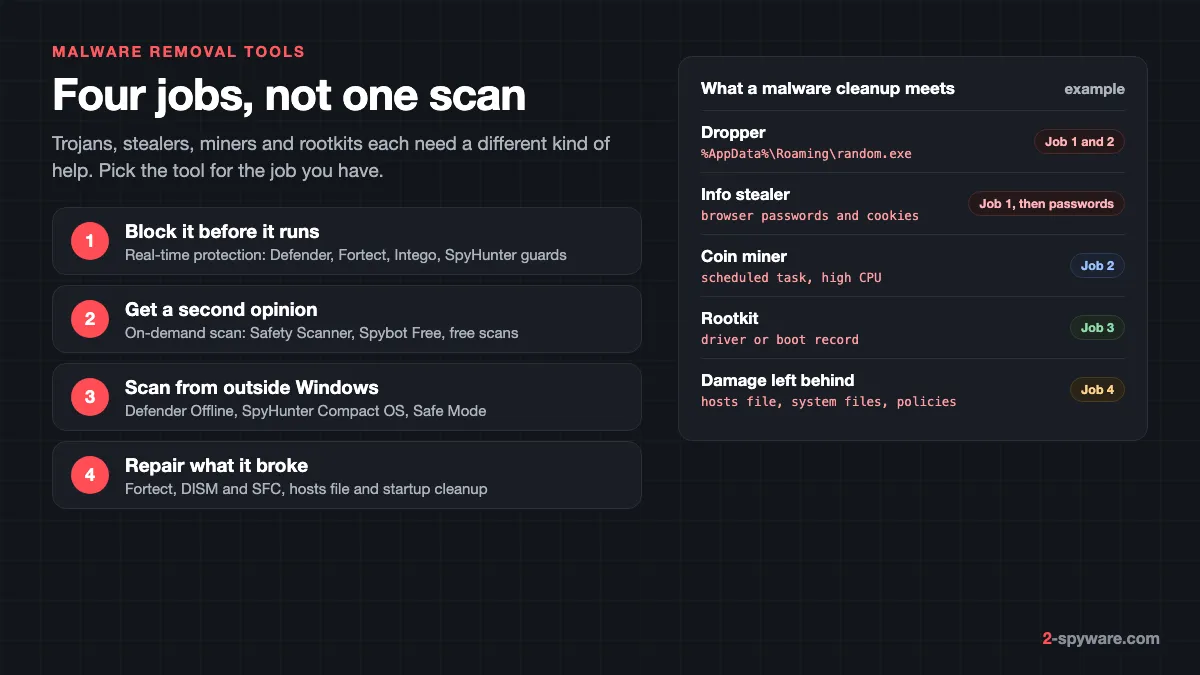
Malware removal is four different jobs
Products sold as malware removal tools work in very different ways. Decide which of these four jobs you need before comparing brands. Most people need two.
- Real-time protection. A guard that checks files as you download and open them, and blocks a dropper before it installs anything.
- On-demand scanning. A scan you start yourself, often with a second engine next to your antivirus. It finds what the first product missed but does not keep watch.
- Offline or rescue scanning. A scan that runs outside normal Windows, so a rootkit or locked file cannot hide or fight back. Microsoft Defender Offline runs from a trusted environment outside the Windows kernel, which lets it target rootkits and boot record infections [12].
- Repair. Deleting the malware does not undo what it changed. AV-Comparatives grades removal partly on leftovers, such as a compromised hosts file, a disabled Task Manager or a disabled Registry Editor [18].
| Malware type | What it does | Job that helps most |
|---|---|---|
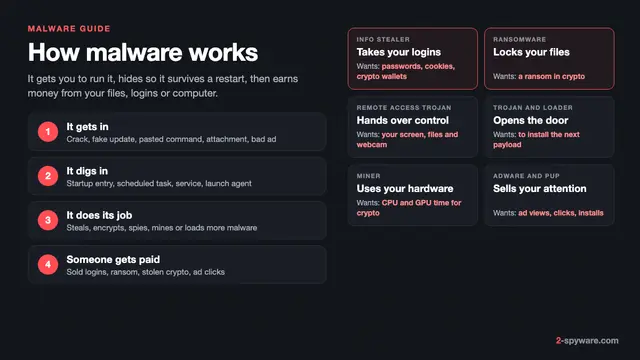
| Dropper or loader | Installs other malware, often from a crack or fake update | Real-time protection, then a full scan |
| Info stealer | Copies saved passwords, cookies and crypto wallets, often in minutes | Real-time protection; after infection, a scan plus new passwords |
| Coin miner | Uses your CPU or GPU through a hidden process or scheduled task | On-demand scan and startup cleanup |
| Rootkit | Hides files, processes or drivers from Windows itself | Offline scan or a scanner with its own boot system |
| Remote access trojan | Lets an attacker control the PC and add more malware | Full scan, offline scan, then repair and password changes |
Stealers need a second step. By the time a scanner finds one, the data may be gone, so follow our guide to securing your accounts after malware. Miners give themselves away with heat and fan noise, and our page on cryptojacking miners shows where they hide.
Malware removal tools compared
| Tool | Best job | Platforms | Real-time | Free part | Price from | Our score |
|---|---|---|---|---|---|---|
| Fortect | Scan, removal and repair of damage | Windows 10 and later; separate Mac product | Yes, in paid plans | Full scan and one-by-one repair | 30.95 euros first year, 1 PC | 9.2 |
| SpyHunter 5 | Stubborn infections, personal help | Windows 7 to 11, macOS 10.13+ | Yes, System Guards | Scan, cookie removal | $29.70 per 6 months | 8.6 |
| Combo Cleaner | Mac malware and adware cleanup | macOS and Windows | Yes on Windows | Mac scan and disk tools | $47.95 per 6 months | 8.4 |
| Intego | Ongoing Mac protection | macOS 12.4 or later | Yes | None; 30-day refund | $29.99 first year | 8.4 |
| Microsoft Defender and Defender Offline | Free baseline and offline scan | Windows 10 and 11 | Yes | Everything | Free | Built in |
| Microsoft Safety Scanner | Free portable second opinion | Windows 7 to 11 | No | Everything | Free | 7.8 |
| Spybot Search and Destroy | Free extra spyware check | Windows 7 to 11 | Paid editions only | Scan and removal | 18.99 euros a year (Home) | 6.4 |
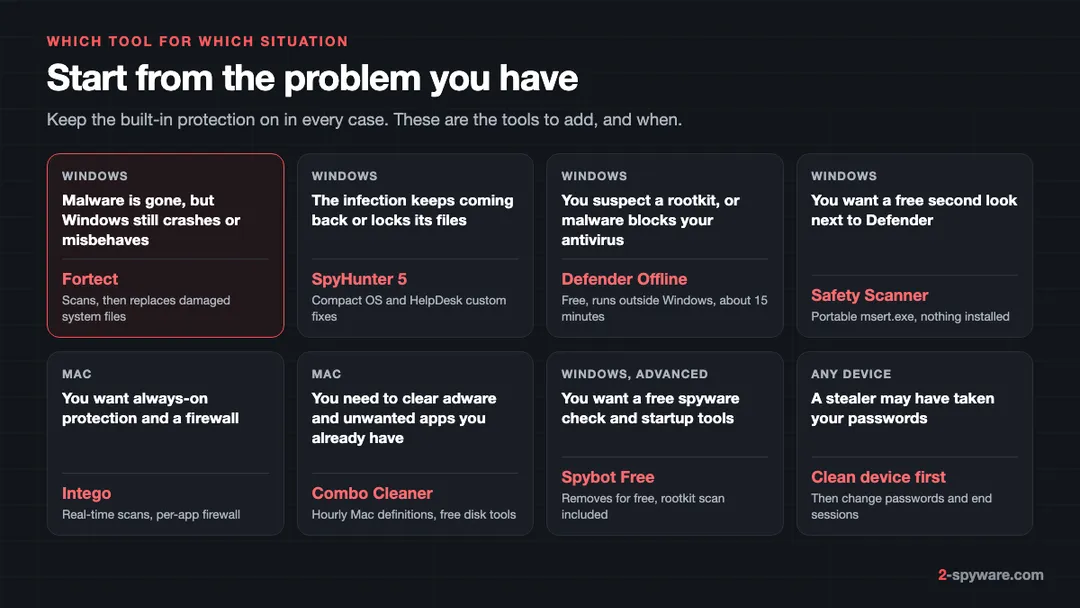
Fortect: removes malware and repairs what it broke
Fortect scores 9.2 in our review, the highest here. It covers two of the four jobs in one app, which is rare. The paid plans include an antivirus that monitors new downloads, installs and files in real time, with quick, full and custom scans [1][2]. The other half is repair.
That is why we put it first for general malware. A trojan or miner often leaves broken system files, changed settings and crashing programs. Fortect's Malware and PUA stage looks for threats and those changes, then replaces damaged Windows files with healthy copies.
- Free part: the full diagnostic scan, plus free one-by-one repair (Pick and Choose), so you see results on your own PC first [1].
- Paid plans: Essential covers 1 PC for 30.95 euros in the first year, Multi-Device 3 PCs for 37.95 euros and Ultimate 5 PCs for 53.95 euros [2].
- Every plan includes automated repair, the antivirus, malware removal, driver updates, restore points and email support [2].
- Refunds: a 60-day money-back window on the first purchase. Plans renew yearly, with a reminder email 30 days before payment [2].
- Also listed: ransomware protection, cloud-based threat detection and a Chrome extension that blocks malicious websites [1].
Fortect works well next to Microsoft Defender.
SpyHunter 5: when malware fights back
SpyHunter 5 scores 8.6. EnigmaSoft lists trojans, ransomware, worms, spyware, rootkits and keyloggers among the threats it removes [3]. Two features target malware that resists removal. Compact OS boots a small system beneath Windows to delete files the malware locks. The HelpDesk builds a custom fix from a diagnostic report, at no extra cost [3].
In AV-TEST's March and April 2024 test of version 5.16, it detected all 19,228 widespread samples and earned the certificate with 15 of 18 points [4]. Its 0-day score was 97.8 and 96.3 percent against an industry average of 99.5 [4].
- Free part: the scan and tracking cookie removal; malware removal needs a subscription [3].
- Paid: Basic from $29.70 per six months, Pro and Mac from $35.70 [3]. The 7-day trial asks for a card, and purchases have a 30-day refund.
Combo Cleaner: Mac malware cleanup
Combo Cleaner scores 8.4. On a Mac it scans for malware, adware and unwanted apps with hourly definition updates, and flags Windows malware stored on the Mac. The scan is free; removal is paid.
- Paid: Essential costs $47.95 per six months for one device, Premium $79.95 for 5 devices [5].
- Testing: VB100 certified, status last updated August 21, 2026 [6]. It has no AV-TEST or AV-Comparatives results.
- Free for good: Disk Cleaner, Big Files and Duplicates on the Mac.
Intego: real-time protection for a Mac
Intego also scores 8.4, and it covers the job Combo Cleaner does not stress: always-on protection. Intego ONE adds real-time and scheduled scans and a firewall with per-app rules [7]. AV-TEST gave it 6 of 6 points for protection, performance and usability in March 2026 [8].
In AV-Comparatives' 2026 Mac test it blocked 96.7 percent of 1,500 Mac malware samples and all 100 Windows samples, earning the Approved award [9]. Plans start at $29.99 for the first year, renew at $39.99 and carry a 30-day refund window [7].
Microsoft Defender and Defender Offline: the free baseline
Windows 10 and 11 already include a full antivirus. In AV-TEST's August 2026 Windows 11 test, Microsoft Defender Antivirus scored 6 of 6 for protection and earned the Top Product award [10]. The real question is what to add to it.
Defender Offline is the free answer to malware that hides. It takes about 15 minutes, restarts the PC and runs outside the normal Windows environment [12]. Open Windows Security, go to Virus & threat protection, then Scan options, select Microsoft Defender Offline scan and click Scan now [12]. Our Defender Offline guide walks through it with pictures.
- Suspend BitLocker first if it protects your system drive, or Windows may ask for the recovery key [12].
- The Windows Recovery Environment must be on, or the scan silently does nothing. Check with reagentc /info in an admin Command Prompt [12].
- It does not run on Arm versions of Windows. Results appear under Protection history [12].
Microsoft Safety Scanner: free portable second opinion
Microsoft Safety Scanner scores 7.8. It is a single file, msert.exe, that uses the same security intelligence as Defender, removes what it finds and tries to reverse the changes those threats made [13]. It installs nothing and offers Quick, Full and Customized scans.
Each copy expires 10 days after download, so get a fresh one before each scan [13]. It suits a PC where Defender is off or broken, or a relative's PC where you do not want to install anything.
Spybot Search and Destroy: free extra check for experienced users
Spybot Search and Destroy scores 6.4. Its Free edition scans for and removes spyware, adware and tracking software, and includes Startup Tools and a Rootkit Scan [14]. Live Protection, the antivirus engine and automatic updates are only in Home (18.99 euros a year) and Professional (29.99 euros) [14].
The program build dates from February 2023, there are no current lab results for Spybot itself, and purchases are not refundable. Use the Free edition as an extra opinion.
Second-opinion scanning next to Defender
Running two real-time antivirus products at once causes conflicts. On Windows 10 and 11, Defender switches itself to disabled mode when another antivirus becomes your main product, and turns back on if that product expires or is removed [11].
On-demand scanners do not have that conflict, because they only work when you start them. That is why Safety Scanner, Spybot Free and the free scans of SpyHunter and Fortect make good second opinions. To see which product is protecting you, open Windows Security, then Virus & threat protection, and under Who's protecting me? select Manage providers [11].
A lone hit from the second scanner may be a false alarm, and names differ between vendors. Our page on antivirus detection names helps you judge it.
When malware blocks your tools
Some malware closes security apps or hides while Windows runs. Try these options in order.
- Run Microsoft Defender Offline from Windows Security. It loads before the malware can.
- Start Windows in Safe Mode with Networking and run your scanner there. AV-Comparatives uses Safe Mode, then a vendor rescue disk, when normal installation fails in its removal test [18].
- Use a scanner with its own boot system, such as SpyHunter's Compact OS [3].
- Download tools on a clean PC and carry them over on a USB drive. Microsoft advises building offline scan media on a PC that is not infected, because malware can interfere with the process [12].
- If nothing loads, back up your files and see our guide on how to clean or reset Windows.
Repair what the malware damaged
After the scanner reports a clean system, check for damage. Malware commonly edits the hosts file, adds startup entries and scheduled tasks, disables Windows tools and corrupts system files. A removal tool may leave any of these behind [18].
- Repair system files. In an admin Command Prompt, run DISM.exe /Online /Cleanup-image /Restorehealth first, then sfc /scannow, as Microsoft recommends [15].
- Reset the hosts file with our hosts file guide if sites redirect or security sites fail to load.
- Remove leftover tasks, services and Run keys with our guide to removing malware leftovers.
- Check that remaining processes are genuine. Our page on checking whether a Windows process is genuine shows the file locations to expect.
Fortect automates the first step and adds registry repair. If SFC cannot fix some files, Microsoft suggests replacing them by hand or reinstalling Windows [15].
What free virus removal really covers
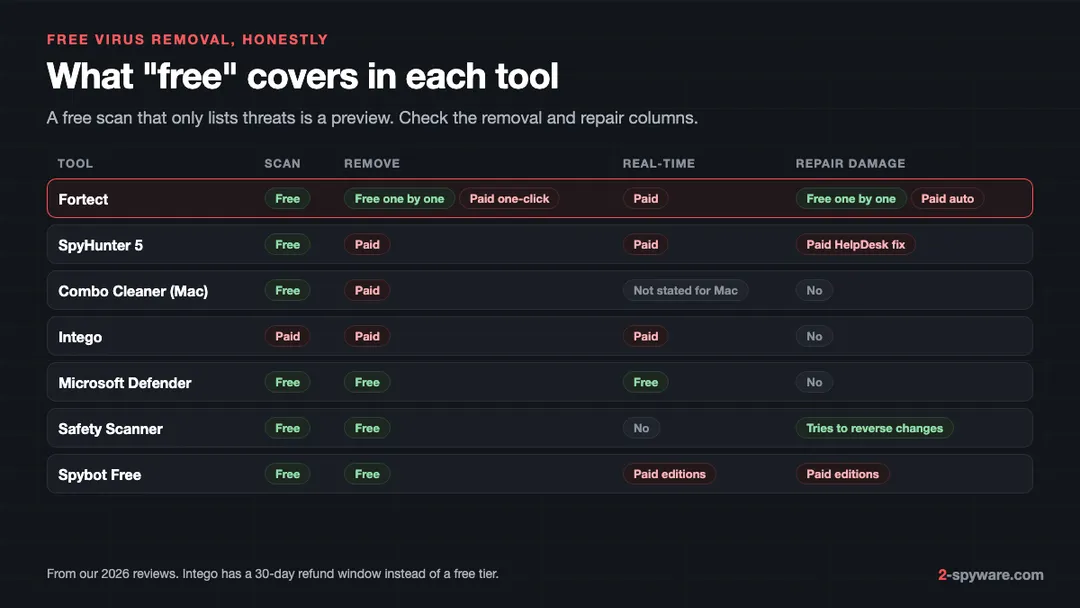
"Free" means very different things here. Microsoft Defender, Defender Offline and Safety Scanner are free in full. Spybot Free scans and removes. Fortect scans for free and lets you repair items one at a time. SpyHunter and Combo Cleaner scan for free but charge to remove. Intego has no free tier, only a refund window.
A "free virus removal" that reaches you through a pop-up and finds dozens of threats is rogue security software. Cracked copies of paid tools are worse, since cracks often carry droppers and stealers, as our page on cracked software malware shows.
How to read AV-TEST and AV-Comparatives results
- Check which test it was. AV-TEST's protection score combines real-world attacks with malware found in the previous 24 hours and a set of widespread malware from the past 4 weeks [16]. SpyHunter's perfect widespread score next to a lower 0-day score means older threats are covered better than new ones [4].
- Protection is not removal. AV-Comparatives' real-world test measures whether a product stops an attack while online, not how it protects an offline PC [17]. Removing an existing infection is a separate test, graded A to D [18].
- Small gaps can be noise. AV-Comparatives treats products in the same results cluster as equally effective if their false positive rate is below average, and a perfect score covers only that test's samples [17].
- Check the date and version. SpyHunter's report is from 2024 and version 5.16 [4]; Intego's Mac results are from 2026 [8][9].
- No result is not a bad result. Combo Cleaner has only VB100 certification and Spybot has no current lab tests, which means unmeasured, not weak. Verify any badge on the lab's own site.
Frequently asked questions
What is the best malware removal tool?
In our reviews, Fortect scored highest at 9.2 for Windows because it removes malware and also repairs the system damage that infections leave. SpyHunter 5 suits stubborn infections, and on a Mac, Intego and Combo Cleaner both scored 8.4.
Is there truly free virus removal?
Yes. Microsoft Defender, Defender Offline and Microsoft Safety Scanner are free in full on Windows, and Spybot Free removes what it finds. Fortect offers free one-by-one repair after its scan. Many other tools scan for free and charge for removal.
Is Microsoft Defender enough to remove malware?
For most home users it is a solid baseline, and AV-TEST rated it 6 of 6 for protection in August 2026. Add a second-opinion scan when you suspect an infection, Defender Offline for hidden malware and a repair step if Windows still misbehaves afterwards.
Can I run two antivirus programs at the same time?
Not two real-time products. On Windows 10 and 11, Defender switches itself off when another antivirus becomes your main product. On-demand scanners such as Safety Scanner or Spybot Free only run when you start them, so they work fine next to Defender.
What should I do if malware blocks my antivirus?
Run Microsoft Defender Offline from Windows Security, which scans before Windows loads. If that fails, try Safe Mode with Networking, a scanner with its own boot system, or tools downloaded on a clean PC and copied over on a USB drive.
Does removing malware fix the damage it caused?
Not always. Malware can leave a changed hosts file, disabled Windows tools, startup entries and corrupted system files. Run DISM and SFC, check the hosts file and startup items, or use a repair tool such as Fortect that restores damaged Windows files.
Which malware removal tool works on a Mac?
Intego for ongoing real-time protection with a firewall, and Combo Cleaner for cleaning up malware and unwanted apps you already have. Keep macOS's XProtect on with either.
Do I need to change passwords after removing an info stealer?
Yes. A stealer usually sends saved passwords and session cookies out soon after it runs, so removing it does not undo the theft. Clean the device first, then change passwords from a clean device and sign out of active sessions.
How much does a malware removal tool cost?
In our reviews, Fortect starts at 30.95 euros for the first year on one PC, SpyHunter 5 at $29.70 per six months and Intego at $29.99 for the first year. Microsoft's tools are free. Check renewal prices at checkout.
Sources
- Fortect homepage: All-in-One Security, Privacy and OS Health Suite (antivirus features, free scan, Pick and Choose) read 2026-10-08
- Fortect pricing and checkout page (plans, included features, renewal and money-back terms) read 2026-10-08
- EnigmaSoft: SpyHunter product page (threats removed, Compact OS, HelpDesk, prices) read 2026-10-08
- AV-TEST: Product Review and Certification Report, EnigmaSoft SpyHunter 5.16, Windows 11, March and April 2024 read 2026-10-08
- Combo Cleaner purchase page (plans, prices and renewal) read 2026-10-08
- Virus Bulletin: Combo Cleaner in VB100 read 2026-10-08
- Intego pricing page: Intego ONE plans, features, renewal prices and system requirements read 2026-10-08
- AV-TEST: Test antivirus software for MacOS Tahoe, March 2026 read 2026-10-08
- AV-Comparatives: Mac Security Test and Review 2026 read 2026-10-08
- AV-TEST: Microsoft Defender Antivirus (Consumer) 4.18 for Windows 11, August 2026 read 2026-10-08
- Microsoft Learn: Microsoft Defender Antivirus compatibility with other security products read 2026-10-08
- Microsoft Learn: Run and review the results of a Microsoft Defender Offline scan read 2026-10-08
- Microsoft Learn: Microsoft Safety Scanner Download (how it works, 10-day expiry, msert.log) read 2026-10-08
- Safer-Networking: Compare Spybot Editions (features and prices) read 2026-10-08
- Microsoft Support: Use the System File Checker tool to repair missing or corrupted system files read 2026-10-08
- AV-TEST: Test Modules under Windows, Protection read 2026-10-08
- AV-Comparatives: Real-World Protection Test Methodology read 2026-10-08
- AV-Comparatives: Malware Removal Test Methodology read 2026-10-08
 What is malware and how to remove it
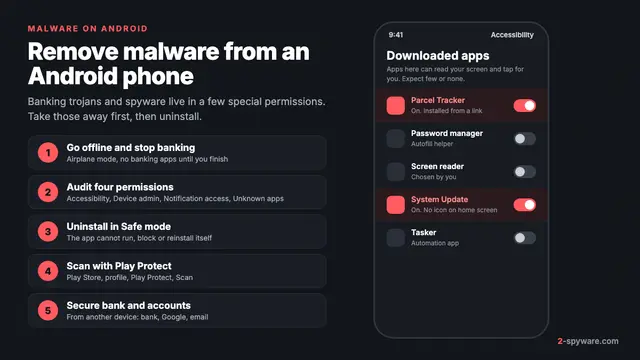 How to remove a virus or malware from an Android phone
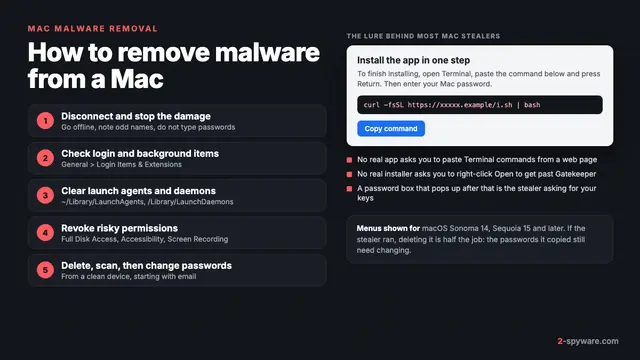 How to remove a virus or malware from a Mac
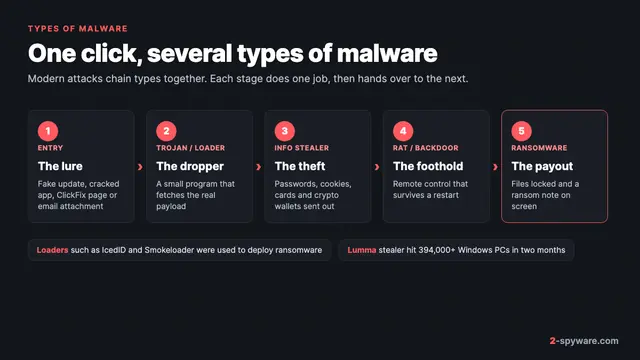 Types of malware: what each kind does and how to spot it