
scribblebubblebibi.top: a server that handed out Linux botnet programs for routers and cameras, and what to do about it
scribblebubblebibi.top is a web address that URLhaus lists 14 times on 15 October 2026 for a shell script and 13 Linux programs named Space.arm, Space.mips, Space.x86_64 and similar, all tagged botnetdomain and fetched with wget.
These are not programs for an ordinary desktop computer: they are built for routers, cameras, recorders and Linux servers. If you only saw the name in a log, nothing is proven; if a device on your network may have fetched these files, take it offline, reset it, update its firmware and change its passwords.
Facts checked October 17, 2026. Removal steps tested on Windows 11 (26H2) and checked against Microsoft's and the browser makers' current documentation.
Automatic
Get a free scan and check if your PC is infected.
Fortect finds malware, unwanted programs and the Windows damage they leave behind, and repairs it in one pass.
Programs like a script or program on a router, camera or Linux server that downloads files from scribblebubblebibi.top usually arrive in groups; a free scan lists the companions that are easy to miss.
Do it yourself · free Remove scribblebubblebibi.top (Linux botnet loader, Space.* files) yourself 5 steps, about 15 minutes, no software needed.
Start the steps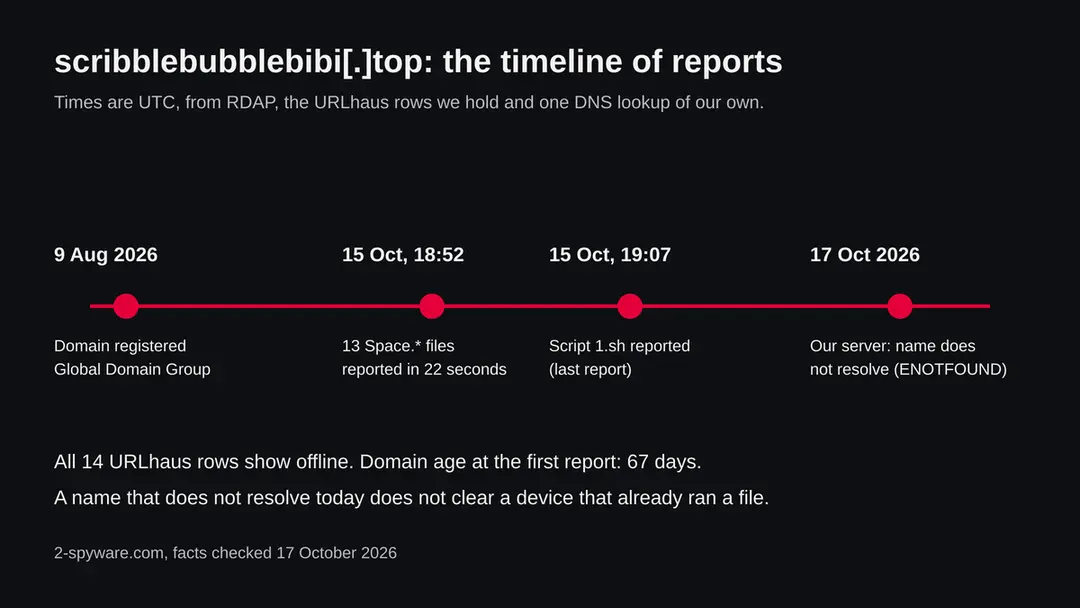
Scribblebubblebibi.top (Linux botnet loader, Space.* files): summary
| Type | A malware server: URLhaus lists a shell script and 13 Linux programs (Space.*) tagged botnetdomain, elf, sh and ua-wget |
|---|---|
| Risk | High for a router, camera, recorder or Linux server that fetched the files: the device may be used in attacks. Low if you only saw the name |
| Symptoms | Often none. A slow line, reboots, a changed admin login or a provider notice about attack traffic are the signs in the reports |
| How to get rid of it | Take the device offline, factory reset, install the newest firmware, set a new admin password, switch off remote management and UPnP; replace it if no patch exists |
| Our check (17 October 2026) | One request from our server: the name did not resolve. That clears nothing; the danger rating comes from URLhaus |
| Running since / first seen | Domain registered 9 August 2026; files first reported 15 October 2026 |
| Removal | Scan the PC with security software to find and remove the malware and anything installed with it. Fortect scans Windows for malware and repairs the system files and settings it damaged. Remove it nowTo use the full-featured product, you have to purchase a license for Fortect. The scan is free. |
Show 9 more facts
| Platform | Linux on routers, cameras and servers. The files are ELF programs and do not run on Windows or macOS |
|---|---|
| Detection names | No Microsoft name is known for the files on this server, because we did not open them. For Mirai in general Microsoft lists Trojan:Linux/Mirai.AA, Trojan:Linux/Mirai.A!MTB and Trojan:Linux/Mirai.A!AMTB (its encyclopedia search, read 17 October 2026). Public sandbox reports label Space.* files from a hiddenbin folder on other servers as Mirai |
| Name | Scribblebubblebibi.top |
| Domain registered | 9 August 2026 |
| Evidence | 14 write-ups by security sites; details still limited |
| First seen | 15 October 2026 |
| Distribution | Typically fake installers, cracked programs, e-mail attachments, fake "verify you are human" pages and ads for popular apps |
| Damage | Installs other malware, often several programs at once |
| Facts checked | 17 October 2026 |
Facts checked on 17 October 2026 against the URLhaus data for scribblebubblebibi.top held in our database, RDAP, one request of our own from our server (the name did not resolve) and public reports by the SANS Internet Storm Center, Joe Sandbox, Microsoft, CISA and the Singapore Cyber Security Agency.
The source pages were read through search result summaries, not opened in full. We did not download the files and infected no device; the cleaning steps follow CISA and CSA advice and were not tried on a live infection.
What scribblebubblebibi.top is, and what we know about it
scribblebubblebibi.top is not a program on your computer. It is a web address that the abuse.ch project URLhaus lists as a place where malware was served: one shell script and thirteen Linux programs, one for each kind of processor. We found no public write-up of this exact address, so what follows is what URLhaus shows, what our own check found, and what other researchers have published about the same pattern.
- 1
What URLhaus lists
Fourteen file addresses on the domain, all on plain http. Thirteen sit in a folder called hiddenbin and are named Space followed by a processor name: arm, arm5, arm6, arm7, arc, i686, m68k, mips, mpsl, ppc, sh4, x86 and x86_64. The fourteenth is a shell script, 1.sh, in the top folder. The 13 programs were added within 22 seconds on 15 October 2026 around 18:52 UTC, and the script at 19:07 UTC. All 14 are marked offline.
- 2
What the tags mean
elf marks a Linux program file (not a Windows .exe). sh marks a shell script. ua-wget means the file was requested by the download tool wget, which is what a script on a router or a server uses, not a person with a browser. botnetdomain means the reporter sees the domain as part of a botnet's infrastructure. The reporter is listed as NDA0E; we know nothing more about them.
- 3
What we could not confirm
We did not download any of the files, so we cannot tell you which malware family they are, what they do or where they report to. The folder name hiddenbin and the file names Space.arm7 and Space.mpsl match files that researchers on other servers have labelled Mirai in public sandbox reports (see the next chapters). That matches the pattern; it does not prove the files here are the same.
- 4
What this means for you
If you only saw the name in a firewall log or a blocked request, you are not infected by that alone. The risk is for a device that already ran a command that went to fetch these files. Ordinary people have no reason to ask for them.
- Kind of threat
- A server that hands out a shell script and 13 Linux programs for different processors, tagged botnetdomain
- Where the files are
- hxxp://scribblebubblebibi[.]top/1.sh and hxxp://scribblebubblebibi[.]top/hiddenbin/Space.<processor>
- Domain registered
- 9 August 2026 through Global Domain Group LLC; status client transfer prohibited (RDAP, read 15 October 2026)
- URLhaus entries
- 14 file addresses, all added on 15 October 2026; none online when we last read the data on 17 October 2026
- Platform
- Linux on routers, cameras, recorders and servers. Files are ELF programs, which do not run on Windows or macOS
- Our request
- 17 October 2026: the name did not resolve from our server (getaddrinfo ENOTFOUND)
What scribblebubblebibi.top (Linux botnet loader, Space.* files) does on an infected PC
What we checked on 17 October 2026, and what we could not
We sent one plain request from our server to scribblebubblebibi.top. It failed before any page could load: the name no longer resolves. That tells you the address is not answering today. It does not tell you the devices that fetched these files are clean.
Our check, 17 October 2026
- The address did not answerThe lookup returned ENOTFOUND, meaning our server could not find an address for the name. The registrar, the host or the operator may have removed the records. We do not know which, and we do not know when it stopped.
- Why that is not a clean resultA botnet server is often moved or switched off within days. A device that already ran one of the programs can keep running it and can still be told what to do by another server.
- Notification request, pop-ups, redirects, ad networksNone seen. There was nothing to see: no page loaded, and the reported files are not web pages.
- URLhaus listing14 file addresses, all added on 15 October 2026, tagged botnetdomain, elf, sh and ua-wget. All 14 are marked offline in our copy of the data.
- Downloads and the files themselvesWe did not download any file and ran nothing. We cannot tell you what the files contain.
Dangerous: treat it as a malware server Our test was one request that ended in a lookup error, so it proves nothing either way. The danger rating comes from the URLhaus reports and their tags, not from our request. Do not request files from this address and do not run anything that does.
What happened to scribblebubblebibi.top, from registration to our check
The domain is about ten weeks old. All reports fall in one evening. The dates come from RDAP and the URLhaus data we hold; times are UTC.
9 August 2026
The domain is registered
RDAP shows scribblebubblebibi.top registered on 9 August 2026 at 17:58 UTC through Global Domain Group LLC. The only status listed is client transfer prohibited, which is a common lock and says nothing about use.
15 October 2026, 18:52 UTC
Thirteen program files are reported
Between 18:52:11 and 18:52:33 UTC, URLhaus receives the Space files for m68k, arc, arm6, i686, ppc, mips, arm5, arm7, x86, mpsl, x86_64, sh4 and arm. All are tagged botnetdomain, elf and ua-wget. Reporting 13 files in 22 seconds looks like a tool reading a folder listing; that is our reading, not something a report says.
15 October 2026, 19:07 UTC
The script 1.sh is reported
Fifteen minutes later the shell script 1.sh is added with the tags botnetdomain, sh and ua-wget. It is the last report we hold.
The reports on scribblebubblebibi.top. The folder, the file naming and the tags stay the same across all 14 entries. 17 October 2026
Our request finds no address
Our server asks for the site and gets ENOTFOUND. URLhaus marks all 14 files offline. The /check tool on this site had been asked about the address 16 times by then, which is why this guide exists.
What the pattern suggests, and what it does not: a young domain, a hidden-sounding folder, one file per processor type and a script reported together is the usual shape of a loader for devices that run Linux. It does not tell us who runs it or whether it is still active on another name.
How a Linux botnet loader like this works
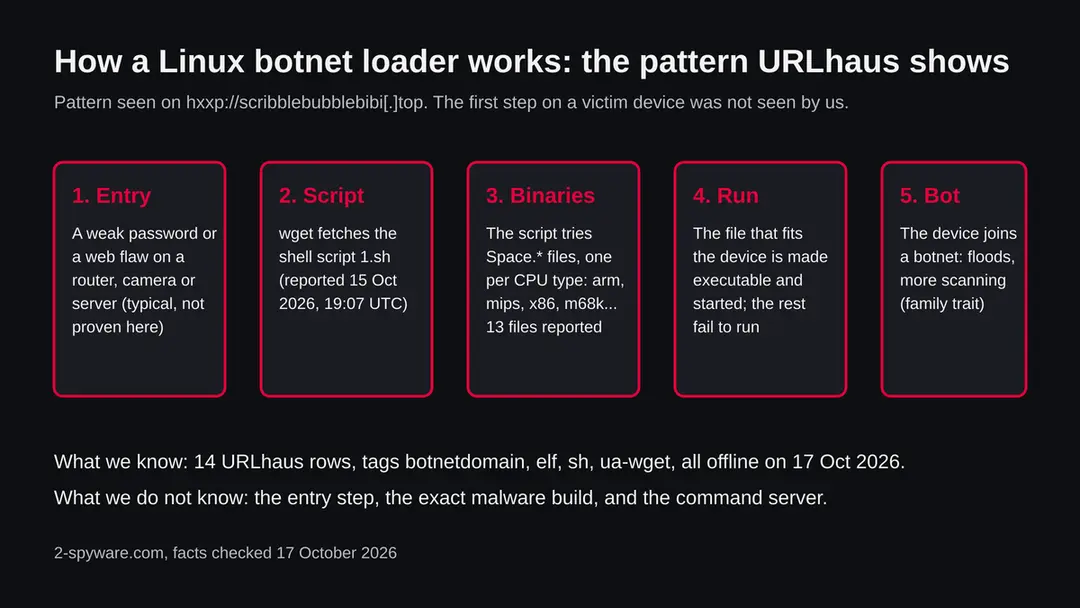
The reports show a script plus one program per processor type. Researchers describe the same arrangement for Mirai-family malware. We did not see this server's files, so this chapter is the pattern, not a finding about the files.
- 1
Something is already running a command
A SANS Internet Storm Center report from February 2024 shows the usual start: a command injected into the web interface of a router, which runs wget to fetch a .sh script. The same pattern is described for devices with a weak or default Telnet password, where the attacker simply logs in and types the command.
- 2
The script asks for one file per processor
SANS describes the script then fetching programs for several architectures, among them mips and mpsl. A router might use ARM, a camera MIPS, an old set top box SuperH (sh4) or PowerPC (ppc). The script does not know which, so it tries them all. The 13 names on this server fit that: arm, arm5, arm6, arm7, mips, mpsl, ppc, sh4, m68k, x86, x86_64, i686 and arc.
- 3
Only the matching file starts
A program built for the wrong processor simply fails to run, so most of the 13 files do nothing on any one device. Public sandbox reports on files named Space.arm7 from a hiddenbin folder on other servers describe them as UPX-packed Mirai samples (Joe Sandbox). Packing makes the file small and harder to read.
- 4
The device becomes a bot
Mirai, whose source code was published in 2016, turns a device into a bot that can flood a target with traffic and scan the internet for more devices with weak passwords. The Singapore Cyber Security Agency describes a hijacked router in a botnet used for denial of service attacks. What the files on this server do was not tested by us.
What the 13 file names tell you about the target devices
The suffix of each Space file is a processor family. Together they cover almost every small Linux device sold in the last twenty years, which is the point of the kit. The device guesses below are our reading, not facts from a report.
| File | Processor family | Where such chips are common (our reading) |
|---|---|---|
| Space.arm, arm5, arm6, arm7 | ARM, in several generations | Home routers, IP cameras, set top boxes, many small Linux boards |
| Space.mips, Space.mpsl | MIPS, big endian and little endian | Older and low cost routers, access points, DVR and NVR recorders |
| Space.x86, i686, x86_64 | Intel and AMD, 32 bit and 64 bit | Linux servers, virtual machines, mini PCs, some network appliances |
| Space.ppc | PowerPC | Older network gear and industrial boxes |
| Space.sh4 | SuperH 4 | Older set top boxes and some recorders |
| Space.m68k | Motorola 68000 family | Very old embedded gear; its presence shows the kit tries every option |
| Space.arc | ARC | Some embedded chips in small appliances |
Two points follow. First, a normal desktop is not the target: these are Linux files, and a Windows PC or a Mac cannot run them. Second, a Linux server is a target as much as a router, so a cloud server with a weak password or an out of date web application is in the same position as a cheap camera.
What this kind of malware can do, and what is not confirmed here
We did not run the files. The table shows what Mirai-family bots are known to do, as the sources describe it, and how far that carries over to this server.
| Behaviour | Where it comes from | How far it can be trusted for this server |
|---|---|---|
| Joins a botnet and floods targets with traffic (denial of service) | Singapore CSA advisory on routers; Mirai reporting in general | Likely if the files are Mirai-family, which is not confirmed for these files |
| Scans the internet for more devices with default passwords | SANS and CSA describe brute forcing of known default logins | A trait of the family, not shown for these files |
| Runs only in memory, so a power cycle removes it | General knowledge; the search results we read did not confirm it | Treat as unproven. A device with the same weak login is taken again within minutes or hours |
| Reads or changes your traffic | CSA says attackers may intercept unencrypted traffic on a hijacked router | Possible for a router; not shown for these files |
| Steals files or passwords from a PC | Nothing we read | Not expected. These files cannot run on Windows or macOS |
What scribblebubblebibi.top (Linux botnet loader, Space.* files) can steal or download
What it can cost you
The owner of an infected device rarely sees a pop-up. The costs are slower connections, a blocked internet account and, for a server, being used to attack others.
- High
A router under someone else's control
A bot on your router sits between every device at home and the internet. It can slow your connection and, according to CSA, attackers can also intercept traffic that is not encrypted.
- High
Your address used to attack others
Denial of service traffic comes from your internet address. Your provider may warn you or cut the line, and the target's logs name you.
- Medium
A server taken over through a weak password
If the device is a Linux server, the same weak login can lead to other programs being installed. Treat the whole server as untrusted until it is rebuilt.
- Medium
Other devices on the same network
Bots scan for more devices with default passwords. A camera or recorder on your home network may be next.
- Low
Nothing at all
If the name only appeared in a blocked request or a threat feed, nothing ran on your side. The danger is the case you cannot tell apart yet.
What you may notice, and what is not a sign
Many infected devices show nothing. These are the signs people report for botnet bots on routers and servers, with the limits of each.
| Sign | What it may mean |
|---|---|
| The internet is slow or drops, mostly at odd hours | Possibly flood traffic, but also a bad line or an overloaded Wi-Fi. Not specific |
| The router or camera reboots on its own or runs hot | Possibly a bot using the processor. Also a failing power adapter |
| The admin page login no longer works, or a setting you did not change is different | A sign worth acting on: someone else has been in the device |
| Your provider sends a notice about attack traffic from your address | A strong sign that a device in your network is part of a botnet |
| Unknown processes or files such as Space.* or 1.sh on a Linux server, in /tmp or /var/run | A strong sign. Names are our reading of the URLhaus file names; a bot may rename itself |
| Connections to scribblebubblebibi.top in firewall or router logs | The device tried to fetch these files. Whether it succeeded depends on whether the server answered at that time |
| Nothing at all | The most common case |
How to check the PC for scribblebubblebibi.top (Linux botnet loader, Space.* files)
Start with the logs, because they tell you which device asked for the files. Write down the device, the date and the time.
- 1
Search your logs for the name
If you saw the name in a security tool, open that tool's log and note the source address of the request. On a home network, the router's own log or your DNS filter shows which device asked. A request that was blocked means the file did not arrive; a request that went through means you must treat the device as possibly infected.
- 2
Find the device behind the address
The source address is usually a private one such as 192.168.1.x. The router's list of connected devices shows the name and the hardware address of each. Look for a camera, a recorder, a set top box or an old network device you forgot.
- 3
On a Linux server, look at what runs
Run
ps auxandss -tunpand look for unknown programs with open connections, especially from /tmp, /var/tmp or /dev/shm. Listcrontab -lfor each user and/etc/cron*for entries you did not add. Look for files named Space.* or 1.sh withfind / -name 'Space.*' -o -name '1.sh' 2>/dev/null. A match is a strong sign; no match does not clear the server. - 4
Check the login history
On a server,
lastand/var/log/auth.log(orjournalctl -u ssh) show who signed in and from where. On a router, check the admin page for users you did not create and for remote management switched on. - 5
Check what is open to the internet
CISA's home Wi-Fi guidance says default router login details may be public, so changing them is essential. Look in the router for remote administration, port forwarding rules and UPnP, and note any you did not set up.
How to remove scribblebubblebibi.top (Linux botnet loader, Space.* files)
How to remove scribblebubblebibi.top
A loader's job is to install other malware, so treat the PC as infected with more than one program until the scans are clean.
Step 1: Delete scheduled tasks that bring it back
Open Task Scheduler from the Start menu and click Task Scheduler Library. Select each task you do not recognise and read the Actions tab:
- a task that starts a file in
%AppData%or%Temp% - runs
powershellwith a long encoded line - opens a web address belongs to scribblebubblebibi.top or a similar program
Right-click such a task and choose Delete, and check the subfolders too. Leave tasks from Microsoft, your PC's maker and programs you use. Task Scheduler is the same in Windows 11 and Windows 10.

Windows 11: Task Scheduler Library, the task selected, the Actions tab shows the file it runs. Full procedure with screenshots: Remove what malware leaves behind in Windows
- a task that starts a file in
Step 2: Remove it from startup
Whatever scribblebubblebibi.top installed usually starts with Windows. Open Task Manager with Ctrl + Shift + Esc, go to Startup apps in Windows 11 or the Startup tab in Windows 10, and disable what you do not know, starting with entries that have an empty Publisher column.
Open file location on the right-click menu shows the file, which helps you decide and tells you what to delete later. Disabling is safe: if something you need stops working, switch it back on.
Full procedure with screenshots: Stop apps from opening at startup On uGetFix
Step 3: Delete the folders left behind
What the uninstaller leaves behind is usually in the user folders. Open File Explorer, switch on View > Show > Hidden items (in Windows 10 View > Hidden items), and go through
%LocalAppData%,%AppData%, %ProgramData% and the two Program Files folders.Sort by Date modified and delete folders that appeared together with the problem and belong to no program you use. Folders with random names that hold
.exe,.dll, .js or .ps1 files are the strongest sign.Full procedure with screenshots: Remove what malware leaves behind in Windows
Step 4: Scan the PC, then run the offline scan
Open Windows Security > Virus & threat protection > Scan options, run a Full scan and remove everything it finds. Then select Microsoft Defender Antivirus (offline scan) and click Scan now: the PC restarts and scans before Windows loads, which finds files that hide while Windows runs.
Save your work first, because the offline scan takes about 15 minutes. Both scans are built into Windows 11 and Windows 10, and a second scanner from another vendor is a useful extra opinion.

Windows 11: Windows Security > Virus & threat protection > Scan options. Full procedure with screenshots: Run a Microsoft Defender Offline scan
Step 5: Change passwords from another device and sign out other sessions
Assume that the passwords saved in this PC's browsers, and the accounts that were open in them, are known to the attacker. From a phone or a clean computer, change the e-mail password first, then banking, shopping, social and gaming accounts.
Use each service's option to sign out of all other sessions, because stolen cookies keep a session open even after a password change. Turn on two-step verification on each account. Wait with the infected Windows 11 or Windows 10 PC until the scans are clean.
Full procedure with screenshots: Turn on two-step verification / secure a hacked account
Clean a router, camera or Linux server
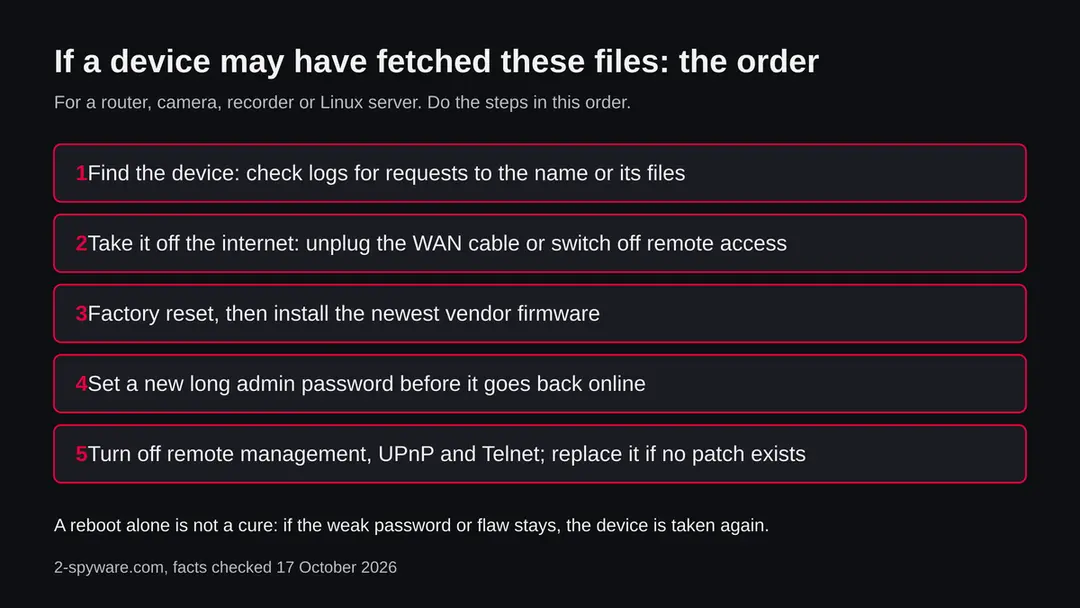
There is no program to uninstall. The safe way is to take the device offline, wipe it, update it and lock it down. We did not run these steps against a live infection; they follow CISA and CSA advice and the SANS description of how these devices are taken.
- 1
Take the device off the internet
Unplug the cable that goes to the internet, or switch the device off, so it cannot be controlled or attack others while you work. For a server, remove its public address in your hosting panel or block it with the provider's firewall.
- 2
Save only what you need
For a router or camera there is little to save: write down the settings you need (the internet account details from your provider's letter). For a server, copy data, not programs, to a clean place. Do not copy scripts or binaries from the server.
- 3
Do a factory reset
Hold the reset button as your device's manual says, or use the reset option in its admin page. A power cycle alone is not enough: the weak login or flaw that let the program in is still there. For a server, the safest path is to rebuild from a fresh image.
- 4
Install the newest firmware before going online
Download the update from the maker's own support page on another device and install it from the admin page. CISA's home Wi-Fi guidance recommends checking for firmware updates. If the maker no longer sells updates for the model, plan to replace it.
- 5
Set a new, long and unique admin password
Use a password or phrase that is long, random and used nowhere else, as CISA recommends. Change the default network name too. On a server, turn off password sign in over SSH and use keys.
- 6
Turn off what you do not need
Switch off remote management on the internet side, UPnP, Telnet and any old file sharing. CISA and CSA both list these among the usual causes of hijacked routers. Put cameras and smart devices on a guest network so one bad device cannot reach the rest.
- 7
Connect again and watch
Reconnect and look at the router's device list and log over the next days. If the same request to scribblebubblebibi.top or a similar name appears, another device is also infected. A provider notice that continues after all this means a device is still missed.
If you run a website or a server
The address scribblebubblebibi.top is the attacker's, not a site that was hacked, as far as the evidence shows. But your server can be the device that fetched the files, and a hacked web server can also serve such files.
Do
- Search web server and system logs for requests to the name and for wget or curl commands you did not write.
- Update the web application, its plugins and the operating system; many Mirai-family infections start from a known flaw in a web interface (SANS).
- Rebuild a taken server from a clean image and restore data only after you checked it.
- Rotate every password and key that was on the server.
Don't
- Do not just delete a file you find and keep running the same server.
- Do not leave Telnet, default accounts or an open admin panel on the internet.
- Do not restore programs or scripts from the infected machine's backups without checking them.
Only saw the name in a log or an alert?
Then you are probably fine, but check one thing: which device asked, and whether the request was answered.
- 1
Blocked request
A security product that says it blocked the request stopped the file. Note the device and move on, but keep the entry for a week.
- 2
Request with a reply
If your router or firewall shows a completed connection (for example, bytes received), treat the device as possibly infected and use the cleaning chapter.
- 3
Request from a PC browser
A PC cannot run these files. But a link that took you to this address came from somewhere: a message, an ad or an infected site. Treat that source with care and scan the PC with Microsoft Defender or your own security tool.
After removal: passwords, accounts and prevention
The advice from CISA and CSA is the same for every device.
Do
- Change the default admin password on every router, camera and recorder the day you plug it in.
- Turn on automatic firmware updates where the maker offers them, and check manually every few months.
- Put smart and cheap devices on a guest network.
- Replace devices the maker no longer updates.
- Keep an eye on your provider's mail: a notice about attack traffic is a real sign.
Don't
- Do not expose the admin page, Telnet or SSH to the internet.
- Do not leave UPnP on if you do not need it.
- Do not reuse one password across devices.
- Do not buy no-name cameras that cannot be updated.
Questions about scribblebubblebibi.top (Linux botnet loader, Space.* files)
What is scribblebubblebibi.top?
It is a web address that URLhaus, the malware tracking project run by abuse.ch, lists 14 times for files served on 15 October 2026: a shell script called 1.sh and 13 Linux programs named Space.arm, Space.mips, Space.x86_64 and similar. It is not a program on your computer and not a website anyone is meant to visit.
The domain was registered on 9 August 2026. We did not download the files, so what they contain is not confirmed by us. Public reports on the same file names from other servers call them Mirai samples.
Is scribblebubblebibi.top safe to open?
No. Do not request files from it and do not run anything that does. When we sent one request from our server on 17 October 2026, the name did not resolve, so there was no page to judge.
That proves nothing: botnet servers are often moved or switched off within days. The danger rating comes from the 14 URLhaus reports and their tags botnetdomain, elf, sh and ua-wget, not from our visit. A browser visit itself is unlikely to harm a PC, but there is no reason to try.
Is scribblebubblebibi.top a virus on my computer?
No. It is a server address, and the files it handed out are Linux programs that cannot run on Windows or macOS. If your antivirus or your router showed the name, a device on your network may have asked for the files, or a link led there.
Find out which device by checking the log entry. A router, camera, recorder or Linux server is the real concern. A desktop PC only needs a normal scan if you also clicked a suspicious link or ran a download you did not trust.
What are the Space.arm, Space.mips and Space.x86_64 files?
They are the same kind of program built for different processors. The word after Space is the chip family: arm and its versions for many routers and cameras, mips and mpsl for older routers and recorders, x86 and x86_64 for Linux servers, ppc, sh4, m68k and arc for rarer embedded devices.
A loader script tries to fetch all of them because it does not know which chip the victim has. Only the matching one runs; the others fail. Public sandbox reports on files with these names from other servers label them Mirai.
How do I know if my router is infected?
You often cannot tell from the outside. Signs are a slow or dropping connection, reboots, an admin password that no longer works, settings you did not change, remote management you did not switch on, or a notice from your provider about attack traffic from your address.
Check the router's log for requests to scribblebubblebibi.top. If you find a completed request, or any of the other signs, treat the router as taken:
- factory reset it
- install the newest firmware
- set a new admin password
- switch off remote management
A clean look does not clear a router.
Does restarting the router remove it?
Not reliably. Some sources say this kind of malware runs only in memory so a restart clears it, but the search results we read did not confirm that, and it does not matter much: if the weak password or the flaw is still there, the device is taken again, often within hours.
Do a factory reset, install the newest firmware from the maker's own support page, set a new long admin password and turn off remote management and UPnP. If the maker offers no update for the model, replace it.
Can this affect Windows, Mac, iPhone or Android?
The files on this server are ELF programs for Linux, so they do not run on Windows or macOS, and nothing we read says they target iPhones. Android is built on Linux, but nothing we found ties these files to Android phones.
The devices at risk are routers, IP cameras, recorders, set top boxes and Linux servers. A Windows PC or Mac on the same home network is not infected by these files, but it can be harmed if the router in between is controlled by someone else, so fix the router first.
What should I do if my server fetched these files?
Treat the server as taken. Remove its public access, find how they got in (a weak password, an open Telnet or SSH, an old web application), and rebuild from a clean image rather than deleting files by hand. Rotate every password and key that was on it.
Update the web application and the system before it goes back online, turn off password sign in for SSH, and close any service that does not need the internet. Check logs for wget or curl commands you did not write, and for files named Space.* or 1.sh in temporary folders.
Why can't you tell me what the malware does?
Because we did not download or run the files, and we found no public report on this exact server. All 14 files are offline in the data we hold, and the name no longer resolves from our server.
What we can say comes from URLhaus tags, the file names and public reports on similar files from other servers, such as the SANS Internet Storm Center and Joe Sandbox, which call them Mirai. Mirai-family bots are known to flood targets and scan for more devices, but that is the family, not a proof for these files.
Will Fortect remove scribblebubblebibi.top?
Fortect scans Windows for malware and unwanted programs and repairs the system files and settings they change, and its free scan shows what it finds on your PC before you decide anything.
For scribblebubblebibi.top, follow the plan above as well: the browser steps take back permissions and settings that no scanner treats as a threat, and uninstalling the program that brought it removes the source.
Run Microsoft Defender's full scan and, if anything was found, its offline scan as a second opinion. If the symptoms are gone after the plan and both scans are clean, there is nothing more to do.
Sources
- SANS Internet Storm Center: Exploit against Unnamed Bytevalue router vulnerability included in Mirai Bot (diary 30642) (read October 17, 2026)
- Joe Sandbox: analysis 1654331 of a Space.arm7 sample from a hiddenbin folder (read October 17, 2026)
- CISA: Module 5, Securing Your Home Wi-Fi (read October 17, 2026)
- Microsoft Security Intelligence: malware encyclopedia, Mirai entries (Trojan:Linux/Mirai.AA and variants) (read October 17, 2026)
- Singapore Cyber Security Agency: How to Protect your Router from Hackers (AD-2024-021) (read October 17, 2026)