
Qepi virus: what it is and how to remove it
Qepi ransomware is a significant cyber threat due to its potent encryption techniques, known for rendering files completely inaccessible. This virus is part of the Djvu malware family and introduces its own unique extension by appending ".qepi" to the filenames it encrypts, utilizing the robust RSA encryption method.
Facts checked October 6, 2026. Removal steps tested on Windows 11 (26H2) and checked against Microsoft's and the browser makers' current documentation. Sections marked as our earlier report are the original text: they describe the threat as it was then and have not been reviewed since. The 2026 status, the removal steps and the questions are current.
Automatic
Get a free scan and check if your PC is infected.
Fortect finds malware, unwanted programs and the Windows damage they leave behind, and repairs it in one pass.
A free scan checks for the encryptor still on the PC; it does not decrypt .qepi files.
Do it yourself · free Remove Qepi virus yourself 6 steps, about 18 minutes, no software needed.
Start the steps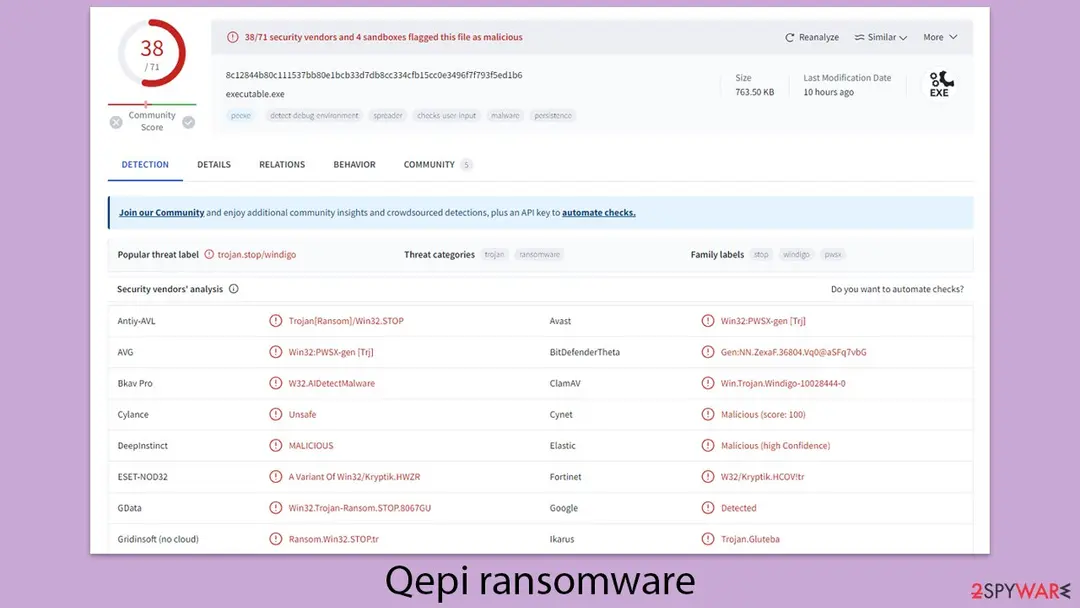
Qepi virus: summary
| Name | Qepi virus |
|---|---|
| Type | Ransomware, file-locking malware |
| File extension | .qepi extension appended to all personal files, rendering them useless |
| Family | Djvu |
| Ransom note | _readme.txt dropped at every location where encrypted files are located |
| Contact | support@freshingmail.top and datarestorehelpyou@airmail.cc |
| Removal | Scan the PC with security software to find and remove the malware and anything installed with it. Fortect scans Windows for malware and repairs the system files and settings it damaged. Remove it nowTo use the full-featured product, you have to purchase a license for Fortect. The scan is free. |
Show 13 more facts
| File Recovery | There is no guaranteed way to recover locked files without backups. Other options include paying cybercriminals (not recommended, might also lose the paid money), using Emisoft's decryptor (works for a limited number of victims), or using third-party recovery software |
|---|---|
| Detection names | No Microsoft detection name is known |
| Encrypted file extension | .qepi |
| Decryptor | No free decryptor is known for this variant; check No More Ransom (nomoreransom.org) for updates |
| Distribution | Not recorded in the old report |
| Damage | Not recorded in the old report |
| Symptoms | Files renamed with a new extension and a ransom note left in folders |
| Evidence | One write-up by a security site; no sample analysed yet |
| Encrypted files | .qepi |
| Attacker contacts | support@freshingmail.top |
| Free decryptor | No free decryptor is known (checked 6 October 2026) |
| First seen | 7 May 2024 |
| Facts checked | 6 October 2026 |
- File extension:
.qepi - Note file:
readme.txt - Contact:
support@freshingmail.top
From our report of May 2024 · not reviewed since
More from our earlier report on Qepi virus
- After disconnecting the computer from the network and the internet, do a complete system scan using the security app
- Upon installation, malware can cause severe damage to system files, resulting in instability issues such as crashes and errors.
- However, PC repair can automatically fix any such damage
- Free Ransomware Decryptors by Kaspersky
The Qepi virus ransom note
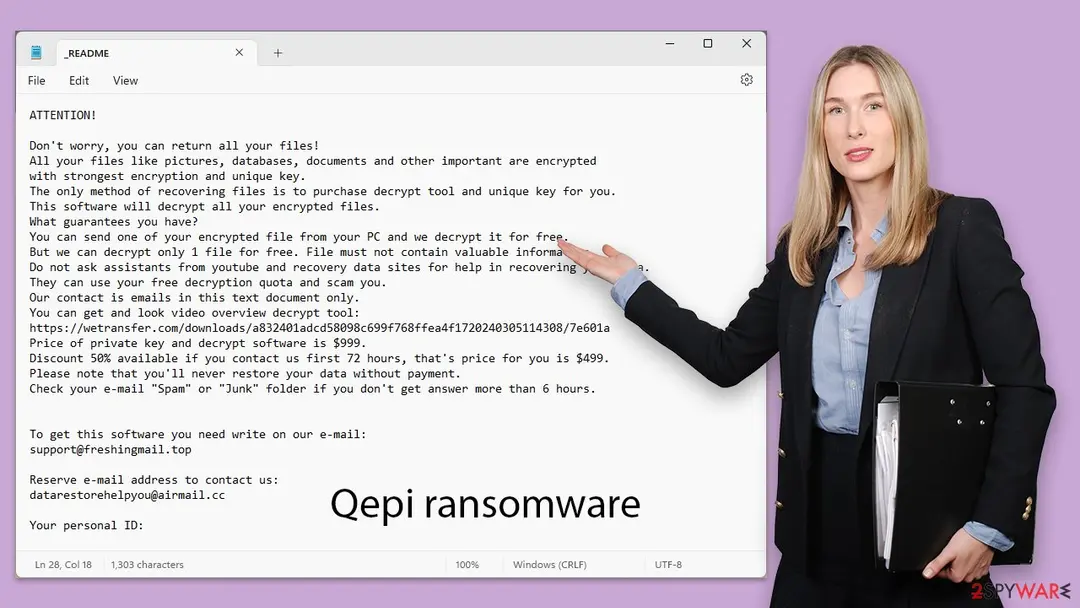
ATTENTION!
Don't worry, you can return all your files!
All your files like pictures, databases, documents and other important are encrypted
with strongest encryption and unique key.
The only method of recovering files is to purchase decrypt tool and unique key for you.
This software will decrypt all your encrypted files.
What guarantees you have?
You can send one of your encrypted file from your PC and we decrypt it for free.
But we can decrypt only 1 file for free. File must not contain valuable information.
Do not ask assistants from youtube and recovery data sites for help in recovering your data.
They can use your free decryption quota and scam you.
Our contact is emails in this text document only.
You can get and look video overview decrypt tool:
https://wetransfer.com/downloads/a832401adcd58098c699f768ffea4f1720240305114308/7e601a
Price of private key and decrypt software is $999.
Discount 50% available if you contact us first 72 hours, that's price for you is $499.
Please note that you'll never restore your data without payment.
Check your e-mail "Spam" or "Junk" folder if you don't get answer more than 6 hours.
To get this software you need write on our e-mail:
support@freshingmail.top
Reserve e-mail address to contact us:
datarestorehelpyou@airmail.cc
Your personal ID:
How to remove Qepi virus
Tools you'll need
All of these are free except where noted. Download them on a clean device if the infected PC is offline.
- A USB stick: to keep the ransom note, two or three encrypted files and screenshots off the infected PC.
- Microsoft Defender Offline: built into Windows 11 and Windows 10; scans before Windows starts, so running malware cannot hide.
- Microsoft Safety Scanner: a second, portable scanner with current signatures; each download works for 10 days.
- ID Ransomware: identifies the family from the note and one encrypted file and says whether a decryptor exists.
- No More Ransom: the free decryptors from police and security companies; check it again every few months.
- Fortect (optional): scans Windows for malware and repairs the system files and settings it damaged. The free scan is in the box above.
How to remove Qepi virus and get your files back
Work in this order.
Disconnecting comes first, removal comes before any restore, and nothing here asks you to contact the attackers.
Step 1: Disconnect the PC and unplug backup drives
Qepi virus encrypts everything it can reach, including drives and shares you connect later. Cut the network first: cable out, or Wi-Fi off from the taskbar.
Then unplug every USB stick and backup disk and pause cloud sync, so the encrypted versions do not replace your online copies. Do not reconnect any of them until the ransomware is removed from the Windows 11 or Windows 10 PC.
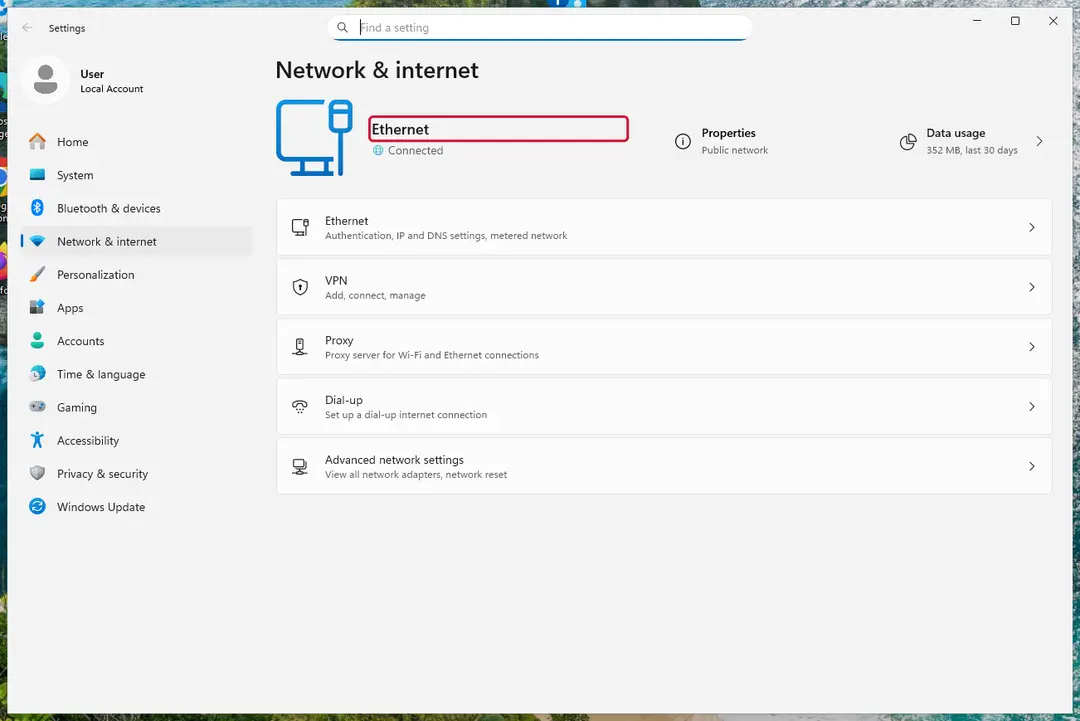
Windows 11: turn off Wi-Fi to take the PC offline. Full procedure with screenshots: Ransomware: first steps, finding a decryptor and recovering files
Step 2: Save the ransom note and confirm the family
Copy
readme.txtand one or two files ending in.qepito a USB stick, and leave the originals where they are.From another device, upload the note and a sample file to ID Ransomware or No More Ransom's Crypto Sheriff, which name the family from the note, the extension and the file structure.
Write down the contact address and your personal ID from the note, because a decryptor or the police may ask for them.
Warning: Never contact the attackers from the infected Windows 11 or Windows 10 PC.
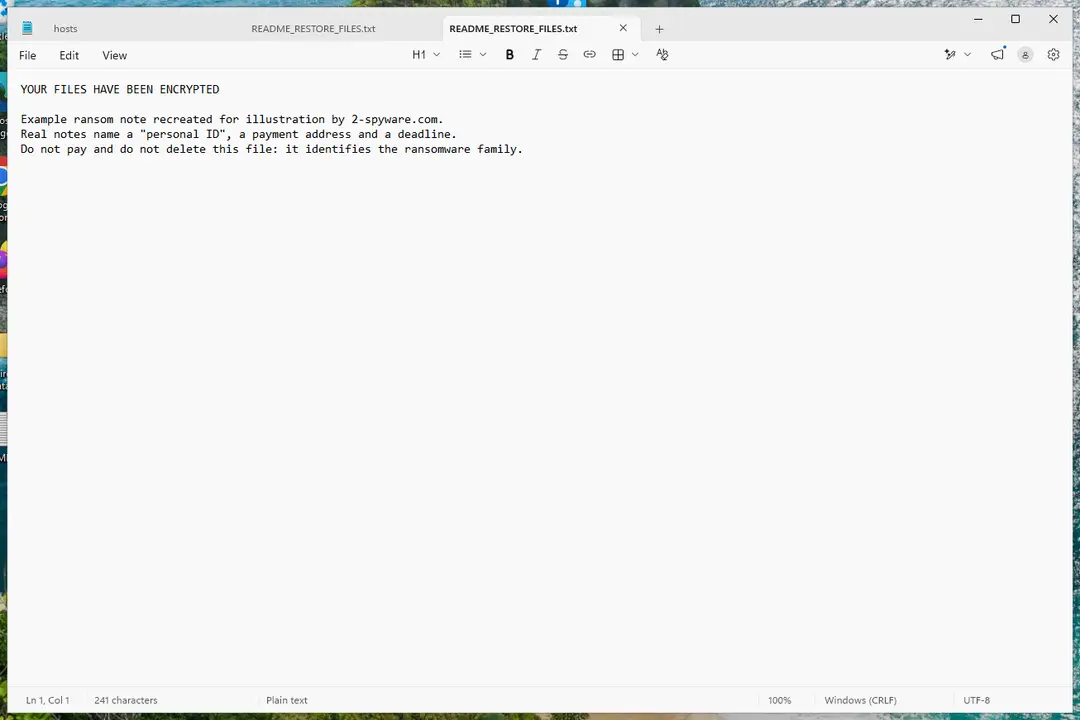
Windows 11: the ransom note and encrypted files to copy for identification. Full procedure with screenshots: Ransomware: first steps, finding a decryptor and recovering files
Step 3: Check for a free decryptor
For Qepi virus, no free decryptor is known (checked 6 October 2026). Search the family name in the No More Ransom decryption tools list and in the free decryptors of Emsisoft, Avast and Kaspersky, because new tools appear years after an attack.
Important: Keep the encrypted files even if nothing works today, and do not pay before every free option is ruled out: payment does not guarantee a working key.
Decryptors run on Windows 11 and Windows 10, but only after the ransomware itself is removed.
Full procedure with screenshots: Ransomware: first steps, finding a decryptor and recovering files
Step 4: Remove the ransomware before you restore or decrypt
Restoring or decrypting files while Qepi virus still runs lets it encrypt them again. Run a Full scan in Windows Security > Virus & threat protection > Scan options, then the Microsoft Defender Antivirus (offline scan).
If the ransomware blocks Windows Security, start Safe Mode with Networking and scan from there. Some families install a password stealer as well, so let both scans finish on Windows 11 or Windows 10.

Windows 11: Windows Security > Virus & threat protection > Scan options. Full procedure with screenshots: Run a Microsoft Defender Offline scan
Step 5: Look for shadow copies of the files
Open Command Prompt as administrator and run
vssadmin list shadows. If it lists copies dated before the attack, right-click a folder with encrypted files in File Explorer, choose Properties > Previous Versions, and open or restore a version from before that date.ShadowExplorer, a free tool, shows the same copies when the tab is empty or hidden. Most current families delete shadow copies, so an empty list is normal, but the check takes two minutes on Windows 11 or Windows 10.
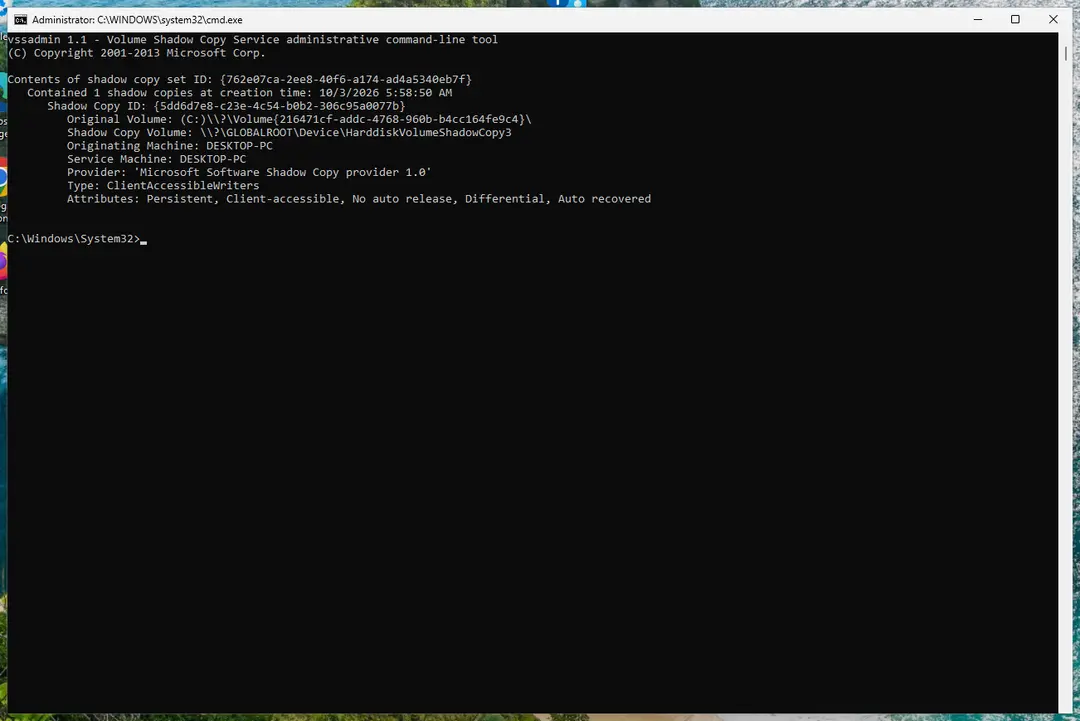
Windows 11: vssadmin list shadows shows whether shadow copies exist. Full procedure with screenshots: Ransomware: first steps, finding a decryptor and recovering files
Step 6: Restore the files from a backup or recover deleted originals
Restore from an external backup, File History or OneDrive's version history, choosing a date before the attack. Connect the backup drive only after the scans are clean, or the ransomware encrypts it too.
If there is no backup, file recovery software can sometimes find the deleted originals, because some ransomware writes an encrypted copy and deletes the original file.
Stop writing to the drive and try recovery on Windows 11 or Windows 10 before new files overwrite the space.
Full procedure with screenshots: Recover deleted files (Recycle Bin, backups, OneDrive) On uGetFix
Instructions for each browser and system
The detailed steps for every browser and system this guide covers. Open the one you use.
Restore Windows "hosts" file to its original state
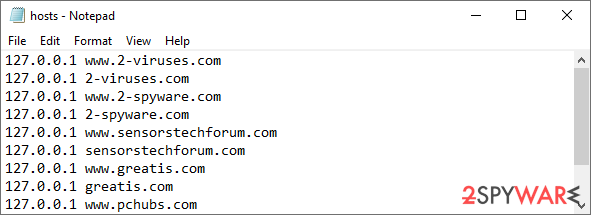
Some ransomware might modify Windows hosts file in order to prevent users from accessing certain websites online. For example, Djvu ransomware variants add dozens of entries containing URLs of security-related websites, such as 2-spyware.com. Each of the entries means that users will not be able to access the listed web addresses and will receive an error instead.
Here's an example of "hosts" file entries that were injected by ransomware:
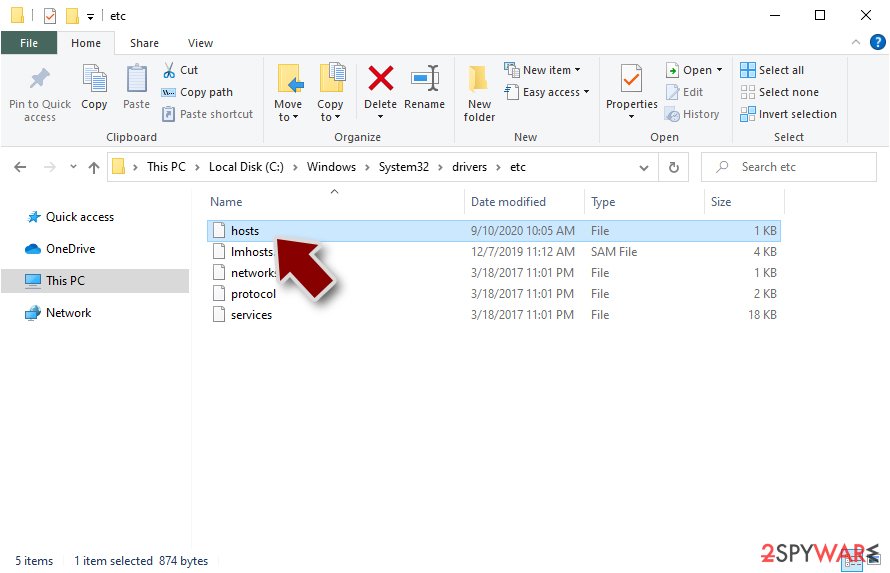
In order to restore your ability to access all websites without restrictions, you should either delete the file (Windows will automatically recreate it) or remove all the malware-created entries. If you have never touched the "hosts" file before, you should simply delete it by marking it and pressing Shift + Del on your keyboard. For that, navigate to the following location:
C:\\Windows\\System32\\drivers\\etc\\
Create data backups to avoid file loss in the future
Report the incident to your local authorities
Ransomware is a lucrative, highly illegal business, and authorities are actively targeting ransomware operators. The level of investigation and follow-up depends on the country, the scale of the incident, and whether the attack is linked to known ransomware groups. To increase the likelihood of identifying the culprits, the agencies need information. In many cases, reports are used primarily for intelligence gathering, trend analysis, and victim support rather than immediate identification of attackers.
Therefore, by reporting the crime, you could help stop the cybercriminal activities and catch the threat actors. Reporting does not guarantee investigation or recovery of data, but it contributes to broader efforts to track ransomware campaigns. Make sure you include all the possible details, including how did you notice the attack, when it happened, etc. Relevant details may also include affected systems, ransom demands, cryptocurrency wallet addresses, and any communication with the attackers. Additionally, providing documents such as ransom notes, encrypted files, or malware executables would be beneficial.
Law enforcement agencies typically deal with online fraud and cybercrime, although it depends on where you live. Here is the list of local authority groups that handle incidents like ransomware attacks, sorted by country:
- USA - Internet Crime Complaint Center IC3
- United Kingdom - ActionFraud
- Canada - Canadian Anti-Fraud Centre
- Australia - ScamWatch
- New Zealand - ConsumerProtection
- Germany - Polizei
- France - Ministère de l'Intérieur
If your country is not listed above, you should contact the local police department or communications center.
From our report of May 2024 · not reviewed since
Qepi ransomware is a type of malware that prevents access to all personal files on Windows
Qepi ransomware is a significant cyber threat due to its potent encryption techniques, known for rendering files completely inaccessible.
This virus is part of the Djvu malware family and introduces its own unique extension by appending ".qepi" to the filenames it encrypts, utilizing the robust RSA encryption method. Once it infiltrates a system, it swiftly begins encrypting files, denying users access to their data.
Following the encryption, the malware leaves behind a note titled "readme.txt" in the affected directories. This note outlines the attackers' demands, asking for a ransom of $999 in exchange for a decryption tool that they claim can recover the encrypted files.
In an apparent bid to entice prompt communication, the note also offers a 50% discount, reducing the ransom to $499 if victims make contact within a specified time. The ransom note includes contact details (support@freshingmail.top and datarestorehelpyou@airmail.cc) through two email addresses provided for initiating communication.
This strategy of extortion brings considerable anguish to affected users and signals a troubling trend in cyber threats. For further information on the Qepi ransomware, including advice on removal and data recovery options, further details are provided in the following sections.

From our report of May 2024 · not reviewed since
Ransom note analysis
After the ransomware attack, criminals mostly interact with their victims via a ransom note.
This notification is intended to instruct the victim on the payment process required to potentially decode their encrypted data.
The ransom note usually specifies the precise amount of Bitcoin required and gives specific instructions for making the payment. Qepi virus developers attempt to be professional in their communication, creating ransom notes that appear convincing and serious.
This note typically pops up on the victim's device once the encryption process is complete. It often comes in the form of a text document, although it can also appear as an image or a webpage. The note generally includes comprehensive guidelines on how to proceed with the payment to regain access to the locked files.
In the case of Qepi ransomware, the note is commonly found in a text document (similar to previous Djvu versions like Baaa or Bgzq) format and states the following:
Ransomware attackers frequently use psychological pressure to coerce victims into paying promptly. A frequent tactic employed by those behind Qepi ransomware is to promise a 50% "discount" on the ransom if paid within a specified time window. Sometimes they will supply a sample decryption to demonstrate the feasibility of data recovery.
Despite these potentially appealing offers, cybersecurity professionals and law enforcement strongly advise against paying the ransom. By agreeing, victims unintentionally subsidize additional criminal activity and attacks. Furthermore, there is no guarantee that the attackers will uphold the agreement by giving a valid decryption key, as trustworthiness is not a characteristic of cybercriminals.
From our report of May 2024 · not reviewed since
How to safely remove the virus
Dealing with a ransomware attack, such as one from Qepi, can be daunting for those unfamiliar with such situations.
Making the right moves early on is crucial for improving the chances of recovering your data.
One of the first steps to take is to isolate your computer by disconnecting it from the internet. This action helps prevent the spread of the malware to other devices on the same network and cuts off communication with any external control servers that the malware might use. Here are the steps you should follow to effectively disconnect your device:
If your device has been compromised by Qepi ransomware and is currently offline, you might consider manually removing the malware. However, this is a complex task that typically requires significant IT expertise. Usually, it's safer to use specialized software designed specifically for removing ransomware or to get help from a professional.
Manually removing ransomware can be risky and may cause additional damage if not executed properly. Therefore, it's recommended to conduct a full system scan using dependable security tools like or . These programs are effective in detecting and eliminating all traces of the ransomware.
Furthermore, after removing the virus, using a reliable recovery program is highly recommended. This can help resolve any system issues like crashes or errors that might arise post-removal.
- Type in Control Panel in Windows search and press Enter
- Go to Network and Internet
- Click Network and Sharing Center
- On the left, pick Change adapter settings
- Right-click on your connection (for example, Ethernet), and select Disable
- Confirm with Yes.
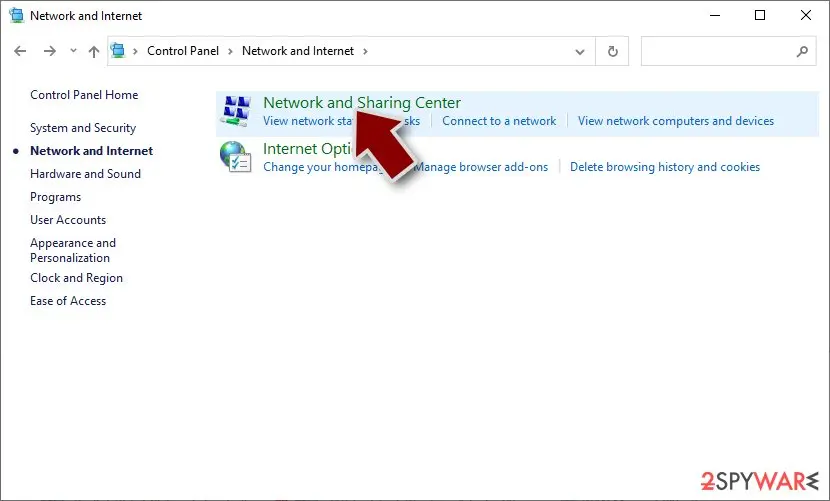
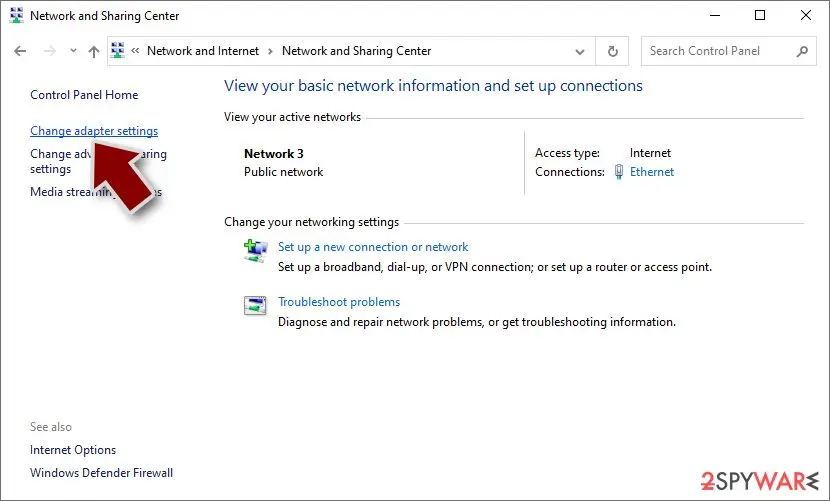
From our report of May 2024 · not reviewed since
Ransomware usually locks files permanently, although there is hope
Handling the ransomware attack can be complex, and there are numerous misconceptions about the mechanisms of data encryption and malware operations.
For instance, some believe that simply running a security scan or renaming files might reverse the encryption of files, but this is rarely the case.
The encryption employed by Qepi ransomware utilizes advanced algorithms to create secure cryptographic sequences, which are extremely difficult to crack. Simply removing the malware does not unlock the encrypted files; they remain inaccessible without the unique decryption key held by the attackers.
Qepi ransomware not only locks data but also assigns each encrypted file a unique identifier and complex encryption key, using this structure to demand a ransom and profit from the victim's urgent need to regain access to their data. This approach makes ransomware a lucrative scheme for cybercriminal groups.
While paying the ransom might seem like the easiest solution, exploring other recovery options is advisable. Always ensure you have a secure backup of your data before attempting any recovery techniques to minimize further data loss.
One potential recovery approach could involve tools like the Emsisoft decryption utility. However, the success of such tools varies depending on the ransomware strain and other factors, so it's crucial to approach recovery with an understanding of these challenges and limitations.
From here, there are three available outcomes:
If your data was encrypted with an online ID, Emsisoft's tool won't work.
Another option is to wait for security experts and organizations to come up with a free decryption tool. This usually happens when flaws are found in the encryption code used by the malware or when law enforcement captures the servers operated by the cybercriminals.
It's crucial to understand that there is no assured promise of such a solution being available later on. However, we suggest checking the links provided to see if there is a decryptor available for this specific virus.
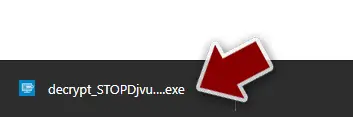
- After pressing Download button, a small pop-up at the bottom, titled decrypt_STOPDjvu.exe should show up - click it.
- If User Account Control (UAC) message shows up, press Yes.
- Agree to License Terms by pressing Yes.
- After Disclaimer shows up, press OK.
- The tool should automatically populate the affected folders, although you can also do it by pressing Add folder at the bottom.
- Press Decrypt.
- "Decrypted!" will be shown under files that were decrypted successfully - they are now usable again.
- "Error: Unable to decrypt file with ID:" means that the keys for this version of the virus have not yet been retrieved, so you should try later.
- "This ID appears to be an online ID, decryption is impossible" - you are unable to decrypt files with this tool.
- Download .
- Double-click the installer to launch it.
- Follow on-screen instructions to install the software.
- As soon as you press Finish, you can use the app.
- Select Everything or pick individual folders which you want the files to be recovered from.
- Press Next.
- At the bottom, enable Deep scan and pick which Disks you want to be scanned.
- Press Scan and wait till it is complete.
- You can now pick which folders/files to recover - don't forget you also have the option to search by the file name!
- Press Recover to retrieve your files.
- No More Ransom Project
- Free Ransomware Decryption Tools from Emsisoft
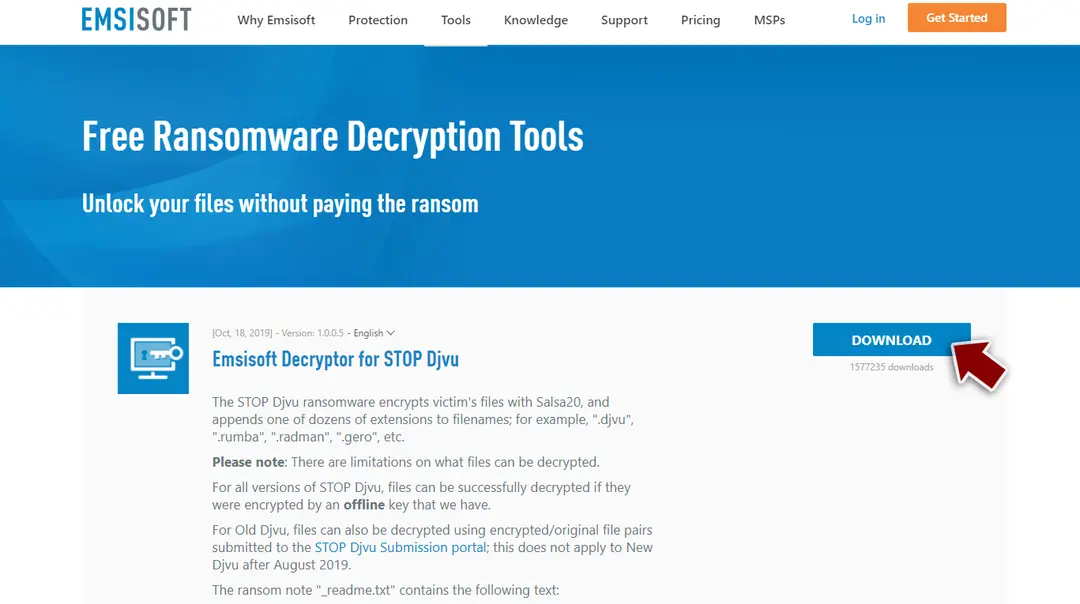
Report it and recover your files
Report it
Report the attack even if you do not expect the files back: insurers and banks ask for the report number, and police use the contacts in the note to link cases.
- United States
- FBI IC3 · FTC ReportFraud
- United Kingdom
- Report Fraud (formerly Action Fraud) · NCSC
- Australia
- ReportCyber (ASD)
- EU countries
- Europol: national reporting sites
Give the victim ID, the note and the date the files were encrypted. A business that holds personal data may also have to notify its data protection authority, in the EU within 72 hours.
Make the next attack harmless
Qepi virus could only hurt the files that had no second copy, and the signs (files that end in .qepi and no longer open) showed exactly which ones those were.
The 3-2-1 rule fixes that:
- three copies
- two media
- one disconnected
A practical version for a home PC: OneDrive or another cloud backup with version history, plus an external disk that you plug in once a week for File History and then unplug. Test a restore now and then by opening a few files from the backup on another device.
Details, schedules and what not to back up are in our 3-2-1 backup guide for Windows.
Stream videos without limitations, no matter where you are
There are multiple parties that could find out almost anything about you by checking your online activity.
While this is highly unlikely, advertisers and tech companies are constantly tracking you online. The first step to privacy should be a secure browser that focuses on tracker reduction to a minimum.
Even if you employ a secure browser, you will not be able to access websites that are restricted due to local government laws or other reasons. In other words, you may not be able to stream Disney+ or US-based Netflix in some countries. To bypass these restrictions, you can employ a powerful VPN, which provides dedicated servers for torrenting and streaming, not slowing you down in the process.
Data backups are important - recover your lost files
Ransomware is one of the biggest threats to personal data.
Once it is executed on a machine, it launches a sophisticated encryption algorithm that locks all your files, although it does not destroy them. The most common misconception is that anti-malware software can return files to their previous states. This is not true, however, and data remains locked after the malicious payload is deleted.
While regular data backups are the only secure method to recover your files after a ransomware attack, tools such as can also be effective and restore at least some of your lost data.
Questions about Qepi virus
How do I open .qepi files?
You cannot open them by renaming or with another program, because the content of files ending in .qepi has been encrypted. The only ways back are a working decryptor for the family, or clean copies from elsewhere:
- OneDrive versions
- File History
- an offline backup drive
- Previous Versions if the ransomware did not delete them
Identify the family first by uploading the ransom note and one encrypted file to ID Ransomware or No More Ransom. Avoid websites and programs that promise to open any encrypted file; they do not work and some are scams.
How did Qepi virus get on my computer?
The way Qepi virus spreads has not been documented yet, so look at your own recent activity. On home PCs, ransomware most often comes with cracked programs, game cheats, key generators and fake updates, or with an e-mail attachment that was opened. On business networks, attackers usually log in through Remote Desktop with a stolen or guessed password.
Think back to what was downloaded or installed in the days before files that end in .qepi and no longer open, and check the Downloads folder and Installed apps sorted by date. Keep anything suspicious for your report, but do not run it again.
Can a data-recovery company decrypt my files for a fee?
Only if a decryptor already exists or the company pays the attackers for you. Some "ransomware recovery" services advertise that they can decrypt families with no known flaw; in practice they negotiate with the attackers and add their own fee. Others use the same free tools listed on No More Ransom.
Before you hire anyone, ask in writing how they will recover the files, whether they will contact the attackers and what happens if they fail. A legitimate service answers clearly. If a free decryptor exists for your family, you can run it yourself.
Is there a free Qepi virus decryptor?
We last checked on 6 October 2026, and for Qepi virus no free decryptor is known. We check No More Ransom, which collects free tools from police and security companies, and the decryptor pages of the major antivirus vendors. A working decryptor exists only when the encryption has a flaw or the keys were leaked or seized.
Ignore sites and videos that offer a "Qepi virus decryptor" for download or for a fee: these are usually scams or malware. Real decryptors are free and come from known security companies or law enforcement. Keep the encrypted files in case a tool appears later.
Should I pay the ransom?
We advise against it, and so do the FBI, Europol and national cyber agencies. Payment does not guarantee a working tool: some attackers never reply, some tools damage files, and some variants have no decryptor at all. Paying also funds further attacks and can make you a target again.
Before considering payment, try every recovery option in this guide and report the attack. Companies must involve their legal adviser and insurer, because payments to sanctioned groups can be illegal. If files are truly irreplaceable, store the encrypted copies and wait; decryptors sometimes appear later.
Did Qepi virus steal my files or passwords?
We do not know yet. Nothing published so far shows data theft by Qepi virus, but the only confirmed sign is files that end in .qepi and no longer open, which says nothing about what happened before. Many current ransomware attacks copy files or run a password stealer first, so it is wise to act as if they did.
From a clean device, change the passwords that were saved in the browsers on this PC, starting with e-mail and banking, sign out of all sessions and turn on two-step verification. Watch bank statements and account activity for the next few weeks.
Is Qepi virus the same as other ransomware with a similar name?
Not necessarily. Ransomware names come from the file extension, the note or a word in the code, so unrelated families often end up with similar names, and one family can appear under several names. The difference matters: a decryptor or advice for one family does not fit another and can damage files.
Compare the ending added to your files and the exact name of the note with the summary table at the top of this guide, then upload the note and one encrypted file to ID Ransomware from a clean device. If the result names another family, follow the guide for that family instead.
Should I open readme.txt?
Reading it is fine if you open it in Notepad. A plain text readme.txt cannot harm the PC. Be careful with notes in HTA or HTML format: double-clicking those runs them in a window that can contain scripts, so right-click and choose Open with > Notepad instead.
The note tells you the contact addresses, the claimed amount and the deadline. Do not visit links or write to the addresses from this PC. Use the note to identify the family and check for a free decryptor first.
My files got .qepi overnight. What happened?
Ransomware often runs at night or when the PC is idle, so the encryption finishes before anyone notices. It usually entered earlier through a cracked program, a fake installer, an e-mail attachment or remote desktop with a weak password.
The .qepi extension marks every file it reached. Start by disconnecting the PC from the network, then identify the family from the ransom note and one encrypted file, check for a decryptor, and look for copies in backups and OneDrive before you consider anything else.
Will Fortect remove Qepi virus?
Fortect scans Windows for malware and unwanted programs and repairs the system files and settings they change, and its free scan shows what it finds on your PC before you decide anything.
For Qepi virus, follow the plan above as well: the browser steps take back permissions and settings that no scanner treats as a threat, and uninstalling the program that brought it removes the source.
Run Microsoft Defender's full scan and, if anything was found, its offline scan as a second opinion. If the symptoms are gone after the plan and both scans are clean, there is nothing more to do.
Sources
- CISA: StopRansomware (read October 6, 2026)
- No More Ransom (read October 6, 2026)
- FTC: How to recognize, remove and avoid malware (read October 6, 2026)
- Microsoft Learn: Microsoft Defender Offline (read October 6, 2026)
- Microsoft Learn: How Microsoft names malware (read October 6, 2026)