
Malware Removal
HitmanPro Review 2026: Is It Still Worth It?
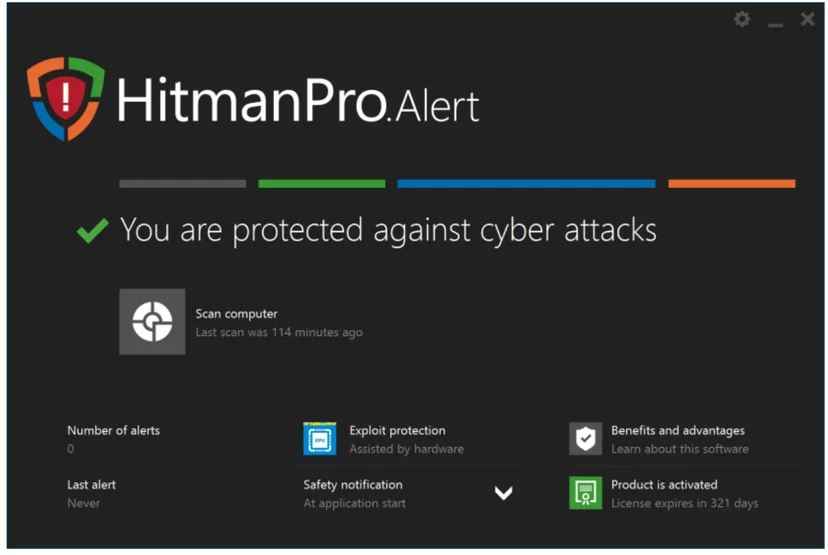
HitmanPro is a Windows malware cleaner that Sophos has sold since it took over SurfRight in 2015. This review covers HitmanPro and HitmanPro.Alert, what each costs, whether they are still updated in 2026, how renewal works, what independent testing exists and how to remove them.
6.9/10
Cheap second-opinion cleaner, no lab results
HitmanPro is a small Windows malware cleaner from Sophos with a free 30-day trial and manual renewal, but we found no current independent lab results.
- Our score
- 6.9 / 10
- Price from
- $24.95 for 1 year
- Platforms
- Windows 7, 8, 8.1, 10 and 11 (HitmanPro also XP and Vista)
- Type
- Malware Removal
Verdict in short
- HitmanPro costs $24.95 a year for one PC and HitmanPro.Alert $34.95, both with a free 30-day trial.
- Both are maintained: HitmanPro build 346 is from February 2026 and Alert build 2059 from May 2026.
- Licenses do not renew automatically, but we found no refund policy and no current lab results.
What we liked
- Maintained by Sophos with 2026 builds
- Small download, scanner needs no installation
- Runs next to other security software
- Low yearly price
- No automatic renewal
- Alert adds ransomware and exploit protection
What we did not
- No current independent lab results found
- A 2026 hands-on test of Alert failed EICAR checks
- False positives reported
- Windows only
- No published refund policy found
Score breakdown
- Detection and protection5.6Behavior scan and four labs' databases, but no current independent lab results.
- Tools and features6.8Cleaner plus CryptoGuard, exploit prevention and keystroke encryption in Alert.
- Ease of use7.8Small file, one-click scan, almost no settings.
- Value7.4$24.95 or $34.95 a year and a 30-day free trial.
- Privacy7.0Vendor says it does not sell your information or install unwanted apps.
- Support and refunds6.4Help center and email support, manual renewal, no refund policy found.
HitmanPro at a glance
HitmanPro is a malware removal tool for Windows. It started at SurfRight, which joined Sophos in 2015, and Sophos still sells it today [2]. Our old review of HitmanPro is the reason this address exists, and we have rewritten it from the vendor's current pages.
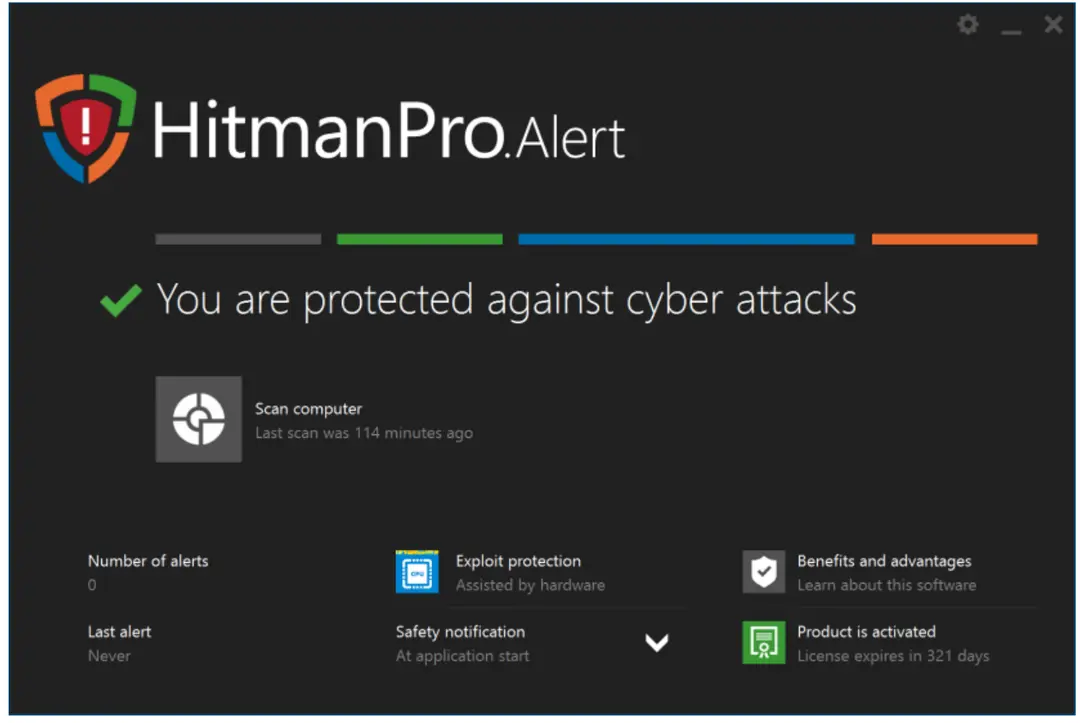
There are now two products under the name. HitmanPro is the scanner that cleans malware, viruses, trojans, worms, keyloggers, rootkits, trackers and spyware [1]. HitmanPro.Alert includes everything in HitmanPro and adds real-time protection against exploits, ransomware and keyloggers [3].
The short answer for 2026: HitmanPro is alive, maintained and sold by Sophos for $24.95 a year for one PC. HitmanPro.Alert costs $34.95 [4]. Both come with a free 30-day trial [1]. The lineage is simple. The product is the same one our old review described, with the same maker family and a new owner's branding.
- Best for: Windows users who want a second-opinion scanner next to the antivirus they already run, or a cleanup tool when something slipped through.
- Platforms: Windows only. HitmanPro runs on Windows 11, 10, 8.1, 8, 7, Vista and XP, and HitmanPro.Alert on Windows 11, 10, 8.1, 8 and 7 SP1 [5].
- Price: $24.95 a year for HitmanPro and $34.95 a year for HitmanPro.Alert, one PC, as listed on 10 October 2026 [4].
- Latest builds we found: HitmanPro build 346 from 5 February 2026 [6] and HitmanPro.Alert build 2059 from 11 May 2026 [7].
- Our score: 6.9 out of 10. A cheap, well maintained tool with no current lab results to back its detection claims.
How we reviewed HitmanPro and how we earn money
For this update we read the vendor's own pages: the HitmanPro and HitmanPro.Alert product pages, the buy page, the downloads page, both release-note pages and the support help center [1][2][3][4][5][6][7][8]. We also read the vendor's uninstall tool article and one independent hands-on review from May 2026 [9][11].
We did not run new detection tests of our own for this update, and we say below which numbers come from other people. Every price and date in this review was read on 10 October 2026. Prices change, so check the vendor's buy page before you pay.
2-spyware.com earns a commission only from partner products such as the Fortect offer shown elsewhere on this site. We have no affiliate deal with Sophos for HitmanPro. The links to Sophos pages in this review are plain links, and there is no buy button for HitmanPro on this page.
What is HitmanPro?
HitmanPro is a second-opinion malware scanner and cleaner. Sophos describes it as a no-nonsense tool for a computer that is slow or acting strangely, and says tens of millions of people use it [2]. It is not a full antivirus suite. HitmanPro has no real-time protection, which is why the vendor says you can use it next to another security product [2][4].
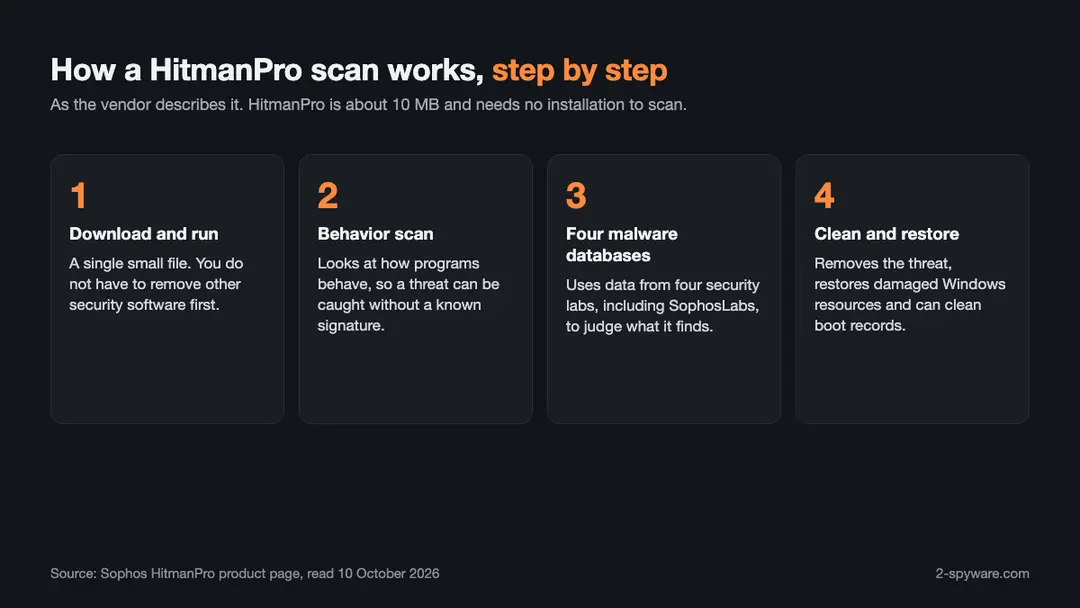
The vendor lists five strengths. It is small, at about 10 MB. It scans for bad behavior and not only for known signatures. It uses malware databases from four security labs, including SophosLabs. It restores damaged Windows resources after removing malware. And it can remove persistent threats from system files and boot records from within the running operating system [2].
Who makes HitmanPro?
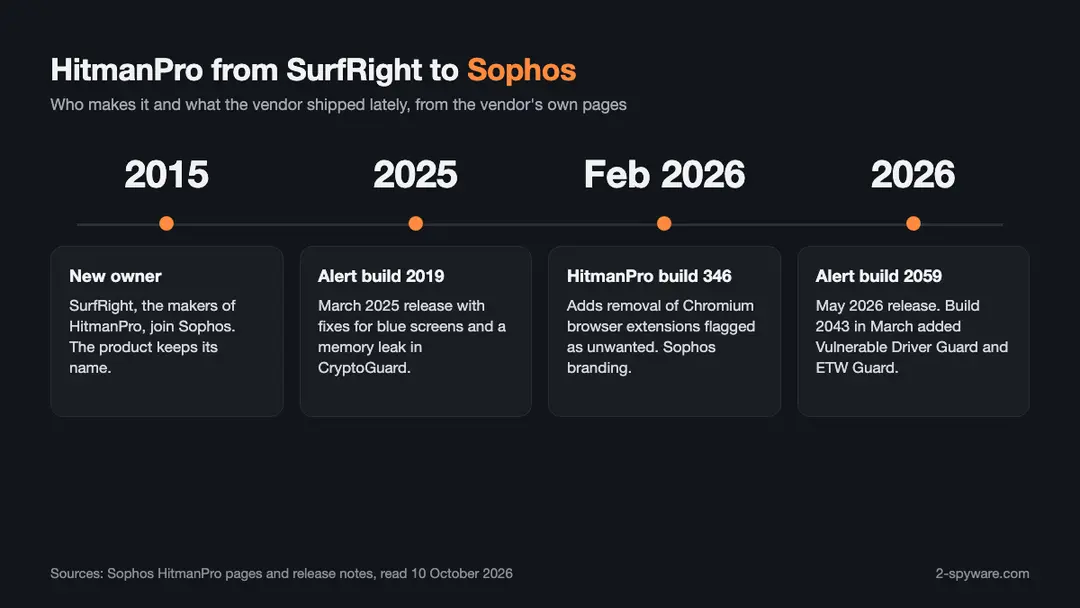
SurfRight, the makers of HitmanPro, joined Sophos in 2015 [2]. Sophos says it protects over 400,000 organizations in more than 150 countries [2]. The home products sit next to Sophos Home, which is the vendor's suggestion if you need protection for a Mac [2][3].
Sophos also sells HitmanPro.Alert to businesses as part of Sophos Intercept X [1][3]. That matters for you as a home user in one way. The exploit protection engine in the consumer product is the same technology family that Sophos ships to companies, and it keeps receiving updates.
HitmanPro versus HitmanPro.Alert
HitmanPro cleans. HitmanPro.Alert cleans first and then watches. The Alert product page puts it this way: it removes malware and also works in the background to stop hacking attacks [3]. If you only want to check a PC once in a while, HitmanPro is enough. If you want protection that stays on, you need Alert.
One practical difference is installation. HitmanPro does not have to be installed to scan. HitmanPro.Alert does, because it constantly monitors for attacks [3].
How HitmanPro.Alert works and what it adds
The Alert product protects in layers, and the vendor's buy page lists them: advanced real-time protection, ransomware protection, web protection against phishing and compromised websites, online banking protection, exploit prevention and privacy protection [4]. Here is what each one does in plain terms.
CryptoGuard against ransomware
CryptoGuard analyzes encryption behavior on your PC. When it sees unauthorized encryption, Sophos says it creates backups of the affected files, then stops and removes the ransomware and lets you revert the files to their original state. It needs no user interaction and no ransomware signatures [3].
That behavior-based approach is the main reason people pick Alert next to a regular antivirus. If you want to know what to do after an attack that got through, our guide on ransomware recovery covers the steps.
Exploit protection
Alert adds layers around programs that attackers often abuse, such as Microsoft Word and Office, and replaces infected Windows resources with safe, original versions [3]. In March 2026 the vendor added two new guards. Vulnerable Driver Guard aims to stop attackers from using legitimate but vulnerable kernel drivers to switch off security software. ETW Guard protects Event Tracing for Windows from manipulation [7].
Build 2043 also improved CookieGuard with protection for Chrome's AppBound cookie security [7]. Those are technical changes, and most home users will never see them. They do show that the exploit engine is not abandoned.
Privacy: keystrokes and webcam
Alert encrypts what you type in the browser, so keyloggers cannot read sensitive data such as card numbers and credentials, and it warns you when any program turns on your webcam [3]. A hands-on reviewer saw a small red bar in the corner of the browser while typing, which shows the keystroke encryption is working [11].
Deceiving malware
The vendor also says Alert makes your PC look like a malware researcher's machine, because many malware programs shut themselves down when they think a researcher is watching [3]. We could not test that claim, so treat it as the vendor's description.
Is HitmanPro still updated in 2026?
Yes. This was the first thing we checked, because the old review said HitmanPro 3 and many readers wonder if the program is dead. Both products have release notes with 2026 dates, and the Sophos pages are live.
HitmanPro build history
HitmanPro build 346 is dated 5 February 2026. It added detection and removal of Chromium-based browser extensions that count as unwanted applications, showed the disk access mode in the title bar, updated the graphics to match Sophos branding and fixed scans on ARM devices [6].
Before that, build 340 came out on 20 March 2025 with fixes for cookie removal on Microsoft Edge and for some false detections, and build 338 on 23 January 2025 [6]. The release notes also go back to build 328 in October 2023 [6]. So the scanner receives a few builds a year. Detection data comes from the cloud and does not depend on the build.
HitmanPro.Alert build history
HitmanPro.Alert build 2059 is dated 11 May 2026 and fixed a crash with Chromium Canary and Beta based browsers [7]. Build 2047 on 22 April 2026 improved several guards and the event log. Build 2043 on 13 March 2026 added Vulnerable Driver Guard and ETW Guard and fixed a compatibility issue with Sophos Home [7].
Build 2019 from 3 March 2025 fixed two blue-screen problems and a memory leak in CryptoGuard [7]. The vendor warns that new builds roll out in phases, so your PC may take a few days to receive the latest one [7].
HitmanPro and HitmanPro.Alert prices in 2026
Sophos shows two personal prices on its buy page. They are listed in US dollars for one PC and one year [4]. We read them on 10 October 2026.
| Feature | HitmanPro | HitmanPro.Alert |
|---|---|---|
| Price, one PC, one year | $24.95 | $34.95 |
| Free trial | 30 days | 30 days |
| Advanced malware removal | Yes | Yes |
| Unwanted application removal | Yes | Yes |
| Real-time protection | No | Yes |
| Ransomware protection | No | Yes |
| Web and phishing protection | No | Yes |
| Online banking protection | No | Yes |
| Exploit prevention | No | Yes |
| Webcam and keystroke privacy | No | Yes |
The free trial is 30 days for both products [1][3]. One independent reviewer says the trial needs no credit card, only a name and email address before you download [11].
The same reviewer reports options for one or three devices and for one or three years, where you pay for two and the third device or third year is free, with plans from $24.95 to $54.95 a year [11]. The vendor's buy page that we read shows only the one-PC, one-year prices [4]. If you need more devices, check the options at checkout.
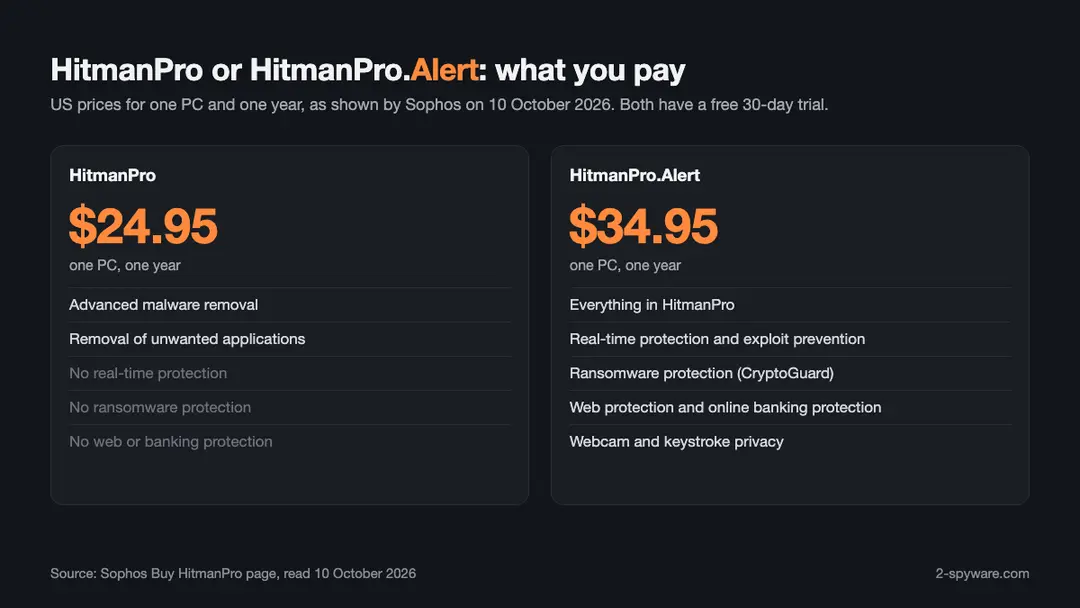
Which one should you buy? If you already run Microsoft Defender or another antivirus and only want to check for leftovers, HitmanPro at $24.95 is the match. If you want exploit and ransomware protection that runs all the time, take Alert at $34.95. Alert includes HitmanPro, so you do not need both [3].
Free trial, renewal and refunds
The free trial
Both products offer a free 30-day trial [1][2]. For HitmanPro.Alert, the vendor's manual says that on a home PC a free trial license is requested from the license server on the internet when the product first starts [12]. The manual is older than today's builds, so we mention it only as background.
Our old review said that after the 30 days you must buy a license, and that this is a reasonable deal because you pay nothing if your PC turns out to be clean. The Sophos page only says free 30-day trial. When the trial ends, read the dialog before you click so you know whether removal needs a license.
Renewal
Sophos support says it does not auto-renew licenses. In its words, renewal is a manual procedure and the company would not start one without your express permission [8]. That is a real advantage over many security products that charge your card again each year. Put a reminder in your calendar, because the license ends after one year [4].
If you buy a new key while an old license still has days left, do not activate it early. The vendor warns that remaining days on an older active license are not added to the new one [2][3]. If you lose your key, support points to a page where you can request that your license information be sent again [13].
Refunds
We could not find a refund or money-back policy on the Sophos product pages or in the support help center articles we read [4][8]. That does not prove there is none. It does mean you should not count on one. The free trial is your protection here: use it fully before you pay.
HitmanPro system requirements and Windows 11
HitmanPro supports 32-bit and 64-bit Windows 11, Windows 10, Windows 8.1, Windows 8, Windows 7, Windows Vista and Windows XP, according to the vendor's downloads page [5]. HitmanPro.Alert supports Windows 11, Windows 10, Windows 8.1, Windows 8 and Windows 7 SP1 [5].
So yes, HitmanPro works on Windows 11. The vendor lists it on the downloads page [5]. Build 346 fixed scanning on ARM devices, and Alert build 2043 fixed an ARM64 driver issue on Windows 10 [6][7].
There is no version for macOS or Linux. Sophos says HitmanPro is a Windows PC-only product and suggests Sophos Home for Mac computers [2][3]. The vendor lists HitmanPro in 17 languages and HitmanPro.Alert in 12 [2][3].
The Getting Started manual for Alert lists 5 MB of disk space as the minimum and 20 MB as recommended, with an Intel Core i3, i5 or i7 processor recommended [12]. It is an old document from the Windows 10 era, but it shows how light the product is. HitmanPro itself is about 10 MB [2].
Is HitmanPro safe, legit or a virus?
HitmanPro is legitimate software. It is made by SurfRight, a company owned by Sophos since 2015, and it is sold on Sophos's own pages [2]. It is not a virus. Sophos says that, unlike free programs, it does not sell your information or install unwanted apps, toolbars or advertising programs [2][3].
There are a few cautions, and you should know them before you run it.
- False positives happen. A May 2026 review says the Alert product flagged thousands of HP Touchpoint files in the past, and that users have complained about such false positives for years [11].
- Read what the scan wants to delete before you accept it. In one test the Alert scan flagged over 2,500 files as spyware and the program showed no record that they were removed [11].
- The scan can find harmless items. That same reviewer's first scan found no threats but listed 46 traces, mostly tracking cookies in Chrome and Edge [11].
- Only use the vendor's own downloads page. We do not link to installers, and you should avoid any site that offers cracked keys or a full version for free. Cracked security software is a common way to spread malware.
If you found HitmanPro in your Event Viewer and never installed it, there is a simple explanation. Sophos Endpoint installs HitmanPro as a hidden component, and a Sophos staff member explained that the component is not shown in Programs and Features [10]. The Alert service and the hmpalert driver show up in Services and in the fltmc command [10].
Detection and independent tests
We did not find current results for HitmanPro or HitmanPro.Alert in the public AV-TEST or AV-Comparatives reports we looked at. A May 2026 review by All About Cookies says the same, that HitmanPro.Alert has no independent third-party testing information [11]. The vendor does not cite lab results on its product pages either [2][3].
That reviewer ran its own hands-on test in the second quarter of 2026 and was unimpressed. The Alert product failed all three EICAR tests, which means it did not block the test malware and phishing files, and it did not detect dummy malware files downloaded before installation [11]. The initial scan took three minutes and 45 seconds [11].
How should you read that? EICAR files are harmless test files meant to trigger antivirus programs. A tool built around behavior and cloud checks, as HitmanPro is [2], works differently from a classic signature scanner. One reviewer's three test files are also not a lab test. Still, the result is a warning not to use Alert as your only protection.
So we cannot give you a measured detection rate for either product. What we can say is how they are built. HitmanPro is an on-demand cleaner with a behavior scan and four malware databases [2]. Alert adds exploit, ransomware and keystroke protection [3]. Both are best used next to a full antivirus.
If your PC is already infected and behaves badly, a single scanner may not be enough. Our guide to removing malware leftovers explains what to clean up after the threat itself is gone, and Microsoft's own offline scan in Defender is another free second look.
How to download, activate and uninstall HitmanPro
Download and install
Get HitmanPro only from the Sophos downloads page, which offers 32-bit and 64-bit versions for the scanner and one file for Alert [5]. The scanner starts a scan at once and does not need installation. If you want to keep it, the installer asks you to accept the terms and save it with shortcuts [2].
HitmanPro.Alert needs a quick installation: open the downloaded file, accept the terms, click Install and wait while it is prepared for first use [3].
How to activate a license
- For HitmanPro, open the program, click Settings in the bottom left corner and go to the License tab [2].
- For HitmanPro.Alert, open the program, click the red or green icon in the bottom right corner and choose Activate license [3].
- Enter your product key, including the hyphens, and click Activate [2][3].
- Do not activate a new key if the old license still has days left, because those days are not carried over [2][3].
How to uninstall HitmanPro
- Close HitmanPro and make sure no scan is running.
- Open Windows Settings, go to Apps, then Installed apps, and find HitmanPro or HitmanPro.Alert.
- Choose Uninstall and follow the prompts, then restart the PC.
Our general guide on how to uninstall a program on Windows shows the same steps with more detail.
If the standard uninstaller fails, Sophos offers SophosZap, a last-resort command-line cleanup tool that can remove HitmanPro and HitmanPro.Alert. The vendor says to try the normal uninstaller first, because SophosZap uses heuristics and carries extra risk [9].
SophosZap needs Windows 7 or later and a Command Prompt run as administrator, and you must turn off tamper protection and take backups first. You run the command SophosZap --confirm, restart when it says to, run it a second time and restart again [9]. Use it only when nothing else works.
HitmanPro compared with other tools
HitmanPro sits in the same group as other second-opinion scanners. Here is how it differs from tools we have reviewed.
HitmanPro versus Malwarebytes
Both are known as scanners you run next to your main antivirus. Our Malwarebytes Anti-Malware review explains that product. HitmanPro's differences are the behavior scan, the four-lab database approach and the small size [2].
HitmanPro versus SUPERAntiSpyware and Spybot
SUPERAntiSpyware and Spybot Search & Destroy both have free editions that remove what they find, which HitmanPro does not offer after the 30-day trial. They are older anti-spyware tools with less emphasis on exploits. HitmanPro.Alert covers exploit and ransomware protection, which those two do not center on.
HitmanPro versus Microsoft tools
Windows 10 and 11 include Microsoft Defender with real-time protection at no extra cost. Microsoft also offers a free on-demand scanner, which we cover in our Microsoft Safety Scanner review. If a free second opinion is all you need, start there.
If your problem is crashes, broken system files or a slow PC rather than malware, a repair tool fits better than a scanner. Our Fortect review covers that kind of product. You can also see all of our software reviews in one place.
Not sure whether a file or link is dangerous? Our link and file check can help before you run anything.
What changed since our earlier review
- The maker is Sophos. Our old text did not say who sells HitmanPro now. SurfRight joined Sophos in 2015, and the product pages are on sophos.com [2].
- There are two products. The old review focused on HitmanPro 3 and its scan. Today you choose between HitmanPro at $24.95 and HitmanPro.Alert at $34.95 [4].
- The engine count changed. We said HitmanPro checked files with five antivirus engines, naming Dr.Web, Ikarus, Emsisoft, Prevx and G Data. The vendor now says it uses databases from four security labs, including SophosLabs [2].
- The trial is still 30 days, as our old review said [1]. The old claim that a license is cheap also still holds.
- No real-time protection in HitmanPro still holds [4]. That is why the Alert product exists.
- Version names changed. HitmanPro now uses build numbers such as 346, and Alert uses builds such as 2059 [6][7].
- We could not re-confirm some old claims, such as running the scanner from a USB stick, or the need for an internet connection to remove malware. The vendor's current pages do not mention them, so we do not repeat them as fact.
HitmanPro pros and cons
Pros
- A maintained product from a large security company, with 2026 builds for both HitmanPro and HitmanPro.Alert [6][7].
- Small download of about 10 MB, and the scanner needs no installation [2].
- Works next to other security software without removing it first [2][3].
- Lower price than many suites, at $24.95 and $34.95 a year [4].
- A 30-day free trial [1].
- No automatic renewal charges [8].
- Alert adds ransomware, exploit and keystroke protection that a normal antivirus may not cover [3].
Cons
- No current independent lab results that we could find [11].
- A reviewer's hands-on test of Alert in 2026 failed all three EICAR checks [11].
- False positives have been reported, for example on HP Touchpoint files [11].
- Windows only, with no Mac, Linux or phone version [2].
- We found no published refund policy on the pages we read.
- Alert has almost no settings to customize, according to one reviewer [11].
Verdict: is HitmanPro worth it?
HitmanPro is a sensible second-opinion cleaner. Sophos still maintains it, the price is low, the trial is free for 30 days and the license does not renew without your say-so [1][4][8]. If your PC is acting oddly and your antivirus sees nothing, a HitmanPro scan is a cheap and quick next step.
HitmanPro.Alert is harder to judge. Its design, with behavior-based ransomware and exploit protection, is interesting, and the 2026 builds show active work [3][7]. But we found no independent lab data, and a hands-on test in 2026 was poor [11]. Use it as an extra layer, not as your only protection.
Our score is 6.9 out of 10. Try the free trial first, read what any scan wants to delete, and keep your main antivirus running.
Features
On-demand malware scan
Behavior scan plus data from four security labs, including SophosLabs.
Unwanted application removal
Targets spyware, adware and other potentially unwanted applications.
Clean-up of Windows resources
Replaces damaged Windows resources with safe, original versions.
CryptoGuard
Watches encryption behavior and can restore files after ransomware; Alert only.
Exploit prevention
Extra layers around vulnerable programs and drivers; Alert only.
Keystroke and webcam privacy
Encrypts typing in the browser and warns when a program uses the webcam; Alert only.
Pricing
HitmanPro$24.95 for 1 year
1 PC · renews at Manual renewal, no automatic charge
- 30-day free trial
- Malware and unwanted application removal
- No installation needed to scan
HitmanPro.Alert$34.95 for 1 year
1 PC · renews at Manual renewal, no automatic charge
- Everything in HitmanPro
- Real-time, ransomware and exploit protection
- Web, banking and privacy protection
Prices as recorded in the review on October 10, 2026. Check the vendor's site for current prices.
Frequently asked questions
What is HitmanPro?
HitmanPro is a Windows malware removal tool from Sophos, which took over its maker SurfRight in 2015. It scans for malware, viruses, trojans, rootkits, keyloggers, trackers and spyware, and it is built to run next to your normal antivirus. It is not a full antivirus suite with real-time protection.
Is HitmanPro free?
Not permanently. Sophos offers a free 30-day trial for both HitmanPro and HitmanPro.Alert. After that, HitmanPro costs $24.95 a year for one PC and HitmanPro.Alert costs $34.95, as listed on 10 October 2026.
Is HitmanPro still supported in 2026?
Yes. HitmanPro build 346 is dated 5 February 2026, and HitmanPro.Alert build 2059 is dated 11 May 2026. The Sophos product, buy and support pages are all live, and the release notes show regular updates.
What is the difference between HitmanPro and HitmanPro.Alert?
HitmanPro is an on-demand scanner and cleaner. HitmanPro.Alert includes it and adds always-on protection: real-time protection, ransomware protection with CryptoGuard, exploit prevention, web and banking protection, and keystroke and webcam privacy. Alert needs installation, the scanner does not.
Does HitmanPro work on Windows 11?
Yes. Sophos lists Windows 11 for both products, along with Windows 10, 8.1, 8 and 7. HitmanPro also lists Vista and XP. There is no version for macOS or Linux, and Sophos suggests Sophos Home for Mac computers.
Is HitmanPro safe or a virus?
It is legitimate software from a security vendor and not a virus. Download it only from the Sophos site. Read what a scan wants to remove, because false positives have been reported, and never use cracked keys or full versions from other sites.
Does HitmanPro renew automatically?
No. Sophos support says it does not auto-renew licenses and that renewal is manual. The license lasts one year, so note the end date. Do not activate a new key early, because remaining days on the old license are not added.
Can I get a refund for HitmanPro?
We found no refund policy on the Sophos product pages or the support articles we read. Ask Sophos support before you buy if this matters to you, and use the free 30-day trial to test the product first.
Can I use HitmanPro with another antivirus?
Yes. Sophos says you do not need to uninstall other security software, and that HitmanPro can be used on its own or next to another product. This is how most people use it, as a second opinion.
How do I uninstall HitmanPro?
Open Windows Settings, go to Apps and Installed apps, choose HitmanPro or HitmanPro.Alert and select Uninstall. If that fails, Sophos offers SophosZap as a last-resort tool, which you run from an administrator Command Prompt after turning off tamper protection.
Has HitmanPro been tested by AV-TEST or AV-Comparatives?
We found no current results for it in their public reports, and a May 2026 review says the same for HitmanPro.Alert. Treat detection claims as the vendor's own until independent results appear.
Why is HitmanPro in my Event Viewer if I never installed it?
Sophos Endpoint can install HitmanPro as a hidden component, and it is not listed in Programs and Features. Look for the HitmanPro.Alert service in Services and the hmpalert driver. If you never used Sophos, check which security software you ran.
Sources
- Sophos: HitmanPro and HitmanPro.Alert overview, prices and free trial
- Sophos: HitmanPro malware removal product page
- Sophos: HitmanPro.Alert product page
- Sophos: Buy HitmanPro, prices and feature comparison
- Sophos: HitmanPro downloads and supported Windows versions
- Sophos: HitmanPro release notes (builds and dates)
- Sophos: HitmanPro.Alert release notes (builds and dates)
- HitmanPro Support: Do you auto-renew my license?
- Sophos Support: SophosZap frequently asked questions
- Sophos Community: HitmanPro found on my system without a Sophos install
- All About Cookies: HitmanPro.Alert Antivirus Review 2026 (last updated May 5, 2026)
- Sophos: HitmanPro.Alert Getting Started manual (PDF)
- HitmanPro Support: I have lost my product key, how can I retrieve it?
Questions and experiences
Ask about this page: members and our editors answer. Reading is open; writing needs a free account.
…