Claro Search Virus (Removal Guide) - Aug 2017 update
Claro Search virus Removal Guide
What is Claro Search Virus?
Reasons why you should not trust Claro Search

Claro Search is a browser hijacker that might alter browser’s settings and force victims to use a questionable search engine. However, these changes might be unexpected because the PUP[1] spreads in software packages and might enter the system silently. What is worse, it might not be easy to get rid of the hijacker easily.
Claro Search engine is developed by Babylon Software and can appear in your browser after installing Babylon Toolbar. Once installed it might change default search engine, homepage, and new tab page settings by entering mixidj.claro-search.com, isearch.claro-search.com or isearch.babylon.com. URL. Nevertheless, its design looks legit and might resemble Google; it’s not a credible search provider.
The problem is that isearch.claro-search.com search engine is designed to combine organic search results with sponsored ones and serve them for the user. Third-party advertisers who sponsor Claro Search want to promote their web pages via this search engine, and it seems that authors of this potentially unwanted program (PUP) rush to allow them to do so.
The analysis of the hijacker revealed risky Claro Search redirect tendencies. Some links appeared on the search results page reroute to sites that seem potentially dangerous. Some of them suggest participating in shady surveys,[2] and others advertise software or updates. However, these offers can be filled with questionable components or even malicious files that can mess up your computer system.
Sponsored search results presented by these vague search tools might be based on your browsing habits. Indeed, Claro Search might spy on your browsing activity and find out what websites you visit, what ads do you click on, what you search for, and even more. Thus, you might be tricked into clicking a potentially dangerous link or ad.
To avoid possible threats and use a reputable search engine, you have to remove Claro Search or/and Babylon Toolbar and adjust browser's settings in a proper way. We suggest using FortectIntego or another reliable anti-malware software for this task. It is going to wipe all spyware and malware related components from your computer for good.
If you are thinking about manual Claro Search removal, you can find detailed instructions at the end of the article. They will explain how to uninstall all hijacker-related browser extensions, plugins or programs entirely.

The secret and silent infiltration method of the browser hijacker
Claro Search hijack can hit computers of users that are unaware of it. Potentially unwanted programs can enter your computer together with shareware and free programs, such as gaming software, bogus updates and the like.
People can install this program unintentionally if they rely on Quick/Standard installation setup. Keep in mind that these settings do not openly disclose about third-party software and install additional components silently.
However, you can avoid this from happening, if you choose Advanced/Custom setup and carefully follow the process. If you find pre-selected agreements to change your search engine to isearch.claro-search.com or install Babylon Toolbar, you have to uncheck these entries and stop their installation.
Uninstall Claro Search from your PC entirely
The quickest way to fix browser-related problems is to remove Claro Search using anti-malware software. It is the most efficient method of cleaning the computer from unwanted programs.
However, if you do not think that it is the best way to uninstall this nasty hijacker, you can try Claro Search removal instructions below. Follow them carefully, and shortly you won't have to encounter this suspicious search tool anymore.
If English is not your native speech, you can find hijacker’s removal instructions on our partners’ websites written in Spanish,[3] French,[4] Russian[5] and others.
You may remove virus damage with a help of FortectIntego. SpyHunter 5Combo Cleaner and Malwarebytes are recommended to detect potentially unwanted programs and viruses with all their files and registry entries that are related to them.
Getting rid of Claro Search virus. Follow these steps
Uninstall from Windows
Use instructions provided below and remove the following programs:
- Claro Search;
- Babylon Toolbar;
- DefaultTab;
- DefaultTabChrome;
- Browser Manager by Bit89;
- and, of course, all other suspicious programs that you cannot remember installing.
-
Click Start → Control Panel → Programs and Features (if you are Windows XP user, click on Add/Remove Programs).

-
If you are Windows 10 / Windows 8 user, then right-click in the lower left corner of the screen. Once Quick Access Menu shows up, select Control Panel and Uninstall a Program.

-
Uninstall Claro Search and related programs
Here, look for Claro Search or any other recently installed suspicious programs. -
Uninstall them and click OK to save these changes.

Delete from macOS
Clean your Mac by removing the following applications:
- Claro Search;
- Babylon Toolbar;
- DefaultTabChrome;
- DefaultTab;
- Browser Manager by Bit89;
- and all other suspicious applications that you cannot remember adding to your Mac.
-
If you are using OS X, click Go button at the top left of the screen and select Applications.

-
Wait until you see Applications folder and look for Claro Search or any other suspicious programs on it. Now right click on every of such entries and select Move to Trash.

Remove from Microsoft Edge
These guides will tell you how to get rid of the virus entirely:
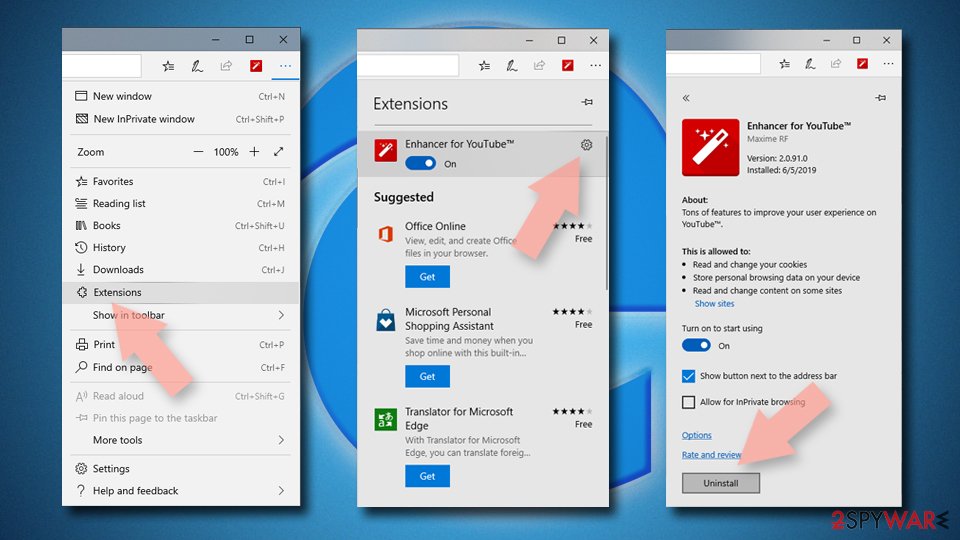
Delete unwanted extensions from MS Edge:
- Select Menu (three horizontal dots at the top-right of the browser window) and pick Extensions.
- From the list, pick the extension and click on the Gear icon.
- Click Remove.
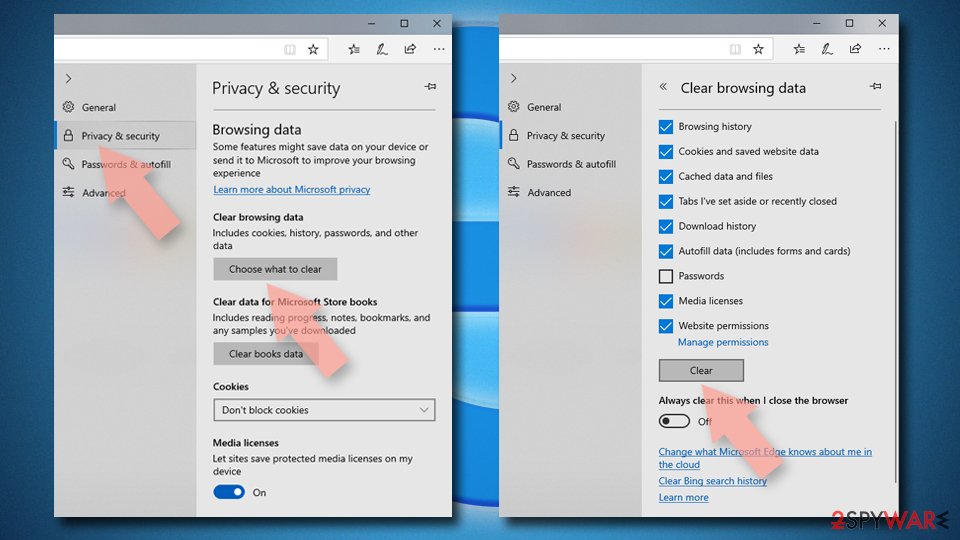
Clear cookies and other browser data:
- Click on the Menu (three horizontal dots at the top-right of the browser window) and select Settings > Privacy, search, and services..
- Under Clear browsing data, pick Choose what to clear.
- Select Cookies and other site data and Cached images and files. (apart from passwords, although you might want to include Media licenses as well, if applicable) and click on Clear.
Restore new tab and homepage settings:
- Click the menu icon and choose Settings.
- Then find On startup section.
- Click Remove next to any suspicious startup page.
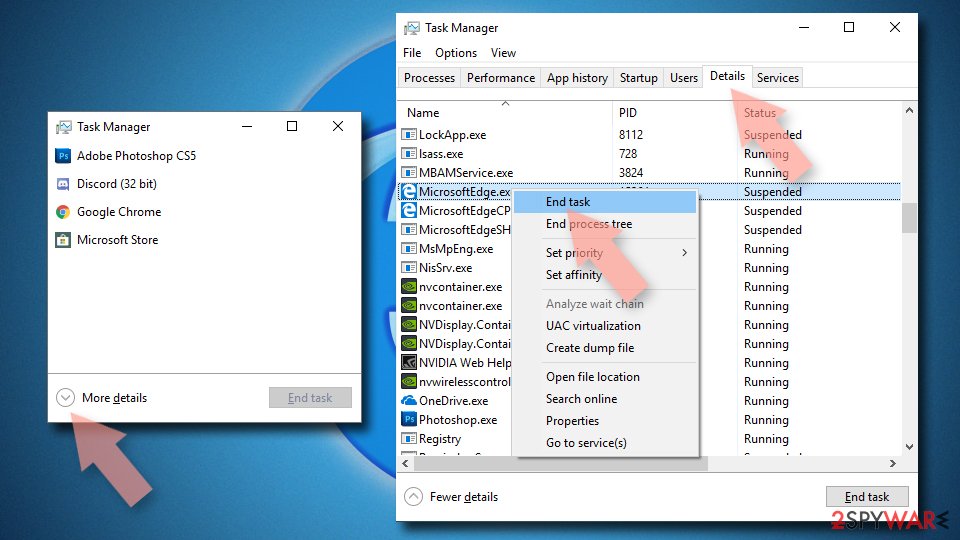
Reset MS Edge if the above steps did not work:
- Press on Ctrl + Shift + Esc to open Task Manager.
- Click on More details arrow at the bottom of the window.
- Select Details tab.
- Now scroll down and locate every entry with Microsoft Edge name in it. Right-click on each of them and select End Task to stop MS Edge from running.
Instructions for Chromium-based Edge
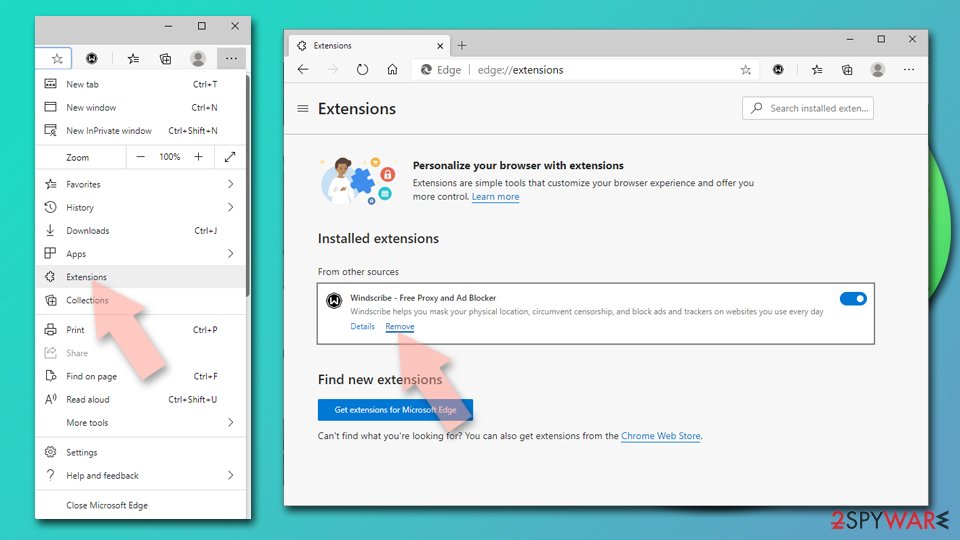
Delete extensions from MS Edge (Chromium):
- Open Edge and click select Settings > Extensions.
- Delete unwanted extensions by clicking Remove.
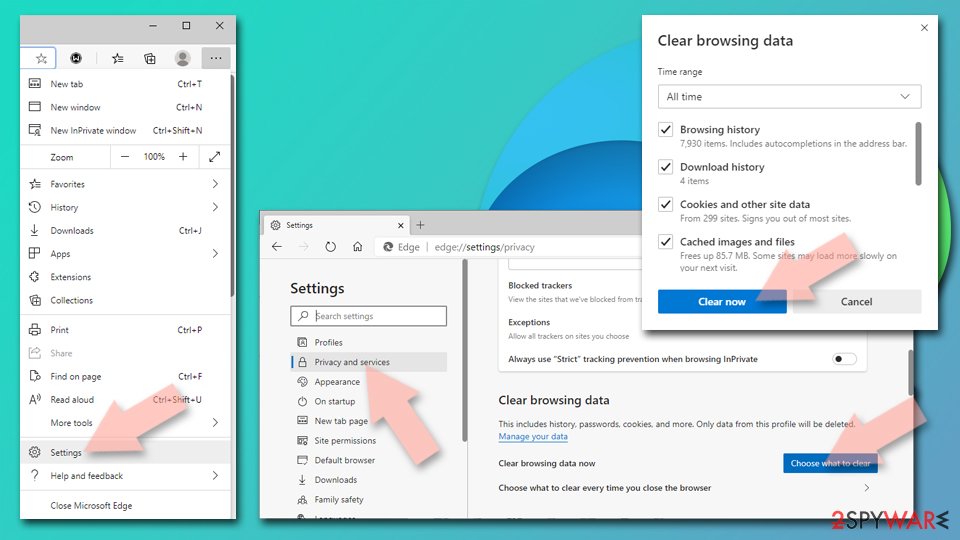
Clear cache and site data:
- Click on Menu and go to Settings.
- Select Privacy, search and services.
- Under Clear browsing data, pick Choose what to clear.
- Under Time range, pick All time.
- Select Clear now.
Reset Chromium-based MS Edge:
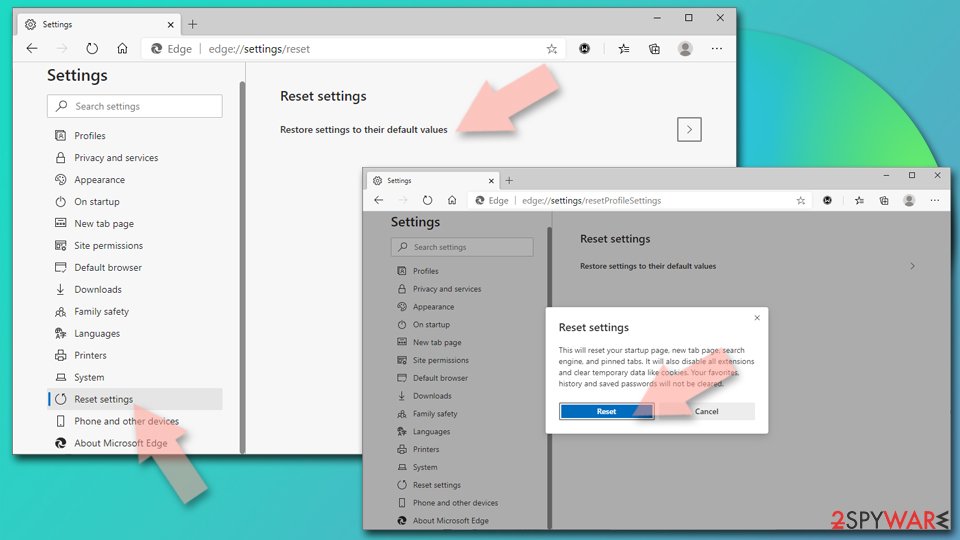
- Click on Menu and select Settings.
- On the left side, pick Reset settings.
- Select Restore settings to their default values.
- Confirm with Reset.
- This will disable extensions and reset startup pages but will not delete bookmarks, saved passwords, or browsing history.
Remove from Mozilla Firefox (FF)
Follow these instructions to uninstall Claro Search from Mozilla Firefox:
Remove dangerous extensions:
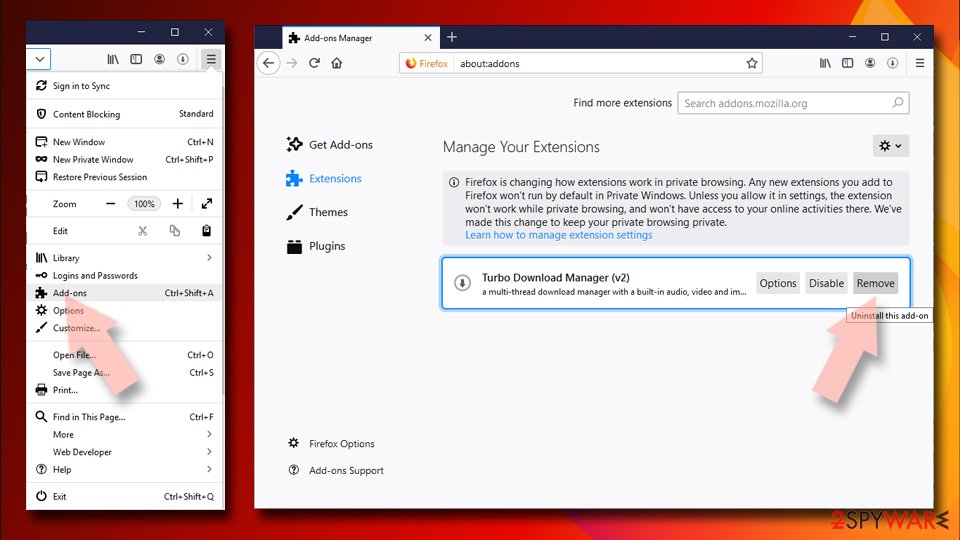
- Open Mozilla Firefox browser and click on the Menu (three horizontal lines at the top-right of the window).
- Select Add-ons.
- In here, select the unwanted extension and click Remove.
Reset the homepage:
- Click three horizontal lines at the top right corner to open the menu.
- Choose Settings.
- Under Home, set your preferred homepage and new tab settings.
Clear cookies and site data:
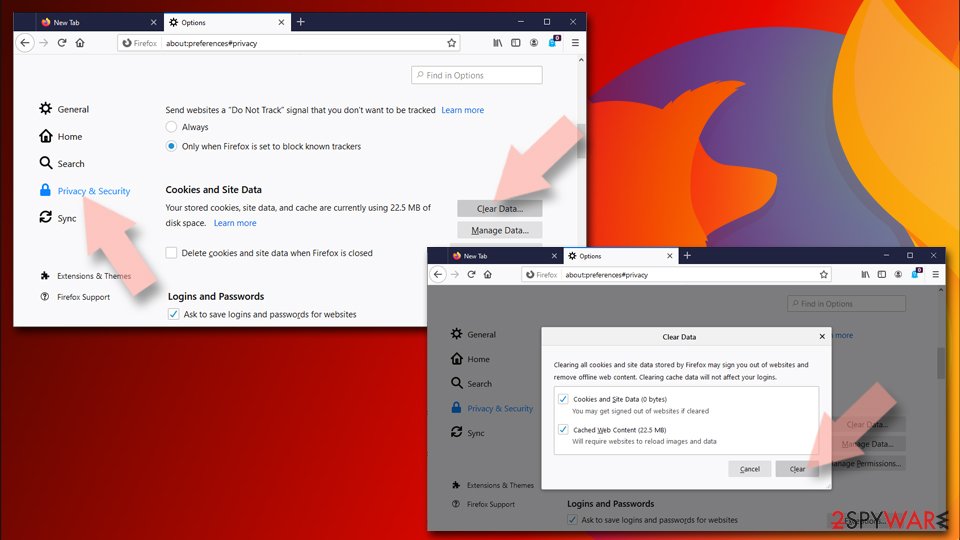
- Click Menu and pick Settings.
- Go to Privacy & Security section.
- Scroll down to locate Cookies and Site Data.
- Click on Clear Data…
- Select Cookies and Site Data and Temporary cached files and pages, then click Clear.
Reset Mozilla Firefox
If clearing the browser as explained above did not help, reset Mozilla Firefox:
- Open Mozilla Firefox browser and click the Menu.
- Go to Help and then choose Troubleshooting Information.
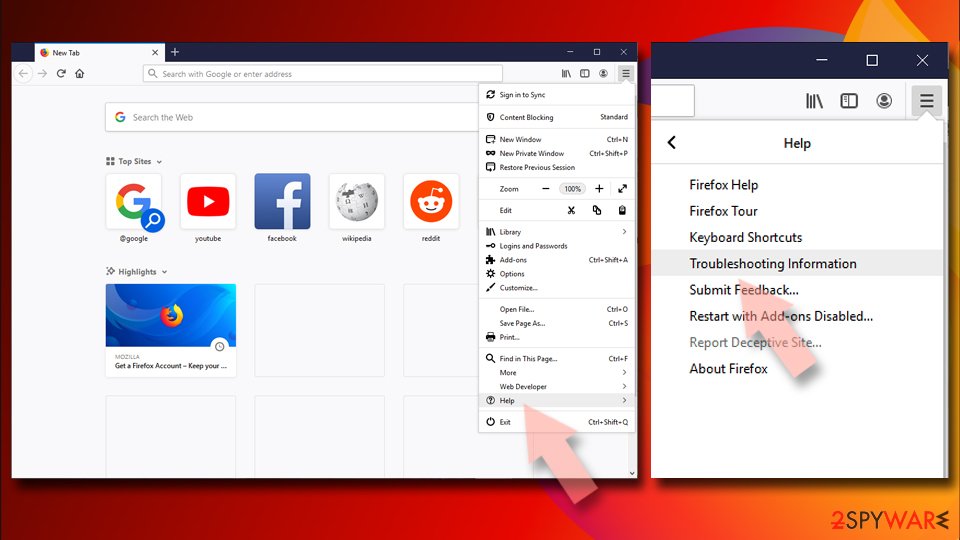
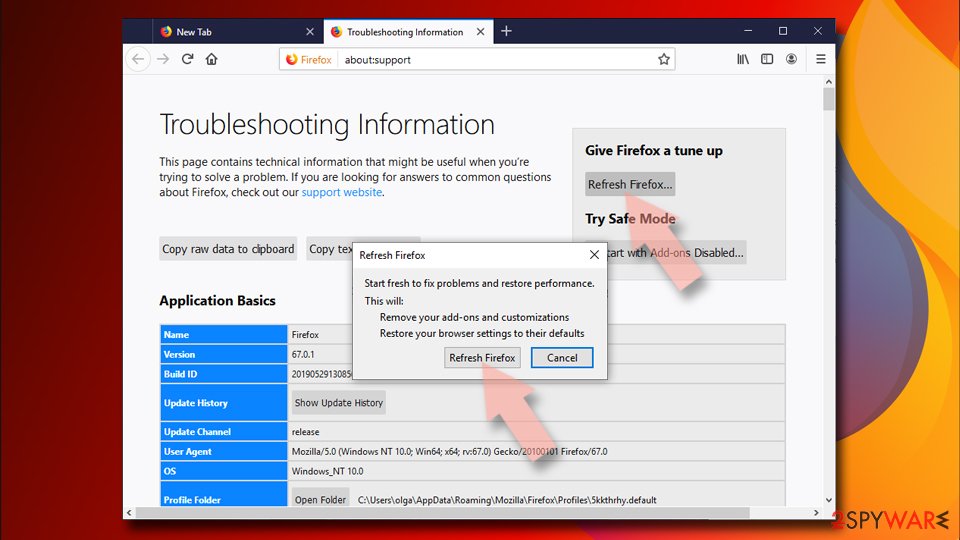
- Under Give Firefox a tune up section, click on Refresh Firefox…
- Once the pop-up shows up, confirm the action by pressing on Refresh Firefox.
Remove from Google Chrome
Taking these steps is necessary for eliminating Claro Search from Google Chrome:
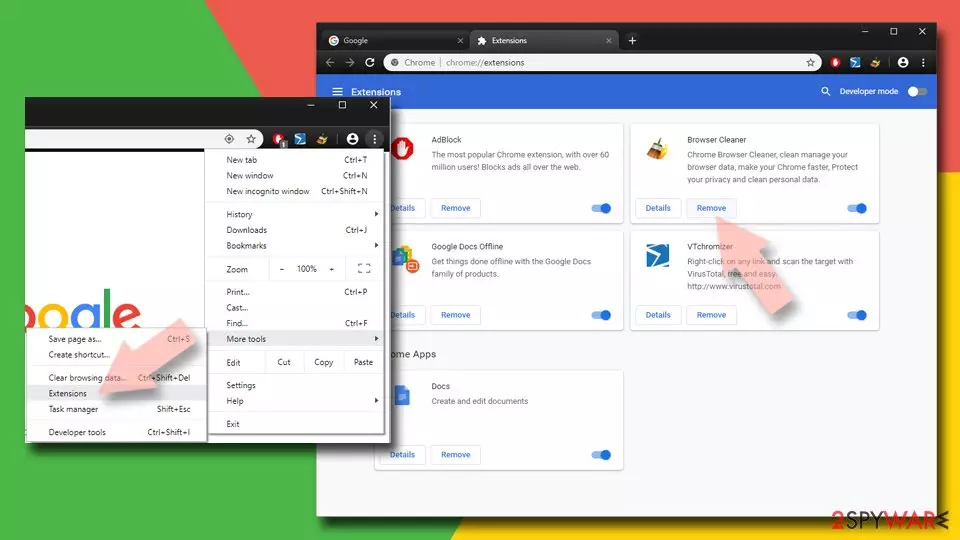
Delete malicious extensions from Google Chrome:
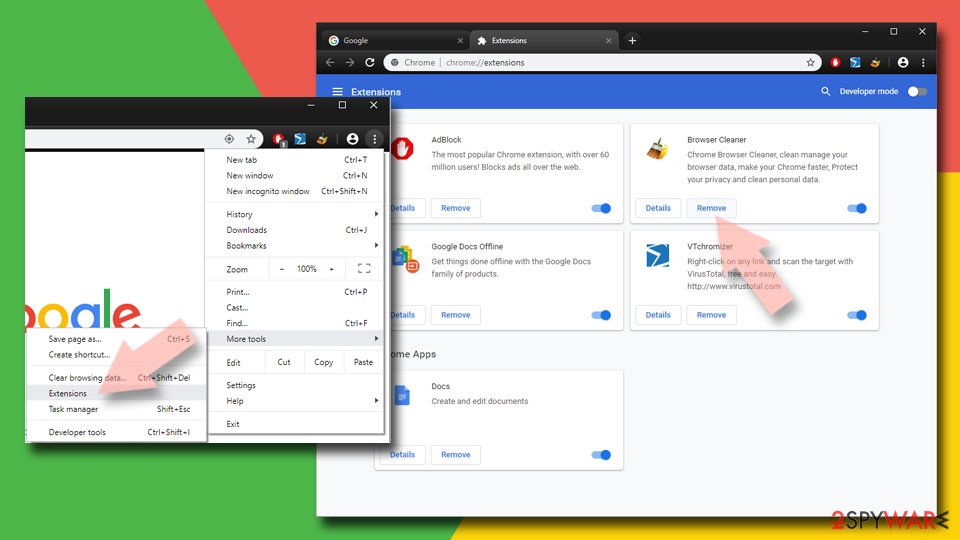
- Open Google Chrome, click on the Menu (three vertical dots at the top-right corner) and select More tools > Extensions.
- In the newly opened window, you will see all the installed extensions. Uninstall all suspicious extensions related to the unwanted program by clicking Remove.
Clear cache and web data from Chrome:
- Click on Menu and pick Settings.
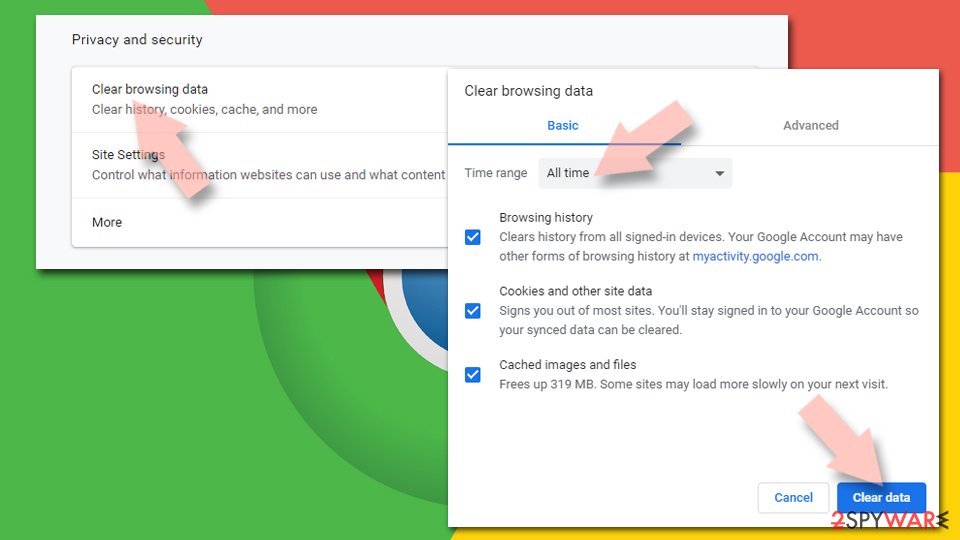
- Under Privacy and security, select Clear browsing data.
- Select Browsing history, Cookies and other site data, as well as Cached images and files.
- Click Clear data.
Change your homepage:
- Click menu and choose Settings.
- Look for a suspicious site in the On startup section.
- Click on Open a specific or set of pages and click on three dots to find the Remove option.
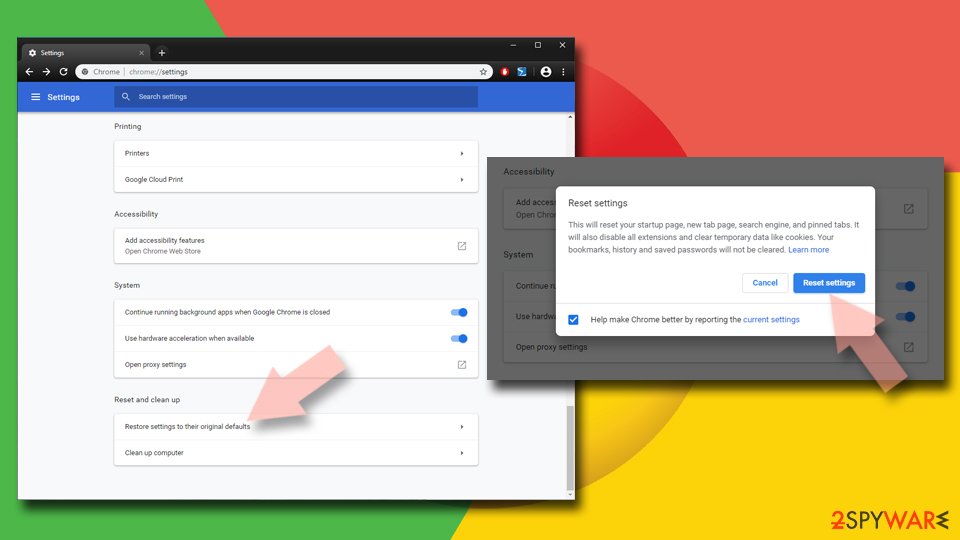
Reset Google Chrome:
If the previous methods did not help you, reset Google Chrome to eliminate all the unwanted components:
- Click on Menu and select Settings.
- In the Settings, scroll down and click Advanced.
- Scroll down and locate Reset and clean up section.
- Now click Restore settings to their original defaults.
- Confirm with Reset settings.
Delete from Safari
Clean Safari web browser from undwanted components by following these instructions:
-
Remove dangerous extensions
Open Safari web browser and click on Safari in menu at the top left of the screen. Once you do this, select Preferences.
-
Here, select Extensions and look for Claro Search or other suspicious entries. Click on the Uninstall button to get rid each of them.

-
Reset Safari
Open Safari browser and click on Safari in menu section at the top left of the screen. Here, select Reset Safari....
-
Now you will see a detailed dialog window filled with reset options. All of those options are usually checked, but you can specify which of them you want to reset. Click the Reset button to complete Claro Search removal process.

-
Click Start → Control Panel → Programs and Features (if you are Windows XP user, click on Add/Remove Programs).




After uninstalling this potentially unwanted program (PUP) and fixing each of your web browsers, we recommend you to scan your PC system with a reputable anti-spyware. This will help you to get rid of Claro Search registry traces and will also identify related parasites or possible malware infections on your computer. For that you can use our top-rated malware remover: FortectIntego, SpyHunter 5Combo Cleaner or Malwarebytes.
How to prevent from getting browser hijacker
Stream videos without limitations, no matter where you are
There are multiple parties that could find out almost anything about you by checking your online activity. While this is highly unlikely, advertisers and tech companies are constantly tracking you online. The first step to privacy should be a secure browser that focuses on tracker reduction to a minimum.
Even if you employ a secure browser, you will not be able to access websites that are restricted due to local government laws or other reasons. In other words, you may not be able to stream Disney+ or US-based Netflix in some countries. To bypass these restrictions, you can employ a powerful Private Internet Access VPN, which provides dedicated servers for torrenting and streaming, not slowing you down in the process.
Data backups are important – recover your lost files
Ransomware is one of the biggest threats to personal data. Once it is executed on a machine, it launches a sophisticated encryption algorithm that locks all your files, although it does not destroy them. The most common misconception is that anti-malware software can return files to their previous states. This is not true, however, and data remains locked after the malicious payload is deleted.
While regular data backups are the only secure method to recover your files after a ransomware attack, tools such as Data Recovery Pro can also be effective and restore at least some of your lost data.

If this free guide helped you and you are satisfied with our service, please consider making a donation to keep this service alive. Even a smallest amount will be appreciated.
- ^ Chris Hoffman. PUPs Explained: What is a “Potentially Unwanted Program”?. How-To Geek. How-to's and technology news.
- ^ Online Surveys: Can You Actually Earn Any Money?. Scambusters. Internet scams, identity theft, and urban legends.
- ^ Olivia Morelli . Claro Search Virus. ¿Cómo eliminar? (Guía de desinstalación de). Los Virus. Spanish website about computer viruses and their removal.
- ^ Les Virus. Les Virus. French security news and virus removal tutorials.
- ^ Olivia Morelli. Claro Search вирус. Как удалить? (Руководство по удалению). Bedynet. Russian cyber security news and malware removal.