CoolWebSearch (Removal Guide) - Mar 2021 update
CoolWebSearch Removal Guide
What is CoolWebSearch?
CoolWebSearch is an infamous browser hijacker that bullies web users

CoolWebSearch is a notorious potentially unwanted program that takes place in cybersecurity history as the nastiest browser hijacker[1] ever created. This cyber threat is known to enter Google Chrome or Internet Explorer and modify their settings without warning.
Soon after that, the hijacker redirects all searches to Coolwebsearch.com or other questionable sites. The hazardous program comes in a variety of versions (107 to be precise),[2] all of them using a different code, but behaving very similarly. During its reign in 2005, it infected over 8% of PCs worldwide, which is a massive amount.
Cool Web Search malware is considered to be one of the most aggressive browser hijackers ever made. As soon as it hijacks the browser, it installs multiple dubious bookmarks to porn sites, introduces browser helper objects (BHO) as well as creates shortcuts on the desktop.
| Summary | |
| Name | CoolWebSearch |
| Type | Browser hijacker |
| Versions | Over 100 created |
| First appeared in | May 2003 |
| Affected browsers | Internet Explorer and Google Chrome |
| Operating system | Windows |
| Distribution | Software bundling, fake ads, malicious sites |
| Symptoms | Altered homepage and new tab URL, intrusive adverts and redirects, modify search results, etc. |
| Main dangers | Malware infection, sensitive data leakage, etc. |
| Elimination | You can remove the threat with anti-malware tools and the help of the instructions below |
| Repair | Running FortectIntego can fix damaged files on the system |
What is more, it considerably slows down the browser and internet speed. Thus, security experts[3] advise users to remove CoolWebSearch from their machines immediately. The most annoying feature of this browser hijacker is the advertising content display, as well as its frequency.
Users are often bothered by multiple pop-up windows or redirects that occur on a daily basis and conceal the content of legitimate websites. What is more, CoolWebSearch hijack considerably slows down your computer and may even crash your operating system.
Additionally, internet speed can be affected too, and getting to even the simplest websites might take a substantial amount of time. Just like any other browser hijacker, CoolWebSearch can track a variety of non-personally identifiable information, such as:
- IP address (note: this data may be considered personal, depending on where you live)
- Internet service provider
- Technical information
- Search queries
- Websites visited
- Bookmarks added
- Links clicked, etc.
This data is invaluable for any marketing firm, as it is used as a tool to generate a virtual ID about every user, and display targeted advertisement, making users buy from sponsored retailers. This way, traffic to unknown websites is boosted, and the sponsors manage to sell their products or services much easier. The sad part is, that a lot of these products may be bogus, or end up being a complete scam.
Developers of CoolWebSearch acted like malware authors – they engaged in DDoS attacks
Adding to all this, there is a much darker side to this browser hijacker. When the unwanted program first appeared on the web, it was challenging to eliminate. Since it modified registry entries, it managed to stay on the PC as long as possible, and users failed to remove Cool Web Search spyware.
No matter what they did. In some cases, only a completed replacement of Windows registry with the previous version helped. What is more, cybercrooks used ByteVerify exploit[4] to inject their malicious software.
Back in 2004, a Dutch student Merjin Bellekom created a CoolWebSearch removal tool called CWShredder. It got rid of the program fast, and developers of the browser hijacker hated it. Therefore, the bad actors used Distributed Denial of Service (DDoS) attacks to target websites hosting this anti-spyware tool. Countless versions of the application came out, just to counter CWS malware updates.
Fortunately, the tools created back then are already outdated, and if you need to deal with CoolWebSearch, you can use Malwarebytes or SpyHunter 5Combo Cleaner – these anti-malware applications can get rid of the annoying pest in just a few minutes.

Over 100 versions of CoolWebSearch created
As we already mentioned, there are over a hundred versions of CoolWebSearch, among them being Websearch.helpmefindyour.info, Websearch.eazytosearch.info, Websearch.simplespeedy.info, and many others. Although all of them use a different code, the main goal remains – to redirect users to questionable websites and generate revenue. Here are the two most wide-spread versions on the internet:
CoolWebSearch.control
CoolWebSearch.control is one of the first versions of Cool Web Search, and it aims to infiltrate as many machines as possible using software bundling technique. Additionally, users can obtain it while browsing unsafe websites, such as file-sharing or torrent sites. Just as its original version, it injects several registry entries and avoid removal and proceeds wit hits malicious activities.
As soon as the hijacker modifies Chrome's or Internet Explorer's settings, the homepage is set to Websearch.coolwebsearch.info. Sadly users are unable to revert these changes until a full CoolWebSearch.control removal is performed. What is more, users have to suffer from continual ads and are as well being spied on by this suspicious software developers.
Websearch.coolwebsearch.info
Websearch.coolwebsearch.info is a browser hijacker and as well a homepage which is used by many Web Cool Search virus variants. It usually injects users' machines as a drive-by installation, which means that users are unaware that the unwanted app was installed on their PC. The browser hijacker does now label its affiliates ads, as well as does not provide an EULA or privacy policy, which is a deplorable behavior what pretends to be a legitimate company.
This variant of the virus can bring users to dangerous websites, including those which can use JavaScript to inject malware into users machines. All they need to do is merely get redirected to a malicious site, and the consequences could be disastrous. Victims can get infected with spyware, trojan horse or even ransomware. The latter one can lock up (potentially permanently) files and demand ransom for its release.
Therefore, we advise users to immediately take action if any traces of this dangerous application are noticed on the machine.
Users can inject even the most dangerous browser hijackers without noticing
Typically, potentially unwanted applications spread bundled as an attachment of freeware and shareware. It means that the only way for it to enter the PC is to get user's permission, but since components that spread along with freeware are seldom disclosed explicitly, people who are not keen on checking Advanced/Custom settings can easily end up with various unwanted add-ons, plug-ins, toolbars, and extensions.

Thus, if you want to prevent that, you have to check expanded settings carefully and deselect all 'optional downloads' without delay. Note that attachments are set by default, so you will have to untick them before clicking the 'Next' button.
Security researchers noted that suspicious programs could also be obtained on the dubious websites. Therefore, you should avoid file-sharing, torrent, porn, gambling, free online gaming and similar sites. Finally, you should never forget to employ security software with real-time protection feature to be safe.
CoolWebSearch virus removal steps
CoolWebSearch removal used to be extremely complicated when it came out back in the early 2000s. Nevertheless, the security technologies improved over the years and browser hijacker elimination became a relatively easy task. So, you can get rid of the virus either manually or automatically.
Normally, we would assure that both methods are equally effective, as you can remove Cool Web Search via the control panel and then reset each of the installed browsers (instructions are presented below). However, because this browser hijacker modifies registry entries, and it can intentionally install additional components without your knowledge, we highly advise using anti-malware software. This way, you can be sure that all traces of the dubious app are eliminated.
You may remove virus damage with a help of FortectIntego. SpyHunter 5Combo Cleaner and Malwarebytes are recommended to detect potentially unwanted programs and viruses with all their files and registry entries that are related to them.
Getting rid of CoolWebSearch. Follow these steps
Uninstall from Windows
To eliminate Web Cool Search virus from Windows, follow these steps:
-
Click Start → Control Panel → Programs and Features (if you are Windows XP user, click on Add/Remove Programs).

-
If you are Windows 10 / Windows 8 user, then right-click in the lower left corner of the screen. Once Quick Access Menu shows up, select Control Panel and Uninstall a Program.

-
Uninstall CoolWebSearch and related programs
Here, look for CoolWebSearch or any other recently installed suspicious programs. -
Uninstall them and click OK to save these changes.


Delete from macOS
-
If you are using OS X, click Go button at the top left of the screen and select Applications.

-
Wait until you see Applications folder and look for CoolWebSearch or any other suspicious programs on it. Now right click on every of such entries and select Move to Trash.


Remove from Microsoft Edge
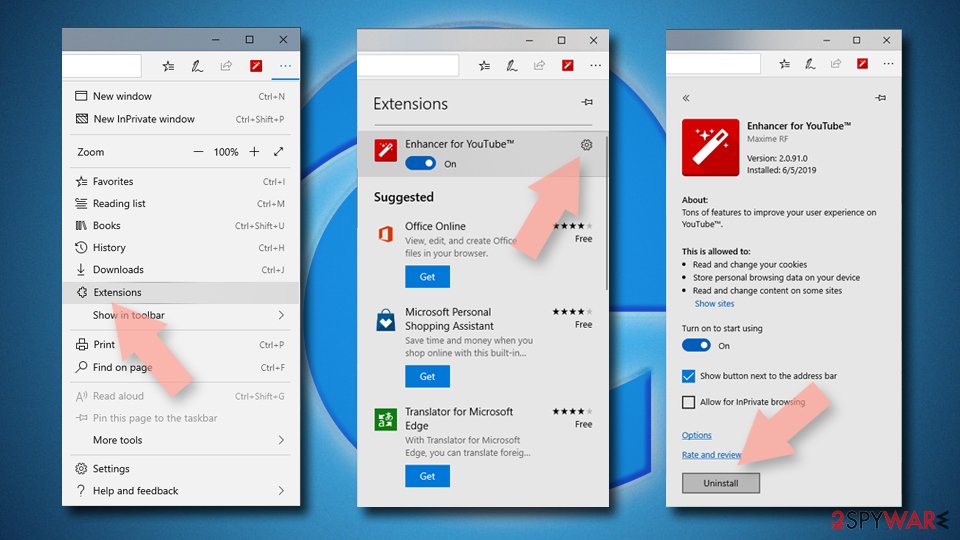
Delete unwanted extensions from MS Edge:
- Select Menu (three horizontal dots at the top-right of the browser window) and pick Extensions.
- From the list, pick the extension and click on the Gear icon.
- Click Remove.

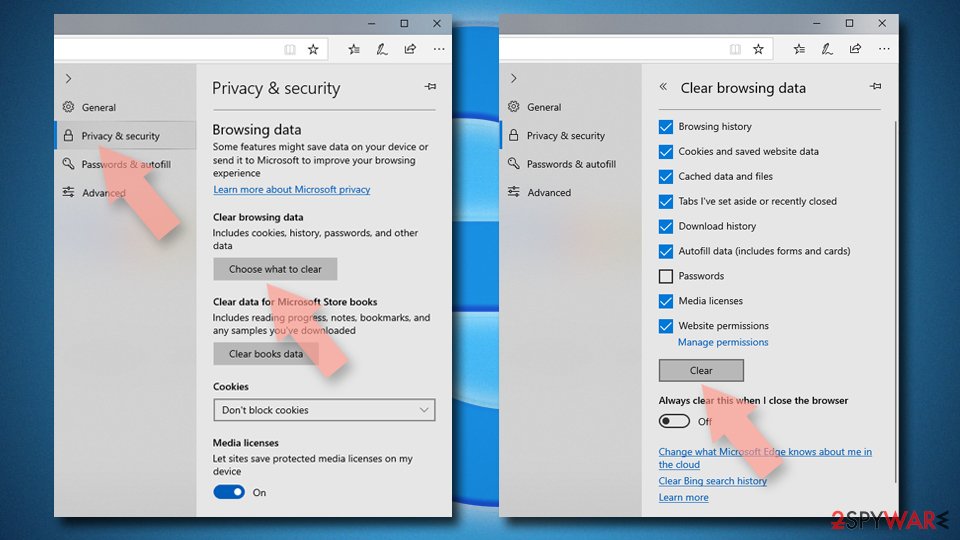
Clear cookies and other browser data:
- Click on the Menu (three horizontal dots at the top-right of the browser window) and select Settings > Privacy, search, and services..
- Under Clear browsing data, pick Choose what to clear.
- Select Cookies and other site data and Cached images and files. (apart from passwords, although you might want to include Media licenses as well, if applicable) and click on Clear.

Restore new tab and homepage settings:
- Click the menu icon and choose Settings.
- Then find On startup section.
- Click Remove next to any suspicious startup page.
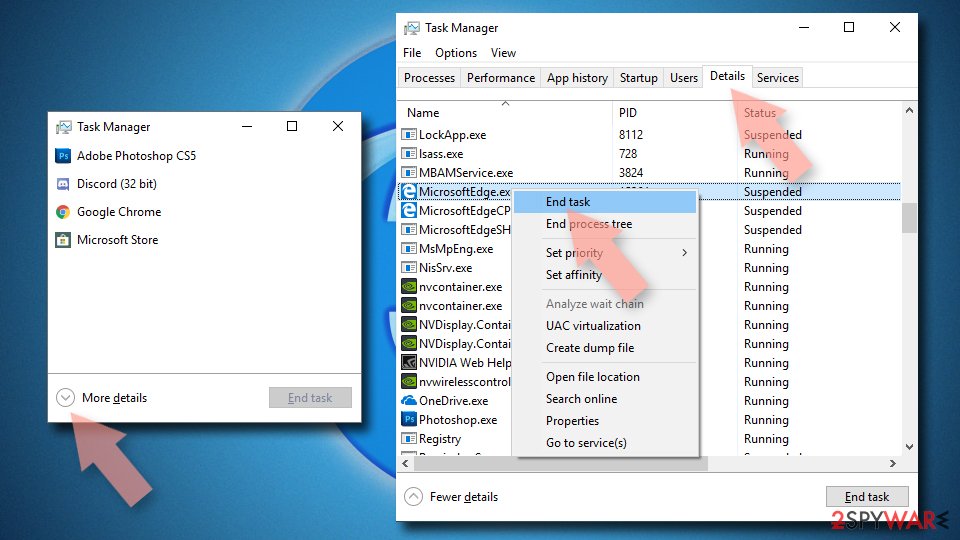
Reset MS Edge if the above steps did not work:
- Press on Ctrl + Shift + Esc to open Task Manager.
- Click on More details arrow at the bottom of the window.
- Select Details tab.
- Now scroll down and locate every entry with Microsoft Edge name in it. Right-click on each of them and select End Task to stop MS Edge from running.

Instructions for Chromium-based Edge
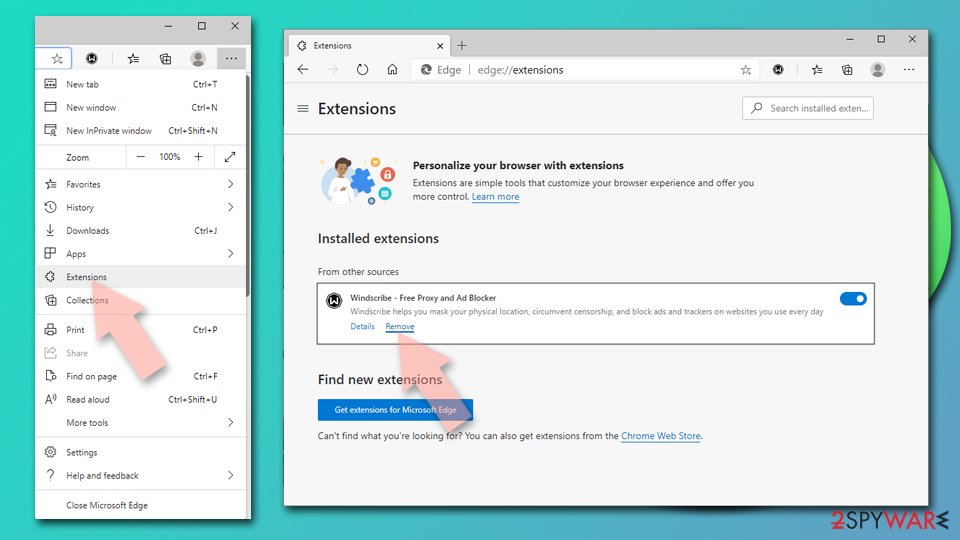
Delete extensions from MS Edge (Chromium):
- Open Edge and click select Settings > Extensions.
- Delete unwanted extensions by clicking Remove.

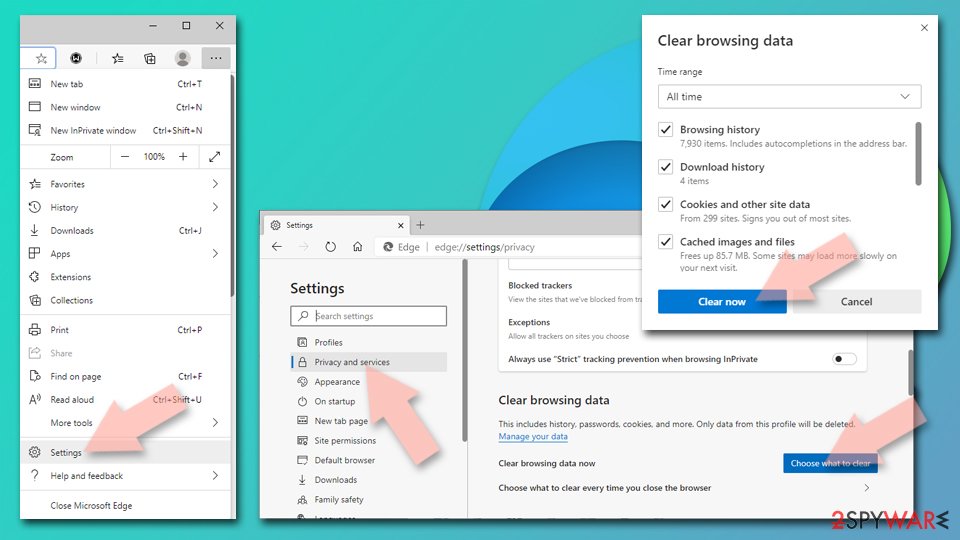
Clear cache and site data:
- Click on Menu and go to Settings.
- Select Privacy, search and services.
- Under Clear browsing data, pick Choose what to clear.
- Under Time range, pick All time.
- Select Clear now.

Reset Chromium-based MS Edge:
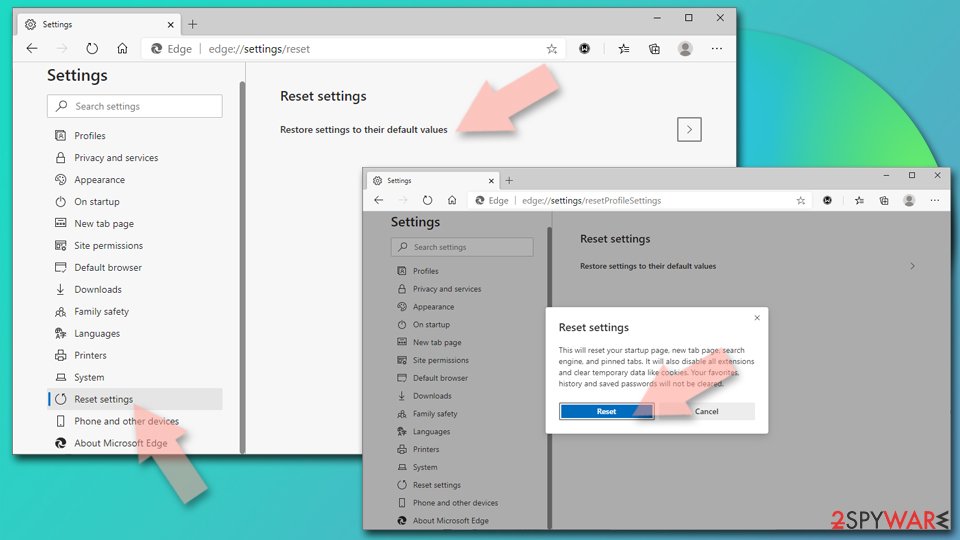
- Click on Menu and select Settings.
- On the left side, pick Reset settings.
- Select Restore settings to their default values.
- Confirm with Reset.
- This will disable extensions and reset startup pages but will not delete bookmarks, saved passwords, or browsing history.

Remove from Mozilla Firefox (FF)
Remove dangerous extensions:
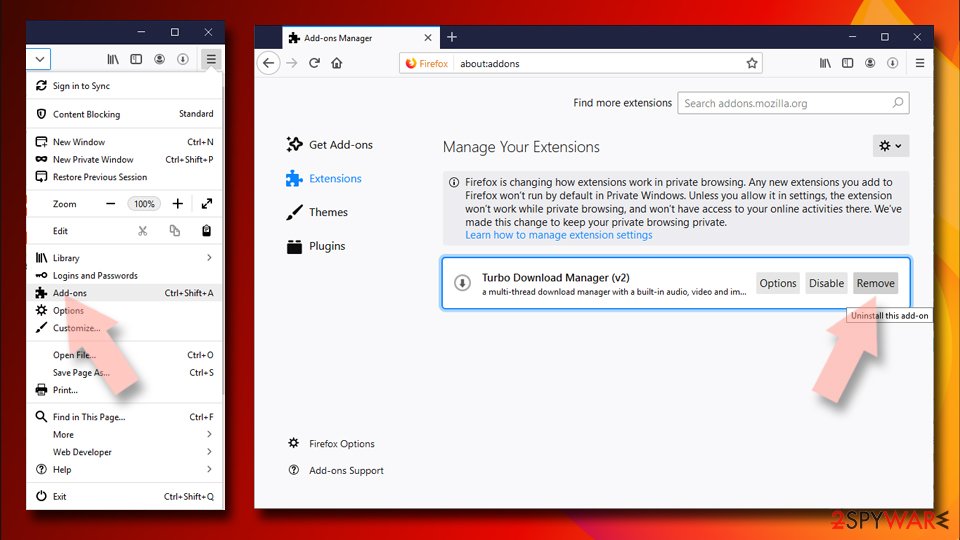
- Open Mozilla Firefox browser and click on the Menu (three horizontal lines at the top-right of the window).
- Select Add-ons.
- In here, select the unwanted extension and click Remove.

Reset the homepage:
- Click three horizontal lines at the top right corner to open the menu.
- Choose Settings.
- Under Home, set your preferred homepage and new tab settings.
Clear cookies and site data:
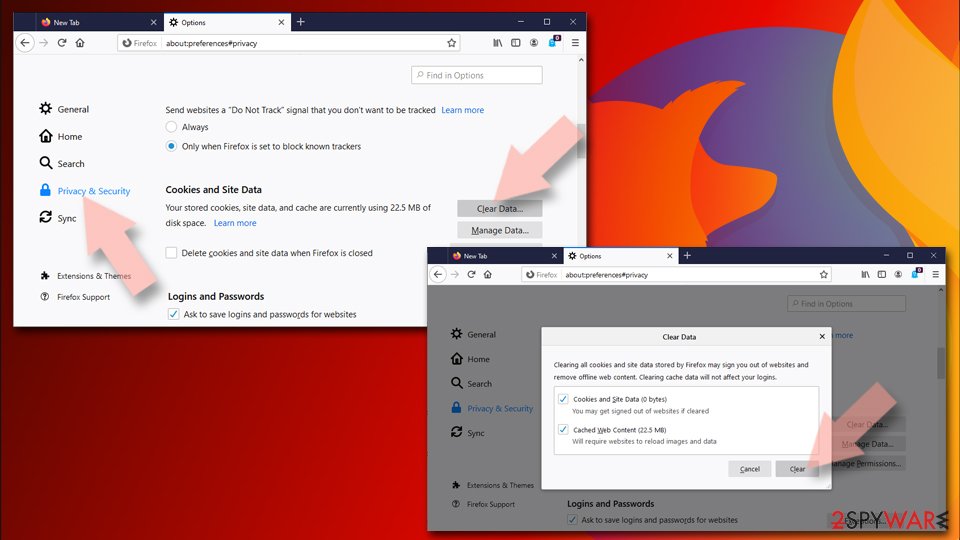
- Click Menu and pick Settings.
- Go to Privacy & Security section.
- Scroll down to locate Cookies and Site Data.
- Click on Clear Data…
- Select Cookies and Site Data and Temporary cached files and pages, then click Clear.

Reset Mozilla Firefox
If clearing the browser as explained above did not help, reset Mozilla Firefox:
- Open Mozilla Firefox browser and click the Menu.
- Go to Help and then choose Troubleshooting Information.
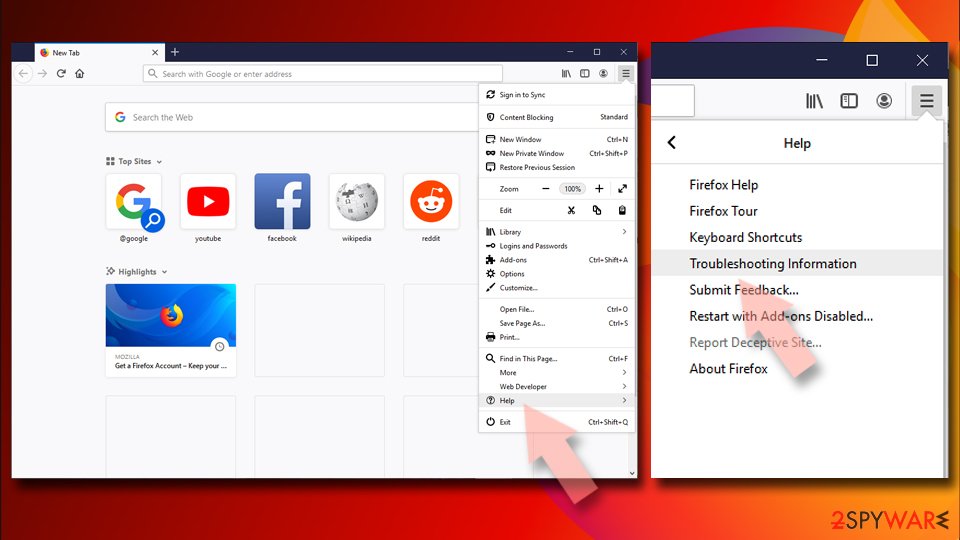
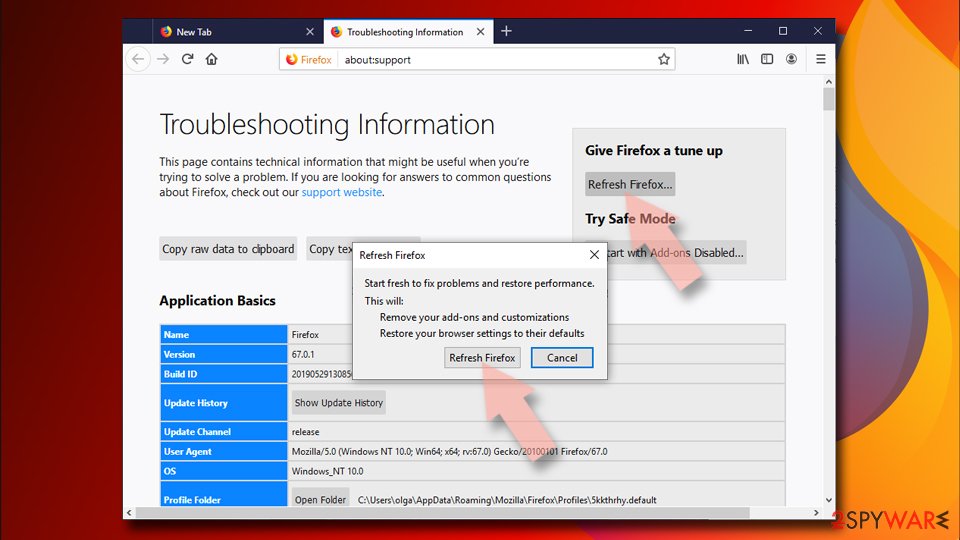
- Under Give Firefox a tune up section, click on Refresh Firefox…
- Once the pop-up shows up, confirm the action by pressing on Refresh Firefox.


Remove from Google Chrome
Delete malicious extensions from Google Chrome:
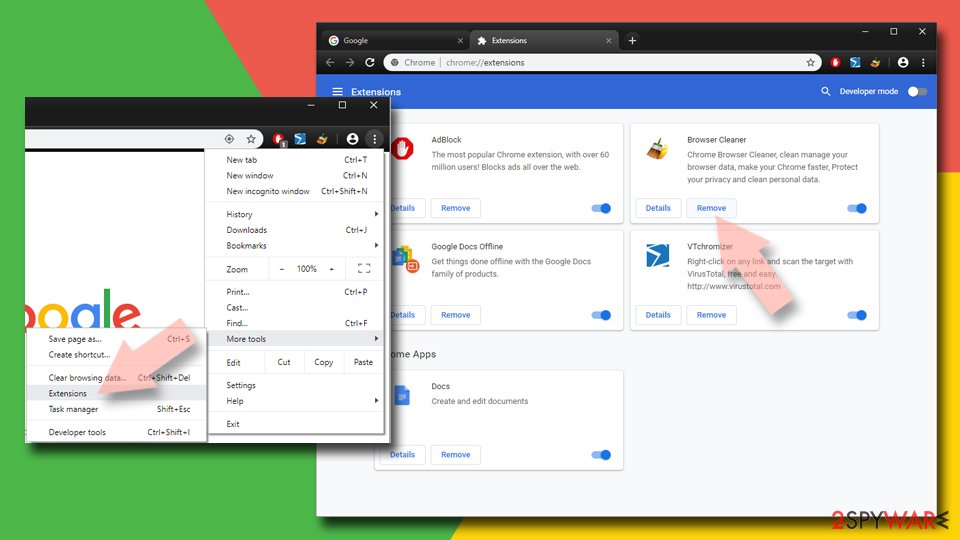
- Open Google Chrome, click on the Menu (three vertical dots at the top-right corner) and select More tools > Extensions.
- In the newly opened window, you will see all the installed extensions. Uninstall all suspicious extensions related to the unwanted program by clicking Remove.

Clear cache and web data from Chrome:
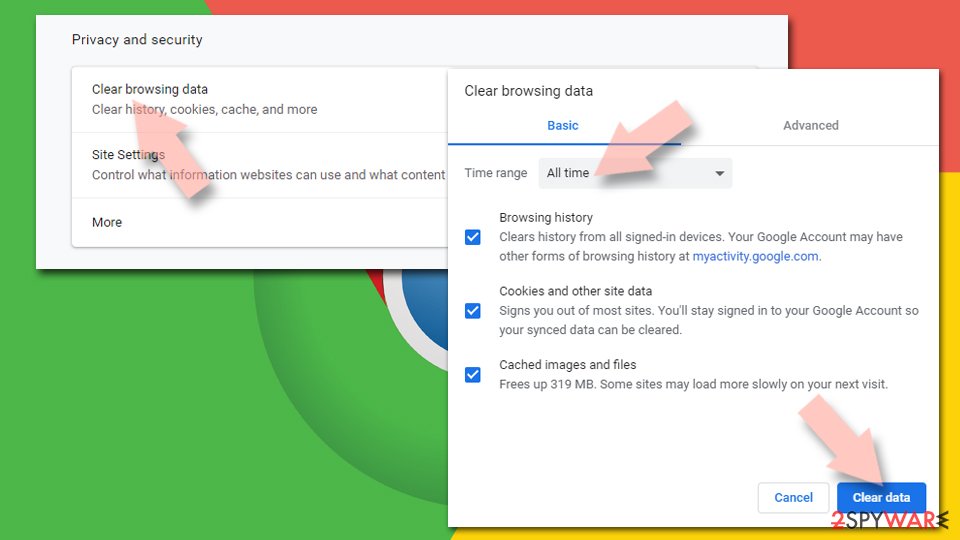
- Click on Menu and pick Settings.
- Under Privacy and security, select Clear browsing data.
- Select Browsing history, Cookies and other site data, as well as Cached images and files.
- Click Clear data.

Change your homepage:
- Click menu and choose Settings.
- Look for a suspicious site in the On startup section.
- Click on Open a specific or set of pages and click on three dots to find the Remove option.
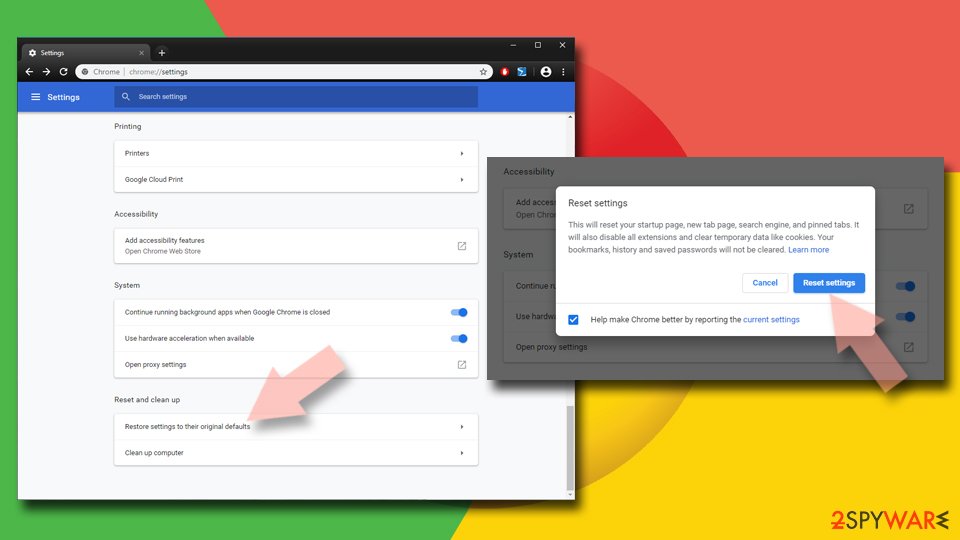
Reset Google Chrome:
If the previous methods did not help you, reset Google Chrome to eliminate all the unwanted components:
- Click on Menu and select Settings.
- In the Settings, scroll down and click Advanced.
- Scroll down and locate Reset and clean up section.
- Now click Restore settings to their original defaults.
- Confirm with Reset settings.

Delete from Safari
-
Remove dangerous extensions
Open Safari web browser and click on Safari in menu at the top left of the screen. Once you do this, select Preferences.
-
Here, select Extensions and look for CoolWebSearch or other suspicious entries. Click on the Uninstall button to get rid each of them.

-
Reset Safari
Open Safari browser and click on Safari in menu section at the top left of the screen. Here, select Reset Safari....
-
Now you will see a detailed dialog window filled with reset options. All of those options are usually checked, but you can specify which of them you want to reset. Click the Reset button to complete CoolWebSearch removal process.


After uninstalling this potentially unwanted program (PUP) and fixing each of your web browsers, we recommend you to scan your PC system with a reputable anti-spyware. This will help you to get rid of CoolWebSearch registry traces and will also identify related parasites or possible malware infections on your computer. For that you can use our top-rated malware remover: FortectIntego, SpyHunter 5Combo Cleaner or Malwarebytes.
How to prevent from getting browser hijacker
Do not let government spy on you
The government has many issues in regards to tracking users' data and spying on citizens, so you should take this into consideration and learn more about shady information gathering practices. Avoid any unwanted government tracking or spying by going totally anonymous on the internet.
You can choose a different location when you go online and access any material you want without particular content restrictions. You can easily enjoy internet connection without any risks of being hacked by using Private Internet Access VPN.
Control the information that can be accessed by government any other unwanted party and surf online without being spied on. Even if you are not involved in illegal activities or trust your selection of services, platforms, be suspicious for your own security and take precautionary measures by using the VPN service.
Backup files for the later use, in case of the malware attack
Computer users can suffer from data losses due to cyber infections or their own faulty doings. Ransomware can encrypt and hold files hostage, while unforeseen power cuts might cause a loss of important documents. If you have proper up-to-date backups, you can easily recover after such an incident and get back to work. It is also equally important to update backups on a regular basis so that the newest information remains intact – you can set this process to be performed automatically.
When you have the previous version of every important document or project you can avoid frustration and breakdowns. It comes in handy when malware strikes out of nowhere. Use Data Recovery Pro for the data restoration process.

If this free guide helped you and you are satisfied with our service, please consider making a donation to keep this service alive. Even a smallest amount will be appreciated.
- ^ Browser Hijacker. Technopedia. Site that helps to better understand technology.
- ^ 88% of PCs have spyware, CoolWebSearch most prevalent. ZDNet. IT news coverage.
- ^ BedyNet. BedyNet. Russian cybersecurity site.
- ^ Exploit:Java/ByteVerify. Microsoft. Windows Defender Security Intelligence.