

The information about recently developed CloudSword virus
CloudSword ransomware is a freshly spotted file-encrypting malware[1] that targets English-speaking and Chinese computer users. It seems that ransomware is still in-development, so we can expect it to grow and spread worldwide. However, malware has already caused damage for some computer users. The purpose of CloudSword virus is to take victim’s files to hostage and demand paying the ransom[2]. It encrypts targeted files with AES encryption chipper which is known as a strong encryption standard that is not easily decryptable. Sadly, CloudSword removal will not decrypt encoded files, so victims might lose their pictures, documents, and other important files if they do not have data backups. Malware is created to aim at the most popular file type in order to cause more damage to the victims and encourage them to pay the ransom. The list of targeted files:
.accdb, .arch00, .bson, .d3dbsp, .DayZProfile, .dbfv, .divx, .docx, .epub, .forge, .hkdb, .hplg, .html, .ibank, .java, .jpeg, .layout, .mcgame, .mdbackup, .menu, .mpeg, .mpqge, .mrwref, .pptm, .rofl, .sc2save, .sqlite, .syncdb, .text, .unity3d, .vfs0, .wotreplay, .xlsb, .xlsx, .ztmp.
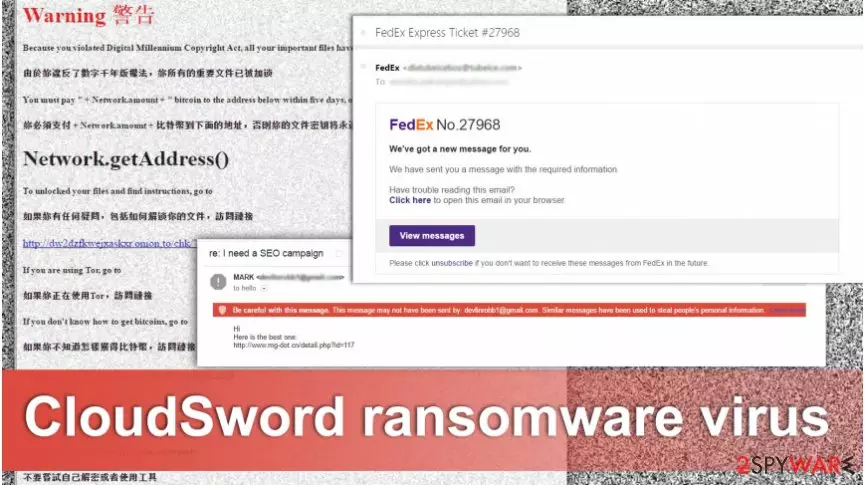
As soon as data encryption is over, the CloudSword virus drops a ransom note called “Warning警告.html.” This HTML file informs victims about supposedly violated Digital Millennium Copyright Act[3], and for this reason, all his or her files have been locked. However, hackers explain data decryption possibilities. Unfortunately, they are not free. Ransomware viruses are one of the biggest and successful projects to make illegal incomes online. Therefore, hackers ask to transfer some bitcoins in five days time to restore files encrypted by CloudSword ransomware. According to the crooks, if you do not meet the deadline, the unlock key will be lost forever. They also warn not to try decrypting files themselves or trying to use other tools. This saying gives hope that there are other ways to unlock and restore corrupted files. At the end of the article, you will find our prepared tips and instructions that might help to restore at least some of your files without risking and paying the ransom[4]. But first, you have to remove CloudSword from the computer.
How can I get infected with ransomware?
One of the main ransomware distribution campaigns is malicious spam emails and their attachments. Hackers create thousands of different messages to trick users into opening an infected document. They might pretend to be from governmental institutions, financial organizations, online retailers, and any popular companies. Some emails can be easily suspect to be malicious; meanwhile, others are perfectly made falsifications. Hence, it might be hard to decide which one you can trust[5]. If you want to avoid CloudSword hijack and other ransomware viruses, you should stay away from spam emails and do not open them at all. Before opening any email attachment, you should think, whether you are supposed to receive this kind of email from this particular organization. If not, do not let your curiosity cause you problems. What is more, CloudSword ransomware virus might also spread via fake software downloads and updates, so it’s important to choose only safe and reliable sources for installing new programs.
How can I safely remove CloudSword virus?
First of all, you should remember that ransomware-type viruses are one of the most dangerous cyber threats. Hence, their elimination has to be taken seriously. Do not even think about manual CloudSword removal because you might end up with even bigger computer-related problems. For example, you may delete necessary system file instead of malicious entry. The only safe way to remove CloudSword from the computer is to use professional malware removal tools, such as FortectIntego, MalwarebytesMalwarebytes or SpyHunterCombo Cleaner. After installation, update your chosen software and run a full system scan. However, we have to warn you that sometimes malware prevents users from installing and accessing security tools. If this happens to you as well, follow the instructions below to restart your PC to the Safe Mode.
Did this guide help?
3 comments
Moly
Oh, I wish there were a decryption tool...
terenkleon
I see hackers are inspired by Final Fantasy :D
Sally
Thanks for the protection tips!