

Yet another virus by EvilTwin: Exotic 3.0 ransomware
Exotic 3.0 virus has appeared, but do you know the story behind it? EvilTwin claims to be liable for the Exotic ransomware project, and the latest version of this malicious virus is Exotic 3.0 ransomware. There are hardly any differences between this one and the previous versions (Exotic 2.0 and Exotic). The only thing that changed is the background of the lock screen that this virus displays. Just like preceding versions, it locks personal files with a strong encryption algorithm, then asks to pay a ransom within 72 hours otherwise all data will be deleted from the computer for good. After experiencing the attack, the victim finds .exotic file extensions appended to encrypted file, and receives a ransom note that automatically launches on the computer screen, saying:
YOU GOT INFECTED BY THE EXOTIC VIRUS
All your files are encrypted, how to restore? Pay me 50 USD in worth of bitcoins to thie address: [BTC wallet address]
You have 72 hours to pay or all your files are gone
You can delete the virus, but your files are gone
Have a nice day =) EVILTWIN
New file extensions on encrypted files is not a new technique, and many ransomware viruses do this to make the victim see how many files have been corrupted. However, not all viruses scramble the original file name, and that’s exactly what this virus does. This way, the victim notices how many files have been encrypted, but loses the possibility to identify which file is which. What’s interesting about Exotic viruses is that they can encrypt executive (.exe) files, which means that the victim loses access to programs. The virus also changes desktop’s wallpaper with an image that contains the same information. Despite angry threats to delete victim’s files in case he/she refuses to pay up in 72 hours, users should not be afraid to remove Exotic 3.0 ransomware using anti-malware tools. A deleted virus can no longer initiate activities on the computer, so it becomes unable to delete encrypted files. This way, you can save encrypted copies and one day decrypt them with a decryption tool. We believe that malware researchers can create one soon, so be patient. In the meantime, use FortectIntego software to delete the virus, but SpyHunterCombo Cleaner is just as good. Do not forget to prepare your PC for Exotic 3.0 removal first – follow instructions provided below this article. 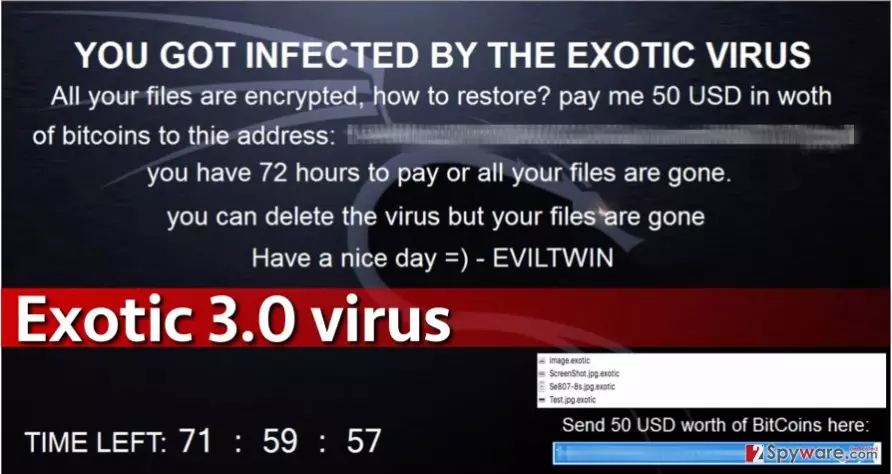
What methods were used to attack your PC and successfully infect it?
Many computer users are confused because they cannot understand how a malicious program managed to enter their computers without their knowledge. Ransomware viruses spread with the help of techniques that are based on file masking, which means they travel the same way that Trojan horses do. To protect your computer from malware attacks, you need to follow these steps:
- Install a trustworthy anti-malware software for enhanced PC protection.
- Avoid emails that come from senders of unknown origin. However, do not forget that scammers often impersonate workers of reputable organizations, so do not open each invoice, resume or bill that comes attached to suspicious emails that you were not expecting to get. Crooks might also try to convince you to open attached files by stating that you have a sum of money waiting for your acceptance (via Paypal or another payment system). Please remember – if you do not know who is the sender of such email, or if you do not trust it, better ignore it and delete it from your inbox.
- Enable automatic software updates or update programs installed on the computer manually. This helps to avoid the menace of exploit kits, which can be encountered in untrustworthy websites and can scan your system for vulnerable software. Exploit kits take advantage of outdated software and use vulnerabilities to infect the system with malware without displaying any pop-ups, alerts, or installation wizards.
- Save downloads to disk before opening them. This gives time for the computer security software to check the safety of the file. If your anti-malware software finds the file secure, you can open it.
Annihilate Exotic 3.0 virus
The best way to remove Exotic 3.0 virus is to let an automatic malware removal tool identify its files during the system scan and remove all of them with a single click. Sadly, trying to delete this malicious virus manually can come to a bad end. You might accidentally delete safe and essential files that are needed to maintain a regular system’s performance. Therefore, we encourage you to rely on our recommended malware removers for successful Exotic 3.0 removal.
Was this guide helpful?
4 comments