
AZORult: what it is and how to remove it
AZORult Trojan is the cyber threat that can get loaded without any indications and run in the background while collecting data from the system or the browser. The main purpose of the virus is to collect valuable information without getting noticed, so it is often dropped as a secondary payload, like in Djvu family attacks.
Facts checked October 6, 2026. Removal steps tested on Windows 11 (26H2) and checked against Microsoft's and the browser makers' current documentation. Sections marked as our earlier report are the original text: they describe the threat as it was then and have not been reviewed since. The 2026 status, the removal steps and the questions are current.
Automatic
Get a free scan and check if your PC is infected.
Fortect finds malware, unwanted programs and the Windows damage they leave behind, and repairs it in one pass.
Programs like AZORult usually arrive in groups; a free scan lists the companions that are easy to miss.
Do it yourself · free Remove AZORult yourself 5 steps, about 15 minutes, no software needed.
Start the steps
AZORult: summary
| Distribution | Spreads via malspam campaigns. Emails come impersonating job applications with a malicious attachment, which disguises as a .doc resume file. The more recent attacks show that malicious websites trigger code that leads to the infiltration of malware, exfiltration of credentials directly |
|---|---|
| Name | AZORult |
| Type | Trojan horse |
| Danger level | High. Collects sensitive data and infects systems with malware. It can steal credentials, payment card numbers, cookies, or sensitive and personal data stored on browsers and exfiltrate such information using the C&C server. Also, the backdoor feature could open a path for more cyber threats |
| Detection | The malware is multi-layered, so researchers cannot find techniques used and detect malware traces. Regular computer users might not be able to identify the infection as it doesn't display a visible window, so the proper tools fighting malware are needed to identify the virus and clean it off of the system; no Microsoft detection name is known for this name |
| Damage | Not recorded in the old report |
| Removal | Scan the PC with security software to find and remove the malware and anything installed with it. Fortect scans Windows for malware and repairs the system files and settings it damaged. Remove it nowTo use the full-featured product, you have to purchase a license for Fortect. The scan is free. |
Show 4 more facts
| Symptoms | An unknown program in Installed apps |
|---|---|
| Evidence | 7 write-ups by security sites; details still limited |
| First seen | 12 March 2020 |
| Facts checked | 6 October 2026 |
What AZORult does on an infected PC
From our report of Mar 2020 · not reviewed since
AZORult 2020 update: attackers relying on Coronavirus pandemic panic
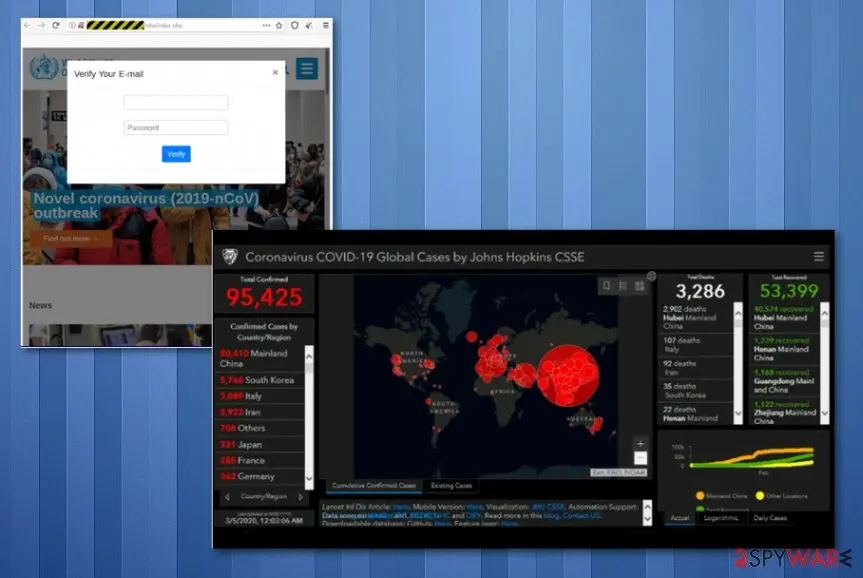
Scammers used John Hopkins Coronavirus map to spread malicious code with files triggering the AZORult trojan infection.
The virus has spread to almost all continents and raised panic, questions when the danger reached pandemic level. People all over the globe each second tries to access new information about levels of infected people and deaths or the rate of spreading. This is why live updates, maps about the outbreak are popular among internet users.
The site Corona-Virus-Map.com became very popular quickly, and bad people used it for their own gain. Malicious code was found hidden on the site. Also, the infection related to the same code has been spreading around with the help of emails with subject lines like "urgent", "important", "official" also stating about pandemic updates.
The domain analysis showed that it is registered in Russia. The fake Johns Hopkins site scrapes data off of the original site, to keep users attracted with up-to-date information in real-time. In the meantime, malicious codes lure in the background waiting for victims' interaction and triggering. Researchers stated that malware functions as a redirect at first, and it triggers the reroute to the original John Hopkins site.
Then, malware gets installed directly on the machine, automatically reporting to the C&C server that attackers control. The virus creates chain infections and installs programs, opens backdoors, steals data at the same time. In most cases, none of the activities can be noticed by the victim because it is created to infiltrate the computer and remain silent.
In other Coronavirus pandemic news, criminals also use scammy sites seeking donations for alleged charities and foundations surrounding the virus. Be cautious when donating to any organization and pay attention to content and suspicious details while browsing online, in general.
From our report of Mar 2020 · not reviewed since
More from our earlier report on AZORult
- If the trojan managed to infect the system, you should get after uninstalling the AZORult virus safely.
- This will help you fix your PC system completely by eliminating virus damage
How AZORult got on your PC
From our report of Mar 2020 · not reviewed since
AZORult virus is the threat that gets used to spread other viruses to the target devices or gets added as a secondary payload
AZORult Trojan is the cyber threat that can get loaded without any indications and run in the background while collecting data from the system or the browser.
The main purpose of the virus is to collect valuable information without getting noticed, so it is often dropped as a secondary payload, like in Djvu family attacks.
This threat gets loaded after recent versions in this ransomware family get done with encryption processes, so valuable data can also get used for blackmailing. The virus can target banking information, sensitive or personal details, or get spread around on the network of a large company or government to gather valuable data.
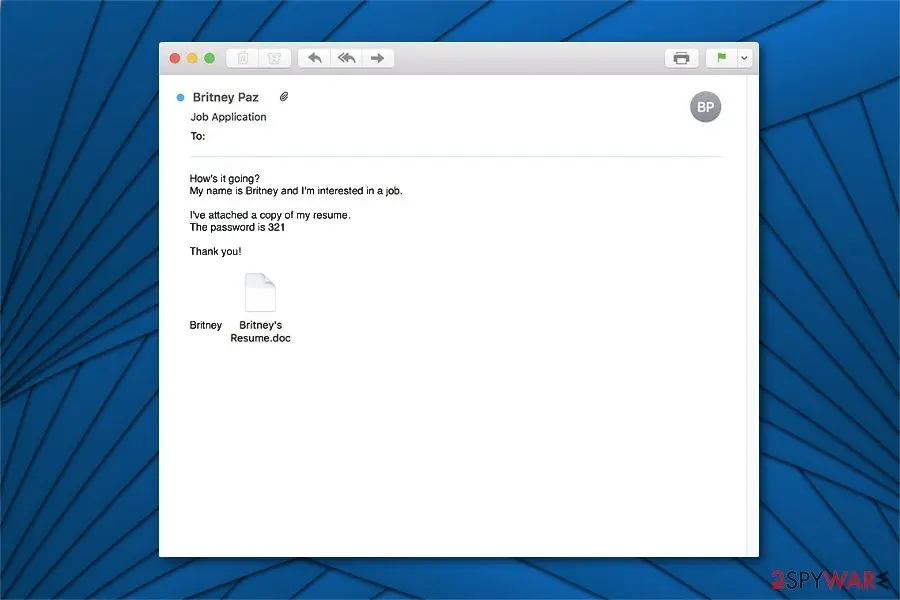
This Trojan horse has been spreading via malicious spam emails that impersonate job applications, e.g. "My name is Britney, and I'm interested in a job." The virus is using a backdoor feature to infect systems with more dangerous infections. Recently, AZORult virus was spread by Aurora ransomware, threats like Mosok, and other malware.
In addition, it can be used to collect valuable personal information and then transfer it to its developers or the C&C server. Keep in mind that it might later be used for phishing purposes and lead to financial losses. The more recent campaigns where this trojan got involved used Coronavirus pandemic theme to attract visitors to fake sites that triggered malicious code and dropped info-stealing trojan.
The most notable feature of the AZORult virus, which makes it exceptionally dangerous, is the keylogging. In other terms, this cyber threat is programmed to record keystrokes, open spoof login windows that look legitimate and collect credentials, personal data, and additional valuable information for the developers of the stealer.
Keep in mind, that personally identifiable data is highly valuable for the attackers as they might sell AZORult stealer in the underground market and earn illegal profits. Such activity not only puts your privacy at risk but also may lead to enormous financial losses by unauthorized transactions from your bank account.
Additionally, AZORult virus could be capable of providing remote access to the attacked system for hackers. Likewise, cybercriminals could use a backdoor feature to open paths for more malicious programs and damage the computer permanently.
This AZORult trojan is mainly interested in getting logins and passwords for cryptocurrency wallets and other banking or credit services, so accounts can get hijacked and used to obtain money directly from victims. There might be some different versions of the trojan, so multiple scenarios can be implemented.
The presence of this trojan on the machine cannot show any symptoms, but leas to serious privacy and identity theft issues. You may encounter suspicious processes running in the background on Windows Task Manager and question the state of the infected system. You need to react to such issues as soon as possible, because these symptoms may occur only after the infection and all the malicious processes.
For all the reasons mentioned above, we strongly suggest you remove AZORult virus as quickly as possible. Since the infection does not display a visible window, you may not be able to identify it in the first place. Therefore, the wisest decision would be to get a professional antivirus program that could clean the machine from various malware traces and the intruder.
On the other hand, is an excellent choice for fixing virus damage after AZORult removal as it can change system files and registry entries. If you can't install the security software, you should boot your computer into Safe Mode. Free instructions showing how to do so are appended at the end of this article.
From our report of Mar 2020 · not reviewed since
Obfuscated Trojan horse is distributed via malicious job application emails and malicious sites
According to the researchers , this trojan horse spreads via malspam campaign sending malicious emails as job applications.
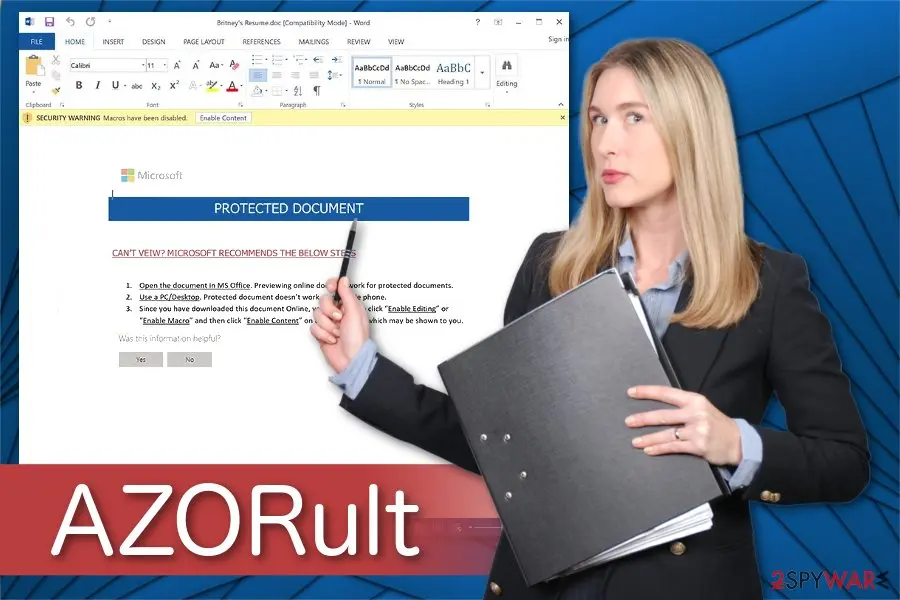
Users receive electronic letters asking to apply for a job place. Additionally, the message includes the .doc resume file, which is protected with a password.
Unfortunately, this is a trick used to lure unsuspecting computer users into opening the malicious attachment with the payload of a trojan horse. Keep in mind that cybercriminals are highly advanced as the password protection feature prevents users from scanning the file with an antivirus before opening.
Therefore, you should be exceptionally cautious and recognize an attempt to infect your computer with a malicious program immediately. Note, do NOT click on the attachment and refrain from opening the email in the first place. In fact, never click on any inbox content which comes from people or companies you don't have business with.
How to remove AZORult
A loader's job is to install other malware, so treat the PC as infected with more than one program until the scans are clean.
Step 1: Delete scheduled tasks that bring it back
Programs like AZORult add a scheduled task so they return after an uninstall or reopen a page at every sign-in. Start Task Scheduler, open Task Scheduler Library and sort by Last Run Time to see what ran recently.
On the Actions tab, a program in a user folder, a script or a web address is a warning sign; right-click such a task and choose Delete.
Tasks with names copying Google, Edge or Windows updaters but pointing to an odd folder are typical. The tool looks the same in Windows 11 and Windows 10.

Windows 11: Task Scheduler Library, the task selected, the Actions tab shows the file it runs. Full procedure with screenshots: Remove what malware leaves behind in Windows
Step 2: Remove it from startup
Press Ctrl + Shift + Esc to open Task Manager and select Startup apps (Windows 11) or the Startup tab (Windows 10). Disable entries you do not recognise, especially ones with no publisher or with a name that copies a Windows component.
Right-click an entry and choose Open file location to see where it runs from: programs in
%AppData%or%Temp%deserve a closer look. Some entries are not listed there but in the registry Run keys, which the procedure below shows how to check.Full procedure with screenshots: Stop apps from opening at startup On uGetFix
Step 3: Delete the folders left behind
Uninstalling often leaves the program's folders, and some threats reinstall themselves from them.
Press Windows + R, type
%LocalAppData%and press Enter, then do the same for%AppData%and %ProgramData%, and look for folders named after AZORult, its publisher or created on the day the problem started. Delete those folders, and check C:\Program Files and C:\Program Files (x86) too.If Windows says a file is in use, end it in Task Manager or delete the folder after a restart in Safe Mode. The folders are the same in Windows 11 and Windows 10.
Full procedure with screenshots: Remove what malware leaves behind in Windows
Step 4: Scan the PC, then run the offline scan
A scan finds the parts of AZORult that the manual steps cannot see. In Windows Security > Virus & threat protection > Scan options, start a Full scan and quarantine what it reports.
Follow it with Microsoft Defender Antivirus (offline scan) > Scan now, which restarts the PC and checks the disk while Windows and the malware are not running.
It takes about 15 minutes and works the same in Windows 11 and Windows 10. If either scan finds something, run the full scan again after removal until it comes back clean.

Windows 11: Windows Security > Virus & threat protection > Scan options. Full procedure with screenshots: Run a Microsoft Defender Offline scan
Step 5: Change passwords from another device and sign out other sessions
AZORult can copy saved passwords, cookies and session tokens and send them out in seconds, so cleaning the PC does not undo the theft.
Change your passwords on a device that was never infected, starting with the e-mail account, since every other reset goes through it. On each account, end all other sessions and check the recovery e-mail, phone number and forwarding rules.
Then turn on two-step verification. Sign in on the Windows 11 or Windows 10 PC again only after the offline scan is clean.
Full procedure with screenshots: Turn on two-step verification / secure a hacked account
Instructions for each browser and system
The detailed steps for every browser and system this guide covers. Open the one you use.
Manual removal using Safe Mode
Important! →
Manual removal guide might be too complicated for regular computer users. It requires advanced IT knowledge to be performed correctly (if vital system files are removed or damaged, it might result in full Windows compromise), and it also might take hours to complete. Therefore, we highly advise using the automatic method provided above instead.
Step 1. Access Safe Mode with Networking
Manual malware removal should be best performed in the Safe Mode environment.
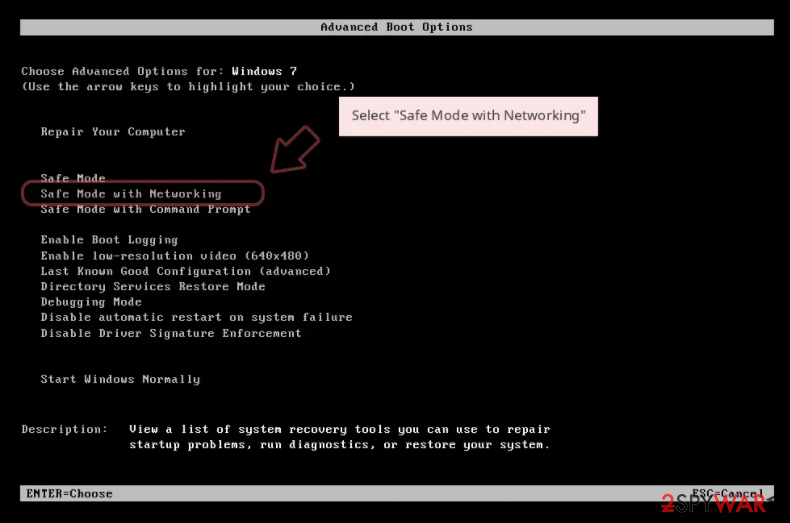
Windows 7 / Vista / XP
- Click Start > Shutdown > Restart > OK.
- When your computer becomes active, start pressing F8 button (if that does not work, try F2, F12, Del, etc. - it all depends on your motherboard model) multiple times until you see the Advanced Boot Options window.
- Select Safe Mode with Networking from the list.
Windows 10 / Windows 8
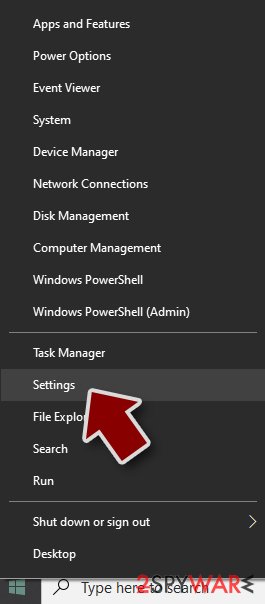
- Right-click on Start button and select Settings.
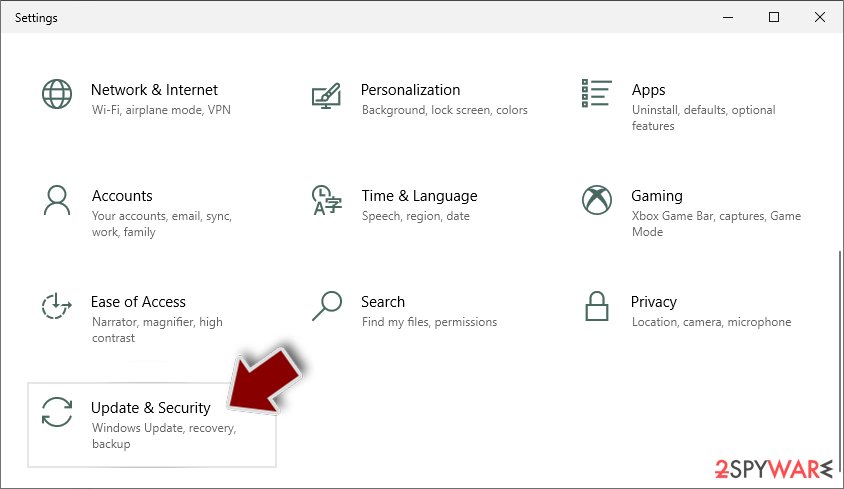
- Scroll down to pick Update & Security.
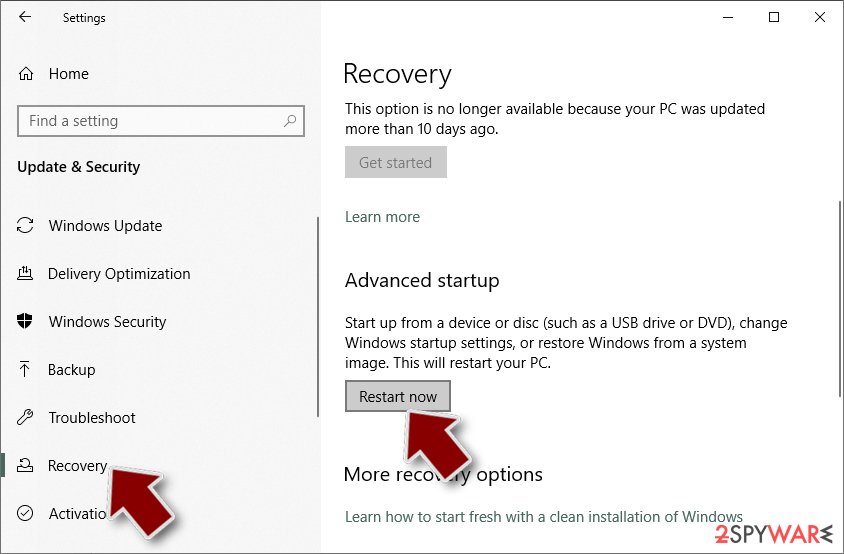
- On the left side of the window, pick Recovery.
- Now scroll down to find Advanced Startup section.
- Click Restart now.
- Select Troubleshoot.
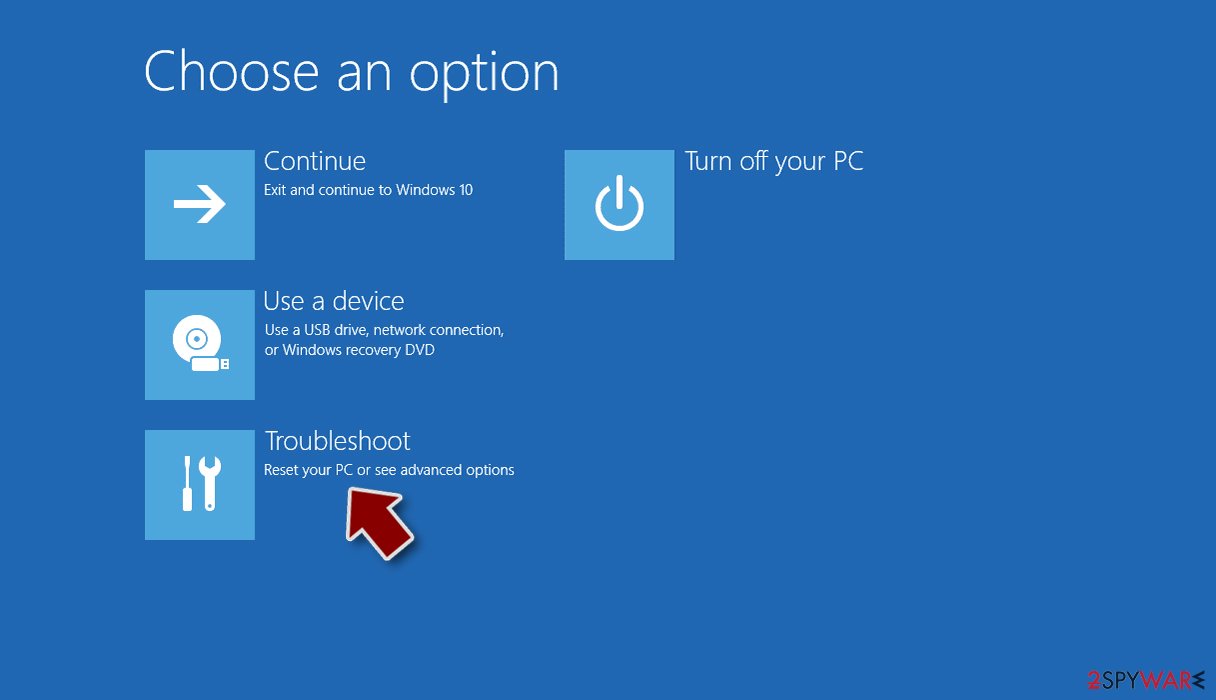
- Go to Advanced options.
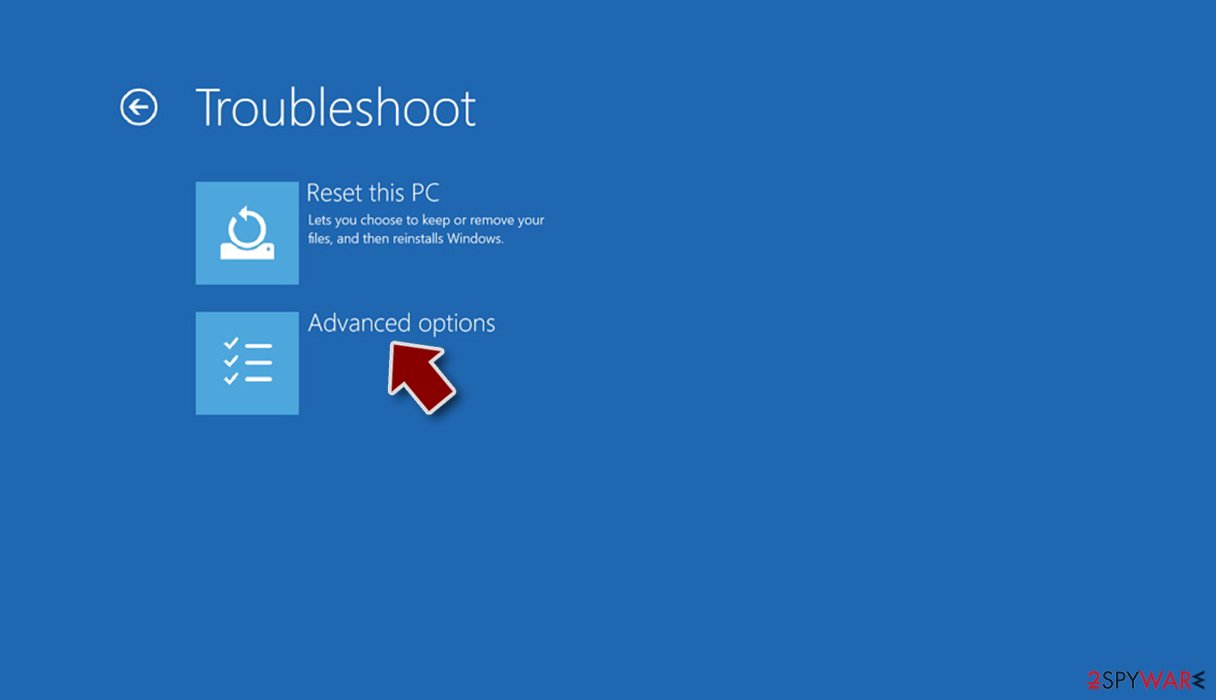
- Select Startup Settings.
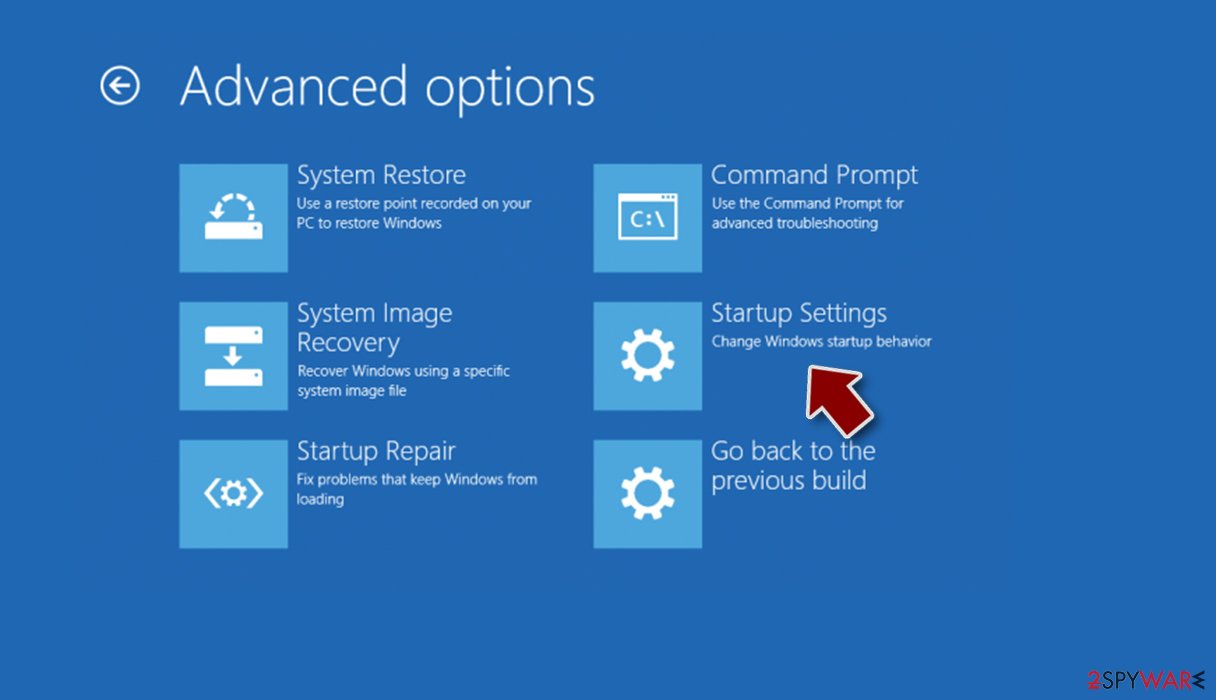
- Press Restart.
- Now press 5 or click 5) Enable Safe Mode with Networking.
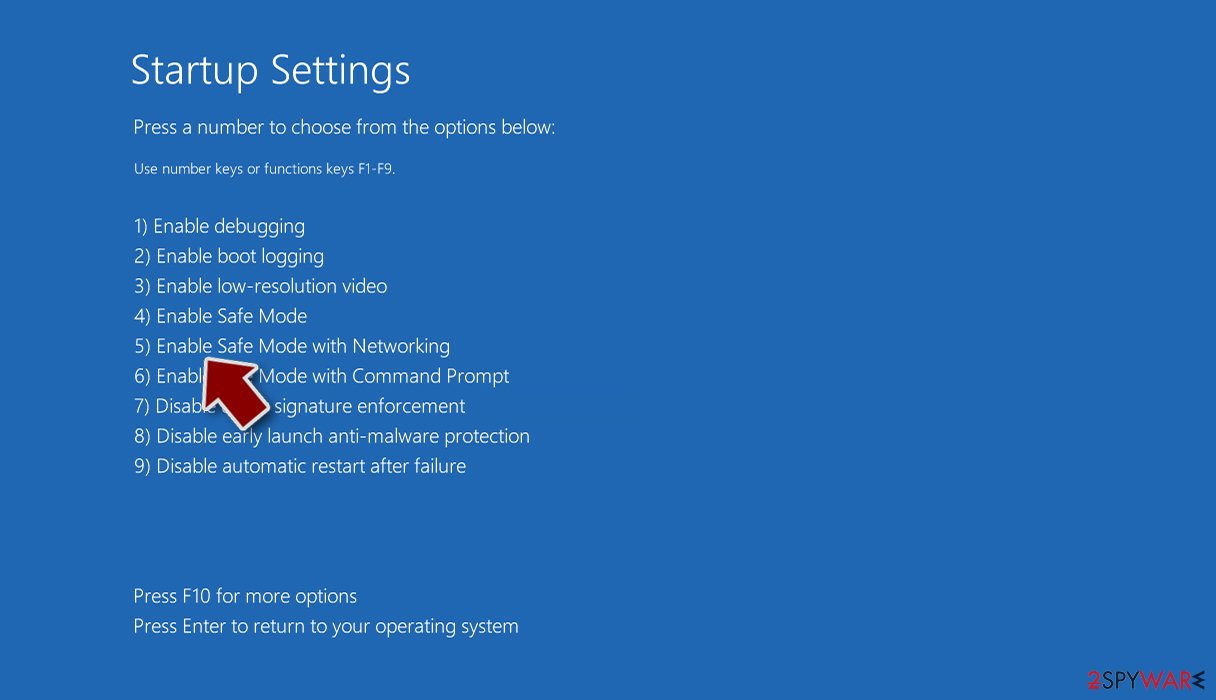
Step 2. Shut down suspicious processes
Windows Task Manager is a useful tool that shows all the processes running in the background. If malware is running a process, you need to shut it down:
- Press Ctrl + Shift + Esc on your keyboard to open Windows Task Manager.
- Click on More details.
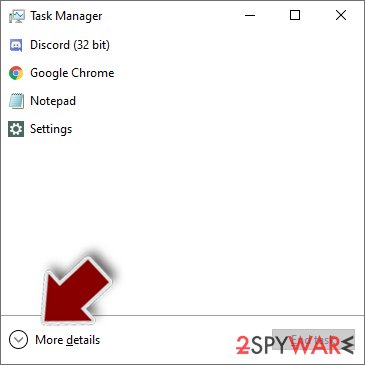
- Scroll down to Background processes section, and look for anything suspicious.
- Right-click and select Open file location.
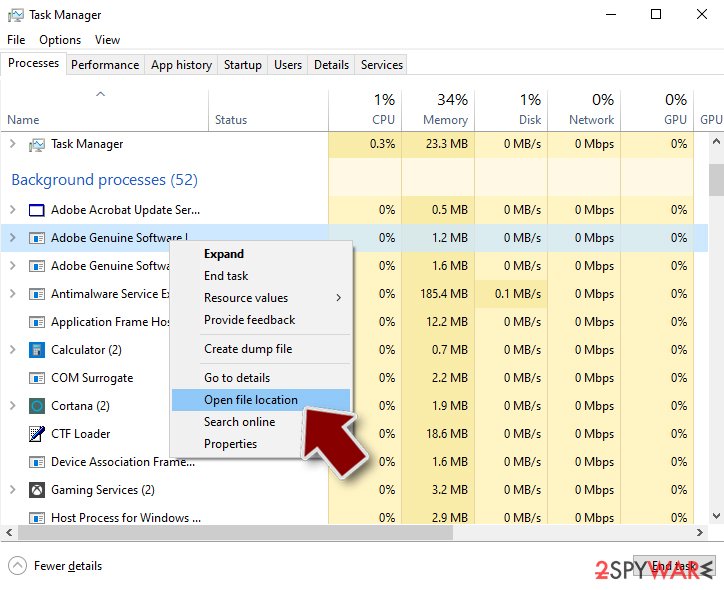
- Go back to the process, right-click and pick End Task.
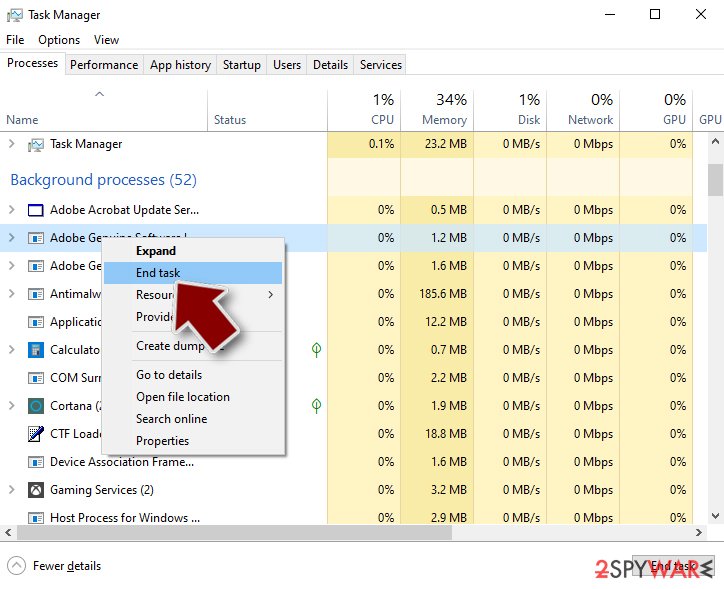
- Delete the contents of the malicious folder.
Step 3. Check program Startup
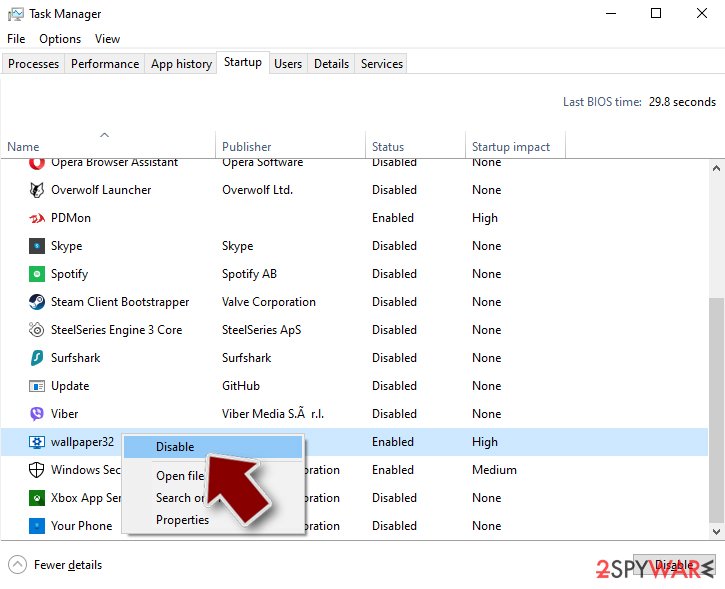
- Press Ctrl + Shift + Esc on your keyboard to open Windows Task Manager.
- Go to Startup tab.
- Right-click on the suspicious program and pick Disable.
Step 4. Delete virus files
Malware-related files can be found in various places within your computer. Here are instructions that could help you find them:
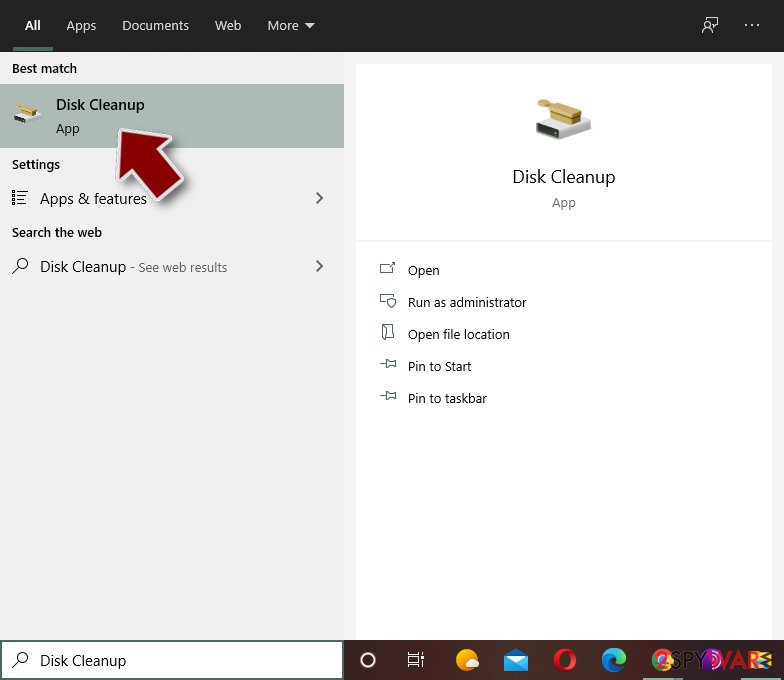
- Type in Disk Cleanup in Windows search and press Enter.
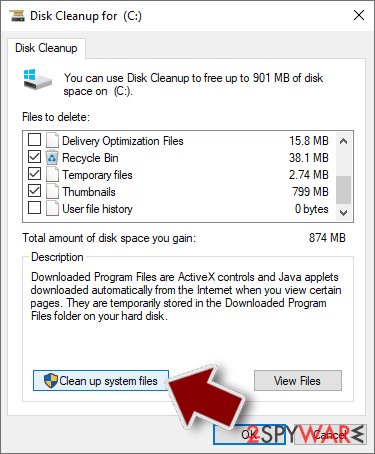
- Select the drive you want to clean (C: is your main drive by default and is likely to be the one that has malicious files in).
- Scroll through the Files to delete list and select the following:
Temporary Internet Files
Downloads
Recycle Bin
Temporary files - Pick Clean up system files.
- You can also look for other malicious files hidden in the following folders (type these entries in Windows Search and press Enter):
%AppData%
%LocalAppData%
%ProgramData%
%WinDir%
After you are finished, reboot the PC in normal mode.
From our report of Mar 2020 · not reviewed since
Remove AZORult virus with the help of a security tool
A proper virus analysis showed that manual elimination of the virus is almost impossible.
Trojan horses are sophisticated and may find ways back to the system if a regular computer user fails to get rid of it properly. Luckily, you can remove AZORult automatically with a professional antivirus. Security tools like , or can help you with the security of the system and such virus termination.
Once it detects system damage or affected, corrupted parts, it will perform system recovery, which is an important step after the AZORult removal.
Make sure to clean the machine using professional tools that can clean the system fully from the AZORult virus and double-check with a few alternate AV tools to make sure that your device is cleared completely. Any traces of this trojan or another malicious infection can trigger more issues with your device.
[GI=method-1]Guide showing how to boot the computer into Safe Mode with Networking:
[GI=method-2]Use System Restore to disable some virus functions and get a chance to launch the anti-spyware tool.
After removal: passwords, accounts and prevention
Accounts come next
Because the PC showed AZORult in the list of installed apps, a sign of a program that could read browser data, the clean-up is only half of the work.
The other half happens in your online accounts.
Change passwords from a clean device, beginning with e-mail; sign out of all sessions; check forwarding rules and recovery phone numbers; and turn on two-step verification with an authenticator app or a passkey. Ask your bank to replace cards saved in the browser.
Why the order matters and what to check in each account: secure your accounts after malware.
Protect your privacy - employ a VPN
There are several ways how to make your online time more private - you can access an incognito tab.
However, there is no secret that even in this mode, you are tracked for advertising purposes. There is a way to add an extra layer of protection and create a completely anonymous web browsing practice with the help of VPN. This software reroutes traffic through different servers, thus leaving your IP address and geolocation in disguise.
Besides, it is based on a strict no-log policy, meaning that no data will be recorded, leaked, and available for both first and third parties. The combination of a secure web browser and VPN will let you browse the Internet without a feeling of being spied or targeted by criminals.
No backups? No problem. Use a data recovery tool
If you wonder how data loss can occur, you should not look any further for answers - human errors, malware attacks, hardware failures, power cuts, natural disasters, or even simple negligence.
In some cases, lost files are extremely important, and many straight out panic when such an unfortunate course of events happen. Due to this, you should always ensure that you prepare proper data backups on a regular basis.
If you were caught by surprise and did not have any backups to restore your files from, not everything is lost. is one of the leading file recovery solutions you can find on the market - it is likely to restore even lost emails or data located on an external device.
Questions about AZORult
Can I safely uninstall AZORult?
If you did not install AZORult yourself and it is not part of your hardware or a program you rely on, yes. Uninstalling an unwanted program does not harm Windows. Before you do, search the exact name and publisher to be sure it is not a driver tool, a printer utility or a game launcher with an odd name.
Then remove it from Settings, Apps, Installed apps. Ignore any offers or warnings in its uninstaller about losing protection or performance. Afterwards check Startup apps and your browsers for leftovers, and restart once to confirm that it does not reinstall itself.
How do I stop programs like AZORult from being installed again?
Most unwanted programs arrive through installers, so the fix is in how you install software. Download programs from their official sites or the Microsoft Store, not from download portals or ads above search results. During setup, choose Custom or Advanced installation and untick every extra offer, including browsers, toolbars and optimizers.
Decline update prompts that appear inside other programs unless you know them. In Windows Security, turn on reputation-based protection and potentially unwanted app blocking. These steps would most likely have stopped AZORult before it reached the app list.
Is AZORult a known trojan?
Not as a documented family, at least not yet. What is known is the visible sign, AZORult in the list of installed apps, which matches a hidden program working for someone else.
New threats are often seen by victims weeks before researchers publish anything about them. Treat AZORult as you would any trojan:
- remove what starts it
- run an offline scan
- change passwords from another device
If a scan reports a detection name, keep it; it usually reveals the family and whether it is known to download other malware. We update this guide when an analysis appears.
I found AnyDesk or ScreenConnect that I did not install. Is that AZORult?
Not necessarily AZORult, but it is a warning sign. These are legitimate remote support tools, and criminals use them as ready-made backdoors, especially after tech support scams or fake invoice calls.
If you did not install it and no one you trust set it up, uninstall it, change passwords from a clean device and check your bank account. If someone connected to your PC through it, follow the steps for remote access trojans and consider a Windows reset. Installed apps sorted by date shows when it appeared.
Should I check my other computers too?
Yes, it takes little time and removes doubt. AZORult itself usually stays on one PC, but the download that carried it may have been copied to other computers, shared drives may hold the same installer, and an attacker who had access could have tried saved passwords on other devices.
Run a full scan on every Windows PC in the home or office, check shared folders for the original download, and change Wi-Fi and router passwords if they were stored on the infected machine.
Do I need to reinstall Windows to get rid of AZORult?
Usually not. A thorough clean-up is enough when the offline scan finds nothing afterwards and you do not see AZORult in the list of installed apps again. A reset is the safer choice if an attacker had remote control, if security tools were switched off, or if detections come back after every clean-up.
Windows 11 can reset itself without a USB stick under Settings > System > Recovery > Reset this PC. Copy documents and photos out first and scan the copies. A reset does not change passwords or undo stolen data, so the account steps still apply.
How dangerous is AZORult?
Treat it as serious until proven otherwise. The visible sign is AZORult in the list of installed apps, and programs that behave this way often have more abilities than they show:
- copying passwords
- downloading other malware
- giving remote access
Its family is not known yet, so nobody can say which of these it uses. The good news is that the response is the same in every case and takes about an hour:
- cut the network
- remove the startup entry
- run an offline scan
- change passwords from a clean device
If someone had remote control, a full reset is safer.
My antivirus was on. How did a trojan get past it?
Antivirus programs see a file only when it is written or run, and criminals test each new build against popular scanners before release. Detection catches up within hours or days, which is often after the first victims ran it.
Archives with passwords, installers that fetch the malware later, and scripts run through PowerShell make the job harder. That is why behaviour such as downloading cracks or pasting commands matters more than any setting. Keep Windows and Defender updated, and turn on Reputation-based protection in App & browser control.
Should I report AZORult?
Report it if you lost money, if accounts were taken over, if you are a business, or if the trojan came through a scam call. A police or national cybercrime report gives you a reference number for your bank and insurer and helps link cases.
You do not need to report a trojan that antivirus blocked before it ran. Before reporting, write down the dates, the detection name, file names and any messages or transactions linked to the attack; screenshots of antivirus alerts are useful evidence. The country list is in the report section above.
Will Fortect remove AZORult?
Fortect scans Windows for malware and unwanted programs and repairs the system files and settings they change, and its free scan shows what it finds on your PC before you decide anything.
For AZORult, follow the plan above as well: the browser steps take back permissions and settings that no scanner treats as a threat, and uninstalling the program that brought it removes the source.
Run Microsoft Defender's full scan and, if anything was found, its offline scan as a second opinion. If the symptoms are gone after the plan and both scans are clean, there is nothing more to do.
Sources
- Wikipedia: Backdoor (computing) (read October 6, 2026)
- VirusTotal: AZORult trojan detection rate (read October 6, 2026)
- FTC: How to recognize, remove and avoid malware (read October 6, 2026)
- Microsoft Learn: Microsoft Defender Offline (read October 6, 2026)
- Microsoft Learn: How Microsoft names malware (read October 6, 2026)