

Trojan Dz demands 0.5 Bitcoins for data recovery
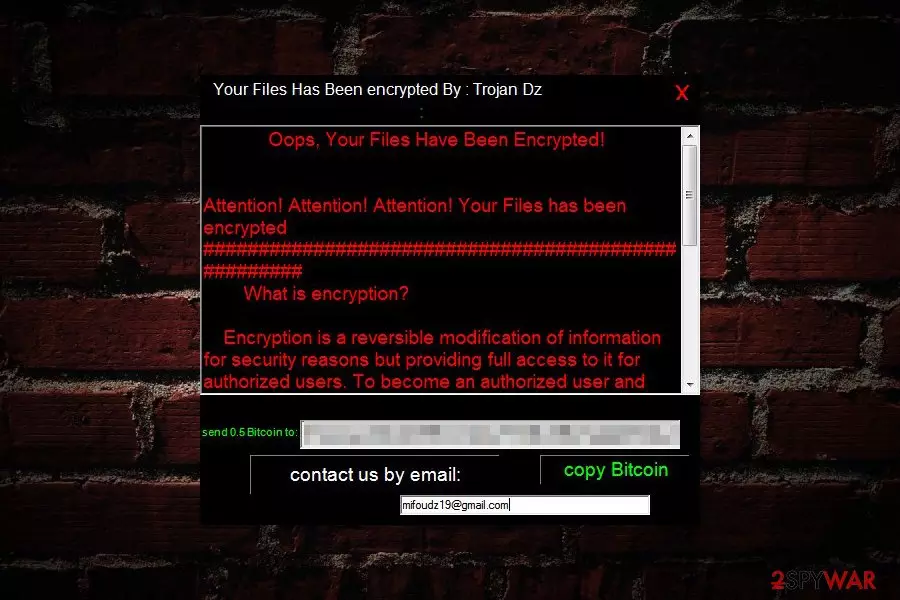
Trojan Dz is a file-encrypting virus that appeared to be a new variant of Cyber SpLiTTer Vbs Ransomware . Malware uses a strong encryption algorithm to take targeted files to hostage and locks them with .Isis file extension.
Following data encryption, Trojan Dz ransomware triggers a ransom-demanding window that starts with the popular phrase: “Oops, Your Files Have Been Encrypted!” The threatening message explains what is data encryption and tells users to send 0,5 Bitcoins to the provided Bitcoin wallet address. Crooks also left a contact email address – mifoudz19@gmail.com.
Once users exchange several hundreds of dollars to unknown decryption software, they are supposed to get back access to their data. However, no one can assure that these statements are true. We do not recommend paying the ransom[1] because authors of Trojan Dz virus might disappear. Keep in mind that the primary purpose of the ransomware is to swindle the money, not help victims.
If you see the ransom note, you should close it immediately and opt for Trojan Dz removal. Elimination of the ransomware will not recover your files. However, this step is crucial to revert system changes made by crypto-malware and try alternative data recovery methods.
Even if you decide to pay the ransom (NOT recommended), the Trojan Dz malware remains installed on the computer. Therefore, malicious processes might be running in the background and later encrypt your files again. This time cyber criminals might ask even more money.
Just like other ransomware-type viruses, Trojan Dz also strengthens its presence by altering Windows Registry, disabling particular processes and installing malicious components. Therefore, in order to use the computer safely again, you have to clean it.
We recommend using FortectIntego or SpyHunterCombo Cleaner for Trojan Dz removal. The instructions how to disable the virus and install security software is presented below. Please follow them carefully and do not try to wipe out ransomware-related files manually. It might end up tragically!

The ways how virus find the way to the computer
Developers of the malware do not rely on only one distribution method. They use a bunch of different methods to hijack devices:
- spam emails with infected links or malicious attachments;[2]
- malvertising;
- bogus downloads and installers;
- exploit kits.
Most of the time, successful ransomware attack requires user’s participation, such as opening obfuscated document attached in the email or downloading an illegal or fake program. Therefore, users are advised to be careful in order to avoid ransomware attack.
According to the security experts from Germany,[3] even the strongest antivirus can protect the computer from ransomware fully if users misbehave online. Thus, watching your clicks and download sources is a must.
Wipe out Trojan Dz virus from the system
In order to install security program that is necessary for Trojan Dz removal, you have to restart your computer to the Safe Mode with Networking. This mode allows disabling the virus. It’s necessary because ransomware might prevent users from installing or running antivirus.
When in Safe Mode, you will be able to download and install reliable security software, such as FortectIntego or SpyHunterCombo Cleaner. If you decide to use another tool, please choose legit download website to avoid installation of malware.
Before you run a full system scan, please update your chosen antivirus or malware removal program. Only an up-to-date tool can remove Trojan Dz from the computer entirely.
Did this guide help?
Be the first to comment