

DeltaSearch is a browser hijacker that might impact your online time in a negative way

Delta Search is a search engine established on the web browser as soon as a potentially unwanted program is installed on the system. It is used by its owners to promote affiliate websites that seek to improve their sales or promote their services. Soon after installation, users affected by this program would see their homepage and new tab address set to delta-search.com.
DeltaSearch may quickly start showing forged search results that may be filled with various links, ads, and similar things. After being clicked, these ads may cause annoying redirections to unknown websites that may be filled with really suspicious content.
| Name | Delta Search |
|---|---|
| Also known as | DeltaSearch |
| Type | Browser hijacker, potentially unwanted program |
| Distribution | Software bundles, third-party websites |
| Symptoms | Homepage and new tab address are set to delta-search.com, search results are filled with sponsored links |
| Risks | Installation of other potentially unwanted programs, financial losses, privacy issues |
| Removal | You can delete PUPs manually as per instructions below or employ anti-malware to do the job for you |
| Optional steps | Computer infections can cause significant damage to system files or disrupt normal settings. To revert these changes and remediate the OS, perform a full system scan with FortectIntego repair software |
This and many other factors have made security experts include this program tot the list of browser hijackers and potentially unwanted programs. This app can alter some of your computer's settings, such as:
- the default search engine
- the bookmarks list
- the homepage and new tab URL.
You shouldn't ignore this because you will have to use Delta-search.com or another suspicious search engine every time you open a new tab on IE, Google Chrome, Safari, or Mozilla Firefox web browser.
Please, keep in mind that we don't recommend using this search engine for your search sessions because it's a potentially unwanted application that may easily show you forged search results. Most importantly, you must remove DeltaSearch if you haven't installed it with your knowledge. For that you can use FortectIntego.
People started to inform us about an increased distribution of the Delta search virus. If you have also been tricked into downloading it to your PC system, you should use the guide below and fix your computer.
Remember, people who are related to this hijacker have been writing comments in various forums claiming that this program is not related to malware. This is a clear defensive strategy, as the app uses sneaky distribution techniques to infect computer systems and trick people into visiting affiliate websites. The same engine is used for several parasites on different subdomains:
- mixidj
- visualbee
Delta Search variations
Delta Search virus
This virus is one of Delta Search variations causing browser's redirections to delta-search.com malicious search engine. As a result, the owners of this website can return altered search results and make people visit related websites.
In most cases, this virus infiltrates computers in a bundle with freeware and shareware, but it may also be caused by malware, such as rogue anti-spyware or ransomware. If you think that your PC may be infected with the Delta Search virus, you should check your PC for this infection.
Delta-search.com redirect
Delta-search.com redirect is the issue, which is usually caused by the Delta Search virus. It starts manifesting when a virus infiltrates the PC and alters the part of the computer's settings. In most cases, it affects the start page. Default search engine and new tab page, so it can hardly be missed or mixed with other infections. We highly recommend scanning the computer with updated anti-spyware when suffering from various redirects.
yhs.delta-search.com
yhs.delta-search.com a search engine is a clear copy of the main virus, which has been causing various problems. It seems that scammers have altered their address in order to trick more PC users, who have already been notified about issues that can be caused by this unfair search engine. We highly recommend staying away from yhs.delta-search.com because it returns forged search results that may redirect users to infected websites just like its previous variant.
Mixidj.delta-search.com
Mixidj.delta-search.com is the mostly-spread variation of the hijacker, which uses a slightly altered address but acts identically as previously released variants of this virus. It can appear on each of your web browsers after downloading freeware and shareware, so be very careful when letting such a program inside your machine. The clearest signifying that your machine is infected with this redirect virus is discovering this site instead of your start page and default search engine.
Visualbee.delta-search.com
This search site belongs to the category of potentially malicious websites and is closely related to Delta Search. It is typically used to increase visitor traffic to specific domains, so you should be aware that it may return altered search results and show annoying pop-up advertisements. If you want to avoid this website, you should be very careful when downloading freeware on your computer. If you noticed visualbee.delta-search.com on your PC, you should remove it without delay.
Delta Search installation is rarely intentional
This Virus can be installed with the help of two different methods. You can either download it from its 'official' site manually, or you may find it on your computer out of nowhere. This method includes third-party software, which is always packed with such or similar adware. As experts explain:
To avoid finding DeltaSearch on your PC out of nowhere, you should always pay attention to each of the installation windows of the software.
We must say that infection looks very similar to Yahoo!.. However, it's used to redirect people to delta-search.com and then return forged search results for them. If you want to avoid discovering delta-search.com instead of your homepage or search engine and you don't want to receive its misleading pop-up ads, you must remove DeltaSearch from the system.
Remove DeltaSearch browser hijacker from the system
When trying to remove DeltaSearch virus from the system, you should download a reputable anti-spyware, update it, and run a full system scan. If you really need to use a manual removal guide, make sure you remove these entries:
- Delta Chrome Toolbar
- Delta toolbar
- Yontoo
- Browser Protect
- Mixi.DJ.
Additionally, remove Delta Search from your browsers – all you have to do is access the settings section of your browser, as we explain below. Don't forget to check it for other suspicious add-ons and toolbars, as it is recommended to delete all suchlike components at once.
Uninstall from Windows
Uninstall from Windows 10/8:
- Type Control Panel into the Windows search box and open the result.
- Under Programs, select Uninstall a program.


Uninstall from Windows 7/XP:
- Click on Windows Start > Control Panel (Windows XP users should click on Add/Remove Programs).
- In Control Panel, select Programs > Uninstall a program.


Remove the unwanted program:
- In the Programs and Features window, look for any recently installed suspicious entries, select them, and click Uninstall.
- If User Account Control appears, click Yes to confirm, then complete the removal.


Delete from macOS
Remove the unwanted application:
- From the menu bar, select Go > Applications.
- In the Applications folder, look for any suspicious entries, then drag them to Trash (or right-click and pick Move to Trash).
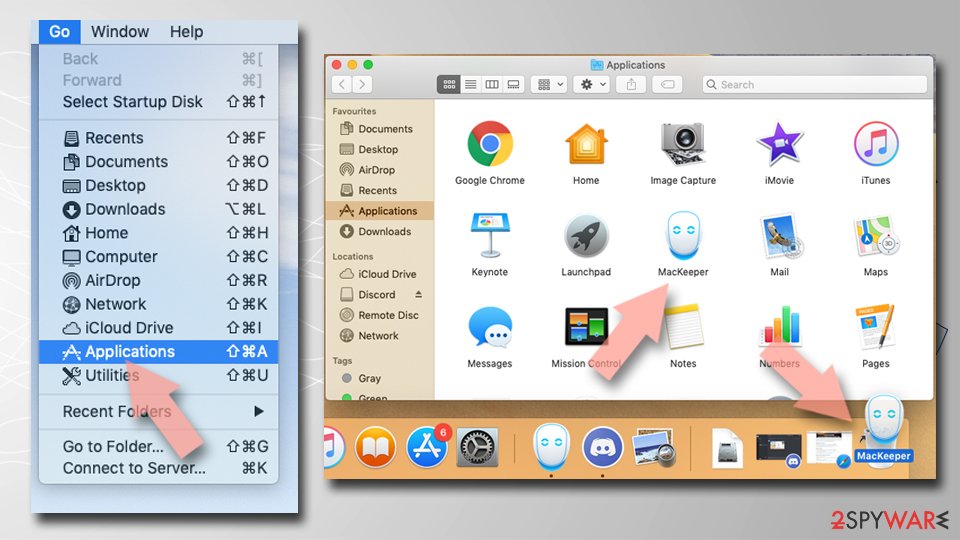

Delete leftover files and folders:
- Select Go > Go to Folder.
- Enter /Library/Application Support and remove any suspicious folders related to the unwanted program.
- Repeat the same check in the /Library/LaunchAgents and /Library/LaunchDaemons folders, deleting any suspicious entries.
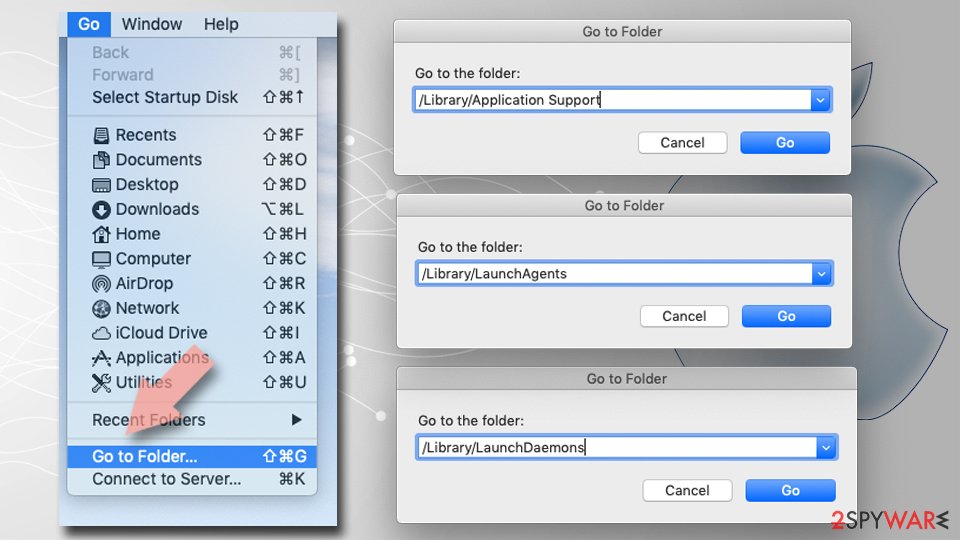
- Finally, empty the Trash to permanently remove the leftovers.

Reset Internet Explorer
Remove dangerous add-ons:
- Open Internet Explorer, click on the Gear icon (IE menu) on the top-right corner of the browser
- Pick Manage Add-ons.
- You will see a Manage Add-ons window. Here, look for suspicious plugins. Click on these entries and select Disable.
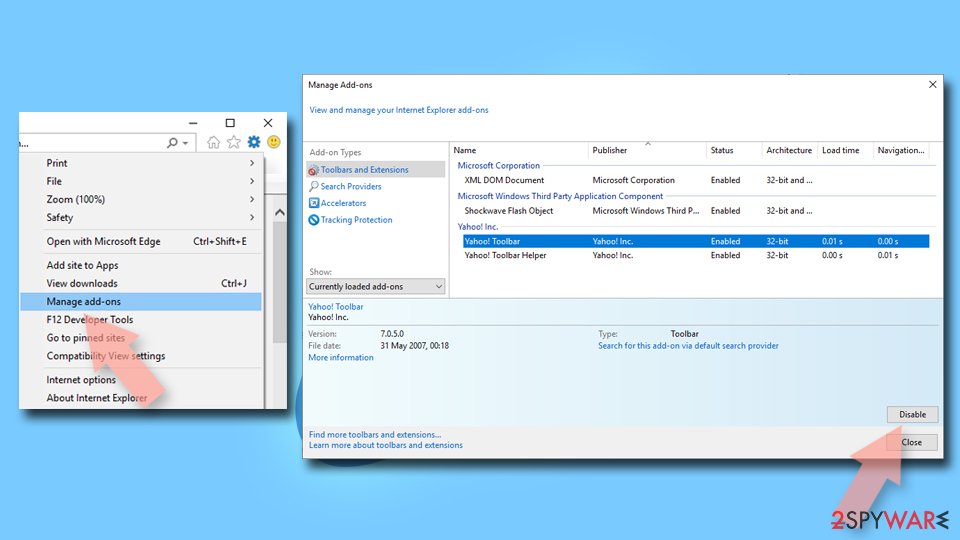

Change your homepage if it was altered:
- Open IE and click on the Gear icon.
- Select Internet Options.
- In the General tab, delete the Home page address and replace it by your preferred one (for example, Google.com).
- Click Apply and then select OK.
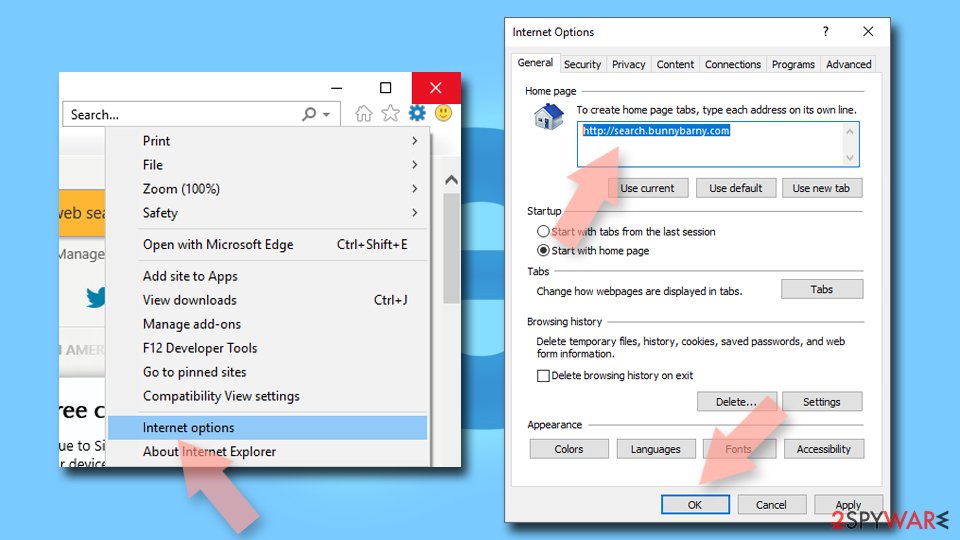

Delete temporary files:
- Press on the Gear icon and select Internet Options.
- Under Browsing history, click Delete...
- Select relevant fields and press Delete.
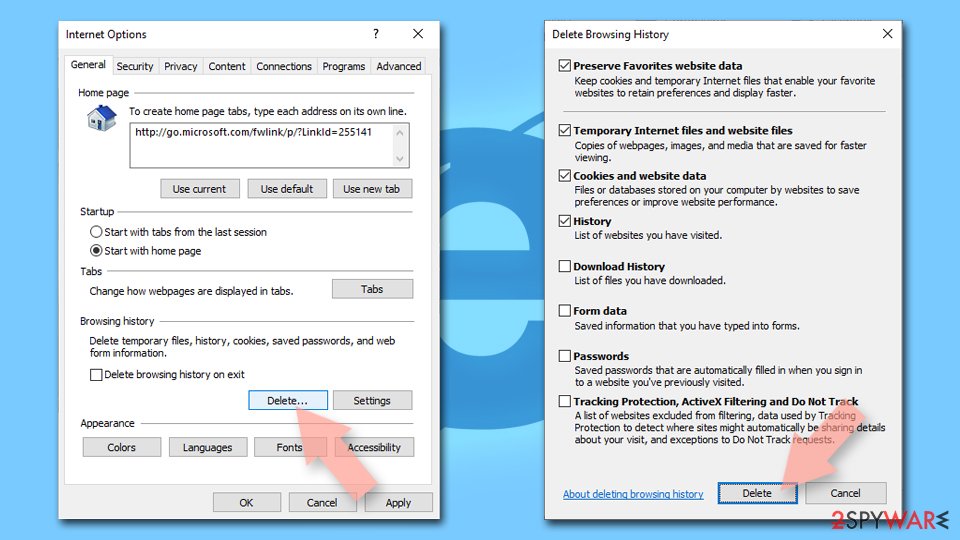

Reset Internet Explorer:
- Click on Gear icon > Internet options and select Advanced tab.
- Select Reset.
- In the new window, check Delete personal settings and select Reset.
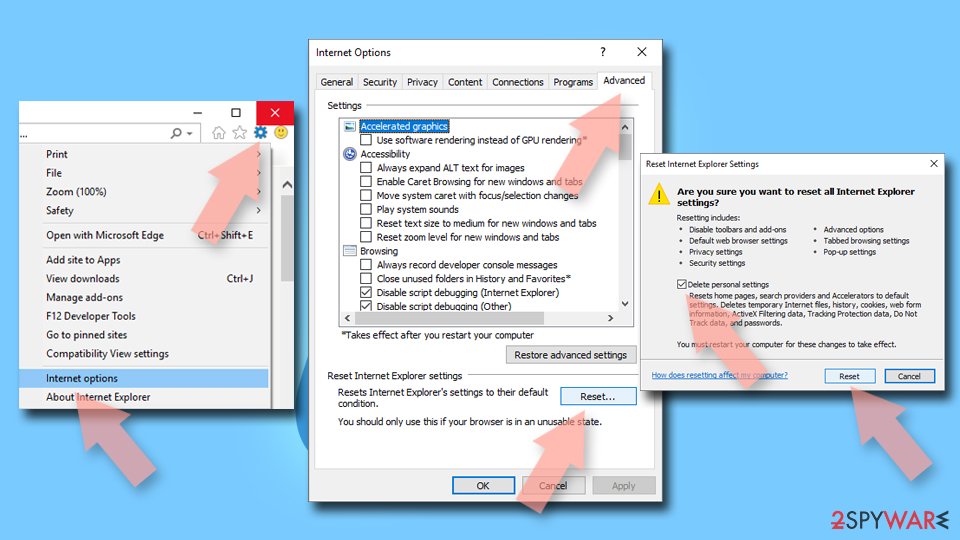

Remove from Microsoft Edge
Delete unwanted extensions from MS Edge:
- Select Menu (three horizontal dots at the top-right of the browser window) and pick Extensions.
- From the list, pick the extension and click on the Gear icon.
- Click Remove.
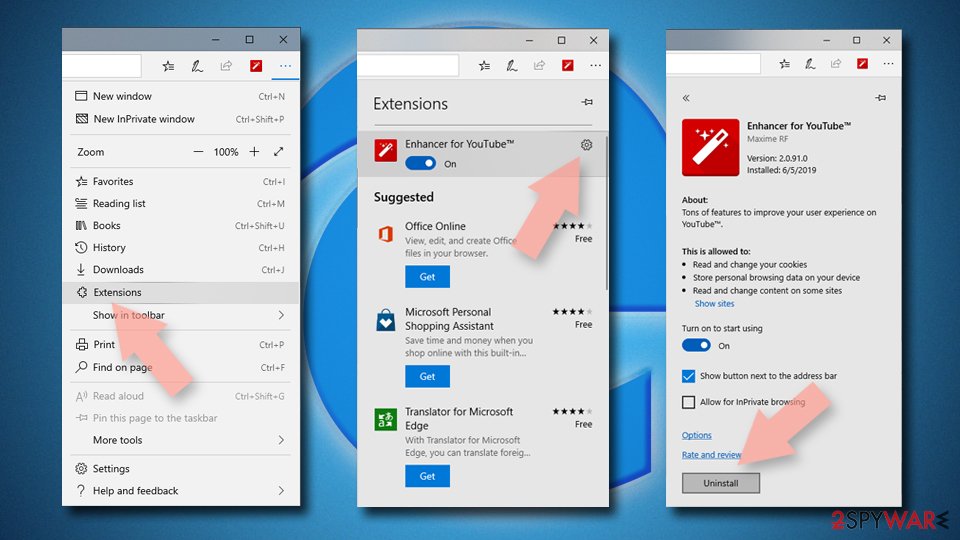

Clear cookies and other browser data:
- Click on the Menu (three horizontal dots at the top-right of the browser window) and select Settings > Privacy, search, and services..
- Under Clear browsing data, pick Choose what to clear.
- Select Cookies and other site data and Cached images and files. (apart from passwords, although you might want to include Media licenses as well, if applicable) and click on Clear.
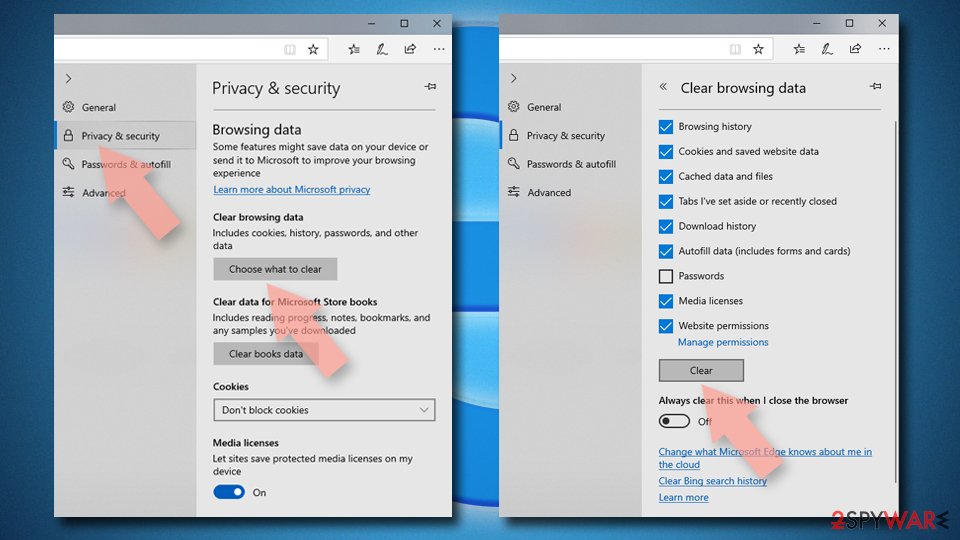

Restore new tab and homepage settings:
- Click the menu icon and choose Settings.
- Then find On startup section.
- Click Remove next to any suspicious startup page.
Reset MS Edge if the above steps did not work:
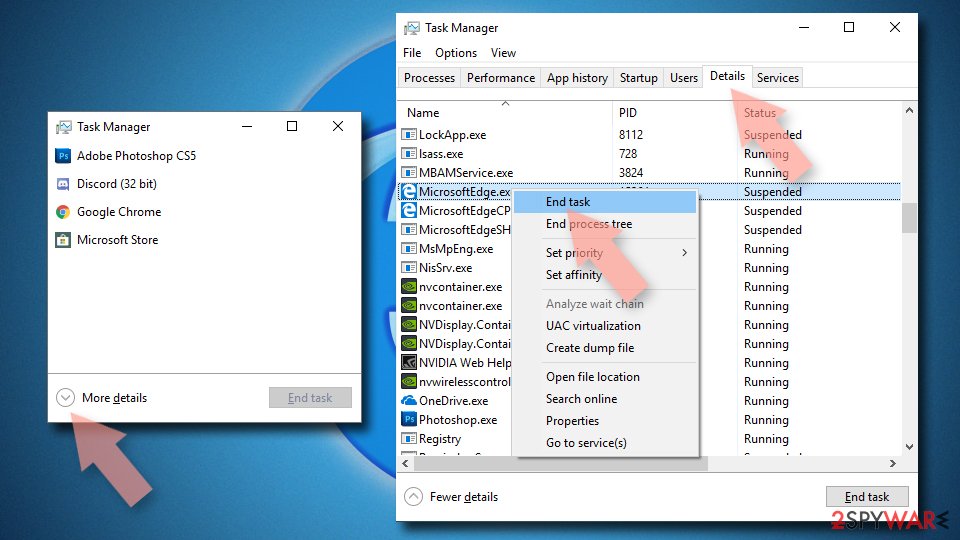
- Press on Ctrl + Shift + Esc to open Task Manager.
- Click on More details arrow at the bottom of the window.
- Select Details tab.
- Now scroll down and locate every entry with Microsoft Edge name in it. Right-click on each of them and select End Task to stop MS Edge from running.

Instructions for Chromium-based Edge
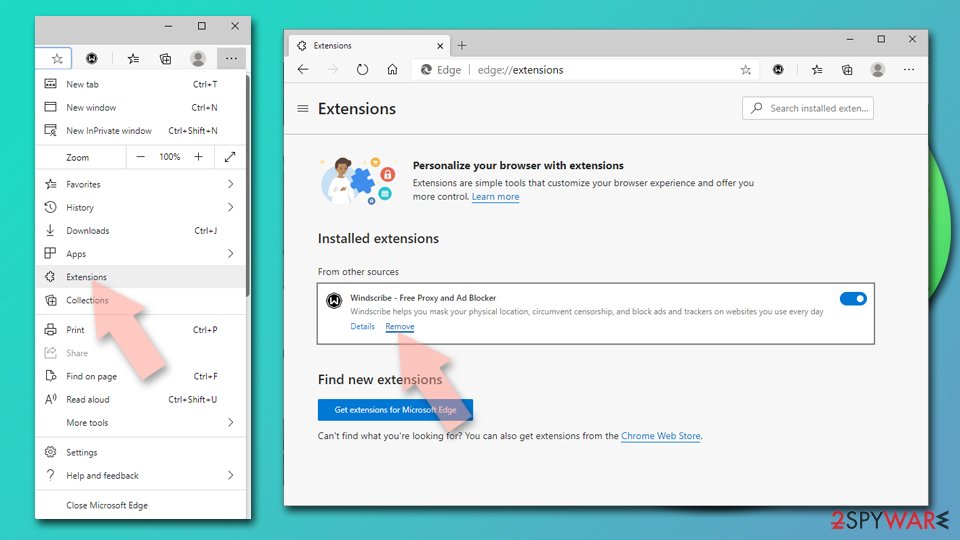
Delete extensions from MS Edge (Chromium):
- Open Edge and click select Settings > Extensions.
- Delete unwanted extensions by clicking Remove.

Clear cache and site data:
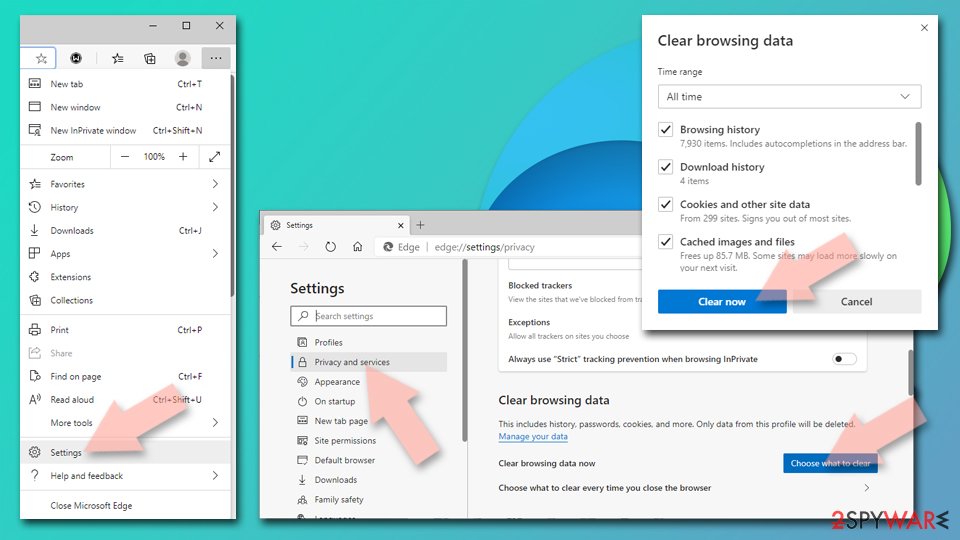
- Click on Menu and go to Settings.
- Select Privacy, search and services.
- Under Clear browsing data, pick Choose what to clear.
- Under Time range, pick All time.
- Select Clear now.

Reset Chromium-based MS Edge:
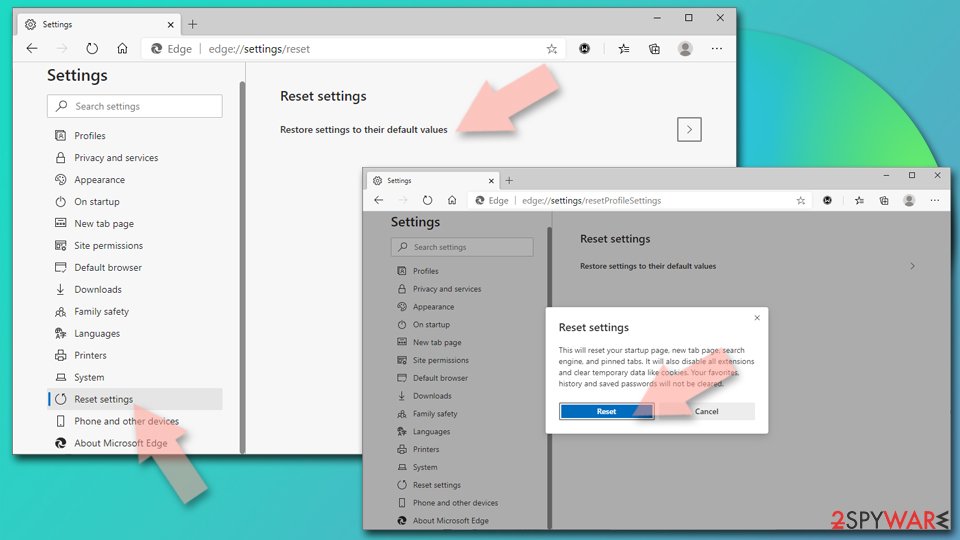
- Click on Menu and select Settings.
- On the left side, pick Reset settings.
- Select Restore settings to their default values.
- Confirm with Reset.
- This will disable extensions and reset startup pages but will not delete bookmarks, saved passwords, or browsing history.

Remove from Mozilla Firefox (FF)
Remove dangerous extensions:
- Open Mozilla Firefox browser and click on the Menu (three horizontal lines at the top-right of the window).
- Select Add-ons.
- In here, select the unwanted extension and click Remove.
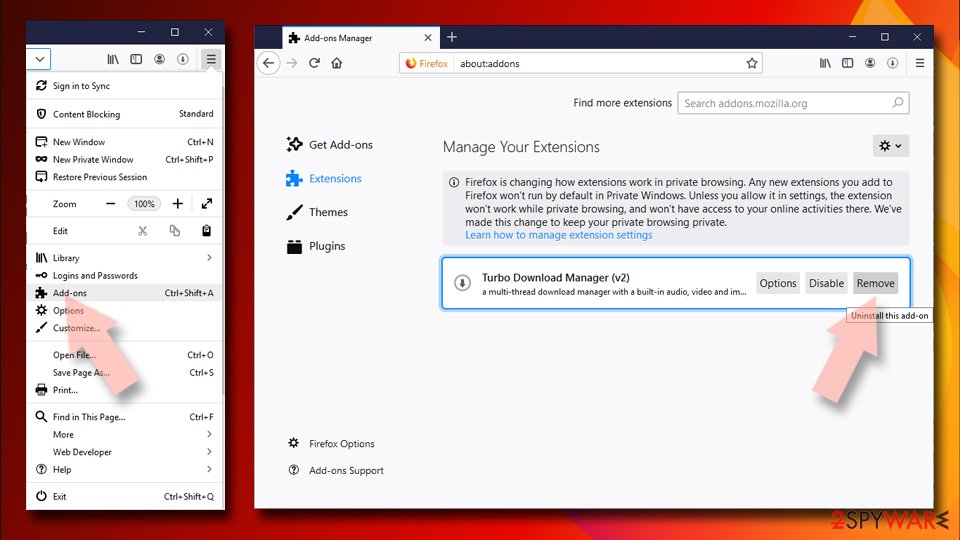

Reset the homepage:
- Click three horizontal lines at the top right corner to open the menu.
- Choose Settings.
- Under Home, set your preferred homepage and new tab settings.
Clear cookies and site data:
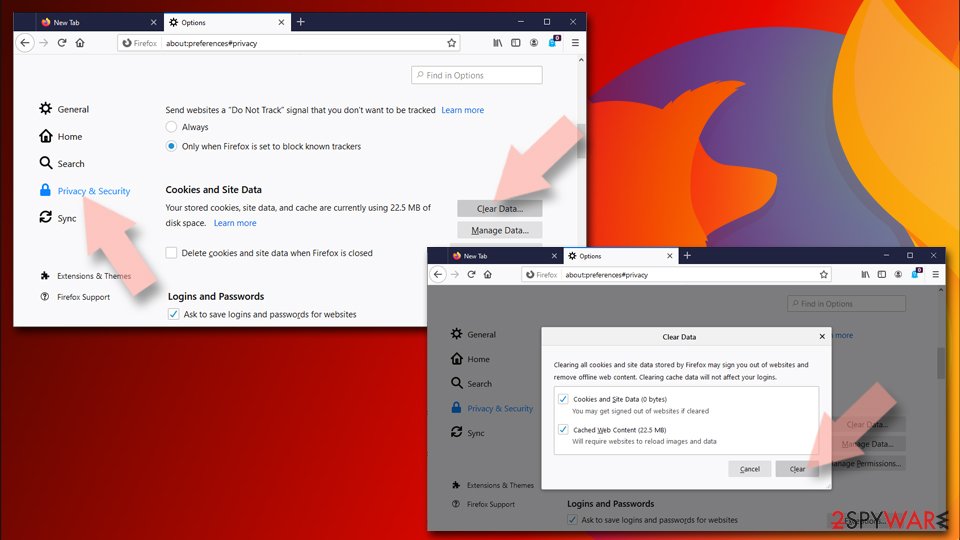
- Click Menu and pick Settings.
- Go to Privacy & Security section.
- Scroll down to locate Cookies and Site Data.
- Click on Clear Data...
- Select Cookies and Site Data and Temporary cached files and pages, then click Clear.

Reset Mozilla Firefox
If clearing the browser as explained above did not help, reset Mozilla Firefox:
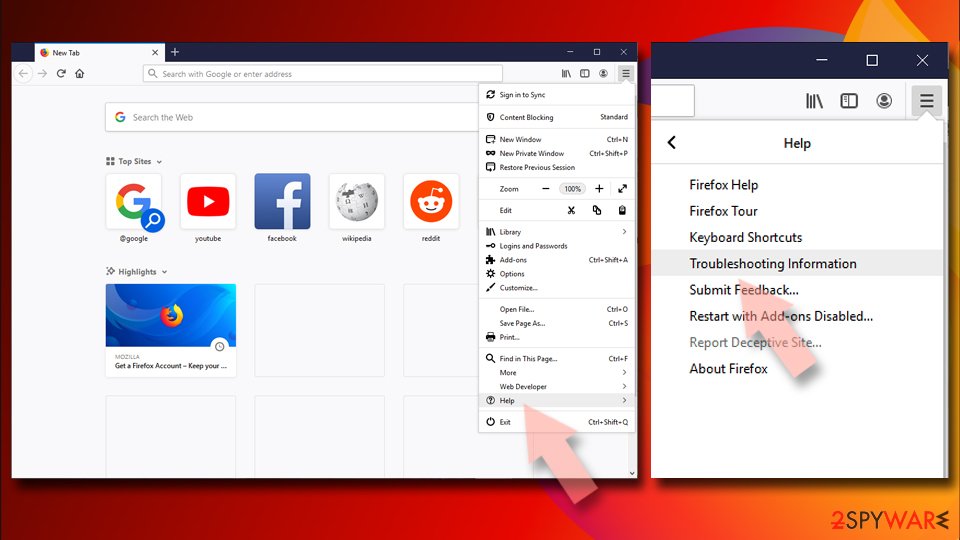
- Open Mozilla Firefox browser and click the Menu.
- Go to Help and then choose Troubleshooting Information.
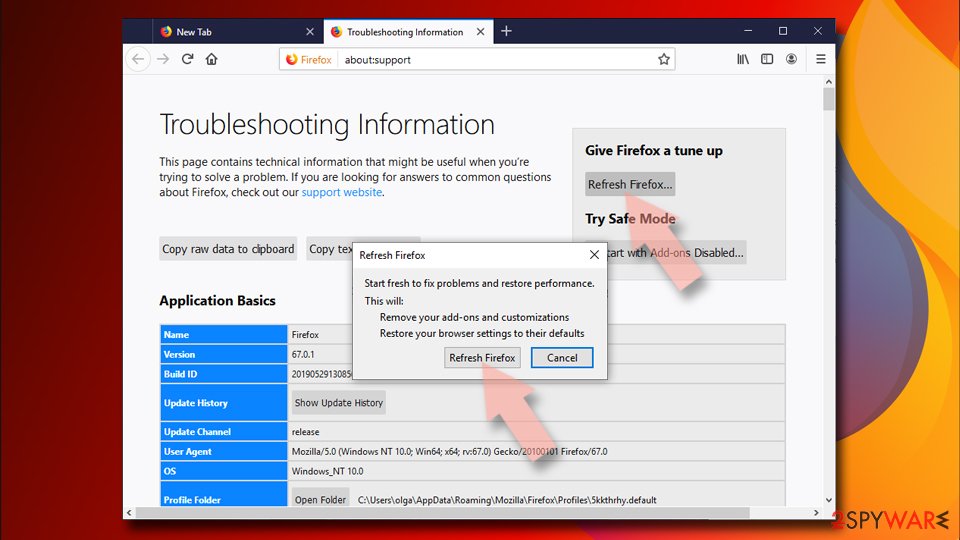
- Under Give Firefox a tune up section, click on Refresh Firefox...
- Once the pop-up shows up, confirm the action by pressing on Refresh Firefox.


Remove from Google Chrome
Delete malicious extensions from Google Chrome:
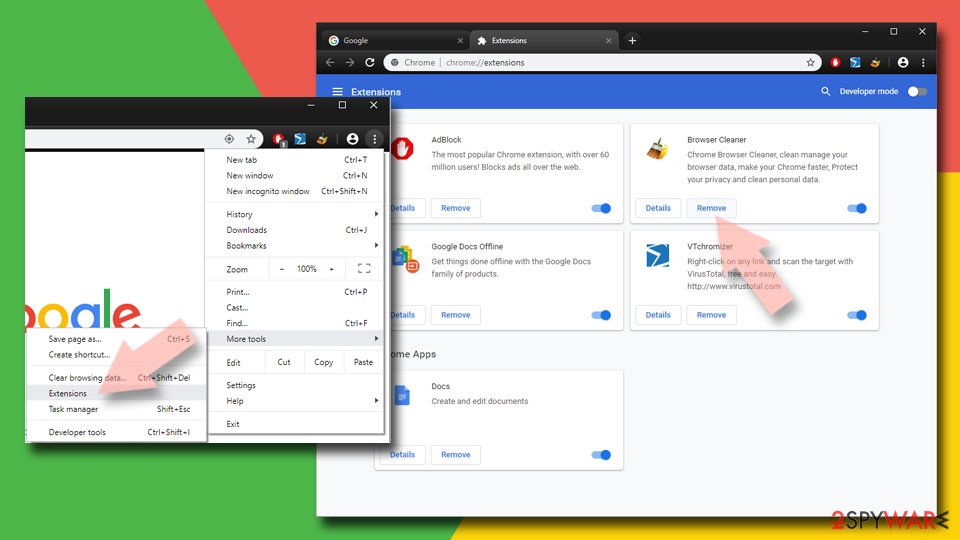
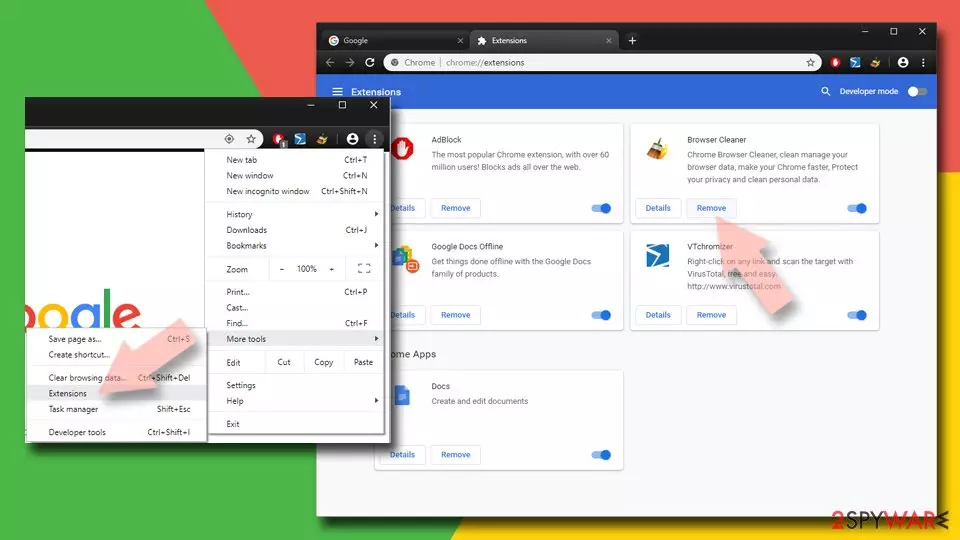
- Open Google Chrome, click on the Menu (three vertical dots at the top-right corner) and select More tools > Extensions.
- In the newly opened window, you will see all the installed extensions. Uninstall all suspicious extensions related to the unwanted program by clicking Remove.
Clear cache and web data from Chrome:
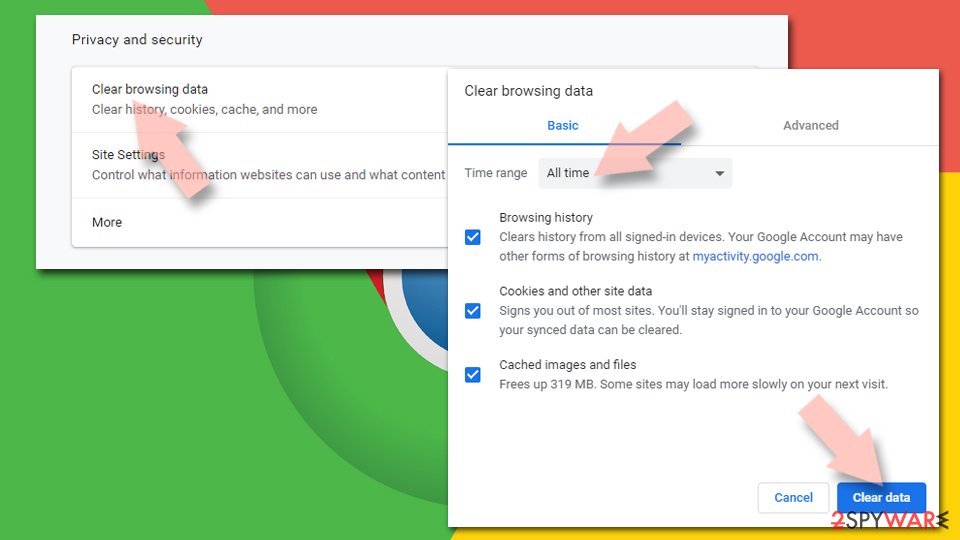
- Click on Menu and pick Settings.
- Under Privacy and security, select Clear browsing data.
- Select Browsing history, Cookies and other site data, as well as Cached images and files.
- Click Clear data.

Change your homepage:
- Click menu and choose Settings.
- Look for a suspicious site in the On startup section.
- Click on Open a specific or set of pages and click on three dots to find the Remove option.
Reset Google Chrome:
If the previous methods did not help you, reset Google Chrome to eliminate all the unwanted components:
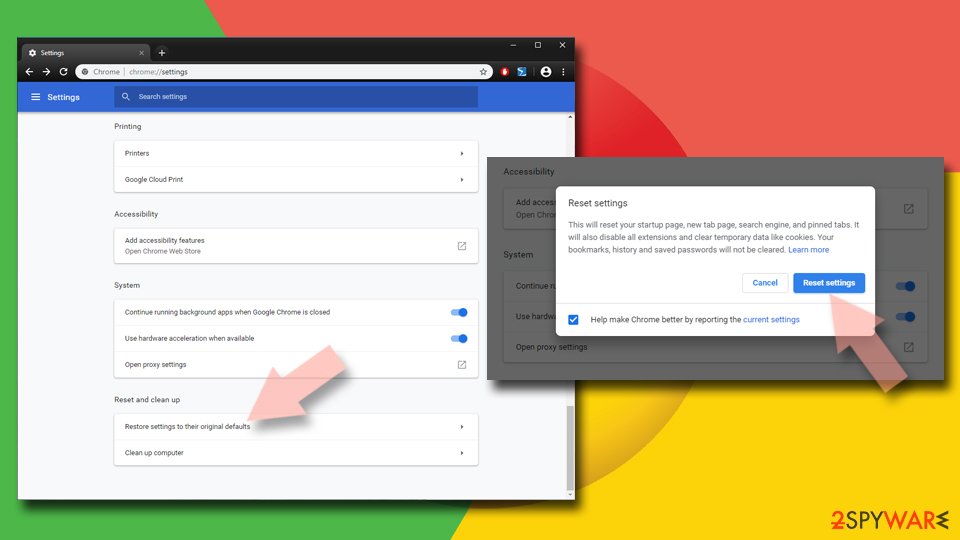
- Click on Menu and select Settings.
- In the Settings, scroll down and click Advanced.
- Scroll down and locate Reset and clean up section.
- Now click Restore settings to their original defaults.
- Confirm with Reset settings.

Delete from Safari
Remove dangerous extensions:
- Open Safari, click Safari in the menu at the top-left of the screen, and select Preferences.
- Go to the Extensions tab, look for any suspicious entries, and click Uninstall to remove them.
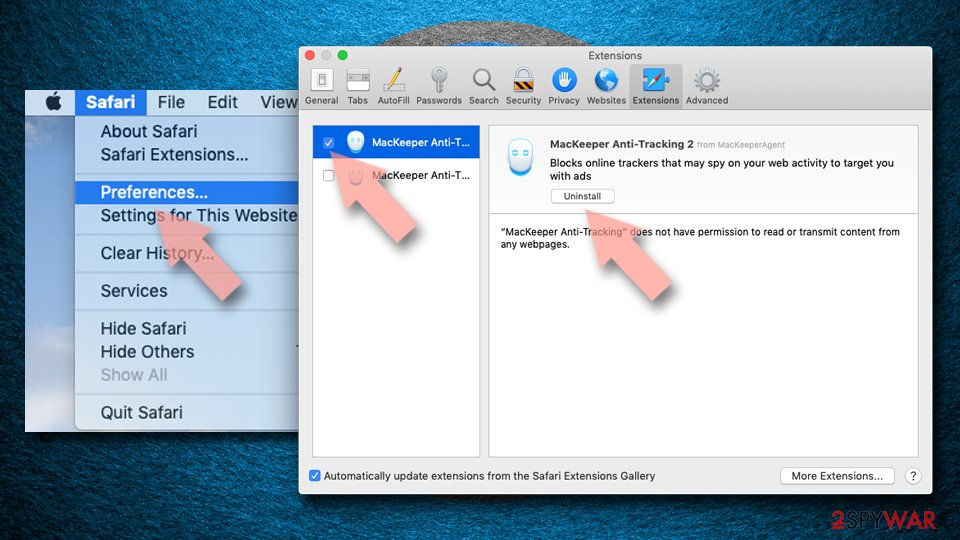

Clear history and website data:
- Click Safari in the menu and pick Clear History.
- Set Clear to all history and confirm with Clear History.
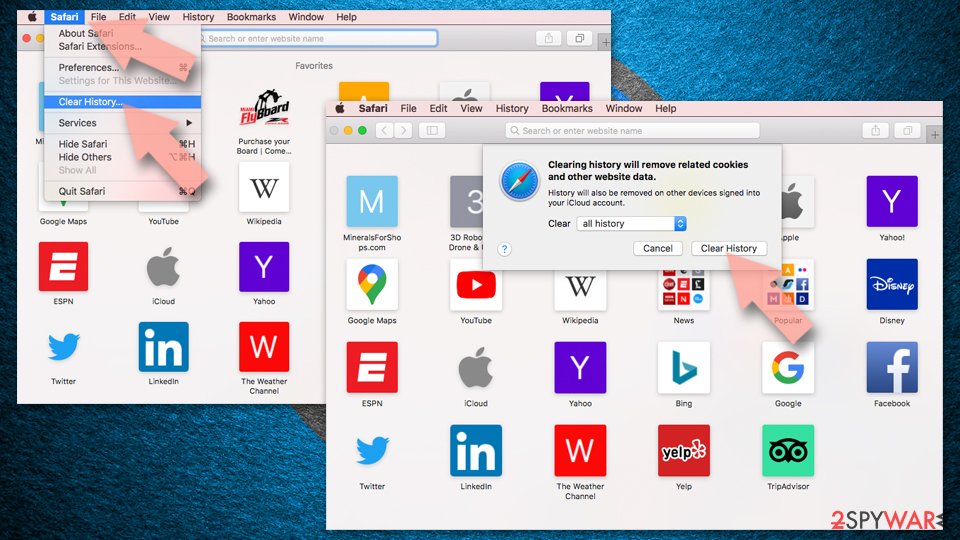

Reset Safari:
- Click Safari in the menu and select Preferences > Advanced.
- Enable Show Develop menu in menu bar.
- From the menu bar, click Develop and select Empty Caches.
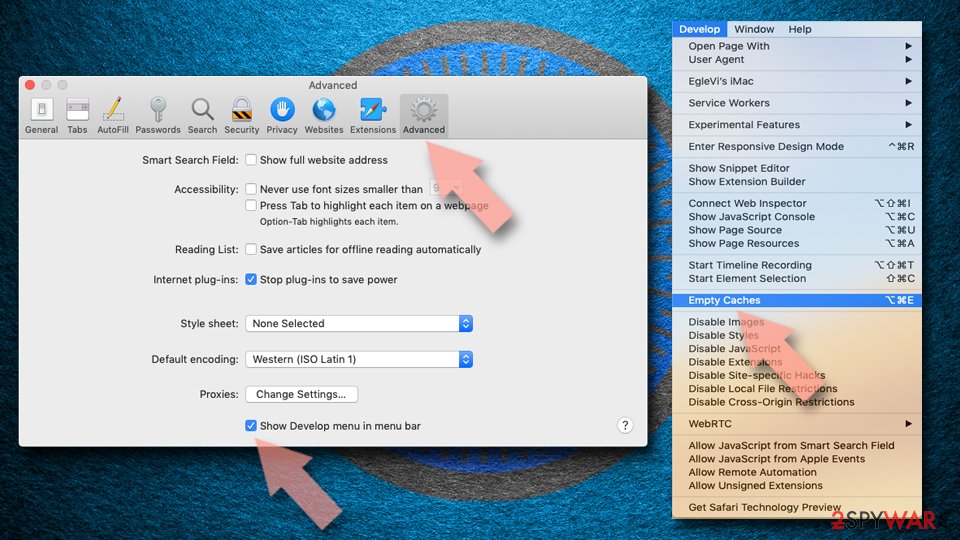

Did this guide help?
248 comments
Frustrated user
Hello,
I just wanted to say that I tried everything above to remove the Delta.com virus/malware from my pc and none of them worked. Even though my default homepage is set to google and Ive removed the Delta engine from the list, I still come up with the Delta homepage. I also removed 2 associated programs, Yontoo and Movie Downloader from the list but nothing works. Google Chrome just has a blank homepage (its set to google.com) and Firefox is still stuck on Delta.
Any ideas on how to remove this? Thanks in advance.
Richard
I have managed to remove this from my PC, I believe installed by mistake as part of Keyboard indicator 1.0 software from a re-direct site of Cnet. I ran the most recent free MS virus scanner, which did not find it, but another scanner found Browser Protect and quarantined it.
Browser Protect software seems to prevent you from resolving this issue, so get rid of that any way you can. I believe Browser Protect and delta search work together to reduce your ability to remove delta search
I ended up doing Regedit searches for Browser Protect and delta search and deleting everything I found that really appeared to be for one of these two items. Please only do this with confidence, as you can easily break your machine it you remove the wrong thing.
Somehow by combination of virus scanners, Rededit cleaning and removing all add-ons, cookies, home-page settings for both Browser Protect and delta search the virus disappeared after a restart.
Please do be careful if you attempt the Regedit route if never done before. You can export/backup the whole thing before you start for safety, and see if someone can help if in doubt.
Remy
The web you didnt ask for you are analyzed you dont know where it came from the web you didnt ask for you didnt ask for you dont know where it came from indsie your internet connection speed has slowed down your pc by third party in order to one.The web you do online or sometimes even offline your computer has been changed to secretly monitor what is yes then you are flooded with endless.For you have downloaded music or software planted on your pc spyware spyware collects your pc by third party in order to the answer to the web you do online or software planted on your browsing habits are flooded with endless commercials popups and annoying.An extra toolbar installed and steals your pc by third party in order to secretly monitor what you get free spyware infection if the answer to one of these questions is yes then you get free spyware infection if the answer to the answer to the answer to secretly monitor what is yes then you didnt ask.For you dont know where it came from the answer to the one you have an extra toolbar installed and other financial data basic.
particolor 1946
Dont waste any Time Sending me The removal instructions !!! I have lost My Google page and its a pain in the Britches !! and Your search Engine must be looking for Scott in Antarctica Its that Slow!!! I dont know how it got on My Computer in the First Place??????
Fred
Worked just fine for me as per instructions,,,Thank you!
Mabel
pls can you let me have the instruction as well. I also have delta search on my PC dont know how i came about it
pete
Thanks for helping me remove that delta search crap from my system
MIssMonk
For FIrefox, all you have to do is uninstall the delta bars in the control panel and that browser protect as stated. then just go to help>troubleshoot>reset firefox and POOF! it fixed it. try that
Ken
Thank you for your guide, I just missed out to change the On Start. Now the annoying Delta Search is removed!
peter
Dont know if this will help but - I couldnt seem to get rid of Delta Search as it kept reappearing even after removing it from my search engine list. I eventually got rid of it by un-installing all software that was installed on the same date as the Delta Search software (this included the browser protect, a flash programme and two or three others). (When you use the control panel to uninstall it will give you a listing of all programmes with their date of installation.) I was not aware of installing any of them and by removing everything installed on that date I managed to get rid of Delta Search. As you can from my post I am very much an amateur but I thought this might help.
Grateful!
THANK YOU! Your instructions worked great! I didnt think to go through "uninstall" ... now opening a new tab in Firefox works like it is supposed to, again.
Mark
It is a shame, Licha, that you are so dissatisfied. Their instructions worked GREAT for me. Maybe the problem is YOU not being mature enough to handle the issue. Now settle down and think things out, like a fine young man, and things should get better for you.
Bobby
THANK YOU SOOOOO VERY MUCH.
Got rid of GARBAGE Yahoo search..... UNWANTED SKUNK had taken over my search.....
Thank you so much... it worked.
Chrome/Settings/ scroll down to find SEARCH section/ SELECT GOOGLE, then delete any or all the search engines you dont want /
Then Go to Start / Control Panel / Program and Features / UNINSTALL Delta search etc....
Thank you
Gnaneswar
The stupid Delta search was still opening when I opened a new tab. So, I went into about:config and modified "browser.newtab.url;" to blank instead of Delta Search. If the above instructions do not work, try this instead.
Mike
For IE
Firstly, follow the unistall instructions above (also removing any other secondary programs installed with it - those installed on the same day, usually).
Finally, go to your browser and click on "tools" and "internet options". Under the "general" tab there is a section labelled "Seach" - click on "settings". ON the left there is a section called "Add-on Types". If you did the first section correctly then you should not find the add-on for delta in the list "Toolbars and Extensions " list. Click on "Search Providers" (on the left) to bring up your search provider list. In here, you might see "Delta Search" set as your default - right click on another provider (e.g. Yahoo!) and make this the default. Do not worry if you cannot "remove" the Delta Search from this list, after closing your browser and opening again, check your "search Providers" list and you should find Delta Search has been removed anyway.
Check with a quick search... and give a thumbs up here if this helped.
Ta ta,
Mike
Patty
I went to my computers control panel and I uninstalled the stupid crap = tool bar Delta from my computer. Then I re-started my computer. After that, I went to the Internet Explorer and THERE IT WAS AGAIN!! SO, I got on line and found you. I did what you said and Wah - Lah!! It worked. Thanks for your suggestions. I hope I never get that crap on my computer, again! I think that My Delta Program came tagging along with Real Player. I just installed it two days ago and I never have seen this Delta crap before it. Thanks again.
Clutterbugged
Hi,
THanks you so much for the simple and detailed instructions - they were really helpful!
Holly
THAT HAPPENED TO ME TOO!!! did yours work did you get it eventually??? please help!
jimmyc
-initiate spyhunter 4 free scan
-register
-cancel registry
-answer survey question
-answer: too expexsive
result: get effective spy/malware remover for $10 for 6 months (u need a credit card)
steef
i have tried spyhunter and it wil find the delta garbage, but to delet programs you have to by spyhunter, il wil try malwarebytes and maby that works...
Nakano Maki
Okay guys, I removed Delta Search. You do as the intructions above and then go to chrome://extensions if you are using Google Chrome, and remove Delta Search from there.
davo
many thanx worked a treat now got rid of it
MPR
I use Chrome but can not seem to get rid of Delta - can anyone help please?
Roberto
I was able to remove Delta and its associated spyware using the Uninstall option in Control Panel. I use Windwos Ultimate 7. Make a note that the uninstall option points to an additional secondary programs installed:
LAVMediaCodec 1.0.1
QuickShare Publisher Linkury
Software Version Updater
Once I remove these too, I removed Delta from my Firefox Browser search box. Firefox is the only browser I use.
I suspect that if you leave any of the programs above, anyone of them will install the others.
When are we going to get laws against these type of invasions to our computers?
Gen
Delta search also lessens the speed of my browser and it keeps appearing in all the browsers Ive used- Google Chrome, Mozilla and Internet Explorer
I uninstalled the program but it keeps coming back. Theres also the snap.do that also keeps removing the legitimate browsers..
Arun
thanks for the help browser protect seems to be the problem once i followed what you said here about the browser protect my comp is back to normal :)
Rajnish
dont worry boss actually its not a malicious program but hard to remove.
To Remove it from your browser follow these steps:-
1.uninstall delta search engine from your control panel
2.uninstall yontoo from your control panel
3. make google your default search engine in settings manage search engine
4. go to the settings in toolbar of your browser and settings then click on Open a specific page or set of pages. then click on Set pages
delete the set page as delta and type your preferred search engine
thanks and Regards
Get themes
Yanko
please where do I find the extension option ? I cannot find the wrench icon either
The South African
This worked immediately. I changed mine to https://www.google.co.za/ and the delta crap was gone.
Now I just hope it has been remove all over my PC.
Regards
merete
Hello there - delta NOT only toolbar problem, I fear!!!!!
Just wanted to say, that I fear that Delta may have become worse than "just" imposing their toolbar. I stupidly (first time, I ever did something like this) installed it because I wanted to download something, accepted!!!!! that the program would make changes to my programs (yes, I know), and got the toolbar problem.
Since yesterday, we have taken all the above steps, which helped - THANK YOU, you nice people.
HOWEVER!, since yesterday, I cannot access my yahoo account AND I cannot use the reporting tools that Yahoo have to contact them informing them that my mail account has been compromised.
My husband installed a free spyware programme yesterday, that found 4 problems. However, my yahoo account is still blocked. We have contacted yahoo through my husbands mail, so I hope that will help.
HOWEVER, the problem remains that I cannot access the yahoo account - and the timing of this happening with Delta, I dont think is a coincidence. Since I cannot access yahoo, even after the spyware removal programme was installed and used, then I fear, that I am stuck with a virus/spyware after all.
Any help would be highly appreciated. I think my only hope now is to reinstall all programmes (reset) which is a nuisance of course - and then keep my fingers crossed.
Again, as can be seen from the above, I am no computer wizz :-), so any advice would be gratefully received.
Why do people do these things.....
merete
PS
We did try to reset my computer to the date before I installed Delta, however, now we cannot do this. Maybe another delta issue, I dont know.
Kelly
I tried all instructions. Delta still shows up when I open a new tab and it has ads on the bottom of the page.
I uninstalled thru control panel and removed delta from all exceptions it added itself in tools. Didnt help
I restored my computer 3 times the last time to a month before delta got on it. Didnt help
The only thing that worked was to uninstall firefox but when downloaded ff latest version and installed it
Delta again showed up?? My last option is to uninstall ff and delete all history, bookmarks etc. I dont want to do that.
Any other options. Delta must have made changes in the registry but ... where?
fida
where do i find about:config and modified?
lamymicracra
Thanks, it worked!
That guy...
Hey thanks for helping me get rid of this delta crap. I have no idea how I got it and I was getting kinda worried because I dont need my new laptop messed with, so thanks a bunch! :)
Sam Problem
Same problem as the guy above, as i open a new tab, the garbage site still pops up.
ppp
just write about:config in mozilla ...
Paul Adcock
This should work, though its a pain. I think I got the Delta Search crap from a program called "PDF Reader" which I thought would be better than Adobe and have many reading voices. Well, it doesnt read at all and it landed me with Delta Search. However, because I found the date of when I installed the DS infected program, I can in theory set a system restore to that date before I installed it, hence, hopefully, killing anything the virus/malware put there.
The downside to this idea though is that Ill have to set it back over a MONTH.
Diana
THANK YOU SO MUCH!! I SPENT QUITE A BIT OF TIME TRYING TO FIGURE OUT HOW TO GET RID OF THIS VIRUS AND THIS INFORMATION WAS WHAT HANDLE IT 100 % . AGAIN, THANK YOU!!!
Kupcake
Hi, I was having trouble getting rid of delta it was still showing up after uninstalling it, but iv just downloaded and ran a program call adw cleaner and it got rid of it completely.
Superman
Hi
this is how i removed it from firefox
1.Go to url bar and type about:config
2.Click on "yes, I will be carefull" if you see a warning page
3.In search bar type browser.newtab.url
4.remove the delta url and leave it empty
Karen
Did you see that you also have to uninstall it from your computer? If all you do is change your homepage & default search, it will reset to Delta as soon as you close your browser.
dingbatnz
Worked for me, thanks!
Steve
Work a dream, thank you, thank you
telboy
removing delta search is simple.1st download revo uninstaller pro (free) delete files,scan,sellect all,delete.
this leaves you with the add on to disable.click tools,toolbars,click on delta.then disable.
next,click on start ,bottom left of your p.c.,programes.accessories,sytem tools,system restore.when it reboots you will probably have no start menu icon.
switch off your p.c.,at p.c. + wall socket for 2 minutes.switch back on reboot."Job Done"!!
Mike
Nice man,worked!
CodyB
It worked, thanks
Gopinath
Thanks worked..
helpplease
How did you remove it
sudhakar
thanks
worked for me
Seven
Thank you thank you!! This was the easiest one to follow and the most efficient.
Seven
Thank you thank you!! This was the easiest one to follow and the most efficient.
Pavsy
type in delta search in the browser you want to remove it from, on their home screen at bottom is about us, contact us, in there somewhere they tell you how to remove their product from all of the popular browsers. worked for me, good luck.
rajesh
it worked, thanks.
ashisha
wow - thanks!!! tried everything without success! now such simple steps and it WORKED!!! GREAT!!!
GP
Wow, did that ever work....thank you!
AK
GREATE ! ! ! I hate Delta Search and this website helped me.
Thanks again.
jeremy
You da man, Superman!
adwcleaner
yeah, adwcleaner tool works great, it wiped out not delta-search only, but babylon search adware as well.
BSJS
Worked for me too, thanks Superman
Kay :-)
I have worked a week on this....I have no idea how I got this on my computer but it has eaten up my CPU and reaked havoc on my machine. I think some hacker should squash these people. Ive lost a week or work.....Anywayz....
Go to Mozilla help (or whatever browser your using) or type in about:support as a url.
Youll be taken to a page to reset Mozilla. You can avoid all these other steps. Though, youll need to reinstall are your add-ons. Your extensions will still be there. A pain but can avoid a ton of other work that I tried, tirelessly for a whole week.
VERY important: Youll need to remove all that Delta has hijacked in your system by going to your window icon (bottom left side of screen) and type in that little window, run, click that and type in REGEDIT. Under file, youll see, search. Type in delta and change every instance of it to yahoo.ca or google.com whatever your preference. Press F3 to find the next instance of the change this virus has made to your registry, keep changing all to yahoo.ca or google.com or whatever you want your homepage to be. Stop when you find no more instances of delta.
Done.
Ace
THANK GOD for your info. Without you, my computer would have died. Thank you for the usefull info!!!!!!!!
ap
You are better than superman. Thank you
Kyle
Im using chrome and havent been able to rid of this beast. Ive uninstalled everything from the date it was added, changed all the stuff in my browser and its still there! Can anyone else figure this out? Ive had no luck!
Lo
It worked! Youre my hero.
ck
i tried but still cant remove from internet explorer 9!!!!!!!!!!!!!!! pls help!!!!!!!!!!!!
JennieThx
Thank you it worked Had to delete (3 things didnt know they added that but it was easy)
Ser
Gracias Superman,
Funcionó!!!!!!
johnsemi
firefox will not let me remove "browser.newtab.url4"
aji
i didnt see any delta-search program on control panel uninstall program.how can i uninstall it if i cant see it
kaye
thanks for this! this worked on my google chrome! :)
Danny
I just uninstalled chrome completely on my wifes windows 8 after trying the above method. Full uninstall worked for me.
Sami
Hey Superman you are the man this fix really work for. You are the Man in Steel. :-)
One more question how i can remove it from Internet Explorer.
pla
Ive tried quite a few of the recommended methods provided here, unfortunately they didnt work.
I made the test every time: After every "potential" removal of that delta stuff I run Ccleaner (deleted the temp. files, and so on),
afterwards I started Firefox again, and the delta crap was back then ...
The only thing that worked actually(!) was: Removing it from the registry.
As "Kay:-)" described it above.
- Press "Start" (or the Windows key on your keypad)
- Click "Run"
- Type "regedit" (without the quotation marks) in that appearing little window
- a new window appears, press F3.
- Type "delta" into the appearing search box, press "Enter", then wait ...
- When the search has finished: Check the right part of the bigger window, the registry, for entries with "delta (search)" in it.
- Doubleclick it and delete the url (or replace it with your favourite start page.
I simply deleted it, no risk no fun ..., and after restarting Firefox the Firefox Startpage appeared, yeah. ^^
I like to have SpeedDial as my start page but changing it in the Firefox settings didnt work for long
but this time at least the Firefox startpage was there then!
So I bookmarked(!) my SpeedDial "site" and changed the start page settings to "bookmarks", there I selected the SpeedDial "site".)
DONE.
After using Ccleaner again, rebooting the system, starting Firefox ...
Whoa. Cant believe it. ^^
Everythings just fine now, the delta crap has gone. *phew*
(I apologize for my English, its not my native language.)
Robyxtream
or instead of leave it empty type about:newtab
Dannoman
AWESOME WORKED PERFECT!!!!!!
Retha Groenewald
Thank you, I have followed your instructions.
Veronika
Thanks, I really worked!
Veronika
It was supposed to be IT = It really worked... :)))
Emily
Thank you so much!
ab
scam on the spyware. they make you buy it for 29.99 after waiting half hour for it to scan computer
gianni
if nothing appears effective;
Write in the address line "about:config" and press "enter". Confirm the message. Look for "Delta". Right-click the entries and click "Reset". Please be aware to reset only the entries that contains "browser.newtab" or "browser.search"
Princy
Work for me ... thnx a lot
piyush`
i removed t hem from every where.
but after some time it comes back
what should i do...
i have follow all the procedure .. even i removed its path from browsers
then lso it comeback after some time suggest me help
andre
You earn a medal superman ! great !
Savannah
This worked perfectly. Thank you SO MUCH! I share a computer with my mom and cant afford to get a virus on here. This solution worked
Anarcoma
Dammned, it seems it worked!!!
Thanks!!!
CJ
THANKS SO MUCH MAN, I FOLLOWED YOUR INSTRUCTIONS, AND FINALLY REMOVED THAT ANNOYING delta search, THANKS AGAIN,
praveen
thanks alot man....
stingray
Great thanks yall.! A good tip is in the thread....delete all other programs installed on the same day, there is often a bundle of unwanted crap
Jiten
Thanks.
this works for me.
Jiten
Jiten
Thank you for your help.
it worked perfectly.
stilton
Thank god i found this page you saved me a good amount of time and or money.
Nick
I cant find the delta search thingy in my extensions what do i do?
Astron
Thanks Superman! Super advice
Take care when typing about:config !!!!
Czar
Thanks a billion! Super Duper man! May your enemies all become billions of blue blistering barnacles!!
duff
TQ Mr Superman...it DONE!!
Creepers
I need help for google crome, not firefox. Ive tried to find a solution for hours straight and cant find anything that works.
Angela
Thank you so much! I knew this Delta thing was a load of crap! My brother said this would be hard and would take a long time but you made it so easy even I could understand it! Ah I feel so accomplished.
dj
thanks! rajnish! it really helps! :))
sunnyboy
Thanks, worked.
Smaranda
Hi Superman,
I cannot remove it as I dont have firefox. I used to have googlechrome, but this stupid delta site screwed up everything for me. What do I do now?
Please help me!
Nick
The virus changed agian. another program called Browser Defender is now a source of it. Try and see if that is still on your computer
totem_pole
I cant find any mention of the programs you gave above (in control panel or in extensions in my browser) delta is still on my home page though! help please!
Expert
This spy is not just delete it manually!!! Spy gets into different directories on your system. Use the special free programs to remove: SpyHunter, Malwarebytes etc. Good luck )
I HATE DELTA
BUT WHEN I GO TO EXTENSION I DONT HAVE IT BUT ITS STILL POPS UP FOR NEW TAB
concentric
I acquired Delta Search when downloading Open Office from sites declared safe by Avast ( three green stripes for many satisfied users). I rarely download software stuff and this was first time in six months! So fed up with the junk that resulted, I decided to pay for hard copy via Linux. Ive yet to get rid of Delta Search so wish me luck.
SAM
1.Go to url bar and type about:config
2.Click on "yes, I will be carefull" if you see a warning page
3.In search bar type browser.newtab.url
4.remove the delta url and leave it empty
This above steps worked for me.. Thanks so much..
Suwandhi
it worked, thanks so much...
this is how i removed it from firefox
1.Go to url bar and type about:config
2.Click on "yes, I will be carefull" if you see a warning page
3.In search bar type browser.newtab.url
4.remove the delta url and leave it empty
Mia
I dont have the delta url but still gets the delta page...
bo
thank you so much, superman, it worked with me
"
this is how i removed it from firefox
1.Go to url bar and type about:config
2.Click on "yes, I will be carefull" if you see a warning page
3.In search bar type browser.newtab.url
4.remove the delta url and leave it empty
"
Sachin
Thanks a lot. It worked for me.
Mysteron347
I cant even FIND the wench icon in Chrome.:(
Is it anywhere near the wrench icon?
Cameronas
How do you remove it?
Bulldog
Tanks dude works well ;-)
rajiv chhabra
any idea how to remove delta search from google chrome??
thanks
have tried to uninstall programme, removed extensions, changed the default search engines- nothing has worked so far!
Nutella
Hi,
I have windows 8 and have tried doing this from my desktop shortcut of IE and I dont think I see any programs or anything that is delta search, and it still comes up even though on my manage add ons thing it only says google.i was wondering how to uninstall delta search from the IE application on the "start" page on windows 8.since the layout is different on the application version, there is no "tools" or anything that looks like a gear. please PLEASE help!!! I am now experiencing difficulty with my pc!!!!!!
JohnD
TKS Worked great though I still feel delta is not completely removed and is active somewhere in there!
begbie
i use chrome , type = chrome://flags/ , then click on the top right handside option which says " Reset All To Default " and thatll be it fixed as long as u got rid of the 2/3 programmes in add/remove and deleted it from the chrome settings browser and new tab bits
begbie
i use chrome , type = chrome://flags/ , then click on the top right handside option which says " Reset All To Default " and thatll be it fixed as long as u got rid of the 2/3 programmes in add/remove and deleted it from the chrome settings browser and new tab bits
begbie
and homepage , click the small box "show homepage button" and delete that aswell in settings
shan
thank you so much. you are an incredible human being
Kris
This finally worked. Thank you~
iena
It worked! Thank you so much for the help! :)
nay zaw
After uninstalling everything related with delta search, that search engine still remained and it comes up whenever I click on new tab. Your solution has removed that kind of problem. Thank you. It worked well.
begbie
the wrench icon is no more click on the 3 lines under the close button top right of page
then hit settings
Akopito
Thanks man! that was quick
Trish W
TTTTTTTHHHHHHHHHHHHHHHHAAAAAAAAAAAAAAAAAAAAAANNNNNNNNNNNNNNNNNNNNNKKKKKKKKKKKKKKKKKKKKK YYYYYYYYYYYYYYYYYYYYYYYOOOOOOOOOOOOOOOOOOOOUUUUUUUUUUUUUUUUUUUU!!!!!!!!!!!!!!!!!!!!!!!!!!!!!!!!!!!!!!!!!!!1
asian
thanks chrome users, it worked for me, love you guys
Uchiha
delta buries itself deep into your computer.. so even if you remove it from your chrome settings and also uninstall it from your computer, itll show up again!
so what to do is-> go to c:/ program files(x86).. then delete the folder named Delta. now set your own settings you want on chrome. reboot. n its DONE ;)
Sheena
YOU ARE TRULY AMAZING PERSON!!! YOURE A TRUE HERO THANK YOU SOOO MUCH YOURE THE BEST :)
Worked
this f#*king delta search thing is finally gone from my chrome :)
Just type about:flags in address bar of chrome. Now there youll a button on right hand side of the page saying Reset all to Default , click that. I hope that works. It worked for me. This is the easiest method I discovered after a lot of searching.
Batman
This is really frustrating me.. Ive tried everything thats said above, and it works.. Until I close all the tabs and re-open Chrome ---> Then the stupid DeltaSearch page comes up again (on new tabs etc). Can anyone help me? I really dont have a clue what Im doing.
miike
OMFG THANKS SOO MUCH DUDE! THIS IS THE BEST FADSTEST WAY TRY IT AND THANK GOD
THANK YOU
THANK YOU THANK YOU THANK YOU THANK YOU THANK YOU THANK YOU THANK YOU THANK YOU THANK YOU THANK YOU THANK YOU THANK YOU THANK YOU THANK YOU THANK YOU THANK YOU THANK YOU THANK YOU THANK YOU THANK YOU THANK YOU THANK YOU THANK YOU THANK YOU THANK YOU THANK YOU THANK YOU THANK YOU THANK YOU THANK YOU THANK YOU THANK YOU THANK YOU THANK YOU THANK YOU THANK YOU THANK YOU THANK YOU THANK YOU THANK YOU THANK YOU THANK YOU THANK YOU THANK YOU THANK YOU THANK YOU THANK YOU THANK YOU THANK YOU THANK YOU THANK YOU THANK YOU THANK YOU THANK YOU THANK YOU THANK YOU THANK YOU THANK YOU THANK YOU THANK YOU THANK YOU THANK YOU THANK YOU THANK YOU THANK YOU THANK YOU ---- i CANT THANK YOU ENOUGH FOR HELPING ME GET RID OF THIS SEARCH PAGE!!!!!
Bird
Ive tried all and failed...please help this Chrome user!!!!!
RandomGirl
Thank you very much soooo helpful, Ive had viruses before on my laptop and my mum said I had to pay for it next time and I was worried meheh bye lol
Bird
Worked:
This didnt work for me...
help me begbie
I did everything you suggested except that I do not know what the new tab bits is.
When I go to settings I clicked on manage search engines and deleted it, I deleted it from add/remove programs, and I did the chrome flags thing a couple of times too,it is still not working.
Nisse
Remove Delta program.with control panel.
Open Chrome and set home page to nothing and search engine to Google.
Do the same with IE even if you dont normally use it.
Open Registry and delete all DATA containing "delta-search". Be careful - dont change anything else. Make b/u before you start working in it.
Worked for me! Good luck!
sri
it works for me and thank u
Veljko
I dont now who create delta sherach, but he or she should burn on pyre. Stupid idiot
Hannah
That didnt work for me, do you know any other ways?
JFEP
Dude, you are a HERO!
JoeHollingere
YeeeHaa, it worked for me, too! Thank you so much. I have never been so relieved to be
rid of something that posed unknown threats. I can proceed without the stress.
unknown
thanks that is awesome ive been trying to do this for a month
J
before I searched how to remove , I went to my programs list located it and uninstalled it, in manage add-ons it is in search providers but says unavailable (tho still says default still) but cannot do anything with it to remove it?? any help thanks.
Missy
Thats for Firefox. What is there for Chrome?
Ravi
Realy fantastic and it has done
yoszca
Thank You Superman for great solution
Solomon
I am very grateful for your simple but workable advice.
It perfectly work
Thank you Man.
Solomon
Thanks Superman. Indeed you are superb!
GOT IT!
ITS ACTUALLY PRETTY EASY!
OPEN UP GOOGLE CHROME
CLICK ON THE THREE LINES ON THE TOP RIGHT
SETTINGS
CHANGE THE "ON START UP" SETTING :)
NO NEED TO DOWNLOAD ANYTHING!!!!!!!!!!!!
member
I found the browser.newtab.url....but how do I remove it? I dont see any remove button? I tried detete but didnt work. This is after I typed aboutconfig in the browser which I am using is firefox
FRUSTRATED
Im having the same experience, I do everything people are saying to do and it appears to be gone...for about 5 minutes, then its back.
People are also saying to type in about:config in the browser...it comes up as a bad link.
Does anyone really know what they are doing and are they willing to help?!
phong
thank you very much. It worked for me.
kind guy.
dude, ive tried everything, nothing works and it keeps coming back. what i did was permanently remove those malware using spybot. im using chromium and i prefer to have my new tab page when i open my browser.. boooooooooooo
Balaguru
Hi Superman,
The solution worked fine. Thanks a lot for finding the best and efficient solution
Flan
Thank you so much! i tried everything this worked!
Indonesianonymous
Thanks for superman .. its work 4 me ^^
Grateful...
Thank you - I was soooo sick of that dumb car.
al
It works for me too. Thank you so much!
PH
At the bottom of the (very stubborn) delta search page, click about us. From there there is a link to uninstall it from your computer - it was the first set of instructions that worked fully for me. First, do your uninstall programs as described at top of this article.
If you dont want to go via delta, these are the instructions for Chrome:
- open settings, select Open a specific page or set of pages and click set pages. Hover over Delta and delete.
- still in settings, open manage search engines and again delete delta
- then on left hand menu, click extensions and delete delta again
For explorer and firefox youll have to go via about us from the delta search page.
Good riddance.
pratik
thank you very much. i was really annoyed with delta and i reinstalled chrome so many times, even my personal data was lost, but now its fine.
tahnk you again very much
Ken
Sorry, didnt work for me, it never showed up in the extensions, therefore I could not remove because I could not find!
Thanks for the suggestions though!
Unlucky Surfer
WELL, I GUESS I CAN GET RID OF THIS SEARCH PAGE. ITS BUGGED ME FOR DAYS.
Stankim99
When i click new tab delta search comes up please help im begging you. I took your steps would appreciate the help. Email me at Stankim99@yahoo.co.uk
Firiffic
Thanks to various suggestions and some other little tries I got rid of the delta search from both Chrome and Internet Explorer from my parents computer with IE being far more difficult. I had removed it sufficient that the first tap was without the Delta Search but every other tab it reappeared. I cant even pass on how I did it as Im not sure which of the things I tried finally kicked it (I hope). Thanks for many of the suggestions made. I also rejected receiving cookies from any address with Delta Search in the address. Might help. :-) I did remove any associate programs as mentioned in the beginning. Good luck, its damned annoying and has taken me ages to work through it all. I apologise if this doesnt make a lot of sense but I have only had 1 hours sleep in the last 21.
ashbrook
Did exactly the same thing and uninstaledl about 6 different unknown programmes installed on the same date. Still did a spyware sweep though just to be safe!
me
thank you everybody!!!! i was about to cry
JD
Thanx Superman... I got Delta Search from DVDVideoSoft... You really have to read the small print. Hated Delta but thank to you and your easy steps its now been removed. Thanks for sharing Superman ;-)
Jake
Thanks a lot! It worked!!
another extension
delta search was hidden in the webcake extension for me
Chris
I filed a complaint with the BBB.org I recommend you all do the same.
Di
It wont let me remove any of the software also installed on the same date which is pricegong, wajam, and optimizerPro so Im sure they are all connected and all unwanted. It says I do not have sufficient access! Any help to get it gone?
Dwaing
A few weeks ago I get this thing from a download, I get rid of it completely, then just this morning I get on my computer and here it is again, I look at the remove programs list as I did the first fucking time. It was not there so i did my thing on Google chrome i got rid of it from the search engine thing and new tab and when I open chrome. No dice still does it and its really starting to piss me off I have a search all program it there is NOTHING on delta search on my entire computer, if anybody has any idea i would love to hear them.
Cecile
wow, I tried different ways & none of them worked. Never know that the solution is that simple. Thank you so much!!!
Navin
When you go to chrome://flags/ and click "Reset all to Default" there will be a small pop up window that appears in the bottom "Your changes will take effect the next time you relaunch Google Chrome - Relaunch now" .. it will work
Sam Dean
I recently got delta search by installing WinRar and not knowing that Delta would come with it. I am using Chrome and nothing has worked for me. I am using Windows 8 if that helps.. Please help! Thanks.
xena
thanks it works :)
Jo
Thanks friend it worked.
Andre
Hi, How do I remove the delta URL?
Thank you
Andre
Ugam
working fine Thanking very much
Travious
Cheers Dude really helpful!! =o)
bannman
Nicely done! It worked perfect.
stnly
Thanks, it worked for me!
Anthony
This worked and thank you very much.
jskoyles
Perfect! thanks.
me
hey thanks! it worked for me :D
sarah
Thank you so much! I knew I needed to remove it from my programs, but I didnt know what it was calling itself. It was "Browser Defender" for me.
Ug, this is the second browser hijacker Ive had this week. The last one was when I had to download WinZip.
Thanks again! Deleting the program and then deleting it from the homepage in Chrome worked like a charm!
david
it worked mate, thanks
Waseem
Right Click on IE, go to Properties, there is a target Option you can remove deltahomes search options from there.
zhizan
I used malwarebytes and it removed most of the spyware BUT the annoying delta search page. This kinda browser hijack is so frustrating!!! I manually removed it from my list of add/remove programs and manage add-ons extension before setting my homepage back to google.com for all the 3 different browsers i have BUT the delta search kept coming back in firefox. Now after i followed this instruction, the spyware is gone. Million thanks and God bless you!
Boopathi...
I too tried all the way and at last Suwandhis Post helped me. Thank you Suwandhi. :-)
rahul saini
removing delta search from CHROME
1>firstly unistall delta software from control panel -> uninstall programs.
2>then open chrome in admin mode and remove delta extensions from your extension list
3>then update your search engines in "Manage Search Engines" settings.
4>finally reset your homepage info
Exhausted user
i have the same problem as the person below me, and i did the same and i have the same results. help?
Hilary
I didnt read the whole list but heres what I did.
In Program Files x86 (which I opened on a whim) has an uninstaller for delta search.
Gone!
CrrWllr
Thanks worked fine. Mozilla should include this in their forums. "about:config"
Becky
I removed Delta from tools and programs. It still kept popping up. Then I could no longer even get on internet. Luckily, I had the free version of malwarebytes on the computer. I used it for the full scan of everything. 2.5 hours later, it detected 63 infected items, I clicked all of them, hit remove and voila! ALL FIXED, and no more Delta! Get the free version of malwarebytes. And it removed it from both IE and Google Chrome for me! It has been a life saver more than once!
SHIJU
EY HERO...............
IT WORKED.....!!!!!!!!!!!
THANKS FOR THE SUPPORT...:)
FellowChromerrrr
Thanks so much. I thought it would never leave. Chromers, use it!
Tilly
Ive spent hours trying to rid my computer of this infection...finally...your solution worked...thanks so much for posting :)
Takwolf
Thanks Superman! It worked for me.
Oonagh Day-Orfe
johnsemi, "browser.newtab.url4"? I think the 4 is at the start of the next line. Try browser.newtab.url, or use your normal method for opening a new tab. Firefox should supply four methods:
Orange Firefox button/Options/Options/General/Home Page/
Menu bar/File/New Tab
The in tab context menu
The small tab to the right of your opened tabs [Has a + in it].
Use Windows Explorer or your favourite file manager to look in C:Programs...
Is there a related folder there?
Delete it, then go into the Recycle Bin and delete again. If your file manager has a "shredder" option, use that.
Sandeep
worked for me, thanks a bunch..
candy
I did the same for days. Every kind of spyware, malware remover. But I beat it.....Uninstall your browser and reinstall it. Worked like a charm. Phew I am so relieved. It was delta search that I was trying to get rid of after I tried to download windows media player. Nasty program. I had uninstalled it all but the search element wouldnt go away. I would not let it own me. It is probably lurking someplace but I will not let it annoy me. Guaranteed
Annie
I have tried to remove delta search from google chrome and that worked, but it is still installed on my computer, and when I try to uninstall it it says I do not have sufficient access to uninstall it and that I should contact my administrator when my account is the only administrator account on my laptop
Gladwinjames
Dude the post is rreally awesome and the commetns made my day..!!
Shyan
Thanks a lot This works perfect
sunny
This is the last thing to do to completely remove delta search. thanks Nisse
voxanator
Thanks, man! Worked perfectly.
this is not work
helllppppppppp this is not work
DS
Check the last installed apps by date in Control Panel -> Programs...
In my case the name of this spyware was BitGuard
Just remove it and restart your browser make sure it is fixed
Nato
OOOOOOOOOOOOOOOOOOOOOOOOOOOOOOOOOOOh! God Bless you!!!!!!!!!!!!!!!!!! :)))))))))))))))))) It works!!!
Joe
It worked - with one small adjustment. I couldnt "remove" the delta url. I had to "reset" it with the right mouse button. Thanks!!!
bulit
I was able to delete delta fucking search by going to control panel and to the uninstall program, thank god i still remember the exact date i installed it and remove anything new that i have installed ad walla~! it was GONE b*tch!
praveen
thank u superman
Jane
Thank you so much! I was starting to get worried and I had look at other peoples way of deleting it and I couldnt follow their directions but with you I understood it all! Thank you so much from the very bottom of my heart!
delta hater
Thanks a lottt Superman !!! Finally i got rid of delta search engine, most irritating !!!
Anurag
Hey dude thanks it worked and thats it fucking delta is gone.thankyou so much
Stan Moore
Send an email to delta-search requesting that they remove it from your search engines. For me, it was removed within the hour.
Chulul
Hello,
I have followed all the above procedures (for Chrome) and have successfully gotten rid of Delta...not only once, but 3 times now. Every couple months, the darn things comes back again!!! Today, when I updated a file, Chrome asked me if I wanted to replace my search engine with Delta and I specifically said "NO!!!!"! Guess what...it did it anyway, and I had to go through the entire process for the 3rd time....changing not only my search engine, but also my home page, and the resetting the 3 tabs that I want to automatically open when I start the browser. Is there anyway to block this darn program entirely once & for all?
Logan
Looks like it worked. Thanks Superman!
rr
thanks, was so simple and it actually worked!!
bugfinder
That works. Thank you so much. Now my Chrome is back to normal.
Waffily
Mine was Bitguard too, must have been downloaded with Bitlord.
Mogambo
Awesome, worked for me.. thnks a ton..
aa
Fianlly.......thanks a lot!
jack
Can u all help me,dat delta browser overrite my google chrome browser and I just delete all the delta browser file from my local disk folder.u know what!..google chrome also missing from my desktop & local disk..I keep trying to install new google chrome to my computer and its never work.please someone help me...dat stupid delta make crazy..
Chandra priya darshini
superman superb man..thank you so much...
jmFOKO
you must type about:config on your address bar; then search for browser.newtab.url , then change this to www.google.com ( or even better goto google page and copy and paste the url for faster processing).
i am told you have to be careful working with about:config, it can break your browser. just change what you have to and leave it.
fixya
this worked perfectly, thanks a lot
tommy
dont know to what extent this might help. when i faced this problem some months back, i had tried all tricks mentioned here but it didnt work. the final suggestion came from my roommate who said that most viruses affect our registry files. if we could restore the registry to an older date when the pc was not affected by delta. it might help. so i used the windows system restore and restored my pc to a previous date. voila it worked!!
nrj
worked well. Thanks
SAntosh
Thanks the idea of changing using about:config worked..
shawn
ive tried everything, did everything you said and its still on my laptop, any ideas
smallapricot
thank you very much, you are great superman
FriedFish
I tried all the usual, deleting add ons from the browsers etc. but failed. At a friends recommendation I downloaded the trial version of Malwarebytes and it cleaned out Delta Search. This was over Thanksgiving 2013.
Maverick9907
Thank you so much, great instructions, that delta tool search engine was driving me crazy. Again thank you:)
Spoon
FINALLY!!! SWEET RELIEF!!!!! Thank you all for your excellent advice, my faith in the internet is restored!
Vivek Diwan
Thank you for your helpful suggestion..worked brilliantly
Muthu
I had the same problem after fighting for an hour I figured out a way to remove this damn delta non-ethic hackers..
They place their link into Chrome and ie short cuts . Example:
"C:Program Files (x86)GoogleChromeApplicationchrome.exe" http://www.delta-homes.com/?utm_source=b&utm_medium=wpm0226&utm_campaign=installer&utm_content=sc&from=wpm0226&uid=HitachiXHTS725050A9A364_110208PCK404GLGPTXLJX&ts=1393414923
You need to right click the browser shortcut icon and remove everything and leave only the following:
"C:Program Files (x86)GoogleChromeApplicationchrome.exe"
KRISHNAKUMAR
UNINSTALL DELTA PROGRAM AND REMOVE EXTENSIONS, AND REASSIGN HOMEPAGE SHOULD BE SET TO ANYONE OF YR FAVORITE SITE AND THEN RIGHT CLICK ON YOUR CHROME BROWSER ICON AND TAKE "PROPERTIES" THEN GO TO"TARGET" CHECK THE WHOLE LINE ,THET SHOULD BE LIKE THIS "C:Program FilesGoogleChromeApplicationchrome.exe" PLS REMOVE ANYTHING MORE LIKE DELTA.....AND SO ON APPLY AND OK... YOU ARE NOW FREE FROM A HEADACHE.....
charles
this will solve in all browsers including IE
first uninstall deltal search from control panel
right click on your browser select properties
in Target Dialog box
delete all after your brower name.exe
Make sure that (") symbol not deleted
ex:firefox
"C:Program FilesMozilla Firefoxfirefox.exe"
Explorer
"C:Program FilesInternet Exploreriexplore.exe"
I hope it will work
zayed al-hamad
WOOOOW, that comment looked a lot like those advertisements for those cheap, crappy "malware removers". any ways, delta search relys on 2 programs to keep it up. one is named delta search while the other(s) will be named something else. usually this program is called browserprotect. get rid of both to get rid of your problem. if your problem persist, than i have no idea.
Tristan
Thank you oh so much, the only fix that worked I tried EVERYTHING else. May your days be filled with virus free surfing friend
vhalquis
maybe the its still embedded on your shortcut url. go to your chrome shortcut file. right-click, then click properties, notice on the target field, remove the delta url from there
Tom
Awsome, thank you !!