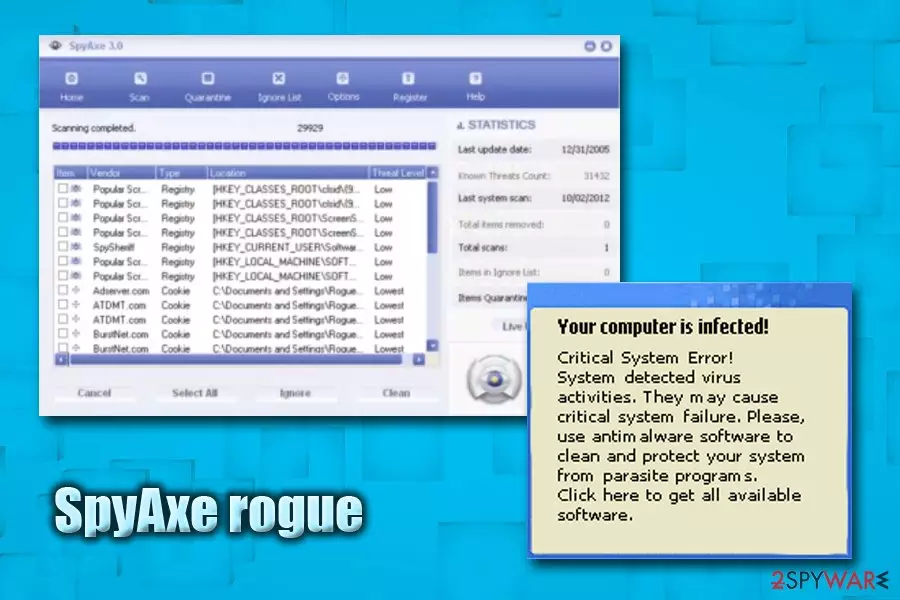
SpyAxe manual removal:
Kill processes:
mscornet.exe, mssearchnet.exe, nvctrl.exe, spyaxe.exe
Delete registry values:HKEY_LOCAL_MACHINE\SOFTWARE\Microsoft\Windows\CurrentVersion\Explorer\SharedTaskScheduler\{A2D9D3F0-8C2A-2A1D-A376-1BECFB10AB72}
HKEY_LOCAL_MACHINE\SOFTWARE\Microsoft\Windows\CurrentVersion\Explorer\SharedTaskScheduler\{E802FFFF-8E58-4D2C-A435-8BEEFB10AB77}
HKEY_LOCAL_MACHINE\SOFTWARE\Microsoft\Windows\CurrentVersion\ShellServiceObject\{A2D9D3F0-8C2A-2A1D-A376-1BECFB10AB72}
HKEY_CLASSES_ROOT\CLSID\{A2D9D3F0-8C2A-2A1D-A376-1BECFB10AB72}
HKEY_CURRENT_USER\Software\Classes\CLSID\{A2D9D3F0-8C2A-2A1D-A376-1BECFB10AB72}
HKEY_LOCAL_MACHINE\SOFTWARE\Microsoft\Windows\CurrentVersion\Explorer\Browser Helper Objects\{3E9B951E-6F72-431B-82CF-4A9FBF2F53BC}
HKEY_LOCAL_MACHINE\SOFTWARE\Microsoft\Windows\CurrentVersion\Explorer\Browser Helper Objects\{7CAF96A2-C556-460A-988E-76FC7895D284}
HKEY_LOCAL_MACHINE\SOFTWARE\Microsoft\Windows\CurrentVersion\Explorer\Browser Helper Objects\{E9CCF15D-4C68-4B5A-9E9A-8E12E4BD39BD}
Unregister DLLs:ioctrl.dll, svchosts.dll, webconm.dll, wbeconm.dll
Delete files:mscornet.exe, mssearchnet.exe, nvctrl.exe, spyaxe.exe, ioctrl.dll, svchosts.dll, webconm.dll, wbeconm.dll, hp[X].tmp
Delete directories:C:\Program Files\SpyAxe
C:\Windows\System\1024
C:\Windows\System32\1024
C:\Winnt\System32\1024
Misc:[X] is a set of four random digits
Exact file location:
spyaxe.exe - C:\Program Files\SpyAxe
mscornet.exe, mssearchnet.exe, nvctrl.exe, webconm.dll,wbeconm.dll,ioctrl.dll, svchosts.dll, hp[X].tmp - C:\Windows\System, C:\Windows\System32 or C:\Winnt\System32
Try to do all these steps below in the safe mode.
Help: starting system in the safe mode
Thanks for the help - HuggyBoy
Thanks for the help. I will recommend to others.
Registrant:
Muirhead
Mattie (wm@needupdate.com)
517 S Kirkman St
Florence
Alabama,35630
US
Tel. +001.256767790
I did a registerysearch for all occurances of spyaxe and nscornet and removed them. I never would have cleared this up without the information on this page.
Thanks,
paul - http://mouseranch.com
HH
This is what I did. I used the search function on my computer to locate all the files that begin spyaxe. After locating the files, I manually deleted them. Then I used the search function again to locate Ioctrl.dll (one of the other posters said this file was part of the spyaxe hijack), Once I found it, I attempted to delete it manually as I did the other files but it would not allow me to because it was in use, so I went straight to the file where it was located, dragged it over to the desk top and rebooted my computer. Sure enough, that piece of crap tried to reinstall on start up but my Spy Sweeper caught it and removed it before it could do any harm. I then dragged the Ioctrl.dll to the recycle bin and flushed it away, and the pop up bubble and that annoying sound are gone. I just saved between $129.00-$229.00 as I had scheduled to have Geek Squad come to my office this coming Tuesday. Do these people really think that is a good way to market their product. I was ready to pay over $200 to have it removed. I hope this is useful to others. Scott
Someone in NZ should go round to their place and shoot the lot of them A bunch of scumbags.
Again many thanks for the tips !!!
Steven
Another possibly helpful piece of info is that Spybot thought I had Smitfraud-C. but this was actually detecting some entries installed by SpyAxe in HKEY_LOCAL_MACHINESOFTWAREMicrosoftWindowsCurrentVersionExplorerrun, so have a look at this also and delete any refences in this area to the files mscornet.exe, mssearchnet.exe, nvctrl.exe, spyaxe.exe, ioctrl.dll, svchosts.dll and hp[X].tmp. Hope this is helpful to someone. Si
I deleted it but the two icons in the system tray keep appearing. I read another article that said multiple accounts on XP might cause some extra fix issues. Can someone help please!!
Sunshine Ltd
David Taylor (david.alant@gmail.com)
187th Ave, 5 King County
Seattle, WA 98101
206-954-3154
Doman was created 8/31/2005
Website Title is "SpyAxe: One of the most technologically advanced applications on the Internet for detection and removql of all forms of Malware". HA !!!!!
I propose that anyone who has been affected by this insidious intrusion e-mail the contact information above. I myself am considering legal action or at least a restraining order to put this individual out of business. Any advice, email girlgeekdel@gmail.com.
i m getting this msg that my comp is infected from malware
i m trying to remove it but its keep poping
can anyone have solution pls help me
I then tried system restore and went back two days. Nearly everything vanished. Spyaxe was renamed spyaxe(2) and the whole folder was then manually deleted from My Computer/programme files.
Was I lucky or what?
Did not know how to clear it until we found your advice on the Internet. Worked first time. Very grateful for this help. Could have found something better to do with my days holiday so no thanks to the person who created it to start with.
Just for info also read a piece from Infopackets.com that states it is recommended that you visit the Windows update web site to install the updates that were released on December 13th which eliminate this problem occuring. GOOD LUCK.
Best of luck to you. Spyaxe is malicious and sucks to get rid of. It initially prevented me from even accessing the Internet.
This thing is nasty. Good Luck to all.
danbolt@sbcglobal.net
Win XP Pro SP2, all security patches installed (even some admin extras not on Windows Update)
Avast
AVG
SpyBot S&D +TeaTimer & full protection
MS Antispyware
Ad-aware
SpywareBlaster
i had just reformatted over Thanksgiving, caught the SpyAxe blend just this past Thurs 12/29. reformatted again Fri, just finished this morning. I CAUGHT IT AGAIN 20 min ago. now going to try this fix posted here. i never get infected. this *$#@! thing is going to cause real probelms out there...
Steve
I just followed the instructions posted by Guest #9 and it worked! It is painless and not too complicated. Just use the search function to find (wbeconm.dll), when it is found, you cannot delete it because it is busy making the warning pop up every 10 seconds. Make sure you MOVE it to your desktop, copying it will not work. You then have to restart your computer in regular mode. You will notice that the annoying pop-up is gone! Then you can take that file and delete it. This method works!--JV
PS I hope that when they find the SOB who unleashed this, they gut him, and hang him by his entrails, I am NOT joking.
I just followed the instructions posted by Guest #10 and it worked! It is painless and not too complicated. Just use the search function to find (wbeconm.dll), when it is found, you cannot delete it because it is busy making the warning pop up every 10 seconds. Make sure you MOVE it to your desktop, copying it will not work. You then have to restart your computer in regular mode. You will notice that the annoying pop-up is gone! Then you can take that file and delete it. This method works!--JV
PS I hope that when they find the SOB who unleashed this, they gut him, and hang him by his entrails, I am NOT joking.
I had tried Microsoft AntiSpyware, McAfee virrusscan and XoftSpy. They removed many infected files but did not remove SpyAxe, as I still had the pop-up in the task tray. Trying to manually remove Spyaxe was unsuccessful as there were no processes or registry keys found that were listed in the manual removal instructions above.
Good luck to everyone having trouble with this nasty thing, I hope you get rid of it.
Hope I never spoke too soon.
I have tried to follow the steps as above. I have:
1. startup in safe mode
2. deleted teh files mscornet.exe, mssearchnet.exe, nvctrl.exe, spyaxe.exe
3. deleted directory system321024 and programfilesspyaxe
4. cannot find the dll for ioctrl, svchosts, webconm
5. cannot find registry values as listed
But the stupid thing still pops up at system tray and when i launch IE, it will go to a webpage called www.system......com
I am at my wits end.
Ad Aware detects but cannot remove it, so does Spybot 1.4. It is very strange. Anyone had the same problem?
Kindly need help.
This nasty piece also had me too. Automatic removal software wiped out this bug in no time! It saved me so much!
Cheers
NFR
for anyone who may have forgot try a system restore. Its probably best to try and remove it by hand first but if all else fails a system restore should work. I recommend you then delete all the old restore points afterwards (by turning off system restore) and then create a new restore point.
The rest was good tnx for the tips
I followed the instructions as mentioned by guest 8 and 10 and managed to eventually get rid thing!! However a small typo on the manual removal instructions, webconm.dll should read wbeconm.dll.
The spyaxe.com registrant, administrative and technical contact is listed as:
David Taylor
U-12 Gamma Commercial Complex #47 Rizal Highway cor. Manila 187th Ave S. (?)
Seattle, Washington 98101
Phone: 206 339 5073 Email:david.alant@gmail.com
Give him a call or email, tell him what a good job they are doing there!
80.77.8x.0-255*
80.77.9x.0-255*
where x= digits 0-9.
20 entries (a pain), but I have had NO Spyaxe, SpyStar or Spy-anything since.
The procedure you had listed worked great. Thankyou for your trouble shooting efforts.
His name is NoahDFear and his site is http://noahdfear.geekstogo.com
Diane
George Dechow
Thanks again
George Dechow
...am i on the right board??
I used to have the same problem as you when I had Spyaxe. I also had that annoying "tunk" sound on my computer. It drove me nuts! I feel your pain man :(. To get rid of that sound manually, here are the directions...
George, you will have to do the following steps while disconnected from the internet, so print them, or write them down, or something.
First, disconnect your computer from the internet. This first step is very impotant. You MUST be disconnected from the internet for this to work. I don't know what kind of internet set-up you are useing so you will have to use your own disgression to disconnect yourself from the internet. Personally, I have DSL, and unplugged the phone wire from my DSL modem. Next, use Window's "Search" feature to find " mssearchnet.exe ". When you find it, RIGHT-click on it and RENAME it. Put a dollar sign in front of the name and hit "Enter". It should now read " $mssearchnet.exe ". Next, close all programs and RESTART your computer. When your computer comes back up, find $mssearchnet.exe again, and DELETE it. Close all programs and TURN OFF your computer. While your computer is off, re-connect your computer to the internet. Wait 5 minutes and turn your computer back on. Since you were disconnected from the internet, you might have to use the software for your internet service to reastablish an internet connect. You probably won't have to do this, but if you do, it is a very simple process which you might already be familiar with.
This should fix your problem. Sorry it was so long. Please post again and let me know how it went.
Much Love, Josh :)
http://www.2-spyware.com/forum/topic454.html
I hope you can find the help that you need. Good luck! :)
Much Love, Josh :)
just wanted to let youy know that on my pc it seems to be running under dcomcfg.exe in my windows task mngr./ processes
thanks, this object is dangerous?
boyacı
ev boya tadilat
dış cephe boya mantolama
çatı onarım tadilat
Post Comment: