
WinZip Malware Protector: what it is and how to remove it
WinZip Malware Protector is a rogue security tool providing fake scan results to trick users into paying for protection. This questionable software was last reported in 2019 and uses bundling and scare tactics to generate revenue.
Facts checked October 5, 2026. Removal steps tested on Windows 11 (26H2) and checked against Microsoft's and the browser makers' current documentation. Sections marked as our earlier report are the original text: they describe the threat as it was then and have not been reviewed since. The 2026 status, the removal steps and the questions are current.
Automatic
Get a free scan and check if your PC is infected.
Fortect finds malware, unwanted programs and the Windows damage they leave behind, and repairs it in one pass.
If WinZip Malware Protector keeps coming back after uninstalling, a scan can find what reinstalls it.
Do it yourself · free Remove WinZip Malware Protector yourself 5 steps, about 15 minutes, no software needed.
Start the steps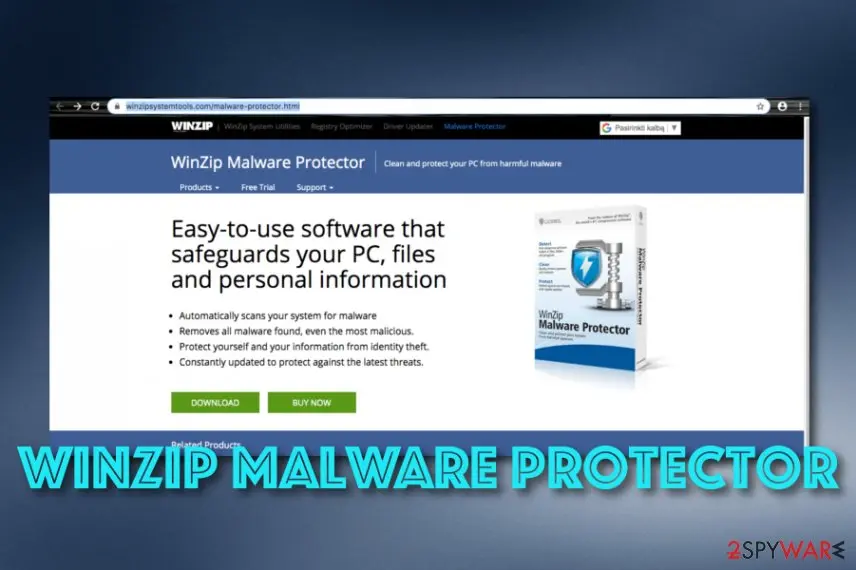
WinZip Malware Protector: summary
| Name | WinZip Malware Protector |
|---|---|
| Type | Rogue system tool/potentially unwanted program |
| Relations | This suspicious software is very similar to another questionable tool known as WinZip Driver Updater that holds the same functionality principle |
| Goal | The main purpose of this program is to provide users with fake scan results that show numerous viruses and issues detected. Afterward, the person is offered to purchase a licensed version of the tool |
| Spreading | Even though this tool is advertised on its official website, users are less likely to receive it from there because of the negative reputation it holds. Mostly, such suspicious security tools come from third-party downloading sources such as cnet.com and when the installation mode is set to Quick |
| Detection names | No Microsoft detection name is known |
| Removal | Scan the PC with security software to find and remove the malware and anything installed with it. Fortect scans Windows for malware and repairs the system files and settings it damaged. Remove it nowTo use the full-featured product, you have to purchase a license for Fortect. The scan is free. |
Show 7 more facts
| Distribution | Not recorded in the old report |
|---|---|
| Damage | Not recorded in the old report |
| Symptoms | An unknown program in Installed apps |
| Evidence | 5 write-ups by security sites; details still limited |
| Program | WinZip Malware Protector |
| First seen | 9 December 2019 |
| Facts checked | 5 October 2026 |
Is WinZip Malware Protector a real security program?
From our report of Dec 2019 · not reviewed since
WinZip Malware Protector - a suspicious protection tool designed for Windows machines
WinZip Malware Protector is considered to be questionable system software that misleads users by providing fake system scan results.
It is initially distributed as a program protecting your PC against malware but is usually regarded by the users as a "WinZip Malware Protector virus". This certain application is compatible with Windows operating systems and is said to monitor their stability and security. In reality, the functionality of this program is very questionable.
Security experts have already investigated another program of the same WinZip Computing branch, the WinZip Driver Updater, which showed similar results. Neither of these programs seems to provide the user with the service they are promoted for. In fact, it has been observed that these system scanners usually are spread through a deceptive marketing method called "bundling" which already raises some doubts about their legitimacy.
Continuously, WinZip Malware Protector modifies the Windows registration point to be able to start automatically when you boot your computer. You might also find your Task Manager, Registry and other locations filled with entries and files that are related to this suspicious tool. What is more, the program is scheduled to launch system scans at regular, predetermined times.
The checkup results that come provided by WinZip Malware Protector are false. The program gathers outdated files, entries, cache and presents these objects as big errors and cyber threats.
As a result, the rogue system tool offers users to download the advanced version of the app that should "fix" all of the issues. However, even if the users pay for the full version of this questionable malware-fighting utility it rarely detects or eliminates any malware.
In fact, there have been reports that after a month, the user's registration key is suddenly rejected, and they are asked to contact the customer support to fix this issue.
In most cases this support is non-responsive, or the user is asked to pay an additional fee for the remote technician to look into the problem. It is advisable to take care of the WinZip Malware Protector removal to avoid additional expenses and replace it with another reliable app.
You should also remove WinZip Malware Protector from your computer system because the tool might truly never leave you alone. It might start dropping alerts that your machine needs a malware scan or that there are some threats discovered that need fixing.
Prevent such content from appearing by getting rid of the tool permanently. Also, if you have found some compromised objects on your PC, you can try repairing them with software such as .
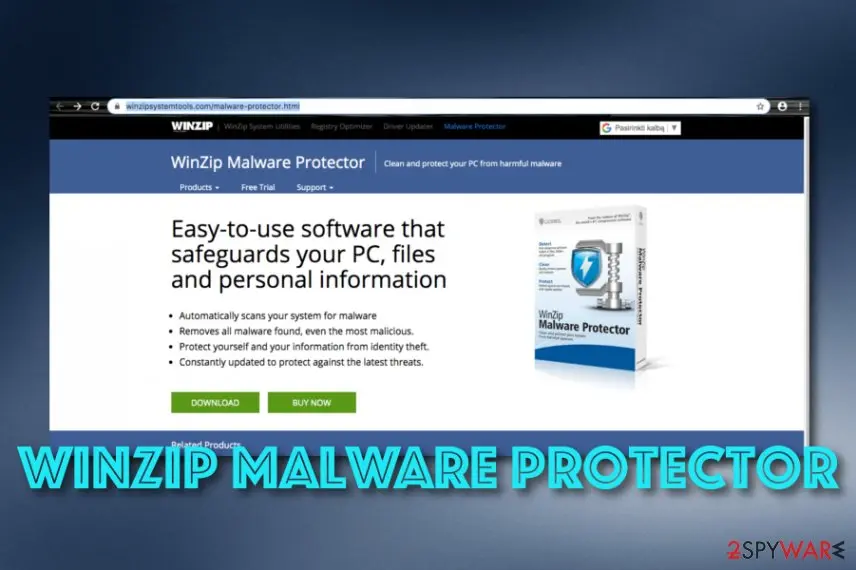
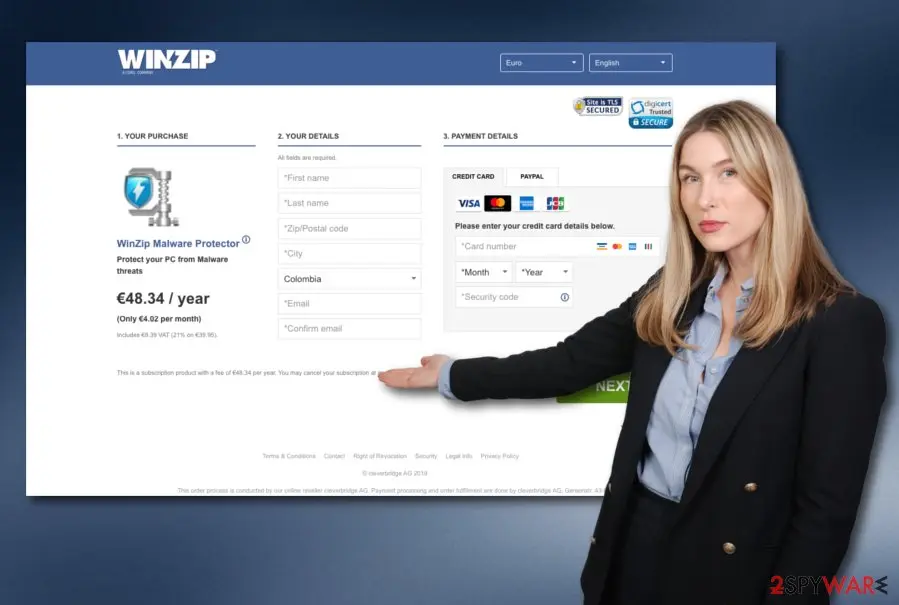
You can find WinZip Malware Protector promoted on winzipsystemtools.com. The developers offer to buy their product for €48.34 per year or €4.02 per month. The rogue tool is advertised as capable of performing regular malware scans, eliminating the most advanced virtual parasites, providing protection from identity theft, updating itself regularly to protect the computer from the most recent malware released.
As you can see, the description of WinZip Malware Protector seems to be nicely-written. You should put no trust in this type of program as it will not bring you any true value.
Besides, if you want to check the true position of your computer security, you should get another reliable tool, scan the system, and measure the received results with the ones that have been provided by WinZip Malware Protector. You should not see any similar threats or issues found.
How WinZip Malware Protector got on your PC
From our report of Dec 2019 · not reviewed since
There are many rogue system tools that include their own distribution sources.
However, people are not very likely to get the software from such sources because of the numerous negative reviews such programs receive online. As the users who do a little research before purchasing software would not download bogus tools on their computers, the program creators have to find some other way to sneak it into the user's computers.
This can be easily achieved through the mentioned "bundling" technique, which allows distributing several programs in singular software packages. PUPs can come into your computer along with PDF creators, readers, music/video players, and similar popular programs. This is very likely to happen if you install software from websites such as cnet.com.
According to NoVirus experts, to avoid such undesirable installations, you should pay more attention to the software installation process. Always use an "Advanced" or "Custom" installation modes and investigate every step carefully. In case you notice suspicious additional programs, terminate their installation by deselecting these programs.
Once you have taken manual actions towards your security, there is another thing you should do. Download and install reliable security software on your computer system that includes a lot of protective features and provides long-term security. Also, make sure that the tool is kept updated regularly.
How to remove WinZip Malware Protector
Nothing it reports is real.
These steps remove it and undo a payment if you made one.
Step 1: Do not pay, and undo a payment if you made one
WinZip Malware Protector reports problems to sell a licence: the "threats" or "errors" it lists are invented or harmless leftovers. If you already paid, ask your card issuer to dispute the charge and cancel the subscription both in the seller's account and through your bank.
If you called a phone number it showed and let someone connect, treat the PC as remotely accessed and remove the remote tool. Uninstalling it from Windows 11 or Windows 10 does not cancel a subscription by itself.
Full procedure with screenshots: What to do after paying a scammer
Step 2: Uninstall WinZip Malware Protector
Open Settings > Apps > Installed apps in Windows 11, or Settings > Apps > Apps & features in Windows 10.
Sort the list by install date and find WinZip Malware Protector, then choose Uninstall from the three-dot menu next to it (in Windows 10, click the entry and then Uninstall).
Remove anything else installed on the same day that you do not recognise, because such programs usually arrive together in one installer. If the uninstaller opens a browser page with an offer or a survey, close it: the program is removed either way.
Full procedure with screenshots: Uninstall a program or app in Windows On uGetFix
Step 3: Remove it from startup
Whatever WinZip Malware Protector installed usually starts with Windows.
Open Task Manager with Ctrl + Shift + Esc, go to Startup apps in Windows 11 or the Startup tab in Windows 10, and disable what you do not know, starting with entries that have an empty Publisher column.
Open file location on the right-click menu shows the file, which helps you decide and tells you what to delete later. Disabling is safe: if something you need stops working, switch it back on.
Full procedure with screenshots: Stop apps from opening at startup On uGetFix
Step 4: Delete the folders left behind
What the uninstaller leaves behind is usually in the user folders. Open File Explorer, switch on View > Show > Hidden items (in Windows 10 View > Hidden items), and go through
%LocalAppData%,%AppData%, %ProgramData% and the two Program Files folders.Sort by Date modified and delete folders that appeared together with the problem and belong to no program you use. Folders with random names that hold
.exe,.dll, .js or .ps1 files are the strongest sign.Full procedure with screenshots: Remove what malware leaves behind in Windows
Step 5: Scan the PC, then run the offline scan
Open Windows Security > Virus & threat protection > Scan options, run a Full scan and remove everything it finds. Then select Microsoft Defender Antivirus (offline scan) and click Scan now: the PC restarts and scans before Windows loads, which finds files that hide while Windows runs.
Save your work first, because the offline scan takes about 15 minutes. Both scans are built into Windows 11 and Windows 10, and a second scanner from another vendor is a useful extra opinion.

Windows 11: Windows Security > Virus & threat protection > Scan options. Full procedure with screenshots: Run a Microsoft Defender Offline scan
Instructions for each browser and system
The detailed steps for every browser and system this guide covers. Open the one you use.
Uninstall from Windows
To eliminate the suspicious program and all its added objects from your Windows computer system, you should apply the following guiding steps:
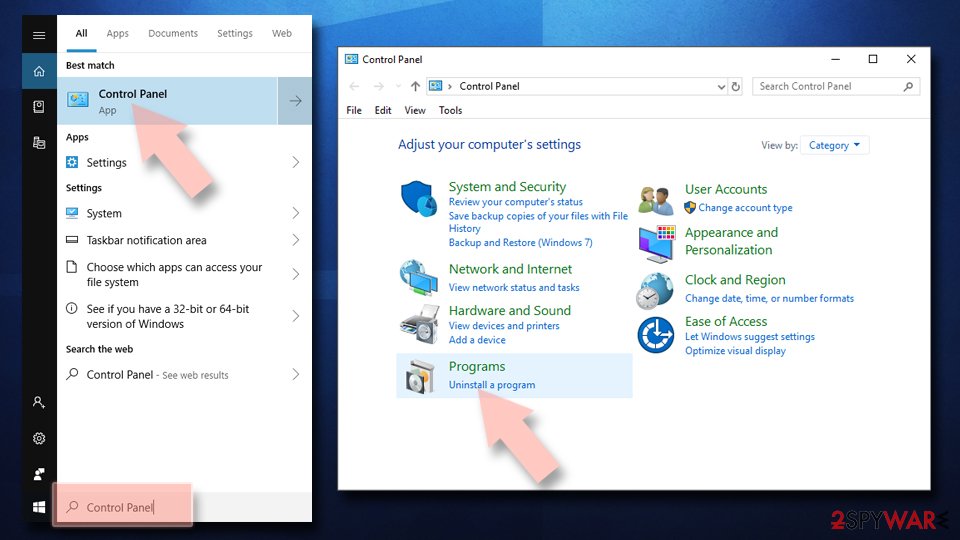
Uninstall from Windows 10/8:
- Type Control Panel into the Windows search box and open the result.
- Under Programs, select Uninstall a program.
Uninstall from Windows 7/XP:
- Click on Windows Start > Control Panel (Windows XP users should click on Add/Remove Programs).
- In Control Panel, select Programs > Uninstall a program.
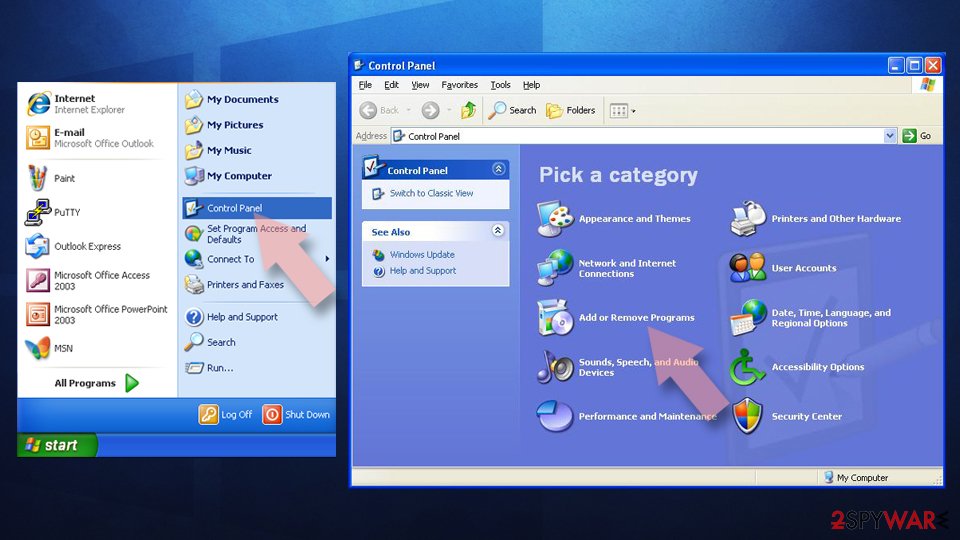
Remove the unwanted program:
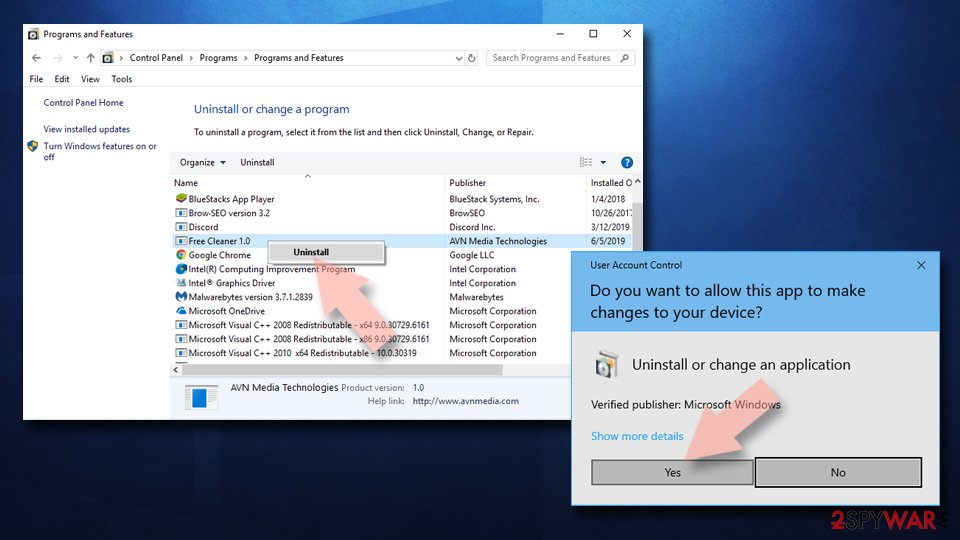
- In the Programs and Features window, look for any recently installed suspicious entries, select them, and click Uninstall.
- If User Account Control appears, click Yes to confirm, then complete the removal.
Protect your privacy - employ a VPN
There are several ways how to make your online time more private - you can access an incognito tab.
However, there is no secret that even in this mode, you are tracked for advertising purposes. There is a way to add an extra layer of protection and create a completely anonymous web browsing practice with the help of VPN. This software reroutes traffic through different servers, thus leaving your IP address and geolocation in disguise.
Besides, it is based on a strict no-log policy, meaning that no data will be recorded, leaked, and available for both first and third parties. The combination of a secure web browser and VPN will let you browse the Internet without a feeling of being spied or targeted by criminals.
No backups? No problem. Use a data recovery tool
If you wonder how data loss can occur, you should not look any further for answers - human errors, malware attacks, hardware failures, power cuts, natural disasters, or even simple negligence.
In some cases, lost files are extremely important, and many straight out panic when such an unfortunate course of events happen. Due to this, you should always ensure that you prepare proper data backups on a regular basis.
If you were caught by surprise and did not have any backups to restore your files from, not everything is lost. is one of the leading file recovery solutions you can find on the market - it is likely to restore even lost emails or data located on an external device.
From our report of Dec 2019 · not reviewed since
The automatical/manual removal process of WinZip Malware Protector
There is no need for keeping WinZip Malware Protector on your Windows computer system as this software will not provide you with many benefits.
Regarding this fact, our recommendation would be to get rid of the rogue software and replace it with a reliable computer tool.
There are two ways how you can remove WinZip Malware Protector. First, you should measure your skills and experience level in the threat elimination field. If you consider yourself to be an advanced user, you can go for the manual elimination steps that have been added to the end of this article.
However, if you do not trust your skills or just have been running into a lack of time, manual WinZip Malware Protector removal might not be for you. What you should try is the automatical elimination technique that requires only downloading and launching a specific malware removal tool.
Questions about WinZip Malware Protector
What is WinZip Malware Protector?
WinZip Malware Protector is a questionable security tool sold on winzipsystemtools.com that claims to scan and protect your PC from malware. However, it delivers fake scan results showing numerous infections that do not exist. The tool costs €48.34 per year and is considered rogue software because it does not provide the protection it advertises.
Does WinZip Malware Protector actually work?
No, WinZip Malware Protector does not provide genuine malware detection or removal. The tool gathers outdated files, cache, and registry entries and presents them as serious cyber threats to frighten users into buying the paid version.
Even after paying for the full version, the application rarely detects or eliminates actual malware, and users have reported their license keys being rejected after a month.
How does WinZip Malware Protector trick users?
WinZip Malware Protector operates by displaying alarming fake scan results and sending repeated notifications that your machine needs scanning or has threats requiring immediate fixing. The fake alerts are designed to create panic and pressure you into upgrading to the paid version. Support for registration key issues is often non-responsive or requires paying an additional fee.
How does WinZip Malware Protector get installed?
WinZip Malware Protector spreads primarily through software bundling, where it comes packaged with other programs from third-party download sites like cnet.com. Users typically receive it when installing free programs with Quick installation settings enabled. The rogue tool is also promoted through deceptive advertising and on websites claiming to offer system optimization.
Is WinZip Malware Protector related to the legitimate WinZip program?
WinZip Malware Protector comes from the WinZip Computing company but is separate from the legitimate WinZip file compression software. The security tool is considered questionable because it uses bundling techniques and provides fake scan results. Security experts have investigated similar WinZip products like WinZip Driver Updater and found comparable deceptive practices.
How do I remove WinZip Malware Protector?
To remove WinZip Malware Protector, use reputable anti-malware software to perform a full system scan that detects and eliminates the rogue tool. The rogue application typically creates entries in Windows Task Manager, Registry, and other system locations that anti-malware software can find and remove. After removal, monitor your system to ensure no alerts from the fake tool reappear.
Should I purchase WinZip Malware Protector if it finds threats?
No, do not purchase WinZip Malware Protector regardless of what threats it claims to find. The scan results are fabricated and designed only to generate sales revenue for the developers. Legitimate security vendors do not operate this way, and paying will not provide any real protection or remove genuine malware from your system.
How can I verify my actual system security?
To accurately assess your computer's security status, use only legitimate, well-known antivirus software from reputable vendors. Run a scan with a trusted security tool and compare results with claims made by WinZip Malware Protector—you should see no similar threats or issues. Never rely on warnings from suspicious security tools, and always download security software from official vendors' websites.
Will Fortect remove WinZip Malware Protector?
Fortect scans Windows for malware and unwanted programs and repairs the system files and settings they change, and its free scan shows what it finds on your PC before you decide anything.
For WinZip Malware Protector, follow the plan above as well: the browser steps take back permissions and settings that no scanner treats as a threat, and uninstalling the program that brought it removes the source.
Run Microsoft Defender's full scan and, if anything was found, its offline scan as a second opinion. If the symptoms are gone after the plan and both scans are clean, there is nothing more to do.
Sources
- Wikipedia: Rogue security software (read October 5, 2026)
- FTC: How to recognize, remove and avoid malware (read October 5, 2026)
- Microsoft Learn: Microsoft Defender Offline (read October 5, 2026)
- Microsoft Learn: How Microsoft names malware (read October 5, 2026)