
XiaoBa ransomware virus: what it is and how to remove it
XiaoBa is a file-encrypting virus that started its activity at the end of October 2017. Originally, it aims at Chinese computer users and encodes their files using RSA-2048 and AES-128 cryptography.
Facts checked October 7, 2026. Removal steps tested on Windows 11 (26H2) and checked against Microsoft's and the browser makers' current documentation. Sections marked as our earlier report are the original text: they describe the threat as it was then and have not been reviewed since. The 2026 status, the removal steps and the questions are current.
Automatic
Get a free scan and check if your PC is infected.
Fortect finds malware, unwanted programs and the Windows damage they leave behind, and repairs it in one pass.
Make sure nothing will rename more files to .adolfhitler: an automatic scan checks the PC first.
Do it yourself · free Remove XiaoBa ransomware virus yourself 6 steps, about 18 minutes, no software needed.
Start the steps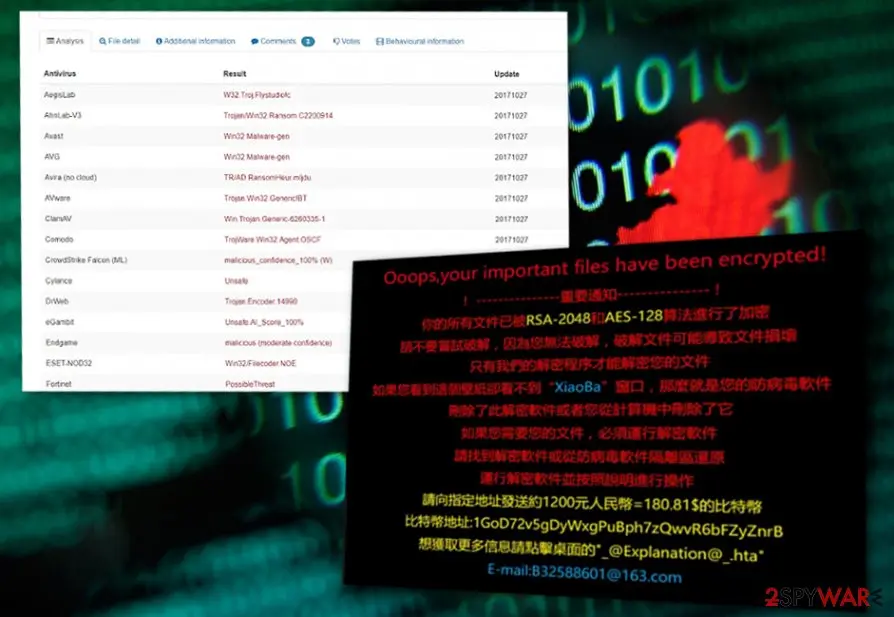
XiaoBa ransomware virus: summary
| Detection names | Microsoft: Program:Win32/Wacapew.C!ml; Avast: Win32:Malware-gen; BitDefender: Gen:Variant.Ransom.208; ESET-NOD32: A Variant Of Win32/Filecoder.NOP; Kaspersky: UDS:Trojan.Win32.Generic |
|---|---|
| Ransom note | _XiaoBa_Info_.hta; the text is quoted in full below |
| Contact | B32588601@163.com, BaYuCheng@yeah.net |
| Encrypted file extension | .adolfhitler |
| Decryptor | No free decryptor is known for this variant; check No More Ransom (nomoreransom.org) for updates |
| Distribution | Not recorded in the old report |
| Removal | Scan the PC with security software to find and remove the malware and anything installed with it. Fortect scans Windows for malware and repairs the system files and settings it damaged. Remove it nowTo use the full-featured product, you have to purchase a license for Fortect. The scan is free. |
Show 11 more facts
| Damage | Not recorded in the old report |
|---|---|
| Name | XiaoBa ransomware virus |
| Type | File-encrypting ransomware |
| Symptoms | Files renamed with a new extension and a ransom note left in folders |
| Evidence | 6 write-ups by security sites; no sample analysed yet |
| Encrypted files | .adolfhitler |
| Attacker contacts | B32588601@163.com |
| Free decryptor | No free decryptor is known (checked 7 October 2026) |
| First seen | 6 June 2018 |
| Microsoft Defender name | Program:Win32/Wacapew.C!ml |
| Facts checked | 7 October 2026 |
Which name will your scanner show?
Microsoft's name for XiaoBa ransomware virus is Program:Win32/Wacapew.C!ml.
Defender sorts threats by category first, so the word before the colon tells you what kind of program was found, even if the family name means nothing to you.
Do not search for a removal tool by the detection name alone; fake "removal tools" use the same keywords. How the naming works is explained in our guide to antivirus detection names.
- File extension:
.adolfhitler - Note file:
_XiaoBa_Info_.hta - Contact:
B32588601@163.com
From our report of Jun 2018 · not reviewed since
More from our earlier report on XiaoBa ransomware virus
- .XiaoBa1, .XiaoBa34 (v 1, 2), .Encrypted[BaYuCheng@yeah.net].XiaBa (v3), .[BaYuCheng@yeah.net].china (v4), .AdolfHitler
- _@XiaoBa@_.bmp, _@Explanation@_.hta, # # DECRYPT MY FILE # #.bmp
- Spam emails, fake updates, etc.
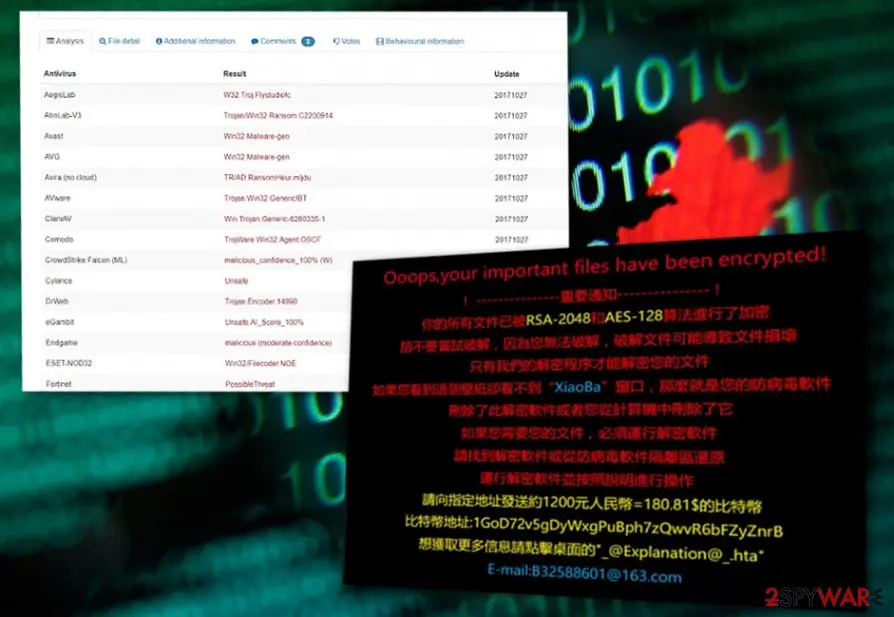
- Ooops, your important files have been encrypted!
- !------ 重要加密 ------ ! 你柏所有文件已被 RSA-2048 AES-128 算法進行了加密 請硕縦破解 , 因為您無 眷破解文件可能導致文壊 這可能會損害他們 只有我們的解密辦捕解密您的文件 如果您看到這個壁紙卻看不到 "XiaoBa" 窗口 , 那麼就是您的防病毒軟件 刪除了此解密軟件或葡恣從計算機中刪除了它 如果您需要您的文件I必須運行解密軟件 請找到解密軟件或從防病毒軟件隔雜區還原 運行解密軟件 , 並按照說明進行操作 請向指定地址發送約1200元人民幣=180.81$的比特幣 比特幣錢包:1GoD72v5gDyWxgPuBph7zQwvR6bFZyZnrB 想獲取更多信息請點擊桌面的 _@Explanation@_.hta E-mail:B32588601@163.com
How XiaoBa ransomware virus behaves
From our report of Jun 2018 · not reviewed since
XiaoBa is a file-encrypting virus that threatens users since 2017
XiaoBa is a file-encrypting virus that started its activity at the end of October 2017.
Originally, it aims at Chinese computer users and encodes their files using RSA-2048 and AES-128 cryptography. Encrypted files become unusable due to the appended file extensions - .XiaoBa1 or .XiaoBa34.
However, in June 2018, a variant of the virus has been detected. It seems that developers decided to launch international cyber attacks and aims at English-speaking computer users. The latest version of ransomware locks data with .AdolfHitler file extension.
It seems that XiaoBa virus arrives on the system with the help of malicious spam emails. When users open an obfuscated attachment, malware payload is downloaded and executed on the computer. Following data encryption, ransomware explains how victims can recover their files in two ransom notes - _@XiaoBa@_.bmp and_@Explanation@_.hta (the note greatly resembles the one used by WannaCry ransomware).
The second variant of XiaoBa ransomware came out later that year in November. Because the virus used FlyStudio adware trojan, this version was also dubbed as FlyStudio ransomware. Victims are asked to pay 250 RMB ($37.7) in BTC and contact cybercrooks via B32588601@163.com email. Once inside the system and finished with its file encryption activity, virus displays such ransom note:
Though the virus is not as elaborate as WannaCry virus, it is capable of deleting shadow volume copies. What is more, the virus also disables startup repair functions, which only makes XiaoBa removal more complicated.
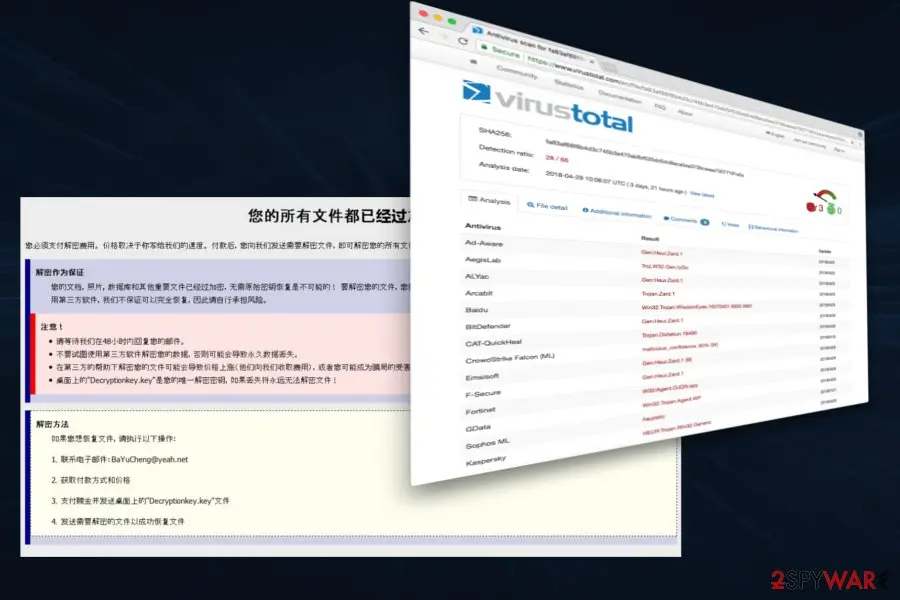
Next, at the end of February 2018, cybersecurity experts detected the third variant of XiaoBa ransomware, which appends the .Encrypted[BaYuCheng@yeah.net].XiaBa file extension to encrypted files. It also generates a ransom note named _XiaoBa_Info_.hta, which introduces the ransomware and indicates how much the victim has to pay for XiaoBa decryptor. Besides, this infection plays a voiceover from a VBA file and distinguishes from the others due to extremely high CPU consumption.
Besides, the ransomware has also been found to install these three files:
The above-given files are associated with the first XiaoBa malware version, while the executable pdf_20180118.exe has exceptionally been found in the third virus version.
While the original version is oriented to Chinese-speaking users, the third version might also seek for Japanese computer users' money as the picture it generates on the desktop features Japanese characters.
The newest variant was discovered by MalwareHunterTeam in early May 2018; it came back with a new extension - .[BaYuCheng@yeah.net].china. Security experts note that it is the first variation of the virus that uses a country name in the file appendix. The ransom note is very similar to the previous version; however, it is written in Chinese only. It seems to be actively spreading via fake Flash updates.
The fact that it is written in a traditional and not simplified version of Chinese, sparks doubts about the initial target. In case victims run into technical difficulties, they can contact the perpetrators via B32588601@163.com email address.
It is not recommended to remit the payment but remove XiaoBa ransomware instead. or might be of use in this situation. Even if the malware deletes shadow volume copies in advance, you can recover the data with the assistance of online backup copies if you have set up them in advance.
- _@XiaoBa@_.bmp
- _@Explanation@_.htaa
- xiaoba.exe
From our report of Jun 2018 · not reviewed since
XiaoBa started using .AdolfHitler file extension to victims' personal files
In June 2018, malware researchers reported that new variant of ransomware emerged.
Malware is executed from New Folder.exe file which typically is dropped from the malicious email attachment. Immediately it starts scanning the system and looks for the file to encrypt.
This time creators of malware launched a campaign targeted at English-speaking computer users, and use the name of a German historic figure. During data encryption, it appends .AdolfHitler file extension.
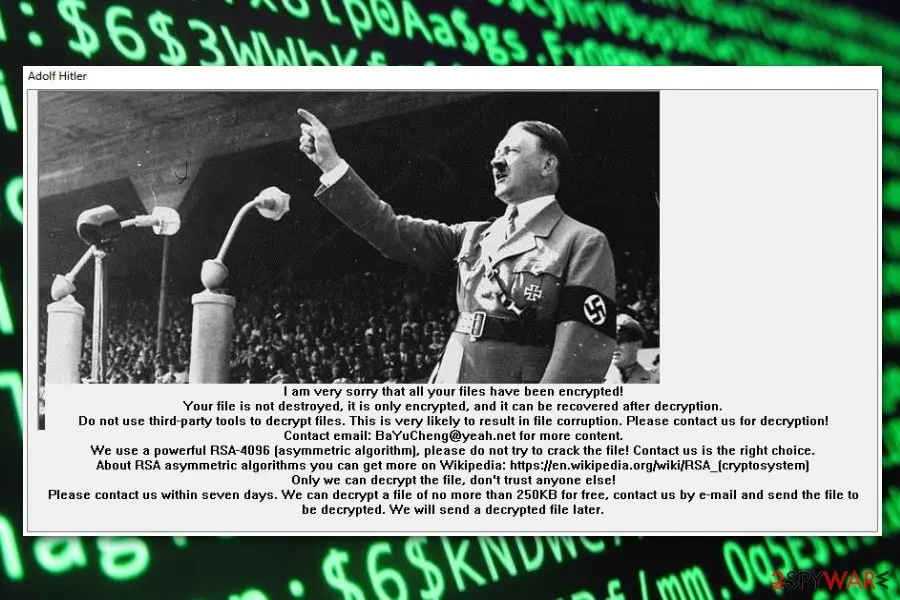
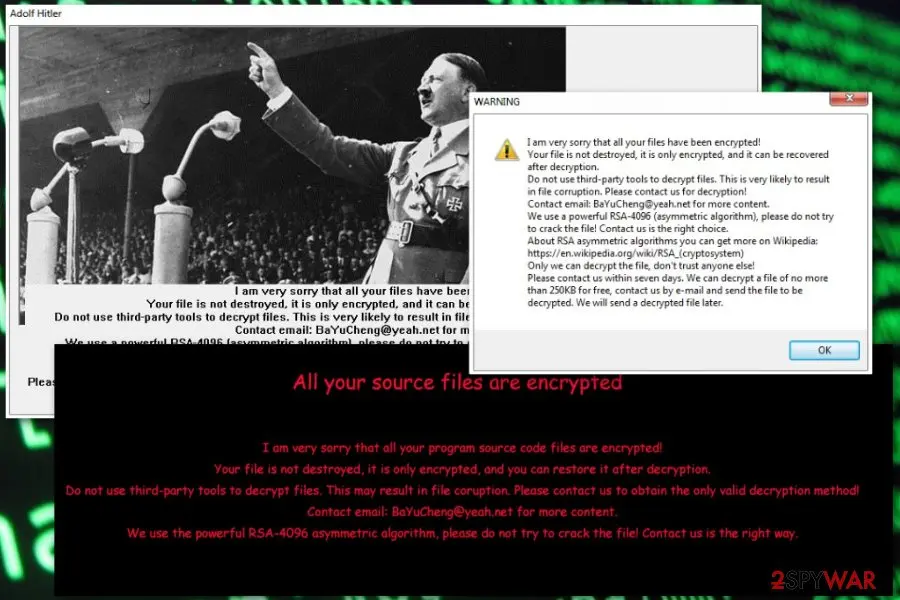
After that, it provides data recovery instructions in # # DECRYPT MY FILE # #.bmp which becomes affected computer's wallpaper. Additionally, it delivers a pop-up window informing about ransomware attack and plays audio in the background. Thus, this cyber attack is loud and cannot be overlooked.
In the pop-up window, authors of the XiaoBa AdolfHitler ransomware informs that files are encrypted using RSA-4096 encryption and can be decrypted only with a specific software. In order to take this offer, victims have to send an email to BaYuCheng@yeah.net in seven days time. The new background picture also provides the same threatening message:
However, security specialists do not recommend following hackers' instructions. Crooks may not provide the decryption software once they receive the ransom. Hence, instead of risking to lose the money, remove .AdolfHitler file virus from the machine with anti-malware software.
From our report of Jun 2018 · not reviewed since
Cyber criminals might use multiple methods to spread ransomware
The malware is likely to be spread via typical means of distribution.
You can get infected with ransomware threats via spam emails, trojans, corrupted apps, and extensions. Exploit kits are also known to help distribute certain ransomware, but at the moment, there is no information whether this particular threat uses the services of these hacking tools.
Therefore, it is crucial to pay attention to the received spam folder. Even if the email urges to open a highly important email attachment, verify the sender before extracting the contents. Cyber villains prefer targeting users with invoices, package delivery notices, etc.
In addition, fortify the overall protection of the device with a few different type applications. Do not download content from websites with no HTTPS protocol or crowded with ads. These tips should assist you in warding off XiaoBa hijack in the future.
The XiaoBa ransomware virus ransom note
I am very sorry that all your files have been encrypted!
Your file i snot destroyed, it is only encrypted, and it can be recovered after decryption.
Do not use third-party tools to decrypt files. This is very likely to result in file corruption. Please contact us for decryption!
Contact email: BaYuCheng@yeah.net for more content.
We use the powerful RSA-4906 asymetric algorithm, please fo not try to crack the file! Contact us the right way.
How to remove XiaoBa ransomware virus
Tools you'll need
All of these are free except where noted. Download them on a clean device if the infected PC is offline.
- A USB stick: to keep the ransom note, two or three encrypted files and screenshots off the infected PC.
- Microsoft Defender Offline: built into Windows 11 and Windows 10; scans before Windows starts, so running malware cannot hide.
- Microsoft Safety Scanner: a second, portable scanner with current signatures; each download works for 10 days.
- ID Ransomware: identifies the family from the note and one encrypted file and says whether a decryptor exists.
- No More Ransom: the free decryptors from police and security companies; check it again every few months.
- Fortect (optional): scans Windows for malware and repairs the system files and settings it damaged. The free scan is in the box above.
How to remove XiaoBa ransomware virus and get your files back
Work in this order.
Disconnecting comes first, removal comes before any restore, and nothing here asks you to contact the attackers.
Step 1: Disconnect the PC and unplug backup drives
Unplug the network cable or turn off Wi-Fi, and disconnect USB drives, external disks and network shares, so XiaoBa ransomware virus cannot reach more files. Pause OneDrive, Google Drive or Dropbox sync, because synced folders upload the encrypted copies over the good ones.
Leave the PC on but offline while you read the next steps, since a restart can let the ransomware run again. This applies to Windows 11 and Windows 10 alike.
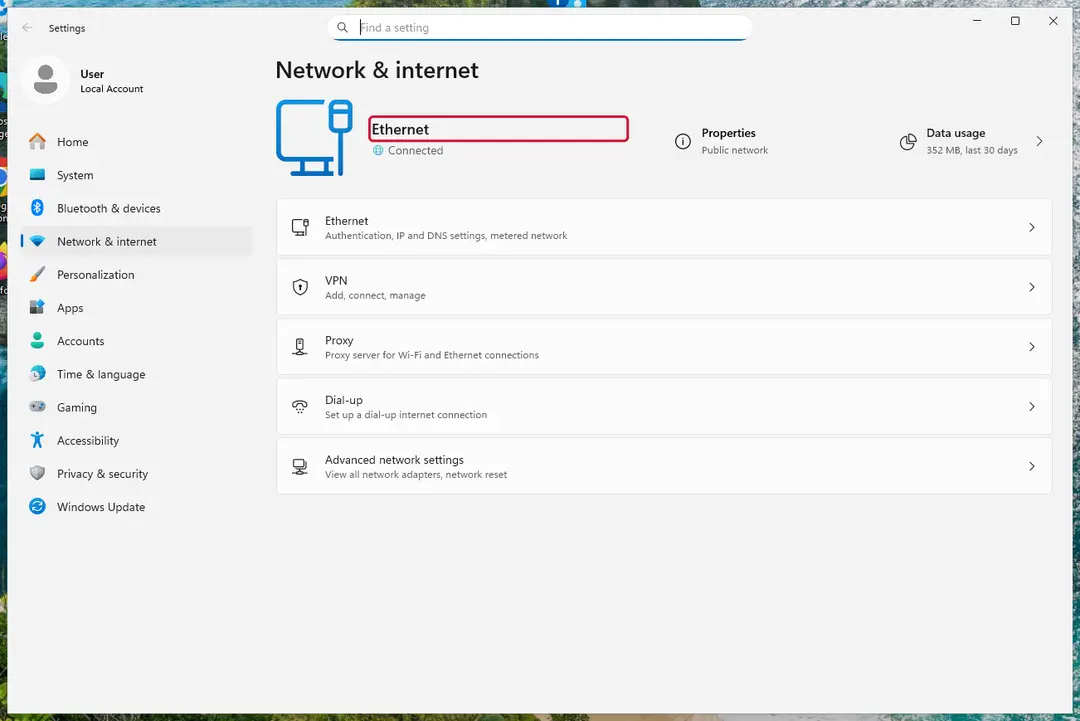
Windows 11: turn off Wi-Fi to take the PC offline. Full procedure with screenshots: Ransomware: first steps, finding a decryptor and recovering files
Step 2: Save the ransom note and confirm the family
Your files now end in
.adolfhitlerand the instructions are in_XiaoBa_Info_.hta. Save both to a USB stick, a copy of the note and two small encrypted files, before anything else.On another device, check them with ID Ransomware or Crypto Sheriff: the family name decides which decryptor, if any, can help. Keep the note's ID and contact line for your report.
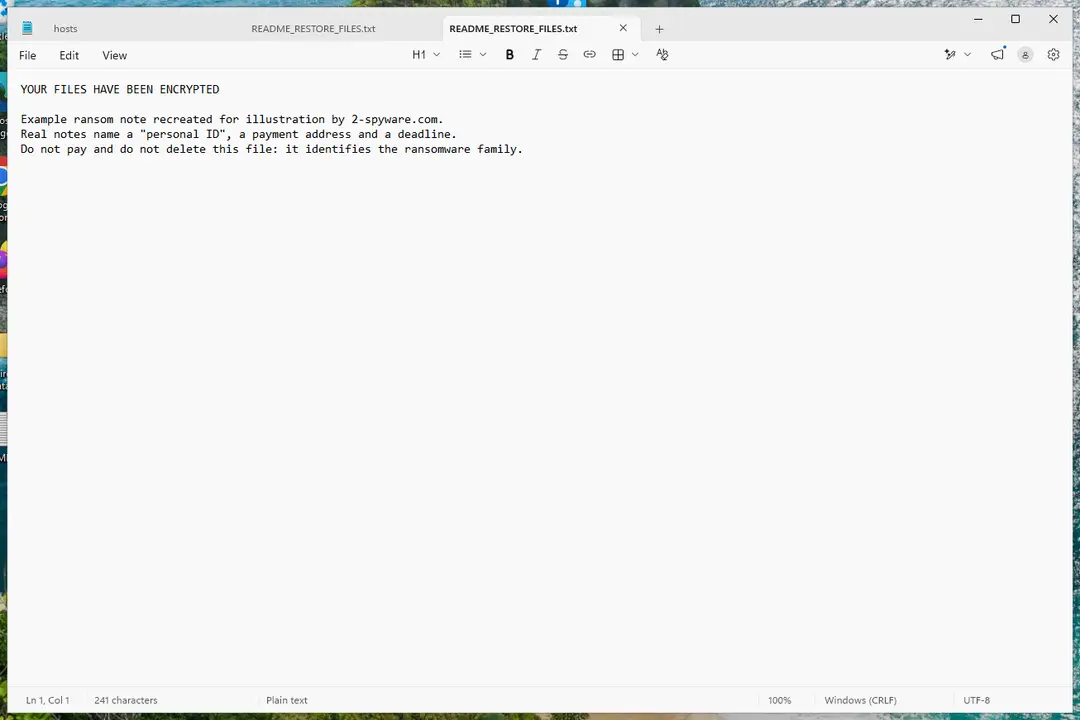
Windows 11: the ransom note and encrypted files to copy for identification. Full procedure with screenshots: Ransomware: first steps, finding a decryptor and recovering files
Step 3: Check for a free decryptor
Our last check found that for XiaoBa ransomware virus, no free decryptor is known (checked 7 October 2026). Look again yourself in the No More Ransom list and the free decryptor pages of Emsisoft, Avast and Kaspersky, which add new families every year.
A decryptor needs the ransomware gone first, or it encrypts the files again. Keep at least one copy of the encrypted files on an external drive, even if no tool works yet.
Full procedure with screenshots: Ransomware: first steps, finding a decryptor and recovering files
Step 4: Remove the ransomware before you restore or decrypt
Removing XiaoBa ransomware virus does not bring the files back, but it has to come first. Start with Defender's Full scan, then the offline scan from the same Scan options page, which checks the disk before Windows loads.
If the scan cannot start, use Safe Mode with Networking. Delete the ransom notes only after you have saved a copy, because removal tools sometimes leave them behind on Windows 11 and Windows 10.

Windows 11: Windows Security > Virus & threat protection > Scan options. Full procedure with screenshots: Run a Microsoft Defender Offline scan
Step 5: Look for shadow copies of the files
Windows keeps shadow copies for restore points and backups, and some ransomware fails to delete them.
vssadmin list shadowsin an administrator Command Prompt tells you at once whether any exist.If they do, right-click the folder that held your files, open Properties > Previous Versions, select a version from before the attack, and click Open to check it before you Restore or copy the files out. Windows 11 and Windows 10 both have the tab.
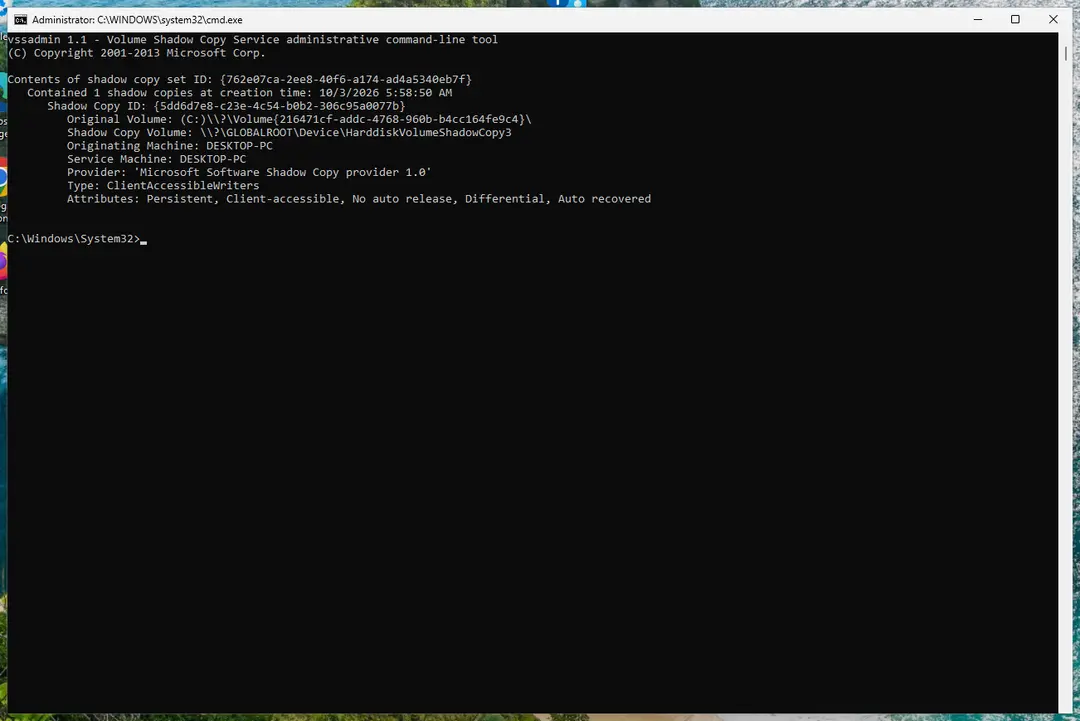
Windows 11: vssadmin list shadows shows whether shadow copies exist. Full procedure with screenshots: Ransomware: first steps, finding a decryptor and recovering files
Step 6: Restore the files from a backup or recover deleted originals
A backup made before the attack is the surest way back. Connect it only once the PC is clean, then restore from File History, Windows Backup, OneDrive's Restore your OneDrive or your own external copies.
Without a backup, try file recovery: the originals that XiaoBa ransomware virus deleted may still be on the disk until something overwrites them. Install nothing new on the drive you want to recover from on the Windows 11 or Windows 10 PC.
Full procedure with screenshots: Recover deleted files (Recycle Bin, backups, OneDrive) On uGetFix
Instructions for each browser and system
The detailed steps for every browser and system this guide covers. Open the one you use.
Manual removal using Safe Mode
Important! →
Manual removal guide might be too complicated for regular computer users. It requires advanced IT knowledge to be performed correctly (if vital system files are removed or damaged, it might result in full Windows compromise), and it also might take hours to complete. Therefore, we highly advise using the automatic method provided above instead.
Step 1. Access Safe Mode with Networking
Manual malware removal should be best performed in the Safe Mode environment.
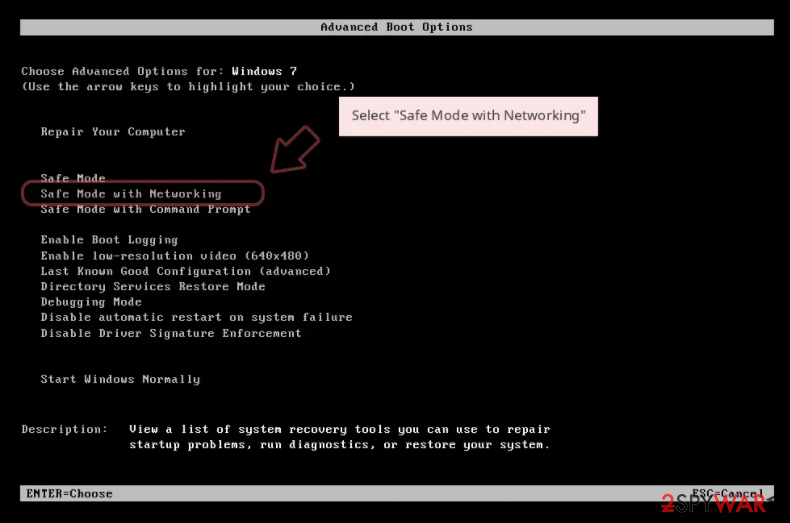
Windows 7 / Vista / XP
- Click Start > Shutdown > Restart > OK.
- When your computer becomes active, start pressing F8 button (if that does not work, try F2, F12, Del, etc. - it all depends on your motherboard model) multiple times until you see the Advanced Boot Options window.
- Select Safe Mode with Networking from the list.
Windows 10 / Windows 8
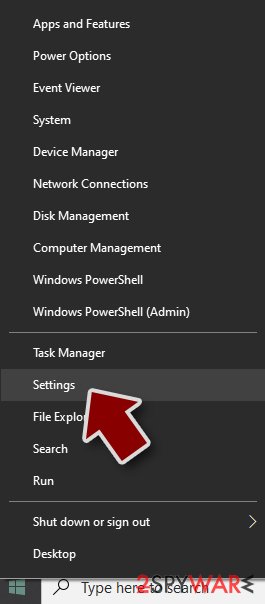
- Right-click on Start button and select Settings.
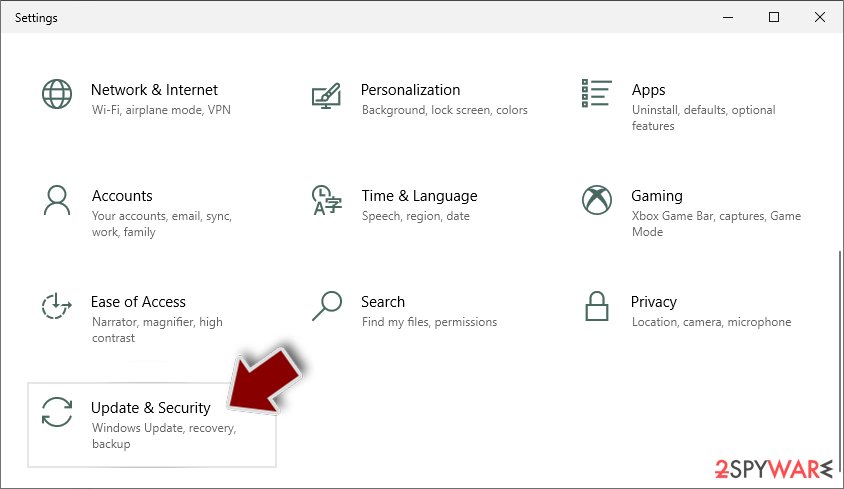
- Scroll down to pick Update & Security.
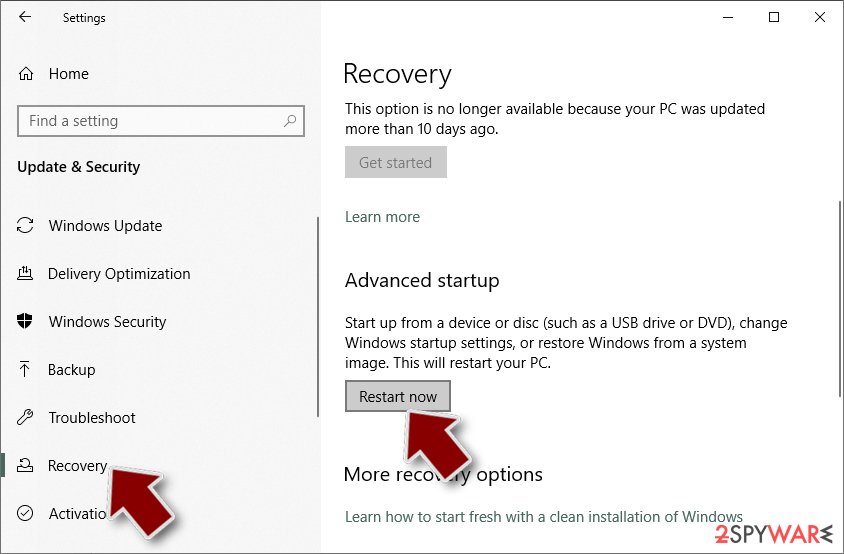
- On the left side of the window, pick Recovery.
- Now scroll down to find Advanced Startup section.
- Click Restart now.
- Select Troubleshoot.
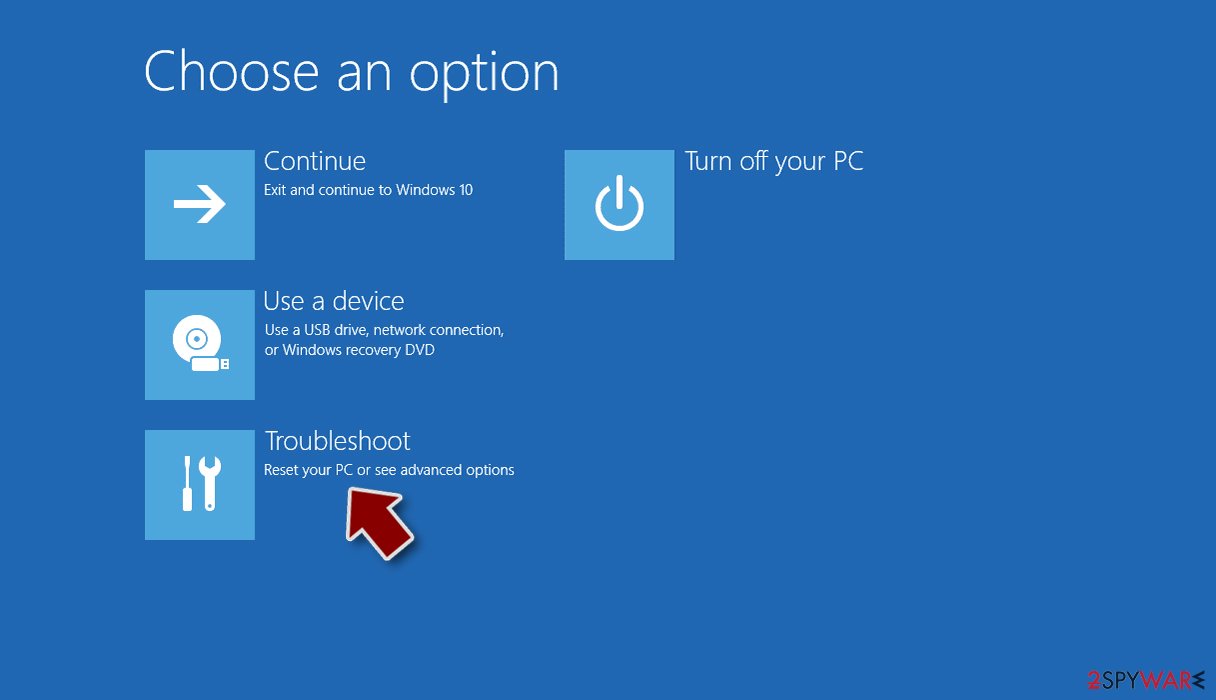
- Go to Advanced options.
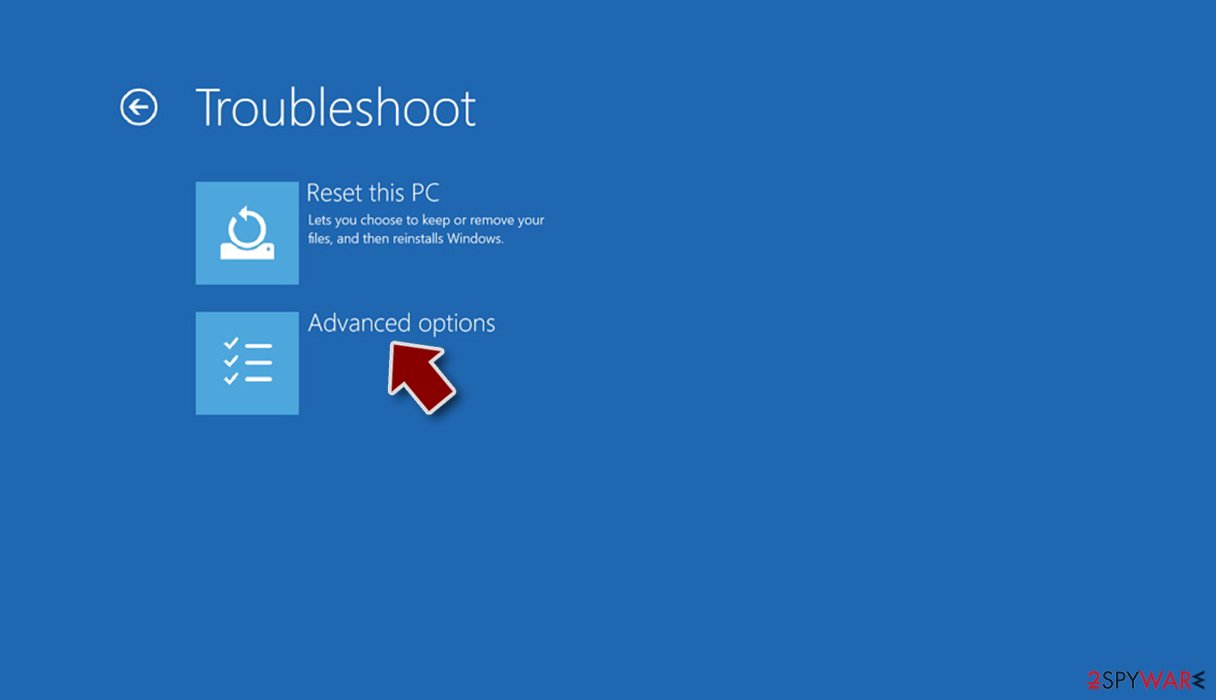
- Select Startup Settings.
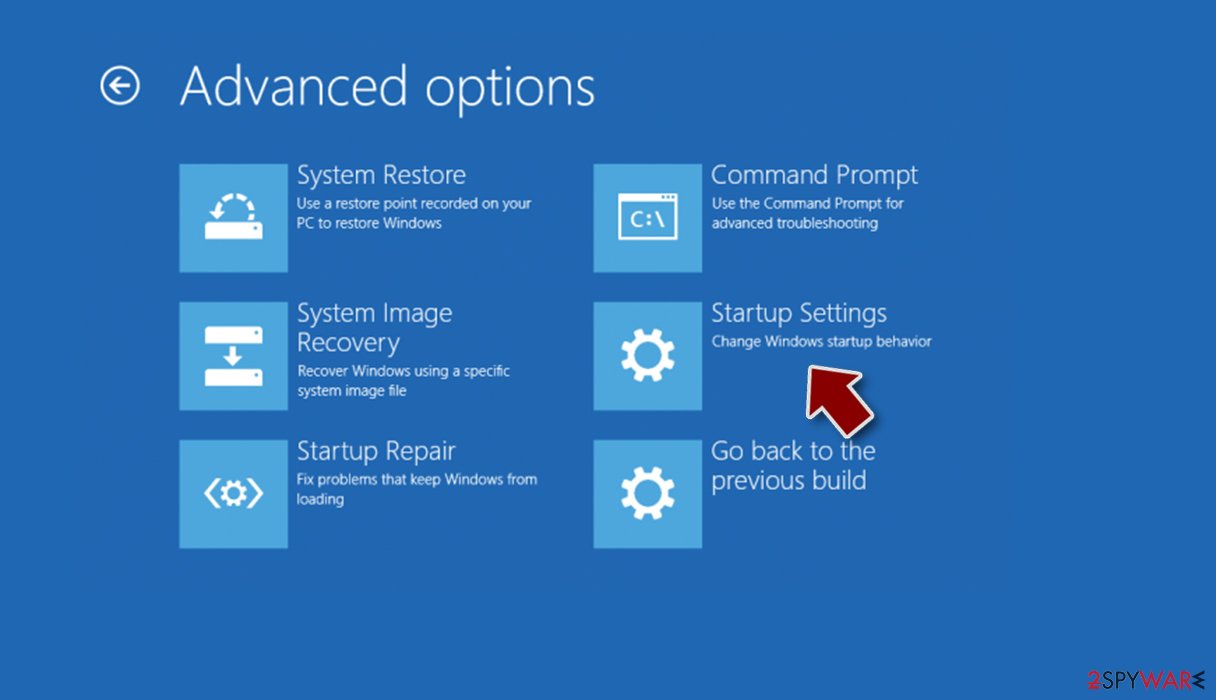
- Press Restart.
- Now press 5 or click 5) Enable Safe Mode with Networking.
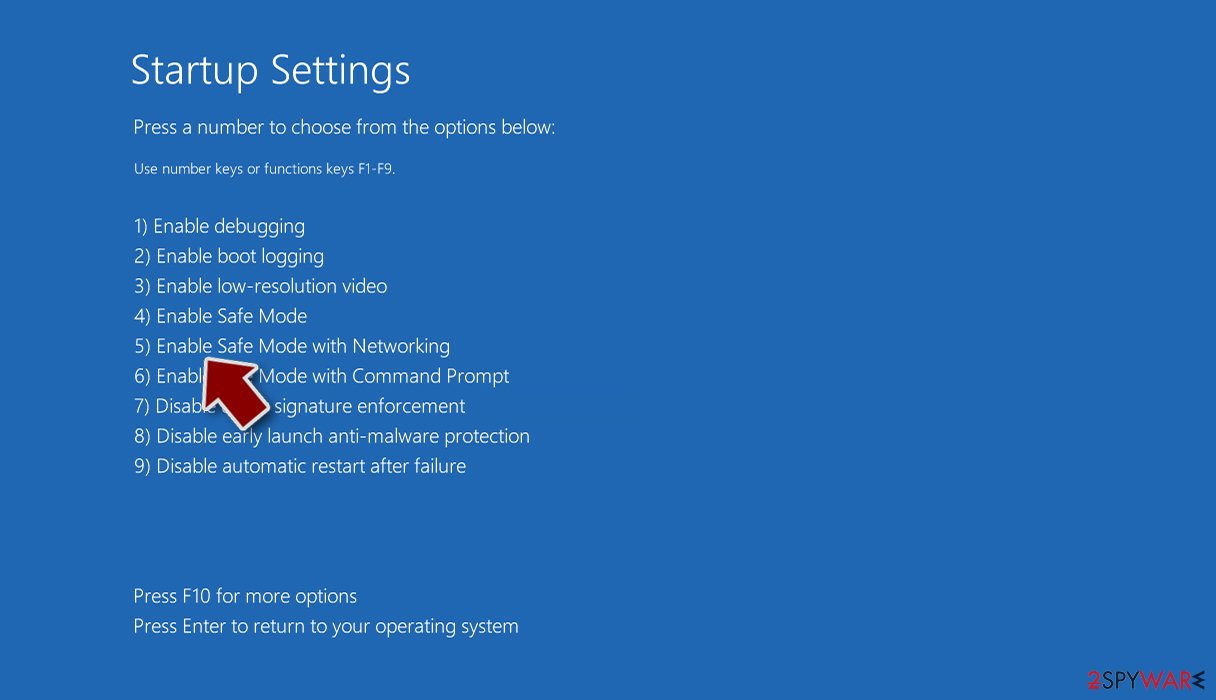
Step 2. Shut down suspicious processes
Windows Task Manager is a useful tool that shows all the processes running in the background. If malware is running a process, you need to shut it down:
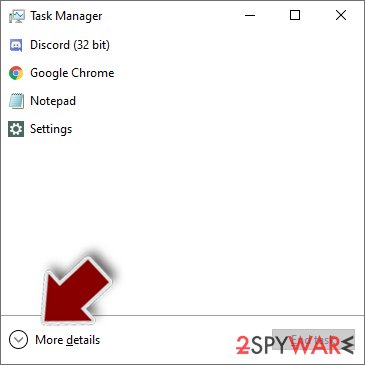
- Press Ctrl + Shift + Esc on your keyboard to open Windows Task Manager.
- Click on More details.
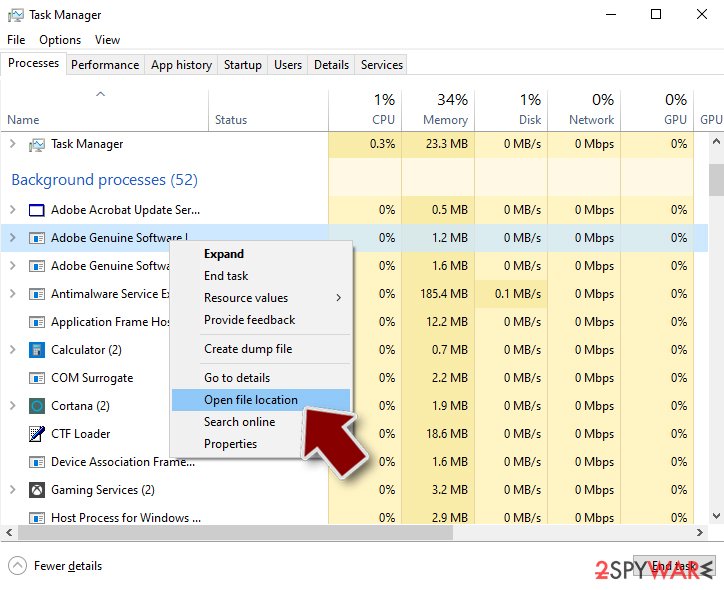
- Scroll down to Background processes section, and look for anything suspicious.
- Right-click and select Open file location.
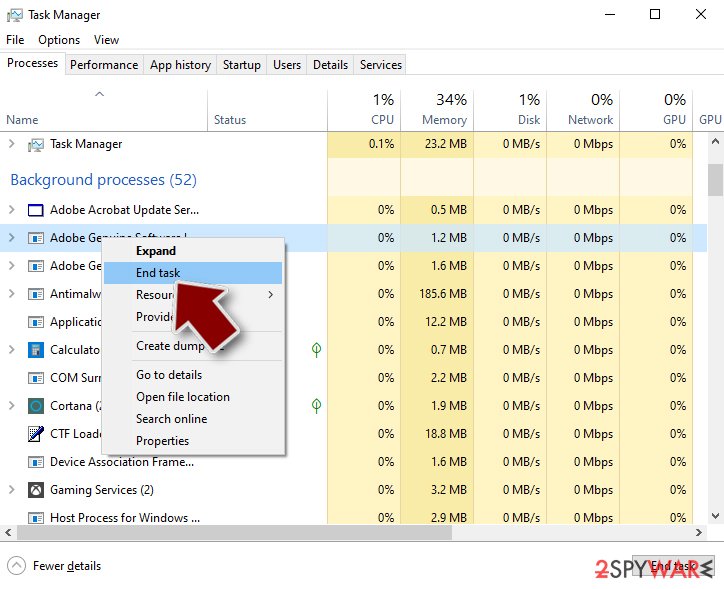
- Go back to the process, right-click and pick End Task.
- Delete the contents of the malicious folder.
Step 3. Check program Startup
- Press Ctrl + Shift + Esc on your keyboard to open Windows Task Manager.
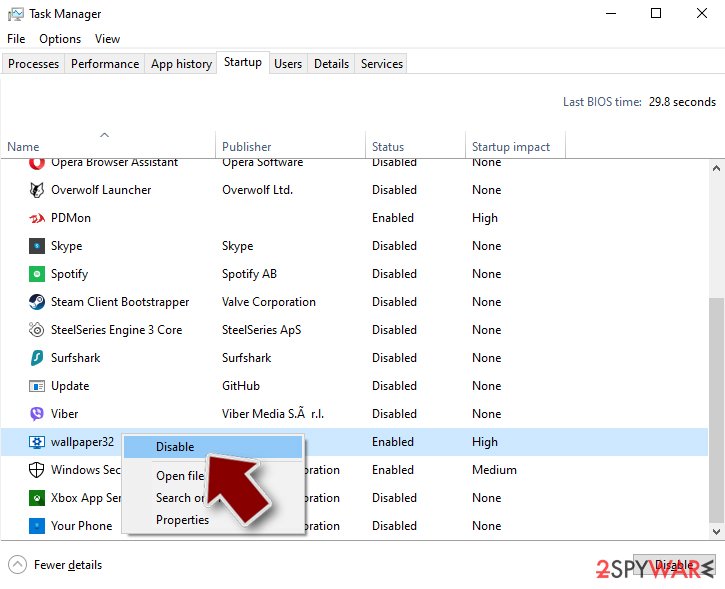
- Go to Startup tab.
- Right-click on the suspicious program and pick Disable.
Step 4. Delete virus files
Malware-related files can be found in various places within your computer. Here are instructions that could help you find them:
- Type in Disk Cleanup in Windows search and press Enter.
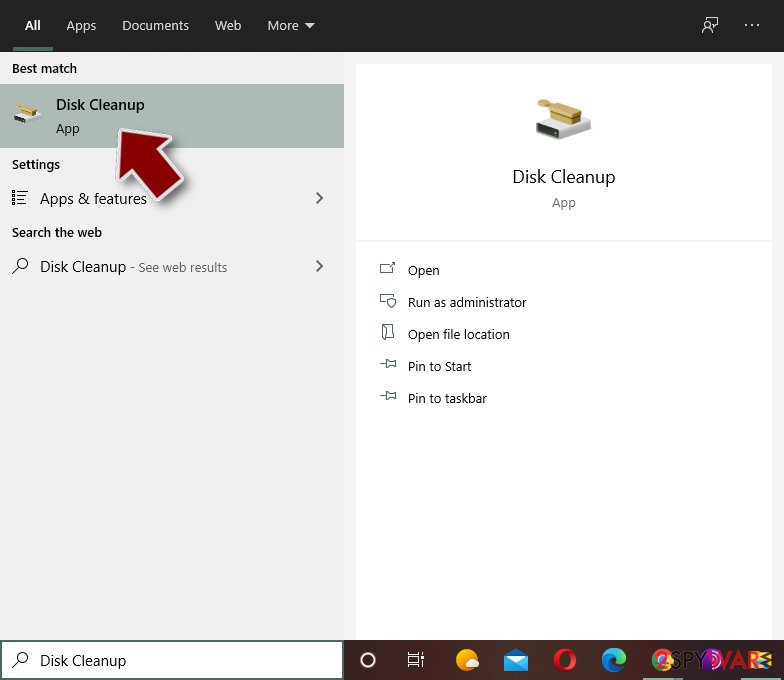
- Select the drive you want to clean (C: is your main drive by default and is likely to be the one that has malicious files in).
- Scroll through the Files to delete list and select the following:
Temporary Internet Files
Downloads
Recycle Bin
Temporary files - Pick Clean up system files.
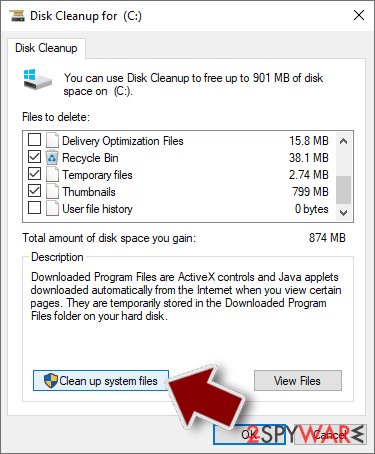
- You can also look for other malicious files hidden in the following folders (type these entries in Windows Search and press Enter):
%AppData%
%LocalAppData%
%ProgramData%
%WinDir%
After you are finished, reboot the PC in normal mode.
From our report of Jun 2018 · not reviewed since
XiaoBa ransomware removal guidelines
Make XiaoBa removal your top priority.
Since there are no guarantees that you will retrieve the data, it is necessary to eliminate the virus entirely. Since the crypto-virus meddles with the system files, it is not surprising if you may not succeed in eliminating at first attempt.
Reboot the computer in Safe Mode and launch the security tool. It should remove XiaoBa virus within a couple of minutes. If you are not sure what program to use, we suggest using or . If you did not make online backup copies in advance, you might need to wait for the free decryption tool to be released.
[GI=method-2]Enter advanced setup settings and perform System Restore, if Safe Mode does not grant you access to the computer. After that, you should be able to run the security tool and remove XiaoBa virus.
This tool is designed to help users recover files after an unexpected system crash. On the other hand, it might be a practical tool in the case of XiaoBa hijack.
Try Windows Previous Versions feature
This Windows feature allows recovering individual files if System Restore was enabled before ransomware attack.
Use ShadowExplorer if ransomware did not delete Shadow Volume Copies
XiaoBa decryptor is not available yet.
Report it and recover your files
Report it
Report the attack even if you do not expect the files back: insurers and banks ask for the report number, and police use the contacts in the note to link cases.
- United States
- FBI IC3 · FTC ReportFraud
- United Kingdom
- Report Fraud (formerly Action Fraud) · NCSC
- Australia
- ReportCyber (ASD)
- EU countries
- Europol: national reporting sites
Give the victim ID, the note and the date the files were encrypted. A business that holds personal data may also have to notify its data protection authority, in the EU within 72 hours.
Make the next attack harmless
XiaoBa ransomware virus could only hurt the files that had no second copy, and the signs (files that end in .adolfhitler and no longer open) showed exactly which ones those were. The 3-2-1 rule fixes that:
- three copies
- two media
- one disconnected
A practical version for a home PC: OneDrive or another cloud backup with version history, plus an external disk that you plug in once a week for File History and then unplug. Test a restore now and then by opening a few files from the backup on another device.
Details, schedules and what not to back up are in our 3-2-1 backup guide for Windows.
Access your website securely from any location
When you work on the domain, site, blog, or different project that requires constant management, content creation, or coding, you may need to connect to the server and content management service more often. The best solution for creating a tighter network could be a dedicated/fixed IP address.
If you make your IP address static and set to your device, you can connect to the CMS from any location and do not create any additional issues for the server or network manager that needs to monitor connections and activities. VPN software providers like can help you with such settings and offer the option to control the online reputation and manage projects easily from any part of the world.
Recover files after data-affecting malware attacks
While much of the data can be accidentally deleted due to various reasons, malware is one of the main culprits that can cause loss of pictures, documents, videos, and other important files.
More serious malware infections lead to significant data loss when your documents, system files, and images get encrypted. In particular, ransomware is is a type of malware that focuses on such functions, so your files become useless without an ability to access them.
Even though there is little to no possibility to recover after file-locking threats, some applications have features for data recovery in the system. In some cases, can also help to recover at least some portion of your data after data-locking virus infection or general cyber infection.
Questions about XiaoBa ransomware virus
Is there a decryptor for .adolfhitler files?
That depends on the family behind the .adolfhitler extension, which this guide cannot confirm yet from the reports alone. Check No More Ransom and ID Ransomware with your ransom note and one encrypted file; they list families with free tools.
If none exists today, keep the encrypted files and a copy of the note on a separate drive, because decryptors are sometimes published months later after flaws are found or servers are seized. Never buy a decryptor from a website that is not the security company that made it.
How do I open .adolfhitler files?
You cannot open them by renaming or by choosing another program. The .adolfhitler ending shows that XiaoBa ransomware virus encrypted the content, and only the matching key can reverse it. Renaming a file back to .docx or .jpg changes nothing except the icon, and it can confuse a future decryptor, so leave the names as they are.
To get the content back, use a backup, an unencrypted copy elsewhere, or a decryptor listed on No More Ransom if one exists for XiaoBa ransomware virus. Store the encrypted files on an external disk until then.
Did XiaoBa ransomware virus steal my files or passwords?
We do not know yet. Nothing published so far shows data theft by XiaoBa ransomware virus, but the only confirmed sign is files that end in .adolfhitler and no longer open, which says nothing about what happened before. Many current ransomware attacks copy files or run a password stealer first, so it is wise to act as if they did.
From a clean device, change the passwords that were saved in the browsers on this PC, starting with e-mail and banking, sign out of all sessions and turn on two-step verification. Watch bank statements and account activity for the next few weeks.
Should I pay the ransom?
We advise against it, and so do the FBI, Europol and national cyber agencies. Payment does not guarantee a working tool: some attackers never reply, some tools damage files, and some variants have no decryptor at all. Paying also funds further attacks and can make you a target again.
Before considering payment, try every recovery option in this guide and report the attack. Companies must involve their legal adviser and insurer, because payments to sanctioned groups can be illegal. If files are truly irreplaceable, store the encrypted copies and wait; decryptors sometimes appear later.
Can a data-recovery company decrypt my files for a fee?
Only if a decryptor already exists or the company pays the attackers for you. Some "ransomware recovery" services advertise that they can decrypt families with no known flaw; in practice they negotiate with the attackers and add their own fee. Others use the same free tools listed on No More Ransom.
Before you hire anyone, ask in writing how they will recover the files, whether they will contact the attackers and what happens if they fail. A legitimate service answers clearly. If a free decryptor exists for your family, you can run it yourself.
How did XiaoBa ransomware virus get on my computer?
The way XiaoBa ransomware virus spreads has not been documented yet, so look at your own recent activity. On home PCs, ransomware most often comes with cracked programs, game cheats, key generators and fake updates, or with an e-mail attachment that was opened. On business networks, attackers usually log in through Remote Desktop with a stolen or guessed password.
Think back to what was downloaded or installed in the days before files that end in .adolfhitler and no longer open, and check the Downloads folder and Installed apps sorted by date. Keep anything suspicious for your report, but do not run it again.
Is XiaoBa ransomware virus the same as other ransomware with a similar name?
Not necessarily. Ransomware names come from the file extension, the note or a word in the code, so unrelated families often end up with similar names, and one family can appear under several names. The difference matters: a decryptor or advice for one family does not fit another and can damage files.
Compare the ending added to your files and the exact name of the note with the summary table at the top of this guide, then upload the note and one encrypted file to ID Ransomware from a clean device. If the result names another family, follow the guide for that family instead.
What does _XiaoBa_Info_.hta tell me about the ransomware?
Quite a lot. The file name _XiaoBa_Info_.hta, the wording, the contact addresses and the format of the personal ID are typical for each family. Uploading the note together with one encrypted file to ID Ransomware or No More Ransom's Crypto Sheriff usually names the family within seconds.
That name decides your options: some families have free decryptors, some can be partially recovered, and some cannot be decrypted at all. The note's claims about stolen data should be taken seriously but not at face value.
Should I reinstall Windows after the .adolfhitler attack?
Reinstalling removes the ransomware but not the encryption: your files ending in .adolfhitler stay encrypted afterwards. So first copy the encrypted files and the ransom note to a separate drive, in case a decryptor appears later. Then decide:
- a clean-up with an offline scan is often enough for home PCs
- while a full reset is safer if remote access was involved
- scans keep finding new items
Restore your backups only after the PC is clean, and change passwords from another device.
Will Fortect remove XiaoBa ransomware virus?
Fortect scans Windows for malware and unwanted programs and repairs the system files and settings they change, and its free scan shows what it finds on your PC before you decide anything.
For XiaoBa ransomware virus, follow the plan above as well: the browser steps take back permissions and settings that no scanner treats as a threat, and uninstalling the program that brought it removes the source.
Run Microsoft Defender's full scan and, if anything was found, its offline scan as a second opinion. If the symptoms are gone after the plan and both scans are clean, there is nothing more to do.
Sources
- Twitter: XiaoBa ransomware: a Chinese junk (read October 7, 2026)
- Twitter: Chinese FlyStudio adware trojan combined with ransomware (read October 7, 2026)
- Microsoft Official Site: Volume Shadow Copy Service (read October 7, 2026)
- Twitter: MalwareHunterTeam (read October 7, 2026)
- CISA: StopRansomware (read October 7, 2026)