Beast - Jan 2021 update
Beast Removal Guide
What is Beast?
Beast – a malicious tool that can give access to your computer to cybercriminals

Beast is just another virus that belongs to a broad family of Remote Administration Tools (if used illegally, they are referred to as Remote Administration Trojans). The author of this threat is a known hacker known as Tataye. As we know, the first versions of Beast appeared from April 2001 to March 2004.
This threat is written in Delphi and is compressed with ASPack. Beware that RATs are actively spread on the Internet at the moment, so you should think about a reputable anti-spyware that could help you to prevent their unexpected infiltration.
| Name | Beast Trojan, Beast RAT |
|---|---|
| Type | Remote Access Trojan / Remote Access Tool |
| First appearance | 2001 – 2004 |
| Language | Delphi |
| Distribution |
Malware is usually delivered via various methods, including:
|
| Malware removal | Perform a full system scan with powerful security software, such as SpyHunter 5Combo Cleaner |
| System fix | Malware can seriously tamper with Windows systems, causing errors, crashes, lag, and other stability issues after it is terminated. To remediate the OS and avoid its reinstallation, we recommend scanning it with the FortectIntego repair tool |
Security software is a must if you want to defend yourself from threats such as Beast Trojan. What activities can they initiate? According to security experts, these cyber infections can easily allow certain people (hackers, scammers, spammers, etc.) to connect to the affected computer.
After that, the attacker gets the ability to manage the system across a local network and then can quickly initiate such malicious things as the stealing of personal victim's information.
Additionally, this threat can help scammers to infect your PC system with various cyber threats and initiate other seriously dangerous issues on the computer.
This and other RATs are based on the server and client technology, which gives predetermined commands for the controlled computer.
If you want to avoid this threat, you should download anti-malware, such as SpyHunter 5Combo Cleaner, and then fix virus damage with FortectIntego. This program will also help you make sure that this RAT is not hiding inside your PC system. Be aware that the number of Beast cases has been growing since 2013.
Malware can use various ways to sneak into your PC
Typically to other RATs, Beast malware has been spreading using lots of malicious techniques, so there is no surprise that it can easily infiltrate the PC system without being noticed. As long as it works in the background of the system and hides from the user, you may have no idea that it is in your computer and is helping its owners to connect to it.
If you want to avoid a virus that allows hackers to:
- control and monitor your online activity,
- manage your files,
- install additional software,
- manage the entire system, including any present application or hardware device,
- modify essential system settings,
- turn off or restart a computer, etc.
Besides, it can be used for spying on the user because it includes a “keylogger” function too. As you can see, this program has all the necessary features needed for the RAT infection. It's a seriously dangerous pest that should be eliminated ASAP.
Use reputable anti-malware to delete Beast virus
If you think you are or might be infected with Beast malware, you should immediately check your computer with reputable security software. We recommend you to select such removal tools, like SpyHunter 5Combo Cleaner or Malwarebytes. Of course, you should update these programs before running them in order to detect and then get rid of each of the components of this dangerous application. Please, don't waste your time because you may lose sensitive information or may get infected with another dangerous cyber threat without realizing that!
Note that some Trojans and other malware might interfere with Beast virus removal on purpose. Therefore, to bypass this functionality, we advise accessing Safe Mode with Networking as explained below and performing a full system scan from there. Also, remember that manual elimination should not be attempted, as you might delete system-related files and damage your OS.
Getting rid of Beast. Follow these steps
Manual removal using Safe Mode
Important! →
Manual removal guide might be too complicated for regular computer users. It requires advanced IT knowledge to be performed correctly (if vital system files are removed or damaged, it might result in full Windows compromise), and it also might take hours to complete. Therefore, we highly advise using the automatic method provided above instead.
Step 1. Access Safe Mode with Networking
Manual malware removal should be best performed in the Safe Mode environment.
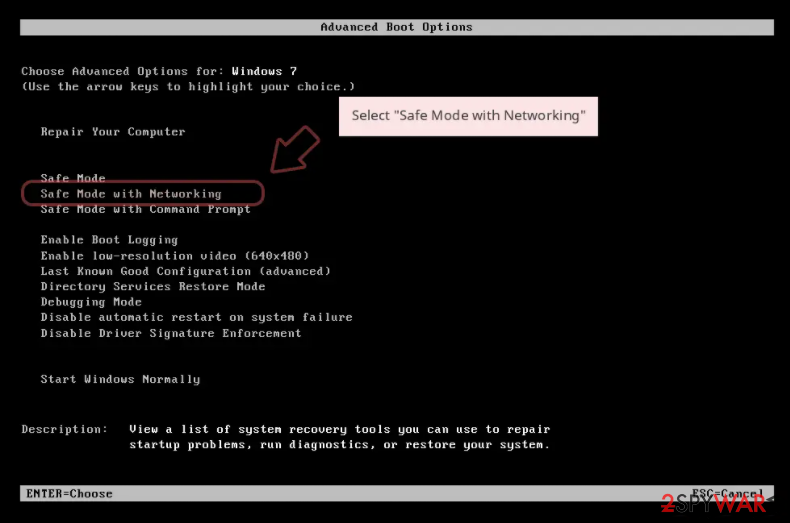
Windows 7 / Vista / XP
- Click Start > Shutdown > Restart > OK.
- When your computer becomes active, start pressing F8 button (if that does not work, try F2, F12, Del, etc. – it all depends on your motherboard model) multiple times until you see the Advanced Boot Options window.
- Select Safe Mode with Networking from the list.

Windows 10 / Windows 8
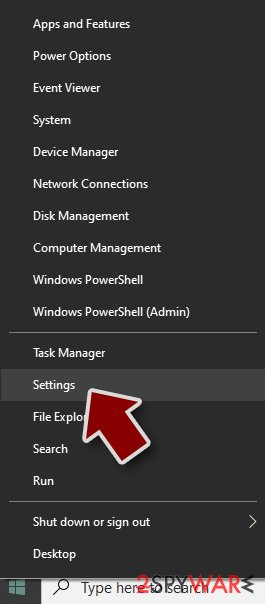
- Right-click on Start button and select Settings.
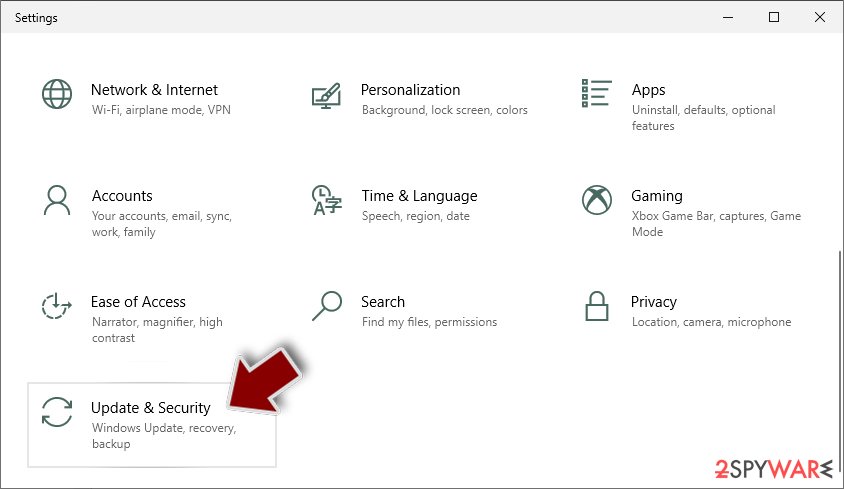
- Scroll down to pick Update & Security.
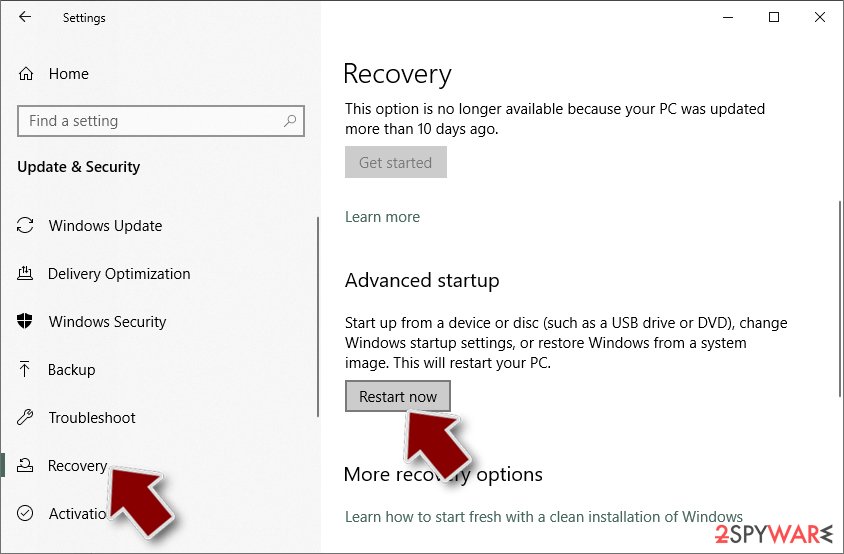
- On the left side of the window, pick Recovery.
- Now scroll down to find Advanced Startup section.
- Click Restart now.
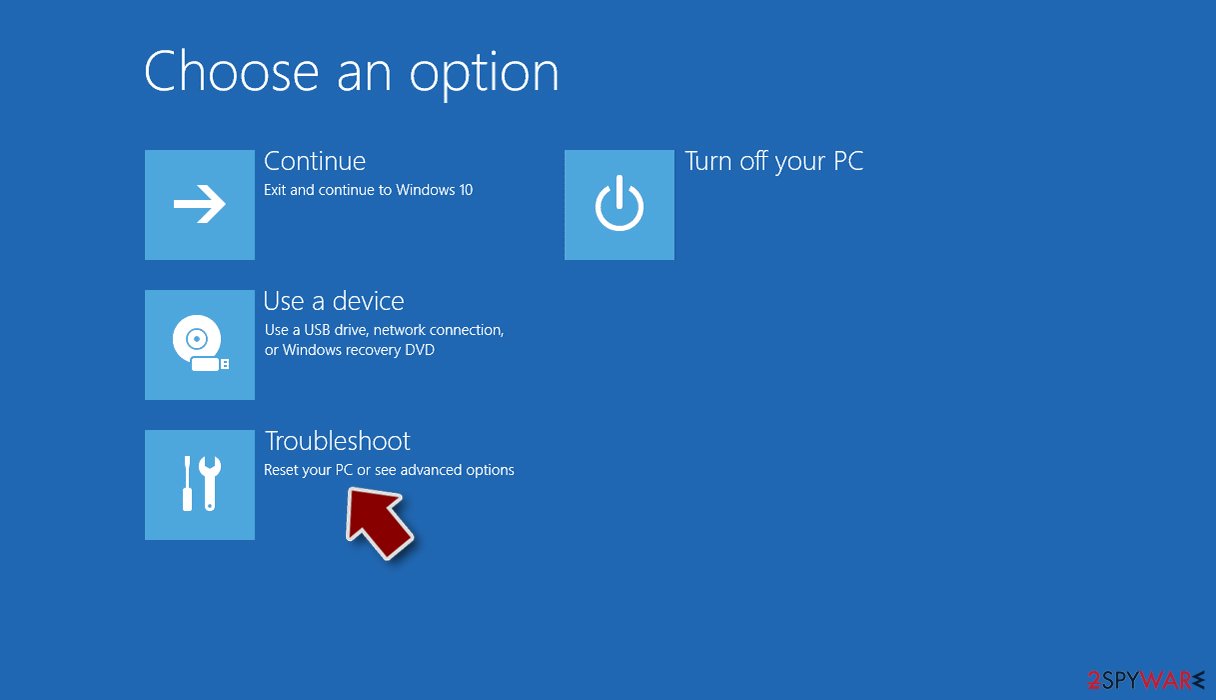
- Select Troubleshoot.
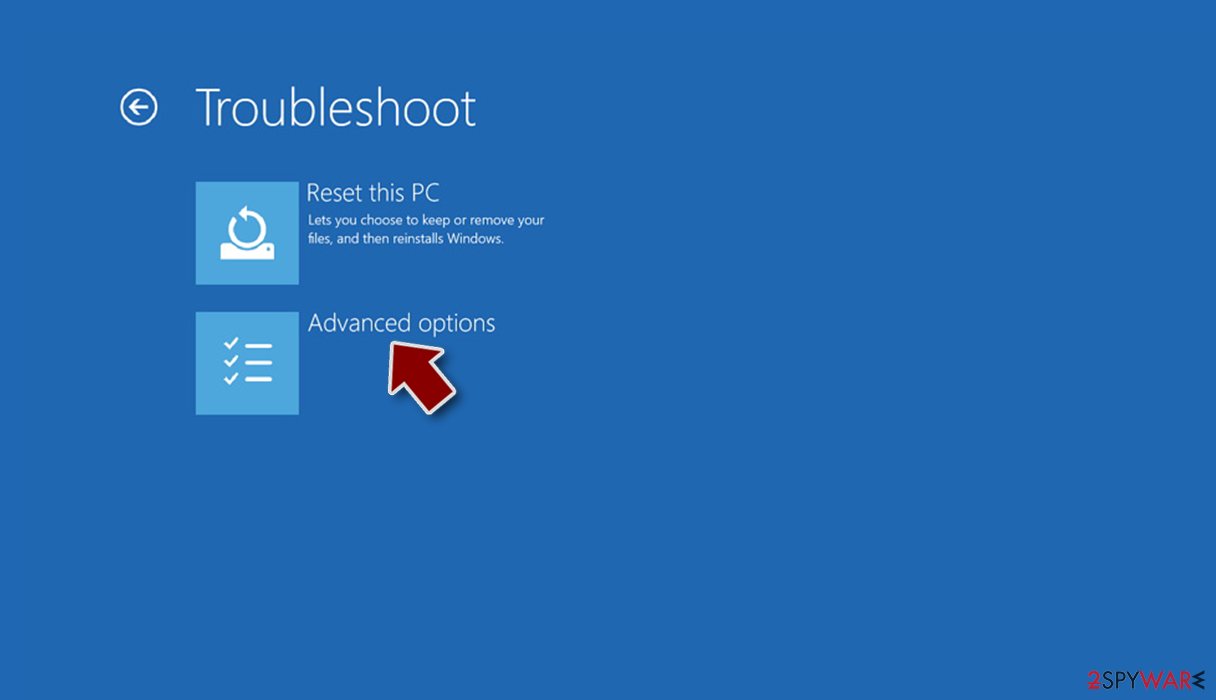
- Go to Advanced options.
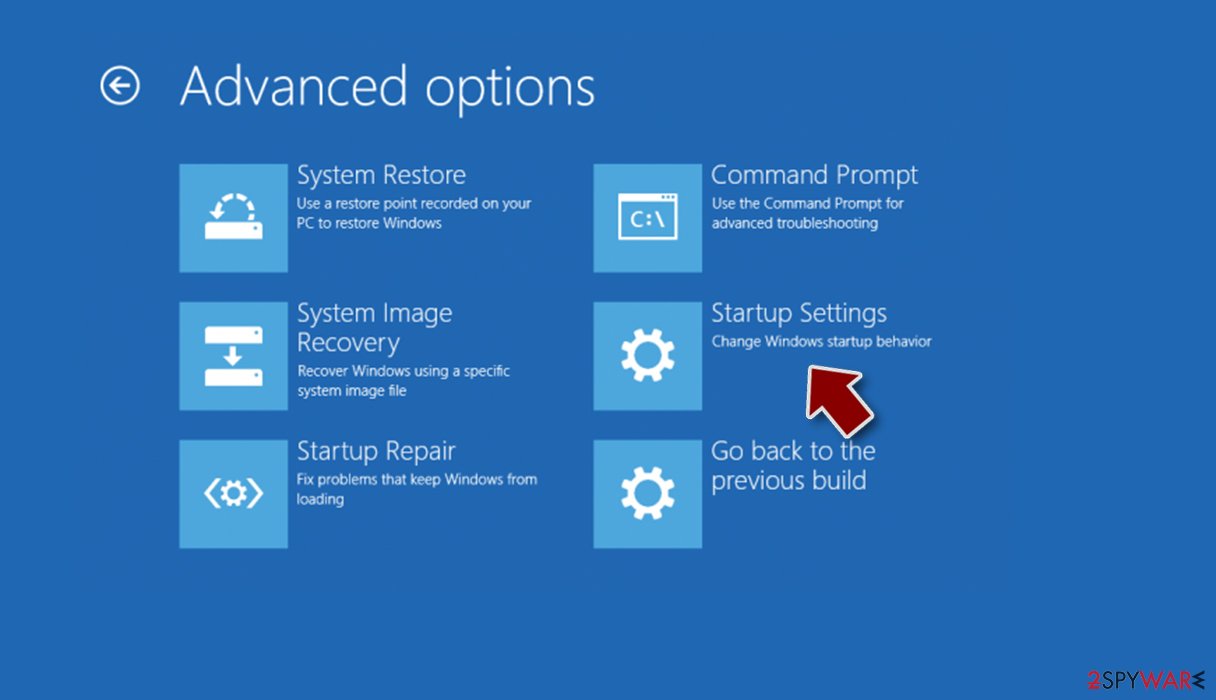
- Select Startup Settings.
- Press Restart.
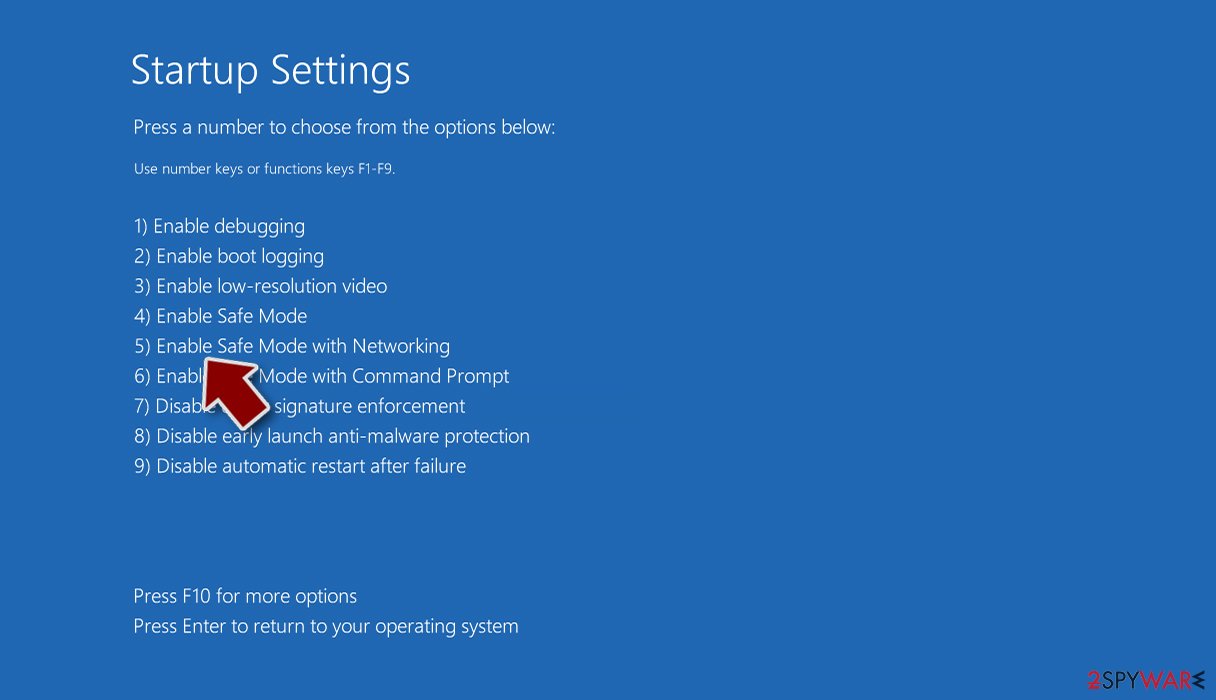
- Now press 5 or click 5) Enable Safe Mode with Networking.


Step 2. Shut down suspicious processes
Windows Task Manager is a useful tool that shows all the processes running in the background. If malware is running a process, you need to shut it down:
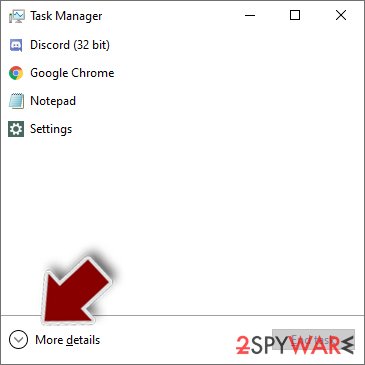
- Press Ctrl + Shift + Esc on your keyboard to open Windows Task Manager.
- Click on More details.
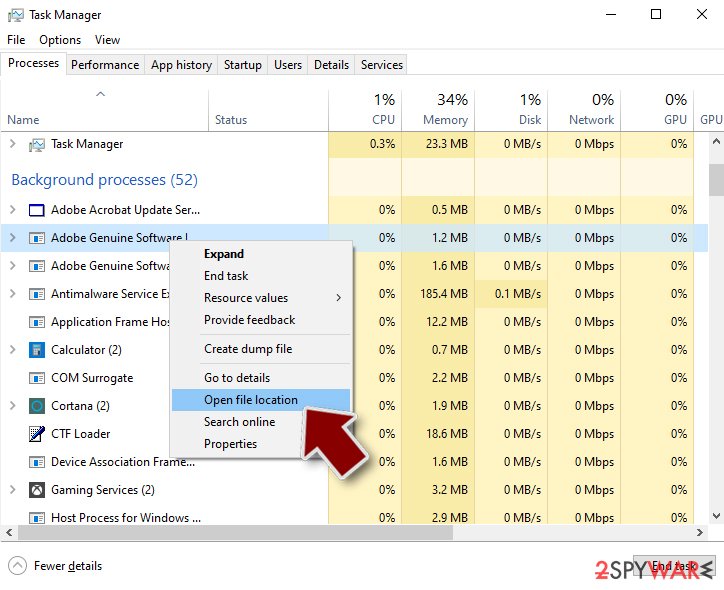
- Scroll down to Background processes section, and look for anything suspicious.
- Right-click and select Open file location.
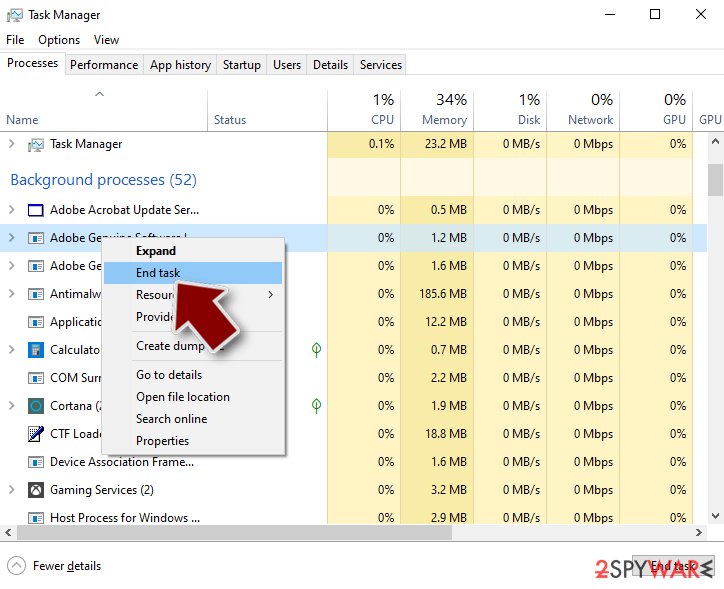
- Go back to the process, right-click and pick End Task.
- Delete the contents of the malicious folder.


Step 3. Check program Startup
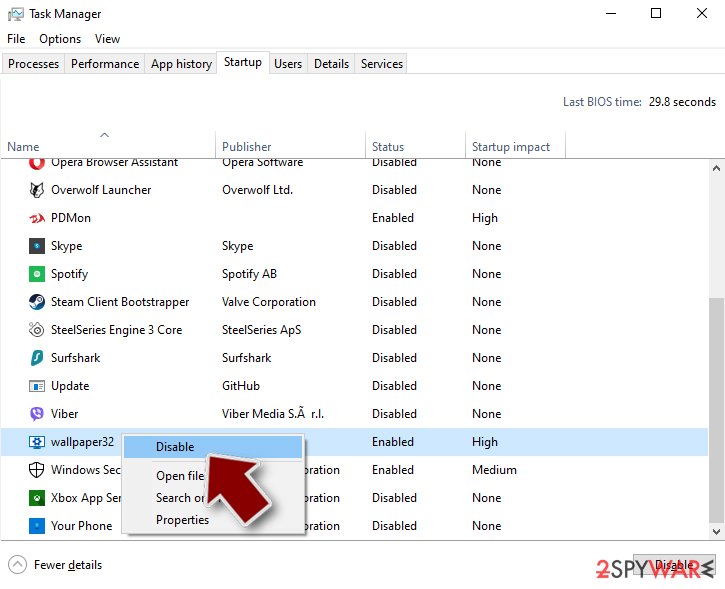
- Press Ctrl + Shift + Esc on your keyboard to open Windows Task Manager.
- Go to Startup tab.
- Right-click on the suspicious program and pick Disable.

Step 4. Delete virus files
Malware-related files can be found in various places within your computer. Here are instructions that could help you find them:
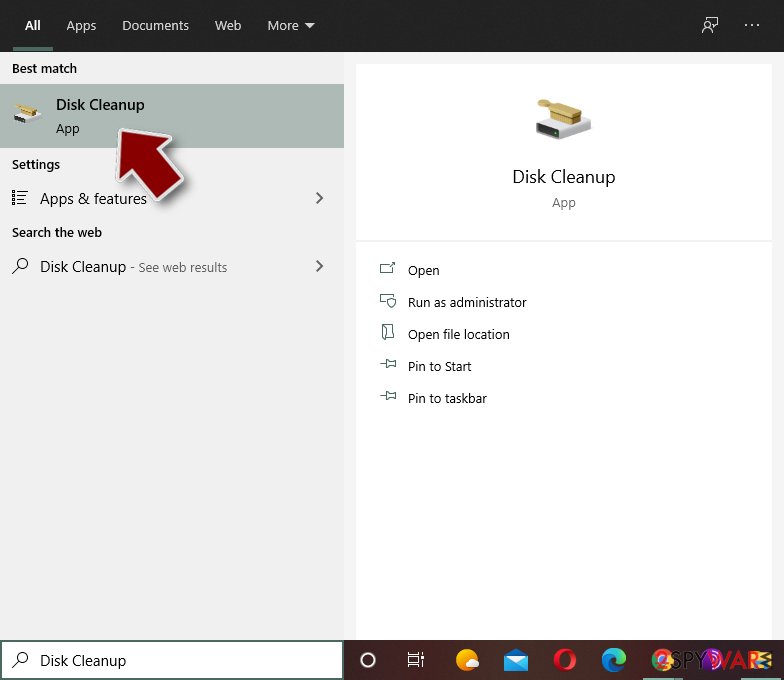
- Type in Disk Cleanup in Windows search and press Enter.
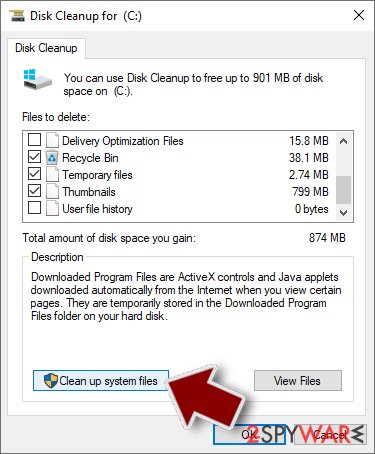
- Select the drive you want to clean (C: is your main drive by default and is likely to be the one that has malicious files in).
- Scroll through the Files to delete list and select the following:
Temporary Internet Files
Downloads
Recycle Bin
Temporary files - Pick Clean up system files.
- You can also look for other malicious files hidden in the following folders (type these entries in Windows Search and press Enter):
%AppData%
%LocalAppData%
%ProgramData%
%WinDir%


After you are finished, reboot the PC in normal mode.
Remove Beast using System Restore
-
Step 1: Reboot your computer to Safe Mode with Command Prompt
Windows 7 / Vista / XP- Click Start → Shutdown → Restart → OK.
- When your computer becomes active, start pressing F8 multiple times until you see the Advanced Boot Options window.
-
Select Command Prompt from the list

Windows 10 / Windows 8- Press the Power button at the Windows login screen. Now press and hold Shift, which is on your keyboard, and click Restart..
- Now select Troubleshoot → Advanced options → Startup Settings and finally press Restart.
-
Once your computer becomes active, select Enable Safe Mode with Command Prompt in Startup Settings window.

-
Step 2: Restore your system files and settings
-
Once the Command Prompt window shows up, enter cd restore and click Enter.

-
Now type rstrui.exe and press Enter again..

-
When a new window shows up, click Next and select your restore point that is prior the infiltration of Beast. After doing that, click Next.


-
Now click Yes to start system restore.

-
Once the Command Prompt window shows up, enter cd restore and click Enter.


Finally, you should always think about the protection of crypto-ransomwares. In order to protect your computer from Beast and other ransomwares, use a reputable anti-spyware, such as FortectIntego, SpyHunter 5Combo Cleaner or Malwarebytes
How to prevent from getting remote administration tools
Choose a proper web browser and improve your safety with a VPN tool
Online spying has got momentum in recent years and people are getting more and more interested in how to protect their privacy online. One of the basic means to add a layer of security – choose the most private and secure web browser. Although web browsers can't grant full privacy protection and security, some of them are much better at sandboxing, HTTPS upgrading, active content blocking, tracking blocking, phishing protection, and similar privacy-oriented features. However, if you want true anonymity, we suggest you employ a powerful Private Internet Access VPN – it can encrypt all the traffic that comes and goes out of your computer, preventing tracking completely.
Lost your files? Use data recovery software
While some files located on any computer are replaceable or useless, others can be extremely valuable. Family photos, work documents, school projects – these are types of files that we don't want to lose. Unfortunately, there are many ways how unexpected data loss can occur: power cuts, Blue Screen of Death errors, hardware failures, crypto-malware attack, or even accidental deletion.
To ensure that all the files remain intact, you should prepare regular data backups. You can choose cloud-based or physical copies you could restore from later in case of a disaster. If your backups were lost as well or you never bothered to prepare any, Data Recovery Pro can be your only hope to retrieve your invaluable files.

If this free guide helped you and you are satisfied with our service, please consider making a donation to keep this service alive. Even a smallest amount will be appreciated.