
Reveton: what it is and how to remove it
Reveton - a dangerous ransomware application which is known to display a fake governmental notice to its victims. Typically, it claims that the user was caught while performing illegal actions on his/her computer.
Facts checked October 7, 2026. Removal steps tested on Windows 11 (26H2) and checked against Microsoft's and the browser makers' current documentation. Sections marked as our earlier report are the original text: they describe the threat as it was then and have not been reviewed since. The 2026 status, the removal steps and the questions are current.
Automatic
Get a free scan and check if your PC is infected.
Fortect finds malware, unwanted programs and the Windows damage they leave behind, and repairs it in one pass.
If more items like %USERPROFILE%\Start keep appearing, an automatic scan checks every user folder at once.
Do it yourself · free Remove Reveton yourself 5 steps, about 15 minutes, no software needed.
Start the steps
Reveton: summary
| Distribution | Dubious programs, spam emails |
|---|---|
| Name | Reveton |
| Category | Trojan horse/Ransomware |
| detected as | Trojan:W32/Reveton; Ransom:Win32/Reveton; TROJ_REVETON.SM4; TROJ_REVETON.SM6 |
| Users affected | Users located in Europe, USA, Middle East |
| Purpose | To lock the desktop screen and demand a ransom to unlock it |
| Removal | Scan the PC with security software to find and remove the malware and anything installed with it. Fortect scans Windows for malware and repairs the system files and settings it damaged. Remove it nowTo use the full-featured product, you have to purchase a license for Fortect. The scan is free. |
Show 10 more facts
| Can be tricky | Once the virus locks the screen, it claims to be from a law enforcement authority (e.g., FBI, Police, etc.) |
|---|---|
| Detection names | No Microsoft detection name is known |
| Damage | Not recorded in the old report |
| Type | Loader |
| Symptoms | An unknown file or folder in AppData, ProgramData or Temp and a Windows Security "Threats found" notification |
| Evidence | 6 write-ups by security sites; no sample analysed yet |
| File names | %USERPROFILE%\Start |
| First seen | 4 September 2018 |
| Microsoft Defender name | Trojan:Win32/Reveton |
| Facts checked | 7 October 2026 |
What Reveton does on an infected PC
From our report of Sep 2018 · not reviewed since
Reveton - a malicious ransomware virus mimicking governmental authorities to swindle users' money
Reveton - a dangerous ransomware application which is known to display a fake governmental notice to its victims.
Typically, it claims that the user was caught while performing illegal actions on his/her computer. The virus also disables its victims from using the computer/mobile device properly and requires specific ransom for unblocking it. Also known as Trojan:Win32/Reveton, this harmful program has mostly been spreading around Europe (Spain, France, Turkey, Italy), the US, and other world's regions.
Typically, crooks behind Reveton ransomware claim that they are representing a particular law enforcement authority which is situated in the victim's location. After starting infecting Windows OS, it switched to mobile devices. While it is unknown how active this malware is at the moment of writing, hackers who had used it for generating the money are known to be sentenced.
Reveton ransomware can be recognized as %USERPROFILE%\Start Menu\Programs\Startup\ .dll.lnk on Windows XP, and as %USERPROFILE%\AppData\Roaming\Microsoft\Windows\StartMenu\Programs\Startup\ dll.lnk on Windows 7. As you can see from its location, it sets itself for launching once the PC is rebooted.
If you see signs showing you the Reveton, e.g. you cannot use your computer, you are urged to pay a particular price to unlock your computer screen, your program's don't work, your computer's desktop is covered by an unusual warning, do not rush to follow commands of cybercriminals. Even if you transfer the demanded payment, there is no guarantee that the crooks will keep their promise and unlock your desktop.
Nevertheless, Reveton can also be filled with other damaging abilities that are familiar with other Trojan infections. For example, such viruses might perform various actions in the background, monitor internet activities, run software without the user's permission and even seek for stealing personal information that can be found in the infected computer.
If you overcome such infection, you need to remove Reveton as it is not just a Trojan that acts like a screen-locking ransomware-type virus. It can also install another malware on your computer or steal your personal data. Make sure you get rid of the threat as soon as you spot the first symptoms to avoid damaging consequences.
Be quick to perform the Reveton removal. After you do so, make sure you take some precautionary measures in the future. Trojans can come together with regular software, or the harmful payload can be dropped as a spam message to the victim's email box. Be careful while performing any actions on the Internet.


From our report of Sep 2018 · not reviewed since
Avoid serious malware by following tips of security experts
According to IT experts , various malware forms such as Trojans or ransomware-type viruses often distribute through spam messages.
Crooks drop harmful payload straight to victims' email boxes. Virus-related content comes in the form of an attachment clipped to the phishing message or as a dubious link. If you click on such components and activate the damaging payload - you can get your computer infected with a serious infection.
Furthermore, various malware can spread widely throughout questionable web pages or software that is downloaded by using third-party installers. Avoid damaging consequences by installing strong antivirus protection. Make sure you keep the security tool always updated. If taken care of properly, this type of software will protect your system from various damaging components that might slip in the system secretly.
From our report of Sep 2018 · not reviewed since
More from our earlier report on Reveton
- Install and get rid of the infection ASAP
How to check the PC for Reveton
Reveton detection names
If Windows Security shows Trojan:Win32/Reveton, it has found Reveton or a file that belongs to it.
Write the name down before you click Remove: it is the most useful search term later, and you will need it if you report the incident.
A family name in the label is more informative than a heuristic one. Our page on why one threat has many antivirus names lists the common formats and what each part means.
- Path:
%USERPROFILE%\Start
How to remove Reveton
A loader's job is to install other malware, so treat the PC as infected with more than one program until the scans are clean.
Step 1: Delete scheduled tasks that bring it back
Open Task Scheduler from the Start menu and click Task Scheduler Library. Select each task you do not recognise and read the Actions tab:
- a task that starts a file in
%AppData%or%Temp% - runs
powershellwith a long encoded line - opens a web address belongs to Reveton or a similar program
Right-click such a task and choose Delete, and check the subfolders too. Leave tasks from Microsoft, your PC's maker and programs you use. Task Scheduler is the same in Windows 11 and Windows 10.

Windows 11: Task Scheduler Library, the task selected, the Actions tab shows the file it runs. Full procedure with screenshots: Remove what malware leaves behind in Windows
- a task that starts a file in
Step 2: Remove it from startup
Whatever Reveton installed usually starts with Windows. Open Task Manager with Ctrl + Shift + Esc, go to Startup apps in Windows 11 or the Startup tab in Windows 10, and disable what you do not know, starting with entries that have an empty Publisher column.
Open file location on the right-click menu shows the file, which helps you decide and tells you what to delete later. Disabling is safe: if something you need stops working, switch it back on.
Full procedure with screenshots: Stop apps from opening at startup On uGetFix
Step 3: Delete the folders left behind
What the uninstaller leaves behind is usually in the user folders. Open File Explorer, switch on View > Show > Hidden items (in Windows 10 View > Hidden items), and go through
%LocalAppData%,%AppData%, %ProgramData% and the two Program Files folders.Sort by Date modified and delete folders that appeared together with the problem and belong to no program you use. Folders with random names that hold
.exe,.dll, .js or .ps1 files are the strongest sign.Full procedure with screenshots: Remove what malware leaves behind in Windows
Step 4: Scan the PC, then run the offline scan
Open Windows Security > Virus & threat protection > Scan options, run a Full scan and remove everything it finds. Then select Microsoft Defender Antivirus (offline scan) and click Scan now: the PC restarts and scans before Windows loads, which finds files that hide while Windows runs.
Save your work first, because the offline scan takes about 15 minutes. Both scans are built into Windows 11 and Windows 10, and a second scanner from another vendor is a useful extra opinion.

Windows 11: Windows Security > Virus & threat protection > Scan options. Full procedure with screenshots: Run a Microsoft Defender Offline scan
Step 5: Change passwords from another device and sign out other sessions
Assume that the passwords saved in this PC's browsers, and the accounts that were open in them, are known to the attacker. From a phone or a clean computer, change the e-mail password first, then banking, shopping, social and gaming accounts.
Use each service's option to sign out of all other sessions, because stolen cookies keep a session open even after a password change. Turn on two-step verification on each account. Wait with the infected Windows 11 or Windows 10 PC until the scans are clean.
Full procedure with screenshots: Turn on two-step verification / secure a hacked account
Instructions for each browser and system
The detailed steps for every browser and system this guide covers. Open the one you use.
Manual removal using Safe Mode
Important! →
Manual removal guide might be too complicated for regular computer users. It requires advanced IT knowledge to be performed correctly (if vital system files are removed or damaged, it might result in full Windows compromise), and it also might take hours to complete. Therefore, we highly advise using the automatic method provided above instead.
Step 1. Access Safe Mode with Networking
Manual malware removal should be best performed in the Safe Mode environment.
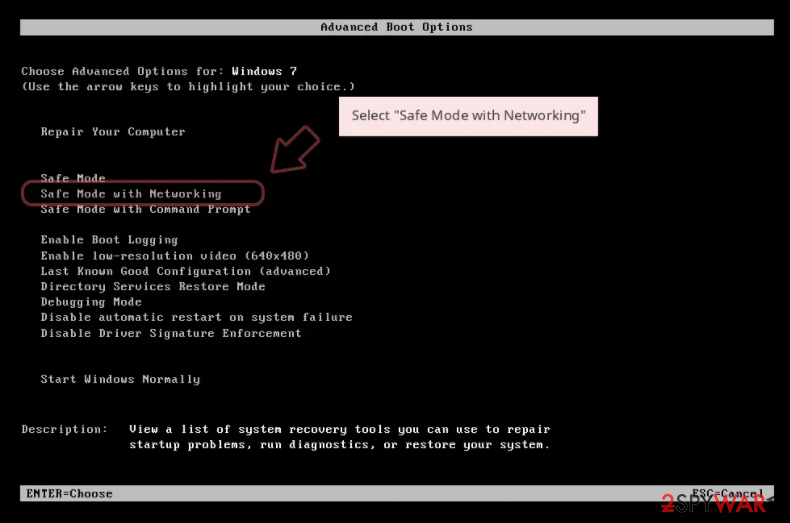
Windows 7 / Vista / XP
- Click Start > Shutdown > Restart > OK.
- When your computer becomes active, start pressing F8 button (if that does not work, try F2, F12, Del, etc. - it all depends on your motherboard model) multiple times until you see the Advanced Boot Options window.
- Select Safe Mode with Networking from the list.
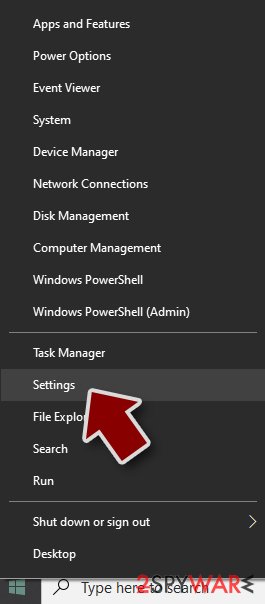
Windows 10 / Windows 8
- Right-click on Start button and select Settings.
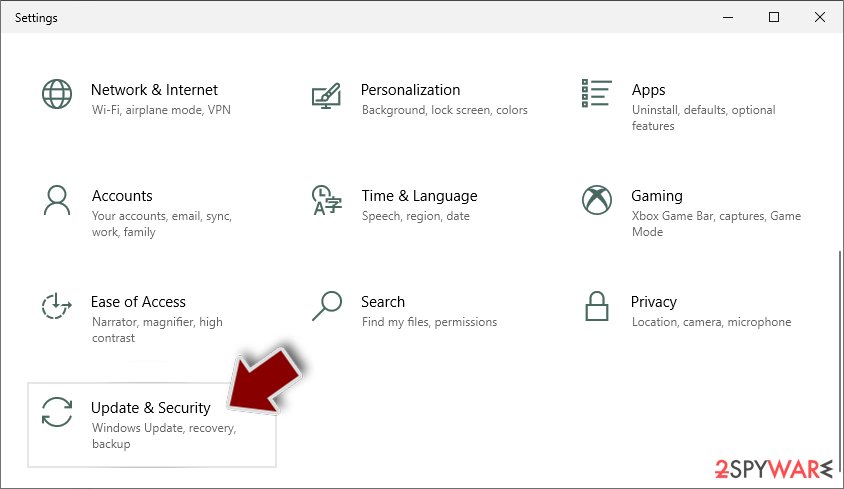
- Scroll down to pick Update & Security.
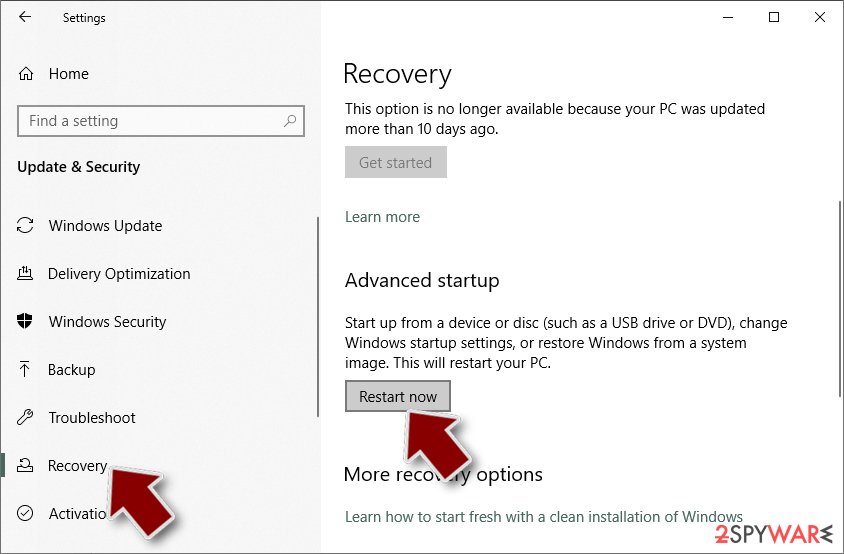
- On the left side of the window, pick Recovery.
- Now scroll down to find Advanced Startup section.
- Click Restart now.
- Select Troubleshoot.
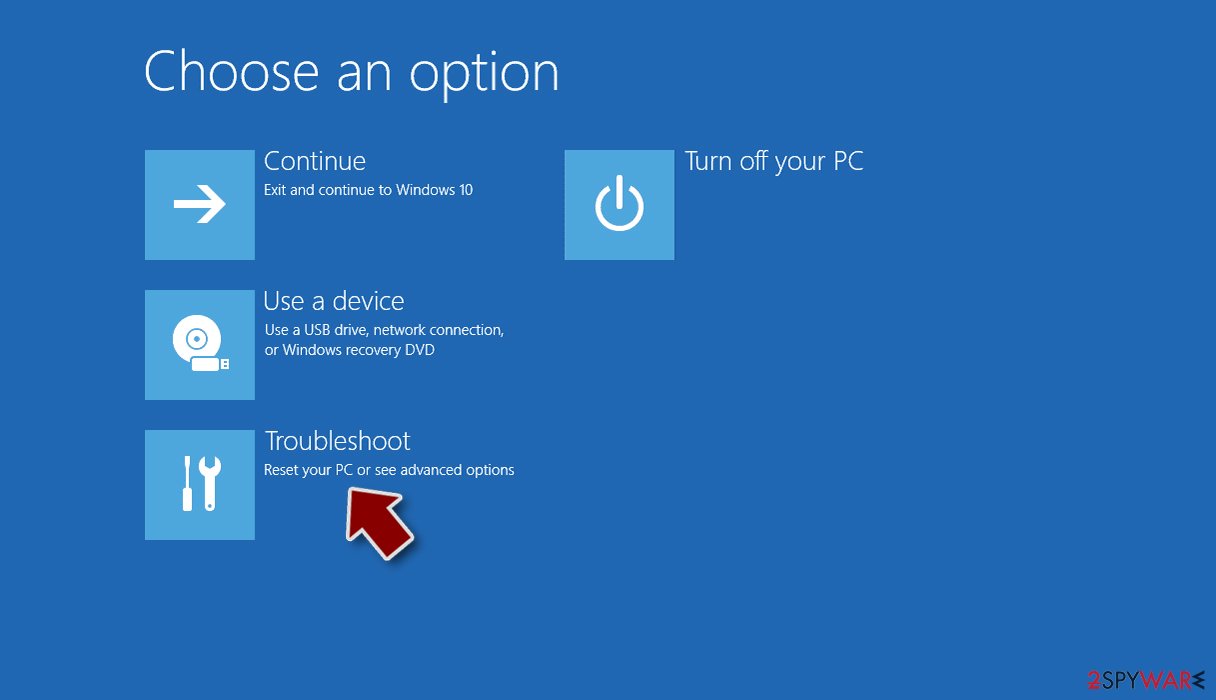
- Go to Advanced options.
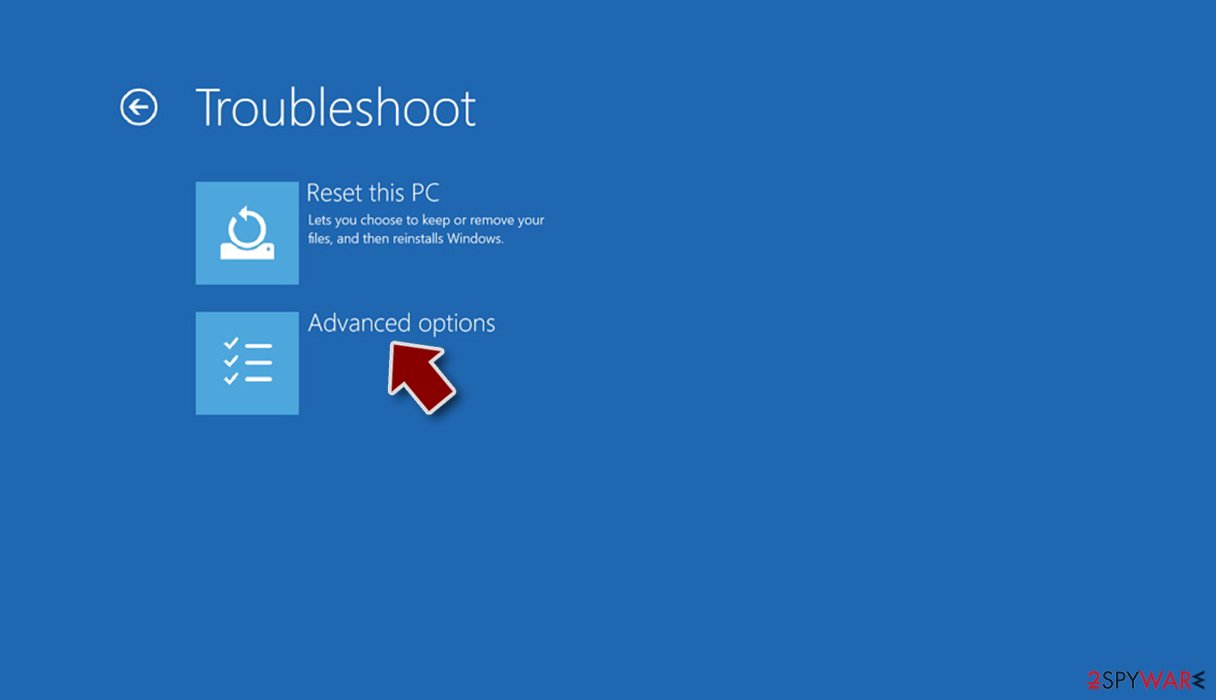
- Select Startup Settings.
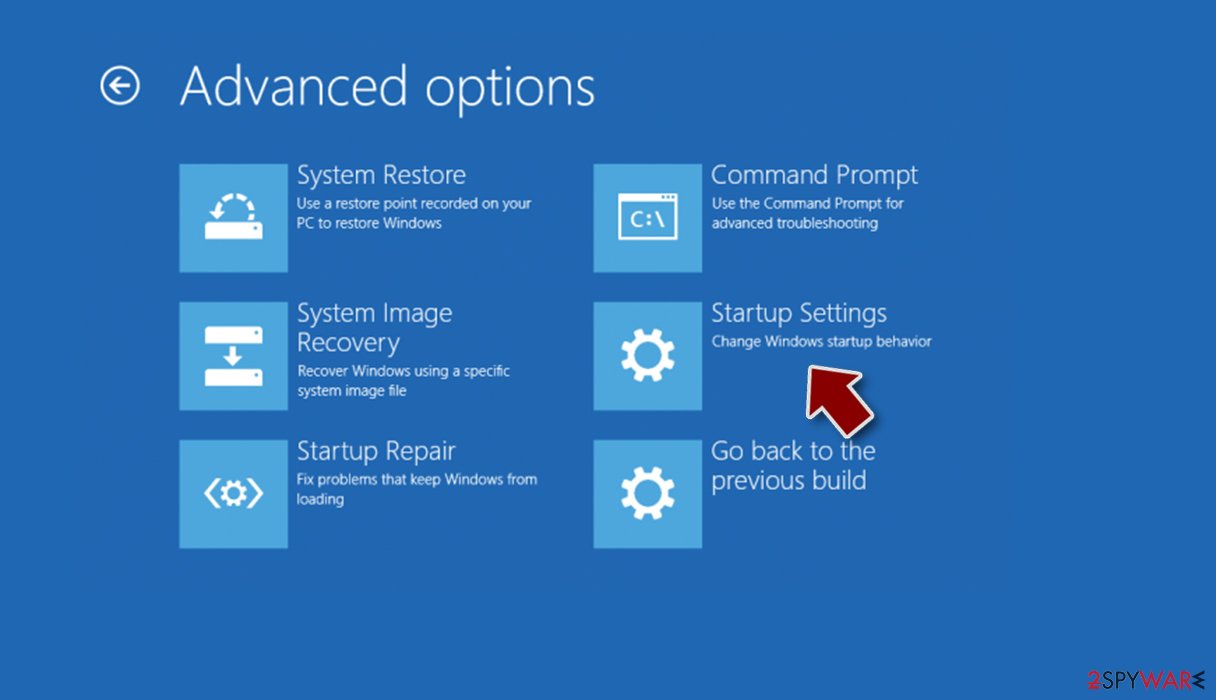
- Press Restart.
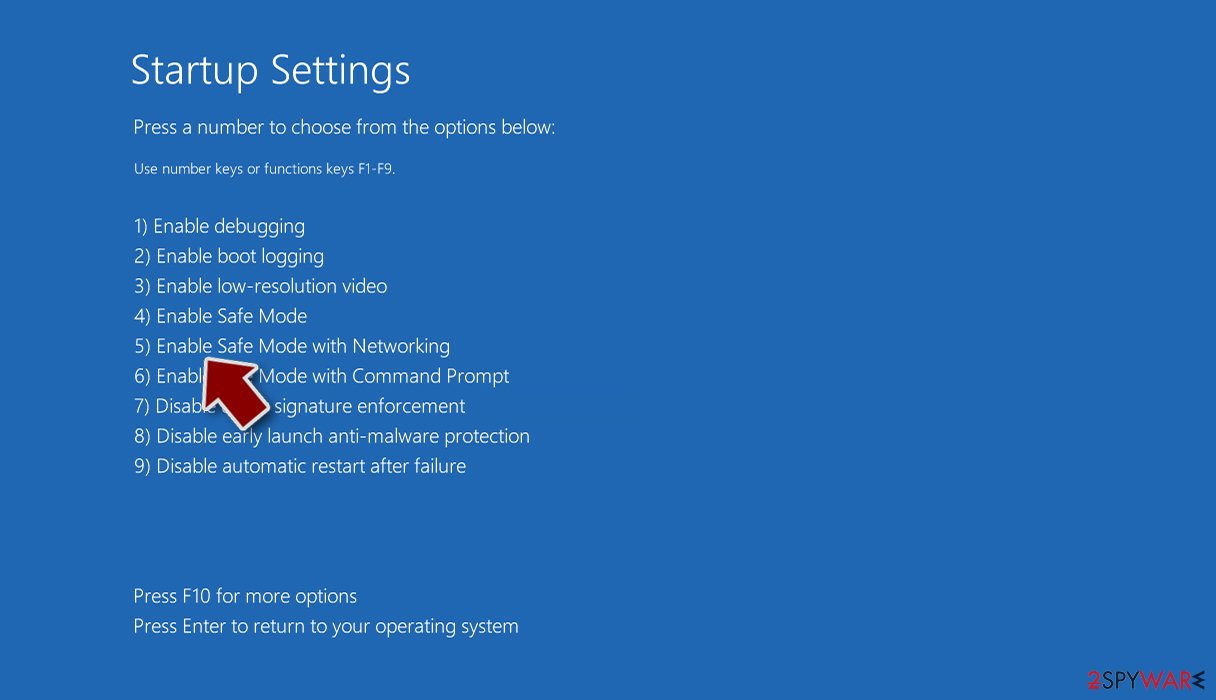
- Now press 5 or click 5) Enable Safe Mode with Networking.
Step 2. Shut down suspicious processes
Windows Task Manager is a useful tool that shows all the processes running in the background. If malware is running a process, you need to shut it down:
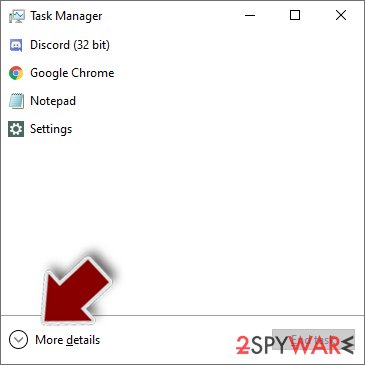
- Press Ctrl + Shift + Esc on your keyboard to open Windows Task Manager.
- Click on More details.
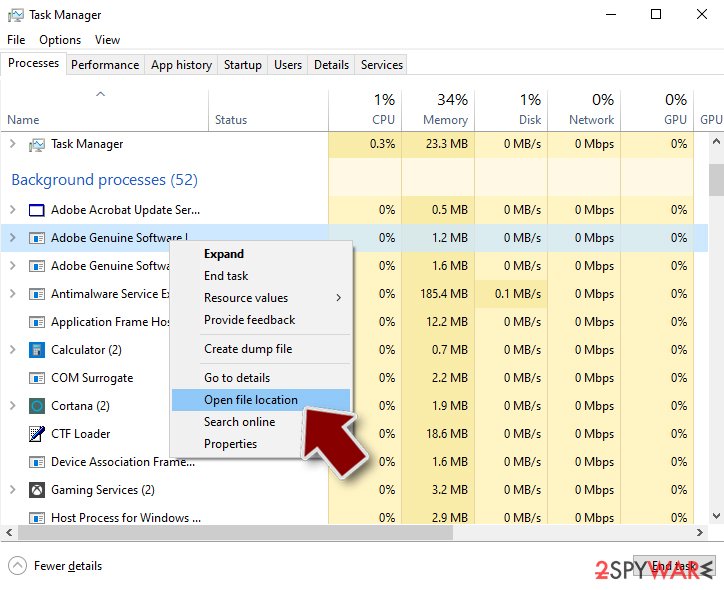
- Scroll down to Background processes section, and look for anything suspicious.
- Right-click and select Open file location.
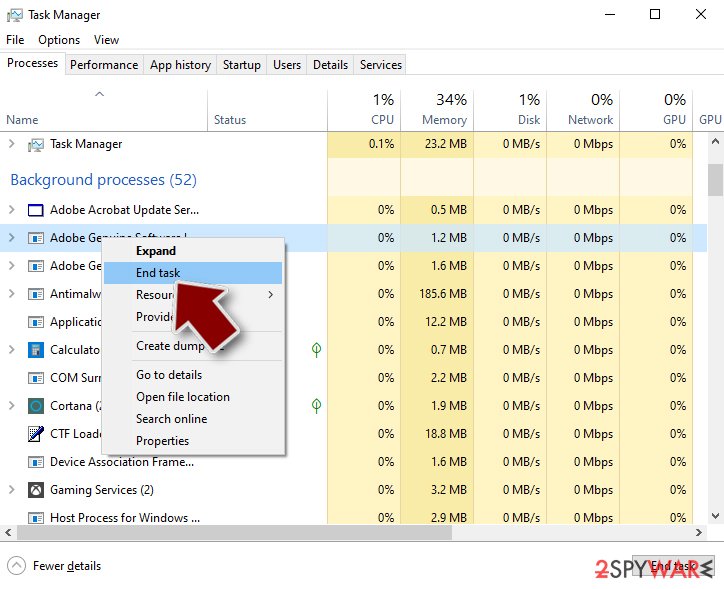
- Go back to the process, right-click and pick End Task.
- Delete the contents of the malicious folder.
Step 3. Check program Startup
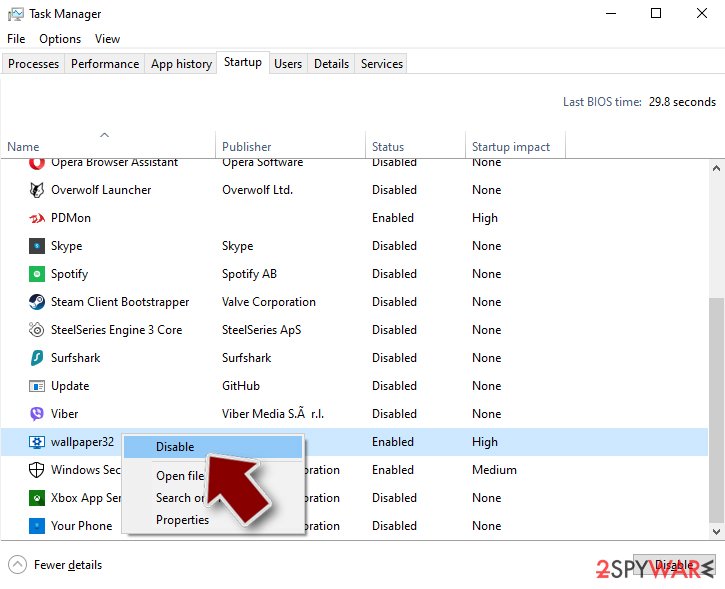
- Press Ctrl + Shift + Esc on your keyboard to open Windows Task Manager.
- Go to Startup tab.
- Right-click on the suspicious program and pick Disable.
Step 4. Delete virus files
Malware-related files can be found in various places within your computer. Here are instructions that could help you find them:
- Type in Disk Cleanup in Windows search and press Enter.
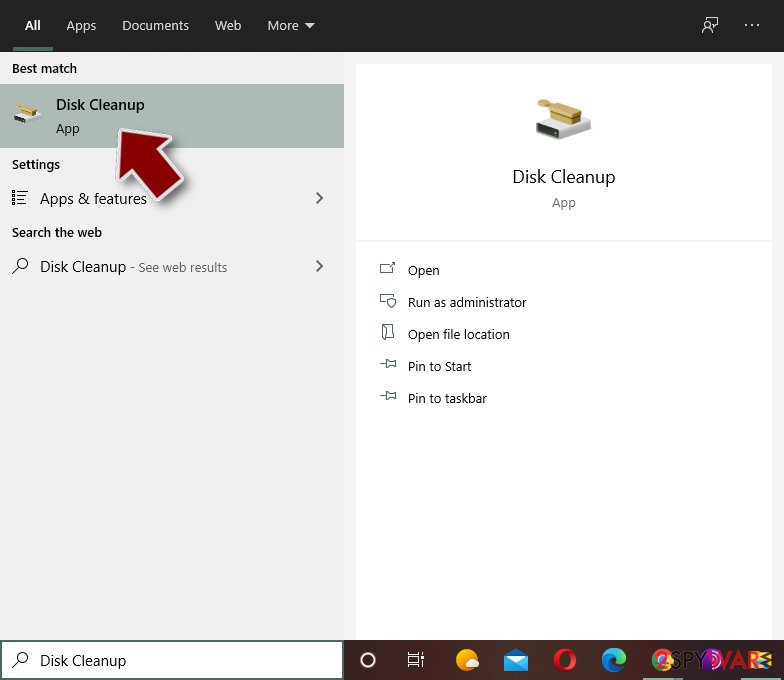
- Select the drive you want to clean (C: is your main drive by default and is likely to be the one that has malicious files in).
- Scroll through the Files to delete list and select the following:
Temporary Internet Files
Downloads
Recycle Bin
Temporary files - Pick Clean up system files.
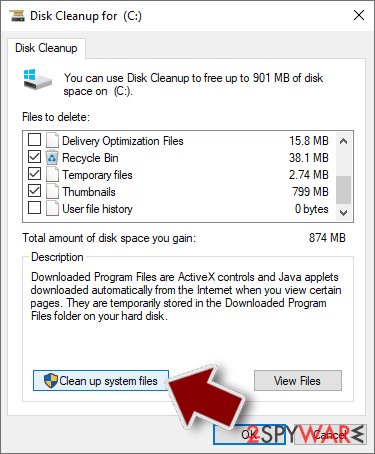
- You can also look for other malicious files hidden in the following folders (type these entries in Windows Search and press Enter):
%AppData%
%LocalAppData%
%ProgramData%
%WinDir%
After you are finished, reboot the PC in normal mode.
From our report of Sep 2018 · not reviewed since
Get rid of Reveton without any delay
If you want to remove Reveton virus, you need to choose a professional anti-malware tool for such purpose.
These types of programs will let you deal with the infection as effectively as possible. However, if you are thinking about manual elimination, notice that such a method is not possible for those who do not have experience in such situations.
After you perform the Reveton Trojan removal, make sure you do not forget to do one more necessary step. You need to carry out some system backups to make sure that the cyber threat has vanished successfully and there are no more damaging components left.
Take care of your computer in the future - pay attention while browsing the web, do not open dubious email attachments and regularly update your antivirus program.
[GI=method-1]Reboot your computer to Safe Mode with Networking by using these instructions:
[GI=method-2]Activate the System Restore feature and disable the virus. Follow these steps:
After removal: passwords, accounts and prevention
Secure your accounts after the clean-up
Assume that whatever was saved in the browsers on this PC while the PC showed an unknown item at %USERPROFILE%\Start has been copied:
- passwords
- cookies
- autofill data
Work from a clean device, or from this PC once the offline scan finds nothing.
Start with your main e-mail account, because it can reset everything else, then banking and payment, then social and gaming accounts. Change each password, sign out of all sessions and turn on two-step verification: Turn on two-step verification / secure a hacked account.
The full order, including crypto wallets and card replacement, is in securing your accounts after malware.
Choose a proper web browser and improve your safety with a VPN tool
Online spying has got momentum in recent years and people are getting more and more interested in how to protect their privacy online.
One of the basic means to add a layer of security - choose the most private and secure web browser. Although web browsers can't grant full privacy protection and security, some of them are much better at sandboxing, HTTPS upgrading, active content blocking, tracking blocking, phishing protection, and similar privacy-oriented features.
However, if you want true anonymity, we suggest you employ a powerful VPN - it can encrypt all the traffic that comes and goes out of your computer, preventing tracking completely.
Lost your files? Use data recovery software
While some files located on any computer are replaceable or useless, others can be extremely valuable.
Family photos, work documents, school projects - these are types of files that we don't want to lose. Unfortunately, there are many ways how unexpected data loss can occur:
- power cuts
- Blue Screen of Death errors
- hardware failures
- crypto-malware attack
- even accidental deletion
To ensure that all the files remain intact, you should prepare regular data backups. You can choose cloud-based or physical copies you could restore from later in case of a disaster. If your backups were lost as well or you never bothered to prepare any, can be your only hope to retrieve your invaluable files.
Questions about Reveton
Why was %USERPROFILE%\Start created on my PC?
Something running under your account wrote it. That might be a browser, a chat or game app, a driver tool, a program bundled with a free download, or malware. The creation date is the best clue: sort Installed apps by date and see what was added at the same time as %USERPROFILE%\Start.
Check your Downloads folder for installers from that day too. If you cannot find a program that explains it and the folder contains executables, remove its startup entry, delete the folder and scan the PC.
Is Trojan:Win32/Reveton a false positive?
Sometimes. Names ending in !ml or describing behaviour are generated by machine learning and occasionally flag cracked tools, game mods or small unsigned utilities. A false positive is likely only when the file is a program you installed from its official developer, it is signed by that developer and other scanners do not flag it.
Files from cracks, cheats, fake updates or unknown downloads are rarely false positives, whatever the detection name. If you are sure the file is genuine, you can report it to Microsoft as a false positive; never add an exclusion for Trojan:Win32/Reveton just to make the alert stop.
How do I find what uses %USERPROFILE%\Start?
Start with Task Manager: in the Details tab, add the Command line column and look for processes that mention %USERPROFILE%\Start. Then open Task Scheduler and check the Actions tab of recent tasks, and look at Settings > Apps > Startup.
If the folder name matches a company or product, search Installed apps for it. For locked files, Resource Monitor (search for it in the Start menu) shows which process holds them under CPU > Associated Handles. Once you know the owner, remove the owner, not just the files.
Should I change my passwords after Trojan:Win32/Reveton?
It depends on the category and on whether the file ran. If the name begins with PWS, Spy, Backdoor or Trojan and the file sat in AppData, ProgramData or Temp, assume it ran and change your important passwords from a different device, starting with e-mail, then banking.
Sign out of all sessions too. If Trojan:Win32/Reveton is a PUA or was caught in Downloads before you opened anything, a password change is a precaution rather than a must. When in doubt, change the e-mail password and turn on two-step verification; it is quick and protects everything else.
Will Windows Security detect Reveton?
Yes, current Microsoft Defender definitions name it Trojan:Win32/Reveton. Make sure the definitions are up to date first: open Windows Security > Virus & threat protection > Protection updates and click Check for updates. Then run a full scan and the Microsoft Defender offline scan.
If the detection comes back after you remove it, look for the program, task or extension that brings it back, using the plan above. Detection removes files and startup entries, but it does not reverse changes Reveton already made, so follow the other steps in this guide as well.
What are the signs of a trojan infection?
Most trojans try to leave no visible signs, so look for side effects. Common ones:
- Windows Security turned off or unable to update
- new entries in Startup apps or Task Scheduler
- programs in Installed apps you did not install
- browser settings that changed by themselves
- unusual network activity while the PC is idle
- password-reset or login-alert e-mails you did not trigger
None of these proves an infection on its own. Together with an antivirus alert naming Reveton, they are a strong reason to follow the full plan.
Why didn't my antivirus stop Reveton?
New trojan builds are packed and changed often so that signatures do not match, and some are signed with stolen or bought certificates. Many arrive inside password-protected archives, which scanners cannot open until you extract them.
Some downloads also tell the user to turn off the antivirus "because it gives false alarms", a common line in cracked software instructions. Keep real-time protection on, never disable it for an installer, and run the offline scan whenever you suspect something slipped through.
Should I reset my PC because of Reveton?
Only if the signs point to deeper access. Reset when you see an unknown item at %USERPROFILE%\Start again after removal, when Windows Security cannot start or update, when remote access tools you did not install keep appearing, or when you simply cannot trust the PC any more.
Otherwise, the plan in this guide plus an offline scan is enough. If you do reset, choose Remove everything and Cloud download for a fresh copy of Windows, restore only documents and photos, and reinstall programs from their official sites. Change important passwords from the clean system afterwards.
Can Reveton spread to other devices on my network?
Most trojans aimed at home users stay on the PC they infected, but an attacker with remote access can look at the network, open shared folders and try passwords on other devices. Loaders sometimes deliver worms or ransomware that do spread.
Disconnect the PC while cleaning, run a full scan on other Windows PCs, change the router's admin password and the Wi-Fi password if they were saved on the infected PC, and update the router's firmware. If other PCs show the same detection, treat them as infected too.
Will Fortect remove Reveton?
Fortect scans Windows for malware and unwanted programs and repairs the system files and settings they change, and its free scan shows what it finds on your PC before you decide anything.
For Reveton, follow the plan above as well: the browser steps take back permissions and settings that no scanner treats as a threat, and uninstalling the program that brought it removes the source.
Run Microsoft Defender's full scan and, if anything was found, its offline scan as a second opinion. If the symptoms are gone after the plan and both scans are clean, there is nothing more to do.
Sources
- Search Security: Ransomware (read October 7, 2026)
- The Register: Florida Man laundered money for Reveton ransomware. Then Microsoft hired him (read October 7, 2026)
- Wikipedia: Trojan horse (computing) (read October 7, 2026)
- FTC: How to recognize, remove and avoid malware (read October 7, 2026)
- Microsoft Learn: Microsoft Defender Offline (read October 7, 2026)